Change Programm Icons

maxpeters

New member

My Computer

Computer type
Laptop
Computer Manufacturer/Model Number
acer aspire 4735g
OS
windows 7
CPU
intel core 2 dou p7450 2.13 ghz 1066 fsb
Memory
2gb ddr3
Graphics Card(s)
nvida geforce g105m
Hard Drives
Seagate Momentus XT 500GB
Hi maxpeters!

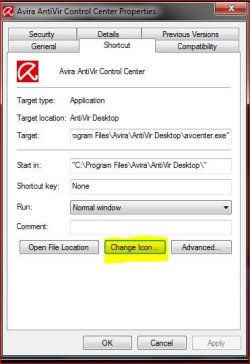
Simply right click on the icon that you want to change,choose properties, and then change icon.:)

icon.JPG

Hope this helps.


.
 

My Computer

Computer Manufacturer/Model Number
Samsung R60 Plus
OS
Operating System Microsoft Windows 7 Ultimate Build 7600
CPU
Mobile DualCore Intel Core 2 Duo T5550, 1833 MHz (1
Motherboard
ATI Radeon Xpress 1100/1250
Memory
2GB (DDR2-667 DDR2 SDRAM)
Graphics Card(s)
ATI Radeon Xpress 1200 Series (256 MB)
Sound Card
Realtek ALC262 @ ATI SB600 - High Definition
Monitor(s) Displays
Samsung LTN154X3-L01 [15.4" LCD]
Screen Resolution
1280x800
PSU
na
Case
na
Cooling
na
Keyboard
na
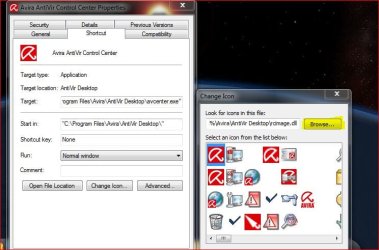
Just a bit of further info re the above. If you can't find an icon that you like, you can download one and then "browse" to the folder where you have saved it and use that as your icon.:)
icon2.JPG

.
 

My Computer

Computer Manufacturer/Model Number
Samsung R60 Plus
OS
Operating System Microsoft Windows 7 Ultimate Build 7600
CPU
Mobile DualCore Intel Core 2 Duo T5550, 1833 MHz (1
Motherboard
ATI Radeon Xpress 1100/1250
Memory
2GB (DDR2-667 DDR2 SDRAM)
Graphics Card(s)
ATI Radeon Xpress 1200 Series (256 MB)
Sound Card
Realtek ALC262 @ ATI SB600 - High Definition
Monitor(s) Displays
Samsung LTN154X3-L01 [15.4" LCD]
Screen Resolution
1280x800
PSU
na
Case
na
Cooling
na
Keyboard
na
I didn't think of making a shortcut then changing that! You see I wanted to change the colours of the icons when pinned to the task bar so they fit my theme nicely. Thanks for that, I can just unpin the orginal programm icon from the taskbar, make a shortcut, change the icon there and then pin the shortcut to the taskbar.

Thanks very much!
 

My Computer

Computer type
Laptop
Computer Manufacturer/Model Number
acer aspire 4735g
OS
windows 7
CPU
intel core 2 dou p7450 2.13 ghz 1066 fsb
Memory
2gb ddr3
Graphics Card(s)
nvida geforce g105m
Hard Drives
Seagate Momentus XT 500GB
No problems:D

Hope you get your desktop sorted the way you want it.;)


.
 

My Computer

Computer Manufacturer/Model Number
Samsung R60 Plus
OS
Operating System Microsoft Windows 7 Ultimate Build 7600
CPU
Mobile DualCore Intel Core 2 Duo T5550, 1833 MHz (1
Motherboard
ATI Radeon Xpress 1100/1250
Memory
2GB (DDR2-667 DDR2 SDRAM)
Graphics Card(s)
ATI Radeon Xpress 1200 Series (256 MB)
Sound Card
Realtek ALC262 @ ATI SB600 - High Definition
Monitor(s) Displays
Samsung LTN154X3-L01 [15.4" LCD]
Screen Resolution
1280x800
PSU
na
Case
na
Cooling
na
Keyboard
na
infact just realized you can right click an icon already in the taskbar and change the icon there, so i dont need to unpin or make a shortcut.

Do you know a way to copy the default icon from the change icon window? I just want to copy the icon or just open it in photoshop, then change the colour.
 

My Computer

Computer type
Laptop
Computer Manufacturer/Model Number
acer aspire 4735g
OS
windows 7
CPU
intel core 2 dou p7450 2.13 ghz 1066 fsb
Memory
2gb ddr3
Graphics Card(s)
nvida geforce g105m
Hard Drives
Seagate Momentus XT 500GB
I posted a thread regarding something like this and it was too confusing. I would like to change the icons that don't give me the option to change icon. like itunes and windows explorer. How would I go about changing that? or do I have to go through that regedit, task manager....etc....
 

My Computer

OS
Windows 7
I don't think you can copy it directly from the "change icon" window.

You will have to go to the folder the actuall program is saved to then search for the .ico file there.

It may be a lot quicker to download new icons...there are tons available.:)


..
 

My Computer

Computer Manufacturer/Model Number
Samsung R60 Plus
OS
Operating System Microsoft Windows 7 Ultimate Build 7600
CPU
Mobile DualCore Intel Core 2 Duo T5550, 1833 MHz (1
Motherboard
ATI Radeon Xpress 1100/1250
Memory
2GB (DDR2-667 DDR2 SDRAM)
Graphics Card(s)
ATI Radeon Xpress 1200 Series (256 MB)
Sound Card
Realtek ALC262 @ ATI SB600 - High Definition
Monitor(s) Displays
Samsung LTN154X3-L01 [15.4" LCD]
Screen Resolution
1280x800
PSU
na
Case
na
Cooling
na
Keyboard
na
well I'v king of found a solution to this. haven't found a way to change the icon for the main program, but you can change the shortcut for it. Then im putting the shortcut on my taskbar for that programm. For what reason do you want to change the icon for the main programm, just for when it displays on the taskbar or start menu, as thats the only times you see them really.

Oh and i just found out about IcoFX - The Free Icon Editor icon editor, so i can extract the icons now.

thanks for all your help/
 

My Computer

Computer type
Laptop
Computer Manufacturer/Model Number
acer aspire 4735g
OS
windows 7
CPU
intel core 2 dou p7450 2.13 ghz 1066 fsb
Memory
2gb ddr3
Graphics Card(s)
nvida geforce g105m
Hard Drives
Seagate Momentus XT 500GB
I posted a thread regarding something like this and it was too confusing. I would like to change the icons that don't give me the option to change icon. like itunes and windows explorer. How would I go about changing that? or do I have to go through that regedit, task manager....etc....

Regarding your I Tunes icon, delete your existing shortcut and make a new one by right clicking the existing shortcuts and choosing Delete.

Navigate to where the iTunes.exe program is located (i.e.: C:\Program Files\iTunes) and right click the iTunes.exe and choose Create Shortcut.

Hold the Ctrl Key and drag the shortcut to the Desktop (the Ctrl Key copies it instead of moving it).

Hold the Ctrl Key and drag the shortcut from the Desktop to the Start Button and hold it until the Start Menu opens, locate the place where you want it, and drop it in the start menu where you want it.

Right click the new shortcuts and change the icon.

Hope this helps:)


.
 

My Computer

Computer Manufacturer/Model Number
Samsung R60 Plus
OS
Operating System Microsoft Windows 7 Ultimate Build 7600
CPU
Mobile DualCore Intel Core 2 Duo T5550, 1833 MHz (1
Motherboard
ATI Radeon Xpress 1100/1250
Memory
2GB (DDR2-667 DDR2 SDRAM)
Graphics Card(s)
ATI Radeon Xpress 1200 Series (256 MB)
Sound Card
Realtek ALC262 @ ATI SB600 - High Definition
Monitor(s) Displays
Samsung LTN154X3-L01 [15.4" LCD]
Screen Resolution
1280x800
PSU
na
Case
na
Cooling
na
Keyboard
na
well I'v king of found a solution to this. haven't found a way to change the icon for the main program, but you can change the shortcut for it. Then im putting the shortcut on my taskbar for that programm. For what reason do you want to change the icon for the main programm, just for when it displays on the taskbar or start menu, as thats the only times you see them really.

Oh and i just found out about IcoFX - The Free Icon Editor icon editor, so i can extract the icons now.

thanks for all your help/

Good news.:) Glad you got what you were looking for.


.
 

My Computer

Computer Manufacturer/Model Number
Samsung R60 Plus
OS
Operating System Microsoft Windows 7 Ultimate Build 7600
CPU
Mobile DualCore Intel Core 2 Duo T5550, 1833 MHz (1
Motherboard
ATI Radeon Xpress 1100/1250
Memory
2GB (DDR2-667 DDR2 SDRAM)
Graphics Card(s)
ATI Radeon Xpress 1200 Series (256 MB)
Sound Card
Realtek ALC262 @ ATI SB600 - High Definition
Monitor(s) Displays
Samsung LTN154X3-L01 [15.4" LCD]
Screen Resolution
1280x800
PSU
na
Case
na
Cooling
na
Keyboard
na
Back
Top