7068 bugs!

Most of the third-party gadgets are off-screen...Well, actually not off-screen, but off their background placeholder, making them losing their initial settings and giving a pink background instead.

Mine are fine. Not had a single problem yet (touch wood). Could it be something else conflicting with them? So far so good for me.:D
 

My Computer

Computer Manufacturer/Model Number
Custom Build.
OS
Windows 7 Ultimate x64.
CPU
i5 760 @ 4.2Ghz. 1.18v
Motherboard
Gigabyte - H55M-USB3
Memory
4g Corsair xms3 ddr3, 1600Mhz.
Graphics Card(s)
Gigabyte GTX-560Ti soc edition
Sound Card
Asus Xonar Dx - Logitech Z5500.
Monitor(s) Displays
Acer 22" LCD Wide screen 1680-1050 -Samsung 42" Plasma....
Screen Resolution
1680/1050 -----1920/1080p.
Hard Drives
2x 2TB Seagate Go Flex,
1x 1TB Seagate,
1x 640WD Black,
x16 Gig sandisc flash drive,
1x8Gig sandisc flash drive.
PSU
XigmaTek 80plus NRP-PC702 - 700w dual 30a.
Case
Venus Gamers Midi Tower Case with LED Display
Cooling
Arctic Freezer 7 Pro Rev 2... x2 Arctic F8 case fans........
Keyboard
Logitech G15-v2 Gaming.
Mouse
Microsoft Sidewinder X8.
Internet Speed
Virgin Media - 50mb down- 8mb up.
Other Info
x2 Xbox 360 wireless controllers...

Dual layer optical disc drive...

Chrome 79million

A.V = MSE
Still missing "animated" network icon in taskbar. For Internet security I want to have a quick control if there is any unusual traffic (perhaps of a Trojan virus etc.). Why do I need installing a third party program like "Network Lights" ?

Still missing mount of ISO images. I don't want to replace all the times my CDs and DVDs into my CD/DVD drive. Why do I need installing a third party program like "Virtual CloneDrive"?

Still missing easy way of changing icons of libraries. When I got the ability creating my own libraries why can I not change their icons like other folders and links (Right mouse bottom -> properties -> Change Icon)? Why do I need a third party program like "LibIconChanger" or manipulate XML files ?

Still missing "Classic Start menu". Vista has it. Why not also Windows 7 ? Why do I need installing a third party program like "Vista Start Menu" (runs also with Windows 7) ?
 

My Computer

OS
Windows XP and 7
I managed to fix that by resizing the background to the default gadget size of 700/400 and it was working fine after that, even when resizing the gadget.

Yeah, I found that fix too but I don't see why so many gadgets should be edited to work.
 

My Computer

Computer Manufacturer/Model Number
ENIAC
OS
Windows 7 RC 7100 32bit/64bit
CPU
Intel Core2Duo E4500 2.20 GHz
Motherboard
ASUS P5LD2-X/1333
Memory
2x1GB Kinsgston DDR2 800MHz
Graphics Card(s)
Nvidia 8500GT
Sound Card
Onboard High Definition Audio Device
Monitor(s) Displays
Sony Bravia 42"
Case
LINKW 2222
Cooling
Standard Intel
Keyboard
Some cheap one
Mouse
Microsoft Intellimouse something
Internet Speed
24MBps ADSL
No issues here. The monitor sleep issue seems to be x64 related as I have no probs with x86. Also, as far as AV goes i've ditched Norton (as compatible as mixing Baileys & Lemonade LOL) for Avast! & it works like a dream.

Have notice that the device driver list has been updated as it now automatically installs my WiFi (laptop) before starting the desktop for the first time (no other version of windows after 98 would detect & install this driver).
 

My Computer

Computer Manufacturer/Model Number
Compaq Desktop
OS
Windows 7 Ultimate x64
CPU
AMD Sempron Dual Core
Memory
3GB
Graphics Card(s)
NVIDIA GeForce 6150SE nForce 430
Screen Resolution
1024x768
Hard Drives
150GB Sata
Still missing "animated" network icon in taskbar. For Internet security I want to have a quick control if there is any unusual traffic (perhaps of a Trojan virus etc.). Why do I need installing a third party program like "Network Lights" ?

Still missing mount of ISO images. I don't want to replace all the times my CDs and DVDs into my CD/DVD drive. Why do I need installing a third party program like "Virtual CloneDrive"?

Still missing easy way of changing icons of libraries. When I got the ability creating my own libraries why can I not change their icons like other folders and links (Right mouse bottom -> properties -> Change Icon)? Why do I need a third party program like "LibIconChanger" or manipulate XML files ?

Still missing "Classic Start menu". Vista has it. Why not also Windows 7 ? Why do I need installing a third party program like "Vista Start Menu" (runs also with Windows 7) ?

Not that i don't agree with those, but they are not bugs.

BTW the upside down album art in media player is fixed but now the pause button does not work when minimized.
 

My Computer

OS
Win 7
Posted under different thread -- Strange error on WIRED LAN (COMSURROGATE ERROR) on laptop X-64 version. Windows says device working OK.

Wireless "jerkey screen " and can't get 108 mb/s even on a 108 mps router wireless card only detects 54 mb/s even thoug router transmitting @108 mbs

Intel Display driver stops working when running the WEI. Random screen crashes ( INTEL driver again)

Run IPCONFIG and it just loops. can shut down network manager until re-boot.

I MUST have wired lan access so this build on this laptop is a no go currently. 7048 was fine.

Haven't tried anything else yet --if I don't have wired LAN then the rest of the build is pointless for me.

This build X-64 -- so far THUMBS DOWN. I've restored my 7048 build which WORKS.

cheers
jimbo
 

My Computer

Computer type
PC/Desktop
Computer Manufacturer/Model Number
Custom built, several laptops HP/ASUS
OS
Linux CENTOS 7 / various Windows OS'es and servers
CPU
Intel i7 Intel i5
Memory
8GB, 16GB
Graphics Card(s)
On Motherboard
Sound Card
Realtek HD audio
Monitor(s) Displays
Apple Cinema display, Samsung LCD
Screen Resolution
1920 X 1080
Hard Drives
4 X 1TB SATA
Mouse
Toshiba wireless laser
Internet Speed
> 20MB up
Windows 7 x64 build 7068 (upgrade install from build 7057)
---
WMP12 GUI still has graphic glitches.
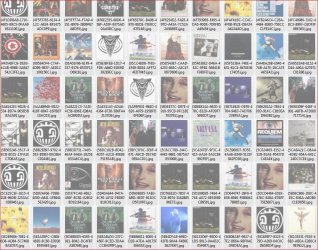
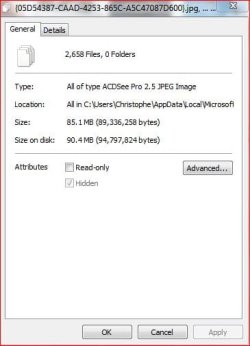
When restoring the media library, WMP12 doesn't clear the album art cache in "C:\Users\<USER NAME>\AppData\Local\Microsoft\Media Player\Art Cache\LocalMLS" and when it recreates a library, new thumbnails are added to this folder. When I found out about this folder, it contained about 15000 (yes, no mistakes) thumbnails.You need to set windows to display hidden (and hidden system?) files to see it.
A last thing regarding WMP12; every time WMP12 creates thumbnails in this album art cache, it creates multiple thumbnails of the same album for some reason. Not really sure why. Maybe because my music library contains a folder.jpg covert in the album's folder and an embedded covert in the file(s) as IDV3 tag.

[EDIT:]
WMP12 still convert a compatible file format my portable media player(NWZ-A82x) support(.m4a) to .wma before sync'ing the file(s).
When changing the default program to sync audio files or/and images in the device management page in "Devices and Printers" to another one, the new program that was set as default sync application doesn't start and is automatically reverted to the Windows default program without notice or any error message when you try to launch it. It could be that the software are not compatible with this feature, though.
There's an option in the "Change general settings" page of the portable media device which doesn't seem to work at all, or hasn't been fully implanted yet. It's called "Display notification from this device on the Windows taskbar". If it's meant to remove the icon that automatically appears in the taskbar when you connect a portable media device (see screen shot below), it doesn't work. If it's meant for something else, I still have to find out what is it used for.

[EDIT2] After deleting drivers for the PMP in the device manager and reinstalling them, the PMP icon stopped showing up in the taskbar when I plug my player and now only appears when I select it in the "Device and printers" windows.
 

Attachments

  • WMP12_GUI_mess.JPG
    WMP12_GUI_mess.JPG
    23.7 KB · Views: 19
  • WMP12_albumarts_cache_mess.JPG
    WMP12_albumarts_cache_mess.JPG
    278.3 KB · Views: 70
  • album_art_cache_mess_after_2_restore_media_lib.JPG
    album_art_cache_mess_after_2_restore_media_lib.JPG
    34.2 KB · Views: 31
  • Device_in_Taskbar.jpg
    Device_in_Taskbar.jpg
    19.9 KB · Views: 869
Last edited:

My Computer

OS
Windows 7 x64
Still missing "animated" network icon in taskbar. For Internet security I want to have a quick control if there is any unusual traffic (perhaps of a Trojan virus etc.). Why do I need installing a third party program like "Network Lights" ?

Still missing mount of ISO images. I don't want to replace all the times my CDs and DVDs into my CD/DVD drive. Why do I need installing a third party program like "Virtual CloneDrive"?


Still missing "Classic Start menu". Vista has it. Why not also Windows 7 ? Why do I need installing a third party program like "Vista Start Menu" (runs also with Windows 7) ?

Not bugs per se, but i too miss these features, esspecially
the internet traffic lights.
It was stupid of them to remove this, and even stupider to combine LAN and INTERNET tray icons into one.

I much preffer the way it was done in Xp, as I dont want to see my lan connection, but I do want to see my internet connection icon in sys tray, and see whether there is any traffic and when, like unawave said because of security reasons. How else am i supposed to know if someone or something is initiating internet traffic without my permission if i can not see the lights in the tray icon?
 

My Computer

Computer Manufacturer/Model Number
custom built
OS
Windows 7 Home Basic 64bit
CPU
Intel Core 2 Duo 6420 (2.13 Ghz)
Motherboard
Asus P5B-E Plus
Memory
2x1 GB Kingston KVR DDR2 800Mhz
Graphics Card(s)
Saphire ATI HD4870 512MB
Sound Card
Creative Audigy 4 PCI
Monitor(s) Displays
Samsung SyncMaster T220
Screen Resolution
1680x1050
Hard Drives
WD 320GB (Sata2)
Maxtor 250GB (ATA133)
Maxtor 80GB (ATA133)
PSU
Coolermaster Silent Pro 700Watt
Case
Chieftec midi tower case
Cooling
stock cpu cooler/fan
Keyboard
Logitech UltraX Premium Keyboard (usb 2.0)
Mouse
Logitech MX518 gaming grade optical mouse 1800dpi(usb2.0)
Not bugs per se, but i too miss these features, esspecially
the internet traffic lights.
It was stupid of them to remove this, and even stupider to combine LAN and INTERNET tray icons into one.

I much preffer the way it was done in Xp, as I dont want to see my lan connection, but I do want to see my internet connection icon in sys tray, and see whether there is any traffic and when, like unawave said because of security reasons. How else am i supposed to know if someone or something is initiating internet traffic without my permission if i can not see the lights in the tray icon?

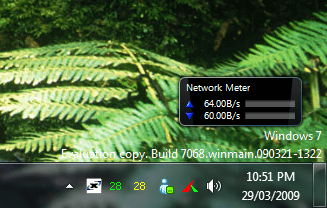
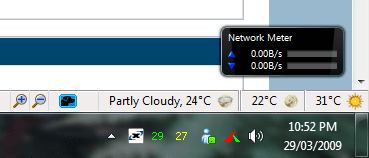
I know it's not exactly what your after but this gadget will help you monitor your traffic.

Network Meter

2009-03-29_225203.png 2009-03-29_225239.png
 

My Computer

Computer Manufacturer/Model Number
Home Brew
OS
Windows 7 Ultimate Vista Ultimate x64
CPU
Core 2 Duo E8500 3.16Ghz @ 3.8Ghz
Motherboard
eVGA 750i FTW
Memory
2x2Gigs Patriot PC2-6400 LL
Graphics Card(s)
Inno3D GeForce GTX260 216 SP
Monitor(s) Displays
ASUS VW222U 22" 2ms Response time
Screen Resolution
1680x1050
Hard Drives
SATA 150GB
SATA II 250GB
USB IDE 750GB Ext.
PSU
HYTEC 600W & Thermaltake 650W Toughpower Power Exp
Case
Thermaltake Armor LCS (Liquid Cooling System)
Cooling
Liquid Cooling System
Keyboard
Logitech G15 Gaming Keyboard
Mouse
Logitech G9 Gaming Mouse
Do yourself a favor, get rid of Norton and go with either Nod32, Kapersky, Avast or AVG............Norton and McAfee are two pieces of crap and cause more problems than solve.

I second that commotion. Norton and McAfee are bloatware. KISS, keep it simple stupid :)
 

My Computer

Computer Manufacturer/Model Number
Dell Inspiron 1525 Notebook
OS
Windows 7
CPU
rocessor Intel(R) Pentium(R) Dual CPU T2390 @ 1.86GHz, 1867
Motherboard
Intel(R) ICH8 Family Chipset
Memory
Installed Physical Memory (RAM) 4 GB
Graphics Card(s)
Mobile Intel(R) 965 Express Chipset Family (Sux)
Sound Card
Intel(R) High Definition Audio HDMI
I know it's not exactly what your after but this gadget will help you monitor your traffic.,,,,,

Thanks, I needed that. :)
 

My Computer

Computer Manufacturer/Model Number
Dell Inspiron 1525 Notebook
OS
Windows 7
CPU
rocessor Intel(R) Pentium(R) Dual CPU T2390 @ 1.86GHz, 1867
Motherboard
Intel(R) ICH8 Family Chipset
Memory
Installed Physical Memory (RAM) 4 GB
Graphics Card(s)
Mobile Intel(R) 965 Express Chipset Family (Sux)
Sound Card
Intel(R) High Definition Audio HDMI
fist, hello, to this forum.
I have not found bug in version 7068 x64 everything work great, but I have some improvements:
I had installed (every time clean) 7048 and 7057, and had a lot of graphic Problems glitches, in games, the worst case was Dawn of War 2.

I have a gtx285 from PNY what is a 100& nvidia reference card without OC, I have tested all the drivers stock, Win7 drivers and last Vista drivers, every time the same problems.

Know on Version 7068, all the Problems are gone, I use the last 182.47 vista drivers.

the remover for the watermark from 7057 work too on this version.

This version has not to much new stuff but a lot of improvements in compatibility.
 

My Computer

OS
Windows 7 / Linux Mint

My Computer

Computer Manufacturer/Model Number
custom built
OS
Windows 7 Home Basic 64bit
CPU
Intel Core 2 Duo 6420 (2.13 Ghz)
Motherboard
Asus P5B-E Plus
Memory
2x1 GB Kingston KVR DDR2 800Mhz
Graphics Card(s)
Saphire ATI HD4870 512MB
Sound Card
Creative Audigy 4 PCI
Monitor(s) Displays
Samsung SyncMaster T220
Screen Resolution
1680x1050
Hard Drives
WD 320GB (Sata2)
Maxtor 250GB (ATA133)
Maxtor 80GB (ATA133)
PSU
Coolermaster Silent Pro 700Watt
Case
Chieftec midi tower case
Cooling
stock cpu cooler/fan
Keyboard
Logitech UltraX Premium Keyboard (usb 2.0)
Mouse
Logitech MX518 gaming grade optical mouse 1800dpi(usb2.0)
OMG!!! I've only just noticed the 'Pause' issue when WMP12 is mininised. Must have fallen asleep LOL
 

My Computer

Computer Manufacturer/Model Number
Compaq Desktop
OS
Windows 7 Ultimate x64
CPU
AMD Sempron Dual Core
Memory
3GB
Graphics Card(s)
NVIDIA GeForce 6150SE nForce 430
Screen Resolution
1024x768
Hard Drives
150GB Sata
My screen saver is not working in build 7068. The monitor is not turning off either. Has anyone noticed this? It's probably something simple I am missing. Anybody have any suggestions? Is there maybe a service that was off by default? I am out of ideas.
 

My Computer

Computer Manufacturer/Model Number
Keeps changing - (Custom)
OS
Windows 7 Professional x64
CPU
Intel Core i7 860
Motherboard
Gigabyte GA-P55-UD4P
Memory
4GB DDR3 Mushkin 1600Mhz @ 7-8-7-20
Graphics Card(s)
MSI GTS250 1GB DDR3 Twin Frozr
Sound Card
Onboard realtek
Monitor(s) Displays
Samsung SyncMaster 24" P2450 + Samsung 20" 2033
Screen Resolution
1920 X 1080 and 1600 X 900 (#2 system 1440 X 900)
Hard Drives
Patriot Inferno 120GB SSD + 3 WD Blue 640GB drives
PSU
Corsair 750 HX Modular
Case
Lancool PC-K62
Cooling
Cooler Master TX3 CPU cooler and 4-140mm and 1-120mm case
Keyboard
Gigabyte USB keyboard
Mouse
Microsoft wireless laser mouse 5000
Internet Speed
7 Mb down 1.5 up
Other Info
System #2: AMD Phenom II X6 1055T (Freezer 7 Pro cooler) - Gigabyte 880GMA-UD2H - WD 500GB Black - 9500GT (1GB) 500W OCZ modular PSU - Antec 200 case. System #3 (LapTop) Core 2 Duo T6670 - 320GB 7200RPM HD - 4GB DDR3 RAM.
My screen saver is not working in build 7068. The monitor is not turning off either. Has anyone noticed this? It's probably something simple I am missing. Anybody have any suggestions? Is there maybe a service that was off by default? I am out of ideas.


Works fine in x64 with latest Nvidia drivers.

You have manufacturer drivers installed or windows default?

What are your power settings? Balanced, Power Saver, High Performance or custom?
 

My Computer

Computer Manufacturer/Model Number
This and that with a bit more of this.
OS
Slackware / Windows 7 x64 7100
CPU
AMD X2 5200+ Windsor
Motherboard
ECS (Yeah, I was broke)
Memory
4GB DDR2 PC5300
Graphics Card(s)
GeForce 7300 GS 256MB
Sound Card
Realtek HD
Monitor(s) Displays
Westinghouse 22 in LCD
Screen Resolution
1680 x 1050
Hard Drives
WD 320 GB
WD 500 GB x2
Maxtor OneTouch 4 Mini 250GB
PSU
Antec 450W
Case
Generic
Cooling
Lots.......sounds like an F-18
Keyboard
Logitech S510 combo
Mouse
Logitech S510 Combo
Internet Speed
Fast
My screen saver is not working in build 7068. The monitor is not turning off either. Has anyone noticed this? It's probably something simple I am missing. Anybody have any suggestions? Is there maybe a service that was off by default? I am out of ideas.

Well it seems like they are some issues with powersaving and monitors in this build. Since i have them as well, just when i "wake" monitor up :) and im using high preformance with disk sleep timer off.
 

My Computer

Computer Manufacturer/Model Number
Custom
OS
Windows 7 SP1 x64 build 7601.21701
CPU
Intel Q9450 @3608mhz (8x451)
Motherboard
Asus Rampage Formula
Memory
6GB - 2x Corsair CM2X1024-8500C5D and 2x CM2X2048-8500C5D
Graphics Card(s)
Zotac nVidia GTX295
Sound Card
SoundMAX ADI1988B (X-FI MB)
Monitor(s) Displays
LG L227WTP & Samsung LE26R71B LCD TV
Screen Resolution
1680x1050 & 1360x768
Hard Drives
2x Seagate ST3500630NS in RAID0
PSU
Thermaltake Toughpower 750W
Case
Thermaltake
Cooling
Thermalright Ultra-120 Extreme and couple of fans
Keyboard
Logitech G15 v2
Mouse
Razer DeathAdder
Internet Speed
FTTH 50/50 (dualstack IPv4 & native IPv6)
Ia m downloading the Nvidia drivers now. I will post back for others in case they have the same problem. Thanks for the tip.
 

My Computer

Computer Manufacturer/Model Number
Keeps changing - (Custom)
OS
Windows 7 Professional x64
CPU
Intel Core i7 860
Motherboard
Gigabyte GA-P55-UD4P
Memory
4GB DDR3 Mushkin 1600Mhz @ 7-8-7-20
Graphics Card(s)
MSI GTS250 1GB DDR3 Twin Frozr
Sound Card
Onboard realtek
Monitor(s) Displays
Samsung SyncMaster 24" P2450 + Samsung 20" 2033
Screen Resolution
1920 X 1080 and 1600 X 900 (#2 system 1440 X 900)
Hard Drives
Patriot Inferno 120GB SSD + 3 WD Blue 640GB drives
PSU
Corsair 750 HX Modular
Case
Lancool PC-K62
Cooling
Cooler Master TX3 CPU cooler and 4-140mm and 1-120mm case
Keyboard
Gigabyte USB keyboard
Mouse
Microsoft wireless laser mouse 5000
Internet Speed
7 Mb down 1.5 up
Other Info
System #2: AMD Phenom II X6 1055T (Freezer 7 Pro cooler) - Gigabyte 880GMA-UD2H - WD 500GB Black - 9500GT (1GB) 500W OCZ modular PSU - Antec 200 case. System #3 (LapTop) Core 2 Duo T6670 - 320GB 7200RPM HD - 4GB DDR3 RAM.
Ia m downloading the Nvidia drivers now. I will post back for others in case they have the same problem. Thanks for the tip.

nvidia drivers for win7 from their page are = 181.71 and they are already bundled with 7068 build. However instalation from page gives you NVCP while bundled version doesnt have it. But they dont change for me anythign anyway, just multigpu+multimonitor at same time is not working. ATM im on latest beta opengl 3.1 drivers 182.47.
 

My Computer

Computer Manufacturer/Model Number
Custom
OS
Windows 7 SP1 x64 build 7601.21701
CPU
Intel Q9450 @3608mhz (8x451)
Motherboard
Asus Rampage Formula
Memory
6GB - 2x Corsair CM2X1024-8500C5D and 2x CM2X2048-8500C5D
Graphics Card(s)
Zotac nVidia GTX295
Sound Card
SoundMAX ADI1988B (X-FI MB)
Monitor(s) Displays
LG L227WTP & Samsung LE26R71B LCD TV
Screen Resolution
1680x1050 & 1360x768
Hard Drives
2x Seagate ST3500630NS in RAID0
PSU
Thermaltake Toughpower 750W
Case
Thermaltake
Cooling
Thermalright Ultra-120 Extreme and couple of fans
Keyboard
Logitech G15 v2
Mouse
Razer DeathAdder
Internet Speed
FTTH 50/50 (dualstack IPv4 & native IPv6)
I tried the beta drivers on the Nvidia site and got a black screen with a mouse pointer. Had to roll back in safe mode. They are different but apparently don't work for all systems...including mine.
 

My Computer

Computer Manufacturer/Model Number
Keeps changing - (Custom)
OS
Windows 7 Professional x64
CPU
Intel Core i7 860
Motherboard
Gigabyte GA-P55-UD4P
Memory
4GB DDR3 Mushkin 1600Mhz @ 7-8-7-20
Graphics Card(s)
MSI GTS250 1GB DDR3 Twin Frozr
Sound Card
Onboard realtek
Monitor(s) Displays
Samsung SyncMaster 24" P2450 + Samsung 20" 2033
Screen Resolution
1920 X 1080 and 1600 X 900 (#2 system 1440 X 900)
Hard Drives
Patriot Inferno 120GB SSD + 3 WD Blue 640GB drives
PSU
Corsair 750 HX Modular
Case
Lancool PC-K62
Cooling
Cooler Master TX3 CPU cooler and 4-140mm and 1-120mm case
Keyboard
Gigabyte USB keyboard
Mouse
Microsoft wireless laser mouse 5000
Internet Speed
7 Mb down 1.5 up
Other Info
System #2: AMD Phenom II X6 1055T (Freezer 7 Pro cooler) - Gigabyte 880GMA-UD2H - WD 500GB Black - 9500GT (1GB) 500W OCZ modular PSU - Antec 200 case. System #3 (LapTop) Core 2 Duo T6670 - 320GB 7200RPM HD - 4GB DDR3 RAM.
Back
Top