
Old Guy with Access permissions after Win7 Upgrade

Windows Explorer .. Under Documents & Settings ... shows All Users, Default, Default User, Harry, Public. Only All Users and Default User have lil Blue arrows (Access Denied).
When I click Harry .... App data, cookies, Local settings, my documents, net hood, print hood, send to, start menu and templates are all BLUE ARROW (access denied).

Eliminating that "access denied" is my only goal.

Sorry to flood the help site. That wasn't my intention. I DO see a bunch of folks reading the posts, though. Maybe I'm not alone with my delima.
Document and Settings is not a real folder. LEAVE IT ALONE!
You need to go to USERS instead.

Any folder that is giving you "Access Denied" is a false folder. Merely there for old applications to find the new locations. See the link in my signature. DO NOT CHANGE THE PERMISSIONS OF THESE FOLDERS. PERIOD.
 

My Computer

Computer type
PC/Desktop
Computer Manufacturer/Model Number
Alienware Aurora ALX R4
OS
Windows 10 Pro (x64)
CPU
Intel Core i7-3930K (3.2GHz - 4.5GHz)
Motherboard
Alienware Aurora-R4 x79
Memory
4x Samsung 4GB PC3-12800 DDR3 (16GB 1600MHz)
Graphics Card(s)
Nvidia Geforce GTX 690
Sound Card
SteelSeries Siberia Elite
Monitor(s) Displays
Dell UltraSharp U3011
Screen Resolution
2560x1600
Hard Drives
Samsung 850 Pro 256 GB, Seagate 1TB Desktop Hybrid HDD, 2x Western Digital 4TB Green HDD
PSU
875W Some Dell PSU <.<
Case
Alienware Aurora ALX
Cooling
Custom Liquid Cooling (EK CPU & GPU blocks) dual EK 480RAD
Keyboard
Logitech G710+ Mechanical
Mouse
Logitech G700s
Internet Speed
Verizon Fios (50 mbps average)
Other Info
Server: Intel NUC D54250WYK: i5-4250U, 16GB, 256 GB mSATA, Windows Server 2012 R2
Document and Settings is not a real folder. LEAVE IT ALONE!

Yup. It's called a "junction" technically. It's basically a complex shortcut for old programs so they'll be redirected to C:\Users, as stated.
 

My Computer

Computer Manufacturer/Model Number
Asus G73SW-XN2
OS
Windows 2000 5.0 Build 2195
CPU
Intel Core i7-2630QM@2GHz(2.9GHz Turbo Boost) [Sandy Bridge]
Motherboard
Asus G73SW (Intel HM65 Chipset)
Memory
Kingston DDR3 1333 16GB (4GBx4)
Graphics Card(s)
nVidia GTX 460m 1.5GB
Sound Card
EAX Advanced HD 5.0, THX TruStudio
Monitor(s) Displays
17.3 in. primary & 23 in. secondary
Screen Resolution
1920x1080
Hard Drives
Seagate Momentus XT (SATA II) 500 GB @ 7200 RPM
Hitachi (SATA II) 500GB @ 7200 RPM

Non Raid because ASUS was crappy to choose an HM65 Chipset
Keyboard
Built-in 102-Key Backlit Keyboard
Other Info
It's a Laptop.
Going to C:\users shows me the same crowd as I see in Documents & Settings. AllUsers, Default, Default User, Harry and Public. Same lil Blue arrows on some and clicking on any of the many accounts shows me more "lil Locks" (more files I can't access).

All I wanna do is access all the files on my computer. Virtual files and Junction files included.

Yawn. I guess that's not gonna happen. Where's my 8086 and my 5 1/4" floppies?

I thank each of your for your time & suggestions. I guess my computer and I are no longer "One". I refuse to give in to my computers rules. I'm blacking out files with a magic marker on my monitor!!!

I'm sending an obscene jesture to my computer ... by use of a digit. I'm suggesting that my computer perform a physically impossible act.
 

My Computer

Computer Manufacturer/Model Number
Dell E520
OS
Windows 7 home premuim
CPU
Dell
Motherboard
2.8 Dual Processor
Memory
2 gigs
Graphics Card(s)
unknown
Sound Card
unknown
Monitor(s) Displays
Dell 19"
Going to C:\users shows me the same crowd as I see in Documents & Settings. AllUsers, Default, Default User, Harry and Public. Same lil Blue arrows on some and clicking on any of the many accounts shows me more "lil Locks" (more files I can't access).

The locks do not mean you do not have access, they mean private as in not shared with anyone but yourself. Again any location that denies you access is a junction for old broken applications.

All I wanna do is access all the files on my computer. Virtual files and Junction files included.
Accessing junctions is pointless, YOU DO NOT NEED ACCESS TO THOSE.
 

My Computer

Computer type
PC/Desktop
Computer Manufacturer/Model Number
Alienware Aurora ALX R4
OS
Windows 10 Pro (x64)
CPU
Intel Core i7-3930K (3.2GHz - 4.5GHz)
Motherboard
Alienware Aurora-R4 x79
Memory
4x Samsung 4GB PC3-12800 DDR3 (16GB 1600MHz)
Graphics Card(s)
Nvidia Geforce GTX 690
Sound Card
SteelSeries Siberia Elite
Monitor(s) Displays
Dell UltraSharp U3011
Screen Resolution
2560x1600
Hard Drives
Samsung 850 Pro 256 GB, Seagate 1TB Desktop Hybrid HDD, 2x Western Digital 4TB Green HDD
PSU
875W Some Dell PSU <.<
Case
Alienware Aurora ALX
Cooling
Custom Liquid Cooling (EK CPU & GPU blocks) dual EK 480RAD
Keyboard
Logitech G710+ Mechanical
Mouse
Logitech G700s
Internet Speed
Verizon Fios (50 mbps average)
Other Info
Server: Intel NUC D54250WYK: i5-4250U, 16GB, 256 GB mSATA, Windows Server 2012 R2
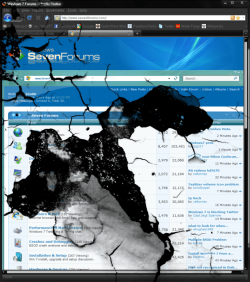
lakeharry, your problems are small compared to this user :(
 

Attachments

  • sevenforumshasproblems.png
    sevenforumshasproblems.png
    181 KB · Views: 13

My Computer

Computer type
PC/Desktop
Computer Manufacturer/Model Number
Built them myself, Science Experiments !
OS
Win7 Enterprise, Win7 x86 (Ult 7600), Win7 x64 Ult 7600, TechNet RTM on AMD x64 (2.8Ghz)
CPU
AMD fx8350 4ghz, AMD-32 2400mhz, AMD-64 3200mhz, AMDx64 2.8G
Motherboard
SIS 755, ECS-K8M890M-M (Ult 7600), GigaByte & others
Memory
2gb, 4gb on the Ult 7600, 4gb on Technet RTM, 32gb on FX8350
Graphics Card(s)
Draw my own Graphics, several nVidia cards
Sound Card
on motherboard
Monitor(s) Displays
19" flat scr, 28" I-Inc widescr,22" Emprex Widescr, 23" Acer
Screen Resolution
1280 x 1024, 1440 x 900, 1920 x 1080
Hard Drives
6 pata Ide HD's & 2 Sata HD's
added 80gb external on Ult 7600 computer,
numerous extra 1tb, 2TB, 3Tb SATA HD's
A collection of ext HD Docks w/ HDs
PSU
430w, 550w, 600w, 700, 800, etc
Case
All Generic Full Towers
Cooling
Open Air & a few fans, some w/ colored LEDs
Keyboard
Compaq & Dell recycled from GoodWill
Mouse
Made in China Optical Wired Mouse
Internet Speed
Fast Cable InterNet
Antivirus
AVG Free on 24 different Desktops, NO Problems!
Browser
IE 8 is preferred, but use FireFox sometimes
Other Info
Linksys Routers, switches, & Hubs
Too Many USB Flash Drives to count, Biggest is 64GB !
Eight computers in my home network.
Sixteen computers at my business network.
Linked via TeamViewer !
Lots of old used spare computer parts everywhere!
I agree that my personal gripes are small when compared to other's Real Problems. It just gets on my last nerve for my computer to tell me what I can see/access and what I can't see/access.

I understand, now, that the permissions are for my own protection. I guess I didn't know that protection from others included me as an "other".

I thank U each for your personal attention.
 

My Computer

Computer Manufacturer/Model Number
Dell E520
OS
Windows 7 home premuim
CPU
Dell
Motherboard
2.8 Dual Processor
Memory
2 gigs
Graphics Card(s)
unknown
Sound Card
unknown
Monitor(s) Displays
Dell 19"
I fully understand your frustration as I can recall having the same reactions when I first encountered the "access denied" messages and that was with Vista. Before I educated myself as to their "purpose", I actually managed to get access nearly anywhere I wanted although to the detriment of the security of my system.

In my opinion, Microsoft should have simply not shown the "locked" folders/junctions/whatever unless one chose a separate option to have them displayed. Microsoft would have saved themself much grief and ill-feelings.

Microsoft seems to full of bright young people with not a lick of common sense. Nice people but they've never been in the trenches.

With all of that said, the user interface, ease of use, features and performance of Win 7 is a vast improvement over Vista. Before Win 7, I was advising the non-techies and parents of non-techies getting ready to send their child off to school to buy a Mac.

Guess who is also a senior citizen and thoroughly enjoying being 71.
karl
 

My Computer

Computer Manufacturer/Model Number
Toshiba Satellite S875D-S7239 laptop
OS
MS Windows 7 Ultimate SP1 64-bit
CPU
AMD A10-4600M
Motherboard
AMD Pumori (Socket FT1)
Memory
6.00 GB Dual-Channel DDR3 @ 798MHz (11-11-12-28)
Graphics Card(s)
AMD Radeon HD 7660G
Sound Card
High Definition Audio Device
Monitor(s) Displays
Generic PnP Monitor (1600x900@60Hz)
Screen Resolution
1600x900@60Hz
Hard Drives
SSD 119GB Corsair CSSD-V128GB2 ATA Device
Keyboard
Standard PS/2 Keyboard
Mouse
HP Wireless Optical Mobile Mouse Model FHA-3410
Internet Speed
What the local pub, local coffee shop offers.
Other Info
Optical Drive:MATSHITA BD-CMB UJ160B ATA Device


Also have an Asus ha1002xp netbook with Win 7 Ultimate installed.
Karl, you and others have been a great help. I'm adjusting my attitude. Many is the time when I have known enough to mess up my computer and not known enough to fix the result of my actions.

Thanks again for your help and the help of all that have responded to my posts. I'm happy to see so many peeps viewing our posts. It makes me think I'm not the only one that has me same concerns.
 

My Computer

Computer Manufacturer/Model Number
Dell E520
OS
Windows 7 home premuim
CPU
Dell
Motherboard
2.8 Dual Processor
Memory
2 gigs
Graphics Card(s)
unknown
Sound Card
unknown
Monitor(s) Displays
Dell 19"
The first time I've used Vista, one of my first hate-encounters was the UAC. Like everyone, I screamed in my mind "WTF?!", and then disabled it immediately. Only after educating myself, just like karl, that in can be good did I decide to re-enable it. Believe me, it was a whole year before that happened.

Like you, I also once desired to access every file and folder. I even gave "Everyone" full control permissions to my whole hard drive including the Windows folder so I could modify it from another PC. It was fun, until I realized what I did was wrong.

Going back, most of the folders you have no access to are not even actual folders. Think of them as a .lnk file but instead, they're a whole new different type which we call a junction.

Remember, if you're denied access, I would be very sure it's because there's nothing you could do there anyway.
 

My Computer

Computer Manufacturer/Model Number
Asus G73SW-XN2
OS
Windows 2000 5.0 Build 2195
CPU
Intel Core i7-2630QM@2GHz(2.9GHz Turbo Boost) [Sandy Bridge]
Motherboard
Asus G73SW (Intel HM65 Chipset)
Memory
Kingston DDR3 1333 16GB (4GBx4)
Graphics Card(s)
nVidia GTX 460m 1.5GB
Sound Card
EAX Advanced HD 5.0, THX TruStudio
Monitor(s) Displays
17.3 in. primary & 23 in. secondary
Screen Resolution
1920x1080
Hard Drives
Seagate Momentus XT (SATA II) 500 GB @ 7200 RPM
Hitachi (SATA II) 500GB @ 7200 RPM

Non Raid because ASUS was crappy to choose an HM65 Chipset
Keyboard
Built-in 102-Key Backlit Keyboard
Other Info
It's a Laptop.
Those users you see that aren't you are logically "virtual users".

Your computer is like a virtual reality that is settled in the very wild forest. So that not just anyone, or anthing, can simply change your important files and ultimately destroy your PC, your computer has those users.

SYSTEM is basically your own computer. Specifically, Windows.
Guests is everyone not registered to your computer and it also incldes the Guest Account.
Administrators include administrator accounts which may also include you.
Administrator includes the one and only boss account which is hidden by default. It is also referred as the true administrator.
Users include ALL user accounts you have created.
Everyone- this is self explanatory.

Now you might be asking yourself "I'm an administrator, why the hell does it ask me for permission?!"

Well, the reason for this is viruses can trick you so they would run under your name which can be devastating if you have full rights. So to be safe, you're treated as an ordinary user. The UAC prompt just basically confirms that you want to do what you think you want to do.

Note: The Windows and System32 folders are very well protected and is basically locked down from any modifications. There is no reason for you to modify these files.

I'm not one of thsoe security fanatics, but I would highly suggest you keep UAC on.

Thank you for providing the above information. I keep seeing people on this forum saying they want to be the BOSS I want full control without understanding what they are doing and want to take ownership of every file and remove all others.....then 30 minutes later they are asking why their machine is crashing why it is doing weird stuff why this is not working, why they cannot install or uninstall software. Holy Cow you just took ownership of everything and the system has no access!!! Duh! You can’t uninstall or re-install or anything.

Just leave the system alone, if it is working who cares if there are other accounts, if it is working who cares if you don't have access to the system files. If it is working who cares if you are prompted for permission to do something. IT IS WORKING! If you really want to remove accounts and take ownership of every file on the machine spend the time reading "Windows 7 Resource Kit" and "Windows 7 Inside Out" cover to cover twice and then do some research on the internet for several months. This way you can be absolutely sure you know what you are doing.

Again Thanks! I gave you some MAJOR REP!
 

My Computer

Computer type
PC/Desktop
Computer Manufacturer/Model Number
Dell OP7010
OS
Windows 7 Enterprise (x64); Windows Server 2008 R2 (x64)
Memory
16GB
Monitor(s) Displays
4 Dell 24" LCD
Screen Resolution
1280x1024
Keyboard
Dell
Mouse
Dell Optical
Internet Speed
40meg
Windows Explorer .. Under Documents & Settings ... shows All Users, Default, Default User, Harry, Public. Only All Users and Default User have lil Blue arrows (Access Denied).
When I click Harry .... App data, cookies, Local settings, my documents, net hood, print hood, send to, start menu and templates are all BLUE ARROW (access denied).

Eliminating that "access denied" is my only goal.

Sorry to flood the help site. That wasn't my intention. I DO see a bunch of folks reading the posts, though. Maybe I'm not alone with my delima.
Document and Settings is not a real folder. LEAVE IT ALONE!
You need to go to USERS instead.

Any folder that is giving you "Access Denied" is a false folder. Merely there for old applications to find the new locations. See the link in my signature. DO NOT CHANGE THE PERMISSIONS OF THESE FOLDERS. PERIOD.

Thank you this is perfect!!!! Glad someone is trying to get these noobies to Windows 7 to understand this is NOT Windows XP. Add some REP.
 

My Computer

Computer type
PC/Desktop
Computer Manufacturer/Model Number
Dell OP7010
OS
Windows 7 Enterprise (x64); Windows Server 2008 R2 (x64)
Memory
16GB
Monitor(s) Displays
4 Dell 24" LCD
Screen Resolution
1280x1024
Keyboard
Dell
Mouse
Dell Optical
Internet Speed
40meg
In my opinion, Microsoft should have simply not shown the "locked" folders/junctions/whatever unless one chose a separate option to have them displayed. Microsoft would have saved themself much grief and ill-feelings.

They are hidden along with all system files like "desktop.ini" you have to selectively enabled viewing of these. "Hide protected operating system files" is what is checked by default and provides the "solution" you are talking about. However, since the user as told Windows to show protected files...?
 

My Computer

Computer type
PC/Desktop
Computer Manufacturer/Model Number
Alienware Aurora ALX R4
OS
Windows 10 Pro (x64)
CPU
Intel Core i7-3930K (3.2GHz - 4.5GHz)
Motherboard
Alienware Aurora-R4 x79
Memory
4x Samsung 4GB PC3-12800 DDR3 (16GB 1600MHz)
Graphics Card(s)
Nvidia Geforce GTX 690
Sound Card
SteelSeries Siberia Elite
Monitor(s) Displays
Dell UltraSharp U3011
Screen Resolution
2560x1600
Hard Drives
Samsung 850 Pro 256 GB, Seagate 1TB Desktop Hybrid HDD, 2x Western Digital 4TB Green HDD
PSU
875W Some Dell PSU <.<
Case
Alienware Aurora ALX
Cooling
Custom Liquid Cooling (EK CPU & GPU blocks) dual EK 480RAD
Keyboard
Logitech G710+ Mechanical
Mouse
Logitech G700s
Internet Speed
Verizon Fios (50 mbps average)
Other Info
Server: Intel NUC D54250WYK: i5-4250U, 16GB, 256 GB mSATA, Windows Server 2012 R2
They are hidden along with all system files like "desktop.ini" you have to selectively enabled viewing of these. "Hide protected operating system files" is what is checked by default and provides the "solution" you are talking about. However, since the user as told Windows to show protected files...?

Yep, you do get a nice warning about showing those files :D
 

My Computer

Computer Manufacturer/Model Number
Asus G73SW-XN2
OS
Windows 2000 5.0 Build 2195
CPU
Intel Core i7-2630QM@2GHz(2.9GHz Turbo Boost) [Sandy Bridge]
Motherboard
Asus G73SW (Intel HM65 Chipset)
Memory
Kingston DDR3 1333 16GB (4GBx4)
Graphics Card(s)
nVidia GTX 460m 1.5GB
Sound Card
EAX Advanced HD 5.0, THX TruStudio
Monitor(s) Displays
17.3 in. primary & 23 in. secondary
Screen Resolution
1920x1080
Hard Drives
Seagate Momentus XT (SATA II) 500 GB @ 7200 RPM
Hitachi (SATA II) 500GB @ 7200 RPM

Non Raid because ASUS was crappy to choose an HM65 Chipset
Keyboard
Built-in 102-Key Backlit Keyboard
Other Info
It's a Laptop.
arkhi is reading my mind. I have given everybody but my Brother-in-Law full permissions. Your mentioned that what U did was wrong ..... ummmmm .. is there something special I should do to my permissions? I promise to let it alone from now on. Just tell me "if U mess with that ... you'll go blind". It worked for my parents B 4 Computers. It should still work.
 

My Computer

Computer Manufacturer/Model Number
Dell E520
OS
Windows 7 home premuim
CPU
Dell
Motherboard
2.8 Dual Processor
Memory
2 gigs
Graphics Card(s)
unknown
Sound Card
unknown
Monitor(s) Displays
Dell 19"

My Computer

Computer type
PC/Desktop
Computer Manufacturer/Model Number
Alienware Aurora ALX R4
OS
Windows 10 Pro (x64)
CPU
Intel Core i7-3930K (3.2GHz - 4.5GHz)
Motherboard
Alienware Aurora-R4 x79
Memory
4x Samsung 4GB PC3-12800 DDR3 (16GB 1600MHz)
Graphics Card(s)
Nvidia Geforce GTX 690
Sound Card
SteelSeries Siberia Elite
Monitor(s) Displays
Dell UltraSharp U3011
Screen Resolution
2560x1600
Hard Drives
Samsung 850 Pro 256 GB, Seagate 1TB Desktop Hybrid HDD, 2x Western Digital 4TB Green HDD
PSU
875W Some Dell PSU <.<
Case
Alienware Aurora ALX
Cooling
Custom Liquid Cooling (EK CPU & GPU blocks) dual EK 480RAD
Keyboard
Logitech G710+ Mechanical
Mouse
Logitech G700s
Internet Speed
Verizon Fios (50 mbps average)
Other Info
Server: Intel NUC D54250WYK: i5-4250U, 16GB, 256 GB mSATA, Windows Server 2012 R2
I sincerely want to thank u both for your advice and suggestions. I have returned the "Slider" to it's default position.

I just want to Access ALL the Folders and files on my computer. Some I wanna delete, Some I wanna view. The "ACCESS DENIED" pisses me off. That's what I'm trying to get around.

I don't wanna disable security but I DO wanna manipulate my files at will.

Best advice...don't delete anything that you do not understand. All the user folders you mentioned NEED to be there. They are part of the operating system. Ignore them. If you don't have files stored in the "access denied" locations, leave them alone. They aren't hurting anything.
 

My Computer

Computer Manufacturer/Model Number
Custom
OS
Windows 7 Ultimate RTM (Technet)
CPU
3.00 gigahertz Intel Core2 Duo E8400
Motherboard
ASUSTeK Computer INC. P5K/EPU Rev 1.xx
Memory
4GB
Graphics Card(s)
ATI Radeon X1950 Pro
Sound Card
Built in HD Audio
Monitor(s) Displays
22" Gateway LCD
Screen Resolution
1920 x 1200
Hard Drives
ST3160023A [Hard drive] (160.04 GB) -- drive 0, rev 8.01, ST3500630AS [Hard drive] (500.11 GB) -- drive 2, rev 3.AAK
ST3500630AS [Hard drive] (500.11 GB) -- drive 1, rev 3.AAK
Keyboard
Logitech G11
Mouse
Microsoft Wireless Laser Mouse 5000
Internet Speed
13.44 Mbps
arkhi is reading my mind. I have given everybody but my Brother-in-Law full permissions. Your mentioned that what U did was wrong ..... ummmmm .. is there something special I should do to my permissions? I promise to let it alone from now on. Just tell me "if U mess with that ... you'll go blind". It worked for my parents B 4 Computers. It should still work.

More good advice:

Stop changing permissions and just use the computer UNLESS you have lost files that you created in one of these folders. You've already made changes that you shouldn't have and the situation is only going to get worse.
 

My Computer

Computer Manufacturer/Model Number
Custom
OS
Windows 7 Ultimate RTM (Technet)
CPU
3.00 gigahertz Intel Core2 Duo E8400
Motherboard
ASUSTeK Computer INC. P5K/EPU Rev 1.xx
Memory
4GB
Graphics Card(s)
ATI Radeon X1950 Pro
Sound Card
Built in HD Audio
Monitor(s) Displays
22" Gateway LCD
Screen Resolution
1920 x 1200
Hard Drives
ST3160023A [Hard drive] (160.04 GB) -- drive 0, rev 8.01, ST3500630AS [Hard drive] (500.11 GB) -- drive 2, rev 3.AAK
ST3500630AS [Hard drive] (500.11 GB) -- drive 1, rev 3.AAK
Keyboard
Logitech G11
Mouse
Microsoft Wireless Laser Mouse 5000
Internet Speed
13.44 Mbps
I understand, now, that the permissions are for my own protection. I guess I didn't know that protection from others included me as an "other".

It does, and it's probably one of the smartest things Microsoft ever did.
 

My Computer

Computer Manufacturer/Model Number
Custom
OS
Windows 7 Ultimate RTM (Technet)
CPU
3.00 gigahertz Intel Core2 Duo E8400
Motherboard
ASUSTeK Computer INC. P5K/EPU Rev 1.xx
Memory
4GB
Graphics Card(s)
ATI Radeon X1950 Pro
Sound Card
Built in HD Audio
Monitor(s) Displays
22" Gateway LCD
Screen Resolution
1920 x 1200
Hard Drives
ST3160023A [Hard drive] (160.04 GB) -- drive 0, rev 8.01, ST3500630AS [Hard drive] (500.11 GB) -- drive 2, rev 3.AAK
ST3500630AS [Hard drive] (500.11 GB) -- drive 1, rev 3.AAK
Keyboard
Logitech G11
Mouse
Microsoft Wireless Laser Mouse 5000
Internet Speed
13.44 Mbps
@MacGyvr
Guess you should start using Multi Quote
multiquote_off.gif
:)

Just click the
multiquote_off.gif
button on all the posts you want to quote and then click on
reply.png


:)
 

My Computer

Computer type
Laptop
Computer Manufacturer/Model Number
HP EliteBook 8530w Mobile Workstation
OS
Windows 7 Ultimate x64 (XP, 98SE, 95, 3.11, DOS 7.10 on VM) + Ubuntu 10.04 LTS Lucid Lynx
CPU
Intel Core 2 Duo Processor P8600 (2.40 GHz, 3 MB L2 cache)
Motherboard
Mobile Intel PM45 Express Chipset ICH9M-Enhanced
Memory
4GB 800 MHz DDR2 SDRAM
Graphics Card(s)
ATI Mobility FireGL V5700 with 256 MB
Sound Card
SoundMAX Integrated Digital HD Audio
Monitor(s) Displays
15.4-inch WXGA anti-glare (1280 x 800 resolution)
Screen Resolution
1280 x 800
Hard Drives
500GB + 1TB
Mouse
Synaptics PS/2 Port Touchpad, USB Mouse
Internet Speed
4 Mbps
Antivirus
MSE
Browser
Firefox, Chrome, IE
Other Info
Authentec AES2810 Fingerprint Reader
Back
Top