Latest AMD Catalyst Video Driver for Windows 7

Status
Not open for further replies.
The .inf file will be in the folder you tell the installer to extract to. Once the files are extracted, the install procedure continues. This is when you can just close the installer.

So if you do that for the 9.3 driver, you will be left with a folder (C:\ATI is default) containing the files for proper install, except the .inf which must be edited in notepad.

That .inf file is located at C:\ATI\Support\*Driver version*\Drivers\Display\LH_INF (at least for me.)

Now do the same exact thing for the 9.2 driver for your card. Here's a link to that, for Vista's x64. Use this...

http://www.ngohq.com/home.php?page=Files&go=cat&dwn_cat_id=18&go=giveme&dwn_id=804

Go to 9.2 .inf and open it in notepad. Copy the manufacturer section in its entirety, then paste it over the manufacturer section in the 9.3 folder's .inf.

Save this newly made .inf 9.3 in its same location, over itself.

Now go to the device manager and install from the 9.3 folder. Hope it works for ya!
 

My Computer My Computer

Computer Manufacturer/Model Number
self built
OS
7600.20510 x86
CPU
P4 550 3.4 GHz HT running at 3.5 GHz
Motherboard
MSI PM8M3-V (MS-7211 v1.x) Micro-ATX mainboard
Memory
OCZ 2 GB(2x1GB) DDR400mHz running @ 414 mHz
Graphics Card(s)
HIS Radeon HD 3850 IceQ 3 Turbo HDMI Dual DL-DVI AGP
Sound Card
MOTU Traveler firewire studio interface 192 kHz 24 bit
Monitor(s) Displays
22" widescreen Acer X223W LCD, 17" Compaq P75 CRT
Screen Resolution
1680x1050 and 1280x1024
Hard Drives
SATA I x2 WD, 400 GB and 120 GB, SATA 2 WD Caviar Black 1 TB
PSU
350W generic
Case
Cybertronpc, it glows blue
Cooling
stock cpu fan, Ice-Q 3 gpu and system, many case fans
Keyboard
Logitch Classical Keyboard 200
Mouse
Logitech Mediaplay cordless
Internet Speed
1792/448 kbits/sec
Other Info
SATA II PCI fake RAID adapter, 1 GB Readyboost, original ATI Remote Wonder (even works with WMC perfectly), Logitech Rumblepad 2 game controller x2
Mobile drivers aren't made by ATI ... normaly they wher you bought the notebook take care of the driver support, but even Alienware doesn't support "us" with W7 drivers, but with modded 8.10 and as far as I know "new" with the 8.12 so I'll give it a shot (on Vista) now to see the 3DMark06 scores :)

On W7 I am running a modded 9.3 wich runs smooth, only L4D has a Multi CPU problem ... wich I didn't have with 8.10 ...

I'll search the link for the mobile 9.3 mom^^ (I think here in this thread is also a guid^^)

Greetings
Julian
 

My Computer My Computer

Computer Manufacturer/Model Number
Alienware M17
OS
Windows 7 Beta
CPU
Intel® Core™2 T9400 2.53GHz (6MB Cache, 1066MHz FSB)
Memory
4GB« Dual Channel DDR3 SO-DIMM at 1066MHz – 2 x 2048MB
Graphics Card(s)
Dual 512MB ATI Mobility Radeon™ HD 3870 - CrossFireX™ Enable
Monitor(s) Displays
17-Inch WideXGA+ LCD
Screen Resolution
1440x900 (720p)
Hard Drives
320GB (160GBx2) 7,200RPM (8MB Cache) (Software)Raid0
Keyboard
Illuminated Keyboard with Numeric Pad - Alienware Exclusive
Mouse
Logitec MX518
The .inf file will be in the folder you tell the installer to extract to. Once the files are extracted, the install procedure continues. This is when you can just close the installer.

So if you do that for the 9.3 driver, you will be left with a folder (C:\ATI is default) containing the files for proper install, except the .inf which must be edited in notepad.

That .inf file is located at C:\ATI\Support\*Driver version*\Drivers\Display\LH_INF (at least for me.)

Now do the same exact thing for the 9.2 driver for your card. Here's a link to that, for Vista's x64. Use this...

Download ATI Catalyst 9.2

Go to 9.2 .inf and open it in notepad. Copy the manufacturer section in its entirety, then paste it over the manufacturer section in the 9.3 folder's .inf.

Save this newly made .inf 9.3 in its same location, over itself.

Now go to the device manager and install from the 9.3 folder. Hope it works for ya!
ok,i did all those thinks but i still can't make it work from the device manager.it sais that i already have the latest driver install, and i don't even have it installed:confused:
 

My Computer My Computer

OS
windows 7
it sais that i already have the latest driver install

6113d1237419585-latest-ati-catalyst-driver-windows-7-driver-5.png


It sounds like you have klicked the wrong button. Am I right?

Don't klick "Next".

6114d1237419585-latest-ati-catalyst-driver-windows-7-driver-6.png


Than search for the inf. after klicking "Have Disk" (that's where the name comes from)

Greetings
Julian
 

My Computer My Computer

Computer Manufacturer/Model Number
Alienware M17
OS
Windows 7 Beta
CPU
Intel® Core™2 T9400 2.53GHz (6MB Cache, 1066MHz FSB)
Memory
4GB« Dual Channel DDR3 SO-DIMM at 1066MHz – 2 x 2048MB
Graphics Card(s)
Dual 512MB ATI Mobility Radeon™ HD 3870 - CrossFireX™ Enable
Monitor(s) Displays
17-Inch WideXGA+ LCD
Screen Resolution
1440x900 (720p)
Hard Drives
320GB (160GBx2) 7,200RPM (8MB Cache) (Software)Raid0
Keyboard
Illuminated Keyboard with Numeric Pad - Alienware Exclusive
Mouse
Logitec MX518
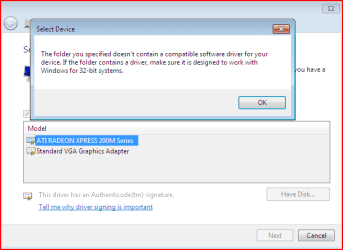
here is what i get.if i use the unchanged 9.3,they apear a lot of drivers,but i can't find the xpress 200m
if i can get my xpress 200m to appear there,i can install it because i can install all of those that they appear. that error is there because those changes that i made from 9.2.inf to 9.3.inf. and i want to say that in 9.2 my video card is there.

ok,new problem.i managed to put my xpress 200m card in the device manager but it says something about the signature and i can't install it. geez, i'm having such a big problem with this driver.i don't want to go back to xp:((
 

Attachments

  • Capture.PNG
    Capture.PNG
    9.9 KB · Views: 26
Last edited:

My Computer My Computer

OS
windows 7
update says my ATI driver for X700 series is up to date but when I boot up into Windows 7 I get a solid line across the entire screen about 2 inches from top..there is also some colors showing... Any ideas on how to get rid of this annoyance? Update says I have latest driver for my card(downloaded the vista_win7 one)
 

My Computer My Computer

Computer Manufacturer/Model Number
ASUS
OS
Windows 7 Ultimate x86
CPU
3.0 GHz
Motherboard
ASUS P5GD1
Memory
2 GB
Graphics Card(s)
ATI Radeon x700
Monitor(s) Displays
Viewsonic 19"
Screen Resolution
1280 * 1024
Hard Drives
2 WD 200GB
Case
Tsunami Dream
Keyboard
Microsoft Natural
I´ve a problem with 59Hz issue talked about in these forums but there was mostly users with nVidia. I´d like to aks if it´s some fix that could permanently set to 60Hz?
I´ve 7057 X64 + ATI 4850 TOP HTDI + EIZO HD2442W in 1920x1200, in OSD on monitor it says 60Hz but in display settings it remains stucked 59Hz:(
Using latest Cat 9.3.
 

My Computer My Computer

OS
Windows7 b7057
here is what i get.if i use the unchanged 9.3,they apear a lot of drivers,but i can't find the xpress 200m
if i can get my xpress 200m to appear there,i can install it because i can install all of those that they appear. that error is there because those changes that i made from 9.2.inf to 9.3.inf. and i want to say that in 9.2 my video card is there.

ok,new problem.i managed to put my xpress 200m card in the device manager but it says something about the signature and i can't install it. geez, i'm having such a big problem with this driver.i don't want to go back to xp:((
the most probable reason is because you either downloaded the 64 bit catalyst
or somehow its not registering for ya...
download it again and follow the instructions set by julian again (in case you want to see the whole ordeal then go here http://www.sevenforums.com/50790-post103 )
 

My Computer My Computer

Computer Manufacturer/Model Number
Tx2500z Tablet Pc/Homemade Server
OS
Windows 7 Ult x64(x2), HomePrem x32(x4), Server 08 (+VM), 08 R2 (VM) , SuSe 11.2 (VM), XP 32 (VM)
CPU
Turion X2 ultra (oh well came with laptop)/P4 @3.2 (yes P4)
Motherboard
IDK HP Motherboard / Intel DG965SS
Memory
OCZ Dual Channel 4GB kit/ 1gb Dual Channel
Graphics Card(s)
HD 3200 graphics /GMA x3100 (yay for intergrated!!)
Sound Card
Realtek HD Audio(mic working, well sort of)/Siig IC-70012
Monitor(s) Displays
built-in Hp 12" laptop screen/ Acer 19"
Screen Resolution
1280x800 /1440x900
Cooling
All Air Cooled
Mouse
Logi MX Rev. /MS Wheel Optical 1.1A /Logitech Optical Mouse
Internet Speed
College baby but its still routed through vpn to 1536k...
Other Info
love my wacom pen and pressure sensitivity...
wished it worked in 7, SUSE for that matter though

My Computer My Computer

OS
Windows 7 Ultimate x64 (Build 7600 RTM)
CPU
Phenom II X4 955BE
Motherboard
GIGABYTE GA-MA790XT-UD5P
Memory
G.Skill Ripjaw 4GB (2x2GB) DDR3 PC3-12800C8 1600MH
Graphics Card(s)
ATI 5870 VaporX
Monitor(s) Displays
Samsung SM2033SW 20"TFT
Screen Resolution
1600 x 900
Hard Drives
2 x OCZ Vertex 2E RAID0
WDC640 Black x2 Storage
PSU
Corsair HX 850W Modular
Case
Coolermaster 690
Cooling
Noctua NH-D14
Keyboard
Razor Lycosa
Mouse
Roccat Kone V2
Internet Speed
8mb/sec

My Computer My Computer

Computer Manufacturer/Model Number
self built
OS
7600.20510 x86
CPU
P4 550 3.4 GHz HT running at 3.5 GHz
Motherboard
MSI PM8M3-V (MS-7211 v1.x) Micro-ATX mainboard
Memory
OCZ 2 GB(2x1GB) DDR400mHz running @ 414 mHz
Graphics Card(s)
HIS Radeon HD 3850 IceQ 3 Turbo HDMI Dual DL-DVI AGP
Sound Card
MOTU Traveler firewire studio interface 192 kHz 24 bit
Monitor(s) Displays
22" widescreen Acer X223W LCD, 17" Compaq P75 CRT
Screen Resolution
1680x1050 and 1280x1024
Hard Drives
SATA I x2 WD, 400 GB and 120 GB, SATA 2 WD Caviar Black 1 TB
PSU
350W generic
Case
Cybertronpc, it glows blue
Cooling
stock cpu fan, Ice-Q 3 gpu and system, many case fans
Keyboard
Logitch Classical Keyboard 200
Mouse
Logitech Mediaplay cordless
Internet Speed
1792/448 kbits/sec
Other Info
SATA II PCI fake RAID adapter, 1 GB Readyboost, original ATI Remote Wonder (even works with WMC perfectly), Logitech Rumblepad 2 game controller x2
Hmm, I can't seem to get 9.4 to install. It keeps crashing no matter what I do. :confused: Maybe I'll have to take out all but 4gb of memory again. :mad:
 

My Computer My Computer

Computer type
PC/Desktop
Computer Manufacturer/Model Number
Airbot 2.0
OS
Windows 7 Ultimate x64 SP1
CPU
Core i7 920 (D0) @ 4Ghz, *26c idle *65c full load on air
Motherboard
Asus P6X58D Premium - Sata 6Gb/s - USB 3.0
Memory
12GB DDR3 Corsair Dominator -CMD12GX3M6A1600C8 at 1600MHz
Graphics Card(s)
Zotac Geforce GTX 770
Sound Card
ASUS Xonar D2X
Monitor(s) Displays
1 LG 24" Flatron W2453V-PF 1 Samsung 24" P2450H both 2ms RT
Screen Resolution
1920x1080@60hz
Hard Drives
1 Samsung 250GB 840 Evo SSD
1 OCZ Vertex2 180GB SSD
1 TB Samsung Spinpoint F1 7200RPM 32MB cache
2 500GB WD Caviar Blacks 7200RPM 32MB cache (WD5001AALS)

Pioneer DVD Burner DVR-S18M
PSU
Corsair HX1000W
Case
Cooler Master HAF 932
Cooling
Case Fans *3 230mm, *1 140mm/CPU - *Tuniq Tower 120 Extreme
Keyboard
Logitech Wireless MK700
Mouse
Logitech Wireless MK700
Internet Speed
DL 15 Mbps UL 0.98 Mbps
Antivirus
None
Browser
Firefox Nightly
Other Info
Processor-7.7 *RAM- 7.9 *Graphics-7.9 *Gaming Graphics- 7.9 *SSD- 7.8 W.E.I final score= 7.7
*Phone- LG Nexus 5

My Computer My Computer

Computer type
PC/Desktop
Computer Manufacturer/Model Number
Self built custom
OS
64-bit Windows 11 Pro for Workstations
CPU
Intel i7-8700K OC'd to 5 GHz
Motherboard
ASUS ROG Maximus XI Formula Z390
Memory
64 GB (4x16GB) G.SKILL TridentZ RGB DDR4 3600 MHz
Graphics Card(s)
ASUS ROG-STRIX-GTX1080TI-O11G-GAMING
Sound Card
Integrated
Monitor(s) Displays
2 x Samsung Odyssey G7 27"
Screen Resolution
2560x1440
Hard Drives
1TB Samsung 990 PRO M.2,
4TB Samsung 990 PRO PRO M.2,
TerraMaster F8 SSD Plus NAS
PSU
Seasonic Prime Titanium 850W
Case
Thermaltake Core P3
Cooling
Corsair Hydro H115i
Keyboard
Logitech wireless K800
Mouse
Logitech MX Master 4
Internet Speed
2 Gb/s Download and 100 Mb/s Upload
Antivirus
Malwarebyte Anti-Malware Premium
Browser
Google Chrome
Other Info
Logitech Z625 speaker system,
Logitech BRIO 4K Pro webcam,
HP Color LaserJet Pro MFP M477fdn,
APC SMART-UPS RT 1000 XL - SURT1000XLI,
Galaxy S23 Plus phone

My Computer My Computer

Computer type
PC/Desktop
Computer Manufacturer/Model Number
Systems by SmartEyeball
OS
8 Pro x64
CPU
i7 3770K 4.6GHz
Motherboard
ASUS P8Z77 WS
Memory
16GB G.Skill Trident X 2666mhz
Graphics Card(s)
x2 EVGA 780 Ti Superclocked SLI
Sound Card
SB X-FI Surround 5.1 PRO USB / ATH-AD900 Headphones
Monitor(s) Displays
x3 Dell U2410 / 58" Samsung
Screen Resolution
5760*1200/ 1920*1200
Hard Drives
2x Intel 520 240GB (RAID 0) * 2x WD Caviar Blacks 2TB (RAID 0) * 2TB WD Caviar Black * Sony Optirac DVD
PSU
Silverstone Strider Evolution 1200W
Case
Thermaltake Level 10 GT Snow Edition
Cooling
Noctua NH-D14
Keyboard
Topre Realforce // Ducky Shine MX Black // Filco Ninja TKL
Mouse
Thermaltake Theron (Highly Recommended) + Razer Imperator
Antivirus
MSE
Browser
IE, FF, WaterFox
Other Info
GT Extreme V2 Sim Racing Cockpit + 40" LCD and K/B Mouse stand ▼
Fanatec CSR Elite Wheel + Clubsport V1 Pedals + CSR shifter/7G-H ▼Saitek X52 Pro ▼ TrackIR 5 Pro
Buttkicker v2 Seat Rumbler with Dedicated 5.1 and Sub Woofer attached to frame ▼
=
Bloody Big Grin
yar..I think they screwed the pooch with this one. I have the same thing. I uninstalled the 9.3 and now I can't get 9.4 to install at all. It keeps crashing on me. 9.2 and 9.3 were good to me...didn't even have to take out any memory with those. Taking the mem out is the only thing I haven't tried yet. It won't even install 9.3 back for me. Might have to do a system restore or just wait till I install the RC.
 

My Computer My Computer

Computer type
PC/Desktop
Computer Manufacturer/Model Number
Airbot 2.0
OS
Windows 7 Ultimate x64 SP1
CPU
Core i7 920 (D0) @ 4Ghz, *26c idle *65c full load on air
Motherboard
Asus P6X58D Premium - Sata 6Gb/s - USB 3.0
Memory
12GB DDR3 Corsair Dominator -CMD12GX3M6A1600C8 at 1600MHz
Graphics Card(s)
Zotac Geforce GTX 770
Sound Card
ASUS Xonar D2X
Monitor(s) Displays
1 LG 24" Flatron W2453V-PF 1 Samsung 24" P2450H both 2ms RT
Screen Resolution
1920x1080@60hz
Hard Drives
1 Samsung 250GB 840 Evo SSD
1 OCZ Vertex2 180GB SSD
1 TB Samsung Spinpoint F1 7200RPM 32MB cache
2 500GB WD Caviar Blacks 7200RPM 32MB cache (WD5001AALS)

Pioneer DVD Burner DVR-S18M
PSU
Corsair HX1000W
Case
Cooler Master HAF 932
Cooling
Case Fans *3 230mm, *1 140mm/CPU - *Tuniq Tower 120 Extreme
Keyboard
Logitech Wireless MK700
Mouse
Logitech Wireless MK700
Internet Speed
DL 15 Mbps UL 0.98 Mbps
Antivirus
None
Browser
Firefox Nightly
Other Info
Processor-7.7 *RAM- 7.9 *Graphics-7.9 *Gaming Graphics- 7.9 *SSD- 7.8 W.E.I final score= 7.7
*Phone- LG Nexus 5
Yep cat 9.4 is a fail for me too :( It updates ccc but will not install the new driver, even via device manager. It even disabled crossfie :mad:
 

My Computer My Computer

Computer type
PC/Desktop
Computer Manufacturer/Model Number
Systems by SmartEyeball
OS
8 Pro x64
CPU
i7 3770K 4.6GHz
Motherboard
ASUS P8Z77 WS
Memory
16GB G.Skill Trident X 2666mhz
Graphics Card(s)
x2 EVGA 780 Ti Superclocked SLI
Sound Card
SB X-FI Surround 5.1 PRO USB / ATH-AD900 Headphones
Monitor(s) Displays
x3 Dell U2410 / 58" Samsung
Screen Resolution
5760*1200/ 1920*1200
Hard Drives
2x Intel 520 240GB (RAID 0) * 2x WD Caviar Blacks 2TB (RAID 0) * 2TB WD Caviar Black * Sony Optirac DVD
PSU
Silverstone Strider Evolution 1200W
Case
Thermaltake Level 10 GT Snow Edition
Cooling
Noctua NH-D14
Keyboard
Topre Realforce // Ducky Shine MX Black // Filco Ninja TKL
Mouse
Thermaltake Theron (Highly Recommended) + Razer Imperator
Antivirus
MSE
Browser
IE, FF, WaterFox
Other Info
GT Extreme V2 Sim Racing Cockpit + 40" LCD and K/B Mouse stand ▼
Fanatec CSR Elite Wheel + Clubsport V1 Pedals + CSR shifter/7G-H ▼Saitek X52 Pro ▼ TrackIR 5 Pro
Buttkicker v2 Seat Rumbler with Dedicated 5.1 and Sub Woofer attached to frame ▼
=
Bloody Big Grin
when the beta 9.4 got out i installed just fine...;)
even an upgrade (which i dont usually do) worked well for me...:sarc:
maybe its just that i have a IGP they havent had many changes to it..
although i tried it with bioshock and i was it good to me..
native res at medium settings while 9.3 i had to custom tweak it...
although i would show a screenie i am still fighting with my quad boot laptop...:)
i got hem hem Osx hem and will start on 7 next...:)
kinda got bored after two weeks of no reinstalling 7...:p
 

My Computer My Computer

Computer Manufacturer/Model Number
Tx2500z Tablet Pc/Homemade Server
OS
Windows 7 Ult x64(x2), HomePrem x32(x4), Server 08 (+VM), 08 R2 (VM) , SuSe 11.2 (VM), XP 32 (VM)
CPU
Turion X2 ultra (oh well came with laptop)/P4 @3.2 (yes P4)
Motherboard
IDK HP Motherboard / Intel DG965SS
Memory
OCZ Dual Channel 4GB kit/ 1gb Dual Channel
Graphics Card(s)
HD 3200 graphics /GMA x3100 (yay for intergrated!!)
Sound Card
Realtek HD Audio(mic working, well sort of)/Siig IC-70012
Monitor(s) Displays
built-in Hp 12" laptop screen/ Acer 19"
Screen Resolution
1280x800 /1440x900
Cooling
All Air Cooled
Mouse
Logi MX Rev. /MS Wheel Optical 1.1A /Logitech Optical Mouse
Internet Speed
College baby but its still routed through vpn to 1536k...
Other Info
love my wacom pen and pressure sensitivity...
wished it worked in 7, SUSE for that matter though
Consider yourself lucky DA ;) The last couple of cats have lulled me into complacency :p This ones going to make work for it :rolleyes:

CCC is now broken even after using a restore point. I'll tackle this pr*ck later...

Good going ATI ;)
 

My Computer My Computer

Computer type
PC/Desktop
Computer Manufacturer/Model Number
Systems by SmartEyeball
OS
8 Pro x64
CPU
i7 3770K 4.6GHz
Motherboard
ASUS P8Z77 WS
Memory
16GB G.Skill Trident X 2666mhz
Graphics Card(s)
x2 EVGA 780 Ti Superclocked SLI
Sound Card
SB X-FI Surround 5.1 PRO USB / ATH-AD900 Headphones
Monitor(s) Displays
x3 Dell U2410 / 58" Samsung
Screen Resolution
5760*1200/ 1920*1200
Hard Drives
2x Intel 520 240GB (RAID 0) * 2x WD Caviar Blacks 2TB (RAID 0) * 2TB WD Caviar Black * Sony Optirac DVD
PSU
Silverstone Strider Evolution 1200W
Case
Thermaltake Level 10 GT Snow Edition
Cooling
Noctua NH-D14
Keyboard
Topre Realforce // Ducky Shine MX Black // Filco Ninja TKL
Mouse
Thermaltake Theron (Highly Recommended) + Razer Imperator
Antivirus
MSE
Browser
IE, FF, WaterFox
Other Info
GT Extreme V2 Sim Racing Cockpit + 40" LCD and K/B Mouse stand ▼
Fanatec CSR Elite Wheel + Clubsport V1 Pedals + CSR shifter/7G-H ▼Saitek X52 Pro ▼ TrackIR 5 Pro
Buttkicker v2 Seat Rumbler with Dedicated 5.1 and Sub Woofer attached to frame ▼
=
Bloody Big Grin
yar..I'm too lazy to take the time to care right now..:mad:

I'm getting theses three reports when it happens, one even seeming to say it's Visual Studios causing it..which I do have Visual Basic installed. :rolleyes:
Code:
Description:
Fault bucket 4979420, type 4
Event Name: APPCRASH
Response: Not available
Cab Id: 0

Problem signature:
P1: InstallManagerApp.exe
P2: 3.0.719.0
P3: 49c04d94
P4: ntdll.dll
P5: 6.1.7068.0
P6: 49c5ab02
P7: c015000f
P8: 0000000000090e9a
P9: 
P10: 


Description:
Faulting application name: InstallManagerApp.exe, version: 3.0.719.0, time stamp: 0x49c04d94
Faulting module name: ntdll.dll, version: 6.1.7068.0, time stamp: 0x49c5ab02
Exception code: 0xc015000f
Fault offset: 0x0000000000090e9a
Faulting process id: 0xdc0
Faulting application start time: 0x01c9b8b2918d7684
Faulting application path: C:\ATI\Support\9-4_vista64_win7_64_dd_ccc_wdm_enu\Driver\Bin64\InstallManagerApp.exe
Faulting module path: C:\Windows\SYSTEM32\ntdll.dll
Report Id: d5ee40c4-24a5-11de-89b4-001e9029a178


Description:
Fault bucket 4925960, type 4
Event Name: APPCRASH
Response: [URL="http://oca.microsoft.com/resredir.aspx?SID=14705&iBucketTable=4&iBucket=4925960"]Microsoft Windows Error Reporting[/URL]
Cab Id: 0

Problem signature:
P1: InstallManagerApp.exe
P2: 3.0.719.0
P3: 49c04d94
P4: MFC80U.DLL
P5: 8.0.50727.1833
P6: 482bb4a2
P7: c0000005
P8: 00000000000854ee
P9: 
P10:
 

My Computer My Computer

Computer type
PC/Desktop
Computer Manufacturer/Model Number
Airbot 2.0
OS
Windows 7 Ultimate x64 SP1
CPU
Core i7 920 (D0) @ 4Ghz, *26c idle *65c full load on air
Motherboard
Asus P6X58D Premium - Sata 6Gb/s - USB 3.0
Memory
12GB DDR3 Corsair Dominator -CMD12GX3M6A1600C8 at 1600MHz
Graphics Card(s)
Zotac Geforce GTX 770
Sound Card
ASUS Xonar D2X
Monitor(s) Displays
1 LG 24" Flatron W2453V-PF 1 Samsung 24" P2450H both 2ms RT
Screen Resolution
1920x1080@60hz
Hard Drives
1 Samsung 250GB 840 Evo SSD
1 OCZ Vertex2 180GB SSD
1 TB Samsung Spinpoint F1 7200RPM 32MB cache
2 500GB WD Caviar Blacks 7200RPM 32MB cache (WD5001AALS)

Pioneer DVD Burner DVR-S18M
PSU
Corsair HX1000W
Case
Cooler Master HAF 932
Cooling
Case Fans *3 230mm, *1 140mm/CPU - *Tuniq Tower 120 Extreme
Keyboard
Logitech Wireless MK700
Mouse
Logitech Wireless MK700
Internet Speed
DL 15 Mbps UL 0.98 Mbps
Antivirus
None
Browser
Firefox Nightly
Other Info
Processor-7.7 *RAM- 7.9 *Graphics-7.9 *Gaming Graphics- 7.9 *SSD- 7.8 W.E.I final score= 7.7
*Phone- LG Nexus 5
it must be the runtime files needed might be causing the error although im not so sure...
at this point i think it refers to that i guess its not liking the MFC80U.DLL runtime file..
btw do you have all the runtime files installed including vc++ 2005 and 08 and all those other ones installed?
 

My Computer My Computer

Computer Manufacturer/Model Number
Tx2500z Tablet Pc/Homemade Server
OS
Windows 7 Ult x64(x2), HomePrem x32(x4), Server 08 (+VM), 08 R2 (VM) , SuSe 11.2 (VM), XP 32 (VM)
CPU
Turion X2 ultra (oh well came with laptop)/P4 @3.2 (yes P4)
Motherboard
IDK HP Motherboard / Intel DG965SS
Memory
OCZ Dual Channel 4GB kit/ 1gb Dual Channel
Graphics Card(s)
HD 3200 graphics /GMA x3100 (yay for intergrated!!)
Sound Card
Realtek HD Audio(mic working, well sort of)/Siig IC-70012
Monitor(s) Displays
built-in Hp 12" laptop screen/ Acer 19"
Screen Resolution
1280x800 /1440x900
Cooling
All Air Cooled
Mouse
Logi MX Rev. /MS Wheel Optical 1.1A /Logitech Optical Mouse
Internet Speed
College baby but its still routed through vpn to 1536k...
Other Info
love my wacom pen and pressure sensitivity...
wished it worked in 7, SUSE for that matter though
These drivers are an EPIC FAIL for me :mad:

I get no installation errors, but I don't get drivers either...

* Express install over the top = FAIL (cat 'installs', no driver)

* Custom Install over the top = FAIL (install manager hangs)

* Remove ATI install manger /CCC and install = FAIL (cat installs', no driver)

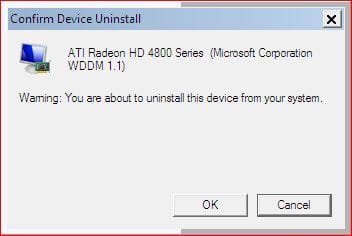
* Uninstall through device manager = Annoying FAIL (I no longer
have the option to delete the drivers which may be the issue. Windows is over-riding / blocking the new drivers) :huh:

No Delete.JPG

* Manual install through Device Manager = FAIL (I point to the folder with the .inf and Windows says "driver is already up to date")

* Device manager uninstall + Driver Sweepr in Safe mode = FAIL

Overall, Cat 9.4 on Seven x64 = FAIL for me ;) I'm not even going to bother with trying them in Vista :p
 

My Computer My Computer

Computer type
PC/Desktop
Computer Manufacturer/Model Number
Systems by SmartEyeball
OS
8 Pro x64
CPU
i7 3770K 4.6GHz
Motherboard
ASUS P8Z77 WS
Memory
16GB G.Skill Trident X 2666mhz
Graphics Card(s)
x2 EVGA 780 Ti Superclocked SLI
Sound Card
SB X-FI Surround 5.1 PRO USB / ATH-AD900 Headphones
Monitor(s) Displays
x3 Dell U2410 / 58" Samsung
Screen Resolution
5760*1200/ 1920*1200
Hard Drives
2x Intel 520 240GB (RAID 0) * 2x WD Caviar Blacks 2TB (RAID 0) * 2TB WD Caviar Black * Sony Optirac DVD
PSU
Silverstone Strider Evolution 1200W
Case
Thermaltake Level 10 GT Snow Edition
Cooling
Noctua NH-D14
Keyboard
Topre Realforce // Ducky Shine MX Black // Filco Ninja TKL
Mouse
Thermaltake Theron (Highly Recommended) + Razer Imperator
Antivirus
MSE
Browser
IE, FF, WaterFox
Other Info
GT Extreme V2 Sim Racing Cockpit + 40" LCD and K/B Mouse stand ▼
Fanatec CSR Elite Wheel + Clubsport V1 Pedals + CSR shifter/7G-H ▼Saitek X52 Pro ▼ TrackIR 5 Pro
Buttkicker v2 Seat Rumbler with Dedicated 5.1 and Sub Woofer attached to frame ▼
=
Bloody Big Grin
Status
Not open for further replies.
Back
Top