Huge Processor Usage Problems

wrathloki

New member
Local time
8:09 AM
Messages
55
So I just installed Windows 7 last night, everything was running great, i got a bunch of new stuff installed, and everything was still working great. I decide to go to bed for a while and when I wake up there's a constant 60% of my processor being used and everything just goes crazy when I try to do things (like freezing, random flipping between pages, flashing). The only thing I can see is dwm.exe in processes pulling a 18-25 and a 20-30 on firefox and that's it. Does anyone know why processor usage is suddenly going crazy? (by the way physical memory usage is staying the same)
 

My Computer

OS
Windows 7
My processor usage with w7 is constantly not less than 80%. RAM stays a steady 50%
 

My Computer

Computer Manufacturer/Model Number
lenovo 3000 y410
OS
Windows 7 x64 build 7068
CPU
1.5 Ghz Core 2 Duo
Motherboard
IGWT
Memory
4g 667mhz
Graphics Card(s)
Mobile Intel 965
Sound Card
Realtek HD
kill dwm and see if ff proc utilization drops
if so try the opposite, reboot but don't start ff, and make sure it's not running

if the cpu issue subsides then it's a ff issue
 

My Computer

Computer type
Laptop
Computer Manufacturer/Model Number
Apple
OS
El Capitan / Windows 10
CPU
i7-4980HQ
Memory
16GB
Graphics Card(s)
Iris 5200
I've had problems with SearcFilterHost.exe and SearchProtocolHost.exe using 30% without any resulting disk activity for literally hours on end.

It always occurs after a few hours of uptime and can only be temporarily stopped by a reboot.
 

My Computer

Computer type
PC/Desktop
Computer Manufacturer/Model Number
Systems by SmartEyeball
OS
8 Pro x64
CPU
i7 3770K 4.6GHz
Motherboard
ASUS P8Z77 WS
Memory
16GB G.Skill Trident X 2666mhz
Graphics Card(s)
x2 EVGA 780 Ti Superclocked SLI
Sound Card
SB X-FI Surround 5.1 PRO USB / ATH-AD900 Headphones
Monitor(s) Displays
x3 Dell U2410 / 58" Samsung
Screen Resolution
5760*1200/ 1920*1200
Hard Drives
2x Intel 520 240GB (RAID 0) * 2x WD Caviar Blacks 2TB (RAID 0) * 2TB WD Caviar Black * Sony Optirac DVD
PSU
Silverstone Strider Evolution 1200W
Case
Thermaltake Level 10 GT Snow Edition
Cooling
Noctua NH-D14
Keyboard
Topre Realforce // Ducky Shine MX Black // Filco Ninja TKL
Mouse
Thermaltake Theron (Highly Recommended) + Razer Imperator
Antivirus
MSE
Browser
IE, FF, WaterFox
Other Info
GT Extreme V2 Sim Racing Cockpit + 40" LCD and K/B Mouse stand ▼
Fanatec CSR Elite Wheel + Clubsport V1 Pedals + CSR shifter/7G-H ▼Saitek X52 Pro ▼ TrackIR 5 Pro
Buttkicker v2 Seat Rumbler with Dedicated 5.1 and Sub Woofer attached to frame ▼
=
Bloody Big Grin
I stopped WinSAT and processor speed went back down to Vista-like levels (30% - 40%). How important is WinSAT?
 

My Computer

Computer Manufacturer/Model Number
lenovo 3000 y410
OS
Windows 7 x64 build 7068
CPU
1.5 Ghz Core 2 Duo
Motherboard
IGWT
Memory
4g 667mhz
Graphics Card(s)
Mobile Intel 965
Sound Card
Realtek HD
I stopped WinSAT and processor speed went back down to Vista-like levels (30% - 40%). How important is WinSAT?

How about you fill out your system profile so we can tell if that's 30% of Via C3 or Intel i7 and whether other system constraints are causing the OS to constantly work to maintain itself.
 

My Computer

Computer type
Laptop
Computer Manufacturer/Model Number
Apple
OS
El Capitan / Windows 10
CPU
i7-4980HQ
Memory
16GB
Graphics Card(s)
Iris 5200
I agree with all the above. Also, a quick look at the processes in task manager should highlight which is using your CPU (see pic)
 

Attachments

  • Capture.PNG
    Capture.PNG
    26.2 KB · Views: 220

My Computer

Computer Manufacturer/Model Number
Compaq Desktop
OS
Windows 7 Ultimate x64
CPU
AMD Sempron Dual Core
Memory
3GB
Graphics Card(s)
NVIDIA GeForce 6150SE nForce 430
Screen Resolution
1024x768
Hard Drives
150GB Sata
System stat partially filled out
 

My Computer

Computer Manufacturer/Model Number
lenovo 3000 y410
OS
Windows 7 x64 build 7068
CPU
1.5 Ghz Core 2 Duo
Motherboard
IGWT
Memory
4g 667mhz
Graphics Card(s)
Mobile Intel 965
Sound Card
Realtek HD
Can you re phrase your last post please. What's partially filled out?
 

My Computer

Computer Manufacturer/Model Number
Compaq Desktop
OS
Windows 7 Ultimate x64
CPU
AMD Sempron Dual Core
Memory
3GB
Graphics Card(s)
NVIDIA GeForce 6150SE nForce 430
Screen Resolution
1024x768
Hard Drives
150GB Sata
oh sorry. baarod asked me to fill my system specs out and I did.
 

My Computer

Computer Manufacturer/Model Number
lenovo 3000 y410
OS
Windows 7 x64 build 7068
CPU
1.5 Ghz Core 2 Duo
Motherboard
IGWT
Memory
4g 667mhz
Graphics Card(s)
Mobile Intel 965
Sound Card
Realtek HD
ok sorry no worries :)
 

My Computer

Computer Manufacturer/Model Number
Compaq Desktop
OS
Windows 7 Ultimate x64
CPU
AMD Sempron Dual Core
Memory
3GB
Graphics Card(s)
NVIDIA GeForce 6150SE nForce 430
Screen Resolution
1024x768
Hard Drives
150GB Sata
I am utterly surprise that you are experiencing 30-40% CPU usage - something is not right here.

At idle, I see no more than 2% usages at any given moment on any given core, and with the latest build. 7077, I am using less than 1/3 of my 4 GB of RAM.

You should start thoroughly checking your system to find the culprit - even my tablet PC with its load of stuff running idles less than 5% usage....
 

My Computers

System One System Two

  • Computer type
    PC/Desktop
    Computer Manufacturer/Model Number
    The Beast Model A (homebrew)
    OS
    Windows 11 21H2 Current build
    CPU
    AMD Ryzen 9 3950X
    Motherboard
    MSI MEG X570 GODLIKE
    Memory
    4 * 32 GB - Corsair Vengeance 3600 MHz
    Graphics Card(s)
    EVGA GeForce RTX 3080 Ti XC3 ULTRA GAMING (12G-P5-3955-KR)
    Sound Card
    Realtek® ALC1220 Codec
    Monitor(s) Displays
    2x Eve Spectrum ES07D03 4K Gaming Monitor (Matte) | Eve Spec
    Screen Resolution
    3x 3840 x 2160
    Hard Drives
    3x Samsung 980 Pro NVMe PCIe 4 M.2 2 TB SSD (MZ-V8P2T0B/AM) } 3x Sabrent Rocket NVMe 4.0 1 TB SSD
    PSU
    PC Power & Cooling’s Silencer Series 1050 Watt, 80 Plus Plat
    Case
    Fractal Design Define 7 XL Dark ATX Full Tower Case
    Cooling
    SteelSeries Apex Pro Wired Gaming Keyboard
    Keyboard
    SteelSeries Apex Pro
    Mouse
    Logitech MX Master 3S | MX Master 3 for business
    Internet Speed
    AT&T LightSpeed Gigabit Duplex Ftth
    Antivirus
    Windows Defender + MB 3
    Browser
    Nightly (default) + Firefox (stable),Chrome, Edge
  • Computer type
    PC/Desktop
    System Manufacturer/Model Number
    Dell Latitude E5470
    OS
    ChromeOS Flex Dev Channel (current)
    CPU
    Intel(R) Core(TM) i5-6300U CPU @ 2.40GHz, 2501 Mhz, 2 Core(s), 4 Logical Processor(s)
    Motherboard
    Dell
    Memory
    16 GB
    Graphics Card(s)
    Intel(R) HD Graphics 520
    Sound Card
    Intel(R) HD Graphics 520 + RealTek Audio
    Monitor(s) Displays
    Dell laptop display 15"
    Screen Resolution
    1920 * 1080
    Hard Drives
    Toshiba 128GB M.2 22300 drive
    INTEL Cherryville 520 Series SSDSC2CW180A 180 GB SATA III SSD
    PSU
    Dell
    Case
    Dell
    Cooling
    Dell
    Keyboard
    Dell
    Mouse
    Logitech MX Master 3S (shared w. Sys 1) | Dell TouchPad
    Internet Speed
    AT&T LightSpeed Gigabit Duplex Ftth
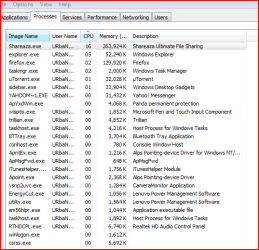
It's now at 20%-40%. Before I disabled WinSAT processor usage was at 90%-100%. Here's a snapshot of Task manager
 

Attachments

  • Capture.PNG
    Capture.PNG
    16.8 KB · Views: 401

My Computer

Computer Manufacturer/Model Number
lenovo 3000 y410
OS
Windows 7 x64 build 7068
CPU
1.5 Ghz Core 2 Duo
Motherboard
IGWT
Memory
4g 667mhz
Graphics Card(s)
Mobile Intel 965
Sound Card
Realtek HD
Ummm, with you using Shareaza and μtorrent it is not hard to see why your processor usage is up there....

How about killing all unnecessary apps and *then* seeing what is going on? your system is not idling by any means in the state that it is in....
 

My Computers

System One System Two

  • Computer type
    PC/Desktop
    Computer Manufacturer/Model Number
    The Beast Model A (homebrew)
    OS
    Windows 11 21H2 Current build
    CPU
    AMD Ryzen 9 3950X
    Motherboard
    MSI MEG X570 GODLIKE
    Memory
    4 * 32 GB - Corsair Vengeance 3600 MHz
    Graphics Card(s)
    EVGA GeForce RTX 3080 Ti XC3 ULTRA GAMING (12G-P5-3955-KR)
    Sound Card
    Realtek® ALC1220 Codec
    Monitor(s) Displays
    2x Eve Spectrum ES07D03 4K Gaming Monitor (Matte) | Eve Spec
    Screen Resolution
    3x 3840 x 2160
    Hard Drives
    3x Samsung 980 Pro NVMe PCIe 4 M.2 2 TB SSD (MZ-V8P2T0B/AM) } 3x Sabrent Rocket NVMe 4.0 1 TB SSD
    PSU
    PC Power & Cooling’s Silencer Series 1050 Watt, 80 Plus Plat
    Case
    Fractal Design Define 7 XL Dark ATX Full Tower Case
    Cooling
    SteelSeries Apex Pro Wired Gaming Keyboard
    Keyboard
    SteelSeries Apex Pro
    Mouse
    Logitech MX Master 3S | MX Master 3 for business
    Internet Speed
    AT&T LightSpeed Gigabit Duplex Ftth
    Antivirus
    Windows Defender + MB 3
    Browser
    Nightly (default) + Firefox (stable),Chrome, Edge
  • Computer type
    PC/Desktop
    System Manufacturer/Model Number
    Dell Latitude E5470
    OS
    ChromeOS Flex Dev Channel (current)
    CPU
    Intel(R) Core(TM) i5-6300U CPU @ 2.40GHz, 2501 Mhz, 2 Core(s), 4 Logical Processor(s)
    Motherboard
    Dell
    Memory
    16 GB
    Graphics Card(s)
    Intel(R) HD Graphics 520
    Sound Card
    Intel(R) HD Graphics 520 + RealTek Audio
    Monitor(s) Displays
    Dell laptop display 15"
    Screen Resolution
    1920 * 1080
    Hard Drives
    Toshiba 128GB M.2 22300 drive
    INTEL Cherryville 520 Series SSDSC2CW180A 180 GB SATA III SSD
    PSU
    Dell
    Case
    Dell
    Cooling
    Dell
    Keyboard
    Dell
    Mouse
    Logitech MX Master 3S (shared w. Sys 1) | Dell TouchPad
    Internet Speed
    AT&T LightSpeed Gigabit Duplex Ftth
Without those 2 apps usage goes down to 6%......what I was really worried about anyway was the 90%-100% usage before I got rid of WINsat.
 

My Computer

Computer Manufacturer/Model Number
lenovo 3000 y410
OS
Windows 7 x64 build 7068
CPU
1.5 Ghz Core 2 Duo
Motherboard
IGWT
Memory
4g 667mhz
Graphics Card(s)
Mobile Intel 965
Sound Card
Realtek HD
WINsat should not have been running in the background in the first place, so you had best figure out if you were trying to run a WEI test, or if it is in fact a piece of malware....
 

My Computers

System One System Two

  • Computer type
    PC/Desktop
    Computer Manufacturer/Model Number
    The Beast Model A (homebrew)
    OS
    Windows 11 21H2 Current build
    CPU
    AMD Ryzen 9 3950X
    Motherboard
    MSI MEG X570 GODLIKE
    Memory
    4 * 32 GB - Corsair Vengeance 3600 MHz
    Graphics Card(s)
    EVGA GeForce RTX 3080 Ti XC3 ULTRA GAMING (12G-P5-3955-KR)
    Sound Card
    Realtek® ALC1220 Codec
    Monitor(s) Displays
    2x Eve Spectrum ES07D03 4K Gaming Monitor (Matte) | Eve Spec
    Screen Resolution
    3x 3840 x 2160
    Hard Drives
    3x Samsung 980 Pro NVMe PCIe 4 M.2 2 TB SSD (MZ-V8P2T0B/AM) } 3x Sabrent Rocket NVMe 4.0 1 TB SSD
    PSU
    PC Power & Cooling’s Silencer Series 1050 Watt, 80 Plus Plat
    Case
    Fractal Design Define 7 XL Dark ATX Full Tower Case
    Cooling
    SteelSeries Apex Pro Wired Gaming Keyboard
    Keyboard
    SteelSeries Apex Pro
    Mouse
    Logitech MX Master 3S | MX Master 3 for business
    Internet Speed
    AT&T LightSpeed Gigabit Duplex Ftth
    Antivirus
    Windows Defender + MB 3
    Browser
    Nightly (default) + Firefox (stable),Chrome, Edge
  • Computer type
    PC/Desktop
    System Manufacturer/Model Number
    Dell Latitude E5470
    OS
    ChromeOS Flex Dev Channel (current)
    CPU
    Intel(R) Core(TM) i5-6300U CPU @ 2.40GHz, 2501 Mhz, 2 Core(s), 4 Logical Processor(s)
    Motherboard
    Dell
    Memory
    16 GB
    Graphics Card(s)
    Intel(R) HD Graphics 520
    Sound Card
    Intel(R) HD Graphics 520 + RealTek Audio
    Monitor(s) Displays
    Dell laptop display 15"
    Screen Resolution
    1920 * 1080
    Hard Drives
    Toshiba 128GB M.2 22300 drive
    INTEL Cherryville 520 Series SSDSC2CW180A 180 GB SATA III SSD
    PSU
    Dell
    Case
    Dell
    Cooling
    Dell
    Keyboard
    Dell
    Mouse
    Logitech MX Master 3S (shared w. Sys 1) | Dell TouchPad
    Internet Speed
    AT&T LightSpeed Gigabit Duplex Ftth
Sorry to jump in here but i am facing the same problem here. I have reinstalled Windows 7 RC1 Build 7100 4 times over the past week after the initial installation (and after telling the OS that i have 2 cores not 1) the CPU idles at about 3-5% but after that it jumps to 100% (thats before i install anything).

After viewing the forums and going over what has been placed to look out for it seems to be that the svchost.exe (LocalServiceNetworkRestricted) CPU useage: 35% +, svchost.exe (LocalServiceNoNetwork) CPU useage: 20% + and svchost.exe (secsvcs) CPU useage: 10% +, are the culprits.

Is there likely to be any kind of fix for this as i have read (not jsut here but on other forums as well) that this is a wide spread problem? I know restarting the PC will 'fix' it temporarely but when it shoots straight back up to 100% CPU useage after about 30 seconds - 1 minute uptime something must be wrong... any Ideas in the mean time?

DD
 

My Computer

OS
Windows 7 RC1 Build: 7100
CPU
Intel Pentium Duel CPU E2180 @ 2.00GHz 2.01 GHz
Memory
2 gig ram
Graphics Card(s)
ATI Radeon 2400 HD Pro
Monitor(s) Displays
Benq FP71G+S
Screen Resolution
1280 X 1024 )reconmended
Case
Soprano
Cooling
Fan
Keyboard
Power Wave
Mouse
DSE Wireless Mouse
Internet Speed
Wireless Broadband (3G)
Wow this is a weird one and to be honest i cant think of anything helpful...hmm.
 

My Computer

OS
Windows 7 x64 Pro
CPU
Intel 990X
Motherboard
Asus P6T Deluxe V2
Memory
CORSAIR XMS3 6GB SDRAM DDR3 1600 (7-7-7-20)
Graphics Card(s)
2 x BFG 285 GTX OCXs in SLI
Sound Card
X-fi Elite Pro
Monitor(s) Displays
HP LP 3065
Screen Resolution
2560 x 1600
Hard Drives
2 x 150 gb Velociraptors RAID 0
PSU
PC Power & Cooling 750W
Case
CM Stacker 832
Cooling
Stock cooler
Keyboard
Saitek Eclipse II
Mouse
Logitech MX Revolution
Here's a tutorial that will show you how to get you computer to use 0% CPU and 0% RAM:

1)Start up your computer and log into Windows.
2)Once your Hard Disk slows down, and Windows is ready, hold the button that has a circle with line going through it, partly. It is located somewhere on the face of your laptop, or on the front of your desktop.
3)The screen should go black and there should be no lights on.

Congratulations, your computer is now using 0% CPU and 0% RAM!


Obviously, that's a joke. I would suggest killing a few unneccesary tasks or services.
 

My Computer

Computer Manufacturer/Model Number
Acer Aspire 5610
OS
Windows 7 Professional, Windows Longhorn 4074
CPU
Intel Centrino Duo T2350 @ 1.87 GHz
Motherboard
Acer Grapevine
Memory
1GB (2x 512MB DDR2 400Mz)
Graphics Card(s)
Intel Integrated 945GM Chipset
Sound Card
On-Board RealTek HD Audio
Monitor(s) Displays
Generic PnP Monitor
Screen Resolution
1280x800
Hard Drives
160GB SATA HD
PSU
Generic PSU
Case
Acer Aspire 5610 Standard Case (U.S. Version)
Cooling
Air
Keyboard
Built-In / Random Logitech wireless keyboard
Mouse
Synaptics Touchpad / Logitech Click! optical mouse.
Internet Speed
2.57 Mbps Download / 0.29 Mbps Upload / 57ms Ping
Other Info
I call it the craptop.
svchost is a generic Windows process - It could be any number of applications using it. Please download and investigate using Process Explorer (basically Process Manager on some pretty good steriods) Process Explorer It should go a long way towards narrowiung down the real culprit.
 

My Computer

Computer Manufacturer/Model Number
Home Built
OS
Windows 7 (x64)
CPU
Intel Core i7 960 @ 3.8GHz (3.2GHz stock)
Motherboard
EVGA E758 X-58
Memory
6GB OCZ DDR3 1600
Graphics Card(s)
Powercolor AX5870 (ATI 5870 w/improved cooling)
Sound Card
Omega Claro+
Monitor(s) Displays
1. Acer P243W (24") 2. Samsung T260 HD HDMI HDTV/Monitor
Screen Resolution
1920 x 1200 x 2
Hard Drives
(1) 128GB Kingston SNVP325-S2 SSD for OS/Games
(2) 500GB WD Caviar Black - Storage
PSU
Corsair CMPSU-850HX
Case
Lian Li PC-K60WB
Cooling
Thermalright Venemous-X
Keyboard
Microsoft Natural keyboard 4000
Mouse
Microsoft Sidewinder
Internet Speed
Cable
Other Info
165 bclk, 23 Multi
Back
Top