
Need Router help

While waiting for a reply I saw this .. on choosing a password for this location..Utilities> System Settings below.
Administrator Password
The Router ships with NO password entered. If you wish to add a password for more security, you can set a password here. Keep your password in a safe place, as you will need this password if you need to log into the router in the future. It is also recommended that you set a password if you plan to use the Remote management feature of this Router.

The login timeout option allows you to set the period of time that you can be logged into the Router's advanced setup interface. The timer starts when there has been no activity. For example, you have made some changes in the advanced setup interface, then left your computer alone without clicking "Logout". Assuming the timeout is set to 10 minutes, then 10 minutes after you leave, the login session will expire. You will have to login to the router again to make any more changes. The login timeout option is for security purposes and the default is set to 10 minutes. As a note, only one computer can be logged into the Router's advanced setup interface at one time.
 

My Computer

Computer type
Laptop
Computer Manufacturer/Model Number
Gateway 17.3" LCD Intel Dual-Core, 8GB RAM 1TB HDD Windows 8 Laptop
OS
Windows 8 - 64-bit
CPU
2.2GHz Intel Pentium dual-core B960 processor with 2MB L3 ca
Memory
8GB DDR3
Graphics Card(s)
Intel HD Graphics with 128MB of dedicated system memory
Monitor(s) Displays
17.3" Ultrabright HD widescreen LED-backlit LCD
Screen Resolution
1280 X 1024
Hard Drives
1TB hard drive-1000 GB HDD
DVD-Super Multi DL drive
PSU
Intel B960 processor
Case
XXXXX
Cooling
XXXXX
Keyboard
Multi Gesture Touchpad
Mouse
USB - portable mouse... I added this
Antivirus
Avast
Browser
I E 10
Other Info
I see nothing about Motherboard info.
I'm not sure about Sound Card
Ports :(3) USB 2.0, (1) HDMI, (1) VGA, (1) Headphone out, (1) Microphone in, (1) Ethernet LAN

•Fast Wi-Fi wireless and wired Gigabit Ethernet networking
•HDMI output
•Kensington lock slot
I have no idea what all this actually means
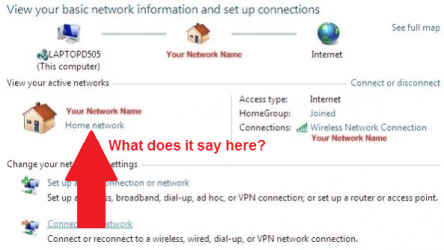
When looking at your "Network and Sharing Center", what does it say where the arrow is pointing?

belkin_11.png

Cheers!
Robert
 

My Computer

OS
...
Mine doesn't look like that..
I used to have that red top house..
In the 1st place on the left I see the OLD.. Georgia-Pc icon...
looks like a pc ..
to the right of the icon... is a LINE with a RED X sitting on the top..
to the right of the red X the line continues.. to what looks like grayed out .. Internet Icon

I looked around while waiting your reply.. on my network map it tells me the adapter is NOT connected.

When looking at your "Network and Sharing Center", what does it say where the arrow is pointing?

View attachment 64706

Cheers!
Robert
 

My Computer

Computer type
Laptop
Computer Manufacturer/Model Number
Gateway 17.3" LCD Intel Dual-Core, 8GB RAM 1TB HDD Windows 8 Laptop
OS
Windows 8 - 64-bit
CPU
2.2GHz Intel Pentium dual-core B960 processor with 2MB L3 ca
Memory
8GB DDR3
Graphics Card(s)
Intel HD Graphics with 128MB of dedicated system memory
Monitor(s) Displays
17.3" Ultrabright HD widescreen LED-backlit LCD
Screen Resolution
1280 X 1024
Hard Drives
1TB hard drive-1000 GB HDD
DVD-Super Multi DL drive
PSU
Intel B960 processor
Case
XXXXX
Cooling
XXXXX
Keyboard
Multi Gesture Touchpad
Mouse
USB - portable mouse... I added this
Antivirus
Avast
Browser
I E 10
Other Info
I see nothing about Motherboard info.
I'm not sure about Sound Card
Ports :(3) USB 2.0, (1) HDMI, (1) VGA, (1) Headphone out, (1) Microphone in, (1) Ethernet LAN

•Fast Wi-Fi wireless and wired Gigabit Ethernet networking
•HDMI output
•Kensington lock slot
I have no idea what all this actually means
OK ... do you see the "Manage Wireless Networks" to the left of what we are looking at now? If so click on that, then right click on the wireless network and select "Properties" and find the "Security Tab". I have two screen shots above for you to look at.

See if you can make sure the "Security Tab" is set to WPA2-Personal.

Robert
 

My Computer

OS
...
Where your PC shows on the far left .. that's where I see GEORGIA_PC
where YOUR red top house is .. that's where the RED X is showing.ontop of that line toward the internet Icon.on my screen .

There is nothing on my screen where your BIG red arrow is...
 

My Computer

Computer type
Laptop
Computer Manufacturer/Model Number
Gateway 17.3" LCD Intel Dual-Core, 8GB RAM 1TB HDD Windows 8 Laptop
OS
Windows 8 - 64-bit
CPU
2.2GHz Intel Pentium dual-core B960 processor with 2MB L3 ca
Memory
8GB DDR3
Graphics Card(s)
Intel HD Graphics with 128MB of dedicated system memory
Monitor(s) Displays
17.3" Ultrabright HD widescreen LED-backlit LCD
Screen Resolution
1280 X 1024
Hard Drives
1TB hard drive-1000 GB HDD
DVD-Super Multi DL drive
PSU
Intel B960 processor
Case
XXXXX
Cooling
XXXXX
Keyboard
Multi Gesture Touchpad
Mouse
USB - portable mouse... I added this
Antivirus
Avast
Browser
I E 10
Other Info
I see nothing about Motherboard info.
I'm not sure about Sound Card
Ports :(3) USB 2.0, (1) HDMI, (1) VGA, (1) Headphone out, (1) Microphone in, (1) Ethernet LAN

•Fast Wi-Fi wireless and wired Gigabit Ethernet networking
•HDMI output
•Kensington lock slot
I have no idea what all this actually means
OK ... do you see the "Manage Wireless Networks" to the left of what we are looking at now? If so click on that, then right click on the wireless network and select "Properties" and find the "Security Tab". I have two screen shots above for you to look at.

See if you can make sure the "Security Tab" is set to WPA2-Personal.

Robert
YES I have found what you ask for ... Top of the screen I see
:GEORGIA-PC NETWORK Wireless Properities on connections Name is the same
SSID is the same
Network type: Access point
Network availibility : All users

There is a ck mark in the top Sentence: Connect automatically when the network is in range.
next tab.

Security tab:

Security type : WPA-Personal
Encryption : AES
Network Security key: 187022652 #'s by the tech guy at Belkin.
 

My Computer

Computer type
Laptop
Computer Manufacturer/Model Number
Gateway 17.3" LCD Intel Dual-Core, 8GB RAM 1TB HDD Windows 8 Laptop
OS
Windows 8 - 64-bit
CPU
2.2GHz Intel Pentium dual-core B960 processor with 2MB L3 ca
Memory
8GB DDR3
Graphics Card(s)
Intel HD Graphics with 128MB of dedicated system memory
Monitor(s) Displays
17.3" Ultrabright HD widescreen LED-backlit LCD
Screen Resolution
1280 X 1024
Hard Drives
1TB hard drive-1000 GB HDD
DVD-Super Multi DL drive
PSU
Intel B960 processor
Case
XXXXX
Cooling
XXXXX
Keyboard
Multi Gesture Touchpad
Mouse
USB - portable mouse... I added this
Antivirus
Avast
Browser
I E 10
Other Info
I see nothing about Motherboard info.
I'm not sure about Sound Card
Ports :(3) USB 2.0, (1) HDMI, (1) VGA, (1) Headphone out, (1) Microphone in, (1) Ethernet LAN

•Fast Wi-Fi wireless and wired Gigabit Ethernet networking
•HDMI output
•Kensington lock slot
I have no idea what all this actually means
OK ... do you see the "Manage Wireless Networks" to the left of what we are looking at now?
YES this was found by me
If so click on that, then right click on the wireless network and select "Properties" and find the "Security Tab".
YES found the security tab..
I have two screen shots above for you to look at.

See if you can make sure the "Security Tab" is set to WPA2-Personal.
YES

Robert


SEE above in RED ink
 

My Computer

Computer type
Laptop
Computer Manufacturer/Model Number
Gateway 17.3" LCD Intel Dual-Core, 8GB RAM 1TB HDD Windows 8 Laptop
OS
Windows 8 - 64-bit
CPU
2.2GHz Intel Pentium dual-core B960 processor with 2MB L3 ca
Memory
8GB DDR3
Graphics Card(s)
Intel HD Graphics with 128MB of dedicated system memory
Monitor(s) Displays
17.3" Ultrabright HD widescreen LED-backlit LCD
Screen Resolution
1280 X 1024
Hard Drives
1TB hard drive-1000 GB HDD
DVD-Super Multi DL drive
PSU
Intel B960 processor
Case
XXXXX
Cooling
XXXXX
Keyboard
Multi Gesture Touchpad
Mouse
USB - portable mouse... I added this
Antivirus
Avast
Browser
I E 10
Other Info
I see nothing about Motherboard info.
I'm not sure about Sound Card
Ports :(3) USB 2.0, (1) HDMI, (1) VGA, (1) Headphone out, (1) Microphone in, (1) Ethernet LAN

•Fast Wi-Fi wireless and wired Gigabit Ethernet networking
•HDMI output
•Kensington lock slot
I have no idea what all this actually means
OK ... do you see the "Manage Wireless Networks" to the left of what we are looking at now? If so click on that, then right click on the wireless network and select "Properties" and find the "Security Tab". I have two screen shots above for you to look at.

See if you can make sure the "Security Tab" is set to WPA2-Personal.

Robert
YES I have found what you ask for ... Top of the screen I see
:GEORGIA-PC NETWORK Wireless Properities on connections Name is the same
SSID is the same
Network type: Access point
Network availibility : All users

There is a ck mark in the top Sentence: Connect automatically when the network is in range.
next tab.

Security tab:

Security type : WPA-Personal
Encryption : AES
Network Security key: 187022652 #'s by the tech guy at Belkin.
OK but we are using WPA2-Personal, not WPA-Personal

Click the drop down box and select WPA2-Personal. Re-enter YOUR "Key Phrase". You might need to restart the laptop.

The one other major issue that might block Internet access for you here is your Anti-Virus / Firewall. If changing to WPA2 does not restore Internet connection, try disabling the Anti-Virus or Firewall or both to see if that helps?

It is late for me, so I will see how things go for you tomorrow.

Good night!
Robert
 

My Computer

OS
...
I need to stop working now it's getting late.. I'm quite tired now.

I also saw an Advanced settings tab on the Wireless Network Properties box at the bottom..
I click on Advance Setting tab...
Shows..802.11 settings
NO tic/check in Enable Federal Info. Processing Standards( FIPS)
compliance for this network
 

My Computer

Computer type
Laptop
Computer Manufacturer/Model Number
Gateway 17.3" LCD Intel Dual-Core, 8GB RAM 1TB HDD Windows 8 Laptop
OS
Windows 8 - 64-bit
CPU
2.2GHz Intel Pentium dual-core B960 processor with 2MB L3 ca
Memory
8GB DDR3
Graphics Card(s)
Intel HD Graphics with 128MB of dedicated system memory
Monitor(s) Displays
17.3" Ultrabright HD widescreen LED-backlit LCD
Screen Resolution
1280 X 1024
Hard Drives
1TB hard drive-1000 GB HDD
DVD-Super Multi DL drive
PSU
Intel B960 processor
Case
XXXXX
Cooling
XXXXX
Keyboard
Multi Gesture Touchpad
Mouse
USB - portable mouse... I added this
Antivirus
Avast
Browser
I E 10
Other Info
I see nothing about Motherboard info.
I'm not sure about Sound Card
Ports :(3) USB 2.0, (1) HDMI, (1) VGA, (1) Headphone out, (1) Microphone in, (1) Ethernet LAN

•Fast Wi-Fi wireless and wired Gigabit Ethernet networking
•HDMI output
•Kensington lock slot
I have no idea what all this actually means
Robert NONE of the screenshots showed or would OPEN in the message I received on those links.


Here are some screen shots that apply to the laptop:

picture.php


picture.php


picture.php


picture.php
 

My Computer

Computer type
Laptop
Computer Manufacturer/Model Number
Gateway 17.3" LCD Intel Dual-Core, 8GB RAM 1TB HDD Windows 8 Laptop
OS
Windows 8 - 64-bit
CPU
2.2GHz Intel Pentium dual-core B960 processor with 2MB L3 ca
Memory
8GB DDR3
Graphics Card(s)
Intel HD Graphics with 128MB of dedicated system memory
Monitor(s) Displays
17.3" Ultrabright HD widescreen LED-backlit LCD
Screen Resolution
1280 X 1024
Hard Drives
1TB hard drive-1000 GB HDD
DVD-Super Multi DL drive
PSU
Intel B960 processor
Case
XXXXX
Cooling
XXXXX
Keyboard
Multi Gesture Touchpad
Mouse
USB - portable mouse... I added this
Antivirus
Avast
Browser
I E 10
Other Info
I see nothing about Motherboard info.
I'm not sure about Sound Card
Ports :(3) USB 2.0, (1) HDMI, (1) VGA, (1) Headphone out, (1) Microphone in, (1) Ethernet LAN

•Fast Wi-Fi wireless and wired Gigabit Ethernet networking
•HDMI output
•Kensington lock slot
I have no idea what all this actually means
Robert over the weekend.. With ONLY the laptop connected to the modem and Router I get connected to the internet.. just fine..
Barman was helping me.
I wanted you to know.. that part was successful. I still cannot connect wireless.
I hope you enjoyed a great Easter.
G.
 

My Computer

Computer type
Laptop
Computer Manufacturer/Model Number
Gateway 17.3" LCD Intel Dual-Core, 8GB RAM 1TB HDD Windows 8 Laptop
OS
Windows 8 - 64-bit
CPU
2.2GHz Intel Pentium dual-core B960 processor with 2MB L3 ca
Memory
8GB DDR3
Graphics Card(s)
Intel HD Graphics with 128MB of dedicated system memory
Monitor(s) Displays
17.3" Ultrabright HD widescreen LED-backlit LCD
Screen Resolution
1280 X 1024
Hard Drives
1TB hard drive-1000 GB HDD
DVD-Super Multi DL drive
PSU
Intel B960 processor
Case
XXXXX
Cooling
XXXXX
Keyboard
Multi Gesture Touchpad
Mouse
USB - portable mouse... I added this
Antivirus
Avast
Browser
I E 10
Other Info
I see nothing about Motherboard info.
I'm not sure about Sound Card
Ports :(3) USB 2.0, (1) HDMI, (1) VGA, (1) Headphone out, (1) Microphone in, (1) Ethernet LAN

•Fast Wi-Fi wireless and wired Gigabit Ethernet networking
•HDMI output
•Kensington lock slot
I have no idea what all this actually means
Robert over the weekend.. With ONLY the laptop connected to the modem and Router I get connected to the internet.. just fine..
Barman was helping me.
I wanted you to know.. that part was successful. I still cannot connect wireless.
I hope you enjoyed a great Easter.
G.
That is great news! A very encouraging step forward!

Based on the last info you posted about laptop settings, it is set to use WPA-Personal whereas the router is set to WPA2-Personal, and using a different KEY passphrase or password. So until The laptop is set the same as the router and both have the same KEY passphrase or password, a secure wireless connection is not possible.

Cheers!
Robert
 

My Computer

OS
...
Hi robert

I've suggested that LPT remove all existing wireless networks from the laptop and set up an unsecured network to prove the connectivity - before setting up wp2-psk security

just keeping you in the loop ;) :D
 

My Computers

System One System Two

  • Computer type
    PC/Desktop
    Computer Manufacturer/Model Number
    ChillBlast - Custom to my design
    OS
    Windows 11 Pro x64 [Latest Release and Release Preview]
    CPU
    Ryzen 9 5950X, 3.8 - 5.2 MHz
    Motherboard
    Asus Prime X570-Pro
    Memory
    64GB [2 x 32GB] DDR4 3200MHz
    Graphics Card(s)
    4GB NVIDIA GEFORCE GTX 1650 Ti
    Sound Card
    On-board SPDIF to 5.1 System + HDMI [5.1 system]
    Monitor(s) Displays
    32" UHD 32 Bit HDR Monitor + 43" UHD 4K 32Bit HDR TV
    Screen Resolution
    2 x 3840 x 2160 @60Hz
    Hard Drives
    1TB M2 SSD OS, 500GB Fast Access SSD, 2 x 8TB Data + Various Externals from 1TB to 4TB, 10TB NAS
    PSU
    NZXT C750 80 PLUS Gold 750W Modular PSU
    Case
    Workstation Case [Matt Black]
    Cooling
    NZXT Kraken X63 280mm CPU Cooler +2x Quiet Case fans
    Keyboard
    Logitech Wireless MX Keys & K400 + others
    Mouse
    Logitech Wireless MX Master 3S
    Internet Speed
    920 MB Down 50 MB Up
    Antivirus
    BitDefender Total Security Pro
    Browser
    Chrome (always run latest Non-Beta)
    Other Info
    Also run ...
    Laptop - Quad 8GB - Windows 10 Pro x64
    Nexus 7 Android tablet x2
    Samsung 10.2" tablet
    Blackview TAB 8 4G Android Tablet c/w Keyboard
    Wacom Intuos Pro Medium Pen Pad
    Wacom Intuos Pro Small Pen Pad
    Wacom Expresskeys Remote
    Loopdeck+ Graphics Controller
    Shuttle Pro v2 Control
  • Computer type
    Laptop
    System Manufacturer/Model Number
    Dell XPS 17 10750H
    OS
    Windows 11 Pro x64 Latest RP
    CPU
    Intel I7 10750H 5.0GHz
    Motherboard
    Dell XPS
    Memory
    32GB [2x16GB] DDR4 2933 MHz
    Graphics Card(s)
    nVidia GTX1650Ti 4 GB GDDR6
    Sound Card
    Stock [Realtek] 4 Speaker
    Monitor(s) Displays
    17" IPS UHD+ Infinity Edge Touchscreen
    Screen Resolution
    3840 x 2400
    Hard Drives
    2TB M2 NVMe, 4TB External + various 500GB & 1TB External NVMe (also have access to spinner HDD from
    PSU
    Stock
    Case
    Stock XPS Aluminium & Carbon Fibre
    Cooling
    Stock - Active Fan Control
    Keyboard
    Backlit + Various Logitech
    Mouse
    Stock Track Pad + Logitech MX Trackball
    Internet Speed
    72 MB Down 18MB Up
    Browser
    Chrome
    Other Info
    Also run ...
    Laptop - Quad 8GB - Windows 10 Pro x64
    Nexus 7 Android tablet x2
    10.2" tablet
    Sony Z3 Android Smartphone
    Wacom Intuos Pro Medium Pen Pad
    Wacom Intuos Pro Small Pen Pad
    Wacom Expresskeys Remote
    Loopdeck+ Graphics Controller
    Shuttle Pro v2 Control Pad
    10TB NAS
Hi robert

I've suggested that LPT remove all existing wireless networks from the laptop and set up an unsecured network to prove the connectivity - before setting up wp2-psk security

just keeping you in the loop ;) :D
That is a great idea. That could expose other blocks to connection like anti-virus, firewall, and pop-up blockers. I think what LPT and I accomplished the most, was to give her some familiarity with the pages in the router and see how to get there and how to make needed adjustments. With every step she is proving she is competent and can do this.

Good luck!
Robert
 

My Computer

OS
...
The golden rule of fault diagnosis - only change one thing at a time and then recheck

It may be an old mantra, but still holds true ;) :D
 

My Computers

System One System Two

  • Computer type
    PC/Desktop
    Computer Manufacturer/Model Number
    ChillBlast - Custom to my design
    OS
    Windows 11 Pro x64 [Latest Release and Release Preview]
    CPU
    Ryzen 9 5950X, 3.8 - 5.2 MHz
    Motherboard
    Asus Prime X570-Pro
    Memory
    64GB [2 x 32GB] DDR4 3200MHz
    Graphics Card(s)
    4GB NVIDIA GEFORCE GTX 1650 Ti
    Sound Card
    On-board SPDIF to 5.1 System + HDMI [5.1 system]
    Monitor(s) Displays
    32" UHD 32 Bit HDR Monitor + 43" UHD 4K 32Bit HDR TV
    Screen Resolution
    2 x 3840 x 2160 @60Hz
    Hard Drives
    1TB M2 SSD OS, 500GB Fast Access SSD, 2 x 8TB Data + Various Externals from 1TB to 4TB, 10TB NAS
    PSU
    NZXT C750 80 PLUS Gold 750W Modular PSU
    Case
    Workstation Case [Matt Black]
    Cooling
    NZXT Kraken X63 280mm CPU Cooler +2x Quiet Case fans
    Keyboard
    Logitech Wireless MX Keys & K400 + others
    Mouse
    Logitech Wireless MX Master 3S
    Internet Speed
    920 MB Down 50 MB Up
    Antivirus
    BitDefender Total Security Pro
    Browser
    Chrome (always run latest Non-Beta)
    Other Info
    Also run ...
    Laptop - Quad 8GB - Windows 10 Pro x64
    Nexus 7 Android tablet x2
    Samsung 10.2" tablet
    Blackview TAB 8 4G Android Tablet c/w Keyboard
    Wacom Intuos Pro Medium Pen Pad
    Wacom Intuos Pro Small Pen Pad
    Wacom Expresskeys Remote
    Loopdeck+ Graphics Controller
    Shuttle Pro v2 Control
  • Computer type
    Laptop
    System Manufacturer/Model Number
    Dell XPS 17 10750H
    OS
    Windows 11 Pro x64 Latest RP
    CPU
    Intel I7 10750H 5.0GHz
    Motherboard
    Dell XPS
    Memory
    32GB [2x16GB] DDR4 2933 MHz
    Graphics Card(s)
    nVidia GTX1650Ti 4 GB GDDR6
    Sound Card
    Stock [Realtek] 4 Speaker
    Monitor(s) Displays
    17" IPS UHD+ Infinity Edge Touchscreen
    Screen Resolution
    3840 x 2400
    Hard Drives
    2TB M2 NVMe, 4TB External + various 500GB & 1TB External NVMe (also have access to spinner HDD from
    PSU
    Stock
    Case
    Stock XPS Aluminium & Carbon Fibre
    Cooling
    Stock - Active Fan Control
    Keyboard
    Backlit + Various Logitech
    Mouse
    Stock Track Pad + Logitech MX Trackball
    Internet Speed
    72 MB Down 18MB Up
    Browser
    Chrome
    Other Info
    Also run ...
    Laptop - Quad 8GB - Windows 10 Pro x64
    Nexus 7 Android tablet x2
    10.2" tablet
    Sony Z3 Android Smartphone
    Wacom Intuos Pro Medium Pen Pad
    Wacom Intuos Pro Small Pen Pad
    Wacom Expresskeys Remote
    Loopdeck+ Graphics Controller
    Shuttle Pro v2 Control Pad
    10TB NAS
iseeyou. and Nigel I'm so greatful to you both.. I so want this to get corrected..
other people have made this work.. I know beyond a doubt this can be accomplished.. it is time consuming .. at best.. But it will work one way or another..
Barman did you get a peek at the last screen shot I left on this thread?
Thank you both ever so much.

LPt
 
Last edited:

My Computer

Computer type
Laptop
Computer Manufacturer/Model Number
Gateway 17.3" LCD Intel Dual-Core, 8GB RAM 1TB HDD Windows 8 Laptop
OS
Windows 8 - 64-bit
CPU
2.2GHz Intel Pentium dual-core B960 processor with 2MB L3 ca
Memory
8GB DDR3
Graphics Card(s)
Intel HD Graphics with 128MB of dedicated system memory
Monitor(s) Displays
17.3" Ultrabright HD widescreen LED-backlit LCD
Screen Resolution
1280 X 1024
Hard Drives
1TB hard drive-1000 GB HDD
DVD-Super Multi DL drive
PSU
Intel B960 processor
Case
XXXXX
Cooling
XXXXX
Keyboard
Multi Gesture Touchpad
Mouse
USB - portable mouse... I added this
Antivirus
Avast
Browser
I E 10
Other Info
I see nothing about Motherboard info.
I'm not sure about Sound Card
Ports :(3) USB 2.0, (1) HDMI, (1) VGA, (1) Headphone out, (1) Microphone in, (1) Ethernet LAN

•Fast Wi-Fi wireless and wired Gigabit Ethernet networking
•HDMI output
•Kensington lock slot
I have no idea what all this actually means
OK ... do you see the "Manage Wireless Networks" to the left of what we are looking at now? If so click on that, then right click on the wireless network and select "Properties" and find the "Security Tab". I have two screen shots above for you to look at.

See if you can make sure the "Security Tab" is set to WPA2-Personal.

Robert
YES I have found what you ask for ... Top of the screen I see
:GEORGIA-PC NETWORK Wireless Properities on connections Name is the same
SSID is the same
Network type: Access point
Network availibility : All users

There is a ck mark in the top Sentence: Connect automatically when the network is in range.
next tab.

Security tab:

Security type : WPA-Personal
Encryption : AES
Network Security key: 187022652 #'s by the tech guy at Belkin.
OK but we are using WPA2-Personal, not WPA-Personal

Click the drop down box and select WPA2-Personal. Re-enter YOUR "Key Phrase". You might need to restart the laptop.

The one other major issue that might block Internet access for you here is your Anti-Virus / Firewall. If changing to WPA2 does not restore Internet connection, try disabling the Anti-Virus or Firewall or both to see if that helps?

It is late for me, so I will see how things go for you tomorrow.

Good night!
Robert

Robert I've not done this yet.. I was concerned that I didn't quite understand it .. I didn't want to make matters worse.
 

My Computer

Computer type
Laptop
Computer Manufacturer/Model Number
Gateway 17.3" LCD Intel Dual-Core, 8GB RAM 1TB HDD Windows 8 Laptop
OS
Windows 8 - 64-bit
CPU
2.2GHz Intel Pentium dual-core B960 processor with 2MB L3 ca
Memory
8GB DDR3
Graphics Card(s)
Intel HD Graphics with 128MB of dedicated system memory
Monitor(s) Displays
17.3" Ultrabright HD widescreen LED-backlit LCD
Screen Resolution
1280 X 1024
Hard Drives
1TB hard drive-1000 GB HDD
DVD-Super Multi DL drive
PSU
Intel B960 processor
Case
XXXXX
Cooling
XXXXX
Keyboard
Multi Gesture Touchpad
Mouse
USB - portable mouse... I added this
Antivirus
Avast
Browser
I E 10
Other Info
I see nothing about Motherboard info.
I'm not sure about Sound Card
Ports :(3) USB 2.0, (1) HDMI, (1) VGA, (1) Headphone out, (1) Microphone in, (1) Ethernet LAN

•Fast Wi-Fi wireless and wired Gigabit Ethernet networking
•HDMI output
•Kensington lock slot
I have no idea what all this actually means
When looking at your "Network and Sharing Center", what does it say where the arrow is pointing?

View attachment 64706

Cheers!
Robert
Robert hi.. when I was connected to the internet and going all over the web..just using the Laptop , moden and power to the laptop yesterday.. my connection looked very much like the above screen shot.. only thing was different was in the middle top of the connection...I have what looked like a park bench .
 

My Computer

Computer type
Laptop
Computer Manufacturer/Model Number
Gateway 17.3" LCD Intel Dual-Core, 8GB RAM 1TB HDD Windows 8 Laptop
OS
Windows 8 - 64-bit
CPU
2.2GHz Intel Pentium dual-core B960 processor with 2MB L3 ca
Memory
8GB DDR3
Graphics Card(s)
Intel HD Graphics with 128MB of dedicated system memory
Monitor(s) Displays
17.3" Ultrabright HD widescreen LED-backlit LCD
Screen Resolution
1280 X 1024
Hard Drives
1TB hard drive-1000 GB HDD
DVD-Super Multi DL drive
PSU
Intel B960 processor
Case
XXXXX
Cooling
XXXXX
Keyboard
Multi Gesture Touchpad
Mouse
USB - portable mouse... I added this
Antivirus
Avast
Browser
I E 10
Other Info
I see nothing about Motherboard info.
I'm not sure about Sound Card
Ports :(3) USB 2.0, (1) HDMI, (1) VGA, (1) Headphone out, (1) Microphone in, (1) Ethernet LAN

•Fast Wi-Fi wireless and wired Gigabit Ethernet networking
•HDMI output
•Kensington lock slot
I have no idea what all this actually means
When looking at your "Network and Sharing Center", what does it say where the arrow is pointing?

View attachment 64706

Cheers!
Robert
Robert hi.. when I was connected to the internet and going all over the web..just using the Laptop , moden and power to the laptop yesterday.. my connection looked very much like the above screen shot.. only thing was different was in the middle top of the connection...I have what looked like a park bench .

YOUR big RED arrow was pointing to what mine looked like.. It is JUST like yours with the RED top house.. to the right... said connected like you..
 
Last edited:

My Computer

Computer type
Laptop
Computer Manufacturer/Model Number
Gateway 17.3" LCD Intel Dual-Core, 8GB RAM 1TB HDD Windows 8 Laptop
OS
Windows 8 - 64-bit
CPU
2.2GHz Intel Pentium dual-core B960 processor with 2MB L3 ca
Memory
8GB DDR3
Graphics Card(s)
Intel HD Graphics with 128MB of dedicated system memory
Monitor(s) Displays
17.3" Ultrabright HD widescreen LED-backlit LCD
Screen Resolution
1280 X 1024
Hard Drives
1TB hard drive-1000 GB HDD
DVD-Super Multi DL drive
PSU
Intel B960 processor
Case
XXXXX
Cooling
XXXXX
Keyboard
Multi Gesture Touchpad
Mouse
USB - portable mouse... I added this
Antivirus
Avast
Browser
I E 10
Other Info
I see nothing about Motherboard info.
I'm not sure about Sound Card
Ports :(3) USB 2.0, (1) HDMI, (1) VGA, (1) Headphone out, (1) Microphone in, (1) Ethernet LAN

•Fast Wi-Fi wireless and wired Gigabit Ethernet networking
•HDMI output
•Kensington lock slot
I have no idea what all this actually means
When looking at your "Network and Sharing Center", what does it say where the arrow is pointing?

View attachment 64706

Cheers!
Robert
Robert hi.. when I was connected to the internet and going all over the web..just using the Laptop , moden and power to the laptop yesterday.. my connection looked very much like the above screen shot.. only thing was different was in the middle top of the connection...I have what looked like a park bench .
I suspected it might. We will want to change that, eventually, and Barman can show you how later. It is in your best interest to follow one adviser at a time and only make one change at a time. So for now, as Barman is intent on diagnosing the wireless connection, stay with that process until solved before going on to something else.

Robert
 

My Computer

OS
...
Back
Top