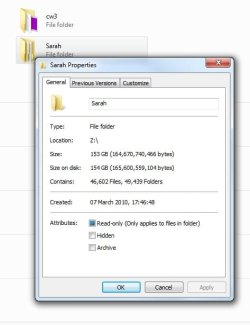
whats wrong with my folder properties?

totalguy

New member
when i right click a folder on my network drive and choose properties the files and folders and the sizes just go up and up forever! see attached pic for example. there is no hope in hell theres almost the same amount of folders as there is files in there and the same goes for the size its nowhere near that.
 

Attachments

  • properties.jpg
    properties.jpg
    62.3 KB · Views: 54

My Computer

OS
windows ultimate 7 64 bit
CPU
phenom 2 X4 965 3.4ghz
Motherboard
asus m4a77td pro
Memory
4gb corsair 1333 CT2KIT25664BA1339
Graphics Card(s)
xfx 220gt
Sound Card
onboard
Monitor(s) Displays
Digimate 23"
Screen Resolution
1920 x 1080 native
when i right click a folder on my network drive and choose properties the files and folders and the sizes just go up and up forever! see attached pic for example. there is no hope in hell theres almost the same amount of folders as there is files in there and the same goes for the size its nowhere near that.

Are you running a good Antivirus app? Strange things like this are often caused by virii!
 

My Computer

Computer Manufacturer/Model Number
Homebrew PC - "Alpha_Dawg"
OS
Windows 7 Ultimate 64 bit Steve Ballmer Signature Edition
CPU
Intel Core 2 Quad - Q9550 - 2.83GHz stock - OC'd to 3.6GHz
Motherboard
Gigabyte EP45-UD3P
Memory
4GB DDR2 800MHz (PC6400) OCZ Reaper
Graphics Card(s)
Nvidia GE Force 8800 GTS
Sound Card
Asus Xonar DX
Monitor(s) Displays
Samsung SyncMaster 2333HD
Screen Resolution
1920 x 1080
Hard Drives
WD Caviar Black 750GB - 7200RPM - 32MB cache
WD Caviar Green 1.5TB - 5400RPM - 64MB cache
WD Caviar Green 2.0TB - 5400RPM - 64MB cache
PSU
PC Power & Cooling Silencer 750
Case
Gigabyte 3D Aurora
Cooling
Case is Air - 5ea. 120mm fans (mix of Arctic and Xigmatec)
Keyboard
MS Natural Wireless KB
Mouse
MS Wireless Mouse
Internet Speed
50 mbps down/5 mbps up
Other Info
AVerMedia - AVerTVHD G2 Dual Tuner Card
when i right click a folder on my network drive and choose properties the files and folders and the sizes just go up and up forever! see attached pic for example. there is no hope in hell theres almost the same amount of folders as there is files in there and the same goes for the size its nowhere near that.

First step...

Control Panel -> Folder Options -> View
Set it to show hidden files
Uncheck the "hide system files" option.

Now revisit that folder and confirm the numbers you are getting are wrong...
I agree the 49,000+ folders does sound a tad suspicious...

From there there are a couple of possibilities...

1) All those files and folders do, in fact, exist in which case you need to have a talk with Sarah...

2) They don't exist in which case you might have some scrambled directory indexes and can try fixing them with CHKDSK...

On the folder's host machine....

WinKey+R type CMD and click OK.

In the shell window...

CHKDSK /F C:

If the files are not on drive C:, substitute the appropriate drive letter for the C...

The system may suggest you dismount the drive ... say Yes
It may also suggest running on the next reboot ... say Yes

Close the command shell when CHKDSK exits and restart your system.

Is it fixed?

 

My Computer

Computer Manufacturer/Model Number
Homebrew
OS
XP Pro SP3 X86 / Win7 Pro X86
CPU
Amd 64 x2 4200 (2.4ghz)
Motherboard
Asus M2N-MX SE Plus
Memory
Kingston DDR2 800 2gb
Graphics Card(s)
Nvidia GF-8400
Sound Card
Realtek on Motherboard
Monitor(s) Displays
Acer x-193bw
Screen Resolution
1440 x 900
Hard Drives
Western Digital 500g
PSU
350watt In-Win
Case
In-Win
Cooling
Air
Keyboard
yes
Mouse
yes
Internet Speed
5mpbs
Other Info
Also ASRock ION 330 as HTPC (on XP).
Acer Aspire as GP netbook (on XP).
the antivirus is eset smart security fully upto date.

tried the hidden files thing although now i see why you would say that, but thats more for a noob than me lol.

chkdsk cannot run on a network drive so i cant do that.
 

My Computer

OS
windows ultimate 7 64 bit
CPU
phenom 2 X4 965 3.4ghz
Motherboard
asus m4a77td pro
Memory
4gb corsair 1333 CT2KIT25664BA1339
Graphics Card(s)
xfx 220gt
Sound Card
onboard
Monitor(s) Displays
Digimate 23"
Screen Resolution
1920 x 1080 native
ok i plugged it direct into computer and the problem isnt apparent so does that mean theres a problem with the nas drive software then?
 

My Computer

OS
windows ultimate 7 64 bit
CPU
phenom 2 X4 965 3.4ghz
Motherboard
asus m4a77td pro
Memory
4gb corsair 1333 CT2KIT25664BA1339
Graphics Card(s)
xfx 220gt
Sound Card
onboard
Monitor(s) Displays
Digimate 23"
Screen Resolution
1920 x 1080 native
the antivirus is eset smart security fully upto date.

tried the hidden files thing although now i see why you would say that, but thats more for a noob than me lol.

chkdsk cannot run on a network drive so i cant do that.

Did you notice the part about "On the drive's host machine..." IOW... that folder on the other machine.
 

My Computer

Computer Manufacturer/Model Number
Homebrew
OS
XP Pro SP3 X86 / Win7 Pro X86
CPU
Amd 64 x2 4200 (2.4ghz)
Motherboard
Asus M2N-MX SE Plus
Memory
Kingston DDR2 800 2gb
Graphics Card(s)
Nvidia GF-8400
Sound Card
Realtek on Motherboard
Monitor(s) Displays
Acer x-193bw
Screen Resolution
1440 x 900
Hard Drives
Western Digital 500g
PSU
350watt In-Win
Case
In-Win
Cooling
Air
Keyboard
yes
Mouse
yes
Internet Speed
5mpbs
Other Info
Also ASRock ION 330 as HTPC (on XP).
Acer Aspire as GP netbook (on XP).
ok i plugged it direct into computer and the problem isnt apparent so does that mean theres a problem with the nas drive software then?

So now it's a NAS?... should have told us that up front.

Anyway if the drive doesn't show a problem when hooked directly to your computer, then there's only one place it can be... right?

Now... here comes the fun part... What make/model/etc. NAS are we talking about?
(A lot of those boxes are on Linux and a real pain to do anything with...)
 

My Computer

Computer Manufacturer/Model Number
Homebrew
OS
XP Pro SP3 X86 / Win7 Pro X86
CPU
Amd 64 x2 4200 (2.4ghz)
Motherboard
Asus M2N-MX SE Plus
Memory
Kingston DDR2 800 2gb
Graphics Card(s)
Nvidia GF-8400
Sound Card
Realtek on Motherboard
Monitor(s) Displays
Acer x-193bw
Screen Resolution
1440 x 900
Hard Drives
Western Digital 500g
PSU
350watt In-Win
Case
In-Win
Cooling
Air
Keyboard
yes
Mouse
yes
Internet Speed
5mpbs
Other Info
Also ASRock ION 330 as HTPC (on XP).
Acer Aspire as GP netbook (on XP).
i did "when i right click a folder on my network drive" its a pluscom nas-rdc3282 i did look it up all i got is a forum post to download the firmware but the file does not include firmware! i called the phone number and was told to send an email to the guy on the phone and he would send me a link for the new firmware unfortunately the email returned!
 

My Computer

OS
windows ultimate 7 64 bit
CPU
phenom 2 X4 965 3.4ghz
Motherboard
asus m4a77td pro
Memory
4gb corsair 1333 CT2KIT25664BA1339
Graphics Card(s)
xfx 220gt
Sound Card
onboard
Monitor(s) Displays
Digimate 23"
Screen Resolution
1920 x 1080 native
i did "when i right click a folder on my network drive" its a pluscom nas-rdc3282 i did look it up all i got is a forum post to download the firmware but the file does not include firmware! i called the phone number and was told to send an email to the guy on the phone and he would send me a link for the new firmware unfortunately the email returned!

Ok... I copied the make and model number from your post... pasted it into google's search bar... this was the second result...

Pluscom Forum: Download Firmware Version for NAS-RDC3282

I suspect you should click the link on that page that says "Download firmware version for ...."

Also... as a general suggestion... it's not a good idea to map network drives. That's really only there for Win3.1 compatibility. Since win2000... folder shares have been the way to go. You will have enhanced security and the root of the drive is not exposed to the network.
 

My Computer

Computer Manufacturer/Model Number
Homebrew
OS
XP Pro SP3 X86 / Win7 Pro X86
CPU
Amd 64 x2 4200 (2.4ghz)
Motherboard
Asus M2N-MX SE Plus
Memory
Kingston DDR2 800 2gb
Graphics Card(s)
Nvidia GF-8400
Sound Card
Realtek on Motherboard
Monitor(s) Displays
Acer x-193bw
Screen Resolution
1440 x 900
Hard Drives
Western Digital 500g
PSU
350watt In-Win
Case
In-Win
Cooling
Air
Keyboard
yes
Mouse
yes
Internet Speed
5mpbs
Other Info
Also ASRock ION 330 as HTPC (on XP).
Acer Aspire as GP netbook (on XP).
i already got that page you put the link for and thats what i explained about in my last post.

if i shouldnt map it how should i do it? the root isnt exposed its mapped to a folder Z:\main. i did it that way because it was much easier to access it when i wanted to use it.
 

My Computer

OS
windows ultimate 7 64 bit
CPU
phenom 2 X4 965 3.4ghz
Motherboard
asus m4a77td pro
Memory
4gb corsair 1333 CT2KIT25664BA1339
Graphics Card(s)
xfx 220gt
Sound Card
onboard
Monitor(s) Displays
Digimate 23"
Screen Resolution
1920 x 1080 native
Also... as a general suggestion... it's not a good idea to map network drives. That's really only there for Win3.1 compatibility. Since win2000... folder shares have been the way to go. You will have enhanced security and the root of the drive is not exposed to the network.

Really tater???

Only for win3.x compatibility??? Ever worked in a networked environment?

I have worked for several, and one thing remains true: "end users are dumb"... mapped drives gives them something they can easily understand and work with. Mapping a drive doesnt expose the root of the drive either, mapping a drive is assigning a drive letter to a folder (plain and simple). Always has been!

totalguy: What format does your NAS use for the drives?
 

My Computer

Computer Manufacturer/Model Number
Homebrew PC - "Alpha_Dawg"
OS
Windows 7 Ultimate 64 bit Steve Ballmer Signature Edition
CPU
Intel Core 2 Quad - Q9550 - 2.83GHz stock - OC'd to 3.6GHz
Motherboard
Gigabyte EP45-UD3P
Memory
4GB DDR2 800MHz (PC6400) OCZ Reaper
Graphics Card(s)
Nvidia GE Force 8800 GTS
Sound Card
Asus Xonar DX
Monitor(s) Displays
Samsung SyncMaster 2333HD
Screen Resolution
1920 x 1080
Hard Drives
WD Caviar Black 750GB - 7200RPM - 32MB cache
WD Caviar Green 1.5TB - 5400RPM - 64MB cache
WD Caviar Green 2.0TB - 5400RPM - 64MB cache
PSU
PC Power & Cooling Silencer 750
Case
Gigabyte 3D Aurora
Cooling
Case is Air - 5ea. 120mm fans (mix of Arctic and Xigmatec)
Keyboard
MS Natural Wireless KB
Mouse
MS Wireless Mouse
Internet Speed
50 mbps down/5 mbps up
Other Info
AVerMedia - AVerTVHD G2 Dual Tuner Card
ive never worked in a network environment and i aint dumb lol

what you say about mapping is right in my case.

by format do you mean file system? fat32. can only use ntfs if i plug it directly into a computer via usb but that would defeat the purpose of a nas drive then :)
 

My Computer

OS
windows ultimate 7 64 bit
CPU
phenom 2 X4 965 3.4ghz
Motherboard
asus m4a77td pro
Memory
4gb corsair 1333 CT2KIT25664BA1339
Graphics Card(s)
xfx 220gt
Sound Card
onboard
Monitor(s) Displays
Digimate 23"
Screen Resolution
1920 x 1080 native
ive never worked in a network environment and i aint dumb lol

what you say about mapping is right in my case.

by format do you mean file system? fat32. can only use ntfs if i plug it directly into a computer via usb but that would defeat the purpose of a nas drive then :)
First off, those comments were directed at tater, not you totalguy.

Yes file system is what I meant here... wow FAT32 is what it uses, not a linux file system? Most NAS's Ive worked with used linux ext3 or simlar... hmmm!

Since it is FAT32 have you tried running Windows utilities such as scandisk?
 

My Computer

Computer Manufacturer/Model Number
Homebrew PC - "Alpha_Dawg"
OS
Windows 7 Ultimate 64 bit Steve Ballmer Signature Edition
CPU
Intel Core 2 Quad - Q9550 - 2.83GHz stock - OC'd to 3.6GHz
Motherboard
Gigabyte EP45-UD3P
Memory
4GB DDR2 800MHz (PC6400) OCZ Reaper
Graphics Card(s)
Nvidia GE Force 8800 GTS
Sound Card
Asus Xonar DX
Monitor(s) Displays
Samsung SyncMaster 2333HD
Screen Resolution
1920 x 1080
Hard Drives
WD Caviar Black 750GB - 7200RPM - 32MB cache
WD Caviar Green 1.5TB - 5400RPM - 64MB cache
WD Caviar Green 2.0TB - 5400RPM - 64MB cache
PSU
PC Power & Cooling Silencer 750
Case
Gigabyte 3D Aurora
Cooling
Case is Air - 5ea. 120mm fans (mix of Arctic and Xigmatec)
Keyboard
MS Natural Wireless KB
Mouse
MS Wireless Mouse
Internet Speed
50 mbps down/5 mbps up
Other Info
AVerMedia - AVerTVHD G2 Dual Tuner Card
i cant run anything on it as a 'nas drive' i have to plug it into a computer directly via usb to do anything like that. ive run a long generic seagate tools test it showed 1 bad lba so i run it again and chose to fix it that time. the original problem only appears when its as a 'nas drive' so its either a bug in windows or the software on the nas drive (firmware) im thinking.
 

My Computer

OS
windows ultimate 7 64 bit
CPU
phenom 2 X4 965 3.4ghz
Motherboard
asus m4a77td pro
Memory
4gb corsair 1333 CT2KIT25664BA1339
Graphics Card(s)
xfx 220gt
Sound Card
onboard
Monitor(s) Displays
Digimate 23"
Screen Resolution
1920 x 1080 native
did a bit of searching on the net and found the site Computer parts - B2becart.com --- B2becart Developers i used their contact us form to request firmware update. i was on version 1.43 but now on 1.51c theres been a lot of changes! so for future reference and anyone coming accross this thread if you have a pluscom nas enclosure model NAS-RDC3282 (or any similar for that matter) visit the site i mentioned and request a firmware update. its easy to do, if you got one of these you should be familiar with it and able to access its control panel. goto maintainance and upload the .bin file. dont worry if its the wrong one you have it will tell you and it only takes seconds to do then reboot it and remap it.
 

My Computer

OS
windows ultimate 7 64 bit
CPU
phenom 2 X4 965 3.4ghz
Motherboard
asus m4a77td pro
Memory
4gb corsair 1333 CT2KIT25664BA1339
Graphics Card(s)
xfx 220gt
Sound Card
onboard
Monitor(s) Displays
Digimate 23"
Screen Resolution
1920 x 1080 native
did a bit of searching on the net and found the site Computer parts - B2becart.com --- B2becart Developers i used their contact us form to request firmware update. i was on version 1.43 but now on 1.51c theres been a lot of changes! so for future reference and anyone coming accross this thread if you have a pluscom nas enclosure model NAS-RDC3282 (or any similar for that matter) visit the site i mentioned and request a firmware update. its easy to do, if you got one of these you should be familiar with it and able to access its control panel. goto maintainance and upload the .bin file. dont worry if its the wrong one you have it will tell you and it only takes seconds to do then reboot it and remap it.

SO this fixed your issue totalguy???
 

My Computer

Computer Manufacturer/Model Number
Homebrew PC - "Alpha_Dawg"
OS
Windows 7 Ultimate 64 bit Steve Ballmer Signature Edition
CPU
Intel Core 2 Quad - Q9550 - 2.83GHz stock - OC'd to 3.6GHz
Motherboard
Gigabyte EP45-UD3P
Memory
4GB DDR2 800MHz (PC6400) OCZ Reaper
Graphics Card(s)
Nvidia GE Force 8800 GTS
Sound Card
Asus Xonar DX
Monitor(s) Displays
Samsung SyncMaster 2333HD
Screen Resolution
1920 x 1080
Hard Drives
WD Caviar Black 750GB - 7200RPM - 32MB cache
WD Caviar Green 1.5TB - 5400RPM - 64MB cache
WD Caviar Green 2.0TB - 5400RPM - 64MB cache
PSU
PC Power & Cooling Silencer 750
Case
Gigabyte 3D Aurora
Cooling
Case is Air - 5ea. 120mm fans (mix of Arctic and Xigmatec)
Keyboard
MS Natural Wireless KB
Mouse
MS Wireless Mouse
Internet Speed
50 mbps down/5 mbps up
Other Info
AVerMedia - AVerTVHD G2 Dual Tuner Card
oh yeah forgot that bit lol yeah its all working tidy now!
 

My Computer

OS
windows ultimate 7 64 bit
CPU
phenom 2 X4 965 3.4ghz
Motherboard
asus m4a77td pro
Memory
4gb corsair 1333 CT2KIT25664BA1339
Graphics Card(s)
xfx 220gt
Sound Card
onboard
Monitor(s) Displays
Digimate 23"
Screen Resolution
1920 x 1080 native
Back
Top