Sound meter software exist for the taskbar?

MattDamonisdumb

Banned - PM abuse
Thanks for taking the time to read this. (screen grab included)

This kind of a two part question.

I sometimes have an issue with my microphone where it sounds terrible and stat-icky. I usually just jiggle the part of the mic where it plugs into my computer and that fixes the issue. I'm pretty sure its either the inexpensive mic I purchased or worse case scenario it's the part inside my notebook where the mic connects to. I just don't know! :cry:

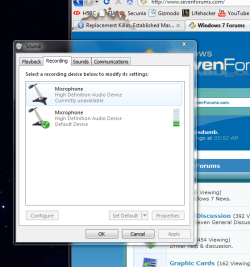
As you can see in my screen shot, I keep that window open so I can know when the mic gets all messed up. When the problem is happening the meter lights up totally green, when its normal the meter is much lower.

1. Do you think it's the crappy mic connector?
2.if it is, and we have ruled out my notebook as the problem, can you recommend any software that will allow me to have a similar meter (gauge) but on the task-bar so I don't have to keep the Windows mic gauge open?

Thanks! :D
 

Attachments

  • Capture.PNG
    Capture.PNG
    114.9 KB · Views: 17

My Computer

Computer Manufacturer/Model Number
Sager NP2096 (Compal JHL90?)
OS
Windows 7 Ultimate 64 bit
CPU
Intel Mobile core 2 Duo P9500 @ 2.53GHz, Penryn 45nm
Motherboard
JHL90 (U2E1) chipset model PM45,southbridge 82801M (ICH9-M)
Memory
4.0GB Dual-Channel DDR2 @398MHz 5-5-5-18
Graphics Card(s)
512MB GeForce 9600M GT (Compal Elect)
Sound Card
Realtek High Definition Audio
Monitor(s) Displays
Generic PnP Monitor
Screen Resolution
1680x1050
Hard Drives
244.20GB Hitachi Hitachi HTS723775L9A360 ATA Device (IDE)
Mouse
crappy Chinese knockoff of the "egg mouse"
Other Info
Thank you Piriform for giving us 'Speccy' so I could get all this info with ease.
Hi Mattdamonisdumb,
First is easy to test. Just try your mic with another computer or borrow a working mic and plug it in your computer. Then you can see what is borken.
Number 2 is harder, but I think you can find something when you search deskbar "VU Meter" or "Audio Meter". Of course free :D
I found couple, but didn't try any...
 

My Computer

OS
XP
Hi Mattdamonisdumb,
First is easy to test. Just try your mic with another computer or borrow a working mic and plug it in your computer. Then you can see what is borken.
Number 2 is harder, but I think you can find something when you search deskbar "VU Meter" or "Audio Meter". Of course free :D
I found couple, but didn't try any...

thanks, maceman. The problem only happens from time to time. Do you think this means it is not my system? I ask because I am not in a position to test my crappy mic on another computer.
 

My Computer

Computer Manufacturer/Model Number
Sager NP2096 (Compal JHL90?)
OS
Windows 7 Ultimate 64 bit
CPU
Intel Mobile core 2 Duo P9500 @ 2.53GHz, Penryn 45nm
Motherboard
JHL90 (U2E1) chipset model PM45,southbridge 82801M (ICH9-M)
Memory
4.0GB Dual-Channel DDR2 @398MHz 5-5-5-18
Graphics Card(s)
512MB GeForce 9600M GT (Compal Elect)
Sound Card
Realtek High Definition Audio
Monitor(s) Displays
Generic PnP Monitor
Screen Resolution
1680x1050
Hard Drives
244.20GB Hitachi Hitachi HTS723775L9A360 ATA Device (IDE)
Mouse
crappy Chinese knockoff of the "egg mouse"
Other Info
Thank you Piriform for giving us 'Speccy' so I could get all this info with ease.
It is actually pretty hard to say without hearing it myself. This could also be the driver issue or a slow internet connection..
But when it's fixed when you jiggle the plug, I would say that it's the microphone. Specially when it's an inexpensive one. I've noticed that they are not very durable, at least with me :D
 

My Computer

OS
XP
It is actually pretty hard to say without hearing it myself. This could also be the driver issue or a slow internet connection..
But when it's fixed when you jiggle the plug, I would say that it's the microphone. Specially when it's an inexpensive one. I've noticed that they are not very durable, at least with me :D


thank you, ill give it a real test when I am home
 

My Computer

Computer Manufacturer/Model Number
Sager NP2096 (Compal JHL90?)
OS
Windows 7 Ultimate 64 bit
CPU
Intel Mobile core 2 Duo P9500 @ 2.53GHz, Penryn 45nm
Motherboard
JHL90 (U2E1) chipset model PM45,southbridge 82801M (ICH9-M)
Memory
4.0GB Dual-Channel DDR2 @398MHz 5-5-5-18
Graphics Card(s)
512MB GeForce 9600M GT (Compal Elect)
Sound Card
Realtek High Definition Audio
Monitor(s) Displays
Generic PnP Monitor
Screen Resolution
1680x1050
Hard Drives
244.20GB Hitachi Hitachi HTS723775L9A360 ATA Device (IDE)
Mouse
crappy Chinese knockoff of the "egg mouse"
Other Info
Thank you Piriform for giving us 'Speccy' so I could get all this info with ease.
Final Update:

the problem was fixed when I updated my sound card drivers!
 

My Computer

Computer Manufacturer/Model Number
Sager NP2096 (Compal JHL90?)
OS
Windows 7 Ultimate 64 bit
CPU
Intel Mobile core 2 Duo P9500 @ 2.53GHz, Penryn 45nm
Motherboard
JHL90 (U2E1) chipset model PM45,southbridge 82801M (ICH9-M)
Memory
4.0GB Dual-Channel DDR2 @398MHz 5-5-5-18
Graphics Card(s)
512MB GeForce 9600M GT (Compal Elect)
Sound Card
Realtek High Definition Audio
Monitor(s) Displays
Generic PnP Monitor
Screen Resolution
1680x1050
Hard Drives
244.20GB Hitachi Hitachi HTS723775L9A360 ATA Device (IDE)
Mouse
crappy Chinese knockoff of the "egg mouse"
Other Info
Thank you Piriform for giving us 'Speccy' so I could get all this info with ease.
Final Update:

the problem was fixed when I updated my sound card drivers!

I had this problem on a desktop but with the speaker OUT connection. I think it has to do with the auto sensing. The Realtek control panel kept resetting the driver as it thought the speaker was being plugged in and then unplugged. At first I thought the jack itself was dirty but after I updated the driver, disabled "front jack panel jack detection", and turned off auto-pop-up dialogs. The problem has been seen (or heard) again. Perhaps the recent drivers change the level at which auto-sensing functions.

Ap
 

My Computer

Computer Manufacturer/Model Number
Assembled in my workshop
OS
Windows 7 Home Premium
CPU
Intel Core 2 Duo @ 3.00gHz
Motherboard
Gigabyte GA-P35-S3G
Memory
4 GB
Graphics Card(s)
ATI Radeon HD 2600 XT
Sound Card
RME 24/96 Card, Realtek Internal Audio PreSonus FireStudio
Monitor(s) Displays
Acer 1917 (x2)
Screen Resolution
1280 x 1024 on both monitors
Hard Drives
Three 250GB Seagate SATA Barracuda 7200rpm
PSU
Rosewill 500-watt
Case
Rosewill mid-tower
Cooling
Noctua NH-U9B (CPU), PwrSupply fan + single large case Fan
Keyboard
Macally w/2/USB ports.
Mouse
Trackman Wheel
Other Info
Event 20/20 bas studio monitors, Yamaha sub.
Rackmount Korg/Roland/Yamaha synthesizers,
Cubase MIDI/audio recording. Sony Soundforge audio/mastering software. CD Architect Mastering. RME & Presonus audio interfaces.
Final Update:

the problem was fixed when I updated my sound card drivers!

I had this problem on a desktop but with the speaker OUT connection. I think it has to do with the auto sensing. The Realtek control panel kept resetting the driver as it thought the speaker was being plugged in and then unplugged. At first I thought the jack itself was dirty but after I updated the driver, disabled "front jack panel jack detection", and turned off auto-pop-up dialogs. The problem has been seen (or heard) again. Perhaps the recent drivers change the level at which auto-sensing functions.

Ap

where can i disable "front jack panel jack detection" in Wind 7? And auto pop-ups?
 

My Computer

Computer Manufacturer/Model Number
Sager NP2096 (Compal JHL90?)
OS
Windows 7 Ultimate 64 bit
CPU
Intel Mobile core 2 Duo P9500 @ 2.53GHz, Penryn 45nm
Motherboard
JHL90 (U2E1) chipset model PM45,southbridge 82801M (ICH9-M)
Memory
4.0GB Dual-Channel DDR2 @398MHz 5-5-5-18
Graphics Card(s)
512MB GeForce 9600M GT (Compal Elect)
Sound Card
Realtek High Definition Audio
Monitor(s) Displays
Generic PnP Monitor
Screen Resolution
1680x1050
Hard Drives
244.20GB Hitachi Hitachi HTS723775L9A360 ATA Device (IDE)
Mouse
crappy Chinese knockoff of the "egg mouse"
Other Info
Thank you Piriform for giving us 'Speccy' so I could get all this info with ease.
where can i disable "front jack panel jack detection" in Wind 7? And auto pop-ups?


Go to the Realtek control panel.

On the right hand side in the upper one third of the panel is a folder icon, click on that, de-select "Enable auto-popup-dialog" and select "disable front panel jack detection".

Next, right click on the jack icons and select connector retasking... de-select the auto popup dialog where available.

Ap
 

My Computer

Computer Manufacturer/Model Number
Assembled in my workshop
OS
Windows 7 Home Premium
CPU
Intel Core 2 Duo @ 3.00gHz
Motherboard
Gigabyte GA-P35-S3G
Memory
4 GB
Graphics Card(s)
ATI Radeon HD 2600 XT
Sound Card
RME 24/96 Card, Realtek Internal Audio PreSonus FireStudio
Monitor(s) Displays
Acer 1917 (x2)
Screen Resolution
1280 x 1024 on both monitors
Hard Drives
Three 250GB Seagate SATA Barracuda 7200rpm
PSU
Rosewill 500-watt
Case
Rosewill mid-tower
Cooling
Noctua NH-U9B (CPU), PwrSupply fan + single large case Fan
Keyboard
Macally w/2/USB ports.
Mouse
Trackman Wheel
Other Info
Event 20/20 bas studio monitors, Yamaha sub.
Rackmount Korg/Roland/Yamaha synthesizers,
Cubase MIDI/audio recording. Sony Soundforge audio/mastering software. CD Architect Mastering. RME & Presonus audio interfaces.
where can i disable "front jack panel jack detection" in Wind 7? And auto pop-ups?


Go to the Realtek control panel.

On the right hand side in the upper one third of the panel is a folder icon, click on that, de-select "Enable auto-popup-dialog" and select "disable front panel jack detection".

Next, right click on the jack icons and select connector retasking... de-select the auto popup dialog where available.

Ap

can't really do any of that. Check my video if you don't mind.

Play - ShowMeWhatsWrong.com

not a big deal if we cant figure it out
 

My Computer

Computer Manufacturer/Model Number
Sager NP2096 (Compal JHL90?)
OS
Windows 7 Ultimate 64 bit
CPU
Intel Mobile core 2 Duo P9500 @ 2.53GHz, Penryn 45nm
Motherboard
JHL90 (U2E1) chipset model PM45,southbridge 82801M (ICH9-M)
Memory
4.0GB Dual-Channel DDR2 @398MHz 5-5-5-18
Graphics Card(s)
512MB GeForce 9600M GT (Compal Elect)
Sound Card
Realtek High Definition Audio
Monitor(s) Displays
Generic PnP Monitor
Screen Resolution
1680x1050
Hard Drives
244.20GB Hitachi Hitachi HTS723775L9A360 ATA Device (IDE)
Mouse
crappy Chinese knockoff of the "egg mouse"
Other Info
Thank you Piriform for giving us 'Speccy' so I could get all this info with ease.

My Computer

Computer Manufacturer/Model Number
Assembled in my workshop
OS
Windows 7 Home Premium
CPU
Intel Core 2 Duo @ 3.00gHz
Motherboard
Gigabyte GA-P35-S3G
Memory
4 GB
Graphics Card(s)
ATI Radeon HD 2600 XT
Sound Card
RME 24/96 Card, Realtek Internal Audio PreSonus FireStudio
Monitor(s) Displays
Acer 1917 (x2)
Screen Resolution
1280 x 1024 on both monitors
Hard Drives
Three 250GB Seagate SATA Barracuda 7200rpm
PSU
Rosewill 500-watt
Case
Rosewill mid-tower
Cooling
Noctua NH-U9B (CPU), PwrSupply fan + single large case Fan
Keyboard
Macally w/2/USB ports.
Mouse
Trackman Wheel
Other Info
Event 20/20 bas studio monitors, Yamaha sub.
Rackmount Korg/Roland/Yamaha synthesizers,
Cubase MIDI/audio recording. Sony Soundforge audio/mastering software. CD Architect Mastering. RME & Presonus audio interfaces.

My Computer

Computer Manufacturer/Model Number
Sager NP2096 (Compal JHL90?)
OS
Windows 7 Ultimate 64 bit
CPU
Intel Mobile core 2 Duo P9500 @ 2.53GHz, Penryn 45nm
Motherboard
JHL90 (U2E1) chipset model PM45,southbridge 82801M (ICH9-M)
Memory
4.0GB Dual-Channel DDR2 @398MHz 5-5-5-18
Graphics Card(s)
512MB GeForce 9600M GT (Compal Elect)
Sound Card
Realtek High Definition Audio
Monitor(s) Displays
Generic PnP Monitor
Screen Resolution
1680x1050
Hard Drives
244.20GB Hitachi Hitachi HTS723775L9A360 ATA Device (IDE)
Mouse
crappy Chinese knockoff of the "egg mouse"
Other Info
Thank you Piriform for giving us 'Speccy' so I could get all this info with ease.
just switches between options page for speakers and mic

Different audio chips, different options I guess.

You can also right click on the Microsoft speaker icon in the task bar and get a different view of options.

Ap
 

My Computer

Computer Manufacturer/Model Number
Assembled in my workshop
OS
Windows 7 Home Premium
CPU
Intel Core 2 Duo @ 3.00gHz
Motherboard
Gigabyte GA-P35-S3G
Memory
4 GB
Graphics Card(s)
ATI Radeon HD 2600 XT
Sound Card
RME 24/96 Card, Realtek Internal Audio PreSonus FireStudio
Monitor(s) Displays
Acer 1917 (x2)
Screen Resolution
1280 x 1024 on both monitors
Hard Drives
Three 250GB Seagate SATA Barracuda 7200rpm
PSU
Rosewill 500-watt
Case
Rosewill mid-tower
Cooling
Noctua NH-U9B (CPU), PwrSupply fan + single large case Fan
Keyboard
Macally w/2/USB ports.
Mouse
Trackman Wheel
Other Info
Event 20/20 bas studio monitors, Yamaha sub.
Rackmount Korg/Roland/Yamaha synthesizers,
Cubase MIDI/audio recording. Sony Soundforge audio/mastering software. CD Architect Mastering. RME & Presonus audio interfaces.

My Computer

Computer Manufacturer/Model Number
Sager NP2096 (Compal JHL90?)
OS
Windows 7 Ultimate 64 bit
CPU
Intel Mobile core 2 Duo P9500 @ 2.53GHz, Penryn 45nm
Motherboard
JHL90 (U2E1) chipset model PM45,southbridge 82801M (ICH9-M)
Memory
4.0GB Dual-Channel DDR2 @398MHz 5-5-5-18
Graphics Card(s)
512MB GeForce 9600M GT (Compal Elect)
Sound Card
Realtek High Definition Audio
Monitor(s) Displays
Generic PnP Monitor
Screen Resolution
1680x1050
Hard Drives
244.20GB Hitachi Hitachi HTS723775L9A360 ATA Device (IDE)
Mouse
crappy Chinese knockoff of the "egg mouse"
Other Info
Thank you Piriform for giving us 'Speccy' so I could get all this info with ease.
Back
Top