Cannot boot from non-RAID image restored to RAID SSD

Chimera43

New member
OK, I was using one Vertex 120 as my Windows 7 C: drive and bought another to take advantage of RAID0 performance. Did a system image backup of the C: drive to my 1TB D: drive, installed the 2nd Vertex 120 (both are FW 1.5), enabled RAID in BIOS and created a RAID0 in the Intel RAID launch program. Then did an image restore to the new RAID0 C: drive. And... it won't boot -- hangs about 1 second into the "fireflies" in the boot process. It must be the boot.ini doesn't like the RAID0 config when it was backed up as a AHCI drive. Windows 7 repair fails. How do I gain access to the boot.ini file? Or is it the boot.ini file?

I should add that it does boot from a clean Win7 install, just not the image restore from the single AHCI Vertex.

HELP!!
 

My Computer

Computer Manufacturer/Model Number
Custom Build
OS
Windows 7 Professional 64-bit
CPU
Core i7 920 @ 3.32Ghz
Motherboard
MSI X58 Pro
Memory
6GB Mushkin DDR3 1600
Graphics Card(s)
ATI Radeon HD 4650
Sound Card
n/a
Monitor(s) Displays
2 X Dell 2405 FPW
Hard Drives
WDC Caviar Black 500GB - system
Hitachi 80GB backup storage (for now)
DVD RW burner
DVD player
PSU
OCZ 500 watt
Case
Antec 300
Cooling
Thermalright HR-01 CPU Cooler, Thermalright 120mm Fan Duct
You need to get the raid drivers into the o/s you just restored.

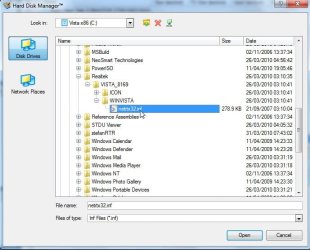
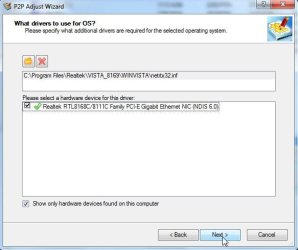
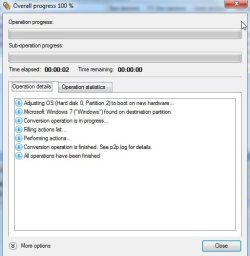
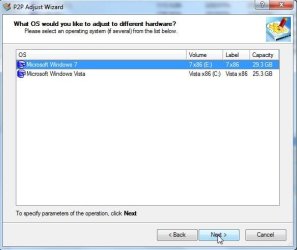
The only way I can think of to do that is with Paragon Adaptive restore - select P2P adjust o/s ,select the o/s to adjust, select upload drivers, browse to the .inf - give it a few secs to load , next, Apply, and it's done.

AR-1-2010-05-14_031728.jpg

AR-2-2010-05-14_031803.jpg

AR-3-2010-05-14_031902.jpg

AR-4-2010-05-14_031946.jpg

AR-5-2010-05-14_032021.jpg
 

My Computers

System One System Two

  • Computer type
    PC/Desktop
    OS
    7 X64
    CPU
    i5 8400
    Motherboard
    gigabyte b365m ds3h
    Memory
    2x8gb 3200mhz
    Hard Drives
    various
    PSU
    pure power 11 400w cm
    Case
    Coolermaster
    Cooling
    cryorig m9i
  • Computer type
    PC/Desktop
    OS
    7x64
    CPU
    g5400
    Motherboard
    ga b365m ds3h
    Memory
    8gb ddr4 2400
    PSU
    xfx pro 450w
How about the opposite? Can a Win7 install to RAID array be reimaged after the drives are un-RAIDed on a Dell desktop?

I can use either Win7 imaging or Acronis 2010.

The combined space is 760gb while the install size is only 50gb now.
 
So I had to take down the RAID0 until I can figure out how to get the Intel RAID drivers installed on the RAID0 BEFORE I try to restore from my system image to the RAID0. Windows 7 driver install during the image restore process FAILS. Any ideas?​
 

My Computer

Computer Manufacturer/Model Number
Custom Build
OS
Windows 7 Professional 64-bit
CPU
Core i7 920 @ 3.32Ghz
Motherboard
MSI X58 Pro
Memory
6GB Mushkin DDR3 1600
Graphics Card(s)
ATI Radeon HD 4650
Sound Card
n/a
Monitor(s) Displays
2 X Dell 2405 FPW
Hard Drives
WDC Caviar Black 500GB - system
Hitachi 80GB backup storage (for now)
DVD RW burner
DVD player
PSU
OCZ 500 watt
Case
Antec 300
Cooling
Thermalright HR-01 CPU Cooler, Thermalright 120mm Fan Duct
Hi Greg ,

Don't think that's going to work as the unraided drive is in effect new hardware.

You could try. If 7 can't clamber to the desktop after restoring the image, then just boot up the Paragon Adaptive Restore cd and point it at the restored o/s.

Select the bottom option - Do Not Upload drivers. That will open up the Win7 registry so it thinks it's just been installed.

How about the opposite? Can a Win7 install to RAID array be reimaged after the drives are un-RAIDed on a Dell desktop?

I can use either Win7 imaging or Acronis 2010.

The combined space is 760gb while the install size is only 50gb now.
 

My Computers

System One System Two

  • Computer type
    PC/Desktop
    OS
    7 X64
    CPU
    i5 8400
    Motherboard
    gigabyte b365m ds3h
    Memory
    2x8gb 3200mhz
    Hard Drives
    various
    PSU
    pure power 11 400w cm
    Case
    Coolermaster
    Cooling
    cryorig m9i
  • Computer type
    PC/Desktop
    OS
    7x64
    CPU
    g5400
    Motherboard
    ga b365m ds3h
    Memory
    8gb ddr4 2400
    PSU
    xfx pro 450w
So I had to take down the RAID0 until I can figure out how to get the Intel RAID drivers installed on the RAID0 BEFORE I try to restore from my system image to the RAID0. Windows 7 driver install during the image restore process FAILS. Any ideas?

I would not use RAID 0 (striped) because it is very unsafe. If one drive fails you lose all your data. I would use RAID 1 (mirroring).

RAID - Wikipedia, the free encyclopedia
 

My Computer

Computer type
PC/Desktop
Computer Manufacturer/Model Number
Dell OP7010
OS
Windows 7 Enterprise (x64); Windows Server 2008 R2 (x64)
Memory
16GB
Monitor(s) Displays
4 Dell 24" LCD
Screen Resolution
1280x1024
Keyboard
Dell
Mouse
Dell Optical
Internet Speed
40meg
So I had to take down the RAID0 until I can figure out how to get the Intel RAID drivers installed on the RAID0 BEFORE I try to restore from my system image to the RAID0. Windows 7 driver install during the image restore process FAILS. Any ideas?

I would not use RAID 0 (striped) because it is very unsafe. If one drive fails you lose all your data. I would use RAID 1 (mirroring).

RAID - Wikipedia, the free encyclopedia

I have been using Raid 0 since forever...granted there are inherent risks aka drive failure,but my experience has been (fingers crossed) that HDD's are pretty much reliable...I have never yet had a drive fail and cause me to lose an array. Currently waiting on a new WD Velo to add to the existing 2 disk raid I'm running.
HDD's I've had fail in non raid have all been Seagates. I don't use them anymore but do use WD Velocoraptors and Samsung Spintpoints for what few backups I do make.

So "unsafe" yes to a point.."very unsafe" no not really..
 

My Computer

Computer Manufacturer/Model Number
home built
OS
Windows 7 Professional 64 bit
CPU
930 i7 quad O/C 4ghz
Motherboard
Asus P6X58D premium
Memory
G Skill 3x2gb O/C to 1603mhz 1T timing
Graphics Card(s)
EVGA 570
Sound Card
creative titanium
Monitor(s) Displays
samsung s23a950d..120hz 3D
Screen Resolution
1920x1080
Hard Drives
Western Digital 3X150 Velocoraptors in Raid 5
PSU
Antec Quattro 1000 watt
Case
Xigmatek Elysium
Cooling
Custom Loop..Kryos block.360rad..BP comp fittings etc
Keyboard
Razor arcosa
Mouse
Razer Diamondback
Internet Speed
Wireless so w/e I get at the time

My Computer

Computer Manufacturer/Model Number
home built
OS
Windows 7 Professional 64 bit
CPU
930 i7 quad O/C 4ghz
Motherboard
Asus P6X58D premium
Memory
G Skill 3x2gb O/C to 1603mhz 1T timing
Graphics Card(s)
EVGA 570
Sound Card
creative titanium
Monitor(s) Displays
samsung s23a950d..120hz 3D
Screen Resolution
1920x1080
Hard Drives
Western Digital 3X150 Velocoraptors in Raid 5
PSU
Antec Quattro 1000 watt
Case
Xigmatek Elysium
Cooling
Custom Loop..Kryos block.360rad..BP comp fittings etc
Keyboard
Razor arcosa
Mouse
Razer Diamondback
Internet Speed
Wireless so w/e I get at the time

The web page you quote on RAID is far from correct, while some of the information is correct and the basic idea is there but leaves a lot of information missing.

Here is one the Wiki page; note this is not perfectly correct but much of the information is correct and posted where it was taken from. I have been using RAID for years and this page is close.

RAID - Wikipedia, the free encyclopedia

As far as your RAID 0 usage you have been very very lucky. I have seen many many RAID 0 arrays fail, server or home user, and many times it was the home user on consumer machines. -WS
 

My Computer

Computer type
PC/Desktop
Computer Manufacturer/Model Number
Dell OP7010
OS
Windows 7 Enterprise (x64); Windows Server 2008 R2 (x64)
Memory
16GB
Monitor(s) Displays
4 Dell 24" LCD
Screen Resolution
1280x1024
Keyboard
Dell
Mouse
Dell Optical
Internet Speed
40meg
Yup the link was just a basic..I'm sure Greg knows what Raid is. The advent of SSD's pretty much ended Raid0 anyway. Once the price drops on bigger capacity SSD's I might switch. Until then I'll run Raid0 arrays and roll the dice re failures.
Seeing as I build a new PC every second year pretty much my luck with Raid0 is probably more than likely a side effect of only 2yr old drives. I have a lot of them around the place lol. S
 

My Computer

Computer Manufacturer/Model Number
home built
OS
Windows 7 Professional 64 bit
CPU
930 i7 quad O/C 4ghz
Motherboard
Asus P6X58D premium
Memory
G Skill 3x2gb O/C to 1603mhz 1T timing
Graphics Card(s)
EVGA 570
Sound Card
creative titanium
Monitor(s) Displays
samsung s23a950d..120hz 3D
Screen Resolution
1920x1080
Hard Drives
Western Digital 3X150 Velocoraptors in Raid 5
PSU
Antec Quattro 1000 watt
Case
Xigmatek Elysium
Cooling
Custom Loop..Kryos block.360rad..BP comp fittings etc
Keyboard
Razor arcosa
Mouse
Razer Diamondback
Internet Speed
Wireless so w/e I get at the time
We see a lot of problems with RAID and Win7, so I'm not sure it's worth it when there is no redundancy and you bet your System and data on two separate HD's stability.

However some video editors use it so they can have much bigger drive capacity for single files. Is this what you need?
 
Nope don't do video editing..this is a gaming machine...I back up game saves sometimes,downloaded drivers etc on to an external drive so I don't need to redownload when zi do a reinstall..

I started running a Raid0 array when it was a new thing for the speed mostly and I have at times a lot of games installed. When SSD's actually become affordable (as in 250BG e.g) I will switch to them.

Cheers
 

My Computer

Computer Manufacturer/Model Number
home built
OS
Windows 7 Professional 64 bit
CPU
930 i7 quad O/C 4ghz
Motherboard
Asus P6X58D premium
Memory
G Skill 3x2gb O/C to 1603mhz 1T timing
Graphics Card(s)
EVGA 570
Sound Card
creative titanium
Monitor(s) Displays
samsung s23a950d..120hz 3D
Screen Resolution
1920x1080
Hard Drives
Western Digital 3X150 Velocoraptors in Raid 5
PSU
Antec Quattro 1000 watt
Case
Xigmatek Elysium
Cooling
Custom Loop..Kryos block.360rad..BP comp fittings etc
Keyboard
Razor arcosa
Mouse
Razer Diamondback
Internet Speed
Wireless so w/e I get at the time
Back
Top