
You are using an out of date browser. It may not display this or other websites correctly.
You should upgrade or use an alternative browser.
You should upgrade or use an alternative browser.
VMWare Workstation cant connect to the Internet
- Thread starter cefurkan
- Start date

jimbo45
New member
i have windows 7 build 7077
and i have latest vmware version 6.5.2
but i couldnt make it connect internet
i installed win xp and it cant connect internet through nat
i need to make it really important pls help
Hi there
1) can the HOST machine connect to the Internet -- this might be obvious but often the Simplest solutions tend to be the correct answer.
2) Is the Virtual adapter connected AND enabled.
3) Firewalls / router blocking the Virtual XP machine.
Incidentally when I did a W7 Upgrade I couldn't get VM networking to work at all until I'd re-installed vmware.
If you did a W7 Upgrade just re-install vmware (and vmware tools onve the vm is powerd on).
Normally NAT is no problem.
You could also try changing the Networking to "Bridged" although this can give problems if your HOST adapter is a Wireless adapter.
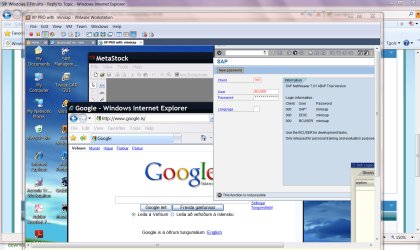
enc XP vm version 6.5.2 running on W7 x-64 build 7077 -- no probs
Cheers
jimbo
Attachments
My Computer
- Computer type
- PC/Desktop
- Computer Manufacturer/Model Number
- Custom built, several laptops HP/ASUS
- OS
- Linux CENTOS 7 / various Windows OS'es and servers
- CPU
- Intel i7 Intel i5
- Memory
- 8GB, 16GB
- Graphics Card(s)
- On Motherboard
- Sound Card
- Realtek HD audio
- Monitor(s) Displays
- Apple Cinema display, Samsung LCD
- Screen Resolution
- 1920 X 1080
- Hard Drives
- 4 X 1TB SATA
- Mouse
- Toshiba wireless laser
- Internet Speed
- > 20MB up
Hi there
1) can the HOST machine connect to the Internet -- this might be obvious but often the Simplest solutions tend to be the correct answer.
2) Is the Virtual adapter connected AND enabled.
3) Firewalls / router blocking the Virtual XP machine.
Incidentally when I did a W7 Upgrade I couldn't get VM networking to work at all until I'd re-installed vmware.
If you did a W7 Upgrade just re-install vmware (and vmware tools onve the vm is powerd on).
Normally NAT is no problem.
You could also try changing the Networking to "Bridged" although this can give problems if your HOST adapter is a Wireless adapter.
enc XP vm version 6.5.2 running on W7 x-64 build 7077 -- no probs
Cheers
jimbo
ofc host can connect internet
bridged doesnt work since i have to use static ip and it tries to take another ip and our dormitory doesnt give dynamic ip atm
dhcp disabled at dormitory network
i can ping the virtual machine so nothing blocks it
i use vmware at windows xp before without any problem
my host is not wireless
win xp sp3 VMWARE version 6.5.2 running on W7 x-32 build 7077 -- i have damn this problem
My Computer
- OS
- win 7
jimbo45
New member
ofc host can connect internet
bridged doesnt work since i have to use static ip and it tries to take another ip and our dormitory doesnt give dynamic ip atm
dhcp disabled at dormitory network
i can ping the virtual machine so nothing blocks it
i use vmware at windows xp before without any problem
my host is not wireless
win xp sp3 VMWARE version 6.5.2 running on W7 x-32 build 7077 -- i have damn this problem
Hi there
if DHCP is disabled in your Dorm then proceed as follows.
It's a pain as you'll have to do it every time.
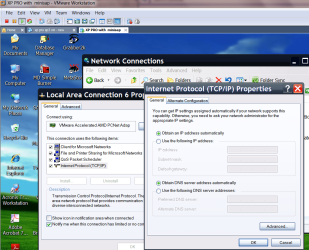
1) Get the HOST IP address and DNS from Control panel ===>Network adapter ==> properties or from Network / sharing center.
2) in the VM XP machine go to the Virtal adapter network settings
change get IP automatically with the IP address of your Host
You'll also need the DNS of the ISP server.
The default get via DHCP is set in the vmware adpter -- but you can't use this as DHCP is disabled in your case.
In my case (the default one) DHCP is enabled
Enc diagram
Cheers
jimbo
Attachments
My Computer
- Computer type
- PC/Desktop
- Computer Manufacturer/Model Number
- Custom built, several laptops HP/ASUS
- OS
- Linux CENTOS 7 / various Windows OS'es and servers
- CPU
- Intel i7 Intel i5
- Memory
- 8GB, 16GB
- Graphics Card(s)
- On Motherboard
- Sound Card
- Realtek HD audio
- Monitor(s) Displays
- Apple Cinema display, Samsung LCD
- Screen Resolution
- 1920 X 1080
- Hard Drives
- 4 X 1TB SATA
- Mouse
- Toshiba wireless laser
- Internet Speed
- > 20MB up
Hi there
if DHCP is disabled in your Dorm then proceed as follows.
It's a pain as you'll have to do it every time.
1) Get the HOST IP address and DNS from Control panel ===>Network adapter ==> properties or from Network / sharing center.
2) in the VM XP machine go to the Virtal adapter network settings
change get IP automatically with the IP address of your Host
You'll also need the DNS of the ISP server.
The default get via DHCP is set in the vmware adpter -- but you can't use this as DHCP is disabled in your case.
In my case (the default one) DHCP is enabled
Enc diagram
Cheers
jimbo
you tell me to do it at nat or at bridged
because at bridged it gives ip error since same ip cant be exist on same network
at nat it didnt work
My Computer
- OS
- win 7
jimbo45
New member
Hi there
I've been playing around with this stuff
It does seem that there's a problem with NAT on W7 build 7077.
I tried booting up a HOST Windows XP machine. It's on my same network so no Router changes etc etc.
I then started same build of VMARE on the XP machine -- and booted up the Identical VM I had on W7.
NAT works fine
From IPCONFIG on the XP VM machine
it's "Virtual connection" is 192.168.23.129
Subnet mask is 255.255.255.0
Default gateway is 192.168.23.2
In Adapter settings
I've just left it to optain IP address automatically (use the "Virtual DHCP stuff".
On the HOST XP machine I've set the Virtual adapter (VMNET8)
Use following IP address 192.168.23.1
Subnet mask 255.255.255.0
Everything else blank.
Will have another go on W7 to see if I can "get to the bottom of this".
Update
W7 definitely is "Broken".
I tried NAT again with XP HOST and GUEST VM both with a WIRED and a WIRELESS connection
No problems
so definitly VMWARE workstation with NAT on W7 HOST a problem.
I don't normally use NAT so this is why I never noticed this.
Cheers
jimbo
I've been playing around with this stuff
It does seem that there's a problem with NAT on W7 build 7077.
I tried booting up a HOST Windows XP machine. It's on my same network so no Router changes etc etc.
I then started same build of VMARE on the XP machine -- and booted up the Identical VM I had on W7.
NAT works fine
From IPCONFIG on the XP VM machine
it's "Virtual connection" is 192.168.23.129
Subnet mask is 255.255.255.0
Default gateway is 192.168.23.2
In Adapter settings
I've just left it to optain IP address automatically (use the "Virtual DHCP stuff".
On the HOST XP machine I've set the Virtual adapter (VMNET8)
Use following IP address 192.168.23.1
Subnet mask 255.255.255.0
Everything else blank.
Will have another go on W7 to see if I can "get to the bottom of this".
Update
W7 definitely is "Broken".
I tried NAT again with XP HOST and GUEST VM both with a WIRED and a WIRELESS connection
No problems
so definitly VMWARE workstation with NAT on W7 HOST a problem.
I don't normally use NAT so this is why I never noticed this.
Cheers
jimbo
Last edited:
My Computer
- Computer type
- PC/Desktop
- Computer Manufacturer/Model Number
- Custom built, several laptops HP/ASUS
- OS
- Linux CENTOS 7 / various Windows OS'es and servers
- CPU
- Intel i7 Intel i5
- Memory
- 8GB, 16GB
- Graphics Card(s)
- On Motherboard
- Sound Card
- Realtek HD audio
- Monitor(s) Displays
- Apple Cinema display, Samsung LCD
- Screen Resolution
- 1920 X 1080
- Hard Drives
- 4 X 1TB SATA
- Mouse
- Toshiba wireless laser
- Internet Speed
- > 20MB up
jimbo45
New member
Hi all
added to the Broken NAT service on W7.
I've also reported it on the VMWARE workstation Forum.
VMware Communities: Windows 7 - both X-64 and X-86 NAT Broken
However being an "Unofficial Build" we might have to wait a bit for a proper Fix.
Cheers
jimbo
added to the Broken NAT service on W7.
I've also reported it on the VMWARE workstation Forum.
VMware Communities: Windows 7 - both X-64 and X-86 NAT Broken
However being an "Unofficial Build" we might have to wait a bit for a proper Fix.
Cheers
jimbo
My Computer
- Computer type
- PC/Desktop
- Computer Manufacturer/Model Number
- Custom built, several laptops HP/ASUS
- OS
- Linux CENTOS 7 / various Windows OS'es and servers
- CPU
- Intel i7 Intel i5
- Memory
- 8GB, 16GB
- Graphics Card(s)
- On Motherboard
- Sound Card
- Realtek HD audio
- Monitor(s) Displays
- Apple Cinema display, Samsung LCD
- Screen Resolution
- 1920 X 1080
- Hard Drives
- 4 X 1TB SATA
- Mouse
- Toshiba wireless laser
- Internet Speed
- > 20MB up
Hi all
added to the Broken NAT service on W7.
I've also reported it on the VMWARE workstation Forum.
VMware Communities: Windows 7 - both X-64 and X-86 NAT Broken
However being an "Unofficial Build" we might have to wait a bit for a proper Fix.
Cheers
jimbo
yes i posted too
i hope they listen
My Computer
- OS
- win 7
jimbo45
New member
Hi there
KevinG from Vmware has answered the post
....
Reply2. Re: Windows 7 - both X-64 and X-86 NAT Broken Apr 23, 2009 10:52 AM
Windows 7 is NOT supported at this time because Windows 7 is only BETA software and not a released product.
After Windows 7 is released, support will be added for this host OS
So you may run into some issues with a untested host OS ..................
So you are out of luck at the moment.
VirtualPC or VirtualBox might work but I don't really want to bother with those ---I am lucky in that I can continue with "Bridged" Networking.
Cheers.
jimbo
KevinG from Vmware has answered the post
....
Reply2. Re: Windows 7 - both X-64 and X-86 NAT Broken Apr 23, 2009 10:52 AM
Windows 7 is NOT supported at this time because Windows 7 is only BETA software and not a released product.
After Windows 7 is released, support will be added for this host OS
So you may run into some issues with a untested host OS ..................
So you are out of luck at the moment.
VirtualPC or VirtualBox might work but I don't really want to bother with those ---I am lucky in that I can continue with "Bridged" Networking.
Cheers.
jimbo
My Computer
- Computer type
- PC/Desktop
- Computer Manufacturer/Model Number
- Custom built, several laptops HP/ASUS
- OS
- Linux CENTOS 7 / various Windows OS'es and servers
- CPU
- Intel i7 Intel i5
- Memory
- 8GB, 16GB
- Graphics Card(s)
- On Motherboard
- Sound Card
- Realtek HD audio
- Monitor(s) Displays
- Apple Cinema display, Samsung LCD
- Screen Resolution
- 1920 X 1080
- Hard Drives
- 4 X 1TB SATA
- Mouse
- Toshiba wireless laser
- Internet Speed
- > 20MB up
Hi there
KevinG from Vmware has answered the post
....
Reply2. Re: Windows 7 - both X-64 and X-86 NAT Broken Apr 23, 2009 10:52 AM
Windows 7 is NOT supported at this time because Windows 7 is only BETA software and not a released product.
After Windows 7 is released, support will be added for this host OS
So you may run into some issues with a untested host OS ..................
So you are out of luck at the moment.
VirtualPC or VirtualBox might work but I don't really want to bother with those ---I am lucky in that I can continue with "Bridged" Networking.
Cheers.
jimbo
i am very sick and tired of this "beta os we dont support "
My Computer
- OS
- win 7
jimbo45
New member
i am very sick and tired of this "beta os we dont support "
Actually it's not their fault even though it's annoying.
Until you get the actual released OS you can't really spend a lot of time and resources designing a process that might not even exist in the final released version.
A program running a Virtual Machine is extremely complex to write as it has to integrate completely with the running kernels of BOTH the HOST and GUEST OS.
A lot of programs that simply don't use a lot of "Internal Core" windows features will run essentially unchanged even on a BETA OS - for example even large programs like OFFICE will give few if any problems. Most of the "base top layer" of Windows won't have changed much if the programs "Obey the rules and use basic WINDOWS API's.
Things like the .NET interface has changed so programs using the older versions will be a problem for a while.
Also once you start interacting with the actual hardware then it gets more difficult as this stuff DOES change from release to release. This is why things like TV tuner applications, complex Video applications, and Vitrtual Machine software tend to be the hardest applications to upgrade to the new OS.
You can see from the amount of Build leaks etc et we've already had since the beta that you cant expect Microsoft to dish out fully working Windows source code to everybody -- how long before you'd see it on"The Bay" (Is there Swedish Jail Network server - judging by the comfortable conditions in most Scandanavian Prisons the'd probably get a BETTER server funded by the taxpayer
 ).
).We'll just have to live with it -- and maybe you can find some way of getting round the ISP 1 IP address restriction you have in the dorm -- you might be able to find a way of setting your HOST machine up as a VPN and then logging on to the Internet from your XP VM machine via the host's VPN and sharing that Internet connection.
Just an Idea BTW - I wouldn't know how to do it so you'll have to ask someone else.
Cheers
jimbo
My Computer
- Computer type
- PC/Desktop
- Computer Manufacturer/Model Number
- Custom built, several laptops HP/ASUS
- OS
- Linux CENTOS 7 / various Windows OS'es and servers
- CPU
- Intel i7 Intel i5
- Memory
- 8GB, 16GB
- Graphics Card(s)
- On Motherboard
- Sound Card
- Realtek HD audio
- Monitor(s) Displays
- Apple Cinema display, Samsung LCD
- Screen Resolution
- 1920 X 1080
- Hard Drives
- 4 X 1TB SATA
- Mouse
- Toshiba wireless laser
- Internet Speed
- > 20MB up
jimwillsher
New member
I'm using VMWare Workstation 6.5.2 on Win7 RC x64, and everything works really well. Internet connectivity is fine (Bridged mode for me).
Jim
Jim
My Computer
- OS
- Win7 x64 RC 7100
I'm using VMWare Workstation 6.5.2 on Win7 RC x64, and everything works really well. Internet connectivity is fine (Bridged mode for me).
Jim
yeah bridged mode is working
but i need nat

My Computer
- OS
- win 7
jimwillsher
New member
Agreed, NAT doesn't work for me either.
Strange thing is, connectivity itself seems to be working - I can :
ping news.bbc.co.uk
and the address gets resolved and I get replies. But both IE7 and Google Chrome refuse to establish connectivity to a website.
So, IP connecivity seems to be "partly" working....
Strange thing is, connectivity itself seems to be working - I can :
ping news.bbc.co.uk
and the address gets resolved and I get replies. But both IE7 and Google Chrome refuse to establish connectivity to a website.
So, IP connecivity seems to be "partly" working....
My Computer
- OS
- Win7 x64 RC 7100
Hello everybody,
I was able to connect to the Internet through Bridged Networking and Microsoft Loopback Adapter in a NAT-like fashion.
Hint: From the command prompt, run "hdwwiz.exe". This should launch the "Add Hardware Wizard".
I hope this will be useful to someone.
Regards.
Rafael Lopez.
I was able to connect to the Internet through Bridged Networking and Microsoft Loopback Adapter in a NAT-like fashion.
Hint: From the command prompt, run "hdwwiz.exe". This should launch the "Add Hardware Wizard".
I hope this will be useful to someone.
Regards.
Rafael Lopez.
My Computer
- Computer Manufacturer/Model Number
- Dell Optiplex 960 MT
- OS
- Microsoft Windows 7 Ultimate 64-bit English
- CPU
- Intel Core 2 Quad Q9650, 3.0GHz, 12M Cache, 1333MHz FSB
- Motherboard
- Dell 0Y958C, Intel Q45 Chipset
- Memory
- 8 GB
- Graphics Card(s)
- NVIDIA GeForce 9400 GT 1GB DDR2 PCI-E 2.0
- Sound Card
- Turtle Beach Montego DDL
- Monitor(s) Displays
- Dell Ultrasharp 2408WFP
- Screen Resolution
- 1900X1200
- Hard Drives
- - Seagate Barracuda ST31000528AS, 1TB, SATA-II, 32MB Cache
- Seagate Barracuda ST31000528AS, 1TB, SATA-II, 32MB Cache
- Keyboard
- Dell Multimedia Pro USB
- Mouse
- Dell USB Laser 6-Button
- Internet Speed
- 1534 kbps