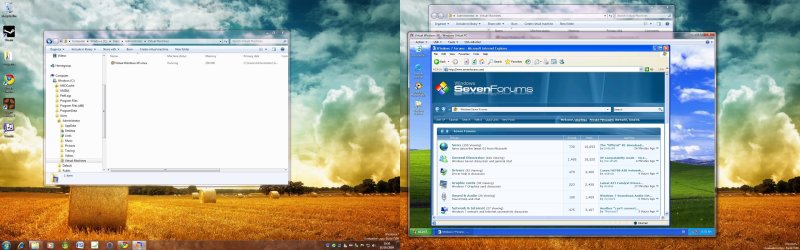
Windows XP Mode - Nice one Microsoft

jimbo45

New member
Hi all

I've just being trying the Windows XP Mode feature

Whilst I'm very happy in using vmware (still excellent for developer / testing scenarios) the "XP compatability mode" works 100% for me so no reason anymore to have anything else for the Main OS other than Windows 7.

I'm retiring all my other old OS'es now since all my incompatable apps work with the "XP compatability feature". Roll on RTM MS please. Just finished testing them ALL.

Minidisc stuff, Photo scanner, negative scanner, plotter, large A2 (Huge poster size) printer, SAP GUI connectivity, SAP JAVA portal access, Web dynpro GUI.

All working (finally). None of this stuff worked either on VISTA (both X-86 and X-64) nor Windows 7.

For typical users this feature will be great -- this IMO is the real "Killer App" that allows small business (and even medium size ones) to upgrade their hardware and software in stages to suit them whilst not having to discard loads of older PC's. Businesses tend to upgrade their equipment much less frequently than home users - especially now.


The "preconfigured" XP machine only has 256MB RAM as standard. Whilst you can't evaluate a Virtual Machine on a ratio 1:1 with a Real machine I think it should be a 512 MB machine by default.

Doesn't seem to want "Activation" either so I assume that the XP machine will work as long as the Windows 7 trial (7100) is active.

I've installed this on the RC 7100 X-64 I downloaded from "the Green Devil" a while ago and its fine.

I'm going to see if I can tinker around with this "Integrated XP VM" and maybe clone it and make the virtual RAM size bigger. I know I can install my own VM but if I have to do that it rather goes against the whole point of "the Integration" feature.

Performance seems pretty good and integration with the desktop just fine.

So far Nice one Microsoft.

Nice to see my old Minidisc app working on the W7 desktop .;)

I'm waiting for additional language packs as well -- using English at the moment.

(Hint -- would like these for W7 as well - still only a few languages like German, Spanish, etc). There ARE other countries BTW.

Anyway once again MS You've finally got your s--t together. well done. :D

Cheers
jimbo
 
Last edited by a moderator:

My Computer

Computer type
PC/Desktop
Computer Manufacturer/Model Number
Custom built, several laptops HP/ASUS
OS
Linux CENTOS 7 / various Windows OS'es and servers
CPU
Intel i7 Intel i5
Memory
8GB, 16GB
Graphics Card(s)
On Motherboard
Sound Card
Realtek HD audio
Monitor(s) Displays
Apple Cinema display, Samsung LCD
Screen Resolution
1920 X 1080
Hard Drives
4 X 1TB SATA
Mouse
Toshiba wireless laser
Internet Speed
> 20MB up
Can you PM me with this if its an addon and will it be compatible with 7068? Thanks.
 

My Computer

Computer Manufacturer/Model Number
HP DV2000 (Service tag 2613tu)
OS
Windozer 7 - 7068
CPU
1.5ghz C2D.
Motherboard
Unkown.
Memory
2x2gb Corsair 667 DDR2
Graphics Card(s)
Intel integrated X3100 (yeah, laugh)
Sound Card
Conexant High definition Audio.
Monitor(s) Displays
14.1 inch laptop display with 17inch CRT as secondary.
Screen Resolution
1280x800 both screens.
Hard Drives
160gb toshiba drive. (chills at around 65 degrees C on a cool day.)
PSU
Battery.
Case
Laptop.
Cooling
Whats that? I own a HP.
Keyboard
Laptop standard.
Mouse
Logitech cordless.
Internet Speed
Depends on the weather. (no, literally.) 5mbs-7mbs line.
Other Info
Build 7068.
cheers jimbo grabbing from the 'OID now:D
 

My Computer

OS
windows7 7100 x64
CPU
amd athlon 64 3500+
Motherboard
asus a8n sli deluxe
Memory
2gb
Graphics Card(s)
nvidia 7800gt
Screen Resolution
1280x1024
I totally agree with 100% with jimbo on this.
 

My Computer

OS
Windows 7 x64 Build 7264
CPU
Core 2 Duo E8600 3.33 GHz, 1333MHz FSB, Socket 775
Motherboard
Gigabyte GA-EP45T-EXTREME, Socket 775
Memory
Corsair XMS3 DOMINATOR, 2x2GB, DDR3-2000
Graphics Card(s)
Sapphire Radeon HD4870 X2, Sapphire Radeon HD4870
Monitor(s) Displays
Sony 52" Full HD
Hard Drives
VelociRaptor 300GB, 10000rpm, 16384KB Cache, SATA-2
PSU
Silverstone Strider ST1000, 1000W ATX PSU, Active PFC, Black
Case
Silverstone TJ07 E-ATX Full Tower Case, Black
Cooling
Cooler Master Aquagate MAX, Watercooling kit, Black
Keyboard
Logitech G15 Gaming Keyboard, USB, 2x USB ports
Mouse
Logitech G5 Laser (2007 Edition), Optical (Laser) Mouse
Hi all

In addition to Shawn's excellent tutorial on this (see the link in the OP or go directly to the tutorials) you CAN make a shortcut on your desktop to run an application in XP compatability mode directly without using the menu.

I know this sounds obvious but if you want to run your app quickly without going through the menu it's OK. Some people might miss this BTW.

As the Virtual PC menu starts with a "V" it's quite a long way down the menu especially if you have a lot of stuff installed on your W7 machine. Saves unnecessary scrolling.

Cheers
jimbo
 

My Computer

Computer type
PC/Desktop
Computer Manufacturer/Model Number
Custom built, several laptops HP/ASUS
OS
Linux CENTOS 7 / various Windows OS'es and servers
CPU
Intel i7 Intel i5
Memory
8GB, 16GB
Graphics Card(s)
On Motherboard
Sound Card
Realtek HD audio
Monitor(s) Displays
Apple Cinema display, Samsung LCD
Screen Resolution
1920 X 1080
Hard Drives
4 X 1TB SATA
Mouse
Toshiba wireless laser
Internet Speed
> 20MB up
if you select VM's in the Virtual PC in all programs, you get to a windows explorer windor with your VM. From there, right click on select settings. From there you can increase the RAM to what you want. You can also add another virtual disk if you would like, but you dont have to build a whole new VM just to get more RAM.
 

My Computer

OS
Windows 7 build 7057
jimbo i stopped the download as my computer went tits up again when trying to download it-http://www.sevenforums.com/system-security/8233-avast-anti-virus.html

strangely this has happened twice and both times i was downloading the xpmode once last night when solar posted it and again this morning when i tried getting it from the 'OID.
so i have gone back to utorrent 1.7.7 tested it on a private site i use and tested it on a small download from the 'OID and both worked fine problem gone.
trouble is i just had a quick look round the 'OID and cant find the xpmode torrent to try again,any chance of a link.
 

My Computer

OS
windows7 7100 x64
CPU
amd athlon 64 3500+
Motherboard
asus a8n sli deluxe
Memory
2gb
Graphics Card(s)
nvidia 7800gt
Screen Resolution
1280x1024
Yes..very nice Microsucks.. Virtual PC 2007 sp1 will no longer run on Windows 7 RC, it installed fine on 7077, but since MS designed this VXP mode, which is really good and great, older Virtual PCs won't install due to program incompatibiliy issues. I can't run Windows Virtual PC because my Intel DualCore doesn't support Intel-VT unlike the Core2Duo. So, thanks again Microsoft:D OOpss. you did it again Bill..-.-
 

My Computer

OS
Windows 7
CPU
Intel E2200
Motherboard
Asrock G31M-S
Memory
2 GB 667 Mhz
Graphics Card(s)
8600GT 256MB
Sound Card
Realtek HD 5.1
Monitor(s) Displays
190WV Philips
Screen Resolution
1440x900
Hard Drives
Seagate IDE 80GB
PSU
420W LC Power
Case
P3 SP
Internet Speed
4M/1M
Heres mine in action:

xpm.jpg

It sees my nvidia 9800gtx card as an s3 card for some reason.
 

My Computer

Computer Manufacturer/Model Number
self built
OS
Windows 7 Professional 64-bit
CPU
Intel E8400 3GHz
Motherboard
Intel DX48BT2
Memory
Kingston PC3-10700H 4Gb
Graphics Card(s)
XFX Radeon HD 5850 BlackEd.
Sound Card
Asus Xonar DG
Monitor(s) Displays
2x Samsung SM-T220HD 22"
Screen Resolution
1680x1050 on two monitors
Hard Drives
OCZ Vertex 2 120gb 3.5" (OS)
Seagate Momentus XT 500gb
Samsung F3 1Tb (games)
2x Samsung F1 1Tb
PSU
Thermaltake ToughPower 850w
Case
Thermaltake Armor
Cooling
Scythe Mugen II
Keyboard
Microsoft Comfort Curve USB
Mouse
Razer Diamondback 3G
Internet Speed
8128/443
I guess this cannot be fun on a AMD machine unless it uses a server cpu?
 

My Computer

Computer Manufacturer/Model Number
Samsung NC10
OS
windows 7
CPU
Intel Atom 1.6ghz
Motherboard
samsung
Memory
PNY 2GB PC6400
Graphics Card(s)
Intel
Sound Card
Intel
Monitor(s) Displays
Samsung 10"
Screen Resolution
1024x600
Hard Drives
160GB HDD
Case
netbook
Cooling
air
Keyboard
samsung
Mouse
trackpad
Internet Speed
20mb Cable and O2 mobile

My Computer

OS
Windows 7
CPU
Intel E2200
Motherboard
Asrock G31M-S
Memory
2 GB 667 Mhz
Graphics Card(s)
8600GT 256MB
Sound Card
Realtek HD 5.1
Monitor(s) Displays
190WV Philips
Screen Resolution
1440x900
Hard Drives
Seagate IDE 80GB
PSU
420W LC Power
Case
P3 SP
Internet Speed
4M/1M
I guess its better than nothing.
 

My Computer

Computer Manufacturer/Model Number
self built
OS
Windows 7 Professional 64-bit
CPU
Intel E8400 3GHz
Motherboard
Intel DX48BT2
Memory
Kingston PC3-10700H 4Gb
Graphics Card(s)
XFX Radeon HD 5850 BlackEd.
Sound Card
Asus Xonar DG
Monitor(s) Displays
2x Samsung SM-T220HD 22"
Screen Resolution
1680x1050 on two monitors
Hard Drives
OCZ Vertex 2 120gb 3.5" (OS)
Seagate Momentus XT 500gb
Samsung F3 1Tb (games)
2x Samsung F1 1Tb
PSU
Thermaltake ToughPower 850w
Case
Thermaltake Armor
Cooling
Scythe Mugen II
Keyboard
Microsoft Comfort Curve USB
Mouse
Razer Diamondback 3G
Internet Speed
8128/443
Heres mine in action:

View attachment 9365

It sees my nvidia 9800gtx card as an s3 card for some reason.

Note Virtual machines create a "Virtual Bios" with their own "Virtual hardware". The VM software interacts with these "Virtual devices" which should work on 99% of machines tested on. You can't relate the "Virtual hardware" like network card or screen or even sound cards to the REAL hardware.

Devices you plug in via USB, COM and parallel ports are different -- these will often require the REAL driver hardware.

Cheers
jimbo
 

My Computer

Computer type
PC/Desktop
Computer Manufacturer/Model Number
Custom built, several laptops HP/ASUS
OS
Linux CENTOS 7 / various Windows OS'es and servers
CPU
Intel i7 Intel i5
Memory
8GB, 16GB
Graphics Card(s)
On Motherboard
Sound Card
Realtek HD audio
Monitor(s) Displays
Apple Cinema display, Samsung LCD
Screen Resolution
1920 X 1080
Hard Drives
4 X 1TB SATA
Mouse
Toshiba wireless laser
Internet Speed
> 20MB up
hmm thanks for that.
 

My Computer

Computer Manufacturer/Model Number
self built
OS
Windows 7 Professional 64-bit
CPU
Intel E8400 3GHz
Motherboard
Intel DX48BT2
Memory
Kingston PC3-10700H 4Gb
Graphics Card(s)
XFX Radeon HD 5850 BlackEd.
Sound Card
Asus Xonar DG
Monitor(s) Displays
2x Samsung SM-T220HD 22"
Screen Resolution
1680x1050 on two monitors
Hard Drives
OCZ Vertex 2 120gb 3.5" (OS)
Seagate Momentus XT 500gb
Samsung F3 1Tb (games)
2x Samsung F1 1Tb
PSU
Thermaltake ToughPower 850w
Case
Thermaltake Armor
Cooling
Scythe Mugen II
Keyboard
Microsoft Comfort Curve USB
Mouse
Razer Diamondback 3G
Internet Speed
8128/443
I guess this cannot be fun on a AMD machine unless it uses a server cpu?

Err most AMD chips support AMD-V (or whatever it calls it's virtualisation tech) since the Athlon 64!
 

My Computer

Computer Manufacturer/Model Number
Made by moi :)
OS
Windows 7 x64 & Ubuntu 9.04 x64
CPU
AMD64x2 6000+ 3.0Ghz
Motherboard
Gigabyte... something.
Memory
4GB 2x2GB @ 667Mhz
Graphics Card(s)
GeForce 8500GT
Sound Card
Onboard bebbe!
Monitor(s) Displays
19" LCD and 17" LCD
Screen Resolution
1440x900 & 1280x1024
Hard Drives
160GB Maxtor 7600RPM, 80GB 7600RPM
External: 500GB Maxtor OneTouch
PSU
750W
Case
Mac Pro Style Brushed Aliminum
Cooling
Zalman
Keyboard
Saitek Blue LED
Internet Speed
10MB
Other Info
Built by me for less than £300 last February. Really want a Phenom II already!
I guess this cannot be fun on a AMD machine unless it uses a server cpu?

not really it works great on my amd quad 9950!!!

i guess it will work on amd athlon+ (AM2) processors!!!
 

My Computer

Computer Manufacturer/Model Number
Custom Build
OS
win 7 build 7600.16385 x64
CPU
AMD Athlon Dual core 7750 2.7GHz
Motherboard
Gigabyte GA78MA s2h
Memory
4GB 800Mhz
Graphics Card(s)
ATI HD 3200 IGP
Monitor(s) Displays
Acer 15 inch
Screen Resolution
1280x720
Hard Drives
Seagate 1 TB
Keyboard
Logitech
Mouse
Logitech
Internet Speed
Airtel DSL 2Mbps

My Computer

Computer Manufacturer/Model Number
ASUS p5w-dh deluxe & IBM Thinkpad T43
OS
Windows 7 x86 and x64 - RTM
CPU
E6700 (core 2 duo ^3.25GHz) & Pentium M 750 (1.86GHz)
Motherboard
P5W-DH Deluxe & Thinkpad T43
Memory
4GB and 1.5GB
Graphics Card(s)
ATI 4850 & ATI X300
My experience so far -- 100% OK

Hi all
I've been testing this-- if you want to have a go yourselves you can download at "The green devil". Look for "XPM".

Remarks so far

1) Very nice Integration with W7 desktop.

2) The windows XP machine's virtual screen driver is based on "S3" and is only 16 bits -- not a real problem as we want to use W7 in "XP" compatability mode - not as a full bloodied Virtual machine in it's own right -- you can still log on to it of course.

3) The XP VM doesn't require any "Activation" or Keys.

4) It's not part of a "Network" so you won't see it as a separate machine on your LAN. However IE6 does work in it (default) and you can with windows update install IE8.

5) Windows explorer will show your HOST drives as well as the "Virtual drives" directly so you can cut and paste data between HOST and VM drives without the need for "Host only" or other networking. You don't need to "Share drives" etc.

6) Video, and Sound are "Virtual" devices from the "Virtual Bios". You can add real printers, scanners etc through USB/COM/ etc ports.

7) printers, scanners, cameras that I've had work fine as well as the Minidisc applications. Nice to see my MD simple burner (rip CD direct to Minidisc) again on the desktop.

8) you can make a short cut to an application in the VM directly to the W7 desktop -- works a treat.

9) There isn't much point in running things like Office etc on this VM since these apps work fine on the Host machine.

10) not suitable for games etc. -- Running a VM like this makes it SIMPLE for typical Legacy hardware with some apps to work that CAN'T work in W7. This VM is NOT intended to be a full featured Virtual machine -- use a "Classical" VM program and install your own VM if you need this feature.

11) Configurable from the HOST W7 by simply right mouse clicking on the "Virtual Machine" image in explorer.

12) Default Virtual RAM is 256MB. Depending on your applications you might want to "Up" this to 512MB or even 1GB.

The only caveat I can see is that your machine MUST be VT enabled for this to work. If it isn't or you only have a 32 bit CPU then you'll have to use some other software for managing VM's such as Virtual Box or Vmware workstation.


All in all I'm impressed --don't compare with a fully featured VM say running under VMWARE workstation -- this software isn't intended to replace that type of development.

All in all well done Microsoft. This is about right for its intended audience. For serious developers etc you will need to use "Classical" VM software but for small businesses etc who don't want to upgrade everything in one go - especially PC hardware this is a real "Killer App".

Cheers
jimbo
 
Last edited by a moderator:

My Computer

Computer type
PC/Desktop
Computer Manufacturer/Model Number
Custom built, several laptops HP/ASUS
OS
Linux CENTOS 7 / various Windows OS'es and servers
CPU
Intel i7 Intel i5
Memory
8GB, 16GB
Graphics Card(s)
On Motherboard
Sound Card
Realtek HD audio
Monitor(s) Displays
Apple Cinema display, Samsung LCD
Screen Resolution
1920 X 1080
Hard Drives
4 X 1TB SATA
Mouse
Toshiba wireless laser
Internet Speed
> 20MB up
Nice summary and I fully agree.
 

My Computer

Computer Manufacturer/Model Number
self built
OS
Windows 7 Professional 64-bit
CPU
Intel E8400 3GHz
Motherboard
Intel DX48BT2
Memory
Kingston PC3-10700H 4Gb
Graphics Card(s)
XFX Radeon HD 5850 BlackEd.
Sound Card
Asus Xonar DG
Monitor(s) Displays
2x Samsung SM-T220HD 22"
Screen Resolution
1680x1050 on two monitors
Hard Drives
OCZ Vertex 2 120gb 3.5" (OS)
Seagate Momentus XT 500gb
Samsung F3 1Tb (games)
2x Samsung F1 1Tb
PSU
Thermaltake ToughPower 850w
Case
Thermaltake Armor
Cooling
Scythe Mugen II
Keyboard
Microsoft Comfort Curve USB
Mouse
Razer Diamondback 3G
Internet Speed
8128/443
Thanks, Jimbo. Haven't gotten that far yet. Good to know.
 

My Computer

Computer Manufacturer/Model Number
Dell XPS420
OS
Vista Ult 64 bit Seven Ult RTM x64
CPU
Intel Core2 Quad Q6600 2.40 gigahertz
Memory
Crucial Ballistix 4x2GB PC2 6400
Graphics Card(s)
NVIDIA GeForce 8600 GTS 256 MB
Sound Card
Creative SB X-Fi audio
Monitor(s) Displays
HP w2207 + HPvs15
Screen Resolution
1680x1050 + 1024x768
Hard Drives
2-WD5000AAKS-500 GB
WD5000AAV-500 GB external
Keyboard
Microsoft Comfort Curve
Mouse
MX Revolution
Other Info
Wacom Intuos 2 Graphics Tablet
Experience Index=5.5
Back
Top