
Cooler Master’s HAF X

sygnus21

New member
Cooler Master’s HAF X

Well for the second time I’ve come off of my usual name brand company items. First I left Intel to go with Gigabyte’s X58A-UD5 motherboard, now I’ve left Antec to go with Cooler Masters’ HAF X PC Case.

Quick story, I’ve been using Antec cases since 2000 and recently grew tired of my P182 since the case temps were getting out of hand. At any rate I was going to get the Antec P193 but was put off by its styling, and then I saw the HAF X… I was sold!

This is one HUGE rock solid case nice looking case; and I can’t stress this enough…. This case is ridiculously quiet as is; that’s with the stock 4 fans running at full speed. The 4 fans are….

1 Front bottom 230mm 700RPM 19dBA (Red LED), 1 Top 200mm 7000RPM 19dBA, 1 Rear 140mm 1200RPM 19dBA, 1 Side 200mm 700RPM 19dBA. There’s also a spot at the top of the case for another 200mm fan if needed.

Add to this my 860-1200RPM Noctua CPU Cooler fan , my ATI 4890’s fan running at 27 percent idle, and ultra quiet power supply, this makes for one quiet system.

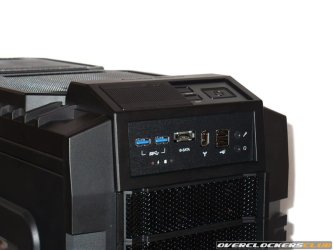
I’ve heard people say they wish they could turn off the LED of the front fan on the Cooler Master HAF 932, well Cooler Master provides an on/off button for the HAF X at the top of the case, just above the reset button, left of the Power On button. Cool.

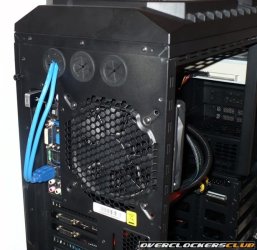
In addition to the standard ports… USB 2.0, FireWire, e-SATA, there’s also two USB 3.0 ports. However the current method of connecting the 3.0 ports to the mother board is to route the included USB 3.0 cables out the back of the case through one of the water cooling holes (Cooler Master provides 3 instead of two for this very reason) and connecting them directly to the 3.0 ports on the back panel.
USB-3-Cable-Routing.jpg Front-Panel.jpg


If you have no need for the 3.0 ports you can convert them to 2.0 by replacing the 3.0 cables with the 2.0 supplied adapter cable and connect it directly to the motherboard like a standard 2.0 connector.

And speaking of supplied cables, you also get a 6 inch 8-pin extension cable for the ATX 12V power connector, should the power supply’s cable fall short. They didn’t miss a beat here!

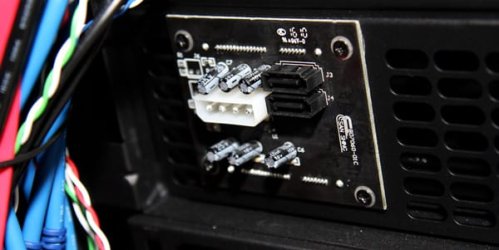
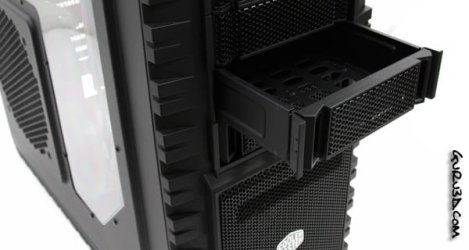
Another thing that’s nice about this case is the fact that it comes with two hot-swappable bays with the connections interface built into the slots. Just hook up your Molex connector and SATA cables to the PCB board, add a drive to the drive tray and slide it into a slot… wholla! You’re connected!
Hot Swap PCB Board.jpg Hot Swap Tray.jpg


I did find a quirk though I’m not sure if it’s my board or what, but when I connected two hot swap drives, one canceled out the other out. In short, when I had hot swap A installed, then installed hot swap B, A disappeared; When I removed B, A reappeared. Hmmm…. Some more research is in order here.

The cable management on this case is a dream; there’s plenty of room on the other side of the case for wire management, and in fact the side panel is bulged to give extra room for cables. There’s also plenty of tie down spots to hold cables. The case even comes with a cover to hide the cables coming out the back of power supply. Well played Cooler Master! Here's my cable management...

HAF-X-Cable-Management.jpg HAF-X-Cable-Management---fr.jpg


Please note the dimensions on the box are backwards. They state that the (H) height is 21.7 inches, and the (D) depth is 23.2. It’s actually the other way around, the height is 23.2 inches and the depth is 21.7
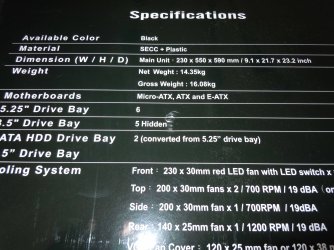
Specifications.jpg


This mistake kind of messed me and I subsequently had to remove a support shelf from my computer desk. Ironically it was the height concern that made me pass on the Corsair 700D.

At any rate since I had to remove the shelf that meant installing the wheels that came with the case as I clearly didn’t want it sitting on my carpeted floor. Adding the wheels raises the case about an inch and a half off the floor. However unlike the rest of the case, top, front, side, the bottom vents do not have dust screens. So….

To those familiar with the HAF 932, this improves upon (added dust screens) and adds (Hot Swap bays) to its success. This is an enthusiast’s case that’s ready to accommodate any setup out there to date, including very tall CPU heat sinks, extra large motherboards, and multiple double slotted long GPU setups.

At this point in time I have no complaints as it more than suits my needs. I wanted something to help control my temps while keeping silent about it; this case does me just fine in both areas.

With its improved air flow over my Antec P182 my overall temps have been lowered by 3 degrees while being far quieter. Here's my system.... I’m quite pleased :)
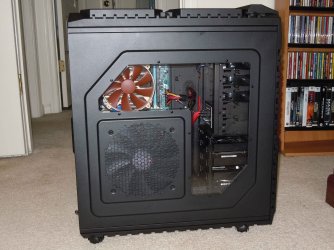
My-System.jpg

BTW for those considering Corsair’s 800D, do yourself a favor and at least look at this case! And it’s price :)

Review… Cooler Master HAF-X review

Peace.
 

My Computer

Computer type
PC/Desktop
Computer Manufacturer/Model Number
Custom built by me.
OS
Windows 10 Pro
CPU
Intel Core i7-4770K (3.5Ghz)
Motherboard
Gigabyte G1 Sniper 5 (F10 Bios)
Memory
32 gig Corsair Dominator Platinum (4x8Gig)
Graphics Card(s)
Sapphire Tri-X R9 Fury
Sound Card
Soundblaster ZXR
Monitor(s) Displays
NEC PA242W 24" LCD Monitor
Screen Resolution
1920 x 1200
Hard Drives
Primary - Samsung 850 Pro (512gig), Samsung 840 Pro (256gig), 2TB WD Caviar Black.
PSU
EVGA Supernova 1000 G2
Case
Cooler Master HAF X
Cooling
Corsair H100i with Corsair Air Series SP120 Quiet Fans
Keyboard
Logitech Wireless Wave
Mouse
Logitech Performance MX
Internet Speed
High Speed Cable
Antivirus
Norton Security
Browser
IE11
Other Info
Memory Timings - 1866MHz @ 9-9-9-27-1T @ 1.5 volts
Quick story, I’ve been using Antec cases since 2000 and recently grew tired of my P182 since the case temps were getting out of hand.

With its improved air flow over my Antec P182 my overall temps have been lowered by 3 degrees while being far quieter.

When I read about temps being out of hand..I expected a bit more than 3 degrees difference. Pretty sensitive about those temps, huh?

However the current method of connecting the 3.0 ports to the mother board is to route the included USB 3.0 cables out the back of the case through one of the water cooling holes (Cooler Master provides 3 instead of two for this very reason) and connecting them directly to the 3.0 ports on the back panel.
Yeah, it's a bit tacky....especially for people crazy about wiring.

It is a really nice case. I personally could do without the side window...but it seems those are all the rage these days.
 

My Computer

Computer Manufacturer/Model Number
Self-Built in July 2009
OS
Windows 7 Ultimate x64
CPU
Intel Q9550 2.83Ghz OC'd to 3.40Ghz
Motherboard
Gigabyte GA-EP45-UD3R rev. 1.1, F12 BIOS
Memory
8GB G.Skill PI DDR2-800, 4-4-4-12 timings
Graphics Card(s)
EVGA 1280MB Nvidia GeForce GTX570
Sound Card
Realtek ALC899A 8 channel onboard audio
Monitor(s) Displays
23" Acer x233H
Screen Resolution
1920x1080
Hard Drives
Intel X25-M 80GB Gen 2 SSD
Western Digital 1TB Caviar Black, 32MB cache. WD1001FALS
PSU
Corsair 620HX modular
Case
Antec P182
Cooling
stock
Keyboard
ABS M1 Mechanical
Mouse
Logitech G9 Laser Mouse
Internet Speed
15/2 cable modem
Other Info
Windows and Linux enthusiast. Logitech G35 Headset.
Pretty sensitive about those temps, huh?

Yeah I am/was but I've come to the conclusion that I'm not going to get lower than where I am right now with my current CPU cooler so... Right now my Idle temps are 41, load temps are 73ish. However my room temp is a constant 80F/23C :o

As long as the CPU isn't frying I'm cool :)

It is a really nice case. I personally could do without the side window...but it seems those are all the rage these days.

So can I, but for what the case does and offers, I can look past a side window ;)

Besides I've been wanting to upgrade my case anyway, next will be my Video card, then I'll be done with the upgrades for awhile.... maybe :D
 
Last edited:

My Computer

Computer type
PC/Desktop
Computer Manufacturer/Model Number
Custom built by me.
OS
Windows 10 Pro
CPU
Intel Core i7-4770K (3.5Ghz)
Motherboard
Gigabyte G1 Sniper 5 (F10 Bios)
Memory
32 gig Corsair Dominator Platinum (4x8Gig)
Graphics Card(s)
Sapphire Tri-X R9 Fury
Sound Card
Soundblaster ZXR
Monitor(s) Displays
NEC PA242W 24" LCD Monitor
Screen Resolution
1920 x 1200
Hard Drives
Primary - Samsung 850 Pro (512gig), Samsung 840 Pro (256gig), 2TB WD Caviar Black.
PSU
EVGA Supernova 1000 G2
Case
Cooler Master HAF X
Cooling
Corsair H100i with Corsair Air Series SP120 Quiet Fans
Keyboard
Logitech Wireless Wave
Mouse
Logitech Performance MX
Internet Speed
High Speed Cable
Antivirus
Norton Security
Browser
IE11
Other Info
Memory Timings - 1866MHz @ 9-9-9-27-1T @ 1.5 volts
It's funny, when I first saw the pics, without reading anything, I would have sworn that was a Thermaltake case. The power button and front slots look almost identical to my V9 Black Edition, and it has almost the same fans.

Nothing like a great case, is there sygnus? :)
 

My Computer

Computer type
PC/Desktop
Computer Manufacturer/Model Number
SuperBeast
OS
Windows 10 Tech Preview 9926 x64
CPU
AMD FX-8350
Motherboard
Gigabyte GA-990FXA-UD3
Memory
16GB DDR3 1333
Graphics Card(s)
Asus R9 290 DirectCU II OC, Gigabyte Windforce R9 290 OC
Sound Card
Integrated w/ Creative A250 2.1 speakers
Monitor(s) Displays
Main: Asus VN289H 28" Secondary: Acer G246HL 24"
Screen Resolution
1920x1080
Hard Drives
128 GB SanDisk Ultra Plus (Windows drive)

240 GB Crucial M500 SSD (Games drive)

1 TB WDC WD10EACS 7200RPM HDD (Data drive)

2 TB Seagate Expansion Desktop external HDD (Backup drive)
PSU
900w Antec HCG-900
Case
Raidmax Agusta Full ATX
Cooling
Corsair H80
Keyboard
Cooler Master Devastator MB24
Mouse
Cooler Master Devastator MS2K 1000/1600/2000 DPI
Internet Speed
100Mbps cable
Antivirus
Avast!
Browser
Chrome
Yeah I lovin this case. For me cable management and air flow are the biggest factors I look for in a case now; obvioulsy looks and functionality factor in as well. This case has it all :)
 

My Computer

Computer type
PC/Desktop
Computer Manufacturer/Model Number
Custom built by me.
OS
Windows 10 Pro
CPU
Intel Core i7-4770K (3.5Ghz)
Motherboard
Gigabyte G1 Sniper 5 (F10 Bios)
Memory
32 gig Corsair Dominator Platinum (4x8Gig)
Graphics Card(s)
Sapphire Tri-X R9 Fury
Sound Card
Soundblaster ZXR
Monitor(s) Displays
NEC PA242W 24" LCD Monitor
Screen Resolution
1920 x 1200
Hard Drives
Primary - Samsung 850 Pro (512gig), Samsung 840 Pro (256gig), 2TB WD Caviar Black.
PSU
EVGA Supernova 1000 G2
Case
Cooler Master HAF X
Cooling
Corsair H100i with Corsair Air Series SP120 Quiet Fans
Keyboard
Logitech Wireless Wave
Mouse
Logitech Performance MX
Internet Speed
High Speed Cable
Antivirus
Norton Security
Browser
IE11
Other Info
Memory Timings - 1866MHz @ 9-9-9-27-1T @ 1.5 volts
I've been drooling over this case for a while now... hoping the price will come down some.
 

My Computer

OS
windows 7 Ultimate x64
CPU
Core i7 3770K
Motherboard
Asus Sabertooth Z77
Memory
8 GB Corsair Vengeance DDR3
Graphics Card(s)
Asus Nvidia GTX 770
Sound Card
Asus Xonar Essence STX
Monitor(s) Displays
Asus VG248QE
Screen Resolution
1920x1200 @ 60 Hz
Hard Drives
Western DIgital Caviar Black 1 GB
Corsair Force GT 240 GB
PSU
Corsair HX-1000
Case
Corsair Air 540
Cooling
Corsair H100i
Keyboard
Microsoft Sidewinder x4
Mouse
Intellimouse Explorer 3.0
Internet Speed
Cable
I really love that the connection interfaces are built into the slots...if I hadn't just bought a new case, I would totally go after this one.
 

My Computer

Computer type
PC/Desktop
Computer Manufacturer/Model Number
SuperBeast
OS
Windows 10 Tech Preview 9926 x64
CPU
AMD FX-8350
Motherboard
Gigabyte GA-990FXA-UD3
Memory
16GB DDR3 1333
Graphics Card(s)
Asus R9 290 DirectCU II OC, Gigabyte Windforce R9 290 OC
Sound Card
Integrated w/ Creative A250 2.1 speakers
Monitor(s) Displays
Main: Asus VN289H 28" Secondary: Acer G246HL 24"
Screen Resolution
1920x1080
Hard Drives
128 GB SanDisk Ultra Plus (Windows drive)

240 GB Crucial M500 SSD (Games drive)

1 TB WDC WD10EACS 7200RPM HDD (Data drive)

2 TB Seagate Expansion Desktop external HDD (Backup drive)
PSU
900w Antec HCG-900
Case
Raidmax Agusta Full ATX
Cooling
Corsair H80
Keyboard
Cooler Master Devastator MB24
Mouse
Cooler Master Devastator MS2K 1000/1600/2000 DPI
Internet Speed
100Mbps cable
Antivirus
Avast!
Browser
Chrome
Yeah the connection slots are a real convenience, which has allowed me to retire the powered sata baracket that Gigabyte sent me :D

sata bracket.JPG

I just can't believe how quiet this case is. It's definitely quieter than my Antec P182 with the stock fans removed in favor of a couple of 120mm S-FLEX SFF21E’s and 2 120mm Enermax Magma fans installed. It's also cooler.
 

My Computer

Computer type
PC/Desktop
Computer Manufacturer/Model Number
Custom built by me.
OS
Windows 10 Pro
CPU
Intel Core i7-4770K (3.5Ghz)
Motherboard
Gigabyte G1 Sniper 5 (F10 Bios)
Memory
32 gig Corsair Dominator Platinum (4x8Gig)
Graphics Card(s)
Sapphire Tri-X R9 Fury
Sound Card
Soundblaster ZXR
Monitor(s) Displays
NEC PA242W 24" LCD Monitor
Screen Resolution
1920 x 1200
Hard Drives
Primary - Samsung 850 Pro (512gig), Samsung 840 Pro (256gig), 2TB WD Caviar Black.
PSU
EVGA Supernova 1000 G2
Case
Cooler Master HAF X
Cooling
Corsair H100i with Corsair Air Series SP120 Quiet Fans
Keyboard
Logitech Wireless Wave
Mouse
Logitech Performance MX
Internet Speed
High Speed Cable
Antivirus
Norton Security
Browser
IE11
Other Info
Memory Timings - 1866MHz @ 9-9-9-27-1T @ 1.5 volts
next will be my Video card, then I'll be done with the upgrades for awhile.... maybe :D

Now, where have I heard that before ? .... oh yes, that's right - me - constantly :D

Congrats on the new case mate :)

Looking good and it's an improved 932 - what's not to love? :p
 

My Computer

Computer type
PC/Desktop
Computer Manufacturer/Model Number
Systems by SmartEyeball
OS
8 Pro x64
CPU
i7 3770K 4.6GHz
Motherboard
ASUS P8Z77 WS
Memory
16GB G.Skill Trident X 2666mhz
Graphics Card(s)
x2 EVGA 780 Ti Superclocked SLI
Sound Card
SB X-FI Surround 5.1 PRO USB / ATH-AD900 Headphones
Monitor(s) Displays
x3 Dell U2410 / 58" Samsung
Screen Resolution
5760*1200/ 1920*1200
Hard Drives
2x Intel 520 240GB (RAID 0) * 2x WD Caviar Blacks 2TB (RAID 0) * 2TB WD Caviar Black * Sony Optirac DVD
PSU
Silverstone Strider Evolution 1200W
Case
Thermaltake Level 10 GT Snow Edition
Cooling
Noctua NH-D14
Keyboard
Topre Realforce // Ducky Shine MX Black // Filco Ninja TKL
Mouse
Thermaltake Theron (Highly Recommended) + Razer Imperator
Antivirus
MSE
Browser
IE, FF, WaterFox
Other Info
GT Extreme V2 Sim Racing Cockpit + 40" LCD and K/B Mouse stand ▼
Fanatec CSR Elite Wheel + Clubsport V1 Pedals + CSR shifter/7G-H ▼Saitek X52 Pro ▼ TrackIR 5 Pro
Buttkicker v2 Seat Rumbler with Dedicated 5.1 and Sub Woofer attached to frame ▼
=
Bloody Big Grin
Wow looks great, and what a clean install. Good on ya and your new toy :)

A Guy
 

My Computer

Computer type
PC/Desktop
OS
Windows 10 Home x64
CPU
INTEL Core i5-750 Quad-Core 3.37GHz
Motherboard
ASUS P7P55D
Memory
HyperX Fury Black Series 8GB (2 x 4GB) 1866Mhz
Graphics Card(s)
EVGA GeForce GTX 750 Superclocked 1GB 128-Bit GDDR5
Monitor(s) Displays
LG 32MA68HY 32" IPS
Screen Resolution
1920 x 1080
Hard Drives
Samsung 840 Evo 120GB, SEAGATE 500GB Barracuda® 7200.12, SATA 3 Gb/s, 7200 RPM, 16MB cache
PSU
ANTEC TruePower New TP-550, 80 PLUS, 550W
Case
ANTEC Three Hundred Illusion
Cooling
COOLER MASTER Hyper 212 Plus, 4 x 120mm 1 x 140mm Noctua's
Internet Speed
85 + Mbps
Antivirus
Avast
Browser
Vivaldi
Thanks guys.

next will be my Video card, then I'll be done with the upgrades for awhile.... maybe :D

Now, where have I heard that before ? .... oh yes, that's right - me - constantly :D

Well.... I do have to slow down. The wife was non too pleased as she watched me sign for the case as UPS was delivering it. Really was hoping it would be delivered before she got home from work but :o

She thinks I’m spending too much money on computer upgrades as is, so a new video card will have to be a deep undercover acquisition :D

LOL even my daughter noticed the case.... then promptly reminded me of her upcoming birthday.

Hmmm..... if nothing else, the case is definitely noticeable :D
 

My Computer

Computer type
PC/Desktop
Computer Manufacturer/Model Number
Custom built by me.
OS
Windows 10 Pro
CPU
Intel Core i7-4770K (3.5Ghz)
Motherboard
Gigabyte G1 Sniper 5 (F10 Bios)
Memory
32 gig Corsair Dominator Platinum (4x8Gig)
Graphics Card(s)
Sapphire Tri-X R9 Fury
Sound Card
Soundblaster ZXR
Monitor(s) Displays
NEC PA242W 24" LCD Monitor
Screen Resolution
1920 x 1200
Hard Drives
Primary - Samsung 850 Pro (512gig), Samsung 840 Pro (256gig), 2TB WD Caviar Black.
PSU
EVGA Supernova 1000 G2
Case
Cooler Master HAF X
Cooling
Corsair H100i with Corsair Air Series SP120 Quiet Fans
Keyboard
Logitech Wireless Wave
Mouse
Logitech Performance MX
Internet Speed
High Speed Cable
Antivirus
Norton Security
Browser
IE11
Other Info
Memory Timings - 1866MHz @ 9-9-9-27-1T @ 1.5 volts
That's a very nice case you got there! :thumbsup:

Too bad my HAF 932 is still too new or I'd look into one of those...

Edit: Question to sygnus21 (and I guess to anyone else who has the HAF series case): Do you have your case with the feet or with the wheels? I ask because I found that included wheels are very, very cheap! This is one of the best items I have added to my case: http://www.homedepot.com/Tools-Hard...splay?langId=-1&storeId=10051&catalogId=10053
 

My Computer

Computer Manufacturer/Model Number
Rig 1
OS
Windows 7 Ultimate x64
CPU
AMD Phenom II X4 940 Black Edition @ 3.4GHz (AM2+)
Motherboard
Gigabyte GA-MA790X-UD4P (AM2+)
Memory
Corsair CM2X4096-8500C5 (4 X 2GB)
Graphics Card(s)
XFX Radeon HD 5770 / Diamond Radeon HD 5770 CrossFireX
Sound Card
Asus Xonar DS (PCI)
Monitor(s) Displays
Samsung SyncMaster 932bw+ (3)
Screen Resolution
4320x900
Hard Drives
OCZ Vertex 2 80 GB - Windows 7 System --
WD Caviar Black 1TB - Music, Movies, Vids, Pics --
WD Caviar Black 640GB - User Profiles & Games --
WD My Book 320GB external
PSU
Corsair CMPSU-750TX
Case
Cooler Master HAF 932
Cooling
Corsair Hydro Series H50
Keyboard
Logitech Desktop Wave
Mouse
Logitech LX8 Laser
Internet Speed
20 down / 2 up
Other Info
LG GGC-H20L Blu-Ray / HDDVD combo --
Hauppauge HVR-1250 --
Silverstone MFP-51 --
Logitech Webcam C600
The HAF X comes with wheels. I haven't experienced any issues yet. Fingers X'd :)
 

My Computer

Computer type
PC/Desktop
Computer Manufacturer/Model Number
Custom built by me.
OS
Windows 10 Pro
CPU
Intel Core i7-4770K (3.5Ghz)
Motherboard
Gigabyte G1 Sniper 5 (F10 Bios)
Memory
32 gig Corsair Dominator Platinum (4x8Gig)
Graphics Card(s)
Sapphire Tri-X R9 Fury
Sound Card
Soundblaster ZXR
Monitor(s) Displays
NEC PA242W 24" LCD Monitor
Screen Resolution
1920 x 1200
Hard Drives
Primary - Samsung 850 Pro (512gig), Samsung 840 Pro (256gig), 2TB WD Caviar Black.
PSU
EVGA Supernova 1000 G2
Case
Cooler Master HAF X
Cooling
Corsair H100i with Corsair Air Series SP120 Quiet Fans
Keyboard
Logitech Wireless Wave
Mouse
Logitech Performance MX
Internet Speed
High Speed Cable
Antivirus
Norton Security
Browser
IE11
Other Info
Memory Timings - 1866MHz @ 9-9-9-27-1T @ 1.5 volts

Another thing that’s nice about this case is the fact that it comes with two hot-swappable bays with the connections interface built into the slots. Just hook up your Molex connector and SATA cables to the PCB board, add a drive to the drive tray and slide it into a slot… wholla! You’re connected!

View attachment 83991 View attachment 83992

I did find a quirk though I’m not sure if it’s my board or what, but when I connected two hot swap drives, one canceled out the other out. In short, when I had hot swap A installed, then installed hot swap B, A disappeared; When I removed B, A reappeared. Hmmm…. Some more research is in order here.

I found the problem.... It was.... O.E. - Operator Error :D

Both drives do show up when installed. I just missed the second one.

All is good and working as advertised :)
 

My Computer

Computer type
PC/Desktop
Computer Manufacturer/Model Number
Custom built by me.
OS
Windows 10 Pro
CPU
Intel Core i7-4770K (3.5Ghz)
Motherboard
Gigabyte G1 Sniper 5 (F10 Bios)
Memory
32 gig Corsair Dominator Platinum (4x8Gig)
Graphics Card(s)
Sapphire Tri-X R9 Fury
Sound Card
Soundblaster ZXR
Monitor(s) Displays
NEC PA242W 24" LCD Monitor
Screen Resolution
1920 x 1200
Hard Drives
Primary - Samsung 850 Pro (512gig), Samsung 840 Pro (256gig), 2TB WD Caviar Black.
PSU
EVGA Supernova 1000 G2
Case
Cooler Master HAF X
Cooling
Corsair H100i with Corsair Air Series SP120 Quiet Fans
Keyboard
Logitech Wireless Wave
Mouse
Logitech Performance MX
Internet Speed
High Speed Cable
Antivirus
Norton Security
Browser
IE11
Other Info
Memory Timings - 1866MHz @ 9-9-9-27-1T @ 1.5 volts
Edit: Question to sygnus21 (and I guess to anyone else who has the HAF series case): Do you have your case with the feet or with the wheels? I ask because I found that included wheels are very, very cheap!

I just use the stock wheels - granted they aren't the highest quality - but then again I don't really need to roll it anywhere ;)

But riding it is definitely out of the question :p
 

My Computer

Computer type
PC/Desktop
Computer Manufacturer/Model Number
Systems by SmartEyeball
OS
8 Pro x64
CPU
i7 3770K 4.6GHz
Motherboard
ASUS P8Z77 WS
Memory
16GB G.Skill Trident X 2666mhz
Graphics Card(s)
x2 EVGA 780 Ti Superclocked SLI
Sound Card
SB X-FI Surround 5.1 PRO USB / ATH-AD900 Headphones
Monitor(s) Displays
x3 Dell U2410 / 58" Samsung
Screen Resolution
5760*1200/ 1920*1200
Hard Drives
2x Intel 520 240GB (RAID 0) * 2x WD Caviar Blacks 2TB (RAID 0) * 2TB WD Caviar Black * Sony Optirac DVD
PSU
Silverstone Strider Evolution 1200W
Case
Thermaltake Level 10 GT Snow Edition
Cooling
Noctua NH-D14
Keyboard
Topre Realforce // Ducky Shine MX Black // Filco Ninja TKL
Mouse
Thermaltake Theron (Highly Recommended) + Razer Imperator
Antivirus
MSE
Browser
IE, FF, WaterFox
Other Info
GT Extreme V2 Sim Racing Cockpit + 40" LCD and K/B Mouse stand ▼
Fanatec CSR Elite Wheel + Clubsport V1 Pedals + CSR shifter/7G-H ▼Saitek X52 Pro ▼ TrackIR 5 Pro
Buttkicker v2 Seat Rumbler with Dedicated 5.1 and Sub Woofer attached to frame ▼
=
Bloody Big Grin
It is definitley a nice case. I'm thinking of getting a new case soon, even though as much as I love my CM690, it is getting quite cramped in there and the two cases I have my eye on are the HAF or the CM690 II Advanced.
 

My Computer

Computer type
PC/Desktop
Computer Manufacturer/Model Number
Custom Built
OS
Windows 8.1 Pro x64
CPU
Intel Core i7 4790k
Motherboard
MSI Z97S Krait Edition
Memory
8GB Corsair Dominator 1600MHz
Graphics Card(s)
MSI TwinFrozr GeForce GTX770
Sound Card
ASUS Xonar DX/XD 7.1
Monitor(s) Displays
Dell 24" S2409W + Dell 20" E207WFP
Screen Resolution
1920x1080 + 1680x1050
Hard Drives
1x 120GB OCZ Agility 3, 1x 750GB Western Digital Caviar Black, 1x 1TB Western Digital Caviar Blue
PSU
Corsair HX850 modular
Case
Fractal Design Define R4
Cooling
Corsair H60 w/ twin Corsair SP120 fans
Keyboard
Logitech G510S Keyboard
Mouse
Logitech G500S Laser Mouse
Internet Speed
40Mbps
Antivirus
Microsoft Security Essentials
Browser
Google Chrome
Other Info
LG Blu-Ray player
We were fortunate that Cooler Master allowed us at PureOC forum to review the HAF-X.

I found the HAF-X to be a great case at the price point with so many upgraded features over its predecessor the 932.

If you are interested you can read my full review of the HAF-X here.
 

My Computer

Computer Manufacturer/Model Number
My Build
OS
win7 Ult 64
CPU
i7 3930K & 3960X
Motherboard
ASUS P9X79 Deluxe
Memory
16GB G-Skill 2133MHz
Graphics Card(s)
Sapphire HD 7970
Sound Card
On-board
Monitor(s) Displays
ASUS 27 inch
Screen Resolution
1920X1080
Hard Drives
Crucial M4 256GB, 1.5TB WD Black for Data/Images
PSU
Corsair AX1200
Case
NZXT 810
Cooling
Custom Loop, Swiftech HDBlock
Keyboard
Mionix
Mouse
Mionix
Internet Speed
Cable
Here's the AMD version of the HAF X …. YouTube - HG - Computex 2010 - Coolermaster - HAF X and Cooler

Also want to add that the features of the HAF X rival Corsairs 800D but is $80 cheaper!

Corsairs Obsidian 800D – 279.99
Cooler Master HAF X - $199.99

Also, it’s been said that the HAF X is better for air cooling while the 800D is more geared for water cooled systems. #164 - Q&A: Cooler Master HAF-X vs. Corsair 800D Case? | Rodney Reynolds

BTW, Neither the 700D or 800D currently support USB 3.0, yet.

@pparks1...

However the current method of connecting the 3.0 ports to the mother board is to route the included USB 3.0 cables out the back of the case through one of the water cooling holes (Cooler Master provides 3 instead of two for this very reason) and connecting them directly to the 3.0 ports on the back panel.
Yeah, it's a bit tacky....especially for people crazy about wiring.
Question - How do I use the SuperSpeed USB 3.0 ports?

Answer - HAF X is the first available full tower chassis with USB 3.0 support. Currently the NEC controllers on USB 3.0 motherboards do not support a standardized header. To use the USB 3.0 ports, route the extension cables from the I/O behind the motherboard and through the rear hole in the motherboard tray. You can then use one of the three rubber water cooling ports on the rear of the chassis to meet the USB 3.0 port on the motherboard. As soon as a better solution is released with a standard USB 3.0 motherboard header on chip, Cooler Master will provide the internal header USB 3.0 cables as a free part exchange.

How do I use the SuperSpeed USB 3.0 ports? - Cooler Master
 

My Computer

Computer type
PC/Desktop
Computer Manufacturer/Model Number
Custom built by me.
OS
Windows 10 Pro
CPU
Intel Core i7-4770K (3.5Ghz)
Motherboard
Gigabyte G1 Sniper 5 (F10 Bios)
Memory
32 gig Corsair Dominator Platinum (4x8Gig)
Graphics Card(s)
Sapphire Tri-X R9 Fury
Sound Card
Soundblaster ZXR
Monitor(s) Displays
NEC PA242W 24" LCD Monitor
Screen Resolution
1920 x 1200
Hard Drives
Primary - Samsung 850 Pro (512gig), Samsung 840 Pro (256gig), 2TB WD Caviar Black.
PSU
EVGA Supernova 1000 G2
Case
Cooler Master HAF X
Cooling
Corsair H100i with Corsair Air Series SP120 Quiet Fans
Keyboard
Logitech Wireless Wave
Mouse
Logitech Performance MX
Internet Speed
High Speed Cable
Antivirus
Norton Security
Browser
IE11
Other Info
Memory Timings - 1866MHz @ 9-9-9-27-1T @ 1.5 volts
Well, I have found my new case :D, now how to get it without the wife noticing..........
While my current case has decent airflow and keeps cool during the colder Melbourne months, the summer gets quite hot and since I dont have an aircon, I need my case to be cool.
 

My Computer

Computer Manufacturer/Model Number
I'll Fix IT Computers
OS
Windows 7 Ultimate 64 Bit
CPU
Intel Core 2 Quad 9400 2.66Ghz @ 3.20
Motherboard
Asus P5QL-E
Memory
4Gb (2x2g) Kingston HyperX 1066Mhz Dual Channel @ 2.3v
Graphics Card(s)
Gigabyte HD5670 1Gig no o/c
Sound Card
On board
Monitor(s) Displays
Screen1 = Samsung 953BW Screen 2 = Samsung 943BW
Screen Resolution
Screen 1 @ 1440x900 Screen 2 @ 1440x900
Hard Drives
Seagate SataII 500Gb 7200 Rpm
PSU
Coolermaster 550w
Case
Coolermaster RC-332
Cooling
Front 120mm, Rear 120mm, side (VGA card vent) 80mm
Keyboard
Logitech G15
Mouse
Logitech G9 Gaming Mouse
Internet Speed
Bigpond Wireless Broadband (variable speeds up to 7Mbps)
Other Info
Thermaltake Max Orb II CPU Fan @ 2000rpm
Nice configuration, sweet and simple; just my style. :p
 

My Computer

OS
Windows 7 Professional
CPU
Intel Core i7-2670QM
Memory
Samsung 8GB
Graphics Card(s)
NVIDIA GT 555M
Hard Drives
Intel 525 120GB | HGST Travelstar 1TB
Mouse
CM Storm Xornet | Microsoft Sculpt Comfort
Internet Speed
25 Mbps | 600 Kbps
Other Info
Centrino 6205 | Seagate Backup Plus 1TB
Back
Top