File sharing- Help!!!

capth4u

New member
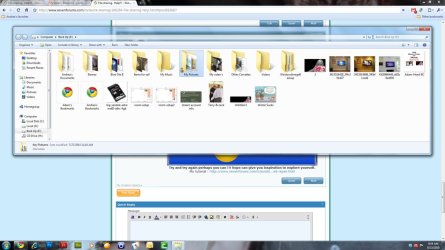
Hello everyone... I am having some issues with not having access to my pictures folder. Here is the story... I have a ps3 and I stream videos, photos and music to it... I use to have my windows media player as my media server as well... I just formated and re-installed windows 7 yesterday and now I can not access my pictures folder or my music.... No thumbnails OR anything! It does have the lock on it and I have tried to gain access but was not successful I also have a question.... when I right click on the My pictures folder and go to properties/security ... there are 3 names in the box - Headman (Headman-PC\Headman) and Administrator (Headman-PC\Administrator) and Administrators (Headman-PC\Administrators) ... is this the issue or will it cause an issue? Thank you so very much!

Adam
 
Last edited:

My Computer

OS
Windows 7 Ultimate 64bit
CPU
Q6600
Motherboard
750I SLI
Memory
4gb
Graphics Card(s)
9800GTX + SC
Sound Card
on board
Monitor(s) Displays
Asus 24inch
Hard Drives
1X1tb & 2x500GB
PSU
Corsair 750watts
what the warning on it when you click to open the folders? access denied?
 

My Computer

Computer Manufacturer/Model Number
built up
OS
windows 7
CPU
Phenom II AMD Dragon 3.5Ghz
Memory
DDR3 4GB
Graphics Card(s)
ATI Radeon 512Mb
Monitor(s) Displays
HP L1506
Screen Resolution
1152 x 864
Hard Drives
WDC 1 TB SATA-II Green Power
Keyboard
HP wireless keyboard
Mouse
HP Optic
Internet Speed
1GB
what the warning on it when you click to open the folders? access denied?

I can get into the folder but can not view anything(Thumbs included) The message I get when I try to open a photo is "Windows photo viewer can't open this picture because you don't have correct permissions to access the file location"
 

My Computer

OS
Windows 7 Ultimate 64bit
CPU
Q6600
Motherboard
750I SLI
Memory
4gb
Graphics Card(s)
9800GTX + SC
Sound Card
on board
Monitor(s) Displays
Asus 24inch
Hard Drives
1X1tb & 2x500GB
PSU
Corsair 750watts
you are login into as administrator? i saw your hdd is 2..the file u means is in the other hdd??
should take ownership.
 

My Computer

Computer Manufacturer/Model Number
built up
OS
windows 7
CPU
Phenom II AMD Dragon 3.5Ghz
Memory
DDR3 4GB
Graphics Card(s)
ATI Radeon 512Mb
Monitor(s) Displays
HP L1506
Screen Resolution
1152 x 864
Hard Drives
WDC 1 TB SATA-II Green Power
Keyboard
HP wireless keyboard
Mouse
HP Optic
Internet Speed
1GB
you are login into as administrator? i saw your hdd is 2..the file u means is in the other hdd??
should take ownership.

Yes the folder is on Drive E (C - D - E are the 3HDD's) I am logged in as Headman but I thought that was the Administrator? When I go to user accounts and family safety in the control panel it show "Headman as administrator. Headman was the name of my old install as well before I formated and re-installed. Any ideals?
 

My Computer

OS
Windows 7 Ultimate 64bit
CPU
Q6600
Motherboard
750I SLI
Memory
4gb
Graphics Card(s)
9800GTX + SC
Sound Card
on board
Monitor(s) Displays
Asus 24inch
Hard Drives
1X1tb & 2x500GB
PSU
Corsair 750watts
upss..sorry you have 3hdd.
so when you login into headman.there is in the C drive where have the file windows, and D,E is have the file system?? or just only files.
 

My Computer

Computer Manufacturer/Model Number
built up
OS
windows 7
CPU
Phenom II AMD Dragon 3.5Ghz
Memory
DDR3 4GB
Graphics Card(s)
ATI Radeon 512Mb
Monitor(s) Displays
HP L1506
Screen Resolution
1152 x 864
Hard Drives
WDC 1 TB SATA-II Green Power
Keyboard
HP wireless keyboard
Mouse
HP Optic
Internet Speed
1GB
upss..sorry you have 3hdd.
so when you login into headman.there is in the C drive where have the file windows, and D,E is have the file system?? or just only files.

C has windows and all programs and D and E are just for photos/music/downloads... ect.

The folder is on E and it had permission to share with my ps3 but I formated and reinstalled windows but I can't access the files in that folder. Thank you for your help!
 

My Computer

OS
Windows 7 Ultimate 64bit
CPU
Q6600
Motherboard
750I SLI
Memory
4gb
Graphics Card(s)
9800GTX + SC
Sound Card
on board
Monitor(s) Displays
Asus 24inch
Hard Drives
1X1tb & 2x500GB
PSU
Corsair 750watts
how about at other drive,in the D drive, you can access?

take ownership can't be run or what?? if i don't miss understand, regarding to you..you say that's the security tab is already appear the username and administrator. can take snapshot? is it full control?
 

My Computer

Computer Manufacturer/Model Number
built up
OS
windows 7
CPU
Phenom II AMD Dragon 3.5Ghz
Memory
DDR3 4GB
Graphics Card(s)
ATI Radeon 512Mb
Monitor(s) Displays
HP L1506
Screen Resolution
1152 x 864
Hard Drives
WDC 1 TB SATA-II Green Power
Keyboard
HP wireless keyboard
Mouse
HP Optic
Internet Speed
1GB
how about at other drive,in the D drive, you can access?

take ownership can't be run or what?? if i don't miss understand, regarding to you..you say that's the security tab is already appear the username and administrator. can take snapshot? is it full control?

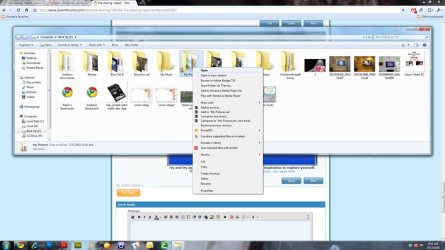
Yes I can access the other folders on that drive(E) and on D as well... its all because that folder had file sharing before I formated the C drive. Here is a screen shot of the E: drive and the folder and another of a right click on the folder.
 

Attachments

  • Folder-with-lock.jpg
    Folder-with-lock.jpg
    128.3 KB · Views: 3
  • Right-click-floder.jpg
    Right-click-floder.jpg
    134.5 KB · Views: 4

My Computer

OS
Windows 7 Ultimate 64bit
CPU
Q6600
Motherboard
750I SLI
Memory
4gb
Graphics Card(s)
9800GTX + SC
Sound Card
on board
Monitor(s) Displays
Asus 24inch
Hard Drives
1X1tb & 2x500GB
PSU
Corsair 750watts
the folder is locked..
uhm,,try to login into safe mode. and see it's work or not.
 

My Computer

Computer Manufacturer/Model Number
built up
OS
windows 7
CPU
Phenom II AMD Dragon 3.5Ghz
Memory
DDR3 4GB
Graphics Card(s)
ATI Radeon 512Mb
Monitor(s) Displays
HP L1506
Screen Resolution
1152 x 864
Hard Drives
WDC 1 TB SATA-II Green Power
Keyboard
HP wireless keyboard
Mouse
HP Optic
Internet Speed
1GB
the folder is locked..
uhm,,try to login into safe mode. and see it's work or not.

I could see the thumbnails of the photos but could NOT open one in safe mode.
 

My Computer

OS
Windows 7 Ultimate 64bit
CPU
Q6600
Motherboard
750I SLI
Memory
4gb
Graphics Card(s)
9800GTX + SC
Sound Card
on board
Monitor(s) Displays
Asus 24inch
Hard Drives
1X1tb & 2x500GB
PSU
Corsair 750watts
Im sure it all has to do with me setting up my windows media player as my media server so I could stream the photos and music to my PS3. But ever since I formated the C: drive and reinstalled I can not see these files.... the same thing with my music folder :(
 

My Computer

OS
Windows 7 Ultimate 64bit
CPU
Q6600
Motherboard
750I SLI
Memory
4gb
Graphics Card(s)
9800GTX + SC
Sound Card
on board
Monitor(s) Displays
Asus 24inch
Hard Drives
1X1tb & 2x500GB
PSU
Corsair 750watts
Anyone else have any ideals?
 

My Computer

OS
Windows 7 Ultimate 64bit
CPU
Q6600
Motherboard
750I SLI
Memory
4gb
Graphics Card(s)
9800GTX + SC
Sound Card
on board
Monitor(s) Displays
Asus 24inch
Hard Drives
1X1tb & 2x500GB
PSU
Corsair 750watts
I fixed the problem.... Thanks experts :P
 

My Computer

OS
Windows 7 Ultimate 64bit
CPU
Q6600
Motherboard
750I SLI
Memory
4gb
Graphics Card(s)
9800GTX + SC
Sound Card
on board
Monitor(s) Displays
Asus 24inch
Hard Drives
1X1tb & 2x500GB
PSU
Corsair 750watts
oh..glad hear it solved.. :)
so you using what?? can share to other so if the other have same can know the ways to solved.
 

My Computer

Computer Manufacturer/Model Number
built up
OS
windows 7
CPU
Phenom II AMD Dragon 3.5Ghz
Memory
DDR3 4GB
Graphics Card(s)
ATI Radeon 512Mb
Monitor(s) Displays
HP L1506
Screen Resolution
1152 x 864
Hard Drives
WDC 1 TB SATA-II Green Power
Keyboard
HP wireless keyboard
Mouse
HP Optic
Internet Speed
1GB
oh..glad hear it solved.. :)
so you using what?? can share to other so if the other have same can know the ways to solved.

To be honest I kept messing with the security settings - It might of been something like this but I am not 100% what I did.... If someone finds out for sure please update post =

1.Folder properties
2.Security Tab
3.Advanced button
4.Permission Tab - Click change permissions
5.Remove the check for "Include inheritable permissions from the objects parent"
6.Click OK
7.Check "Replace all child object permission with inheritable permissions from object"
8.Click OK
9.Click change permissions button
10.Check check for "Include inheritable permissions from the objects parent"
11. Click OK

See if that worked :) This fixed my padlock on the main folder as well as the sub-folders.
 

My Computer

OS
Windows 7 Ultimate 64bit
CPU
Q6600
Motherboard
750I SLI
Memory
4gb
Graphics Card(s)
9800GTX + SC
Sound Card
on board
Monitor(s) Displays
Asus 24inch
Hard Drives
1X1tb & 2x500GB
PSU
Corsair 750watts
thanks for the update.. :D glad that's solved
 

My Computer

Computer Manufacturer/Model Number
built up
OS
windows 7
CPU
Phenom II AMD Dragon 3.5Ghz
Memory
DDR3 4GB
Graphics Card(s)
ATI Radeon 512Mb
Monitor(s) Displays
HP L1506
Screen Resolution
1152 x 864
Hard Drives
WDC 1 TB SATA-II Green Power
Keyboard
HP wireless keyboard
Mouse
HP Optic
Internet Speed
1GB
Back
Top