Text looks as if water has been poured on it

mpooley

New member
Member
Local time
5:28 AM
Messages
49
I have a new radeon HD 6850 and Sometimes with certain programs the text looks like it has water poured over it and it gradually dissolves!

I updated the drivers today and now it is much worse and Firefox text is affected as well.
In fact as i'm typing this the text is gradually dissolving !

one thing i have noticed is that the text if ine at first and takes say 30 seconds before it starts getting blurry but if i highlight the text and then de-highlight it it goes completely un readable straight away.
I have tried to turn off hardware accelleration in catylist but cant find any w ay of doing it.

I need help please !

thanks
Mike :cry::cry:
 

My Computer My Computer

At a glance

Windows 7 Ultimate x642.67 gigahertz Intel Core2 Quad Q94508gbnvidia 8800gt
OS
Windows 7 Ultimate x64
CPU
2.67 gigahertz Intel Core2 Quad Q9450
Motherboard
Gigabyte Technology Co., Ltd. EP35C-DS3R
Memory
8gb
Graphics Card(s)
nvidia 8800gt
Monitor(s) Displays
sony bravia 46
Screen Resolution
1900x1200
Hard Drives
1tb sanyo
WDC WD2500KS-00MJB0 ATA (250.06 GB)
Corsair CSSD-F60GB2 [Hard drive] (60.02 GB)
Internet Speed
very slow
When you updated the drivers, did you uninstall the old ones first?

Did you update with the ATI Radeon drivers, the computer manufacturer's drivers or via Windows Update.

You will sometimes find that the computer manufacturer's OEM drivers are configured differently to the ones from the graphics card manufacturer and updating with them can lead to problems.

I'd be inclined to roll back your drivers to those that came with your computer, which you can do in Device Manager.
 

My Computer My Computer

At a glance

Windows 7 Ultimate SP1 64-BitIntel Core i7 870 @ 2.93GHz8Gb Dual-Channel DDR3 @ 664MHznVidia GeForce GTX 460 1024MB dedicated RAM
Computer Manufacturer/Model Number
HP Pavilion Elite 495UK
OS
Windows 7 Ultimate SP1 64-Bit
CPU
Intel Core i7 870 @ 2.93GHz
Motherboard
MSI 2A9C (CPU1)
Memory
8Gb Dual-Channel DDR3 @ 664MHz
Graphics Card(s)
nVidia GeForce GTX 460 1024MB dedicated RAM
Sound Card
Realtek HD Audio
Monitor(s) Displays
HP2310i
Screen Resolution
1920 x 1080
Hard Drives
1x1954GB Hitachi HDS22020ALA 330 (RAID), 1x1954GB Hitachi External for backup and storage
PSU
460W
Case
HP Elite
Cooling
Air cooled
Keyboard
Logitech K750 solar-powered keyboard
Mouse
Logitech Wireless M180 mouse
Internet Speed
2Mb
Other Info
Pure Avanti Flow Internet Radio with iPod Dock, 64Gb iPod, HP USB Speakers, Sony MDR-V500 Headphones, Sony Vaio F-Series Laptop
Thanks
I didn't uninstall old drivers and I used the standard radeon driver from their web page.
I tried to roll back to old drivers but the button was greyed out .
so I uninstalled the driver and then re- installed it.

At the moment it seems to have improved :)
so I'll keep my fingers crossed
and thanks again.

Mike
 

My Computer My Computer

At a glance

Windows 7 Ultimate x642.67 gigahertz Intel Core2 Quad Q94508gbnvidia 8800gt
OS
Windows 7 Ultimate x64
CPU
2.67 gigahertz Intel Core2 Quad Q9450
Motherboard
Gigabyte Technology Co., Ltd. EP35C-DS3R
Memory
8gb
Graphics Card(s)
nvidia 8800gt
Monitor(s) Displays
sony bravia 46
Screen Resolution
1900x1200
Hard Drives
1tb sanyo
WDC WD2500KS-00MJB0 ATA (250.06 GB)
Corsair CSSD-F60GB2 [Hard drive] (60.02 GB)
Internet Speed
very slow
I have a new radeon HD 6850 and Sometimes with certain programs the text looks like it has water poured over it and it gradually dissolves!

I updated the drivers today and now it is much worse and Firefox text is affected as well.
In fact as i'm typing this the text is gradually dissolving !

one thing i have noticed is that the text if ine at first and takes say 30 seconds before it starts getting blurry but if i highlight the text and then de-highlight it it goes completely un readable straight away.
I have tried to turn off hardware accelleration in catylist but cant find any w ay of doing it.

I need help please !

thanks
Mike :cry::cry:

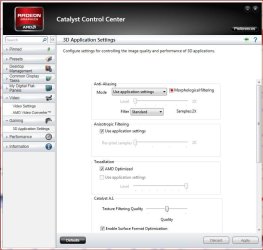
Since you have a 6850 make sure MLAA (Morphological filtering) is turned off. It tends to mess with 2D apps when enabled - making some things look blured.
 

Attachments

  • MLAA.JPG
    MLAA.JPG
    64.8 KB · Views: 1,175

My Computer My Computer

At a glance

Windows 10 ProIntel Core i7-4770K (3.5Ghz)32 gig Corsair Dominator Platinum (4x8Gig)Sapphire Tri-X R9 Fury
Computer type
PC/Desktop
Computer Manufacturer/Model Number
Custom built by me.
OS
Windows 10 Pro
CPU
Intel Core i7-4770K (3.5Ghz)
Motherboard
Gigabyte G1 Sniper 5 (F10 Bios)
Memory
32 gig Corsair Dominator Platinum (4x8Gig)
Graphics Card(s)
Sapphire Tri-X R9 Fury
Sound Card
Soundblaster ZXR
Monitor(s) Displays
NEC PA242W 24" LCD Monitor
Screen Resolution
1920 x 1200
Hard Drives
Primary - Samsung 850 Pro (512gig), Samsung 840 Pro (256gig), 2TB WD Caviar Black.
PSU
EVGA Supernova 1000 G2
Case
Cooler Master HAF X
Cooling
Corsair H100i with Corsair Air Series SP120 Quiet Fans
Keyboard
Logitech Wireless Wave
Mouse
Logitech Performance MX
Internet Speed
High Speed Cable
Antivirus
Norton Security
Browser
IE11
Other Info
Memory Timings - 1866MHz @ 9-9-9-27-1T @ 1.5 volts
Thanks
I didn't uninstall old drivers and I used the standard radeon driver from their web page.
I tried to roll back to old drivers but the button was greyed out .
so I uninstalled the driver and then re- installed it.

At the moment it seems to have improved :)
so I'll keep my fingers crossed
and thanks again.

Mike

OK, pleased to hear it and you're very welcome.

I have an NVIDIA GeForce GTX 460 graphics card and recently upgraded it to the latest 270.61 driver and was pleased to notice it gave me the option to uninstall the old driver first, and then carry out a clean install. Perhaps other card manufacturers could take note?

Please post back if you start to experience any more problems.
 

My Computer My Computer

At a glance

Windows 7 Ultimate SP1 64-BitIntel Core i7 870 @ 2.93GHz8Gb Dual-Channel DDR3 @ 664MHznVidia GeForce GTX 460 1024MB dedicated RAM
Computer Manufacturer/Model Number
HP Pavilion Elite 495UK
OS
Windows 7 Ultimate SP1 64-Bit
CPU
Intel Core i7 870 @ 2.93GHz
Motherboard
MSI 2A9C (CPU1)
Memory
8Gb Dual-Channel DDR3 @ 664MHz
Graphics Card(s)
nVidia GeForce GTX 460 1024MB dedicated RAM
Sound Card
Realtek HD Audio
Monitor(s) Displays
HP2310i
Screen Resolution
1920 x 1080
Hard Drives
1x1954GB Hitachi HDS22020ALA 330 (RAID), 1x1954GB Hitachi External for backup and storage
PSU
460W
Case
HP Elite
Cooling
Air cooled
Keyboard
Logitech K750 solar-powered keyboard
Mouse
Logitech Wireless M180 mouse
Internet Speed
2Mb
Other Info
Pure Avanti Flow Internet Radio with iPod Dock, 64Gb iPod, HP USB Speakers, Sony MDR-V500 Headphones, Sony Vaio F-Series Laptop
I have an NVIDIA GeForce GTX 460 graphics card and recently upgraded it to the latest 270.61 driver and was pleased to notice it gave me the option to uninstall the old driver first, and then carry out a clean install.

If it helps any ATI/AMD drivers have done that for more than a year now. The Catalyst Install Manager uninstalls the old and then installs the new without any user interaction.
 

My Computer My Computer

At a glance

Win 7 Ultimate x64FX-8350 @ 4.6 GHz so farADATA XPG V1 Series Black 8GB DDR3 1600Sapphire R9 270x Dual-X
Computer type
PC/Desktop
Computer Manufacturer/Model Number
Me
OS
Win 7 Ultimate x64
CPU
FX-8350 @ 4.6 GHz so far
Motherboard
Asus M5A97 EVO
Memory
ADATA XPG V1 Series Black 8GB DDR3 1600
Graphics Card(s)
Sapphire R9 270x Dual-X
Sound Card
Xonar DGX w/ Corsair Vengence 1300
Monitor(s) Displays
Acer S232HL Abid
Screen Resolution
1920x1080
Hard Drives
120 GB OCZ Vertex 3
500 GB Seagate 7200.12
PSU
Antec Earthwatts 650W Green
Case
Antec Three Hundred
Cooling
Cooler Master 212 EVO
Keyboard
Logitech G510
Mouse
Logitech G500s
Internet Speed
35000/3000
I have an NVIDIA GeForce GTX 460 graphics card and recently upgraded it to the latest 270.61 driver and was pleased to notice it gave me the option to uninstall the old driver first, and then carry out a clean install.

If it helps any ATI/AMD drivers have done that for more than a year now. The Catalyst Install Manager uninstalls the old and then installs the new without any user interaction.

Thanks for that. It's always useful to know what other manufacturers are doing.
 

My Computer My Computer

At a glance

Windows 7 Ultimate SP1 64-BitIntel Core i7 870 @ 2.93GHz8Gb Dual-Channel DDR3 @ 664MHznVidia GeForce GTX 460 1024MB dedicated RAM
Computer Manufacturer/Model Number
HP Pavilion Elite 495UK
OS
Windows 7 Ultimate SP1 64-Bit
CPU
Intel Core i7 870 @ 2.93GHz
Motherboard
MSI 2A9C (CPU1)
Memory
8Gb Dual-Channel DDR3 @ 664MHz
Graphics Card(s)
nVidia GeForce GTX 460 1024MB dedicated RAM
Sound Card
Realtek HD Audio
Monitor(s) Displays
HP2310i
Screen Resolution
1920 x 1080
Hard Drives
1x1954GB Hitachi HDS22020ALA 330 (RAID), 1x1954GB Hitachi External for backup and storage
PSU
460W
Case
HP Elite
Cooling
Air cooled
Keyboard
Logitech K750 solar-powered keyboard
Mouse
Logitech Wireless M180 mouse
Internet Speed
2Mb
Other Info
Pure Avanti Flow Internet Radio with iPod Dock, 64Gb iPod, HP USB Speakers, Sony MDR-V500 Headphones, Sony Vaio F-Series Laptop
Thanks
I didn't uninstall old drivers and I used the standard radeon driver from their web page.
I tried to roll back to old drivers but the button was greyed out .
so I uninstalled the driver and then re- installed it.

At the moment it seems to have improved :)
so I'll keep my fingers crossed
and thanks again.

Mike

OK, pleased to hear it and you're very welcome.

I have an NVIDIA GeForce GTX 460 graphics card and recently upgraded it to the latest 270.61 driver and was pleased to notice it gave me the option to uninstall the old driver first, and then carry out a clean install. Perhaps other card manufacturers could take note?

Please post back if you start to experience any more problems.

Ah ! Well this morning it started again!
Not in my browser this time just the same few programs that were affected before.
The first is Visual studio - this is a application written using WPF (windows presentation foundation)
I can get rid of this problem as there is an option to not use graphics hardware acceleration.
another is a little program called 'TED' which looks for tv programs on the net.
I suspect this is written using WPF too and that is the basis of the problem.
another is 'Soluto' which again looks like it was written in WPF.

So does everyone else with my card get this problem or is it just me i wonder?

I cant find any way of turning off hardware acceleration in catalyst either.

thanks

Mike
 

My Computer My Computer

At a glance

Windows 7 Ultimate x642.67 gigahertz Intel Core2 Quad Q94508gbnvidia 8800gt
OS
Windows 7 Ultimate x64
CPU
2.67 gigahertz Intel Core2 Quad Q9450
Motherboard
Gigabyte Technology Co., Ltd. EP35C-DS3R
Memory
8gb
Graphics Card(s)
nvidia 8800gt
Monitor(s) Displays
sony bravia 46
Screen Resolution
1900x1200
Hard Drives
1tb sanyo
WDC WD2500KS-00MJB0 ATA (250.06 GB)
Corsair CSSD-F60GB2 [Hard drive] (60.02 GB)
Internet Speed
very slow
You do this yet?

Since you have a 6850 make sure MLAA (Morphological filtering) is turned off. It tends to mess with 2D apps when enabled - making some things look blured.
 

My Computer My Computer

At a glance

Win 7 Ultimate x64FX-8350 @ 4.6 GHz so farADATA XPG V1 Series Black 8GB DDR3 1600Sapphire R9 270x Dual-X
Computer type
PC/Desktop
Computer Manufacturer/Model Number
Me
OS
Win 7 Ultimate x64
CPU
FX-8350 @ 4.6 GHz so far
Motherboard
Asus M5A97 EVO
Memory
ADATA XPG V1 Series Black 8GB DDR3 1600
Graphics Card(s)
Sapphire R9 270x Dual-X
Sound Card
Xonar DGX w/ Corsair Vengence 1300
Monitor(s) Displays
Acer S232HL Abid
Screen Resolution
1920x1080
Hard Drives
120 GB OCZ Vertex 3
500 GB Seagate 7200.12
PSU
Antec Earthwatts 650W Green
Case
Antec Three Hundred
Cooling
Cooler Master 212 EVO
Keyboard
Logitech G510
Mouse
Logitech G500s
Internet Speed
35000/3000
You do this yet?

Since you have a 6850 make sure MLAA (Morphological filtering) is turned off. It tends to mess with 2D apps when enabled - making some things look blured.

oh thats strange !
Yes I did yesterday and it was still happening but then of course I re-installed and it seemed to work for a time.

But today when i tried it ------ IT Worked :D

wierd but :party:

Thanks mate :D
 

My Computer My Computer

At a glance

Windows 7 Ultimate x642.67 gigahertz Intel Core2 Quad Q94508gbnvidia 8800gt
OS
Windows 7 Ultimate x64
CPU
2.67 gigahertz Intel Core2 Quad Q9450
Motherboard
Gigabyte Technology Co., Ltd. EP35C-DS3R
Memory
8gb
Graphics Card(s)
nvidia 8800gt
Monitor(s) Displays
sony bravia 46
Screen Resolution
1900x1200
Hard Drives
1tb sanyo
WDC WD2500KS-00MJB0 ATA (250.06 GB)
Corsair CSSD-F60GB2 [Hard drive] (60.02 GB)
Internet Speed
very slow
So turning off MLAA (Morphological filtering) worked?

Anyway whatever it was, glad to hear it's fixed.

Later.
 

My Computer My Computer

At a glance

Windows 10 ProIntel Core i7-4770K (3.5Ghz)32 gig Corsair Dominator Platinum (4x8Gig)Sapphire Tri-X R9 Fury
Computer type
PC/Desktop
Computer Manufacturer/Model Number
Custom built by me.
OS
Windows 10 Pro
CPU
Intel Core i7-4770K (3.5Ghz)
Motherboard
Gigabyte G1 Sniper 5 (F10 Bios)
Memory
32 gig Corsair Dominator Platinum (4x8Gig)
Graphics Card(s)
Sapphire Tri-X R9 Fury
Sound Card
Soundblaster ZXR
Monitor(s) Displays
NEC PA242W 24" LCD Monitor
Screen Resolution
1920 x 1200
Hard Drives
Primary - Samsung 850 Pro (512gig), Samsung 840 Pro (256gig), 2TB WD Caviar Black.
PSU
EVGA Supernova 1000 G2
Case
Cooler Master HAF X
Cooling
Corsair H100i with Corsair Air Series SP120 Quiet Fans
Keyboard
Logitech Wireless Wave
Mouse
Logitech Performance MX
Internet Speed
High Speed Cable
Antivirus
Norton Security
Browser
IE11
Other Info
Memory Timings - 1866MHz @ 9-9-9-27-1T @ 1.5 volts
So turning off MLAA (Morphological filtering) worked?

Anyway whatever it was, glad to hear it's fixed.

Later.
Yes It made a remarkable improvement :)

I have noticed that the text in firefox is a bit odd ! it looks 'soft' not crisp. it's ok but not good for my old eyes:shock:

thanks

Mike
 

My Computer My Computer

At a glance

Windows 7 Ultimate x642.67 gigahertz Intel Core2 Quad Q94508gbnvidia 8800gt
OS
Windows 7 Ultimate x64
CPU
2.67 gigahertz Intel Core2 Quad Q9450
Motherboard
Gigabyte Technology Co., Ltd. EP35C-DS3R
Memory
8gb
Graphics Card(s)
nvidia 8800gt
Monitor(s) Displays
sony bravia 46
Screen Resolution
1900x1200
Hard Drives
1tb sanyo
WDC WD2500KS-00MJB0 ATA (250.06 GB)
Corsair CSSD-F60GB2 [Hard drive] (60.02 GB)
Internet Speed
very slow
Fingers crossed then. :)

Perhaps we ought to leave the thread open for a few days, and then if you're experiencing no further problems perhaps you'd be kind enough to notify the mods it's solved - just click the red triangle and type solved in the text box.
 

My Computer My Computer

At a glance

Windows 7 Ultimate SP1 64-BitIntel Core i7 870 @ 2.93GHz8Gb Dual-Channel DDR3 @ 664MHznVidia GeForce GTX 460 1024MB dedicated RAM
Computer Manufacturer/Model Number
HP Pavilion Elite 495UK
OS
Windows 7 Ultimate SP1 64-Bit
CPU
Intel Core i7 870 @ 2.93GHz
Motherboard
MSI 2A9C (CPU1)
Memory
8Gb Dual-Channel DDR3 @ 664MHz
Graphics Card(s)
nVidia GeForce GTX 460 1024MB dedicated RAM
Sound Card
Realtek HD Audio
Monitor(s) Displays
HP2310i
Screen Resolution
1920 x 1080
Hard Drives
1x1954GB Hitachi HDS22020ALA 330 (RAID), 1x1954GB Hitachi External for backup and storage
PSU
460W
Case
HP Elite
Cooling
Air cooled
Keyboard
Logitech K750 solar-powered keyboard
Mouse
Logitech Wireless M180 mouse
Internet Speed
2Mb
Other Info
Pure Avanti Flow Internet Radio with iPod Dock, 64Gb iPod, HP USB Speakers, Sony MDR-V500 Headphones, Sony Vaio F-Series Laptop
I,myself has gone through the Blur effect also but it effected only the browsers/everything else was decent.

If you uninstall the video driver you have and go back to a older one that could fix it for me that was the only solution

step 1 uninstall /drivers
step 2 use driver sweep
step 3 install older driver just before the newest one

with these steps it should go back I have done this several times seems like ATI has corrective problems sometimes when new drivers are updated
 

My Computer My Computer

At a glance

Windows 10 Home Premium 64bit sp1Intel I7-6700K @ 4.6 Ghz 1.344 volts everyday OC32GB G-Skill TridentZ 3200mhz 16-18-18-38 DDR4Sli Gigabyte Windforce GTX 980 G1
Computer type
PC/Desktop
Computer Manufacturer/Model Number
CoreI7-6700K MrFingerIII Special Builds
OS
Windows 10 Home Premium 64bit sp1
CPU
Intel I7-6700K @ 4.6 Ghz 1.344 volts everyday OC
Motherboard
Asrock Fatality K6 Z170 Socket 1151
Memory
32GB G-Skill TridentZ 3200mhz 16-18-18-38 DDR4
Graphics Card(s)
Sli Gigabyte Windforce GTX 980 G1
Sound Card
AC97 Creative Rage Tactic 3D Headphones Bluetooth
Monitor(s) Displays
27" Asus ROG Swift PG278Q G-Sync 48" Vizio Smart HD TV
Screen Resolution
2560x1440p 27"- 48" Currently Gaming at 2560x1440p Res 2K
Hard Drives
250GB Samsung Evo840SSD Seagate baracuda 500 GB WD Mybook 500Gb 1TB Seagate Barracuda
PSU
HX1050w Corsair Silver 80plus certified crosfire/sli
Case
Enthod Pro Full Tower
Cooling
Corsair H110i GT 280 mm High Performance WaterBlock
Keyboard
Logitech wireless keyboard
Mouse
Logitech wireless mouse
Internet Speed
Cox Cable 100+ mb
Antivirus
WebRoot Spysweeper with Antivirus
Browser
IE-10, Chrome, Opera
Other Info
My Other Rig is a AMD FX8320E @4.6Ghz 16GB Ballistic Sport Ram
Mobo Asrock Fatality 990FX 120GB OCZ SSD 1TB Seagate Barracuda Corsair H75 Cooling PSU Corsair CX750
GPU GTX Gigabyte 970G1

My Computer My Computer

At a glance

Main - Windows 7 Pro SP1 64-Bit; 2nd - Window...Main - Core i7 2600K; 2nd - Core i7 920Main - 16GB Corsair Vengeance; 2nd - 12GB Cor...Main - XFX Radeon 6870 1GB; 2nd - XFX Radeon ...
Computer Manufacturer/Model Number
Self
OS
Main - Windows 7 Pro SP1 64-Bit; 2nd - Windows Server 2008 R2
CPU
Main - Core i7 2600K; 2nd - Core i7 920
Motherboard
Main - Asus P8Z68-V Pro/Gen3; 2nd - Gigabyte GA-EX58-UDR3
Memory
Main - 16GB Corsair Vengeance; 2nd - 12GB Corsair Vengeance
Graphics Card(s)
Main - XFX Radeon 6870 1GB; 2nd - XFX Radeon 4870 1GB
Sound Card
Both: Onboard Realtek Azalia
Monitor(s) Displays
Main - Hann 25" + I-INC 25" + Acer 23"; 2nd - Upgrading Soon
Screen Resolution
Main - 1920x1080 (All Three Monitors); 2nd - Upgrading Soon
Hard Drives
Main - (1) Crucial M4 128GB (Boot)
Main - (1) Seagate 2TB 64MB Cache (Data)
Main - (1) Seagate 2TB 64MB Cache (Data Backup)
2nd - (1) Intel X25-M SSD 80GB (Boot)
2nd - (3) Seagate 1TB 32MB Cache (Data Backup)
2nd - (1) Seagate 320GB (Because)
PSU
Main - OCZ 600W Modular; 2nd - OCZ 600W
Case
Main - Thermaltake Element G; 2nd - NZXT something or other
Cooling
Main - Corsair H80; 2nd - Prolimatech Megahalems
Keyboard
Main - Razer Reclusa; 2nd - Old MS Keyboard
Mouse
Main - Logitech MX Revolution; 2nd - Old MS Mouse
Internet Speed
20Mbps Time-Warner Cable
Ah Thats even better !!:D
Thanks I have disabled gfx.direct2d and that worked I have also downloaded 'Anti aliasing tuner' and will have a play with that.
Thanks to all who contributed to this thread you have been very helpfull :cool:
 

My Computer My Computer

At a glance

Windows 7 Ultimate x642.67 gigahertz Intel Core2 Quad Q94508gbnvidia 8800gt
OS
Windows 7 Ultimate x64
CPU
2.67 gigahertz Intel Core2 Quad Q9450
Motherboard
Gigabyte Technology Co., Ltd. EP35C-DS3R
Memory
8gb
Graphics Card(s)
nvidia 8800gt
Monitor(s) Displays
sony bravia 46
Screen Resolution
1900x1200
Hard Drives
1tb sanyo
WDC WD2500KS-00MJB0 ATA (250.06 GB)
Corsair CSSD-F60GB2 [Hard drive] (60.02 GB)
Internet Speed
very slow
Good luck! :D
 

My Computer My Computer

At a glance

Main - Windows 7 Pro SP1 64-Bit; 2nd - Window...Main - Core i7 2600K; 2nd - Core i7 920Main - 16GB Corsair Vengeance; 2nd - 12GB Cor...Main - XFX Radeon 6870 1GB; 2nd - XFX Radeon ...
Computer Manufacturer/Model Number
Self
OS
Main - Windows 7 Pro SP1 64-Bit; 2nd - Windows Server 2008 R2
CPU
Main - Core i7 2600K; 2nd - Core i7 920
Motherboard
Main - Asus P8Z68-V Pro/Gen3; 2nd - Gigabyte GA-EX58-UDR3
Memory
Main - 16GB Corsair Vengeance; 2nd - 12GB Corsair Vengeance
Graphics Card(s)
Main - XFX Radeon 6870 1GB; 2nd - XFX Radeon 4870 1GB
Sound Card
Both: Onboard Realtek Azalia
Monitor(s) Displays
Main - Hann 25" + I-INC 25" + Acer 23"; 2nd - Upgrading Soon
Screen Resolution
Main - 1920x1080 (All Three Monitors); 2nd - Upgrading Soon
Hard Drives
Main - (1) Crucial M4 128GB (Boot)
Main - (1) Seagate 2TB 64MB Cache (Data)
Main - (1) Seagate 2TB 64MB Cache (Data Backup)
2nd - (1) Intel X25-M SSD 80GB (Boot)
2nd - (3) Seagate 1TB 32MB Cache (Data Backup)
2nd - (1) Seagate 320GB (Because)
PSU
Main - OCZ 600W Modular; 2nd - OCZ 600W
Case
Main - Thermaltake Element G; 2nd - NZXT something or other
Cooling
Main - Corsair H80; 2nd - Prolimatech Megahalems
Keyboard
Main - Razer Reclusa; 2nd - Old MS Keyboard
Mouse
Main - Logitech MX Revolution; 2nd - Old MS Mouse
Internet Speed
20Mbps Time-Warner Cable
AH I spoke too soon :(
I have reminderfox installed which is a calendar reminder shceduler for firefox which now when I move my mouse over or highlight any text.
I am getting thick horizontal black bars across it!

I will have a play with anti aliasing tuner to see if i can solve it

Mike
 

My Computer My Computer

At a glance

Windows 7 Ultimate x642.67 gigahertz Intel Core2 Quad Q94508gbnvidia 8800gt
OS
Windows 7 Ultimate x64
CPU
2.67 gigahertz Intel Core2 Quad Q9450
Motherboard
Gigabyte Technology Co., Ltd. EP35C-DS3R
Memory
8gb
Graphics Card(s)
nvidia 8800gt
Monitor(s) Displays
sony bravia 46
Screen Resolution
1900x1200
Hard Drives
1tb sanyo
WDC WD2500KS-00MJB0 ATA (250.06 GB)
Corsair CSSD-F60GB2 [Hard drive] (60.02 GB)
Internet Speed
very slow
Back
Top