Solved Using VGA-to-SVideo converter, dual monitor situation?

Gordon Freeman

New member
Local time
10:37 PM
Messages
19
Hi again all.

I'm doing a PC build and it's secondary purpose will be as an HTPC in a room that has an old analog tube style TV (a 1998-vintage Sony Trinitron). Replacing that TV is not an option at the moment.

I want to use something like this to get the signal on to the TV. The video card (already purchased) is this one.

As you can see on the card details, it's dual head (what video cards aren't these days? :) ) so will this allow a sort of "dual monitor" setup in Win7, where monitor #2 is in fact the TV? If that is the case, can I have the monitor at a nice high resolution and the TV at it's nominal low resolution simultaneously? Or will I have to use the converter's passthrough feature and connect it all through a single head?

Thanks in advance all.
 

My Computer My Computer

At a glance

Windows 7 Professional x64AMD Athlon II x2 250 3.0ghzCrucial DDR2/1066 - 4gbXFX Geforce 8600 GT (x2)
OS
Windows 7 Professional x64
CPU
AMD Athlon II x2 250 3.0ghz
Motherboard
Asus M4N72E
Memory
Crucial DDR2/1066 - 4gb
Graphics Card(s)
XFX Geforce 8600 GT (x2)
Sound Card
Onboard AC97
Monitor(s) Displays
Sceptre X24WG
Hard Drives
Seagate ST32000542AS 2 terabyte
Western Digital WDC6401AALS 640 gigabyte
PSU
Raidmax RS730 730W
Case
Raidmax Scorpio 686
Cooling
Stock
Don't see why it wouldn't. Just remember that you will need to use a DVI-VGA adapter, and a VGA cable which looks like it comes with the converter (the DVI-VGA adapter should come with the video card).

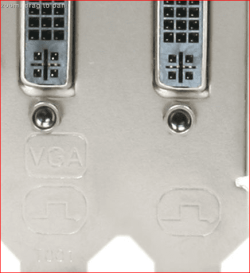
About the only "problem" you might run into is which if the two DVI ports on the card is the one that supports VGA via adapter, seeing as it looks like EVGA didn't marl the back plate on the card from looking at the pictures of the card. It isn't really a problem, more a matter of trial and error when the back plate isn't marked something like this (or says which in the manual),

backplate.PNG

Won't hurt anything if you get it wrong, the VGA connection just won't work and just a matter of swapping the connections. Usually it is the bottom DVI port or the one furthest away from the HDMI port that supports VGA.
 

My Computer My Computer

At a glance

Win 7 Ultimate x64FX-8350 @ 4.6 GHz so farADATA XPG V1 Series Black 8GB DDR3 1600Sapphire R9 270x Dual-X
Computer type
PC/Desktop
Computer Manufacturer/Model Number
Me
OS
Win 7 Ultimate x64
CPU
FX-8350 @ 4.6 GHz so far
Motherboard
Asus M5A97 EVO
Memory
ADATA XPG V1 Series Black 8GB DDR3 1600
Graphics Card(s)
Sapphire R9 270x Dual-X
Sound Card
Xonar DGX w/ Corsair Vengence 1300
Monitor(s) Displays
Acer S232HL Abid
Screen Resolution
1920x1080
Hard Drives
120 GB OCZ Vertex 3
500 GB Seagate 7200.12
PSU
Antec Earthwatts 650W Green
Case
Antec Three Hundred
Cooling
Cooler Master 212 EVO
Keyboard
Logitech G510
Mouse
Logitech G500s
Internet Speed
35000/3000
Excellent. For those who are curious it appears it is the lower (furthest away from HDMI, just like you suggested) which is VGA-out.

Do you think setting it up as dual-monitor will work, and if so can I run the TV in TV res (640x480 max, I believe? For TV res?) and the monitor in 2048x1600 (or whatever res the computer's user - Mrs. Freeman! - wishes) or will it just be a case of doing the pass-through and switching resolutions as needed?
 

My Computer My Computer

At a glance

Windows 7 Professional x64AMD Athlon II x2 250 3.0ghzCrucial DDR2/1066 - 4gbXFX Geforce 8600 GT (x2)
OS
Windows 7 Professional x64
CPU
AMD Athlon II x2 250 3.0ghz
Motherboard
Asus M4N72E
Memory
Crucial DDR2/1066 - 4gb
Graphics Card(s)
XFX Geforce 8600 GT (x2)
Sound Card
Onboard AC97
Monitor(s) Displays
Sceptre X24WG
Hard Drives
Seagate ST32000542AS 2 terabyte
Western Digital WDC6401AALS 640 gigabyte
PSU
Raidmax RS730 730W
Case
Raidmax Scorpio 686
Cooling
Stock
The widget got here today; I tested it out with a notebook I have and it worked just swimmingly.
 

My Computer My Computer

At a glance

Windows 7 Professional x64AMD Athlon II x2 250 3.0ghzCrucial DDR2/1066 - 4gbXFX Geforce 8600 GT (x2)
OS
Windows 7 Professional x64
CPU
AMD Athlon II x2 250 3.0ghz
Motherboard
Asus M4N72E
Memory
Crucial DDR2/1066 - 4gb
Graphics Card(s)
XFX Geforce 8600 GT (x2)
Sound Card
Onboard AC97
Monitor(s) Displays
Sceptre X24WG
Hard Drives
Seagate ST32000542AS 2 terabyte
Western Digital WDC6401AALS 640 gigabyte
PSU
Raidmax RS730 730W
Case
Raidmax Scorpio 686
Cooling
Stock
Good to hear it worked.

Should mention for anyone considering an adapter like this for a TV or an extra monitor, make sure that the adapter supports up to at least the resolution of the display to be connected to it. When using one of these the adapter determines the max resolution supported, not what the video card is capable of.
 

My Computer My Computer

At a glance

Win 7 Ultimate x64FX-8350 @ 4.6 GHz so farADATA XPG V1 Series Black 8GB DDR3 1600Sapphire R9 270x Dual-X
Computer type
PC/Desktop
Computer Manufacturer/Model Number
Me
OS
Win 7 Ultimate x64
CPU
FX-8350 @ 4.6 GHz so far
Motherboard
Asus M5A97 EVO
Memory
ADATA XPG V1 Series Black 8GB DDR3 1600
Graphics Card(s)
Sapphire R9 270x Dual-X
Sound Card
Xonar DGX w/ Corsair Vengence 1300
Monitor(s) Displays
Acer S232HL Abid
Screen Resolution
1920x1080
Hard Drives
120 GB OCZ Vertex 3
500 GB Seagate 7200.12
PSU
Antec Earthwatts 650W Green
Case
Antec Three Hundred
Cooling
Cooler Master 212 EVO
Keyboard
Logitech G510
Mouse
Logitech G500s
Internet Speed
35000/3000
Good to hear it worked.

Should mention for anyone considering an adapter like this for a TV or an extra monitor, make sure that the adapter supports up to at least the resolution of the display to be connected to it. When using one of these the adapter determines the max resolution supported, not what the video card is capable of.

Now, I will point out, on the 7-running Dell Laptop (an Inspiron 1525) the intel graphics adapter auto-sensed the new video out device and played nicely. Once the HTPC is built it'll be interesting to see if it behaves as well...
 

My Computer My Computer

At a glance

Windows 7 Professional x64AMD Athlon II x2 250 3.0ghzCrucial DDR2/1066 - 4gbXFX Geforce 8600 GT (x2)
OS
Windows 7 Professional x64
CPU
AMD Athlon II x2 250 3.0ghz
Motherboard
Asus M4N72E
Memory
Crucial DDR2/1066 - 4gb
Graphics Card(s)
XFX Geforce 8600 GT (x2)
Sound Card
Onboard AC97
Monitor(s) Displays
Sceptre X24WG
Hard Drives
Seagate ST32000542AS 2 terabyte
Western Digital WDC6401AALS 640 gigabyte
PSU
Raidmax RS730 730W
Case
Raidmax Scorpio 686
Cooling
Stock
Okay, one final update to this.

Taking the video out of the "VGA" port on the Evga GTX550 into the converter box then to the TV produced an image on the screen, but all the colors were inverted and no amount of fiddling with the controls or changing the on-screen palette (either via control panel or changing the TV's settings) could produce a viewable image. I just switched over to an old laptop running 32-bit Win7 and took it from there. Too much of a hassle otherwise.
 

My Computer My Computer

At a glance

Windows 7 Professional x64AMD Athlon II x2 250 3.0ghzCrucial DDR2/1066 - 4gbXFX Geforce 8600 GT (x2)
OS
Windows 7 Professional x64
CPU
AMD Athlon II x2 250 3.0ghz
Motherboard
Asus M4N72E
Memory
Crucial DDR2/1066 - 4gb
Graphics Card(s)
XFX Geforce 8600 GT (x2)
Sound Card
Onboard AC97
Monitor(s) Displays
Sceptre X24WG
Hard Drives
Seagate ST32000542AS 2 terabyte
Western Digital WDC6401AALS 640 gigabyte
PSU
Raidmax RS730 730W
Case
Raidmax Scorpio 686
Cooling
Stock
Back
Top