fresh build with ATI 4350 gives high CPU on SVCHOST

toycar69

New member
Local time
2:51 AM
Messages
9
Hi there,

I've been having a problem with my media centre for some time now, and I'm finally getting to the end of my patience.

This is a system that has been working happily with XP Pro for a number of years, and is mainly used for watching HD video, bluray and listening to music.

A while back I tried a clean install of Windows 7 Home Premium on a spare disk. Everything seemed ok until I noticed there were 2 SVCHOST process always chewing up 15-30% of my CPU time each, and a lot more when I try to play a 720p H264 MKV file.. Recently I decided to look into it again, and I discovered that when I remove the ATI 4350 and use the onboard VIA Chrome graphics, it all starts working fine.

I've tried running through all the windows updates, updating all drivers to current including Catalyst 12.6, but I'm still getting the problem. I had thought it was a conflict between the internal REALTEK audio controller and the HDMI output on the ATI4350, but I've tried disabling each of them in turn, and that doesn't help either.

Can anyone offer any more suggestions?
Thanks!
TC :)
 

My Computer My Computer

At a glance

Window 7 Home Premium x64E66003GB DDR2ATI 4350
Computer Manufacturer/Model Number
Homebrew
OS
Window 7 Home Premium x64
CPU
E6600
Motherboard
Foxconn P4M9007
Memory
3GB DDR2
Graphics Card(s)
ATI 4350
Sound Card
Onboard Realtek
Monitor(s) Displays
Sony TV
Hard Drives
Samsung 1TB
Case
Antec NSK1380
Cooling
Zalmann
Hello and welcome to the forums toycar69!

Svchost processes are usually containers that represent a set of services that are currently running on your system.

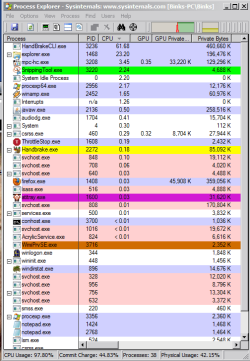
In order to determine the exact services that are running havoc on your system with the high CPU usage, can you please download Process Explorer, extract the file using 7zip/WinRAR/Winzip, run it, and take a screenshot of the current processes on your system with the CPU usage sorted from highest to lowest when the problem occurs?

View attachment Process Explorer.zip

Capture.PNG

Here are tutorials for taking snapshots from your system and uploading them using the Snipping Tool..

http://www.sevenforums.com/tutorials/9733-screenshots-files-upload-post-seven-forums.html

How to Use the Snipping Tool in Vista - Vista Forums

(Vista tutorial works for 7 as well)
 

My Computer My Computer

At a glance

Windows 7 x64 Professional SP1Intel C2D T9550 2.66 GHz @ 2.793 GHz (Thanks ...8 GB DDR3ATI MOBILITY RADEON 4670
Computer Manufacturer/Model Number
DELL SXPS 1640
OS
Windows 7 x64 Professional SP1
CPU
Intel C2D T9550 2.66 GHz @ 2.793 GHz (Thanks ThrottleStop!!)
Motherboard
Intel PM45
Memory
8 GB DDR3
Graphics Card(s)
ATI MOBILITY RADEON 4670
Sound Card
CREATIVE XFI AUDIO NOTEBOOK
Monitor(s) Displays
16.1 WLED
Screen Resolution
1920x1080
Hard Drives
Seagate ST9500420AS 500GB (465GiBi) 7200 RPM Drive

External Drives:-
2 TB WD Essentials x 3
1 TB WD Mybook Gen 1
1 TB WD Mybook Gen 2
1 TB Seagate
1 TB Seagate
320 GB WD Scorpio Black (enclosed)
PSU
90W Dell Power Brick
Case
Dell Chassis
Cooling
Coolermaster Cooling Pad
Keyboard
Built-in backlighted Keyboard
Mouse
Logitech Wireless Mini Mouse
Internet Speed
4/0.5
Thanks for the reply.
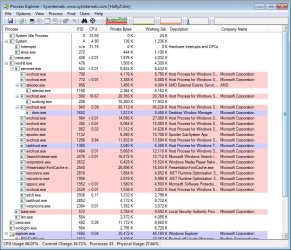
I've uploaded a process explorer screenshot. As you can see, a big chunk of CPU time is being taken up by audiodg. Interestingly looking gain after a few minutes and the audiodg child process has gone.

The services being run under these instances of svchost are:
DHCP, Homegroup, Sec center, TCP/IP Netbios, Windows Audio, and Windows Event.

The second instance is running:
BFE, DPS, and MpsSvc

Thanks!
TC
 

Attachments

  • procexp.jpg
    procexp.jpg
    133.3 KB · Views: 15

My Computer My Computer

At a glance

Window 7 Home Premium x64E66003GB DDR2ATI 4350
Computer Manufacturer/Model Number
Homebrew
OS
Window 7 Home Premium x64
CPU
E6600
Motherboard
Foxconn P4M9007
Memory
3GB DDR2
Graphics Card(s)
ATI 4350
Sound Card
Onboard Realtek
Monitor(s) Displays
Sony TV
Hard Drives
Samsung 1TB
Case
Antec NSK1380
Cooling
Zalmann
Quick update:
I spotted one of the services under the first SVCHOST was the event logger, so I looked around and found a repeated error in the system log:
Source WHEA-Logger:

A corrected hardware error has occurred.
Component: PCI Express Root Port
Error Source: Advanced Error Reporting (PCI Express)
Bus:Device:Function: 0x0:0x2:0x0
Vendor ID:Device ID: 0x1106:0xa364
Class Code: 0x30400
The details view of this entry contains further information.
 

My Computer My Computer

At a glance

Window 7 Home Premium x64E66003GB DDR2ATI 4350
Computer Manufacturer/Model Number
Homebrew
OS
Window 7 Home Premium x64
CPU
E6600
Motherboard
Foxconn P4M9007
Memory
3GB DDR2
Graphics Card(s)
ATI 4350
Sound Card
Onboard Realtek
Monitor(s) Displays
Sony TV
Hard Drives
Samsung 1TB
Case
Antec NSK1380
Cooling
Zalmann
Hi toycar69,

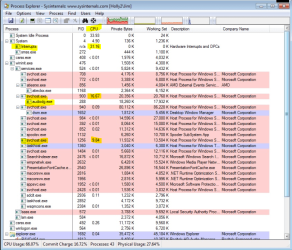
From a quick glance on your screenshot, i can see 3 processes with high CPU usage.

Capture.PNG

1. Your System Interrupts which are at 31% (should be only 1 - 5% tops)

2. The svchost containing audiodg.exe (which corresponds with what you've mentioned is a possible conflict between your ATI HDMI audio and and your motherboard audio

3. Another svchost with the PID 1256 that has 10% CPU usage, please right click on it the next time and select properties so we can figure out the services involved with that process..


To know what exactly is causing the high CPU Interrupts, we need to use the the xperf tool from the Windows Performance Toolkit:-

View attachment 219365 View attachment 219366 View attachment 219367

Please download the attachments, unzip them using 7zip/WinRAR (http://www.7zip.org http://www.rarlab.com/), and run the installer.

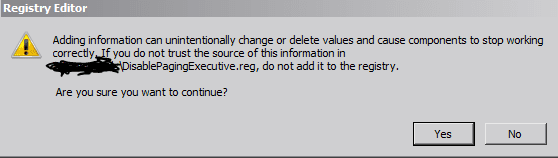
When done, please prepare your system for the diagnosis by Disabling Paging Executive (needed for xperf to run with the stackwalk profile)

View attachment DisablePagingExecutive.reg

Double click the downloaded .reg file and click yes to allow it change that entry in your registry.

Capture1.PNG

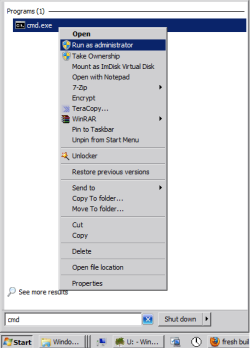
Next, open a command prompt with admin rights (type in cmd at your search bar, right click on cmd.exe and run as administrator)

start.png

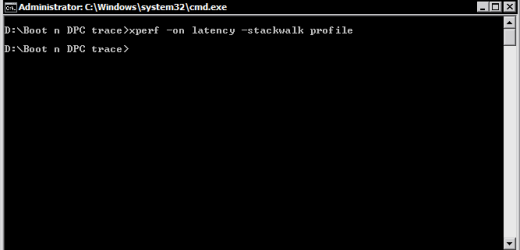
Go to C:\temp (cd\temp) (make the folder if you do not have it) and run the following commands:


xperf -on latency -stackwalk profile

Capture2.PNG

(I use the a different folder for mine but it doesn't matter where you run it from)

Now wait for some time (2 - 3 minutes) while the high DPC and Interrupt usage occurs.

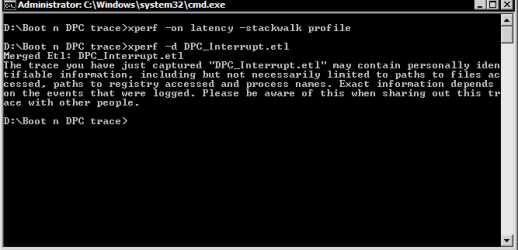
to stop the trace run the following command:


xperf -d DPC_Interrupt.etl

Capture3.PNG

This closes the trace and writes the result to the file DPC_Interrupt.etl.

In the next step, make a double click the etl file (which would be in the C:\temp folder) to run the Viewer.

Now wait until the 2 passes are over.

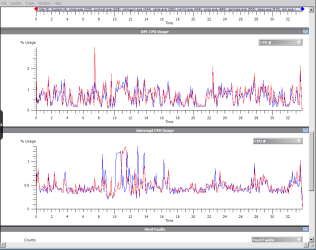
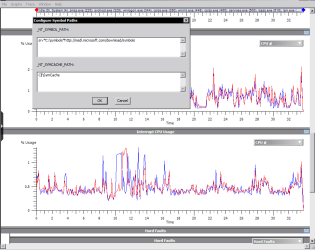
Here's what the graphs looks like for example on my system (scroll down to see DPC CPU Utilization and Interrupt CPU Utilization)

Capture4.PNG

Go to "Trace"(in the menu bar at the top) ->"Configure Symbol Paths" and type in the following:


srv*C:\symbols*http://msdl.microsoft.com/download/symbols

Capture5.PNG


Click OK, to close the dialog.

Now go to the graphs "DPC CPU Usage" or "Interrupt CPU Usage" (depending where your high CPU usage occurs) and select the interval, make a right click and select "Load Symbols" and next, click summary table.

Now, you will have to accept the license agreement to download the public debugging symbols.

(The PDBs can be massive, and it may take a while to download depending on your Internet connection)


Here you'll see summary of the calls..

Please upload the etl file(s), and post screenshots of those graphs if possible using the tutorial I linked to you earlier on so we can anaylyze them together...

Hope that helps!

EDIT:- On second thought, do not upload the etl files (they're massive after around 3 - 5 minutes),
please convert the etl files to uploadable txt files by using this command. Run it, and upload the txt file please...


xperf -I DPC_Interrupt.etl -a dpcisr > dpc.txt
 

My Computer My Computer

At a glance

Windows 7 x64 Professional SP1Intel C2D T9550 2.66 GHz @ 2.793 GHz (Thanks ...8 GB DDR3ATI MOBILITY RADEON 4670
Computer Manufacturer/Model Number
DELL SXPS 1640
OS
Windows 7 x64 Professional SP1
CPU
Intel C2D T9550 2.66 GHz @ 2.793 GHz (Thanks ThrottleStop!!)
Motherboard
Intel PM45
Memory
8 GB DDR3
Graphics Card(s)
ATI MOBILITY RADEON 4670
Sound Card
CREATIVE XFI AUDIO NOTEBOOK
Monitor(s) Displays
16.1 WLED
Screen Resolution
1920x1080
Hard Drives
Seagate ST9500420AS 500GB (465GiBi) 7200 RPM Drive

External Drives:-
2 TB WD Essentials x 3
1 TB WD Mybook Gen 1
1 TB WD Mybook Gen 2
1 TB Seagate
1 TB Seagate
320 GB WD Scorpio Black (enclosed)
PSU
90W Dell Power Brick
Case
Dell Chassis
Cooling
Coolermaster Cooling Pad
Keyboard
Built-in backlighted Keyboard
Mouse
Logitech Wireless Mini Mouse
Internet Speed
4/0.5
Bumping in case it gets lost.
 

My Computer My Computer

At a glance

Windows 7 x64 Professional SP1Intel C2D T9550 2.66 GHz @ 2.793 GHz (Thanks ...8 GB DDR3ATI MOBILITY RADEON 4670
Computer Manufacturer/Model Number
DELL SXPS 1640
OS
Windows 7 x64 Professional SP1
CPU
Intel C2D T9550 2.66 GHz @ 2.793 GHz (Thanks ThrottleStop!!)
Motherboard
Intel PM45
Memory
8 GB DDR3
Graphics Card(s)
ATI MOBILITY RADEON 4670
Sound Card
CREATIVE XFI AUDIO NOTEBOOK
Monitor(s) Displays
16.1 WLED
Screen Resolution
1920x1080
Hard Drives
Seagate ST9500420AS 500GB (465GiBi) 7200 RPM Drive

External Drives:-
2 TB WD Essentials x 3
1 TB WD Mybook Gen 1
1 TB WD Mybook Gen 2
1 TB Seagate
1 TB Seagate
320 GB WD Scorpio Black (enclosed)
PSU
90W Dell Power Brick
Case
Dell Chassis
Cooling
Coolermaster Cooling Pad
Keyboard
Built-in backlighted Keyboard
Mouse
Logitech Wireless Mini Mouse
Internet Speed
4/0.5
Thanks a lot for your help solarmystic!

Firstly, I think I posted the details of the other SVCHOST process before. It was the one running:

BFE, DPS, and MpsSvc

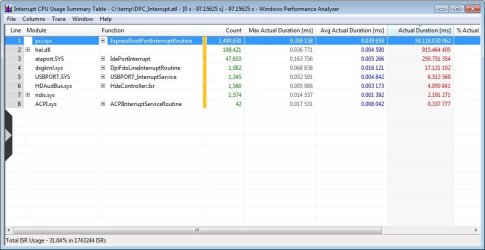
I've gone through the steps you outlined, and I've attached the screen dump of the Interrupt summary table, as it seems to be the interrupts that is showing high CPU.

I've also spotted that the disk I/O is maxing out, but I guess thats probably to do with constant writes to the event logs.

I've also attached the dpc.txt file created. The ETL file was massive after around 1 minute (300MB).

Thanks again for all your help, what is the next step?

TC :)
 

Attachments

  • cpu-summary.jpg
    cpu-summary.jpg
    65 KB · Views: 10
  • dpc.txt
    dpc.txt
    38.8 KB · Views: 6

My Computer My Computer

At a glance

Window 7 Home Premium x64E66003GB DDR2ATI 4350
Computer Manufacturer/Model Number
Homebrew
OS
Window 7 Home Premium x64
CPU
E6600
Motherboard
Foxconn P4M9007
Memory
3GB DDR2
Graphics Card(s)
ATI 4350
Sound Card
Onboard Realtek
Monitor(s) Displays
Sony TV
Hard Drives
Samsung 1TB
Case
Antec NSK1380
Cooling
Zalmann
Thanks for your reply, toycar69!

The BFE, DPS, and the MpsSvc services are the Base Filtering Engine, Diagnostic Policy Service, and the Windows Firewall Service; they all have have something to do with your Network Connectivity and Firewall activity.... Have your network card drivers been updated?

As for the text file of the trace you have kindly provided me, there are is one entry that definitely confirms what the problematic process/service is that is consuming a combined 60% of CPU 0 (or 30% overall CPU usage) throughout the trace...


--------------------------
Interrupt Info

--------------------------

CPU Usage Summing By Module For the Whole Trace

CPU Usage from 0 us to 97156250 us:


CPU0 usage

59118030 60.85 0 0.00 pci.sys


It's the pci.sys module, which handles the pci-e slot that houses the ATI 4350, which indicates hardware interfacing instability on its part...

This is further confirmed by the screenshot you've provided me:-


Capture.PNG


To put it in simple English, i think you'd most likely need to replace the card with another one or continue using your onboard graphics chipset, as your motherboard doesn't play nice with it.. it also explains why switching out drivers did nothing to resolve the situation and the fact that when you took out the card the problems went away!

I'm sorry to be the bearer of bad news, but at least we definitively say that it was the ATI 4350 all along that was the culprit for both the pci.sys and the audiodg high CPU usage :(
 

My Computer My Computer

At a glance

Windows 7 x64 Professional SP1Intel C2D T9550 2.66 GHz @ 2.793 GHz (Thanks ...8 GB DDR3ATI MOBILITY RADEON 4670
Computer Manufacturer/Model Number
DELL SXPS 1640
OS
Windows 7 x64 Professional SP1
CPU
Intel C2D T9550 2.66 GHz @ 2.793 GHz (Thanks ThrottleStop!!)
Motherboard
Intel PM45
Memory
8 GB DDR3
Graphics Card(s)
ATI MOBILITY RADEON 4670
Sound Card
CREATIVE XFI AUDIO NOTEBOOK
Monitor(s) Displays
16.1 WLED
Screen Resolution
1920x1080
Hard Drives
Seagate ST9500420AS 500GB (465GiBi) 7200 RPM Drive

External Drives:-
2 TB WD Essentials x 3
1 TB WD Mybook Gen 1
1 TB WD Mybook Gen 2
1 TB Seagate
1 TB Seagate
320 GB WD Scorpio Black (enclosed)
PSU
90W Dell Power Brick
Case
Dell Chassis
Cooling
Coolermaster Cooling Pad
Keyboard
Built-in backlighted Keyboard
Mouse
Logitech Wireless Mini Mouse
Internet Speed
4/0.5
Thanks again for the help.
It's interesting that this graphics card has played nicely with Windows XP Pro inside this PC for the last 18 months, but won't with Windows 7. It was this fact that made me think it is a driver issue, not hardware incompatibility.

Do you have any suggestions for a replacement card? Should I go for another ATI, or switch to NVIDIA? My specific requirements are a card that can easily handle hardware decoding of Blurays and H264 based video files. It must also have low power consumtion and not produce too much heat, as this system is running in a compact case, with a proprietary PSU, so I can't upgrade it.

TC
 

My Computer My Computer

At a glance

Window 7 Home Premium x64E66003GB DDR2ATI 4350
Computer Manufacturer/Model Number
Homebrew
OS
Window 7 Home Premium x64
CPU
E6600
Motherboard
Foxconn P4M9007
Memory
3GB DDR2
Graphics Card(s)
ATI 4350
Sound Card
Onboard Realtek
Monitor(s) Displays
Sony TV
Hard Drives
Samsung 1TB
Case
Antec NSK1380
Cooling
Zalmann
We'll need to know the wattage of your PSU to determine the range of graphic cards it can support.

In general when it comes to H264 encoding and Bluray playback both of the companies are neck to neck AFAIK. It's only when it comes to gaming that I'd recommend NVIDIA right now as their drivers are better at the moment according to reviews and benchmarks from forums.

But... if a low profile card is what you wish, and you're not doing any serious gaming on your system at all, may i recommend these cards?

Newegg.com - SAPPHIRE Radeon HD 5450 1GB 64-bit DDR3 PCI Express 2.1 x16 HDCP Ready Low Profile Ready Video Card ( 100292DDR3L)

Newegg.com - XFX HD-645X-YNH2 Radeon HD 6450 512MB 32-bit DDR3 PCI Express 2.1 x16 HDCP Ready Low Profile Ready Video Card

Both are from AMD but they're both reasonable for your purposes...
 

My Computer My Computer

At a glance

Windows 7 x64 Professional SP1Intel C2D T9550 2.66 GHz @ 2.793 GHz (Thanks ...8 GB DDR3ATI MOBILITY RADEON 4670
Computer Manufacturer/Model Number
DELL SXPS 1640
OS
Windows 7 x64 Professional SP1
CPU
Intel C2D T9550 2.66 GHz @ 2.793 GHz (Thanks ThrottleStop!!)
Motherboard
Intel PM45
Memory
8 GB DDR3
Graphics Card(s)
ATI MOBILITY RADEON 4670
Sound Card
CREATIVE XFI AUDIO NOTEBOOK
Monitor(s) Displays
16.1 WLED
Screen Resolution
1920x1080
Hard Drives
Seagate ST9500420AS 500GB (465GiBi) 7200 RPM Drive

External Drives:-
2 TB WD Essentials x 3
1 TB WD Mybook Gen 1
1 TB WD Mybook Gen 2
1 TB Seagate
1 TB Seagate
320 GB WD Scorpio Black (enclosed)
PSU
90W Dell Power Brick
Case
Dell Chassis
Cooling
Coolermaster Cooling Pad
Keyboard
Built-in backlighted Keyboard
Mouse
Logitech Wireless Mini Mouse
Internet Speed
4/0.5
Ok, its a 350W PSU. As I said before its a small form factor case, and a proprietary PSU, so I can't upgrade it.

Wouldn't you be a little worried installing another ATI card where one failed to work properly? Its the same driver package after all, and I know my existing card is physically fine, as it runs perfectly under XP.

Just looking at the HD5450, at UK shops. I think I need a power comparison against the old card
 

My Computer My Computer

At a glance

Window 7 Home Premium x64E66003GB DDR2ATI 4350
Computer Manufacturer/Model Number
Homebrew
OS
Window 7 Home Premium x64
CPU
E6600
Motherboard
Foxconn P4M9007
Memory
3GB DDR2
Graphics Card(s)
ATI 4350
Sound Card
Onboard Realtek
Monitor(s) Displays
Sony TV
Hard Drives
Samsung 1TB
Case
Antec NSK1380
Cooling
Zalmann
If the brand bugs you out a bit... here are some alternatives from NVIDIA to look out for:-

http://www.amazon.com/MSI-GeForce-PCI-Express-N520GT-MD1GD3-LP/dp/B004W9BGJY

MSI NVIDIA GT 520 Graphics Card - 1GB - N520GT-MD1GD3/LP - Scan.co.uk

Low profile cards should run fine on that PSU as they usually don't require additional power besides that provided by the PCI-E slot itself.

Just a heads up, if you do change brands to NVIDIA you'll need to do a clean wipe of all traces of the AMD drivers on your system using a Driver Cleaner to ensure you get a clean slate and no potential conflicts occur (in your registry) after uninstalling it normally.

This software does the trick, and I've used it many times without incident.

Driver Sweeper

http://phyxion.net/item/driver-sweeper.html
 

My Computer My Computer

At a glance

Windows 7 x64 Professional SP1Intel C2D T9550 2.66 GHz @ 2.793 GHz (Thanks ...8 GB DDR3ATI MOBILITY RADEON 4670
Computer Manufacturer/Model Number
DELL SXPS 1640
OS
Windows 7 x64 Professional SP1
CPU
Intel C2D T9550 2.66 GHz @ 2.793 GHz (Thanks ThrottleStop!!)
Motherboard
Intel PM45
Memory
8 GB DDR3
Graphics Card(s)
ATI MOBILITY RADEON 4670
Sound Card
CREATIVE XFI AUDIO NOTEBOOK
Monitor(s) Displays
16.1 WLED
Screen Resolution
1920x1080
Hard Drives
Seagate ST9500420AS 500GB (465GiBi) 7200 RPM Drive

External Drives:-
2 TB WD Essentials x 3
1 TB WD Mybook Gen 1
1 TB WD Mybook Gen 2
1 TB Seagate
1 TB Seagate
320 GB WD Scorpio Black (enclosed)
PSU
90W Dell Power Brick
Case
Dell Chassis
Cooling
Coolermaster Cooling Pad
Keyboard
Built-in backlighted Keyboard
Mouse
Logitech Wireless Mini Mouse
Internet Speed
4/0.5
lol, the brand doesn't bug me! I'm just a little worried that if I pop another ATI card in, it will install using the current catalyst driver, and have the same problem!

Something in the back of my brain is still telling me this is a software / driver issue, as the card ran fine on this PC with Windows XP.

I think I'm going to look into the AMD HD5450 and the HD6450 cards.

The 6450 with DDR3 seems to be very power efficient, and not that much more expensive.
 

My Computer My Computer

At a glance

Window 7 Home Premium x64E66003GB DDR2ATI 4350
Computer Manufacturer/Model Number
Homebrew
OS
Window 7 Home Premium x64
CPU
E6600
Motherboard
Foxconn P4M9007
Memory
3GB DDR2
Graphics Card(s)
ATI 4350
Sound Card
Onboard Realtek
Monitor(s) Displays
Sony TV
Hard Drives
Samsung 1TB
Case
Antec NSK1380
Cooling
Zalmann
hi guys, I'm back again!
well, just to update you on this, I've replaced the graphics card with an AMD HD6450, and guess what?
I get the same issue. WHEA error in the event logs and high utilisation under SVCHOST.

I've been searching around and there seem to be hints that this kind of error is a chipset driver error, but as this motherboard uses an older VIA chipset, with drivers included in the Windows 7 media, I'm at a bit of a loss.

Surely I don't have to buy a new PC to get this working? My Core2Duo E6600 is perfectly up for the job of a media PC, especially with a hardware decoding graphics card.
 

My Computer My Computer

At a glance

Window 7 Home Premium x64E66003GB DDR2ATI 4350
Computer Manufacturer/Model Number
Homebrew
OS
Window 7 Home Premium x64
CPU
E6600
Motherboard
Foxconn P4M9007
Memory
3GB DDR2
Graphics Card(s)
ATI 4350
Sound Card
Onboard Realtek
Monitor(s) Displays
Sony TV
Hard Drives
Samsung 1TB
Case
Antec NSK1380
Cooling
Zalmann
Does anyone have any other thoughts I could try? If not, I'll have to save up and replace the system, which seems a shame because its still got plenty of power to do what I need.
 

My Computer My Computer

At a glance

Window 7 Home Premium x64E66003GB DDR2ATI 4350
Computer Manufacturer/Model Number
Homebrew
OS
Window 7 Home Premium x64
CPU
E6600
Motherboard
Foxconn P4M9007
Memory
3GB DDR2
Graphics Card(s)
ATI 4350
Sound Card
Onboard Realtek
Monitor(s) Displays
Sony TV
Hard Drives
Samsung 1TB
Case
Antec NSK1380
Cooling
Zalmann
Back
Top