Solved How to control my graphics card

bloomingflower

New member
Hi everybody,

I bought a new hp, core i5 4G RAM laptop.
I use an engineering program that requires high graphical capabilities and I have problems.
The problem is that I don't know if I have a graphics card on my laptop, how could I know?? how to access it ? how to control options for best 3D visualization?
I didn't insert a graphics card to it but they told me I can.

I have a RADEON GRAPHICS label on the laptop, what does it mean/

Thanks in advance
blooming flower
 

My Computer

OS
Home basic x64
What's the model number of the machine
 

My Computer

Computer Manufacturer/Model Number
CUSTOM
OS
Window 7 Ultimate x64
CPU
i7-920
Motherboard
Asus Rampage
Memory
Crucial 12gb ddr3
Graphics Card(s)
2x ATI Radeon HD 6770 2gb
Sound Card
-NONE-
Monitor(s) Displays
3 Samsung 24" displays
Hard Drives
6 256gb SSD Kingston Striped
PSU
Thermaltake 1300
Case
Thermaltake Black Widow
Cooling
Antec CPU water radiator; Air

My Computer

Computer Manufacturer/Model Number
homegrown
OS
Windows 7 Pro X64 SP1
CPU
Intel Core I7-3930k
Motherboard
Asus P9X79 Pro
Memory
16 GB Gskill DDR3-2133
Graphics Card(s)
eVGA GTX680
Sound Card
Creative X-Fi Titanium
Monitor(s) Displays
As PA246Q
Screen Resolution
1920 X 1200
Hard Drives
Corsair Force GT, 120 GB
WDC 1.5TB Caviar Black
PSU
PCP&C Silencer 750 Crossfire
Case
Silverstone FT02
Cooling
Noctua NH-D14
Keyboard
cheap Logitech USB
Mouse
Microsoft Intellimouse Explorer (old optical) USB
Internet Speed
6Mb cable
Other Info
Pioneer BDR-205
Samsung SH-203B
Monsoon 5.1 speakers
thank you bobkn

I DO appreciate your effort but I still want the answer to my questions.
There is no detailed inf. about graphics card requirements but what I Know is that 3D graphics don't work.
 

My Computer

OS
Home basic x64
"3D Graphics don't work".

Can you tell us what engineering software you're trying to use?

I suppose that it might want some sort of OpenGL capabilities that aren't available from consumer graphics controllers, but that's pure speculation.

I assume that you have proper drivers installed for the graphics controller. (See Device Manager.) The generic VGA drivers that come with Windows wouldn''t support 3D at all, but it would be unusual for those to be in place on a new laptop.
 

My Computer

Computer Manufacturer/Model Number
homegrown
OS
Windows 7 Pro X64 SP1
CPU
Intel Core I7-3930k
Motherboard
Asus P9X79 Pro
Memory
16 GB Gskill DDR3-2133
Graphics Card(s)
eVGA GTX680
Sound Card
Creative X-Fi Titanium
Monitor(s) Displays
As PA246Q
Screen Resolution
1920 X 1200
Hard Drives
Corsair Force GT, 120 GB
WDC 1.5TB Caviar Black
PSU
PCP&C Silencer 750 Crossfire
Case
Silverstone FT02
Cooling
Noctua NH-D14
Keyboard
cheap Logitech USB
Mouse
Microsoft Intellimouse Explorer (old optical) USB
Internet Speed
6Mb cable
Other Info
Pioneer BDR-205
Samsung SH-203B
Monsoon 5.1 speakers
Dear bobkn

You've given valuable information but if you notice the thread I couldn't even know if had a graphics card on my laptop!! so plz work with me based on that fact.

Opening device manager I found this, what does it mean?

Display Adapter
Intel(R) HD Graphics Family
Radeon (TM) HD

You might be right about OpenGL, someone told me that. Doesn't it come naturally with windows?

"I assume that you have proper drivers installed for the graphics controller. (See Device Manager.) The generic VGA drivers that come with Windows wouldn''t support 3D at all, but it would be unusual for those to be in place on a new laptop."
I didn't understand.

when I open device manager -> Display Adapter I find a bunch of files that I can't work on. I only updated the drivers.
 

My Computer

OS
Home basic x64
if you notice the thread I couldn't even know if had a graphics card on my laptop!! so plz work with me based on that fact.
Download and install GPU-Z. Then run it.

It will provide ALL of the information you need to know (and provide us) about your graphics hardware/software setup on the "General" tab.

Please post a screenshot of what that GPU-Z General tab presents. Then we can provide more help to you.
 

My Computer

Computer type
PC/Desktop
Computer Manufacturer/Model Number
Home-built, two systems (1) and (2)
OS
Windows 7 Pro x64 (1), Win7 Pro X64 (2)
CPU
i5-3350p 3.1Ghz/6MB-cache (1); E8400 3.0Ghz/6MB-cache (2)
Motherboard
ASUS P8Z77-V Pro (1); ASUS P5Q3 (2)
Memory
8GB PC3-12800 DDR3 (1); 4GB PC3-10600 DDR3 (2)
Graphics Card(s)
ATI HD7750 (1), (see TV cards); ATI R7 250 (2)
Sound Card
Realtek ALC892 HD Audio (1); Realtek ALC1200 HD Audio (2)
Monitor(s) Displays
Eizo HD2441W LCD, Eizo S2433W (1); Eizo 24" S2433W (2)
Screen Resolution
1920x1200, 1920x1200 (1); 1920x1200 (2)
Hard Drives
(1) 1TB SATA-II (7200RPM), 2x2TB SATA-III (7200RPM), 250GB SATA-III (10000RPM) for OS; 2x2TB external USB 3.0

(2) 320GB SATA-II (7200RPM), 750GB SATA-II (7200RPM), 150GB SATA-II (10000RPM) for OS; 2TB external USB 3.0
PSU
Nesteq ECS-6001 600W (1); Nesteq ECS-5001 500W (2)
Case
Acousti-Case 360 (1) and (2)
Cooling
Noctua NH-U12P SE2 for CPU, 2x120mm case fans (1) and (2)
Keyboard
IBM PS/2 (1) and (2)
Mouse
Logitech MX Revolution wireless (1); Microsoft wired (2)
Internet Speed
100mbps down / 10mbps up
Antivirus
Microsoft Security Essentials; Malwarebyte Anti-Malware Pro
Browser
Firefox
Other Info
Ceton InfiniTV 4-tuner cablecard-enabled TV card as well as Hauppauge HVR-2250 OTA/ATSC 2-tuner TV card in (1), running under Win7 WMC
Opening device manager I found this, what does it mean?

Display Adapter
Intel(R) HD Graphics Family
Radeon (TM) HD
I wouldn't actually expect to see BOTH hardware graphics adapters shown, even if your motherboard provided built-in Intel HD Graphics but the computer also had an external add-on ATI Radeon HD graphics card in a PCIe slot. Normally, if the BIOS is set properly, the presence of the external card should supercede the onboard Intel graphics, the onboard graphics would never even be seen by Windows, and you'd only see the ATI Radeon HD display adapter. So this is certainly interesting and strange.

But as I mentioned in my prior post, GPU-Z will confirm which graphics hardware is actually in effect and its details. Please post that screenshot from GPU-Z I requested.
 

My Computer

Computer type
PC/Desktop
Computer Manufacturer/Model Number
Home-built, two systems (1) and (2)
OS
Windows 7 Pro x64 (1), Win7 Pro X64 (2)
CPU
i5-3350p 3.1Ghz/6MB-cache (1); E8400 3.0Ghz/6MB-cache (2)
Motherboard
ASUS P8Z77-V Pro (1); ASUS P5Q3 (2)
Memory
8GB PC3-12800 DDR3 (1); 4GB PC3-10600 DDR3 (2)
Graphics Card(s)
ATI HD7750 (1), (see TV cards); ATI R7 250 (2)
Sound Card
Realtek ALC892 HD Audio (1); Realtek ALC1200 HD Audio (2)
Monitor(s) Displays
Eizo HD2441W LCD, Eizo S2433W (1); Eizo 24" S2433W (2)
Screen Resolution
1920x1200, 1920x1200 (1); 1920x1200 (2)
Hard Drives
(1) 1TB SATA-II (7200RPM), 2x2TB SATA-III (7200RPM), 250GB SATA-III (10000RPM) for OS; 2x2TB external USB 3.0

(2) 320GB SATA-II (7200RPM), 750GB SATA-II (7200RPM), 150GB SATA-II (10000RPM) for OS; 2TB external USB 3.0
PSU
Nesteq ECS-6001 600W (1); Nesteq ECS-5001 500W (2)
Case
Acousti-Case 360 (1) and (2)
Cooling
Noctua NH-U12P SE2 for CPU, 2x120mm case fans (1) and (2)
Keyboard
IBM PS/2 (1) and (2)
Mouse
Logitech MX Revolution wireless (1); Microsoft wired (2)
Internet Speed
100mbps down / 10mbps up
Antivirus
Microsoft Security Essentials; Malwarebyte Anti-Malware Pro
Browser
Firefox
Other Info
Ceton InfiniTV 4-tuner cablecard-enabled TV card as well as Hauppauge HVR-2250 OTA/ATSC 2-tuner TV card in (1), running under Win7 WMC
the utility couldn't display info. about radeon. goes to "not responding" mode. there is no ATI on the card its only Radeon (TM) HD. may be utility doesn't support it. if so whats next?

plz I help me on my issue as soon as possible. it's urgent!
 

Attachments

  • Intel graphics.gif
    Intel graphics.gif
    24.4 KB · Views: 31

My Computer

OS
Home basic x64
the utility couldn't display info. about radeon. goes to "not responding" mode. there is no ATI on the card its only Radeon (TM) HD. may be utility doesn't support it. if so whats next?
Apparently something is not right with the hardware setup, perhaps a BIOS setting needs to be changed.

===> I would call HP SUPPORT, and give them the serial number of your HP Pavillion g6-2020ee Notebook (which is what shows up from the B1N48EA model number you provided). Ask them to help you uncover the mystery of the "wrong" graphics setup.

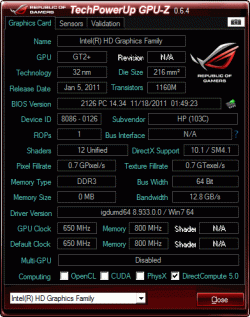
According to the HP hardware description of that machine, your video graphics are supposed to be true ATI/AMD HD: Video Graphics AMD Radeon HD 7670M (1 GB DDR3 dedicated). GPU-Z should show you all kinds of details that conforms to AMD Radeon HD graphics but it's not... it's showing you onboard Intel Graphics stuff.

According to what GPU-Z says you are running with onboard Intel HD Graphics Family (GT2+ GPU) with 0 memory, which is absolutely NOT AMD Radeon HD 7670M with 1GB memory as documented on the Dell site for that machine.

===> PHONE HP and get their support. Could be as simple as a BIOS setting to pick one graphics processor or the other, if there's really an HD7670M chip in that notebook.


HOWEVER... IT COULD ALSO BE JUST THE WRONG VIDEO DRIVER INSTALLED AND YOU SIMPLY NEED TO INSTALL THE PROPER DRIVER (probably after uninstalling the Intel HD graphcs driver first, but HP support could help you with that question)!! Or, the correct ATI driver may already be installed BUT YOU MUST SELECT THAT ATI HD7670M GRAPHICS FOR USE ON THE MACHINE (since it appears to be a dual-mode graphics machine, from what I can read about it).


NOTES:

(1) I'm puzzled. The BIN48EA model number leads to the g6-2020ee as you describe, but on this list of HP products for the g6 notebook family there is no such model as the g6-2020ee. Other models in the g6 family, but not 2020ee. Perhaps the 2020ee is unique to HP Australia. Don't know.

(2) Searching further, I found this post on an HP support forum, which describes EXACTLY THE SAME PROBLEM YOU'RE HAVING (also without having success finding the exact model number in the HP notebook product list):
I own the HP G6-2003eq and I am unable to find this model in the HP support/drivers page.

I want to install official AMD drivers for the graphics card because the games that I play are unable to identify and use the 7670m.

I am now running on the integrated hd3000 gpu and that does not suffice. The graphics driver is not available on the official AMD site either. Please respond to this request as I am sure I am not the only one in this situation.
(3) And the solution (which apparently worked and solved his problem) was to examine another "nearby" model in the g6 notebook family on the HP site, and notice that there are TWO DIFFERENT VIDEO GRAPHICS DRIVERS AVAILABLE. For example, looking up the g6-2010nr shows the following two drivers available, one for the ATI HD7670M and the other for the onboard Intel HD graphics:

hpvideodrivers.jpg


(4) Following the link to the ATI HD drivers reveals the following... that your machine apparently has DUAL-MODE GRAPHICS CONFIGURABLE (i.e. you can choose either low-power graphics from Intel or high-power graphics from ATI):

hpdualdrivers.jpg


(5) And the description of what that dual-mode driver consists of is as follows:

hpbothdrivers.jpg


Note that the version of the dual-driver which is currently included in this ATI/Intel driver package is 8.933.3.3000, and that THERE IS A FIX TO PROVIDE BOTH INTEL AND ATI GRAPHICS SUPPORT. Your GPU-Z screenshot shows a driver version 8.933.0.0, which obviously is older (and perhaps doesn't have the "fix" to truly support dual-mode switchable configurable Intel/ATI graphics).

===>> You may already have the proper dual-mode driver installed (or not). Read your user manual to see how to reconfigure your notebook to switch from (a) onboard low-power Intel graphics (say on battery), to (b) ATI HD7670M high-power ATI graphics (say when it's plugged in, perhaps also supporting HDMI output for digital audio and video).

It may be as simple as installing the dual-mode driver I'm pointing you to, or there may be more to the selection process in order to switch graphcs. But if your notebook DOES support dual-mode graphics (as it apparently does) READ YOUR MANUAL to learn how to configure for either mode.

I suspect that when you do get the proper dual-mode driver installed (if it's not already installed, so that you just need to learn how to select the HD7670M graphics), and you do select the ATI HD7670M graphics, that when you then run GPU-Z you will absolutely see it is the HD7670M graphics you are making use of.

This should get your engineering graphics to work properly.

Let us know how it works out.


(1) TRY UPDATING TO THE NEW, LATEST DUAL-MODE DRIVER FROM THAT LINK.

(2) READ THE MANUAL AND LEARN HOW TO SWITCH GRAPICS MODE, BETWEEN INTEL AND ATI.

 

My Computer

Computer type
PC/Desktop
Computer Manufacturer/Model Number
Home-built, two systems (1) and (2)
OS
Windows 7 Pro x64 (1), Win7 Pro X64 (2)
CPU
i5-3350p 3.1Ghz/6MB-cache (1); E8400 3.0Ghz/6MB-cache (2)
Motherboard
ASUS P8Z77-V Pro (1); ASUS P5Q3 (2)
Memory
8GB PC3-12800 DDR3 (1); 4GB PC3-10600 DDR3 (2)
Graphics Card(s)
ATI HD7750 (1), (see TV cards); ATI R7 250 (2)
Sound Card
Realtek ALC892 HD Audio (1); Realtek ALC1200 HD Audio (2)
Monitor(s) Displays
Eizo HD2441W LCD, Eizo S2433W (1); Eizo 24" S2433W (2)
Screen Resolution
1920x1200, 1920x1200 (1); 1920x1200 (2)
Hard Drives
(1) 1TB SATA-II (7200RPM), 2x2TB SATA-III (7200RPM), 250GB SATA-III (10000RPM) for OS; 2x2TB external USB 3.0

(2) 320GB SATA-II (7200RPM), 750GB SATA-II (7200RPM), 150GB SATA-II (10000RPM) for OS; 2TB external USB 3.0
PSU
Nesteq ECS-6001 600W (1); Nesteq ECS-5001 500W (2)
Case
Acousti-Case 360 (1) and (2)
Cooling
Noctua NH-U12P SE2 for CPU, 2x120mm case fans (1) and (2)
Keyboard
IBM PS/2 (1) and (2)
Mouse
Logitech MX Revolution wireless (1); Microsoft wired (2)
Internet Speed
100mbps down / 10mbps up
Antivirus
Microsoft Security Essentials; Malwarebyte Anti-Malware Pro
Browser
Firefox
Other Info
Ceton InfiniTV 4-tuner cablecard-enabled TV card as well as Hauppauge HVR-2250 OTA/ATSC 2-tuner TV card in (1), running under Win7 WMC
hey bro.... Gpu-z only show u your hardware info... It seems that your lappy supports switchable graphics... just right click on desktop click on switchable graphics... then browse the content for the application u r using.. then click on high performance mode.. the program will definitely use your graphics card....
Bst of luck..
 

My Computer

Computer Manufacturer/Model Number
Hp pavillion g6 2007tx
OS
Windows 7 ultimate x64
CPU
Intel i5 2nd gen
Motherboard
Dont know
Graphics Card(s)
Ati radeon 7670m 1gb ddr3
:D...And kindly please dont go for the drivers provided by hp as mentioned above.... It really sucks... I had a long time issue with the driver version 9.933.3.3000. Just download catalyst 12.8 WHQL from amd official site.... Trust me u will get benefit...
thank you
 

My Computer

Computer Manufacturer/Model Number
Hp pavillion g6 2007tx
OS
Windows 7 ultimate x64
CPU
Intel i5 2nd gen
Motherboard
Dont know
Graphics Card(s)
Ati radeon 7670m 1gb ddr3
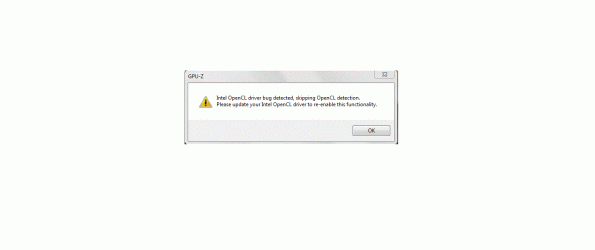
I forgot to include this. this dialog box appeared when opened GOU-Z.
what about it?

thnx
 

Attachments

  • warning.gif
    warning.gif
    20.4 KB · Views: 40

My Computer

OS
Home basic x64
Several things...

(1) Your current video driver level of 8.933.0.0 appears to be back-level. And that means both ATI and Intel graphics drivers (assuming both are installed with 8.933.0.0, by HP) are back-level. If GPU-Z is detecting some problem, that's interesting. It's obvious to me you need to update your clearly back-level video drivers.

Whether you use (a) the HP-recommended dual-driver 8.933.3.3000 download (to get "reasonably current" versions of both ATI Catalyst driver for the HD7670M as well the Intel HD Graphics driver) which has a date back in April 2012, or (b) the most current 12.8 ATI Catalyst driver which presumably should install ok for just the HD7670M and which would mean you would likely still want to download/install the "current" version of the Intel HD Graphics driver as well, one way or the other it appears your video drivers are out-of-date.

It's not clear if a driver for both the HD7670M as well as the Intel HD Graphics hardware are installed, but both back-level, or whether just the Intel driver is installed. Personally I would think BOTH are currently already installed (from HP), but you probably could stand to update them (as shown on the HP support site to get the latest version they provide).

Updating both drivers seems important, and would be helpful and useful no doubt. Personally, I'd probably first use the HP dual-driver download since that's still posted on the HP support site. Make sure things are stable. Then you could take a system image backup, and try further updating the HD7670M driver by itself even further through applying the latest 12.8 drivers from ATI (which may or may not work), and if it worked great but if not you could just restore the image backup from the prior stable environment.

(2) Your machine apparently has dual-graphics mode (which I've never come across myself, personally) and apparently you can enable it using the instructions provided in a post above:
It seems that your lappy supports switchable graphics... just right click on desktop click on switchable graphics... then browse the content for the application u r using.. then click on high performance mode..
It seems this is the method you should use to actually ENABLE use of the HD7670M. Have you tried doing this as recommended? What happens?

Is there actually a "switchable graphics" item that appears on the desktop right-click context menu? If you follow that item, what are you then presented with... perhaps a way to browse \Program Files for the applications which you want to enable "high performance mode" with? Sounds good to me.
 

My Computer

Computer type
PC/Desktop
Computer Manufacturer/Model Number
Home-built, two systems (1) and (2)
OS
Windows 7 Pro x64 (1), Win7 Pro X64 (2)
CPU
i5-3350p 3.1Ghz/6MB-cache (1); E8400 3.0Ghz/6MB-cache (2)
Motherboard
ASUS P8Z77-V Pro (1); ASUS P5Q3 (2)
Memory
8GB PC3-12800 DDR3 (1); 4GB PC3-10600 DDR3 (2)
Graphics Card(s)
ATI HD7750 (1), (see TV cards); ATI R7 250 (2)
Sound Card
Realtek ALC892 HD Audio (1); Realtek ALC1200 HD Audio (2)
Monitor(s) Displays
Eizo HD2441W LCD, Eizo S2433W (1); Eizo 24" S2433W (2)
Screen Resolution
1920x1200, 1920x1200 (1); 1920x1200 (2)
Hard Drives
(1) 1TB SATA-II (7200RPM), 2x2TB SATA-III (7200RPM), 250GB SATA-III (10000RPM) for OS; 2x2TB external USB 3.0

(2) 320GB SATA-II (7200RPM), 750GB SATA-II (7200RPM), 150GB SATA-II (10000RPM) for OS; 2TB external USB 3.0
PSU
Nesteq ECS-6001 600W (1); Nesteq ECS-5001 500W (2)
Case
Acousti-Case 360 (1) and (2)
Cooling
Noctua NH-U12P SE2 for CPU, 2x120mm case fans (1) and (2)
Keyboard
IBM PS/2 (1) and (2)
Mouse
Logitech MX Revolution wireless (1); Microsoft wired (2)
Internet Speed
100mbps down / 10mbps up
Antivirus
Microsoft Security Essentials; Malwarebyte Anti-Malware Pro
Browser
Firefox
Other Info
Ceton InfiniTV 4-tuner cablecard-enabled TV card as well as Hauppauge HVR-2250 OTA/ATSC 2-tuner TV card in (1), running under Win7 WMC
SOLVED
This method works.

"R.C on desktop ->Graphics properties-> switchable graphics-> ....etc". YES

thank you all

but I'm not sure about the drivers you mentioned many. After this what drivers should be installed/updated? I'd be grateful if you have links.
 

My Computer

OS
Home basic x64
SOLVED
This method works.
And what method was that? Right-click on the desktop, select "switchable graphics", and follow the wizard to enable "high performance" for specific programs? Or what?

And now what does GPU-Z show? Is there any mention of the HD7670M now, or is it still only showing the onboard Intel graphics hardware?


but I'm not sure about the drivers you mentioned many. After this what drivers should be installed/updated?
Your 8.933.0.0 is obviously not current. That's for absolute sure.

The HP support site provides a link to download 8.933.3.3000, with a dual-driver package that provides updated drivers for both your HD7670M as well as for your Intel graphics. That's why you normally go to the manufacturer's site and see what they recommend as the "latest drivers" for the various hardware components on the particular machine they built and that you bought. Same with updating drivers for network adapter, audio, etc.

Now, might you get "more current" drivers from say the ATI/AMD site (e.g. current Catalyst drivers are recently released 12.8) and would it support the HD7670M in your machine? I don't know. You could try it, but if the hardware is "unique" then the general 12.8 drivers may not install. You could try it, but just be aware that it may or may not work. I'd certainly trust the HP-provided "latest driver" 8.933.3.3000 package to work, and improve your existing 8.933.0.0 situation (even though since it's from April it is obviously not going to be the latest general 12.8 version from ATI/AMD).

In the end, it's up to you. Just take a precautionary "system image" backup before you begin applying significant driver updates, just to give you an "instant recovery" method (i.e. restore system image) in case something goes awry.


But as to the subject of this thread, are you saying you now have absolute proof-positive that you ARE making use of the HD7670M for your engineering application? How do you know for sure?
 

My Computer

Computer type
PC/Desktop
Computer Manufacturer/Model Number
Home-built, two systems (1) and (2)
OS
Windows 7 Pro x64 (1), Win7 Pro X64 (2)
CPU
i5-3350p 3.1Ghz/6MB-cache (1); E8400 3.0Ghz/6MB-cache (2)
Motherboard
ASUS P8Z77-V Pro (1); ASUS P5Q3 (2)
Memory
8GB PC3-12800 DDR3 (1); 4GB PC3-10600 DDR3 (2)
Graphics Card(s)
ATI HD7750 (1), (see TV cards); ATI R7 250 (2)
Sound Card
Realtek ALC892 HD Audio (1); Realtek ALC1200 HD Audio (2)
Monitor(s) Displays
Eizo HD2441W LCD, Eizo S2433W (1); Eizo 24" S2433W (2)
Screen Resolution
1920x1200, 1920x1200 (1); 1920x1200 (2)
Hard Drives
(1) 1TB SATA-II (7200RPM), 2x2TB SATA-III (7200RPM), 250GB SATA-III (10000RPM) for OS; 2x2TB external USB 3.0

(2) 320GB SATA-II (7200RPM), 750GB SATA-II (7200RPM), 150GB SATA-II (10000RPM) for OS; 2TB external USB 3.0
PSU
Nesteq ECS-6001 600W (1); Nesteq ECS-5001 500W (2)
Case
Acousti-Case 360 (1) and (2)
Cooling
Noctua NH-U12P SE2 for CPU, 2x120mm case fans (1) and (2)
Keyboard
IBM PS/2 (1) and (2)
Mouse
Logitech MX Revolution wireless (1); Microsoft wired (2)
Internet Speed
100mbps down / 10mbps up
Antivirus
Microsoft Security Essentials; Malwarebyte Anti-Malware Pro
Browser
Firefox
Other Info
Ceton InfiniTV 4-tuner cablecard-enabled TV card as well as Hauppauge HVR-2250 OTA/ATSC 2-tuner TV card in (1), running under Win7 WMC
I told u.. I have ati 7670m... Pls donot install the driver version 9.933.3.0000. This is totally an insane driver.. I had tried it & suffered a lot.. My system rating was decreased by .3 after updating it.. I dont want anyone to be suffered like me.. Trust me.. I am again saying that DOWNLOAD CATALYST 12.8 WHQl.. It will bet sure work on your display adapter.. Just google it.. There are many links for this download.. Otherwise i will post a link 2maro..
 

My Computer

Computer Manufacturer/Model Number
Hp pavillion g6 2007tx
OS
Windows 7 ultimate x64
CPU
Intel i5 2nd gen
Motherboard
Dont know
Graphics Card(s)
Ati radeon 7670m 1gb ddr3
I've mentioned it above. "Right click on desktop ->Graphics properties-> switchable graphics-> (from browse choose the program you want to configure)->high performance".
YES.This is the method that worked.


-->regarding the GPU-Z nothing is different. It still not responding for radeon.

-->I KNOW it works coz I see the 3D graphics now by my own eyes.Besides you select this option "switchable graphics.. etc" from the AMD Radeon window.

thank you

sid92
We are waiting your post.
 

My Computer

OS
Home basic x64
Back
Top