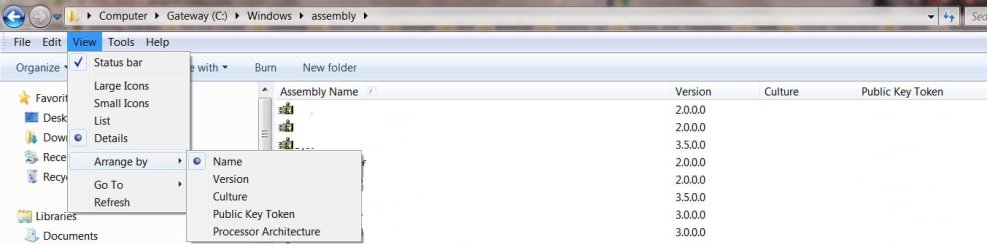
Where is the option to sort by Public Key Token?

Hi xBashy, welcome to 7F! :)

2 - Go to C:\Windows\assembly and sort by "Public Key Token". Locate the following Public Key Token "90ba9c70f846762e" Usually there are only two entries. However, there can be many just be careful here we are only deleting/uninstalling entries tagged with the "90ba9c70f846762e" token. (if deletion will not work right click and uninstall)
When Maguscreed states:
Go to C:\Windows\assembly and sort by "Public Key Token".
I believe he means to go to >View >Arrange By >and then select or click on Public Token.
This will arrange that column in alpha-numeric order so it would be easier to find "90ba9c70f846762e"

Public token.jpg
 
Last edited:

My Computer My Computer

Computer type
PC/Desktop
Computer Manufacturer/Model Number
Gateway DX4831-01e (Mid-Tower Desktop)
OS
Originally Win 7 Hm Prem x64 Ver 6.1.7600 Build 7601-SP1 | Upgraded to Windows 10 December 14, 2019
CPU
Intel i3 530 2.93GHz, 2933MHz 2 Cores 4 Logical Processors
Motherboard
Gateway H57M01 133 megahertz
Memory
6GB of 1,333MHz DDR3 SDRAM
Graphics Card(s)
32MB Intel Graphics Media Accelerator HD IGChip
Sound Card
Realtek High Definition Audio
Monitor(s) Displays
Gateway HX2000 20inch TFT active matrix TN
Screen Resolution
1600 x 900 x 59 hertz
Hard Drives
WDC WD10EADS-00M2B0 [HDD] (1000.20 GB) -- drive 0,
HL-DT-ST DVDRAM GH41N [CD-ROM dr]
Four card readers, and Four USB 2.0
PSU
300watts.
Case
Mid-Tower Desktop
Cooling
Stock from Gateway
Keyboard
Natural Ergonomic Keyboard 4000, see Other Info
Mouse
Orig. Gateway wore out now using Insignia USB wired optical
Internet Speed
Vz FIOS 10ms png 57.64Mbps down 65.53Mbps up Speedtest.org
Antivirus
Zamana Anti-logger with Anti-malware, MSE, Windows Firewall,
Browser
IE11.0.9600.19399-Upd ver11.0.135, Firefox 68.0.1 x64
Other Info
System Specs by Belarc.

BIOS: American Megatrends Inc. P01-A0 11/17/2009

Replaced the MS 'Natural' Standard PS/2 Enhanced 101-102 Keyboard with a new Natural Ergonomic Keyboard 4000 on August 1st 2014.

Canon Pixma MG3222 Printer.

Updated to IE11 on 12102015 | Fios Quantum Router g1100

Additional AV: SpywareBlaster, manual Mbam, SAS
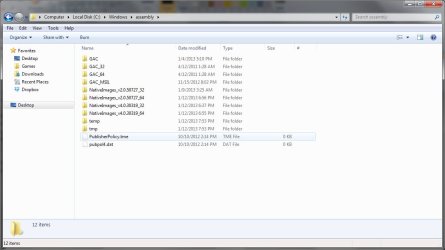
I don't have the "Arrange by" option under View. There are "Sort by" and "Group by" and neither of those have the "Public Key Token" option within them. In fact, I don't even see the assemblies within that directory. Any help? :/
 

Attachments

  • arrange_by.jpg
    arrange_by.jpg
    57.6 KB · Views: 49
Last edited:

My Computer My Computer

OS
Windows 7 64
I am not sure why your assembly folder looks different from mine. Could you fill out your system specs please?

Especially, be specific about your version of Windows 7;

i.e. Is it?

  • Windows 7 Enterprise?
  • Windows 7 Home Basic?
  • Windows 7 Home Premium?
  • Windows 7 Professional?
  • Windows 7 Starter?
  • Windows 7 Ultimate?
  • You already specified x64


I have asked for more experienced help so hang in there.
 
Last edited:

My Computer My Computer

Computer type
PC/Desktop
Computer Manufacturer/Model Number
Gateway DX4831-01e (Mid-Tower Desktop)
OS
Originally Win 7 Hm Prem x64 Ver 6.1.7600 Build 7601-SP1 | Upgraded to Windows 10 December 14, 2019
CPU
Intel i3 530 2.93GHz, 2933MHz 2 Cores 4 Logical Processors
Motherboard
Gateway H57M01 133 megahertz
Memory
6GB of 1,333MHz DDR3 SDRAM
Graphics Card(s)
32MB Intel Graphics Media Accelerator HD IGChip
Sound Card
Realtek High Definition Audio
Monitor(s) Displays
Gateway HX2000 20inch TFT active matrix TN
Screen Resolution
1600 x 900 x 59 hertz
Hard Drives
WDC WD10EADS-00M2B0 [HDD] (1000.20 GB) -- drive 0,
HL-DT-ST DVDRAM GH41N [CD-ROM dr]
Four card readers, and Four USB 2.0
PSU
300watts.
Case
Mid-Tower Desktop
Cooling
Stock from Gateway
Keyboard
Natural Ergonomic Keyboard 4000, see Other Info
Mouse
Orig. Gateway wore out now using Insignia USB wired optical
Internet Speed
Vz FIOS 10ms png 57.64Mbps down 65.53Mbps up Speedtest.org
Antivirus
Zamana Anti-logger with Anti-malware, MSE, Windows Firewall,
Browser
IE11.0.9600.19399-Upd ver11.0.135, Firefox 68.0.1 x64
Other Info
System Specs by Belarc.

BIOS: American Megatrends Inc. P01-A0 11/17/2009

Replaced the MS 'Natural' Standard PS/2 Enhanced 101-102 Keyboard with a new Natural Ergonomic Keyboard 4000 on August 1st 2014.

Canon Pixma MG3222 Printer.

Updated to IE11 on 12102015 | Fios Quantum Router g1100

Additional AV: SpywareBlaster, manual Mbam, SAS
The member that I asked for help, also, does not know why your assembly folder looks different.
It could be because you may have been experimenting with changing your Themes

Have you been having any other problems with your Operating System (OS)?
The assembly folder can become corrupted so to speak if repeated attempts are made to install programs, and this can cause problems later on because of duplication.

At this point you could try running http://www.sevenforums.com/tutorials/1538-sfc-scannow-command-system-file-checker.html If you have been working with Themes be sure to read the Warning box in the beginning. If SFC does find anything that it cannot fix read the Note box after Option Two.
 

My Computer My Computer

Computer type
PC/Desktop
Computer Manufacturer/Model Number
Gateway DX4831-01e (Mid-Tower Desktop)
OS
Originally Win 7 Hm Prem x64 Ver 6.1.7600 Build 7601-SP1 | Upgraded to Windows 10 December 14, 2019
CPU
Intel i3 530 2.93GHz, 2933MHz 2 Cores 4 Logical Processors
Motherboard
Gateway H57M01 133 megahertz
Memory
6GB of 1,333MHz DDR3 SDRAM
Graphics Card(s)
32MB Intel Graphics Media Accelerator HD IGChip
Sound Card
Realtek High Definition Audio
Monitor(s) Displays
Gateway HX2000 20inch TFT active matrix TN
Screen Resolution
1600 x 900 x 59 hertz
Hard Drives
WDC WD10EADS-00M2B0 [HDD] (1000.20 GB) -- drive 0,
HL-DT-ST DVDRAM GH41N [CD-ROM dr]
Four card readers, and Four USB 2.0
PSU
300watts.
Case
Mid-Tower Desktop
Cooling
Stock from Gateway
Keyboard
Natural Ergonomic Keyboard 4000, see Other Info
Mouse
Orig. Gateway wore out now using Insignia USB wired optical
Internet Speed
Vz FIOS 10ms png 57.64Mbps down 65.53Mbps up Speedtest.org
Antivirus
Zamana Anti-logger with Anti-malware, MSE, Windows Firewall,
Browser
IE11.0.9600.19399-Upd ver11.0.135, Firefox 68.0.1 x64
Other Info
System Specs by Belarc.

BIOS: American Megatrends Inc. P01-A0 11/17/2009

Replaced the MS 'Natural' Standard PS/2 Enhanced 101-102 Keyboard with a new Natural Ergonomic Keyboard 4000 on August 1st 2014.

Canon Pixma MG3222 Printer.

Updated to IE11 on 12102015 | Fios Quantum Router g1100

Additional AV: SpywareBlaster, manual Mbam, SAS
What Anak is seeing in the assembly folder is an aggregate view of different folders. You can open up the command prompt and navigate to C:/Windows/assembly and see the same folder structure exists that xBashy is seeing. A shell namespace extension is used to achieve the aggregate view, and I do not know how to enable that. (Source)

However, I was having the same problem as xBashy above, so I followed the steps to fix the Catalyst Control Center, and when it was time to remove the assemblies, I searched the assembly folder for the Public Token Key "90ba9c70f846762e" and deleted any folders this search returned. This method was successful for me, and I now have a working CCC.
 

My Computer My Computer

Computer type
PC/Desktop
Computer Manufacturer/Model Number
Dell Studio XPS
OS
Wimdows 7 Professional x64
CPU
Intel Core i7 Q 720 @ 1.60 GHz
Memory
6GB RAM
Graphics Card(s)
ATI Mobility Radeon HD 4670
What Anak is seeing in the assembly folder is an aggregate view of different folders. You can open up the command prompt and navigate to C:/Windows/assembly and see the same folder structure exists that xBashy is seeing. A shell namespace extension is used to achieve the aggregate view, and I do not know how to enable that. (Source)

However, I was having the same problem as xBashy above, so I followed the steps to fix the Catalyst Control Center, and when it was time to remove the assemblies, I searched the assembly folder for the Public Token Key "90ba9c70f846762e" and deleted any folders this search returned. This method was successful for me, and I now have a working CCC.

I am having the same problem with CCC, and I'm also getting stuck at this point of the fix.

My C://Windows/assembly/ folder looks like this:

2GprPMO.png


And therefore I am unable to 'sort by Public key token', And I am unsure how to search the folder for files that have the Public Key Token "90ba9c70f846762e"

Help? :)
 

My Computer My Computer

Computer type
PC/Desktop
Computer Manufacturer/Model Number
Apple
OS
Windows 7 Ultimate x64 (Bootcamp)
CPU
Intel i5 2.5Ghz
Memory
8GB
Graphics Card(s)
AMD Radeon HD 6750M graphics processor with 512MB of GDDR5 m
Hard Drives
500GB HDD
Antivirus
AVG
Browser
Chrome
Search is in the top right of your screen, where it says "Search assembly".
 

My Computer My Computer

Computer type
PC/Desktop
Computer Manufacturer/Model Number
Dell Studio XPS
OS
Wimdows 7 Professional x64
CPU
Intel Core i7 Q 720 @ 1.60 GHz
Memory
6GB RAM
Graphics Card(s)
ATI Mobility Radeon HD 4670
Back
Top