GTX 660 not recognized in x16 only in x8 slot

RaviR

New member
Member
VIP
Local time
5:39 PM
Messages
229
Location
Trinidad
Hey guys,

Recently bought this card from BestBuy to be installed on my current mobo. When the card is placed in the top x16 slot it is not being recognized and i'm not getting any display. When placed in the slot below it works but i'm seeing it as only x8. I checked and my current BIOS is the latest that is on the Asus website.

Can anyone help me fix this or is it a problem with the card itself?

Regards
 

Attachments
  • inslot 1.JPG
    inslot 1.JPG
    58.7 KB · Views: 18
  • in slot2.JPG
    in slot2.JPG
    50.5 KB · Views: 13
  • in slot1.JPG
    in slot1.JPG
    55.2 KB · Views: 12
  • In slot 2.png
    In slot 2.png
    25.4 KB · Views: 30
  • In slot 1.png
    In slot 1.png
    27.9 KB · Views: 26

My Computer My Computer

At a glance

Microsoft Windows 7 Ultimate 64-bit 7601 Mult...Intel(R) Core(TM) i5-3570K CPU @ 3.40GHz8.00 GBNVIDIA GeForce GTX 660
Computer type
PC/Desktop
Computer Manufacturer/Model Number
Custom Build
OS
Microsoft Windows 7 Ultimate 64-bit 7601 Multiprocessor Free Service Pack 1
CPU
Intel(R) Core(TM) i5-3570K CPU @ 3.40GHz
Motherboard
ASUSTeK COMPUTER INC. P8Z77-V
Memory
8.00 GB
Graphics Card(s)
NVIDIA GeForce GTX 660
Sound Card
(1) USB Audio Device (2) High Definition Audio Device (3
Screen Resolution
1360 x 768 x 32 bits (4294967296 colors) @ 60 Hz
Hard Drives
(1) M4-CT128M4SSD2 ATA Device (2) WDC WD1002FAEX-00Z3A0 ATA Device (3) WDC WD10EZEX-22BN5A0 ATA Device
PSU
Corsair Enthusiast Series TX650M
Case
NZXT Phantom 410
Cooling
Cooler Master Hyper 212 EVO
Keyboard
Logitech HID-Compliant Keyboard
Mouse
Logitech HID-compliant MX320 Laser Mouse
Ravir, I followed your thread over. Did you try Britton30's advice to update the bios yet. I think you should disable the IGPU, update your Bios and try it in the first slot again.
 

My Computer My Computer

At a glance

Windows 10 Pro X64Intel(R) Core(TM) i5-3570K CPU OC@ 4.5GHZ Turbo8.00 GB DDR3 1600MhzMSI Gaming X GTX 1070
Computer type
PC/Desktop
Computer Manufacturer/Model Number
Dude Build
OS
Windows 10 Pro X64
CPU
Intel(R) Core(TM) i5-3570K CPU OC@ 4.5GHZ Turbo
Motherboard
MSI Z77A-G45 Gaming
Memory
8.00 GB DDR3 1600Mhz
Graphics Card(s)
MSI Gaming X GTX 1070
Sound Card
Realtek High Definition
Monitor(s) Displays
Dell S23O9W, HP L1710
Screen Resolution
DELL-1920 x 1080 HP-1280 x1024
Hard Drives
Crucial m4 256 SSD, WD 7200RPM 500GB WD 1TB
PSU
Seasonic X650 GOLD
Case
Zalman Z12
Cooling
Antec Kuhler 920
Keyboard
Logitech
Mouse
MSI DS100 Interceptor
Internet Speed
50 down and 5 up
Antivirus
MSE
Browser
Chrome, IE 11
Other Info
Logitech X-620 Speakers
Ok, downloading the BIOS update now and checking. Will post back in a few.
 

My Computer My Computer

At a glance

Microsoft Windows 7 Ultimate 64-bit 7601 Mult...Intel(R) Core(TM) i5-3570K CPU @ 3.40GHz8.00 GBNVIDIA GeForce GTX 660
Computer type
PC/Desktop
Computer Manufacturer/Model Number
Custom Build
OS
Microsoft Windows 7 Ultimate 64-bit 7601 Multiprocessor Free Service Pack 1
CPU
Intel(R) Core(TM) i5-3570K CPU @ 3.40GHz
Motherboard
ASUSTeK COMPUTER INC. P8Z77-V
Memory
8.00 GB
Graphics Card(s)
NVIDIA GeForce GTX 660
Sound Card
(1) USB Audio Device (2) High Definition Audio Device (3
Screen Resolution
1360 x 768 x 32 bits (4294967296 colors) @ 60 Hz
Hard Drives
(1) M4-CT128M4SSD2 ATA Device (2) WDC WD1002FAEX-00Z3A0 ATA Device (3) WDC WD10EZEX-22BN5A0 ATA Device
PSU
Corsair Enthusiast Series TX650M
Case
NZXT Phantom 410
Cooling
Cooler Master Hyper 212 EVO
Keyboard
Logitech HID-Compliant Keyboard
Mouse
Logitech HID-compliant MX320 Laser Mouse
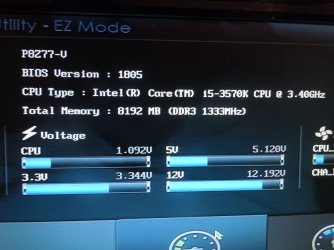
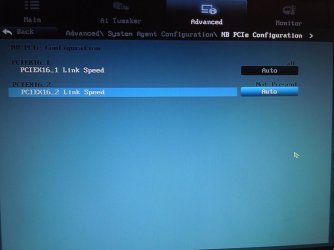
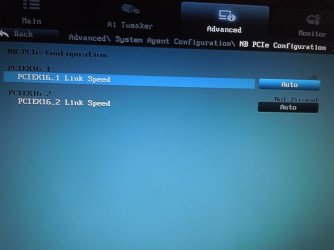
Ok so I installed the latest BIOS listed from the website, changed the settings and placed the card in the 1st slot..same result. I'm seeing it as x0 don't know what that means.
 

Attachments

  • DSCN2715.JPG
    DSCN2715.JPG
    78.2 KB · Views: 9
  • DSCN2716.JPG
    DSCN2716.JPG
    57.3 KB · Views: 9
  • DSCN2717.JPG
    DSCN2717.JPG
    57.6 KB · Views: 9
  • Untitled.png
    Untitled.png
    19.5 KB · Views: 25

My Computer My Computer

At a glance

Microsoft Windows 7 Ultimate 64-bit 7601 Mult...Intel(R) Core(TM) i5-3570K CPU @ 3.40GHz8.00 GBNVIDIA GeForce GTX 660
Computer type
PC/Desktop
Computer Manufacturer/Model Number
Custom Build
OS
Microsoft Windows 7 Ultimate 64-bit 7601 Multiprocessor Free Service Pack 1
CPU
Intel(R) Core(TM) i5-3570K CPU @ 3.40GHz
Motherboard
ASUSTeK COMPUTER INC. P8Z77-V
Memory
8.00 GB
Graphics Card(s)
NVIDIA GeForce GTX 660
Sound Card
(1) USB Audio Device (2) High Definition Audio Device (3
Screen Resolution
1360 x 768 x 32 bits (4294967296 colors) @ 60 Hz
Hard Drives
(1) M4-CT128M4SSD2 ATA Device (2) WDC WD1002FAEX-00Z3A0 ATA Device (3) WDC WD10EZEX-22BN5A0 ATA Device
PSU
Corsair Enthusiast Series TX650M
Case
NZXT Phantom 410
Cooling
Cooler Master Hyper 212 EVO
Keyboard
Logitech HID-Compliant Keyboard
Mouse
Logitech HID-compliant MX320 Laser Mouse
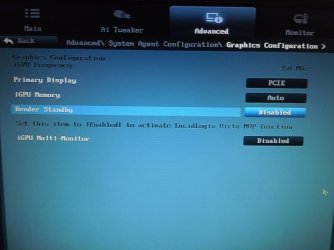
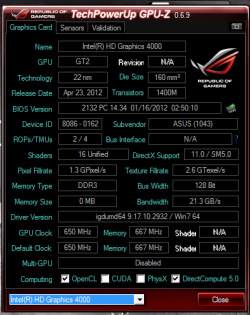
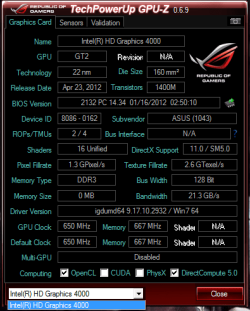
Do you have another rig you can check the card in? Your gpuz is still looking at the integrated not the 660
 

My Computer My Computer

At a glance

Windows 10 Pro X64Intel(R) Core(TM) i5-3570K CPU OC@ 4.5GHZ Turbo8.00 GB DDR3 1600MhzMSI Gaming X GTX 1070
Computer type
PC/Desktop
Computer Manufacturer/Model Number
Dude Build
OS
Windows 10 Pro X64
CPU
Intel(R) Core(TM) i5-3570K CPU OC@ 4.5GHZ Turbo
Motherboard
MSI Z77A-G45 Gaming
Memory
8.00 GB DDR3 1600Mhz
Graphics Card(s)
MSI Gaming X GTX 1070
Sound Card
Realtek High Definition
Monitor(s) Displays
Dell S23O9W, HP L1710
Screen Resolution
DELL-1920 x 1080 HP-1280 x1024
Hard Drives
Crucial m4 256 SSD, WD 7200RPM 500GB WD 1TB
PSU
Seasonic X650 GOLD
Case
Zalman Z12
Cooling
Antec Kuhler 920
Keyboard
Logitech
Mouse
MSI DS100 Interceptor
Internet Speed
50 down and 5 up
Antivirus
MSE
Browser
Chrome, IE 11
Other Info
Logitech X-620 Speakers
I do not =(

Question, what would be the difference if the card is running in the 2nd slot as to the first? Would it affect game performance etc?
 

My Computer My Computer

At a glance

Microsoft Windows 7 Ultimate 64-bit 7601 Mult...Intel(R) Core(TM) i5-3570K CPU @ 3.40GHz8.00 GBNVIDIA GeForce GTX 660
Computer type
PC/Desktop
Computer Manufacturer/Model Number
Custom Build
OS
Microsoft Windows 7 Ultimate 64-bit 7601 Multiprocessor Free Service Pack 1
CPU
Intel(R) Core(TM) i5-3570K CPU @ 3.40GHz
Motherboard
ASUSTeK COMPUTER INC. P8Z77-V
Memory
8.00 GB
Graphics Card(s)
NVIDIA GeForce GTX 660
Sound Card
(1) USB Audio Device (2) High Definition Audio Device (3
Screen Resolution
1360 x 768 x 32 bits (4294967296 colors) @ 60 Hz
Hard Drives
(1) M4-CT128M4SSD2 ATA Device (2) WDC WD1002FAEX-00Z3A0 ATA Device (3) WDC WD10EZEX-22BN5A0 ATA Device
PSU
Corsair Enthusiast Series TX650M
Case
NZXT Phantom 410
Cooling
Cooler Master Hyper 212 EVO
Keyboard
Logitech HID-Compliant Keyboard
Mouse
Logitech HID-compliant MX320 Laser Mouse
I edited my post change gpuz to the 660
 

My Computer My Computer

At a glance

Windows 10 Pro X64Intel(R) Core(TM) i5-3570K CPU OC@ 4.5GHZ Turbo8.00 GB DDR3 1600MhzMSI Gaming X GTX 1070
Computer type
PC/Desktop
Computer Manufacturer/Model Number
Dude Build
OS
Windows 10 Pro X64
CPU
Intel(R) Core(TM) i5-3570K CPU OC@ 4.5GHZ Turbo
Motherboard
MSI Z77A-G45 Gaming
Memory
8.00 GB DDR3 1600Mhz
Graphics Card(s)
MSI Gaming X GTX 1070
Sound Card
Realtek High Definition
Monitor(s) Displays
Dell S23O9W, HP L1710
Screen Resolution
DELL-1920 x 1080 HP-1280 x1024
Hard Drives
Crucial m4 256 SSD, WD 7200RPM 500GB WD 1TB
PSU
Seasonic X650 GOLD
Case
Zalman Z12
Cooling
Antec Kuhler 920
Keyboard
Logitech
Mouse
MSI DS100 Interceptor
Internet Speed
50 down and 5 up
Antivirus
MSE
Browser
Chrome, IE 11
Other Info
Logitech X-620 Speakers
Have you tried disabling intel graphics in the bios then rebooting and see if it recognized it then?
 

My Computer My Computer

At a glance

Windows 10 64bitAMD Phenom II X4 925 (Deneb)(2.8GHz) OC 3.4GHzCorsair Vengeance DDR3 4GBX2 (8192MB)XFX HD 6870 1GB (OC)- 940MHz core, mem 1150MHz
Computer type
PC/Desktop
Computer Manufacturer/Model Number
custom build
OS
Windows 10 64bit
CPU
AMD Phenom II X4 925 (Deneb)(2.8GHz) OC 3.4GHz
Motherboard
M5A78L-MLX Plus
Memory
Corsair Vengeance DDR3 4GBX2 (8192MB)
Graphics Card(s)
XFX HD 6870 1GB (OC)- 940MHz core, mem 1150MHz
Monitor(s) Displays
Vizio 26' 1920x1080 / Acer 1336x768
Screen Resolution
1920x1080 60Hz /1336x768
Hard Drives
Kingston Digital 60GB SSDNow V300/500gb HDD Western Digital 7200rpm (/WD 160GB HDD 7200rpm
PSU
CORSAIR CX600 600w
Case
AZZA Orion 202 EVO
Cooling
cooler master hyper TX3 cpu cooler
Keyboard
Razer DeathStalker
Mouse
Logitech Optical Gaming Mouse G400
Antivirus
Defualt on win 10
Browser
Firefox
Other Info
cpu is overclocked in bios
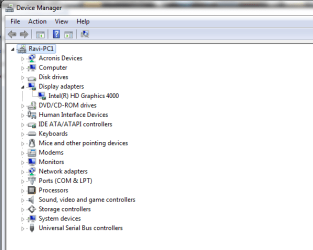
It is not showing up in gpuz or device manager.
 

Attachments

  • Untitled.png
    Untitled.png
    16.4 KB · Views: 19
  • Untitaled.png
    Untitaled.png
    20.1 KB · Views: 20

My Computer My Computer

At a glance

Microsoft Windows 7 Ultimate 64-bit 7601 Mult...Intel(R) Core(TM) i5-3570K CPU @ 3.40GHz8.00 GBNVIDIA GeForce GTX 660
Computer type
PC/Desktop
Computer Manufacturer/Model Number
Custom Build
OS
Microsoft Windows 7 Ultimate 64-bit 7601 Multiprocessor Free Service Pack 1
CPU
Intel(R) Core(TM) i5-3570K CPU @ 3.40GHz
Motherboard
ASUSTeK COMPUTER INC. P8Z77-V
Memory
8.00 GB
Graphics Card(s)
NVIDIA GeForce GTX 660
Sound Card
(1) USB Audio Device (2) High Definition Audio Device (3
Screen Resolution
1360 x 768 x 32 bits (4294967296 colors) @ 60 Hz
Hard Drives
(1) M4-CT128M4SSD2 ATA Device (2) WDC WD1002FAEX-00Z3A0 ATA Device (3) WDC WD10EZEX-22BN5A0 ATA Device
PSU
Corsair Enthusiast Series TX650M
Case
NZXT Phantom 410
Cooling
Cooler Master Hyper 212 EVO
Keyboard
Logitech HID-Compliant Keyboard
Mouse
Logitech HID-compliant MX320 Laser Mouse
Have you tried disabling intel graphics in the bios then rebooting and see if it recognized it then?

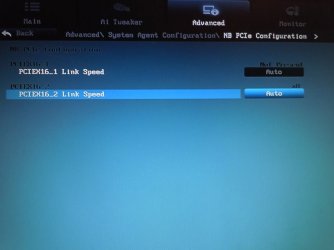
Um not sure if i already did that from the 1st screen shot?
 

My Computer My Computer

At a glance

Microsoft Windows 7 Ultimate 64-bit 7601 Mult...Intel(R) Core(TM) i5-3570K CPU @ 3.40GHz8.00 GBNVIDIA GeForce GTX 660
Computer type
PC/Desktop
Computer Manufacturer/Model Number
Custom Build
OS
Microsoft Windows 7 Ultimate 64-bit 7601 Multiprocessor Free Service Pack 1
CPU
Intel(R) Core(TM) i5-3570K CPU @ 3.40GHz
Motherboard
ASUSTeK COMPUTER INC. P8Z77-V
Memory
8.00 GB
Graphics Card(s)
NVIDIA GeForce GTX 660
Sound Card
(1) USB Audio Device (2) High Definition Audio Device (3
Screen Resolution
1360 x 768 x 32 bits (4294967296 colors) @ 60 Hz
Hard Drives
(1) M4-CT128M4SSD2 ATA Device (2) WDC WD1002FAEX-00Z3A0 ATA Device (3) WDC WD10EZEX-22BN5A0 ATA Device
PSU
Corsair Enthusiast Series TX650M
Case
NZXT Phantom 410
Cooling
Cooler Master Hyper 212 EVO
Keyboard
Logitech HID-Compliant Keyboard
Mouse
Logitech HID-compliant MX320 Laser Mouse
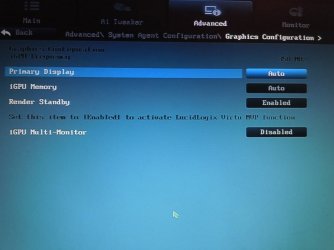
On your first screen shot change primary display from auto and see if you can select peg
 

My Computer My Computer

At a glance

Windows 10 Pro X64Intel(R) Core(TM) i5-3570K CPU OC@ 4.5GHZ Turbo8.00 GB DDR3 1600MhzMSI Gaming X GTX 1070
Computer type
PC/Desktop
Computer Manufacturer/Model Number
Dude Build
OS
Windows 10 Pro X64
CPU
Intel(R) Core(TM) i5-3570K CPU OC@ 4.5GHZ Turbo
Motherboard
MSI Z77A-G45 Gaming
Memory
8.00 GB DDR3 1600Mhz
Graphics Card(s)
MSI Gaming X GTX 1070
Sound Card
Realtek High Definition
Monitor(s) Displays
Dell S23O9W, HP L1710
Screen Resolution
DELL-1920 x 1080 HP-1280 x1024
Hard Drives
Crucial m4 256 SSD, WD 7200RPM 500GB WD 1TB
PSU
Seasonic X650 GOLD
Case
Zalman Z12
Cooling
Antec Kuhler 920
Keyboard
Logitech
Mouse
MSI DS100 Interceptor
Internet Speed
50 down and 5 up
Antivirus
MSE
Browser
Chrome, IE 11
Other Info
Logitech X-620 Speakers
I agree with Dude that testing it in another rig would be ideal. from searching around, the slot is 16x/0x so it is showing up as 0x because it is not recognizing the card in 16x. (I think)

one that is looking at the same mobo/gpu combo: P8Z7-M Pro Detects graphics card as PCIE 0x - Asus - Motherboards

[SOLVED] PCI Express Slot, Dead? - Tech Support Forum

From other forums, people have said that 8x would be fine because you won't go over that bandwidth Any difference for GTX 670 SLI in PCIe 16/16 vs PCIe 16/8 ? - AnandTech Forums

but I'm not sure given this: nVidia GeForce GTX 660 Video Card - Reviews, Specifications, and Pictures - GPUReview.com


corrections: here is bandwidth chart: http://www.directron.com/expressguide.html

Maybe someone else on here can test their 660 in the 8x and see what it benches? :rolleyes:
 

My Computer My Computer

At a glance

Win7 Home Premium 64xIntel Core 2 Duo P7450 / 2.13 GHz (2.29 with ...4 GB PC-6400 Hyundai (2X2) at 800MhzNVIDIA GeForce GTX 260M 1GB DDR3 VRAM
Computer type
Laptop
Computer Manufacturer/Model Number
ASUS G60-RBBX05
OS
Win7 Home Premium 64x
CPU
Intel Core 2 Duo P7450 / 2.13 GHz (2.29 with Extreme Turbo)
Memory
4 GB PC-6400 Hyundai (2X2) at 800Mhz
Graphics Card(s)
NVIDIA GeForce GTX 260M 1GB DDR3 VRAM
Monitor(s) Displays
16" LED Backlit
Screen Resolution
1366 x 768 on laptop 1600x1050 max res on 22" external mon
Hard Drives
OCZ Agility 3 60GB SSD / 320 GB - Serial ATA-150 - 7200 rpm
PSU
6-cell Lithium ion { lasts 1.5 hours }
Case
ASUS G60 Laptop
Keyboard
Chicklet type back-lit (white light) keyboard
Mouse
Logitech G9 Laser Mouse 3200dpi and 1000 reports per minute
Internet Speed
Comcast 8.60mb/s up - 3.11mb/s down
Antivirus
MSE
Browser
Firefox
Other Info
General mid-budget gaming Comp. Low batterylife - High FrameRates - currently overheating problems :(

2nd Rig: Case: Rosewill BLACKHAWK Gaming ATX Mid Tower Computer Case

Mobo: GIGABYTE GA-990FXA-UD3
CPU: AMD FX-6200 Zambezi 3.8GHz (4.1GHz Turbo)
Heatsink: COOLER MASTER V8 CPU Cooler
RAM: Patriot Viper 3 8GB (2 x 4GB) 240-Pin DDR3 SDRAM 1866 (PC3 15000)
GPU: SAPPHIRE Radeon HD 6850 1GB 2
On your first screen shot change primary display from auto and see if you can select peg

Did that, it just switched back to auto on restart still no display.

I'm guessing that my bandwidth on the card sucks? lol


Am I looking at a faulty card? As I live outside America I think getting it fixed is gonna suck =(
 

My Computer My Computer

At a glance

Microsoft Windows 7 Ultimate 64-bit 7601 Mult...Intel(R) Core(TM) i5-3570K CPU @ 3.40GHz8.00 GBNVIDIA GeForce GTX 660
Computer type
PC/Desktop
Computer Manufacturer/Model Number
Custom Build
OS
Microsoft Windows 7 Ultimate 64-bit 7601 Multiprocessor Free Service Pack 1
CPU
Intel(R) Core(TM) i5-3570K CPU @ 3.40GHz
Motherboard
ASUSTeK COMPUTER INC. P8Z77-V
Memory
8.00 GB
Graphics Card(s)
NVIDIA GeForce GTX 660
Sound Card
(1) USB Audio Device (2) High Definition Audio Device (3
Screen Resolution
1360 x 768 x 32 bits (4294967296 colors) @ 60 Hz
Hard Drives
(1) M4-CT128M4SSD2 ATA Device (2) WDC WD1002FAEX-00Z3A0 ATA Device (3) WDC WD10EZEX-22BN5A0 ATA Device
PSU
Corsair Enthusiast Series TX650M
Case
NZXT Phantom 410
Cooling
Cooler Master Hyper 212 EVO
Keyboard
Logitech HID-Compliant Keyboard
Mouse
Logitech HID-compliant MX320 Laser Mouse
Well you just bought it so it should be under warranty. If you could test it in another rig that could tell us. It might the the pci lane on your motherboard. I'm also not sure about your bios settings. We really need to have you igpu disabled to test this too.
 

My Computer My Computer

At a glance

Windows 10 Pro X64Intel(R) Core(TM) i5-3570K CPU OC@ 4.5GHZ Turbo8.00 GB DDR3 1600MhzMSI Gaming X GTX 1070
Computer type
PC/Desktop
Computer Manufacturer/Model Number
Dude Build
OS
Windows 10 Pro X64
CPU
Intel(R) Core(TM) i5-3570K CPU OC@ 4.5GHZ Turbo
Motherboard
MSI Z77A-G45 Gaming
Memory
8.00 GB DDR3 1600Mhz
Graphics Card(s)
MSI Gaming X GTX 1070
Sound Card
Realtek High Definition
Monitor(s) Displays
Dell S23O9W, HP L1710
Screen Resolution
DELL-1920 x 1080 HP-1280 x1024
Hard Drives
Crucial m4 256 SSD, WD 7200RPM 500GB WD 1TB
PSU
Seasonic X650 GOLD
Case
Zalman Z12
Cooling
Antec Kuhler 920
Keyboard
Logitech
Mouse
MSI DS100 Interceptor
Internet Speed
50 down and 5 up
Antivirus
MSE
Browser
Chrome, IE 11
Other Info
Logitech X-620 Speakers
Well you just bought it so it should be under warranty. If you could test it in another rig that could tell us. It might the the pci lane on your motherboard. I'm also not sure about your bios settings. We really need to have you igpu disabled to test this too.


Not to sure on how the whole return shipping thing works but i guess i'll figure it out. As for the igpu I did what you said and set it to PCI-E, when the system rebooted it went back to auto and still showed as x0. Am i missing a step?
 

My Computer My Computer

At a glance

Microsoft Windows 7 Ultimate 64-bit 7601 Mult...Intel(R) Core(TM) i5-3570K CPU @ 3.40GHz8.00 GBNVIDIA GeForce GTX 660
Computer type
PC/Desktop
Computer Manufacturer/Model Number
Custom Build
OS
Microsoft Windows 7 Ultimate 64-bit 7601 Multiprocessor Free Service Pack 1
CPU
Intel(R) Core(TM) i5-3570K CPU @ 3.40GHz
Motherboard
ASUSTeK COMPUTER INC. P8Z77-V
Memory
8.00 GB
Graphics Card(s)
NVIDIA GeForce GTX 660
Sound Card
(1) USB Audio Device (2) High Definition Audio Device (3
Screen Resolution
1360 x 768 x 32 bits (4294967296 colors) @ 60 Hz
Hard Drives
(1) M4-CT128M4SSD2 ATA Device (2) WDC WD1002FAEX-00Z3A0 ATA Device (3) WDC WD10EZEX-22BN5A0 ATA Device
PSU
Corsair Enthusiast Series TX650M
Case
NZXT Phantom 410
Cooling
Cooler Master Hyper 212 EVO
Keyboard
Logitech HID-Compliant Keyboard
Mouse
Logitech HID-compliant MX320 Laser Mouse
RaviR, lets wait for someone more familiar with your BIOS so we can give step by step pointers on what you need to set in the bios. Thorsen brought up some great points, and I'm not up to speed on the lane performance to give you an answer. Also I think you should clear your cmos after flashing the bios.
 

My Computer My Computer

At a glance

Windows 10 Pro X64Intel(R) Core(TM) i5-3570K CPU OC@ 4.5GHZ Turbo8.00 GB DDR3 1600MhzMSI Gaming X GTX 1070
Computer type
PC/Desktop
Computer Manufacturer/Model Number
Dude Build
OS
Windows 10 Pro X64
CPU
Intel(R) Core(TM) i5-3570K CPU OC@ 4.5GHZ Turbo
Motherboard
MSI Z77A-G45 Gaming
Memory
8.00 GB DDR3 1600Mhz
Graphics Card(s)
MSI Gaming X GTX 1070
Sound Card
Realtek High Definition
Monitor(s) Displays
Dell S23O9W, HP L1710
Screen Resolution
DELL-1920 x 1080 HP-1280 x1024
Hard Drives
Crucial m4 256 SSD, WD 7200RPM 500GB WD 1TB
PSU
Seasonic X650 GOLD
Case
Zalman Z12
Cooling
Antec Kuhler 920
Keyboard
Logitech
Mouse
MSI DS100 Interceptor
Internet Speed
50 down and 5 up
Antivirus
MSE
Browser
Chrome, IE 11
Other Info
Logitech X-620 Speakers
Ok thank you for the help so far :)
 

My Computer My Computer

At a glance

Microsoft Windows 7 Ultimate 64-bit 7601 Mult...Intel(R) Core(TM) i5-3570K CPU @ 3.40GHz8.00 GBNVIDIA GeForce GTX 660
Computer type
PC/Desktop
Computer Manufacturer/Model Number
Custom Build
OS
Microsoft Windows 7 Ultimate 64-bit 7601 Multiprocessor Free Service Pack 1
CPU
Intel(R) Core(TM) i5-3570K CPU @ 3.40GHz
Motherboard
ASUSTeK COMPUTER INC. P8Z77-V
Memory
8.00 GB
Graphics Card(s)
NVIDIA GeForce GTX 660
Sound Card
(1) USB Audio Device (2) High Definition Audio Device (3
Screen Resolution
1360 x 768 x 32 bits (4294967296 colors) @ 60 Hz
Hard Drives
(1) M4-CT128M4SSD2 ATA Device (2) WDC WD1002FAEX-00Z3A0 ATA Device (3) WDC WD10EZEX-22BN5A0 ATA Device
PSU
Corsair Enthusiast Series TX650M
Case
NZXT Phantom 410
Cooling
Cooler Master Hyper 212 EVO
Keyboard
Logitech HID-Compliant Keyboard
Mouse
Logitech HID-compliant MX320 Laser Mouse
I agree with Dude that testing it in another rig would be ideal. from searching around, the slot is 16x/0x so it is showing up as 0x because it is not recognizing the card in 16x. (I think)

one that is looking at the same mobo/gpu combo: P8Z7-M Pro Detects graphics card as PCIE 0x - Asus - Motherboards

[SOLVED] PCI Express Slot, Dead? - Tech Support Forum

From other forums, people have said that 8x would be fine because you won't go over that bandwidth Any difference for GTX 670 SLI in PCIe 16/16 vs PCIe 16/8 ? - AnandTech Forums

but I'm not sure given this: nVidia GeForce GTX 660 Video Card - Reviews, Specifications, and Pictures - GPUReview.com


corrections: here is bandwidth chart: What is PCI Express? A Layman's Guide to High Speed PCI-E Technology-Best Computer Online Store - Buy with Discount Prices from Houston Texas-Directron.com

Maybe someone else on here can test their 660 in the 8x and see what it benches? :rolleyes:

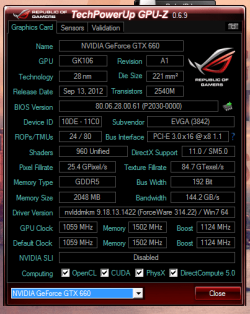
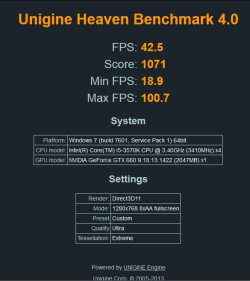
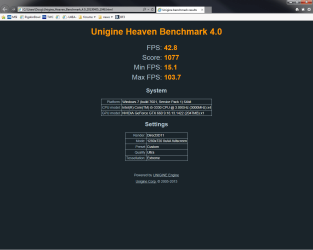
Great idea Thorsen, since I have a 660 card I did that

x16.png
This is the card in the x16 (top Slot)


x8lane.png

This is the card in the bottom x8 slot

My motherboard is different, but the same for the slots. It ran heaven pretty much identical.
 

My Computer My Computer

At a glance

Windows 10 Pro X64Intel(R) Core(TM) i5-3570K CPU OC@ 4.5GHZ Turbo8.00 GB DDR3 1600MhzMSI Gaming X GTX 1070
Computer type
PC/Desktop
Computer Manufacturer/Model Number
Dude Build
OS
Windows 10 Pro X64
CPU
Intel(R) Core(TM) i5-3570K CPU OC@ 4.5GHZ Turbo
Motherboard
MSI Z77A-G45 Gaming
Memory
8.00 GB DDR3 1600Mhz
Graphics Card(s)
MSI Gaming X GTX 1070
Sound Card
Realtek High Definition
Monitor(s) Displays
Dell S23O9W, HP L1710
Screen Resolution
DELL-1920 x 1080 HP-1280 x1024
Hard Drives
Crucial m4 256 SSD, WD 7200RPM 500GB WD 1TB
PSU
Seasonic X650 GOLD
Case
Zalman Z12
Cooling
Antec Kuhler 920
Keyboard
Logitech
Mouse
MSI DS100 Interceptor
Internet Speed
50 down and 5 up
Antivirus
MSE
Browser
Chrome, IE 11
Other Info
Logitech X-620 Speakers
I agree with Dude that testing it in another rig would be ideal. from searching around, the slot is 16x/0x so it is showing up as 0x because it is not recognizing the card in 16x. (I think)

one that is looking at the same mobo/gpu combo: P8Z7-M Pro Detects graphics card as PCIE 0x - Asus - Motherboards

[SOLVED] PCI Express Slot, Dead? - Tech Support Forum

From other forums, people have said that 8x would be fine because you won't go over that bandwidth Any difference for GTX 670 SLI in PCIe 16/16 vs PCIe 16/8 ? - AnandTech Forums

but I'm not sure given this: nVidia GeForce GTX 660 Video Card - Reviews, Specifications, and Pictures - GPUReview.com


corrections: here is bandwidth chart: What is PCI Express? A Layman's Guide to High Speed PCI-E Technology-Best Computer Online Store - Buy with Discount Prices from Houston Texas-Directron.com

Maybe someone else on here can test their 660 in the 8x and see what it benches? :rolleyes:

Great idea Thorsen, since I have a 660 card I did that

View attachment 262747
This is the card in the x16 (top Slot)


View attachment 262748

This is the card in the bottom x8 slot

My motherboard is different, but the same for the slots. It ran heaven pretty much identical.

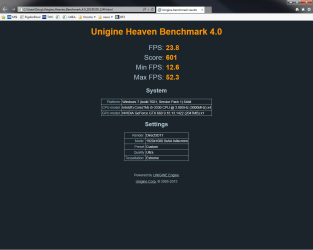
This is what I got after running that program.

EDIT: Was using the wrong resolution for the test.
 

Attachments

  • Untitled.png
    Untitled.png
    13.9 KB · Views: 21
Last edited:

My Computer My Computer

At a glance

Microsoft Windows 7 Ultimate 64-bit 7601 Mult...Intel(R) Core(TM) i5-3570K CPU @ 3.40GHz8.00 GBNVIDIA GeForce GTX 660
Computer type
PC/Desktop
Computer Manufacturer/Model Number
Custom Build
OS
Microsoft Windows 7 Ultimate 64-bit 7601 Multiprocessor Free Service Pack 1
CPU
Intel(R) Core(TM) i5-3570K CPU @ 3.40GHz
Motherboard
ASUSTeK COMPUTER INC. P8Z77-V
Memory
8.00 GB
Graphics Card(s)
NVIDIA GeForce GTX 660
Sound Card
(1) USB Audio Device (2) High Definition Audio Device (3
Screen Resolution
1360 x 768 x 32 bits (4294967296 colors) @ 60 Hz
Hard Drives
(1) M4-CT128M4SSD2 ATA Device (2) WDC WD1002FAEX-00Z3A0 ATA Device (3) WDC WD10EZEX-22BN5A0 ATA Device
PSU
Corsair Enthusiast Series TX650M
Case
NZXT Phantom 410
Cooling
Cooler Master Hyper 212 EVO
Keyboard
Logitech HID-Compliant Keyboard
Mouse
Logitech HID-compliant MX320 Laser Mouse
It seems to be running good in that slot, soon someone who knows about the lane answer will let us know. I have to travel for work today but will keep checking.

I couldn't get the exact resolution setting as you but got as close as I could. It doesn't seem to be bottle necking at all.

I found a thread with the same issue, note the last post talking about the cpu, just something else you could check.
http://forum-en.msi.com/index.php?topic=167393.0
 

Attachments

  • 1280x720.png
    1280x720.png
    30.2 KB · Views: 8
Last edited:

My Computer My Computer

At a glance

Windows 10 Pro X64Intel(R) Core(TM) i5-3570K CPU OC@ 4.5GHZ Turbo8.00 GB DDR3 1600MhzMSI Gaming X GTX 1070
Computer type
PC/Desktop
Computer Manufacturer/Model Number
Dude Build
OS
Windows 10 Pro X64
CPU
Intel(R) Core(TM) i5-3570K CPU OC@ 4.5GHZ Turbo
Motherboard
MSI Z77A-G45 Gaming
Memory
8.00 GB DDR3 1600Mhz
Graphics Card(s)
MSI Gaming X GTX 1070
Sound Card
Realtek High Definition
Monitor(s) Displays
Dell S23O9W, HP L1710
Screen Resolution
DELL-1920 x 1080 HP-1280 x1024
Hard Drives
Crucial m4 256 SSD, WD 7200RPM 500GB WD 1TB
PSU
Seasonic X650 GOLD
Case
Zalman Z12
Cooling
Antec Kuhler 920
Keyboard
Logitech
Mouse
MSI DS100 Interceptor
Internet Speed
50 down and 5 up
Antivirus
MSE
Browser
Chrome, IE 11
Other Info
Logitech X-620 Speakers
Back
Top