SomeUserName
Banned
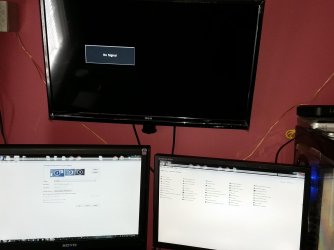
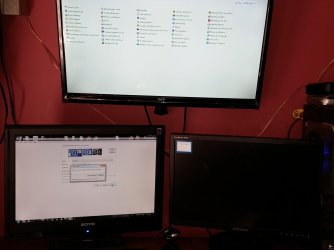
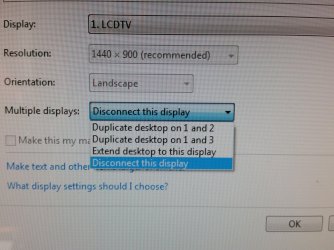
I added a HDTV to my computer. Yesterday I did something where when I turned off the TV the display would AUTOMATICALLY switch back to my secondary monitor and if I turned the TV back on it would automatically switch back to the TV. When this happened I had extend display #1 to HDTV selected. I did not have to manually switch over the displays.
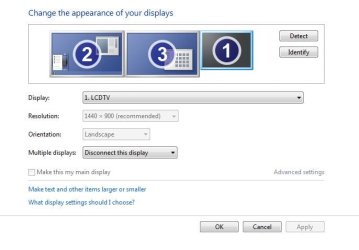
This morning the only way I can get them to switch is by doing it manually through the settings.
Does someone know what I may have done to make the monitors automatically switch without having to do it manually?
Its almost like the computer knew through voltage or something that made it "know" the HDTV had been turned off so it went back to secondary monitor on its own. I want screen #2 and HDTV to switch by themselves like that all the time through the power button.
Is it possible to do that or was that just a glitch in my machine?
(EDIT: **IDEALLY** I would like to get all 3 monitors running at the same time so I can work on #1, Take notes ect/have extra work space on #2 and have music videos, studio software, movies, Tweetdeck news tickers or other stationary items on the HDTV but I think in order to have all 3 monitors running you need some kind of special dongle or something. The way it is right now is Monitor 1 is always on and I have to decide if I want to use monitor 2 or the HDTV. The unused one goes black.)
This morning the only way I can get them to switch is by doing it manually through the settings.
Does someone know what I may have done to make the monitors automatically switch without having to do it manually?
Its almost like the computer knew through voltage or something that made it "know" the HDTV had been turned off so it went back to secondary monitor on its own. I want screen #2 and HDTV to switch by themselves like that all the time through the power button.
Is it possible to do that or was that just a glitch in my machine?
(EDIT: **IDEALLY** I would like to get all 3 monitors running at the same time so I can work on #1, Take notes ect/have extra work space on #2 and have music videos, studio software, movies, Tweetdeck news tickers or other stationary items on the HDTV but I think in order to have all 3 monitors running you need some kind of special dongle or something. The way it is right now is Monitor 1 is always on and I have to decide if I want to use monitor 2 or the HDTV. The unused one goes black.)
My Computer
At a glance
Windows 7 Ultimate 64Bit (SP1)Intel® Core™ i3-6100 Processor (3M Cache, 3.7...Kingston 16GB Hyper X Fury Blue DDR3 1600Mhz ...On board (Asus B150M-C D3) VGA and DVI on Ext...
- Computer type
- PC/Desktop
- Computer Manufacturer/Model Number
- Custom built by myself
- OS
- Windows 7 Ultimate 64Bit (SP1)
- CPU
- Intel® Core™ i3-6100 Processor (3M Cache, 3.70 GHz)
- Motherboard
- Asus B150M-C D3
- Memory
- Kingston 16GB Hyper X Fury Blue DDR3 1600Mhz (2x 8GB sticks)
- Graphics Card(s)
- On board (Asus B150M-C D3) VGA and DVI on Extended Desktop
- Sound Card
- On Board (Asus B150M-C D3)
- Monitor(s) Displays
- Left DVI: Samsung 920WM - Right VGA: Samsung 941BW
- Hard Drives
- WD WD5000AADS 500GB SATA Green--WD 1TB WD1001FALS SATA Black--WD 320GB WD3200JB
- PSU
- Cooler Master 700W Silent Pro
- Case
- See through Side panel--right hinge door--5x 5" & 2x 3" bays
- Cooling
- Side, Front, Rear fan & Power supply fan
- Keyboard
- Logitech MX5000 BT
- Mouse
- Logitech MX500
- Internet Speed
- 40Mb down--10Mb Up
- Antivirus
- AVG Internet Security
- Browser
- Chrome-Firefox-Opera-IE-TOR
- Other Info
- 2x LG DVD-RW--NZXT Fan contoller--4in1 Card reader