
Solved What settings in Device Manager will allow Win7 to 'discover' a card

loninappleton

New member
Member
VIP
Local time
10:04 AM
Messages
892
The installed driver on this system for onboard video is ATI Radeon 4250.

If a PCIe Nvidia card is installed, can device manager have the ATI Radeon driver
turned off to discover the newly installed NVidia. And from there put in the
needed Nvidia driver.

Also on this, does the NVidia driver install include the NVidia control panel?

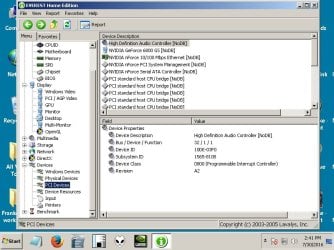
Attached is a screen shot of the XFX Video card to install made with Everest.
 

Attachments
  • Nvidia VideocardXFX GeForce 6800Untitled.jpg
    Nvidia VideocardXFX GeForce 6800Untitled.jpg
    74.9 KB · Views: 1

My Computer My Computer

At a glance

Windows 7 x64 UltimateAMD Athlon II x3 4502 GB
Computer type
PC/Desktop
Computer Manufacturer/Model Number
custom
OS
Windows 7 x64 Ultimate
CPU
AMD Athlon II x3 450
Motherboard
MSI 880GM
Memory
2 GB
Hard Drives
various
Browser
Firefox, Opera
Looking at this highlight, I got some info from the system I temporarily installed to.

Anyway it's a Geforce 6800
 

My Computer My Computer

At a glance

Windows 7 x64 UltimateAMD Athlon II x3 4502 GB
Computer type
PC/Desktop
Computer Manufacturer/Model Number
custom
OS
Windows 7 x64 Ultimate
CPU
AMD Athlon II x3 450
Motherboard
MSI 880GM
Memory
2 GB
Hard Drives
various
Browser
Firefox, Opera
When you installed a graphics card in your PCI-e slot, the onboard should appear disabled and not visible when you boot up your computer (Some motherboards makes it easier for anyone to upgrade a graphics card, just disabling the onboard GPU automatically if they detect a device in the PCI-E). Your computer seems to be alright. Have you installed the drivers for that GeForce 6800? The resolution on the screenshot looks small.
 

My Computer My Computer

At a glance

Windows 7 Home Premium 64-BITAMD A8 7200P8GB 1600mhzRadeon R5 (APU) + Radeon R5 M230 2GB Dual Gra...
Computer type
PC/Desktop
Computer Manufacturer/Model Number
ASUS X550ZE
OS
Windows 7 Home Premium 64-BIT
CPU
AMD A8 7200P
Motherboard
N/A
Memory
8GB 1600mhz
Graphics Card(s)
Radeon R5 (APU) + Radeon R5 M230 2GB Dual Graphics
Sound Card
Realtek ALC269 with SonicMaster
Monitor(s) Displays
Laptop Display
Screen Resolution
1920 x 1080 @60hz
Hard Drives
WDC WD50 00LPVX-80V0TT0 (500GB)
PSU
Laptop Charger
Mouse
ARMAGGEDON TEXTRON SCORPION 7
Internet Speed
100 mbps DOWN / 50 mbps UP
Antivirus
Windows Defender
Browser
Mozzila FireFox, Valve Steam in-game internet browser
Thanks for answering. I know this duplicates a question I made earlier.
I'm on the right track and located the card manual via a google search. That says
that yes, you should delete the driver in this case the Radeon present on the system in Device Manager.

I had seen this technique earlier when migrating a disk. That it is indeed possible to migrate
a hard disk from one motherboard to another by deleting all but the generic
HD driver. System will then think it's a new install.

The same sort of thing may work for graphic cards and avoid the BSOD.

I could mark this solved. I'm not going to do the operation til needed (at a power down
for whatever reason.)
 

My Computer My Computer

At a glance

Windows 7 x64 UltimateAMD Athlon II x3 4502 GB
Computer type
PC/Desktop
Computer Manufacturer/Model Number
custom
OS
Windows 7 x64 Ultimate
CPU
AMD Athlon II x3 450
Motherboard
MSI 880GM
Memory
2 GB
Hard Drives
various
Browser
Firefox, Opera
In most cases, yeah you should uninstall the onboard graphics driver before proceeding into installing the driver of the dedicated graphics card. In some cases, you don't. When you disable the Onboard GPU in the BIOS the driver itself will be hidden and you can proceed installing the drivers for the dedicated ones, usual for pre-built desktops.
 

My Computer My Computer

At a glance

Windows 7 Home Premium 64-BITAMD A8 7200P8GB 1600mhzRadeon R5 (APU) + Radeon R5 M230 2GB Dual Gra...
Computer type
PC/Desktop
Computer Manufacturer/Model Number
ASUS X550ZE
OS
Windows 7 Home Premium 64-BIT
CPU
AMD A8 7200P
Motherboard
N/A
Memory
8GB 1600mhz
Graphics Card(s)
Radeon R5 (APU) + Radeon R5 M230 2GB Dual Graphics
Sound Card
Realtek ALC269 with SonicMaster
Monitor(s) Displays
Laptop Display
Screen Resolution
1920 x 1080 @60hz
Hard Drives
WDC WD50 00LPVX-80V0TT0 (500GB)
PSU
Laptop Charger
Mouse
ARMAGGEDON TEXTRON SCORPION 7
Internet Speed
100 mbps DOWN / 50 mbps UP
Antivirus
Windows Defender
Browser
Mozzila FireFox, Valve Steam in-game internet browser
I am back and a thing went wrong in this.

What I managed to do was disable the Radeon driver in Device Mgr. Then after shut down and plugging to the card etc, I attempted to get video from the card but all has failed: a dark screen on that HD. I am using a backup HD.

Repair Windows Routine hung at the video. Also cannot get to Safe Mode, the trace of
programs loading stopped at a line I didn't write down (forgot). But it's all the same. Disabling the
video driver did not revert to the Win7 default 640 x 480 or whatever happens when
video discovery is supposed to take place. I'm stumped. Not even explaining it adequately.

As to Repair tools I've never seen Win7 repair anything.

I do not want to have to lose that primary disk. Is there any fix?
 

My Computer My Computer

At a glance

Windows 7 x64 UltimateAMD Athlon II x3 4502 GB
Computer type
PC/Desktop
Computer Manufacturer/Model Number
custom
OS
Windows 7 x64 Ultimate
CPU
AMD Athlon II x3 450
Motherboard
MSI 880GM
Memory
2 GB
Hard Drives
various
Browser
Firefox, Opera
Back
Top