HP Compaq nx9010 and Windows 7

skunkworks

New member
Hi, 2 days ago i installed Windows 7 on my nx9010. Then I tried to find drivers for it that are compatible with Windows 7. Precisely, I mean drivers that enable me access to internet so I can let Windows auto update to do its job and find other needed drivers.

So can anybody tell me what drivers I need and where can I find them, because I found some drivers, like National Semiconductor Corp. DP83815/816 10/100 MacPhyter PCI Adapter which seems to be "repaired". But I just can't connect to the internet.

Sorry if I made some mistakes in posting a new thread. nhf

p.s. just to make everything clear, i'm online right now on a different computer :)
 

My Computer

OS
windows 7 ultimate 32bit

My Computer

Computer type
PC/Desktop
Computer Manufacturer/Model Number
Home Built - Jan 2013
OS
Windows 7 64 Bit Home Premium SP1
CPU
i7-3820
Motherboard
Asus P9X79-PRO - Bios 4608
Memory
GSkill F3-14900CL9Q - 16GB
Graphics Card(s)
EVGA GeForce GTX660 - Driver 352.86
Sound Card
On board Realtek ALC898
Monitor(s) Displays
Acer S271HL
Screen Resolution
1920 x 1080
Hard Drives
#1- Samsung 840 Pro Series
#2- Western Digital WD1002FAEX Sata3 Black
#3- Western Digital WD1002FAEX Sata3 Black
PSU
Corsair CMPSU-850TX-V2 - 850 watt (by Seasonic)
Case
Corsair Obsidian 550D
Cooling
Standard 3 120mm case fans, Cooler Master Hyper 212 EVO
Keyboard
MS KC-0405
Mouse
Intellimouse 5-button
Internet Speed
56 Mbits/Sec (on a good day)
Antivirus
Avast & Malwarebytes
Browser
Firefox
Other Info
Asus DVD - DRW-24B1ST 24X
Yeah, I tried everything and just cant get it to work. So I decided to go back to Windows XP. But now I have another problem. I put my disc with Windows XP in the computer and when I start the setup it says: "Program compatibility assistant setup cannot continue because the version of Windows on your computer is newer than the version on the CD"

So I tried to boot it and it just doesn't want to boot it. When I go to BIOS it has no priority boot so that I can set it to auto boot from CD-ROM. And when I manually set it to boot from CD-ROM it just ignores me and continues to boot Windows 7.
 

My Computer

OS
windows 7 ultimate 32bit
That is unfortunate. People do get these old computers to run W7, but if you are not interested in invest that kind of time in the effort that is understandable.

As for XP, no, you will not be able to install it while W7 is running, as you've already discovered. You will need to wipe the disk clean and then install XP.

You need to be able to boot from the CD before the hard disk and I'm very surprised there would be no boot order option in the BIOS to do so. You should check that again carefully. And I would not wipe the hard drive until I was sure I could get the CD to boot. A quick test would be to turn off the computer, disconnect the power, disconnect the hard drive, and then reboot. You should get a black screen with the message: "no boot device available....". Now put the CD in and restart. If the CD boots then you are good to go.

There is a tutorial in this forum for using Diskpart in W7 to wipe the hard disk clean. I'd find it for you but I am being called away right now.

Hope that helps.
 

My Computer

Computer type
PC/Desktop
Computer Manufacturer/Model Number
Home Built - Jan 2013
OS
Windows 7 64 Bit Home Premium SP1
CPU
i7-3820
Motherboard
Asus P9X79-PRO - Bios 4608
Memory
GSkill F3-14900CL9Q - 16GB
Graphics Card(s)
EVGA GeForce GTX660 - Driver 352.86
Sound Card
On board Realtek ALC898
Monitor(s) Displays
Acer S271HL
Screen Resolution
1920 x 1080
Hard Drives
#1- Samsung 840 Pro Series
#2- Western Digital WD1002FAEX Sata3 Black
#3- Western Digital WD1002FAEX Sata3 Black
PSU
Corsair CMPSU-850TX-V2 - 850 watt (by Seasonic)
Case
Corsair Obsidian 550D
Cooling
Standard 3 120mm case fans, Cooler Master Hyper 212 EVO
Keyboard
MS KC-0405
Mouse
Intellimouse 5-button
Internet Speed
56 Mbits/Sec (on a good day)
Antivirus
Avast & Malwarebytes
Browser
Firefox
Other Info
Asus DVD - DRW-24B1ST 24X
I figured out that the problem is in the CD-ROM drive. It can read DVDs but can't read CDs. Now I'm pretty much in trouble unless I find those drivers or buy a new CD drive :)

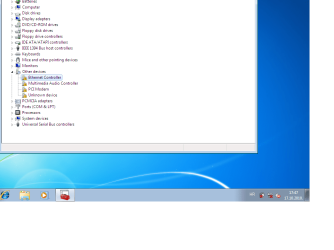
I just installed Windows 7 x86 again, a fresh copy. And here's a screenshot of the device manager if it's of any use.
 

Attachments

  • screen shot.png
    screen shot.png
    256.7 KB · Views: 147

My Computer

OS
windows 7 ultimate 32bit
I figured out that the problem is in the CD-ROM drive. It can read DVDs but can't read CDs. Now I'm pretty much in trouble unless I find those drivers or buy a new CD drive :)

I just installed Windows 7 x86 again, a fresh copy. And here's a screenshot of the device manager if it's of any use.

skunkworks, in device manager right click on the devices with the exclamation mark against them and select " update driver" windows should then find a compatible driver, if not piost back and we will see what we can find for you ;)
 

My Computer

Computer type
PC/Desktop
Computer Manufacturer/Model Number
self build
OS
win 7 ultimate32bit, Win8.1pro wmc 32bit
CPU
amd phenom x4 9600
Motherboard
asus m2n32-sli deluxe
Memory
corsair twinxs 2x2gb
Graphics Card(s)
2x nvidia 1gb 8500gt
Sound Card
onboard
Monitor(s) Displays
23" PB Viseo 233d
Screen Resolution
1920x1080
Hard Drives
maxtor sata 500gb
maxtor sata 320gb
fujitsu sata200gb
PSU
oryxx tornado 750w
Case
thermaltake xaser lll
Cooling
artic freezer64 pro + 7 case fans
I've done that just in case, but all I need is a connection to the internet so I can let Windows to find his own updates. I just need a working driver for my network adapter :)
 

My Computer

OS
windows 7 ultimate 32bit
I've done that just in case, but all I need is a connection to the internet so I can let Windows to find his own updates. I just need a working driver for my network adapter :)

OK skunkworks try this driver 1st HP Compaq nx9010 Notebook PC -  Intel PRO/Wireless Drivers - HP Business Support Center all the drivers on the site are old mainly XP/Vista drivers install them in compatibility mode http://www.sevenforums.com/tutorials/316-compatibility-mode.html ,work your way through the network drivers 'til you find a working driver all must be installed using compat mode ;)
 

My Computer

Computer type
PC/Desktop
Computer Manufacturer/Model Number
self build
OS
win 7 ultimate32bit, Win8.1pro wmc 32bit
CPU
amd phenom x4 9600
Motherboard
asus m2n32-sli deluxe
Memory
corsair twinxs 2x2gb
Graphics Card(s)
2x nvidia 1gb 8500gt
Sound Card
onboard
Monitor(s) Displays
23" PB Viseo 233d
Screen Resolution
1920x1080
Hard Drives
maxtor sata 500gb
maxtor sata 320gb
fujitsu sata200gb
PSU
oryxx tornado 750w
Case
thermaltake xaser lll
Cooling
artic freezer64 pro + 7 case fans
Hi guys, just came in to say everything is solved. Got wireless to function and managed to update everything via Windows update. Thanks for your efforts. You were very helpful :)
 

My Computer

OS
windows 7 ultimate 32bit
Glad you got it working skunkworks! You will like W7 much better than XP I assure you.

Just for our info, how did you get it to go? Compatibility mode? Let us know. It can be a help to others.
 

My Computer

Computer type
PC/Desktop
Computer Manufacturer/Model Number
Home Built - Jan 2013
OS
Windows 7 64 Bit Home Premium SP1
CPU
i7-3820
Motherboard
Asus P9X79-PRO - Bios 4608
Memory
GSkill F3-14900CL9Q - 16GB
Graphics Card(s)
EVGA GeForce GTX660 - Driver 352.86
Sound Card
On board Realtek ALC898
Monitor(s) Displays
Acer S271HL
Screen Resolution
1920 x 1080
Hard Drives
#1- Samsung 840 Pro Series
#2- Western Digital WD1002FAEX Sata3 Black
#3- Western Digital WD1002FAEX Sata3 Black
PSU
Corsair CMPSU-850TX-V2 - 850 watt (by Seasonic)
Case
Corsair Obsidian 550D
Cooling
Standard 3 120mm case fans, Cooler Master Hyper 212 EVO
Keyboard
MS KC-0405
Mouse
Intellimouse 5-button
Internet Speed
56 Mbits/Sec (on a good day)
Antivirus
Avast & Malwarebytes
Browser
Firefox
Other Info
Asus DVD - DRW-24B1ST 24X
Hi, sorry guys, got it working and forgot about this here :)

Well, I went to my friend cause he has a wireless connection and the cd with the driver needed for the wireless to function on nx9010. So we installed the driver and got an internet connection and then the windows update went about its own business and downloaded everything else.
 

My Computer

OS
windows 7 ultimate 32bit
Back
Top