Slow reaction after clicking "Print" in any software

Raynian

New member
Member
VIP
Local time
5:49 AM
Messages
126
I realised I have got this issue. Whenever I click print in any application, ( firefox, Powerpoint, Notepad etc) , my laptop would take quite awhile to react and enter the print options window.

I thought perhaps I may have disabled the print spooler service by accident, but it was on. :(

Any help would be greatly appreciated =D
 

My Computer My Computer

At a glance

Microsoft Windows 7 Professional 64-bitIntel(R) Core(TM) i7-3520M CPU @ 2.90GHz12.00 GB(1) Intel(R) HD Graphics 4000 (2) NVIDIA GeFo...
Computer type
Laptop
Computer Manufacturer/Model Number
Sony Vaio S 13 A
OS
Microsoft Windows 7 Professional 64-bit
CPU
Intel(R) Core(TM) i7-3520M CPU @ 2.90GHz
Memory
12.00 GB
Graphics Card(s)
(1) Intel(R) HD Graphics 4000 (2) NVIDIA GeForce GT 640M L
Screen Resolution
1600x900
Hard Drives
ATA SAMSUNG SSD 830 SCSI Disk Device
Mouse
Logitech / Microsoft touch Mouse
Other Info
Weight: 1.67 Kg
How many seconds does it take to do actually?
 

My Computer My Computer

At a glance

Windows 7 Ultimate 64 bit SP1Intel(R) Core(TM) i5-2500K12GB Kingston Hyperx 1600MHzAsus GTS 450
Computer type
PC/Desktop
Computer Manufacturer/Model Number
Custom Built PC
OS
Windows 7 Ultimate 64 bit SP1
CPU
Intel(R) Core(TM) i5-2500K
Motherboard
Gigabyte Technology Co., Ltd. Z68X-UD3-B3
Memory
12GB Kingston Hyperx 1600MHz
Graphics Card(s)
Asus GTS 450
PSU
500W Coolink
Other Info
Genius G-Pen F610 (PenPad)
It depends. Between 15-35 seconds.
 

My Computer My Computer

At a glance

Microsoft Windows 7 Professional 64-bitIntel(R) Core(TM) i7-3520M CPU @ 2.90GHz12.00 GB(1) Intel(R) HD Graphics 4000 (2) NVIDIA GeFo...
Computer type
Laptop
Computer Manufacturer/Model Number
Sony Vaio S 13 A
OS
Microsoft Windows 7 Professional 64-bit
CPU
Intel(R) Core(TM) i7-3520M CPU @ 2.90GHz
Memory
12.00 GB
Graphics Card(s)
(1) Intel(R) HD Graphics 4000 (2) NVIDIA GeForce GT 640M L
Screen Resolution
1600x900
Hard Drives
ATA SAMSUNG SSD 830 SCSI Disk Device
Mouse
Logitech / Microsoft touch Mouse
Other Info
Weight: 1.67 Kg
1. check the connection btw the computer and the printer
2. once the windows has opened, what devices are listen alongside your printer?
3. please post the exact model of your printer (I guess it is written on it :))
 

My Computer My Computer

At a glance

Windows 7 Ultimate 64 bit SP1Intel(R) Core(TM) i5-2500K12GB Kingston Hyperx 1600MHzAsus GTS 450
Computer type
PC/Desktop
Computer Manufacturer/Model Number
Custom Built PC
OS
Windows 7 Ultimate 64 bit SP1
CPU
Intel(R) Core(TM) i5-2500K
Motherboard
Gigabyte Technology Co., Ltd. Z68X-UD3-B3
Memory
12GB Kingston Hyperx 1600MHz
Graphics Card(s)
Asus GTS 450
PSU
500W Coolink
Other Info
Genius G-Pen F610 (PenPad)
1. check the connection btw the computer and the printer
2. once the windows has opened, what devices are listen alongside your printer?
3. please post the exact model of your printer (I guess it is written on it :))

1. I changed the USB cable for the printer and the connection speed is still the same :cry:

2. Add PRinter,Epson Tx110 series,fax,FX docuprint 205b,Microsoft XPS document writer.

3. Epson Tx110 and Fuji Xerox docuprint M205b .


Oh, I fogotten to add, during the lag period, the software will be "Not Responding" and after the lag, it will be fine.
 

My Computer My Computer

At a glance

Microsoft Windows 7 Professional 64-bitIntel(R) Core(TM) i7-3520M CPU @ 2.90GHz12.00 GB(1) Intel(R) HD Graphics 4000 (2) NVIDIA GeFo...
Computer type
Laptop
Computer Manufacturer/Model Number
Sony Vaio S 13 A
OS
Microsoft Windows 7 Professional 64-bit
CPU
Intel(R) Core(TM) i7-3520M CPU @ 2.90GHz
Memory
12.00 GB
Graphics Card(s)
(1) Intel(R) HD Graphics 4000 (2) NVIDIA GeForce GT 640M L
Screen Resolution
1600x900
Hard Drives
ATA SAMSUNG SSD 830 SCSI Disk Device
Mouse
Logitech / Microsoft touch Mouse
Other Info
Weight: 1.67 Kg
thanks
interesting :$
You have 2 printers right? Disconnect all of your printers/fax(?) and hit print button again, if it reacts normally, plug in the printers one by one and do the same check.
ps: what do you mean by Add Printer, if you mean the print buttom, it's ok :D
 

My Computer My Computer

At a glance

Windows 7 Ultimate 64 bit SP1Intel(R) Core(TM) i5-2500K12GB Kingston Hyperx 1600MHzAsus GTS 450
Computer type
PC/Desktop
Computer Manufacturer/Model Number
Custom Built PC
OS
Windows 7 Ultimate 64 bit SP1
CPU
Intel(R) Core(TM) i5-2500K
Motherboard
Gigabyte Technology Co., Ltd. Z68X-UD3-B3
Memory
12GB Kingston Hyperx 1600MHz
Graphics Card(s)
Asus GTS 450
PSU
500W Coolink
Other Info
Genius G-Pen F610 (PenPad)
Also try UNinstalling all printer software, rebooting, plug in ONE printer you want to use. See if windows will load a driver for you. IF not, install from the CD that came with the said printer.
 

My Computer My Computer

At a glance

Windows 7 Ultimate X64 SP1Intel i5-2550K, Differing ~4.4-4.8GHz No buil...16GB G.Skill Sniper 1866MHz @ 2133MHz 2x8GBASUS GTX650TIB-DC2OC-2GD5, (650TI Boost)
Computer type
PC/Desktop
Computer Manufacturer/Model Number
Home Built Desktop By DataTech
OS
Windows 7 Ultimate X64 SP1
CPU
Intel i5-2550K, Differing ~4.4-4.8GHz No built in GPU
Motherboard
ASUS P8Z68-V PRO/GEN3
Memory
16GB G.Skill Sniper 1866MHz @ 2133MHz 2x8GB
Graphics Card(s)
ASUS GTX650TIB-DC2OC-2GD5, (650TI Boost)
Sound Card
Onboard Realtek 5-1
Monitor(s) Displays
Samsung P2570HD
Screen Resolution
1920x1080
Hard Drives
Samsung 840 Pro 256GB SSD for OS, 500GB Seagate Constellation (Enterprise drive) for Data
PSU
Corsair HX650W
Case
Inwin Dragon Rider
Cooling
Hyper 212 EVO w/two Noctua fans, push-pull, @1300 RPM
Keyboard
E-Z Eyes, bright yellow keys with large characters
Mouse
steelseries SENSEI Laser Pro Gaming
Internet Speed
48-51Mbs Mbs down, 11 Mbs up Xfinity Cable
Antivirus
Norton Internet Security 2013
Browser
IE 10, Opera, Pale Moon if needed
Other Info
4 case fans, LG BluRay-RE, ASUS DVD-RW, Mr. Fusion power supply, 1.21 gigawatts.
thanks
interesting :$
You have 2 printers right? Disconnect all of your printers/fax(?) and hit print button again, if it reacts normally, plug in the printers one by one and do the same check.
ps: what do you mean by Add Printer, if you mean the print buttom, it's ok :D

Attempted it but still same result. Oh ignore the add printer part haha :o

Also try UNinstalling all printer software, rebooting, plug in ONE printer you want to use. See if windows will load a driver for you. IF not, install from the CD that came with the said printer.

Yup just did a full uninstall 3-4 days back .. :confused:
 

My Computer My Computer

At a glance

Microsoft Windows 7 Professional 64-bitIntel(R) Core(TM) i7-3520M CPU @ 2.90GHz12.00 GB(1) Intel(R) HD Graphics 4000 (2) NVIDIA GeFo...
Computer type
Laptop
Computer Manufacturer/Model Number
Sony Vaio S 13 A
OS
Microsoft Windows 7 Professional 64-bit
CPU
Intel(R) Core(TM) i7-3520M CPU @ 2.90GHz
Memory
12.00 GB
Graphics Card(s)
(1) Intel(R) HD Graphics 4000 (2) NVIDIA GeForce GT 640M L
Screen Resolution
1600x900
Hard Drives
ATA SAMSUNG SSD 830 SCSI Disk Device
Mouse
Logitech / Microsoft touch Mouse
Other Info
Weight: 1.67 Kg
Sorry, I'm out of ideas.
Are you trying to print large documents or pictures? They may be taking some time to fill the print spooler.
 

My Computer My Computer

At a glance

Windows 7 Ultimate X64 SP1Intel i5-2550K, Differing ~4.4-4.8GHz No buil...16GB G.Skill Sniper 1866MHz @ 2133MHz 2x8GBASUS GTX650TIB-DC2OC-2GD5, (650TI Boost)
Computer type
PC/Desktop
Computer Manufacturer/Model Number
Home Built Desktop By DataTech
OS
Windows 7 Ultimate X64 SP1
CPU
Intel i5-2550K, Differing ~4.4-4.8GHz No built in GPU
Motherboard
ASUS P8Z68-V PRO/GEN3
Memory
16GB G.Skill Sniper 1866MHz @ 2133MHz 2x8GB
Graphics Card(s)
ASUS GTX650TIB-DC2OC-2GD5, (650TI Boost)
Sound Card
Onboard Realtek 5-1
Monitor(s) Displays
Samsung P2570HD
Screen Resolution
1920x1080
Hard Drives
Samsung 840 Pro 256GB SSD for OS, 500GB Seagate Constellation (Enterprise drive) for Data
PSU
Corsair HX650W
Case
Inwin Dragon Rider
Cooling
Hyper 212 EVO w/two Noctua fans, push-pull, @1300 RPM
Keyboard
E-Z Eyes, bright yellow keys with large characters
Mouse
steelseries SENSEI Laser Pro Gaming
Internet Speed
48-51Mbs Mbs down, 11 Mbs up Xfinity Cable
Antivirus
Norton Internet Security 2013
Browser
IE 10, Opera, Pale Moon if needed
Other Info
4 case fans, LG BluRay-RE, ASUS DVD-RW, Mr. Fusion power supply, 1.21 gigawatts.
Sorry, I'm out of ideas.
Are you trying to print large documents or pictures? They may be taking some time to fill the print spooler.

Nope. I tried a notepad document with only "a" and the reaction speed was equally slow :cry:.
 

My Computer My Computer

At a glance

Microsoft Windows 7 Professional 64-bitIntel(R) Core(TM) i7-3520M CPU @ 2.90GHz12.00 GB(1) Intel(R) HD Graphics 4000 (2) NVIDIA GeFo...
Computer type
Laptop
Computer Manufacturer/Model Number
Sony Vaio S 13 A
OS
Microsoft Windows 7 Professional 64-bit
CPU
Intel(R) Core(TM) i7-3520M CPU @ 2.90GHz
Memory
12.00 GB
Graphics Card(s)
(1) Intel(R) HD Graphics 4000 (2) NVIDIA GeForce GT 640M L
Screen Resolution
1600x900
Hard Drives
ATA SAMSUNG SSD 830 SCSI Disk Device
Mouse
Logitech / Microsoft touch Mouse
Other Info
Weight: 1.67 Kg
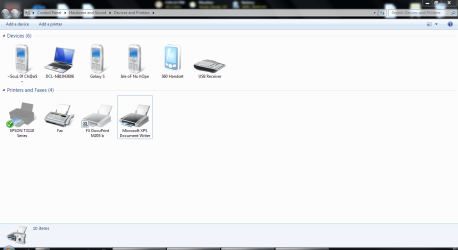
please post a screenshot of your device manager opened at the printer
edit: sorry I meant to write "Devices and Printers"
 

My Computer My Computer

At a glance

Windows 7 Ultimate 64 bit SP1Intel(R) Core(TM) i5-2500K12GB Kingston Hyperx 1600MHzAsus GTS 450
Computer type
PC/Desktop
Computer Manufacturer/Model Number
Custom Built PC
OS
Windows 7 Ultimate 64 bit SP1
CPU
Intel(R) Core(TM) i5-2500K
Motherboard
Gigabyte Technology Co., Ltd. Z68X-UD3-B3
Memory
12GB Kingston Hyperx 1600MHz
Graphics Card(s)
Asus GTS 450
PSU
500W Coolink
Other Info
Genius G-Pen F610 (PenPad)
Meanwhile I found out that if you have a lot of documents scanned, the print open opens very slowly.
Go to: C:\Users\USERNAME\Documents\Scanned Documents
and move the files away from it, the point is to empty it.
 

My Computer My Computer

At a glance

Windows 7 Ultimate 64 bit SP1Intel(R) Core(TM) i5-2500K12GB Kingston Hyperx 1600MHzAsus GTS 450
Computer type
PC/Desktop
Computer Manufacturer/Model Number
Custom Built PC
OS
Windows 7 Ultimate 64 bit SP1
CPU
Intel(R) Core(TM) i5-2500K
Motherboard
Gigabyte Technology Co., Ltd. Z68X-UD3-B3
Memory
12GB Kingston Hyperx 1600MHz
Graphics Card(s)
Asus GTS 450
PSU
500W Coolink
Other Info
Genius G-Pen F610 (PenPad)
Okay uploaded =)
 

Attachments

  • dnp1.PNG
    dnp1.PNG
    45.9 KB · Views: 9

My Computer My Computer

At a glance

Microsoft Windows 7 Professional 64-bitIntel(R) Core(TM) i7-3520M CPU @ 2.90GHz12.00 GB(1) Intel(R) HD Graphics 4000 (2) NVIDIA GeFo...
Computer type
Laptop
Computer Manufacturer/Model Number
Sony Vaio S 13 A
OS
Microsoft Windows 7 Professional 64-bit
CPU
Intel(R) Core(TM) i7-3520M CPU @ 2.90GHz
Memory
12.00 GB
Graphics Card(s)
(1) Intel(R) HD Graphics 4000 (2) NVIDIA GeForce GT 640M L
Screen Resolution
1600x900
Hard Drives
ATA SAMSUNG SSD 830 SCSI Disk Device
Mouse
Logitech / Microsoft touch Mouse
Other Info
Weight: 1.67 Kg

My Computer My Computer

At a glance

Windows 7 Ultimate 64 bit SP1Intel(R) Core(TM) i5-2500K12GB Kingston Hyperx 1600MHzAsus GTS 450
Computer type
PC/Desktop
Computer Manufacturer/Model Number
Custom Built PC
OS
Windows 7 Ultimate 64 bit SP1
CPU
Intel(R) Core(TM) i5-2500K
Motherboard
Gigabyte Technology Co., Ltd. Z68X-UD3-B3
Memory
12GB Kingston Hyperx 1600MHz
Graphics Card(s)
Asus GTS 450
PSU
500W Coolink
Other Info
Genius G-Pen F610 (PenPad)
I dont have the Scanned documents folder =/
 

My Computer My Computer

At a glance

Microsoft Windows 7 Professional 64-bitIntel(R) Core(TM) i7-3520M CPU @ 2.90GHz12.00 GB(1) Intel(R) HD Graphics 4000 (2) NVIDIA GeFo...
Computer type
Laptop
Computer Manufacturer/Model Number
Sony Vaio S 13 A
OS
Microsoft Windows 7 Professional 64-bit
CPU
Intel(R) Core(TM) i7-3520M CPU @ 2.90GHz
Memory
12.00 GB
Graphics Card(s)
(1) Intel(R) HD Graphics 4000 (2) NVIDIA GeForce GT 640M L
Screen Resolution
1600x900
Hard Drives
ATA SAMSUNG SSD 830 SCSI Disk Device
Mouse
Logitech / Microsoft touch Mouse
Other Info
Weight: 1.67 Kg
How did it go with your printer? Did you solved it? I have the same problem and as you said, there is no scanned documents in my folder either.
I have stopped the print spooler and cleared it by removing everything in c:\windows\system32\spool\printers and started it again but I have still the same problem.
 

My Computer My Computer

At a glance

Windows 7 Enterprise x64
OS
Windows 7 Enterprise x64
How did it go with your printer? Did you solved it? I have the same problem and as you said, there is no scanned documents in my folder either.
I have stopped the print spooler and cleared it by removing everything in c:\windows\system32\spool\printers and started it again but I have still the same problem.

I forgotten what I did already, it is long ago =/

But I believe I deleted the Epson printer drivers and everything became fine.
 

My Computer My Computer

At a glance

Microsoft Windows 7 Professional 64-bitIntel(R) Core(TM) i7-3520M CPU @ 2.90GHz12.00 GB(1) Intel(R) HD Graphics 4000 (2) NVIDIA GeFo...
Computer type
Laptop
Computer Manufacturer/Model Number
Sony Vaio S 13 A
OS
Microsoft Windows 7 Professional 64-bit
CPU
Intel(R) Core(TM) i7-3520M CPU @ 2.90GHz
Memory
12.00 GB
Graphics Card(s)
(1) Intel(R) HD Graphics 4000 (2) NVIDIA GeForce GT 640M L
Screen Resolution
1600x900
Hard Drives
ATA SAMSUNG SSD 830 SCSI Disk Device
Mouse
Logitech / Microsoft touch Mouse
Other Info
Weight: 1.67 Kg
Under vista I had a similar problem it could take up to an HOUR for the printer to start to print. Never found a fix, don't care now (HP all-in-one)
 

My Computer My Computer

At a glance

Windows 8.1 Proi5 3550 Ivy Bridge8gb 1600 GSkill 9-9-9-24 xmpGigabyte GTX 760 OC
Computer type
PC/Desktop
Computer Manufacturer/Model Number
Home Build
OS
Windows 8.1 Pro
CPU
i5 3550 Ivy Bridge
Motherboard
Gigabyte Z77MX-D3H
Memory
8gb 1600 GSkill 9-9-9-24 xmp
Graphics Card(s)
Gigabyte GTX 760 OC
Sound Card
VIA VT2021 onboard
Monitor(s) Displays
BenQ GL2760H 27inch hdmi; LG Flatron E2351 23inch dvi
Screen Resolution
1920x1080
Hard Drives
1x Samsung 850 Evo 120GB
1x 4TB WD Green HDD
1x 3TB WD Green HDD
2x 2TB Seagate HDD
1x 1TB Seagate External HDD
PSU
Cooler Master V750
Case
Coolermaster HAF 912 Advanced
Cooling
Standard
Keyboard
Logitech K120 USB
Mouse
Razor Abyssus USB
Internet Speed
Broadband
Antivirus
MSE + Malwarebytes
Browser
Palemoon
Other Info
It's been the worst day since yesterday (thanks Flogging Molly) so apt!
Back
Top