BSOD Asus P8Z68-V PRO Z68 + OCZ 120GB Agility 3 SSD

Davos

New member
Local time
7:58 PM
Messages
3
Hi 1st post from Scotland
Just building new system.
I get constant crashes when booting off the SSD (after 2 mins)
I successfully installed windows on an HDD in same system so I am confident all my other components are working.But very disappointed not to be using my SSD.:cry:

Does anyone know of any issues / fixes around the Asus P8Z68-V PRO Z68 + OCZ 120GB Agility 3 SSD and Windows 7 .?

List below is all the bits I got for my build.

OCZ 120GB Agility 3 SSD - SATA-III - Read 525MB/s Write 500MB/s 85,000 IOPS
Intel Core i7 2600k 3.4GHz Socket 1155 8MB Cache Retail Boxed Processor
Seagate 1TB 3.5" Barracuda SATA-III 6Gb/s Hard Drive - 7200RPM 32MB Cache
1 x Asus P8Z68-V PRO Z68 Socket 1155 8 Channel HD Audio ATX Motherboard
1 x Coolermaster Centurion 5 II SPECIAL EDITION w
1 x Sony Optiarc AD-7260B 24x DVD±RW & DL SATA Optical Drive - OEM Black
1 x Coolermaster V8 Socket 1156,1155, 1366, 775, AM2+, AM2, 940 Processor Cooler
1 x Samsung SyncMaster E1920NW LCD TFT 19" VGA Monitor 224033
1 x Sony Optiarc BWU-500S 12x BD-RE with DVD±RW DL RAM SATA Blu-Ray Drive -
1 x Corsair Vengeance 8GB (2x4GB) DDR3 1600Mhz CL9 1.5V Non-ECC Unbuffered
1 x Xenta Black 2.4Ghz Wireless Keyboard and Optical Mouse - Nano USB Receiver
PNY GTS 450 1GB GDDR5 Dual DVI Mini HDMI Out PCI-E Graphics Card
Thanks
Davos
 

My Computer My Computer

At a glance

Windows 7 Ultimate 64bit
OS
Windows 7 Ultimate 64bit
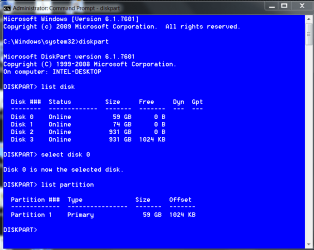
Do you have the latest firmware and toolbox ? You should not be getting BSODs. My only suggestion is to update the firmware and download the toolbox. Make sure you are in correct alignment, and trim is enabled. When you installed, was the SSD the only HD connected and is it on port 0 and were you in AHCI mode? To check alignment, open an elevated command prompt ( start- type cmd in the search box, right click it and select run as administrator) To see if trim is enabled, copy and paste this into the command window and press enter fsutil behavior query disabledeletenotify if it returns DisableDeleteNotify = 0 then trim is enabled. In the window next type diskpart and press enter, when the cmd responds with diskpart, type list disk and press enter, it will list all disks in your machine. They will be numbered, find your SSD (disk 0 hopefully) based on the disk size, type select disk 0 (or the number of your SSD) then type list partition. It will respond with a size and an offset. The offset is your alignment. Any number divisible by 4 is OK. The window should look like this: You will notice that my alignment is 1024.
diskpart alignment.PNG

Also make sure disk defragmentation is off.
 

My Computers My Computers

  • At a glance

    Windows 11 ProRyzen 9 5900X32GB G Skill DDR4-3600EVGA RTX 3080 FTW 3 Ultra
    Computer type
    PC/Desktop
    Computer Manufacturer/Model Number
    ALWAYS UNDER CONSTRUCTION
    OS
    Windows 11 Pro
    CPU
    Ryzen 9 5900X
    Motherboard
    Asus X570 Crosshair Viii Hero
    Memory
    32GB G Skill DDR4-3600
    Graphics Card(s)
    EVGA RTX 3080 FTW 3 Ultra
    Sound Card
    On Board/Sennheiser PC37X Headset
    Monitor(s) Displays
    3 X Asus 27"
    Screen Resolution
    2560x1440
    Hard Drives
    2 X 1 TB NVME drives
    PSU
    EVGA 850
    Case
    Phanteks Eclipse P400A
    Cooling
    EVGA 280 AIO
    Keyboard
    Logitech G510s/ Logitech G13
    Mouse
    Logitech G502
    Internet Speed
    24/1
    Antivirus
    ESET/MBAM Pro/SAS Pro
    Browser
    Chrome/ Firefox/ Edge
  • At a glance

    Windows 11 ProIntel Ultra 9 288V32 GB LPDDR5X 8533
    Computer type
    Laptop
    System Manufacturer/Model Number
    Dell 16 Plus
    OS
    Windows 11 Pro
    CPU
    Intel Ultra 9 288V
    Memory
    32 GB LPDDR5X 8533
    Monitor(s) Displays
    16" Mini-LED HDR600 Touch 90 Hz
    Screen Resolution
    2560X1600
    Hard Drives
    1 TB NVME
Asus P8Z68 bios update

I think I have answered my own question.....Bios Update
but i have never updated a bios b4 and dont know where to start apart
Any hints people?
Thanks
Davos
 

My Computer My Computer

At a glance

Windows 7 Ultimate 64bit
OS
Windows 7 Ultimate 64bit
Read your motherboard manual. It will explain it there. I don't have an Asus board so don't really know.
 

My Computers My Computers

  • At a glance

    Windows 11 ProRyzen 9 5900X32GB G Skill DDR4-3600EVGA RTX 3080 FTW 3 Ultra
    Computer type
    PC/Desktop
    Computer Manufacturer/Model Number
    ALWAYS UNDER CONSTRUCTION
    OS
    Windows 11 Pro
    CPU
    Ryzen 9 5900X
    Motherboard
    Asus X570 Crosshair Viii Hero
    Memory
    32GB G Skill DDR4-3600
    Graphics Card(s)
    EVGA RTX 3080 FTW 3 Ultra
    Sound Card
    On Board/Sennheiser PC37X Headset
    Monitor(s) Displays
    3 X Asus 27"
    Screen Resolution
    2560x1440
    Hard Drives
    2 X 1 TB NVME drives
    PSU
    EVGA 850
    Case
    Phanteks Eclipse P400A
    Cooling
    EVGA 280 AIO
    Keyboard
    Logitech G510s/ Logitech G13
    Mouse
    Logitech G502
    Internet Speed
    24/1
    Antivirus
    ESET/MBAM Pro/SAS Pro
    Browser
    Chrome/ Firefox/ Edge
  • At a glance

    Windows 11 ProIntel Ultra 9 288V32 GB LPDDR5X 8533
    Computer type
    Laptop
    System Manufacturer/Model Number
    Dell 16 Plus
    OS
    Windows 11 Pro
    CPU
    Intel Ultra 9 288V
    Memory
    32 GB LPDDR5X 8533
    Monitor(s) Displays
    16" Mini-LED HDR600 Touch 90 Hz
    Screen Resolution
    2560X1600
    Hard Drives
    1 TB NVME
OCZ SSD no thanks

Finally worked out how to complete my beautiful build that was constantly blue screening on boot up.:mad:

Step 1 --- Put OCZ Agility 120gb drive in Jiffy bag and send back to Ebuyer
Step 2 --- Order Corsair 120gbSSD
Step 3 --- Install Corsair drive and system works immediately

System been running 3 days straight....no probs:D

Cheers
Davod
 

My Computer My Computer

At a glance

Windows 7 Ultimate 64bit
OS
Windows 7 Ultimate 64bit
I'm glad you have it working like you want it too. Seems like you have resolved the problem.
 

My Computers My Computers

  • At a glance

    Windows 11 ProRyzen 9 5900X32GB G Skill DDR4-3600EVGA RTX 3080 FTW 3 Ultra
    Computer type
    PC/Desktop
    Computer Manufacturer/Model Number
    ALWAYS UNDER CONSTRUCTION
    OS
    Windows 11 Pro
    CPU
    Ryzen 9 5900X
    Motherboard
    Asus X570 Crosshair Viii Hero
    Memory
    32GB G Skill DDR4-3600
    Graphics Card(s)
    EVGA RTX 3080 FTW 3 Ultra
    Sound Card
    On Board/Sennheiser PC37X Headset
    Monitor(s) Displays
    3 X Asus 27"
    Screen Resolution
    2560x1440
    Hard Drives
    2 X 1 TB NVME drives
    PSU
    EVGA 850
    Case
    Phanteks Eclipse P400A
    Cooling
    EVGA 280 AIO
    Keyboard
    Logitech G510s/ Logitech G13
    Mouse
    Logitech G502
    Internet Speed
    24/1
    Antivirus
    ESET/MBAM Pro/SAS Pro
    Browser
    Chrome/ Firefox/ Edge
  • At a glance

    Windows 11 ProIntel Ultra 9 288V32 GB LPDDR5X 8533
    Computer type
    Laptop
    System Manufacturer/Model Number
    Dell 16 Plus
    OS
    Windows 11 Pro
    CPU
    Intel Ultra 9 288V
    Memory
    32 GB LPDDR5X 8533
    Monitor(s) Displays
    16" Mini-LED HDR600 Touch 90 Hz
    Screen Resolution
    2560X1600
    Hard Drives
    1 TB NVME
Back
Top