Solved Permanent black bar on bottom of secondary monitor

Jorwoody

New member
Local time
6:08 PM
Messages
3
I installed DisplayFusion for my dual-monitor setup, but decided to uninstall it soon after. Upon uninstalling I noticed a permanent black band/bar across the bottom of my screen. I can access (right click and get a context menu, etc.) the screen space under the band, but it completely hides anything under it including the mouse pointer.

Here is a screenshot of the area and a representation of what I see:
NY7Q8.png


I'm not sure if DisplayFusion could have caused this, or if it was a coincidence.

Has anybody seen a problem like this before? Any direction would be greatly appreciated. Thanks!
 
Last edited:

My Computer My Computer

At a glance

Windows 7 Ultimate x64
OS
Windows 7 Ultimate x64
Welcome to Seven Forums Jorwoody. Does the black bar appear to be the height of the taskbar DisplayFusion put on the secondary monitor? If so, it seems likely that DisplayFusion is the culprit (it seems likely anyway). Do you have a System restore point from before you installed DisplayFusion? If so, I would start there.

http://www.sevenforums.com/tutorials/700-system-restore.html

If not, or if that doesn't help, I would suggest you reinstall DisplayFusion, confirm the secondary monitors taskbar displays normally. I would then uninstall using the free Revo Uninstaller. See if that fixes it.

If neither help, I would run the System File Checker

http://www.sevenforums.com/tutorials/1538-sfc-scannow-command-system-file-checker.html

Let us know how it goes. A Guy
 

My Computer My Computer

At a glance

Windows 10 Home x64INTEL Core i5-750 Quad-Core 3.37GHzHyperX Fury Black Series 8GB (2 x 4GB) 1866MhzEVGA GeForce GTX 750 Superclocked 1GB 128-Bit...
Computer type
PC/Desktop
OS
Windows 10 Home x64
CPU
INTEL Core i5-750 Quad-Core 3.37GHz
Motherboard
ASUS P7P55D
Memory
HyperX Fury Black Series 8GB (2 x 4GB) 1866Mhz
Graphics Card(s)
EVGA GeForce GTX 750 Superclocked 1GB 128-Bit GDDR5
Monitor(s) Displays
LG 32MA68HY 32" IPS
Screen Resolution
1920 x 1080
Hard Drives
Samsung 840 Evo 120GB, SEAGATE 500GB Barracuda® 7200.12, SATA 3 Gb/s, 7200 RPM, 16MB cache
PSU
ANTEC TruePower New TP-550, 80 PLUS, 550W
Case
ANTEC Three Hundred Illusion
Cooling
COOLER MASTER Hyper 212 Plus, 4 x 120mm 1 x 140mm Noctua's
Internet Speed
85 + Mbps
Antivirus
Avast
Browser
Vivaldi
The bar is actually 10-20 pixels thinner than the windows taskbar, as I was able to see some of the top of the taskbar when I reinstalled Display Fusion. I used the Revo uninstaller and SFC /scannow but to no effect. I don't want to resort to a system restore unless I have to, because I installed a bunch of software since the last available one. The only other thing I can think to try is grabbing a different monitor and plugging it in as my secondary, and seeing if the black bar is still there. Perhaps that portion of the screen broke? :confused:
 

My Computer My Computer

At a glance

Windows 7 Ultimate x64
OS
Windows 7 Ultimate x64

My Computer My Computer

At a glance

Windows 10 Home x64INTEL Core i5-750 Quad-Core 3.37GHzHyperX Fury Black Series 8GB (2 x 4GB) 1866MhzEVGA GeForce GTX 750 Superclocked 1GB 128-Bit...
Computer type
PC/Desktop
OS
Windows 10 Home x64
CPU
INTEL Core i5-750 Quad-Core 3.37GHz
Motherboard
ASUS P7P55D
Memory
HyperX Fury Black Series 8GB (2 x 4GB) 1866Mhz
Graphics Card(s)
EVGA GeForce GTX 750 Superclocked 1GB 128-Bit GDDR5
Monitor(s) Displays
LG 32MA68HY 32" IPS
Screen Resolution
1920 x 1080
Hard Drives
Samsung 840 Evo 120GB, SEAGATE 500GB Barracuda® 7200.12, SATA 3 Gb/s, 7200 RPM, 16MB cache
PSU
ANTEC TruePower New TP-550, 80 PLUS, 550W
Case
ANTEC Three Hundred Illusion
Cooling
COOLER MASTER Hyper 212 Plus, 4 x 120mm 1 x 140mm Noctua's
Internet Speed
85 + Mbps
Antivirus
Avast
Browser
Vivaldi
Problem solved... magically :p

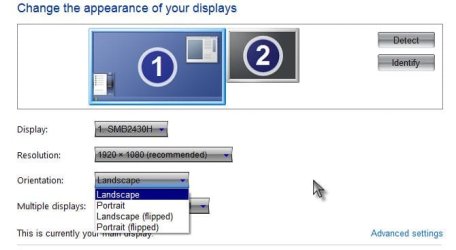
I went to "Control Panel -> Appearance and Personalization -> Display -> Screen Resolution -> advanced settings for my secondary monitor

Then I clicked on "List All Modes" in the adapter tab and switched back and forth between True Color (32 bits) and High Color (16 bits). I was able to move the black bar from the bottom to the top of the monitor. Then I switched back to True Color and then I went to my NVIDIA control panel and BOOM! black edge gone. Not very scientific, but I suppose not all solutions are completely understood.

Anyways, thanks for your help! Hope nobody else runs into this problem :)

 

My Computer My Computer

At a glance

Windows 7 Ultimate x64
OS
Windows 7 Ultimate x64
Great, sometimes we don't ask why, and are just glad it's fixed ;)

A Guy
 

My Computer My Computer

At a glance

Windows 10 Home x64INTEL Core i5-750 Quad-Core 3.37GHzHyperX Fury Black Series 8GB (2 x 4GB) 1866MhzEVGA GeForce GTX 750 Superclocked 1GB 128-Bit...
Computer type
PC/Desktop
OS
Windows 10 Home x64
CPU
INTEL Core i5-750 Quad-Core 3.37GHz
Motherboard
ASUS P7P55D
Memory
HyperX Fury Black Series 8GB (2 x 4GB) 1866Mhz
Graphics Card(s)
EVGA GeForce GTX 750 Superclocked 1GB 128-Bit GDDR5
Monitor(s) Displays
LG 32MA68HY 32" IPS
Screen Resolution
1920 x 1080
Hard Drives
Samsung 840 Evo 120GB, SEAGATE 500GB Barracuda® 7200.12, SATA 3 Gb/s, 7200 RPM, 16MB cache
PSU
ANTEC TruePower New TP-550, 80 PLUS, 550W
Case
ANTEC Three Hundred Illusion
Cooling
COOLER MASTER Hyper 212 Plus, 4 x 120mm 1 x 140mm Noctua's
Internet Speed
85 + Mbps
Antivirus
Avast
Browser
Vivaldi
Back
Top