Solved USB External Drive Problem

Nelly

New member
Member
Local time
10:38 PM
Messages
40
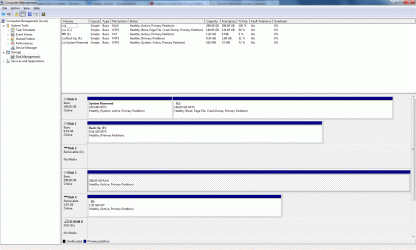
Good morning All, I have an external USB Drive that has been working well until now. I am unable to see it in "My Computer" and Disk Management shows it as having no drive letter and 298 gb free.It has only about 25 gb free as it contains all my photos and docs. I believe if I assign a drive letter I will need to format the drive to use it. I'm desperate to recover it without formatting if possible.
Can anyone help please ?
 

My Computer

OS
Windows 7 Home Premium
Hi,

Before you do anything, please post a screen capture image of your Disk Management screen using these steps:

1. Click :orb:
2. Right-click Computer, and then click Manage
3. In the panel that opens, click Disk Management

Regards,
Golden
 

My Computer

Computer type
PC/Desktop
Computer Manufacturer/Model Number
Golden Mk. I.4
OS
Windows 10 Pro x64 ; Xubuntu x64
CPU
Intel i7 860 @ 2.80 GHz O/C'ed to 4.0GHz
Motherboard
Gigabyte P55A-UD3R Rev.1. Award BIOS F13
Memory
16GB Corsair Vengance DDR3 @ 661 MHz Dual Channel (9-9-9-24)
Graphics Card(s)
EVGA NVidia GTX 560 1024MB
Sound Card
Realtek Integrated
Monitor(s) Displays
Dual Samsung SyncMaster 2494HS
Screen Resolution
1920*1080 and 1920*1080
Hard Drives
1*Samsung 840 EVO 120GB SSD;
1*OCZ Vertex 2 60GB SSD;
2*Samsung F3 SpinPoint 1TB in RAID0;
1*Samsung F1 SpinPoint 1TB;
2*Western Digital 1TB External USB 3.0
1*Western Digital 500GB External USB 3.0
1*Seagate 500GB External USB 2.0
PSU
Thermaltake ToughPower QFan 750W
Case
Thermaltake Element S VK60001W2Z
Cooling
Corsair H60 Water Cooling, 2*230mm and 2*80mm case fans
Keyboard
Logitech G110
Mouse
Logitech MX518
Hi Golden,
Thanks for the quick reply.
Never posted a screen capture before, assuming this is right ?
Nelly
 

Attachments

  • Screen Capture Disk Management.gif
    Screen Capture Disk Management.gif
    254.5 KB · Views: 17

My Computer

OS
Windows 7 Home Premium
Hi,

Yes that's fine, but the results are'nt good. The disk is shown as RAW - meaning it requires a format/initialisation.....but....that means losing the data.

There are a few things we could try. Lets start with the easiest first. Please follow this tutorial, and see if you can use the File Manager as shown in STEP C to access the external USB drive:

http://www.sevenforums.com/tutorial...ate-live-cd-dvd-usb-use-emergency-backup.html

NOTE: if at any stage you are prompted to format the drive, do NOT do so.

Regards,
Golden
 

My Computer

Computer type
PC/Desktop
Computer Manufacturer/Model Number
Golden Mk. I.4
OS
Windows 10 Pro x64 ; Xubuntu x64
CPU
Intel i7 860 @ 2.80 GHz O/C'ed to 4.0GHz
Motherboard
Gigabyte P55A-UD3R Rev.1. Award BIOS F13
Memory
16GB Corsair Vengance DDR3 @ 661 MHz Dual Channel (9-9-9-24)
Graphics Card(s)
EVGA NVidia GTX 560 1024MB
Sound Card
Realtek Integrated
Monitor(s) Displays
Dual Samsung SyncMaster 2494HS
Screen Resolution
1920*1080 and 1920*1080
Hard Drives
1*Samsung 840 EVO 120GB SSD;
1*OCZ Vertex 2 60GB SSD;
2*Samsung F3 SpinPoint 1TB in RAID0;
1*Samsung F1 SpinPoint 1TB;
2*Western Digital 1TB External USB 3.0
1*Western Digital 500GB External USB 3.0
1*Seagate 500GB External USB 2.0
PSU
Thermaltake ToughPower QFan 750W
Case
Thermaltake Element S VK60001W2Z
Cooling
Corsair H60 Water Cooling, 2*230mm and 2*80mm case fans
Keyboard
Logitech G110
Mouse
Logitech MX518
Hello Golden,
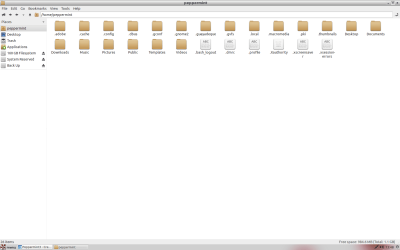
I've followed the tutorial and the USB drive does not show in File Manager.
Unless there is something I'm not selecting in Peppermint ?
Nelly
 

Attachments

  • Screenshot.png
    Screenshot.png
    78.3 KB · Views: 8

My Computer

OS
Windows 7 Home Premium
Mmm. OK, I was afraid of that. On to the next thing.

Please try the free Partition Wizard Recovery Tool to see if it can recover any partitions on the USB. This video shows the process in action.
 

My Computer

Computer type
PC/Desktop
Computer Manufacturer/Model Number
Golden Mk. I.4
OS
Windows 10 Pro x64 ; Xubuntu x64
CPU
Intel i7 860 @ 2.80 GHz O/C'ed to 4.0GHz
Motherboard
Gigabyte P55A-UD3R Rev.1. Award BIOS F13
Memory
16GB Corsair Vengance DDR3 @ 661 MHz Dual Channel (9-9-9-24)
Graphics Card(s)
EVGA NVidia GTX 560 1024MB
Sound Card
Realtek Integrated
Monitor(s) Displays
Dual Samsung SyncMaster 2494HS
Screen Resolution
1920*1080 and 1920*1080
Hard Drives
1*Samsung 840 EVO 120GB SSD;
1*OCZ Vertex 2 60GB SSD;
2*Samsung F3 SpinPoint 1TB in RAID0;
1*Samsung F1 SpinPoint 1TB;
2*Western Digital 1TB External USB 3.0
1*Western Digital 500GB External USB 3.0
1*Seagate 500GB External USB 2.0
PSU
Thermaltake ToughPower QFan 750W
Case
Thermaltake Element S VK60001W2Z
Cooling
Corsair H60 Water Cooling, 2*230mm and 2*80mm case fans
Keyboard
Logitech G110
Mouse
Logitech MX518
I lost about 50GB data the same way. . . .
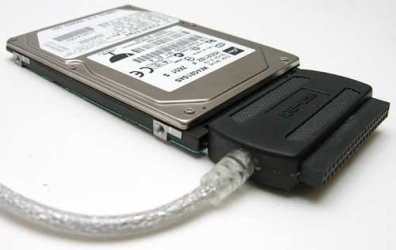
Is it IDE drive , try connecting it in a PC as slave that might detect it ! ! ! !
 

My Computer

Computer Manufacturer/Model Number
INTEL
OS
Windows 7 Ultimate x64
CPU
DUAL CORE e5700
Motherboard
DG41Wv
Memory
4GB ddr3 kingston
Graphics Card(s)
9500gt IGB ddr2
Sound Card
Built-in realteck
Monitor(s) Displays
SAMSUNG sync 73
Screen Resolution
1024x768
Hard Drives
80GB
PSU
400W Enermax
Case
SV
Cooling
Stock
Keyboard
-
Mouse
DELL
Internet Speed
1Mbps
Other Info
WHAT U WANNA KNOW !!!

My Computer

Computer type
PC/Desktop
Computer Manufacturer/Model Number
Golden Mk. I.4
OS
Windows 10 Pro x64 ; Xubuntu x64
CPU
Intel i7 860 @ 2.80 GHz O/C'ed to 4.0GHz
Motherboard
Gigabyte P55A-UD3R Rev.1. Award BIOS F13
Memory
16GB Corsair Vengance DDR3 @ 661 MHz Dual Channel (9-9-9-24)
Graphics Card(s)
EVGA NVidia GTX 560 1024MB
Sound Card
Realtek Integrated
Monitor(s) Displays
Dual Samsung SyncMaster 2494HS
Screen Resolution
1920*1080 and 1920*1080
Hard Drives
1*Samsung 840 EVO 120GB SSD;
1*OCZ Vertex 2 60GB SSD;
2*Samsung F3 SpinPoint 1TB in RAID0;
1*Samsung F1 SpinPoint 1TB;
2*Western Digital 1TB External USB 3.0
1*Western Digital 500GB External USB 3.0
1*Seagate 500GB External USB 2.0
PSU
Thermaltake ToughPower QFan 750W
Case
Thermaltake Element S VK60001W2Z
Cooling
Corsair H60 Water Cooling, 2*230mm and 2*80mm case fans
Keyboard
Logitech G110
Mouse
Logitech MX518

Attachments

  • brando-usb2ide-cable-v2-4.jpg
    brando-usb2ide-cable-v2-4.jpg
    14.2 KB · Views: 2

My Computer

Computer Manufacturer/Model Number
INTEL
OS
Windows 7 Ultimate x64
CPU
DUAL CORE e5700
Motherboard
DG41Wv
Memory
4GB ddr3 kingston
Graphics Card(s)
9500gt IGB ddr2
Sound Card
Built-in realteck
Monitor(s) Displays
SAMSUNG sync 73
Screen Resolution
1024x768
Hard Drives
80GB
PSU
400W Enermax
Case
SV
Cooling
Stock
Keyboard
-
Mouse
DELL
Internet Speed
1Mbps
Other Info
WHAT U WANNA KNOW !!!
Hi, the recovery tool detects partitions but the free version only allows 1 gb of recovery. Not a complaint but an observation, will pay if it can get my files back. Although free is best :)

Golden, great advice thanks. Some serious rep coming your way, and Beret not a problem thanks for getting in on it.
All help appreciated.
Nelly
 

My Computer

OS
Windows 7 Home Premium
Ahh, I wasn't aware of the 1GB limitation :(

I think Paragon do an unlimited version, but I'm not 100% sure of that, nor am I familiar with the software.....but...I think I know who might be, and I'll ask them to drop by - please look out for replies from SiW2 and/or GregRocker.

I've emailed both with a request to stop by here - these are some of our most experienced members, so you are in excellent hands..

Regards,
Golden
 

My Computer

Computer type
PC/Desktop
Computer Manufacturer/Model Number
Golden Mk. I.4
OS
Windows 10 Pro x64 ; Xubuntu x64
CPU
Intel i7 860 @ 2.80 GHz O/C'ed to 4.0GHz
Motherboard
Gigabyte P55A-UD3R Rev.1. Award BIOS F13
Memory
16GB Corsair Vengance DDR3 @ 661 MHz Dual Channel (9-9-9-24)
Graphics Card(s)
EVGA NVidia GTX 560 1024MB
Sound Card
Realtek Integrated
Monitor(s) Displays
Dual Samsung SyncMaster 2494HS
Screen Resolution
1920*1080 and 1920*1080
Hard Drives
1*Samsung 840 EVO 120GB SSD;
1*OCZ Vertex 2 60GB SSD;
2*Samsung F3 SpinPoint 1TB in RAID0;
1*Samsung F1 SpinPoint 1TB;
2*Western Digital 1TB External USB 3.0
1*Western Digital 500GB External USB 3.0
1*Seagate 500GB External USB 2.0
PSU
Thermaltake ToughPower QFan 750W
Case
Thermaltake Element S VK60001W2Z
Cooling
Corsair H60 Water Cooling, 2*230mm and 2*80mm case fans
Keyboard
Logitech G110
Mouse
Logitech MX518
Not a problem mate. With the tool I found out the partitions and the files are there, just have to get at them :D
 

My Computer

OS
Windows 7 Home Premium
remember not to save files to b recovered on the disc that you are recovering from !
 

My Computer

Computer Manufacturer/Model Number
INTEL
OS
Windows 7 Ultimate x64
CPU
DUAL CORE e5700
Motherboard
DG41Wv
Memory
4GB ddr3 kingston
Graphics Card(s)
9500gt IGB ddr2
Sound Card
Built-in realteck
Monitor(s) Displays
SAMSUNG sync 73
Screen Resolution
1024x768
Hard Drives
80GB
PSU
400W Enermax
Case
SV
Cooling
Stock
Keyboard
-
Mouse
DELL
Internet Speed
1Mbps
Other Info
WHAT U WANNA KNOW !!!
Hi Nelly,

You can try PhotoRec. http://www.sevenforums.com/software/193467-guide-using-photorec-recovery-software.html

The advantage of using PhotoRec is that since it does not write anything to your external hard drive, your data to be recovered is safe. ( You may have to copy the files to another device.)

You can also try TestDisk. http://www.sevenforums.com/software/190430-regain-lost-drive-using-test-disk-illustrated-guide.html

If it can identify the partitions, it can rewrite the partition information and you will get the hard drive back as it was before and can access all your folders and files straightaway. ( A little difficult to learn for a first time user but not impossible. Go through the documentation on the testDisk website and also the guide.)

Let us know how it went.

Finally if you have only photos and videos to recover, you can try Zero Assumption Recovery Digital image recovery - ZAR usage demo
The image recovery feature in ZAR is free without any limitation. Perhaps you can try this first since it appears to be easy.
 

My Computer

OS
Windows 7 Home Premium 32 bit
Thanks for all the suggestions fellas. Going to look into them all and will get back to you. Big apology to Golden, I followed the link he gave and which led to partition recovery and somehow got onto DATA recovery. The partition recovery is unlimited.
Will report back.
Thanks again.
 

My Computer

OS
Windows 7 Home Premium
Hello All,
I am over the moon. Ran the partition recovery and it took seconds to do it's thing and all my files are there. Thanks to everyone for the suggestions.
Special thanks to Golden for suggesting the partition recovery, it worked like a charm, and Gregrocker for knowing I had blundered onto data recovery by mistake.
Thanks again to you all.
Nelly.
 

My Computer

OS
Windows 7 Home Premium
good work on this thread guys,
always a relief to recover your data,
 

My Computer

Computer Manufacturer/Model Number
Hewlett packard/p6512uk
OS
Microsoft Windows 7 Home Premium 64-bit 7600
CPU
IIx4 amd athelon 635 processor
Motherboard
FOXCONN 2AA9
Memory
2x2gb
Graphics Card(s)
ati radeon HD 5450
Sound Card
(1) Realtek High Definition Audio (2) AMD High Definition
Monitor(s) Displays
samsung lcd tv 32"
Screen Resolution
1360x 768
Hard Drives
(1) WDC WD10 01FAES-60Z2A0 SATA Disk Device (2) Maxtor OneTouch USB Device (3) ST310003 33AS USB Device (4) WD My Book 1111 USB Device
PSU
?
Cooling
air!
Keyboard
wireless hp
Mouse
wireless Hp,optical
Internet Speed
1.10mb/s
Antivirus
MSE
Browser
Firefox
Back
Top