Laptop missing RAM; 1 slot of RAM suddenly not working & overheating.

aw3Sum3K9

New member
Local time
10:06 PM
Messages
5
Laptop missing RAM; 1 slot of RAM suddenly not working & overheating.

Hey everybody,

Thanks for viewing this page.
before I send my laptop to Acer for repairs, I would like to consult with you guys, ok so,
it was yesterday when I found out that my laptop is missing 4GB of RAM out of 8GB (4GBx2). So I checked both RAM cards, and switched their places, confirmed both are working, and confirmed that 1 of the 2 slots ain't working no more.

I would like to know is there anything that I could do to fix it?

Here's the second part.
Now currently on 4GB of RAM, with my laptop's specs;

Aspire V3-571G
Intel Core i5-2450M 2.5Hz with Turbo Boost up to 3.1GHz
Nvidia GeForce GT 640M with 2GB dedicated VRAM
4* GB DDR3 memory
750GB HDD
Windows 7 64 bit

Still under the 1yr Acer warranty

...it would be able to manage running high end games right?

Well, now these two days running Counterstrike GO seems to be a problem. When I start playing the game, it's normal at first, but very quickly my laptop somehow overheats quickly and lags.
Also with Battlefield 3 in campaign, with the screen resolution at max, running under 1 minute in the game everything is fine till it lags and overheats so quickly. While playing both games, laptop was set to high performance, with the vents clear of obstruction, with just a page of Firefox running or two.

I have never encountered this overheating and lagging problem before while gaming, and the missing RAM too!

Any help in configuring these issues would be gladly appreciated!
Thanks again,

Regards,

Kelvin
 

My Computer My Computer

At a glance

Windows 7 Premium 64 bit
OS
Windows 7 Premium 64 bit
Since you've already swapped out RAM modules and you've determined that one of the RAM slots isn't working, I think the best thing to do is return it to Acer for warranty repairs. One caution, however. Did the computer come with 8GB RAM when you bought it? If not, you may want to install the original RAM so the computer configuration is the same as when it left the factory.

If you do send the computer in to Acer for repair, make sure you tell them about the overheating and lagging issue. I believe it's related to the faulty RAM slot but as long as Acer has the machine, let them do a full diagnostic check to make sure nothing else was affected.
 

My Computer My Computer

At a glance

Win 7 Pro 64-bitIntel i5 2.4 Ghz8GB DDR3Intel HD 3000
Computer type
Laptop
Computer Manufacturer/Model Number
Sony Vaio VPCEB47GM Laptop
OS
Win 7 Pro 64-bit
CPU
Intel i5 2.4 Ghz
Memory
8GB DDR3
Graphics Card(s)
Intel HD 3000
Sound Card
IDT High Definition
Monitor(s) Displays
15.6 WGXA Anti-Glare LED
Screen Resolution
1280x800
Hard Drives
640Gb 7200rpm
Antivirus
MSE
Browser
Opera (primary) with IE9 backup
Since you've already swapped out RAM modules and you've determined that one of the RAM slots isn't working, I think the best thing to do is return it to Acer for warranty repairs. One caution, however. Did the computer come with 8GB RAM when you bought it? If not, you may want to install the original RAM so the computer configuration is the same as when it left the factory.

If you do send the computer in to Acer for repair, make sure you tell them about the overheating and lagging issue. I believe it's related to the faulty RAM slot but as long as Acer has the machine, let them do a full diagnostic check to make sure nothing else was affected.

Thanks.
I'm pretty sure RAM upgrade won't affect the warranty, because I have sent this laptop to Acer before.
 

My Computer My Computer

At a glance

Windows 7 Premium 64 bit
OS
Windows 7 Premium 64 bit
Since you've already swapped out RAM modules and you've determined that one of the RAM slots isn't working, I think the best thing to do is return it to Acer for warranty repairs. One caution, however. Did the computer come with 8GB RAM when you bought it? If not, you may want to install the original RAM so the computer configuration is the same as when it left the factory.

If you do send the computer in to Acer for repair, make sure you tell them about the overheating and lagging issue. I believe it's related to the faulty RAM slot but as long as Acer has the machine, let them do a full diagnostic check to make sure nothing else was affected.

Thanks.
I'm pretty sure RAM upgrade won't affect the warranty, because I have sent this laptop to Acer before.
Hum I wouldn't bet the house on it AW they will at the least provocation dump your warranty like a red hot cake and especially if the dealer sees a chance to make another buck out of you.

Take it from someone who has been there done that ;)

I meant to say seeing that this is another warranty job.
 

My Computer My Computer

At a glance

Desk1 7 Home Prem / Desk2 10 Pro / Main lap A...Desk1 i5 3750K / Laptop i7 GTX 860M / Desk2 i...Desk1 8GB (1866) / Desk2 16GB (1333) / Laptop...Desk 1& 2NVidia GTX 650 & Laptops on board Intel
Computer type
PC/Desktop
Computer Manufacturer/Model Number
Own build (new) Desk1 / Asus ROG Win 7 / Desk2 1st build
OS
Desk1 7 Home Prem / Desk2 10 Pro / Main lap Asus ROG 10 Pro 2 laptop Toshiba 7 Pro Asus P2520 7 & 10
CPU
Desk1 i5 3750K / Laptop i7 GTX 860M / Desk2 i5 2500
Motherboard
Desk1 Asus P877-V / Desk2 Gigabyte H67 UD3H / Laptop ?
Memory
Desk1 8GB (1866) / Desk2 16GB (1333) / Laptop 8Gb DDR3
Graphics Card(s)
Desk 1& 2NVidia GTX 650 & Laptops on board Intel
Sound Card
Desk 1 & 2 -XONAR DG Realtek High Def audio Laptop
Monitor(s) Displays
Desk 1 Benq HD 2450 / Desk2 Philips 24" / Laptop 17.5"
Screen Resolution
1920x1080 D1 & D2 & Laptop 1
Hard Drives
Desk1 Samsung 120GB 830 SSD
Asus ROG 256GB 850 Pro SSD
Desk2 Samsung 840 256 SSD
Toshiba 120GB EVO
PSU
Desk 1 Corsair HX 1050/ Laptop ? / Desk 2 Corsair HX 650
Case
Desk 1 Cooler HAF XM ? Toshiba laptop / Desk2 Coolermaster
Cooling
Fans on all Desk1 -2 Desk2 - all Coolermasters 5 Laptop ?
Keyboard
Desk 1 MS Sidewinder X6 Desk 2 MS Sidewinder X 4
Mouse
Desk 1&2 - Gigabyte MS 900 gamer - laptop - Logitec wireless
Internet Speed
ADSL2+
Other Info
One other Desktop (tester) and spare Toshba laptop both with SSD's
Running Kaspersky 2016 ISS on all machines config'd identically
Logitec audio stereo systems on each machine (x3)
Canon MG5250MFC
Router/modem TP-Link running WPA2SK
Just thought about the reason for my laptop overheating is... the fan isn't working, I think!
That might be the reason cos not as much hot air is exiting from the vent, as I remember!

Also, this laptop has also experienced sudden restarts/shutdown a few times when I lift/tilt it at random angles when moving it, since it came back from a HDD replacement from Acer. Possibly not entirely secured internal connection somewhere?

Will have to send my laptop to Acer again! -.-
 

My Computer My Computer

At a glance

Windows 7 Premium 64 bit
OS
Windows 7 Premium 64 bit
Just make sure to tell Acer what all the symptoms are. But I wouldn't offer any suggested fixes. For example, it's OK to tell them the machine is overheating, but if you say, "I don't think the fan is working," they might check the fan, find out it's working, and not check anything else. But if you simply leave it as an overheating problem, they'll be forced to check the fan, and any other heat related issues like a short, etc.
 

My Computer My Computer

At a glance

Win 7 Pro 64-bitIntel i5 2.4 Ghz8GB DDR3Intel HD 3000
Computer type
Laptop
Computer Manufacturer/Model Number
Sony Vaio VPCEB47GM Laptop
OS
Win 7 Pro 64-bit
CPU
Intel i5 2.4 Ghz
Memory
8GB DDR3
Graphics Card(s)
Intel HD 3000
Sound Card
IDT High Definition
Monitor(s) Displays
15.6 WGXA Anti-Glare LED
Screen Resolution
1280x800
Hard Drives
640Gb 7200rpm
Antivirus
MSE
Browser
Opera (primary) with IE9 backup
Just thought about the reason for my laptop overheating is... the fan isn't working, I think!
That might be the reason cos not as much hot air is exiting from the vent, as I remember!

Also, this laptop has also experienced sudden restarts/shutdown a few times when I lift/tilt it at random angles when moving it, since it came back from a HDD replacement from Acer. Possibly not entirely secured internal connection somewhere?

Will have to send my laptop to Acer again! -.-
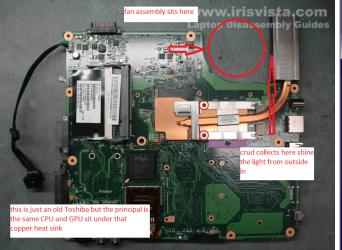
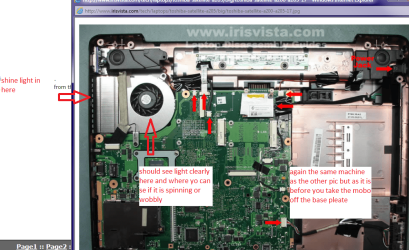
Well mate you can check that very easily shine a very bright light into the out vent and then look into the fan aperture if you cannot see light then the radiator is blocked with crud. You should see the fan spinning if you look into that fan intake anyway.

If you can power off while you are watching the fan it should slow and stop quite evenly - if it is wobbling from side to side like a buckled bicycle wheel then the bearing has had it oh and yes if it isn't spinning it definitely is dead. As marsmimar said if you can see those thing happening tell the Acer people as he states then they will have to check it if they tell you there is nothing wrong and you have clearly seen problems as I have described then they are not the full quid.

The machine is a Toshiba in the pics but is typical of the set up of laptops.
 

Attachments

  • T1.PNG
    T1.PNG
    254.3 KB · Views: 2
  • T2.PNG
    T2.PNG
    243 KB · Views: 2

My Computer My Computer

At a glance

Desk1 7 Home Prem / Desk2 10 Pro / Main lap A...Desk1 i5 3750K / Laptop i7 GTX 860M / Desk2 i...Desk1 8GB (1866) / Desk2 16GB (1333) / Laptop...Desk 1& 2NVidia GTX 650 & Laptops on board Intel
Computer type
PC/Desktop
Computer Manufacturer/Model Number
Own build (new) Desk1 / Asus ROG Win 7 / Desk2 1st build
OS
Desk1 7 Home Prem / Desk2 10 Pro / Main lap Asus ROG 10 Pro 2 laptop Toshiba 7 Pro Asus P2520 7 & 10
CPU
Desk1 i5 3750K / Laptop i7 GTX 860M / Desk2 i5 2500
Motherboard
Desk1 Asus P877-V / Desk2 Gigabyte H67 UD3H / Laptop ?
Memory
Desk1 8GB (1866) / Desk2 16GB (1333) / Laptop 8Gb DDR3
Graphics Card(s)
Desk 1& 2NVidia GTX 650 & Laptops on board Intel
Sound Card
Desk 1 & 2 -XONAR DG Realtek High Def audio Laptop
Monitor(s) Displays
Desk 1 Benq HD 2450 / Desk2 Philips 24" / Laptop 17.5"
Screen Resolution
1920x1080 D1 & D2 & Laptop 1
Hard Drives
Desk1 Samsung 120GB 830 SSD
Asus ROG 256GB 850 Pro SSD
Desk2 Samsung 840 256 SSD
Toshiba 120GB EVO
PSU
Desk 1 Corsair HX 1050/ Laptop ? / Desk 2 Corsair HX 650
Case
Desk 1 Cooler HAF XM ? Toshiba laptop / Desk2 Coolermaster
Cooling
Fans on all Desk1 -2 Desk2 - all Coolermasters 5 Laptop ?
Keyboard
Desk 1 MS Sidewinder X6 Desk 2 MS Sidewinder X 4
Mouse
Desk 1&2 - Gigabyte MS 900 gamer - laptop - Logitec wireless
Internet Speed
ADSL2+
Other Info
One other Desktop (tester) and spare Toshba laptop both with SSD's
Running Kaspersky 2016 ISS on all machines config'd identically
Logitec audio stereo systems on each machine (x3)
Canon MG5250MFC
Router/modem TP-Link running WPA2SK
Back
Top