
Solved Backlight not working on replacement LED Screen Toshiba Portege z835

kslip

New member
Local time
5:03 PM
Messages
5
I have a Toshiba Portege Z835 P330 ultrabook. I accidently broke the old screen and ordered a replacement from laptopscreen.com My original 14" screen was a samsung model. The one laptopscreen.com sent me was an LG. The First LG screen I received partially worked as in I could see graphics, but no backlight. I sent the screen back for an exchange, and they mailed me a replacement. Same problem: Graphics, but no backlight at all. I am perplexed. What could the issue be? I've quadruple checked the connection and restarted the laptop multiple times. It doesn't appear the video cable is damaged.

The Samsung model # of my original screen is LTN133AT25-T01
The LG Model # of the "compatible" replacement is LP133WH2

Any insight would be appreciated as im not looking forward to hashing it out with the laptopscreen.com tech anymore. Thanks
 

My Computer My Computer

At a glance

Windows 7 Ultimate x64
Computer type
PC/Desktop
OS
Windows 7 Ultimate x64
There are two types of laptop LCD displays: older versions that use a separate fluorescent backlight bulb with an inverter, and newer models that use a true LED backlight integral with the display screen.
Do you know which type your laptop uses? Pure LED backlit screens with have only one ribbon cable to it. CCFL screens will have a second connection.
 

My Computer My Computer

At a glance

Windows 7 64 Bit Home Premium SP1i7-3820GSkill F3-14900CL9Q - 16GBEVGA GeForce GTX660 - Driver 352.86
Computer type
PC/Desktop
Computer Manufacturer/Model Number
Home Built - Jan 2013
OS
Windows 7 64 Bit Home Premium SP1
CPU
i7-3820
Motherboard
Asus P9X79-PRO - Bios 4608
Memory
GSkill F3-14900CL9Q - 16GB
Graphics Card(s)
EVGA GeForce GTX660 - Driver 352.86
Sound Card
On board Realtek ALC898
Monitor(s) Displays
Acer S271HL
Screen Resolution
1920 x 1080
Hard Drives
#1- Samsung 840 Pro Series
#2- Western Digital WD1002FAEX Sata3 Black
#3- Western Digital WD1002FAEX Sata3 Black
PSU
Corsair CMPSU-850TX-V2 - 850 watt (by Seasonic)
Case
Corsair Obsidian 550D
Cooling
Standard 3 120mm case fans, Cooler Master Hyper 212 EVO
Keyboard
MS KC-0405
Mouse
Intellimouse 5-button
Internet Speed
56 Mbits/Sec (on a good day)
Antivirus
Avast & Malwarebytes
Browser
Firefox
Other Info
Asus DVD - DRW-24B1ST 24X
1, This is an ultrabook. They all have LED screens. 2, I haven't seen a laptop with a fluorescent lcd screen in years, cmon. Thanks anyways.
 

My Computer My Computer

At a glance

Windows 7 Ultimate x64
Computer type
PC/Desktop
OS
Windows 7 Ultimate x64
Garbage in, garbage out dude. I go with what I have. You could have provided that little piece of information in your first post to be helpful.

It could be that the connection is not complete. What I have found is that you need to really push on that connector to get it to snap all the way into the socket. I always feel like I am going to break something, but it takes that much force.

It is highly unlikely you got 2 bad replacement screens. Therefore it seems more likely it is user error. Sorry.

You could insist on a Samsung replacement to see if it is indeed an incompatible replacement. Other than that you are left with the possibility that something else got broken.
 

My Computer My Computer

At a glance

Windows 7 64 Bit Home Premium SP1i7-3820GSkill F3-14900CL9Q - 16GBEVGA GeForce GTX660 - Driver 352.86
Computer type
PC/Desktop
Computer Manufacturer/Model Number
Home Built - Jan 2013
OS
Windows 7 64 Bit Home Premium SP1
CPU
i7-3820
Motherboard
Asus P9X79-PRO - Bios 4608
Memory
GSkill F3-14900CL9Q - 16GB
Graphics Card(s)
EVGA GeForce GTX660 - Driver 352.86
Sound Card
On board Realtek ALC898
Monitor(s) Displays
Acer S271HL
Screen Resolution
1920 x 1080
Hard Drives
#1- Samsung 840 Pro Series
#2- Western Digital WD1002FAEX Sata3 Black
#3- Western Digital WD1002FAEX Sata3 Black
PSU
Corsair CMPSU-850TX-V2 - 850 watt (by Seasonic)
Case
Corsair Obsidian 550D
Cooling
Standard 3 120mm case fans, Cooler Master Hyper 212 EVO
Keyboard
MS KC-0405
Mouse
Intellimouse 5-button
Internet Speed
56 Mbits/Sec (on a good day)
Antivirus
Avast & Malwarebytes
Browser
Firefox
Other Info
Asus DVD - DRW-24B1ST 24X
Hey I apologize for my tone, and I do appreciate the help. I did, however, state that my screen was LED in the title of my post.

I asked for an identical Samsung replacement, and the company doesn't stock them. Only LG's. The laptopscreen.com tech suggested that a fuse may be blown on my motherboard. Who knows. It is beyond me now, and I will probably end up spending money for a local computer repair shop to look at it.

Thanks
 

My Computer My Computer

At a glance

Windows 7 Ultimate x64
Computer type
PC/Desktop
OS
Windows 7 Ultimate x64
Yeah that may be a good idea. Although I've never seen a fuse (or breaker) for the display on a laptop motherboard. If there is one it is probably something that needs replacement. Beyond the capabilities of tinkerers like me.

The LG should work, the only compatibility issues with displays are size (and mounting) and socket. So if you got it plugged in correctly then what is left?

Ah! You put LED in the title. My bad. Who reads the titles?;)
Although I've lost count of the posters who think LCD and LED mean the same thing.
 

My Computer My Computer

At a glance

Windows 7 64 Bit Home Premium SP1i7-3820GSkill F3-14900CL9Q - 16GBEVGA GeForce GTX660 - Driver 352.86
Computer type
PC/Desktop
Computer Manufacturer/Model Number
Home Built - Jan 2013
OS
Windows 7 64 Bit Home Premium SP1
CPU
i7-3820
Motherboard
Asus P9X79-PRO - Bios 4608
Memory
GSkill F3-14900CL9Q - 16GB
Graphics Card(s)
EVGA GeForce GTX660 - Driver 352.86
Sound Card
On board Realtek ALC898
Monitor(s) Displays
Acer S271HL
Screen Resolution
1920 x 1080
Hard Drives
#1- Samsung 840 Pro Series
#2- Western Digital WD1002FAEX Sata3 Black
#3- Western Digital WD1002FAEX Sata3 Black
PSU
Corsair CMPSU-850TX-V2 - 850 watt (by Seasonic)
Case
Corsair Obsidian 550D
Cooling
Standard 3 120mm case fans, Cooler Master Hyper 212 EVO
Keyboard
MS KC-0405
Mouse
Intellimouse 5-button
Internet Speed
56 Mbits/Sec (on a good day)
Antivirus
Avast & Malwarebytes
Browser
Firefox
Other Info
Asus DVD - DRW-24B1ST 24X
Haha, Thanks TVeblen. I completely understand. It looks like you've helped many people on here, and you really have to start with the basic questions. It's hard to know the level of understanding or skill a person has, especially with a new member like me with few posts.

Yeah, everything seems right with the replacement LG screen. Drivers are up to date. Time to take it in to a shop I guess.
Thanks for the help & have a good day! :)
 

My Computer My Computer

At a glance

Windows 7 Ultimate x64
Computer type
PC/Desktop
OS
Windows 7 Ultimate x64
Toshiba z830 no backlight after screen replacement

I have just encountered this exact problem. I broke my z830 screen by accidentally wedging it in a car door :(. There was definitely no damage to the motherboard though so I figured a replacement screen would solve my problem. The old screen still lit up and the majority of it even worked as normal except for about an inch wide crack down the left hand side. After replacing the screen it worked perfectly but with no backlight. I thought it was just faulty so ordered another. 3 screens later I still can't get a backlight. After putting the old one back in, it also now has no backlight.
Did you end up finding a solution for this problem kslip or should I just go buy another one?
 

My Computer My Computer

At a glance

Windows 7 64 bit
Computer type
PC/Desktop
OS
Windows 7 64 bit
No, unfortunately I am exactly where you are at. I am thinking I will have to pay someone an outrageous amount to get it fixed, and im low on cash so im just sitting on a useless ultrabook. I left it in storage, and now it wont even power on or charge. No status lights. Nothing. Good luck, please post back here if you figure anything out.
 

My Computer My Computer

At a glance

Windows 7 Ultimate x64
Computer type
PC/Desktop
OS
Windows 7 Ultimate x64
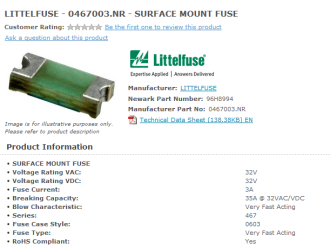
I just discovered that there IS a fuse for the back light circuit on some motherboards.

It may be soldered onto the board, and if so, not an easy fix. A lot of these look like resistors. Many are marked F1 (on a Dell motherboard.)

If you have a local repair shop nearby you could probably get this done for "small" money ($75 US). If you are handy with a solder iron you could DIY. But it will require complete disassembly of the unit.

Capture.PNG

Dim Laptop LED Screen – F1 or F8 Fuse just below the motherboard video connector | NWA PC Help
 

My Computer My Computer

At a glance

Windows 7 64 Bit Home Premium SP1i7-3820GSkill F3-14900CL9Q - 16GBEVGA GeForce GTX660 - Driver 352.86
Computer type
PC/Desktop
Computer Manufacturer/Model Number
Home Built - Jan 2013
OS
Windows 7 64 Bit Home Premium SP1
CPU
i7-3820
Motherboard
Asus P9X79-PRO - Bios 4608
Memory
GSkill F3-14900CL9Q - 16GB
Graphics Card(s)
EVGA GeForce GTX660 - Driver 352.86
Sound Card
On board Realtek ALC898
Monitor(s) Displays
Acer S271HL
Screen Resolution
1920 x 1080
Hard Drives
#1- Samsung 840 Pro Series
#2- Western Digital WD1002FAEX Sata3 Black
#3- Western Digital WD1002FAEX Sata3 Black
PSU
Corsair CMPSU-850TX-V2 - 850 watt (by Seasonic)
Case
Corsair Obsidian 550D
Cooling
Standard 3 120mm case fans, Cooler Master Hyper 212 EVO
Keyboard
MS KC-0405
Mouse
Intellimouse 5-button
Internet Speed
56 Mbits/Sec (on a good day)
Antivirus
Avast & Malwarebytes
Browser
Firefox
Other Info
Asus DVD - DRW-24B1ST 24X
I also read about fuses for the back light on spme laptops TVeblen. I have another z830 that I ran over previously that is already in bits (long story....) so I had a look at that where it all hooks up to the m/b. I couldn't see anything marked f1 for a fuse. Of course there still might be a fuse that is just marked differently. I will definitely take it down to a repair shop to at least get it looked at kslip so I will let you know how it goes. If they quote me more than $200 chances are I will just have a very expensive media player for the lounge room since it works fine through HDMI.

Thanks for the replies.
 

My Computer My Computer

At a glance

Windows 7 64 bit
Computer type
PC/Desktop
OS
Windows 7 64 bit
Take a look at the link in my previous post. There are a few pics of various motherboards and their fuse locations.
Bottom line: without a circuit schematic it is not a DIY job.
 

My Computer My Computer

At a glance

Windows 7 64 Bit Home Premium SP1i7-3820GSkill F3-14900CL9Q - 16GBEVGA GeForce GTX660 - Driver 352.86
Computer type
PC/Desktop
Computer Manufacturer/Model Number
Home Built - Jan 2013
OS
Windows 7 64 Bit Home Premium SP1
CPU
i7-3820
Motherboard
Asus P9X79-PRO - Bios 4608
Memory
GSkill F3-14900CL9Q - 16GB
Graphics Card(s)
EVGA GeForce GTX660 - Driver 352.86
Sound Card
On board Realtek ALC898
Monitor(s) Displays
Acer S271HL
Screen Resolution
1920 x 1080
Hard Drives
#1- Samsung 840 Pro Series
#2- Western Digital WD1002FAEX Sata3 Black
#3- Western Digital WD1002FAEX Sata3 Black
PSU
Corsair CMPSU-850TX-V2 - 850 watt (by Seasonic)
Case
Corsair Obsidian 550D
Cooling
Standard 3 120mm case fans, Cooler Master Hyper 212 EVO
Keyboard
MS KC-0405
Mouse
Intellimouse 5-button
Internet Speed
56 Mbits/Sec (on a good day)
Antivirus
Avast & Malwarebytes
Browser
Firefox
Other Info
Asus DVD - DRW-24B1ST 24X
Just a quick update. I took both my screens to the place I bought the new screen from and they both worked ok (except for the massive crack in the old one). This means that something must have happened to the motherboard when replacing the screen. I also replaced the screen cable, but no change. I rang toshiba service and they mentioned that even with power off the screen can short out the motherboard, the battery should be completely removed before changing. This is a mission in itself for this model given that it is built in.... I have seen you tube clips where the screen has been replced without removing the battery, so maybe we just got unlucky kslip :(
I got a price of about $560 to replace the motherboard, so I am not sure if I will get it repaired yet but that seems to be the only solution the tech had.
 

My Computer My Computer

At a glance

Windows 7 64 bit
Computer type
PC/Desktop
OS
Windows 7 64 bit
Do you have a small computer repair shop near you? You may be able to get the motherboard repaired (if it has that breaker) for much less than that.

Otherwise it probably makes more sense to put that $560 towards a new laptop. The difference between that and the cost of a new one can be chalked up to tuition for the school of hard knocks.
 

My Computer My Computer

At a glance

Windows 7 64 Bit Home Premium SP1i7-3820GSkill F3-14900CL9Q - 16GBEVGA GeForce GTX660 - Driver 352.86
Computer type
PC/Desktop
Computer Manufacturer/Model Number
Home Built - Jan 2013
OS
Windows 7 64 Bit Home Premium SP1
CPU
i7-3820
Motherboard
Asus P9X79-PRO - Bios 4608
Memory
GSkill F3-14900CL9Q - 16GB
Graphics Card(s)
EVGA GeForce GTX660 - Driver 352.86
Sound Card
On board Realtek ALC898
Monitor(s) Displays
Acer S271HL
Screen Resolution
1920 x 1080
Hard Drives
#1- Samsung 840 Pro Series
#2- Western Digital WD1002FAEX Sata3 Black
#3- Western Digital WD1002FAEX Sata3 Black
PSU
Corsair CMPSU-850TX-V2 - 850 watt (by Seasonic)
Case
Corsair Obsidian 550D
Cooling
Standard 3 120mm case fans, Cooler Master Hyper 212 EVO
Keyboard
MS KC-0405
Mouse
Intellimouse 5-button
Internet Speed
56 Mbits/Sec (on a good day)
Antivirus
Avast & Malwarebytes
Browser
Firefox
Other Info
Asus DVD - DRW-24B1ST 24X
Did anyone figure this out?

I have the same problem with a Toshiba Z835-330. Bent the screen so that a portion of it was not working but the rest was, put in a replacement and when I got done no picture. I put the old screen back in and no picture on that either. I can connect the laptop to a monitor and everything works fine if I use the monitor.

I followed the directions on a video posted on one of the laptop screen replacement sites. They showed someone using a small screwdriver to carefully pry the screen connector apart. Even though my laptop was not plugged in, I noticed a small spark/flash when I touched the connector with a screwdriver to gently pry it apart.

I called toshiba and they want $120 just to look at it. Their website says a new motherboard is $400 and a new screen is $400, so if both are required, no sense in repairing the laptop.

Any help?
 

My Computer My Computer

At a glance

windows 7
Computer type
Laptop
Computer Manufacturer/Model Number
Toshiba Portege Z835-P330
OS
windows 7
I wonder if the screen replacement would have gone ok if I had not used something metal to pry the connector apart. If so, I wish the company who had the self help video on their website would have included that little tid-bit in the video!
 

My Computer My Computer

At a glance

windows 7
Computer type
Laptop
Computer Manufacturer/Model Number
Toshiba Portege Z835-P330
OS
windows 7
There should be no power to the laptop when doing ANY work inside it.
Did you remove the battery Also?
 

My Computer My Computer

At a glance

Windows 7 64 Bit Home Premium SP1i7-3820GSkill F3-14900CL9Q - 16GBEVGA GeForce GTX660 - Driver 352.86
Computer type
PC/Desktop
Computer Manufacturer/Model Number
Home Built - Jan 2013
OS
Windows 7 64 Bit Home Premium SP1
CPU
i7-3820
Motherboard
Asus P9X79-PRO - Bios 4608
Memory
GSkill F3-14900CL9Q - 16GB
Graphics Card(s)
EVGA GeForce GTX660 - Driver 352.86
Sound Card
On board Realtek ALC898
Monitor(s) Displays
Acer S271HL
Screen Resolution
1920 x 1080
Hard Drives
#1- Samsung 840 Pro Series
#2- Western Digital WD1002FAEX Sata3 Black
#3- Western Digital WD1002FAEX Sata3 Black
PSU
Corsair CMPSU-850TX-V2 - 850 watt (by Seasonic)
Case
Corsair Obsidian 550D
Cooling
Standard 3 120mm case fans, Cooler Master Hyper 212 EVO
Keyboard
MS KC-0405
Mouse
Intellimouse 5-button
Internet Speed
56 Mbits/Sec (on a good day)
Antivirus
Avast & Malwarebytes
Browser
Firefox
Other Info
Asus DVD - DRW-24B1ST 24X
toshiba z835 / 830 no backlight SOLVED!!!!

deleted
 
Last edited:

My Computer My Computer

At a glance

Illinois
Computer type
Laptop
OS
Illinois
That is a good workaround. But I need to mention for anyone else looking here that these circuit breakers are there for a reason: to protect the rest of the motherboard from damage. If you do this workaround and the same power surge occurs that burnt out the breaker in the first place then you could fry all or part of the motherboard.
As bryce42082 says: try this at your own risk.

Bryce: so when you plug the power supply/charger into the laptop while it is running (on the desktop) it just immediately turns off? What is blinking? The power light on the laptop, or something on the display?
 

My Computer My Computer

At a glance

Windows 7 64 Bit Home Premium SP1i7-3820GSkill F3-14900CL9Q - 16GBEVGA GeForce GTX660 - Driver 352.86
Computer type
PC/Desktop
Computer Manufacturer/Model Number
Home Built - Jan 2013
OS
Windows 7 64 Bit Home Premium SP1
CPU
i7-3820
Motherboard
Asus P9X79-PRO - Bios 4608
Memory
GSkill F3-14900CL9Q - 16GB
Graphics Card(s)
EVGA GeForce GTX660 - Driver 352.86
Sound Card
On board Realtek ALC898
Monitor(s) Displays
Acer S271HL
Screen Resolution
1920 x 1080
Hard Drives
#1- Samsung 840 Pro Series
#2- Western Digital WD1002FAEX Sata3 Black
#3- Western Digital WD1002FAEX Sata3 Black
PSU
Corsair CMPSU-850TX-V2 - 850 watt (by Seasonic)
Case
Corsair Obsidian 550D
Cooling
Standard 3 120mm case fans, Cooler Master Hyper 212 EVO
Keyboard
MS KC-0405
Mouse
Intellimouse 5-button
Internet Speed
56 Mbits/Sec (on a good day)
Antivirus
Avast & Malwarebytes
Browser
Firefox
Other Info
Asus DVD - DRW-24B1ST 24X
I have just experienced this problem, would anyone here be able to tell me what the quick fix was? Thanks guys!
 

My Computer My Computer

At a glance

Windows 8 64
Computer type
Laptop
Computer Manufacturer/Model Number
Toshiba Z830
OS
Windows 8 64
Back
Top