External HDD suddenly requires formatting, read as RAW instead of ntfs

flows69

New member
Local time
12:52 AM
Messages
33
Hey guys,

I use an external HDD (4TB Seagate) connected with a USB docking station to my laptop. In there are all my back ups, movies and everything ....

It used to be a mess so I take some time to tidy up (simply moving files and renaming them). Next thing I know when I try to access the drive, Windows asks that I format the drive. Disk manager shows the drive as a healthy partition but the format has changed from NTFS to RAW.

I tried to use Seagate software to fix my problem, to no avail.

I obviously made a mistake, please tell me I do not have to format and loose all my data ...

Thanks for your help,

flows69
 

My Computer My Computer

At a glance

Windows 7 ultimate 64 bits
Computer type
Laptop
Computer Manufacturer/Model Number
Alienware M17X R2
OS
Windows 7 ultimate 64 bits
Hard Drives
1 SSD OCZ 256gb
1 HDD Western Digital 1tb black scorpion
1 external HDD Seagate 4tb connected with a USB docking station
Antivirus
Avast pro
Welcome to SevenForums.

Download and install Partition Wizard Home Edition 8.1.1 Free download Magic Partition Manager Software, partition magic alternative, free partition magic, partition magic Windows 7 and server partition software - Partition Wizard Online and run Partition Recovery Wizard. For help go to the topic Recovery with Partition Wizard: SanDisk Cruzer Blade 16GB (In your case it will be your the currently RAW external drive) in Recover a flash drive turned RAW – Partition Wizard and TestDisk
 

My Computer My Computer

At a glance

Windows 7 Home Premium 32 bit
OS
Windows 7 Home Premium 32 bit
Thank you for the quick reply. I am letting the recovery wizard run through the night and will keep you posted.
 

My Computer My Computer

At a glance

Windows 7 ultimate 64 bits
Computer type
Laptop
Computer Manufacturer/Model Number
Alienware M17X R2
OS
Windows 7 ultimate 64 bits
Hard Drives
1 SSD OCZ 256gb
1 HDD Western Digital 1tb black scorpion
1 external HDD Seagate 4tb connected with a USB docking station
Antivirus
Avast pro
I made a mistake and have to rerun the wizard ... I would be interested in what caused the problem. If I am to prevent it from happening in the future, what did I do wrong ? WHat could cause an HDD to suddently be read as rar instead of ntfs ?
 

My Computer My Computer

At a glance

Windows 7 ultimate 64 bits
Computer type
Laptop
Computer Manufacturer/Model Number
Alienware M17X R2
OS
Windows 7 ultimate 64 bits
Hard Drives
1 SSD OCZ 256gb
1 HDD Western Digital 1tb black scorpion
1 external HDD Seagate 4tb connected with a USB docking station
Antivirus
Avast pro
What mistake did you do? It will help us to know where and why people went wrong.

Were you able to rescan, recover the partition, restore the HDD to its previous condition and access the files?

If yes, please mark the thread as solved.

When the first sector in a HDD known as the boot sector containing the MBR Code and the partition table gets corrupted, Windows is unable to see and read any file system. Since Windows sees no filesystem in the partition, it prompts you to format it in order to create a filesystem on it.

The most common cause of external hard drives suddenly becoming RAW drives is if they are disconnected from a computer without using the “Safely Remove Hardware” option. This can happen in many ways such as a power failure, unplugging the drive from the USB port or from its AC adapter, a problem with the computer that causes it to temporarily disconnect the USB hubs and many more circumstances can lead to this occurring.

Always use “Safely remove hardware” to disconnect the drive. Left click the icon on the taskbar, select the device from the menu, and wait for the confirmation message.
 

My Computer My Computer

At a glance

Windows 7 Home Premium 32 bit
OS
Windows 7 Home Premium 32 bit
Alright, now I am getting worried. The first time I ran the partition recovery wizard, I didn't read the post you referred me to carefully enough. I had to take my laptop with me so cancelled everything before doing anything wrong. I reread the post, reran the scan. When it was done (4tb sorry it's a bit long), The Partition wizard displayed several partitions on my HDD. One was 128mb, that's the systered reserved one. Another was 2TB, I assume that is where my data is even though I had more than 2tb and I couldn't see what was inside. There were three very small partitions (3mb), I don't know how they got created. I select the 2tb one, the software indicates that the other partitions may be deleted in the process. I go through.

Now the HDD is still read as RAW, the partition wizard reads it as a 2TB HDD and I fear I lost some data ...
 

My Computer My Computer

At a glance

Windows 7 ultimate 64 bits
Computer type
Laptop
Computer Manufacturer/Model Number
Alienware M17X R2
OS
Windows 7 ultimate 64 bits
Hard Drives
1 SSD OCZ 256gb
1 HDD Western Digital 1tb black scorpion
1 external HDD Seagate 4tb connected with a USB docking station
Antivirus
Avast pro
Things are getting a bit curiouser now.

First thing is that it was not a branded OEM external drive. You had perhaps put in a used HDD and that what was a system drive before, inside an enclosure. If it was such an used HDD, you must have known what all partitions it had.

The second thing is that, after rescanning the Partition Recovery Wizard should have shown you all the partitions it found and if all of that did not add to 4TB and right clicking and exploring the partitions did not show all the data in it (you must be knowing what all data you had in it) you should have stopped at it and asked for help putting a screenshot of how your drive appeared after completion of scanning.

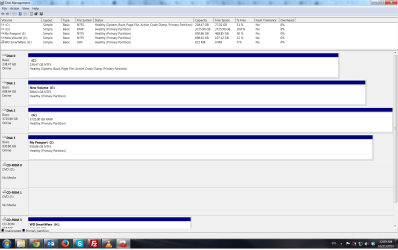
Can you please post a screenshot of the external drive in Windows Disk Management?
 

My Computer My Computer

At a glance

Windows 7 Home Premium 32 bit
OS
Windows 7 Home Premium 32 bit
Sure, here it is:
I bought the HDD brand new on Amazon, the docking station is also pretty recent. I could try with another docking station if you think the problem comes from this. I never divided the HDD into several partitions.
 

Attachments

  • Screenshot Disk Management.png
    Screenshot Disk Management.png
    71.3 KB · Views: 23

My Computer My Computer

At a glance

Windows 7 ultimate 64 bits
Computer type
Laptop
Computer Manufacturer/Model Number
Alienware M17X R2
OS
Windows 7 ultimate 64 bits
Hard Drives
1 SSD OCZ 256gb
1 HDD Western Digital 1tb black scorpion
1 external HDD Seagate 4tb connected with a USB docking station
Antivirus
Avast pro
Thank you very much for your help, it is really appreciated. ;-)
 

My Computer My Computer

At a glance

Windows 7 ultimate 64 bits
Computer type
Laptop
Computer Manufacturer/Model Number
Alienware M17X R2
OS
Windows 7 ultimate 64 bits
Hard Drives
1 SSD OCZ 256gb
1 HDD Western Digital 1tb black scorpion
1 external HDD Seagate 4tb connected with a USB docking station
Antivirus
Avast pro
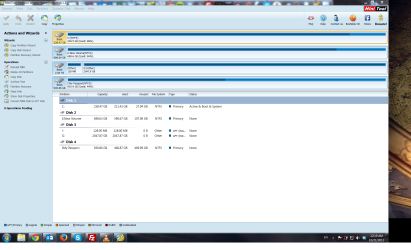
Here is the screenshot of the partition wizard that only see a 2TB partition:
 

Attachments

  • Screenshot Disk Management 2.png
    Screenshot Disk Management 2.png
    162.3 KB · Views: 22

My Computer My Computer

At a glance

Windows 7 ultimate 64 bits
Computer type
Laptop
Computer Manufacturer/Model Number
Alienware M17X R2
OS
Windows 7 ultimate 64 bits
Hard Drives
1 SSD OCZ 256gb
1 HDD Western Digital 1tb black scorpion
1 external HDD Seagate 4tb connected with a USB docking station
Antivirus
Avast pro
OK, thanks for the update. Good that you also put out the screenshot of PW.

1. Was it showing only 2 TB before?

2. In your first post you had mentioned that you used some Seagate software. Can you specify what exactly was that software? I have to check on it. You may also post the link.

Run Partition Recovery wizard again. Do it at your leisure when you have enough time to run the Quick scan. ( you can cancel the scan/wizard anytime and that is not going to affect your data. Even if you had deleted some partitions earlier, the data will still be there. So let us try.)

When the Partition Recovery Wizard finds all the partitions, post a screenshot. If it does not add up to 4 GB then we have to give up and take recourse to using PhotoRec where data recovery does not depend upon the file system. But it is going to be an excruciatingly long scan.

Before running Partition Recovery Wizard again, please take your time to read How to perform lost partition recovery and deleted partition recovery under Windows? Partition Recovery Help.

At the moment I am inclined to think that Partition Recovery Wizard is unable to deal with GPT or your HDD got messed up by the Seagate software before.
 

My Computer My Computer

At a glance

Windows 7 Home Premium 32 bit
OS
Windows 7 Home Premium 32 bit
Hello again,

Here is the link to the Seagate software I used: SeaTools for Windows | Seagate
I honestly believe that it did not do any change to the HDD, it did not find any real problem. I used several scans, it did not ask for my permission to change anything, thus my belief that it actually did not do anything. I hope I am wrong on that.

Unfortunately I do not remember if the first time I used partition wizard it showed 2TB or 4TB... sorry.
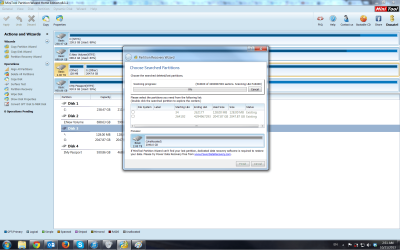
The scan has been restarted (following the post you sent me step by step), here is a screenshot. So far it only detects 2TB for the entire disk. Should I let the scan go or can we expect that it will only detect the partitions on the 2TB it is working on ?

Once again, thank you very much for your help.
 

Attachments

  • Screenshot Disk Management 5.png
    Screenshot Disk Management 5.png
    132.5 KB · Views: 13

My Computer My Computer

At a glance

Windows 7 ultimate 64 bits
Computer type
Laptop
Computer Manufacturer/Model Number
Alienware M17X R2
OS
Windows 7 ultimate 64 bits
Hard Drives
1 SSD OCZ 256gb
1 HDD Western Digital 1tb black scorpion
1 external HDD Seagate 4tb connected with a USB docking station
Antivirus
Avast pro
OK, Seatools for Windows will only check your HDD if you had run only the Short test and long test.

Unfortunately The Partition Recovery Wizard shows only 2TB. If you have the time, run a full scan. Let us see whether it finds 4TB. And yes, full scan will take a lot of time.

If it does not find the missing 2TB, then perhaps you have to run PhotoRec.

Unfortunately, I have no hands-on experience with GPT disks for I have no GPT disks for any experiments. So cannot say for certain whether PhotoRec also can scan full 4 TB. Anyway, we have to try.
 

My Computer My Computer

At a glance

Windows 7 Home Premium 32 bit
OS
Windows 7 Home Premium 32 bit
Hey,

I restarted the scan, this time full time (gonna take a day or two). I had an idea: would it be possible that my 4TB HDD be in reality 2 2TB HDDs ? If yes, could it be that one of them failed and now I can only access the only 2TB that are still working ?

Yet, if it were the case, how could it be possible to have a bit more than 2TB accessible ....

++
 

My Computer My Computer

At a glance

Windows 7 ultimate 64 bits
Computer type
Laptop
Computer Manufacturer/Model Number
Alienware M17X R2
OS
Windows 7 ultimate 64 bits
Hard Drives
1 SSD OCZ 256gb
1 HDD Western Digital 1tb black scorpion
1 external HDD Seagate 4tb connected with a USB docking station
Antivirus
Avast pro
OMG! Your drive in Windows Disk Management shows as one 4TB drive and yes, two 2TB drives in Raid 0 can show as one single 4 TB drive.

You must be knowing what you purchased in Amazon. Can you check on the specs of it?

I shudder at the thought of one drive in RAID 0 failing. It is a catastrophy .

I wish it is not that one drive failure.

Let the full scan continue. Let us see whether Partition Recovery Wizard can see the full 4 TB.
 

My Computer My Computer

At a glance

Windows 7 Home Premium 32 bit
OS
Windows 7 Home Premium 32 bit
Alright, here is the model of my HDD: Seagate Barracuda ST4000DM000. Amazon.com: Seagate Desktop HDD 4 TB SATA 6Gb/s NCQ 64MB Cache 3.5-Inch Internal Bare Drive ST4000DM000: Computers & Accessories

If it can help, here are the info written on the HDD:
SN; Z300JE1T
ST; 100DM000
PN: 1F2168-300
FW; CC52
DATE; 13484
SITE; TK

I don't really understand if it is a 1x4tb, 2x2tb or 4x1tb HDD. Well shit, it was so new I didn't have a back up for most of what was on it. I assume if one is dead, what was on it is lost ...
 

My Computer My Computer

At a glance

Windows 7 ultimate 64 bits
Computer type
Laptop
Computer Manufacturer/Model Number
Alienware M17X R2
OS
Windows 7 ultimate 64 bits
Hard Drives
1 SSD OCZ 256gb
1 HDD Western Digital 1tb black scorpion
1 external HDD Seagate 4tb connected with a USB docking station
Antivirus
Avast pro
OK, It is only a single 4 TB drive with four 1TB platters. ( you gave me a jolt.:))

Continue with the PRW scan.

EDIT: I don't know whether the Free Seagate DiskWizard software can help you in anyway. I had never dealt with more than 2 GB drives. So would call upon other experts and experienced users to pitch in and have a look at your problem. Otherwise I will go on with what I know and what I do not know. LOL.
 

My Computer My Computer

At a glance

Windows 7 Home Premium 32 bit
OS
Windows 7 Home Premium 32 bit
I was ind of freaking out myself ;-)
Quick question: do you have any way to prevent Window from installing an update and automatically restarting during the night ? The scan is half way through and I keep postponing four hours at a time ...
 

My Computer My Computer

At a glance

Windows 7 ultimate 64 bits
Computer type
Laptop
Computer Manufacturer/Model Number
Alienware M17X R2
OS
Windows 7 ultimate 64 bits
Hard Drives
1 SSD OCZ 256gb
1 HDD Western Digital 1tb black scorpion
1 external HDD Seagate 4tb connected with a USB docking station
Antivirus
Avast pro
found it, just had to google it ...
 

My Computer My Computer

At a glance

Windows 7 ultimate 64 bits
Computer type
Laptop
Computer Manufacturer/Model Number
Alienware M17X R2
OS
Windows 7 ultimate 64 bits
Hard Drives
1 SSD OCZ 256gb
1 HDD Western Digital 1tb black scorpion
1 external HDD Seagate 4tb connected with a USB docking station
Antivirus
Avast pro
Good. ( Went to Auchan for a long grocery shopping, came back and took a long nap and didn't peep into SevenForums for quite a while. :D )
 

My Computer My Computer

At a glance

Windows 7 Home Premium 32 bit
OS
Windows 7 Home Premium 32 bit
Back
Top