Trying to set up function keys on the Logitech keyboard

dc2000

New member
Member
VIP
Local time
11:49 AM
Messages
153
I'm curious if such is possible. I have this keyboard, "Logitech Wireless Touch Keyboard K400 with Built-In Multi-Touch Touchpad":
Amazon.com: Logitech Wireless Touch Keyboard K400 with Built-In Multi-Touch Touchpad: Electronics
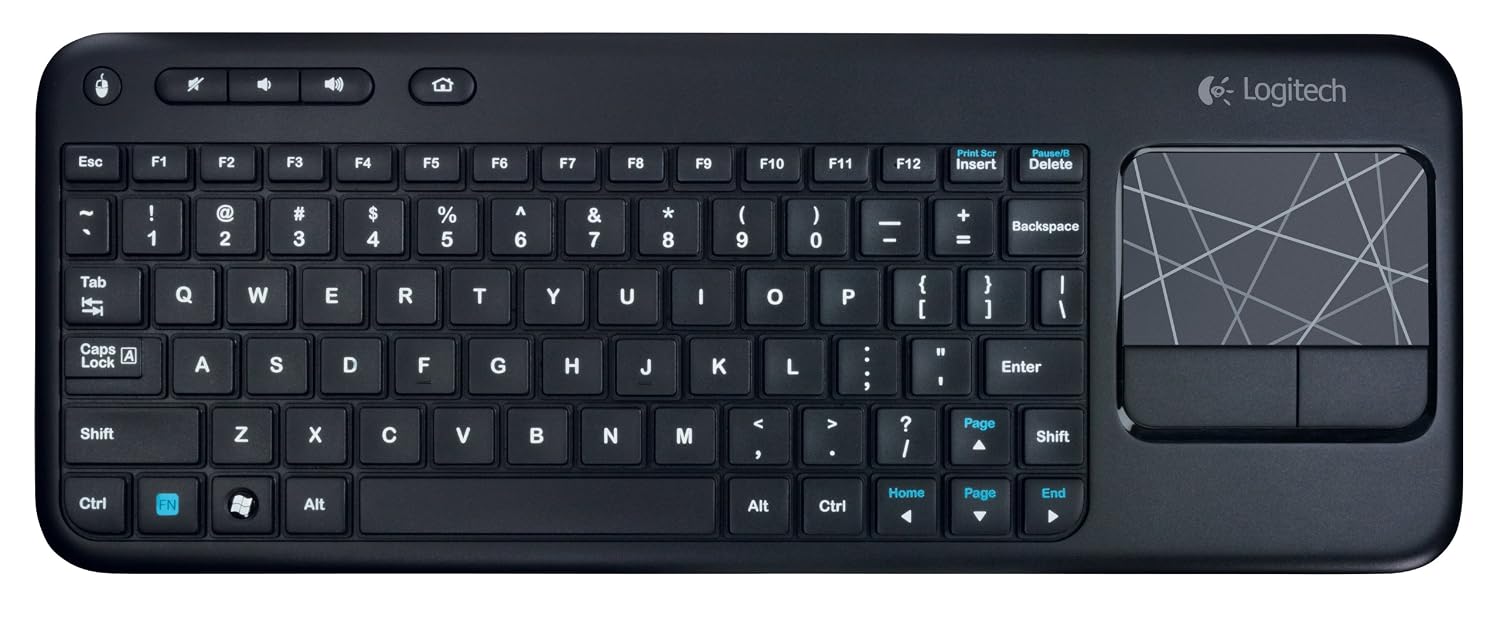
81wMFKCb7vL._SL1500_.jpg


It comes with a row on function keys on top (F1 thru F12) that are mixed with different multimedia keys (play, fastforward, rewind, sound volume, etc.) It uses multimedia keys by default, and to use function keys I have to press and hold down the Fn key. For my purposes, I'd like to set up the function keys F1 thru F12 to work by default without the need to hold down the Fn key.

Can I set this up?

PS. Oh yeah, forgot to say, I'm using Windows 7 Professional.
 

My Computer My Computer

At a glance

Windows
OS
Windows

My Computers My Computers

  • At a glance

    Win7, Win10, Win11
    Computer type
    PC/Desktop
    Computer Manufacturer/Model Number
    HP Pavilion 6751c
    OS
    Win7, Win10, Win11
    Internet Speed
    100 Mbps
    Antivirus
    Norton 360
    Browser
    IE 11
  • At a glance

    Win7, Win10, Win11
    Computer type
    PC/Desktop
    System Manufacturer/Model Number
    HP ENVY 750-514 & Dell XPS 8960
    OS
    Win7, Win10, Win11
    Antivirus
    Norton 360
Thanks. Although I'm not sure how I'd be able to remap, say Fn+F10 to F10. Does Fn+F10 have its own scan code?
 

My Computer My Computer

At a glance

Windows
OS
Windows

My Computers My Computers

  • At a glance

    Win7, Win10, Win11
    Computer type
    PC/Desktop
    Computer Manufacturer/Model Number
    HP Pavilion 6751c
    OS
    Win7, Win10, Win11
    Internet Speed
    100 Mbps
    Antivirus
    Norton 360
    Browser
    IE 11
  • At a glance

    Win7, Win10, Win11
    Computer type
    PC/Desktop
    System Manufacturer/Model Number
    HP ENVY 750-514 & Dell XPS 8960
    OS
    Win7, Win10, Win11
    Antivirus
    Norton 360

My Computer My Computer

At a glance

10 Pro x64Ryzen 9 3900X64GB(4x16GB) DDR4EVGA 1080ti FTW3
Computer type
PC/Desktop
Computer Manufacturer/Model Number
Custom
OS
10 Pro x64
CPU
Ryzen 9 3900X
Motherboard
Asrock x370 Tachi
Memory
64GB(4x16GB) DDR4
Graphics Card(s)
EVGA 1080ti FTW3
Sound Card
ASUS Xonar Essence STX (V4 Bursons), ODAC rev B, NFB-11, O2
Monitor(s) Displays
3xASUS PB278Q/R, Optoma HD142X
Screen Resolution
3x1440p, 1080p
Hard Drives
512GB 850 EVO(OS, Programs)
4TB (Movies)
3TB (Downloads)
3TB (Programs)
1TB HDD (Games)
2x6TB R1 (videos)
PSU
AX760
Case
Fractal Define R5
Cooling
NH-D15S
Keyboard
Massdrop Ctrl with Box Navy's
Mouse
G903, Alioth XXL Mat
Internet Speed
280/40
Antivirus
MBAM, ESET
Browser
Canary 64 Bit
Other Info
I also own a Thinkpad P50 Xeon 4K, X220T, X1C5

My Computers My Computers

  • At a glance

    Win7, Win10, Win11
    Computer type
    PC/Desktop
    Computer Manufacturer/Model Number
    HP Pavilion 6751c
    OS
    Win7, Win10, Win11
    Internet Speed
    100 Mbps
    Antivirus
    Norton 360
    Browser
    IE 11
  • At a glance

    Win7, Win10, Win11
    Computer type
    PC/Desktop
    System Manufacturer/Model Number
    HP ENVY 750-514 & Dell XPS 8960
    OS
    Win7, Win10, Win11
    Antivirus
    Norton 360

My Computer My Computer

At a glance

10 Pro x64Ryzen 9 3900X64GB(4x16GB) DDR4EVGA 1080ti FTW3
Computer type
PC/Desktop
Computer Manufacturer/Model Number
Custom
OS
10 Pro x64
CPU
Ryzen 9 3900X
Motherboard
Asrock x370 Tachi
Memory
64GB(4x16GB) DDR4
Graphics Card(s)
EVGA 1080ti FTW3
Sound Card
ASUS Xonar Essence STX (V4 Bursons), ODAC rev B, NFB-11, O2
Monitor(s) Displays
3xASUS PB278Q/R, Optoma HD142X
Screen Resolution
3x1440p, 1080p
Hard Drives
512GB 850 EVO(OS, Programs)
4TB (Movies)
3TB (Downloads)
3TB (Programs)
1TB HDD (Games)
2x6TB R1 (videos)
PSU
AX760
Case
Fractal Define R5
Cooling
NH-D15S
Keyboard
Massdrop Ctrl with Box Navy's
Mouse
G903, Alioth XXL Mat
Internet Speed
280/40
Antivirus
MBAM, ESET
Browser
Canary 64 Bit
Other Info
I also own a Thinkpad P50 Xeon 4K, X220T, X1C5
Last edited:

My Computers My Computers

  • At a glance

    Win7, Win10, Win11
    Computer type
    PC/Desktop
    Computer Manufacturer/Model Number
    HP Pavilion 6751c
    OS
    Win7, Win10, Win11
    Internet Speed
    100 Mbps
    Antivirus
    Norton 360
    Browser
    IE 11
  • At a glance

    Win7, Win10, Win11
    Computer type
    PC/Desktop
    System Manufacturer/Model Number
    HP ENVY 750-514 & Dell XPS 8960
    OS
    Win7, Win10, Win11
    Antivirus
    Norton 360
rvcjew,

If your referring to the keyboard I use, it does have an FN key. It's to the right of the spacebar.

Take a look at this:

http://www.logitech.com/assets/32691/2/k800620-002351004403gsamr.pdf

John

i was referring to the OP's it looks like it has no fn functions on the f1-f12 keys to begin with.

The OP does have an FN key on his keyboard, it's to the left of the spacebar. The print on the FN key is blue.

yes but he is asking how to make it so that he doesn't have to hit fn+f1 to use f1 normaly, and his keyboard has no fn functions associated with the f1-12 keys anyways so they should always function normally, all his fn does is work with page up/down and anything else in blue his f1-12 keys have nothing blue on them so they should not be affected.
 

My Computer My Computer

At a glance

10 Pro x64Ryzen 9 3900X64GB(4x16GB) DDR4EVGA 1080ti FTW3
Computer type
PC/Desktop
Computer Manufacturer/Model Number
Custom
OS
10 Pro x64
CPU
Ryzen 9 3900X
Motherboard
Asrock x370 Tachi
Memory
64GB(4x16GB) DDR4
Graphics Card(s)
EVGA 1080ti FTW3
Sound Card
ASUS Xonar Essence STX (V4 Bursons), ODAC rev B, NFB-11, O2
Monitor(s) Displays
3xASUS PB278Q/R, Optoma HD142X
Screen Resolution
3x1440p, 1080p
Hard Drives
512GB 850 EVO(OS, Programs)
4TB (Movies)
3TB (Downloads)
3TB (Programs)
1TB HDD (Games)
2x6TB R1 (videos)
PSU
AX760
Case
Fractal Define R5
Cooling
NH-D15S
Keyboard
Massdrop Ctrl with Box Navy's
Mouse
G903, Alioth XXL Mat
Internet Speed
280/40
Antivirus
MBAM, ESET
Browser
Canary 64 Bit
Other Info
I also own a Thinkpad P50 Xeon 4K, X220T, X1C5
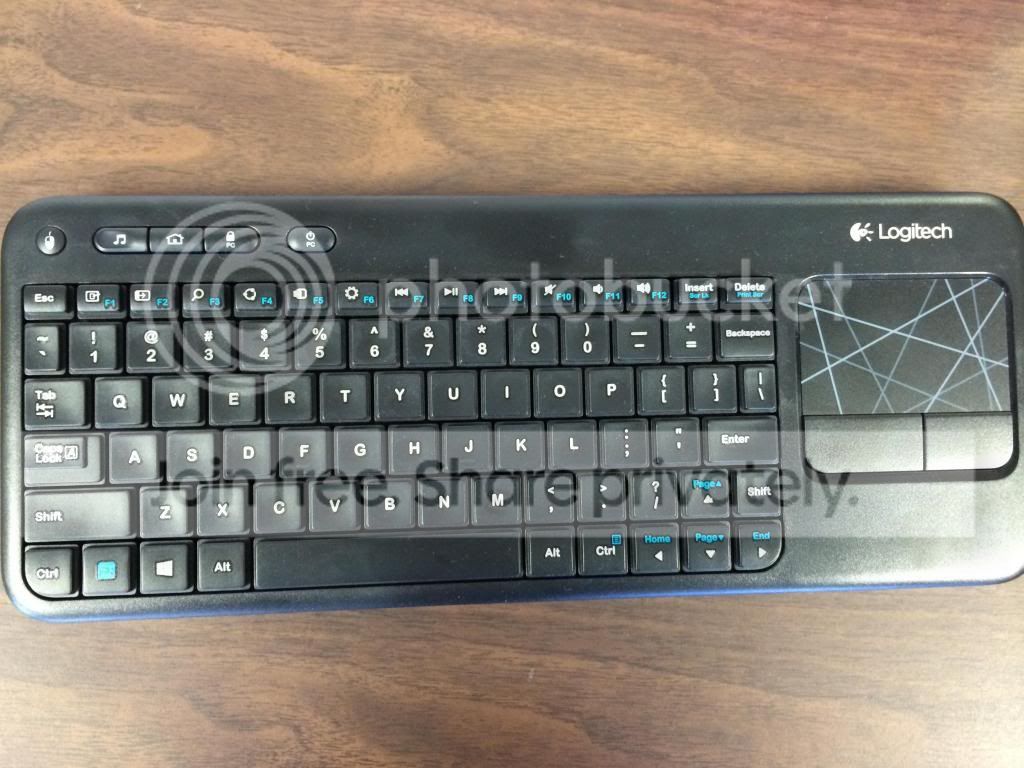
Thanks, guys. That picture is not the exact match of how my actual keyboard looks like. So it does have Fn functions. The Fn button is that blue one on the bottom left. But what appears as F1-F12 on the shot there have all the media functions. Heck, let me just make a picture of the actual keyboard. So here it is:

keyboard_zps37725fd8.jpg


You see, we use it in the office for our DVR (Digital Video Recorder) and there're actually only two keys on the whole keyboard that are used the most: F to toggle full screen mode, and F10 for playback. I usually do it with one hand (the keyboard sits in a special enclosure) and as you can see hitting Fn+F10 with one hand is not that easy.

As for the SetPoint driver that was recommended above, I did try it, but it's totally useless. It does absolutely nothing in the form of function -- it simply adds a button to the system tray that in turn links to their web site and allows to check for updates. So nothing that I would need it for, so I uninstalled it.

I also tried doing the keyboard mapping through Windows registry but it didn't work for the keys I needed.

I was actually able to find out that if I hit F10 the scan code for it was AD (hex) and for Fn+F10 the scan code was 79 (hex). But when I add this to the "Scancode Map" registry key:

00000000,00000000,02000000,AD007900,00000000

It didn't do anything (even after a reboot.)
 

My Computer My Computer

At a glance

Windows
OS
Windows
what program is your dvr using? as the play/pause button should start playback and probably space as well. the program may be using its own keymap that you can edit as well that supersedes the OS? Also sorry for not understanding your fn keys but every pic i found of that board had no fn functions on it there, it must be a new revision or something.
 

My Computer My Computer

At a glance

10 Pro x64Ryzen 9 3900X64GB(4x16GB) DDR4EVGA 1080ti FTW3
Computer type
PC/Desktop
Computer Manufacturer/Model Number
Custom
OS
10 Pro x64
CPU
Ryzen 9 3900X
Motherboard
Asrock x370 Tachi
Memory
64GB(4x16GB) DDR4
Graphics Card(s)
EVGA 1080ti FTW3
Sound Card
ASUS Xonar Essence STX (V4 Bursons), ODAC rev B, NFB-11, O2
Monitor(s) Displays
3xASUS PB278Q/R, Optoma HD142X
Screen Resolution
3x1440p, 1080p
Hard Drives
512GB 850 EVO(OS, Programs)
4TB (Movies)
3TB (Downloads)
3TB (Programs)
1TB HDD (Games)
2x6TB R1 (videos)
PSU
AX760
Case
Fractal Define R5
Cooling
NH-D15S
Keyboard
Massdrop Ctrl with Box Navy's
Mouse
G903, Alioth XXL Mat
Internet Speed
280/40
Antivirus
MBAM, ESET
Browser
Canary 64 Bit
Other Info
I also own a Thinkpad P50 Xeon 4K, X220T, X1C5
@rvcjew: Sure, thanks. No problem. The DVR software is from FocusMicro. I thought that it would honor a regular Windows play key, but it doesn't. It's a good idea though to see if it remaps the keyboard itself.
 

My Computer My Computer

At a glance

Windows
OS
Windows
this is not the best solution but in theory will work, if you take off the fn key and then put something small under it and put it back it will hold down the rubber dome key making contact with the board and force it to always use fn so they are those keys lol. ghetto but works. just be careful taking out the key don't force it, use a small flat head to pop it off. event ghost might also let you just have a normal keymap with those keys being changed to f1-f12.
 

My Computer My Computer

At a glance

10 Pro x64Ryzen 9 3900X64GB(4x16GB) DDR4EVGA 1080ti FTW3
Computer type
PC/Desktop
Computer Manufacturer/Model Number
Custom
OS
10 Pro x64
CPU
Ryzen 9 3900X
Motherboard
Asrock x370 Tachi
Memory
64GB(4x16GB) DDR4
Graphics Card(s)
EVGA 1080ti FTW3
Sound Card
ASUS Xonar Essence STX (V4 Bursons), ODAC rev B, NFB-11, O2
Monitor(s) Displays
3xASUS PB278Q/R, Optoma HD142X
Screen Resolution
3x1440p, 1080p
Hard Drives
512GB 850 EVO(OS, Programs)
4TB (Movies)
3TB (Downloads)
3TB (Programs)
1TB HDD (Games)
2x6TB R1 (videos)
PSU
AX760
Case
Fractal Define R5
Cooling
NH-D15S
Keyboard
Massdrop Ctrl with Box Navy's
Mouse
G903, Alioth XXL Mat
Internet Speed
280/40
Antivirus
MBAM, ESET
Browser
Canary 64 Bit
Other Info
I also own a Thinkpad P50 Xeon 4K, X220T, X1C5
Back
Top