
Solved How to recover ntfs partition

Good going. Good that you were able to correct the sector count with Linux.Good that you were able to recover some data also. But tell us whether the 1GB limitation kicked in. How many GBs of data were you able to recover?

You may rerun Partition Recovery Wizard again and make sure that the correct partition table is written after the sector count correction..

Regarding Bootice MBR writing, initially your hard disk will show as "Unknown MBR".( This actually is the factory condition.) After you write the Windows MBR, close bootice and rerun Bootice..Now it should show as Windows MBR. You can easily make out the difference by viewing sector 0 before and after that operation.

As long as Windows shows your drive as RAW, you may not be able to run Checkdisk - that is as far as I know.
 

My Computer My Computer

At a glance

Windows 7 Home Premium 32 bit
OS
Windows 7 Home Premium 32 bit

My Computer My Computer

At a glance

Windows 7 x64, Ubuntu 12.04.3 64bitIntel(R) Xeon(R) CPU E3-1230 V2 @ 3.30GHz2x 8GB DDR3Sapphire Radeon HD 6950 2GB OC
Computer type
PC/Desktop
Computer Manufacturer/Model Number
custom build
OS
Windows 7 x64, Ubuntu 12.04.3 64bit
CPU
Intel(R) Xeon(R) CPU E3-1230 V2 @ 3.30GHz
Motherboard
ASRock H77 Pro4/MVP
Memory
2x 8GB DDR3
Graphics Card(s)
Sapphire Radeon HD 6950 2GB OC
Monitor(s) Displays
Samsung SyncMaster 226cw, Eizo FS2333-BK
Screen Resolution
1680x1050, 1920x1080
Hard Drives
currently complicated
Keyboard
Logitech K350
Mouse
Logitech G5
Internet Speed
100Mbit
Good going. Good that you were able to correct the sector count with Linux.Good that you were able to recover some data also. But tell us whether the 1GB limitation kicked in. How many GBs of data were you able to recover?

You may rerun Partition Recovery Wizard again and make sure that the correct partition table is written after the sector count correction..

Regarding Bootice MBR writing, initially your hard disk will show as "Unknown MBR".( This actually is the factory condition.) After you write the Windows MBR, close bootice and rerun Bootice..Now it should show as Windows MBR. You can easily make out the difference by viewing sector 0 before and after that operation.

Yes, after I had run Bootice it showed "Windows NT 5.x MBR" and 6.x respectively. But the drive was still inaccessible so I wrote the backup to the drive.
 

My Computer My Computer

At a glance

Windows 7 x64, Ubuntu 12.04.3 64bitIntel(R) Xeon(R) CPU E3-1230 V2 @ 3.30GHz2x 8GB DDR3Sapphire Radeon HD 6950 2GB OC
Computer type
PC/Desktop
Computer Manufacturer/Model Number
custom build
OS
Windows 7 x64, Ubuntu 12.04.3 64bit
CPU
Intel(R) Xeon(R) CPU E3-1230 V2 @ 3.30GHz
Motherboard
ASRock H77 Pro4/MVP
Memory
2x 8GB DDR3
Graphics Card(s)
Sapphire Radeon HD 6950 2GB OC
Monitor(s) Displays
Samsung SyncMaster 226cw, Eizo FS2333-BK
Screen Resolution
1680x1050, 1920x1080
Hard Drives
currently complicated
Keyboard
Logitech K350
Mouse
Logitech G5
Internet Speed
100Mbit
Good going. Good that you were able to correct the sector count with Linux.Good that you were able to recover some data also. But tell us whether the 1GB limitation kicked in. How many GBs of data were you able to recover?

You may rerun Partition Recovery Wizard again and make sure that the correct partition table is written after the sector count correction..

Regarding Bootice MBR writing, initially your hard disk will show as "Unknown MBR".( This actually is the factory condition.) After you write the Windows MBR, close bootice and rerun Bootice..Now it should show as Windows MBR. You can easily make out the difference by viewing sector 0 before and after that operation.

Yes, after I had run Bootice it showed "Windows NT 5.x MBR" and 6.x respectively. But the drive was still inaccessible so I wrote the backup to the drive.
It NOT a MBR problem. Partition table is fine.

NTFS Boot Sector (sector 0 of file system) was wrong (the sector count was too large). Luckily there's a backup NTFS Boot Sector near end of file system. ntfsfix did copy the backup to sector 0.

It seems $MFT has problems as well. Or maybe its mirror $MFTmirr. I hope chkdsk will run on this RAW drive called G. Even better I hope it can fix the problem.
 

My Computer My Computer

At a glance

Microsoft Windows 7 Home Premium 64-bits 7601...Intel(R) Core(TM) i3 CPU M 370 @ 2.40GHz4,00 GBATI Mobility Radeon HD 5400 Series
Computer type
Laptop
Computer Manufacturer/Model Number
ACER ASPIRE 5742G
OS
Microsoft Windows 7 Home Premium 64-bits 7601 Multiprocessor Free Service Pack 1
CPU
Intel(R) Core(TM) i3 CPU M 370 @ 2.40GHz
Motherboard
Acer Aspire 5742G
Memory
4,00 GB
Graphics Card(s)
ATI Mobility Radeon HD 5400 Series
Sound Card
(1) AMD High Definition Audio Device (2) Realtek High Defi
Screen Resolution
1366 x 768 x 32 bits (4294967296 colors) @ 60 Hz
Hard Drives
WDC WD5000BEVT-22ZAT0
Let us hope that checkdisk will run.:)
 

My Computer My Computer

At a glance

Windows 7 Home Premium 32 bit
OS
Windows 7 Home Premium 32 bit
Let us hope that checkdisk will run.:)
I have more tricks than that ;-)
NTFS boot sector corrupt (but fixed), MFT corrupt ... how the hack can that happen! I think it's not a hardware problem. And if it is hardware problem many other sectors will also have problem.
 

My Computer My Computer

At a glance

Microsoft Windows 7 Home Premium 64-bits 7601...Intel(R) Core(TM) i3 CPU M 370 @ 2.40GHz4,00 GBATI Mobility Radeon HD 5400 Series
Computer type
Laptop
Computer Manufacturer/Model Number
ACER ASPIRE 5742G
OS
Microsoft Windows 7 Home Premium 64-bits 7601 Multiprocessor Free Service Pack 1
CPU
Intel(R) Core(TM) i3 CPU M 370 @ 2.40GHz
Motherboard
Acer Aspire 5742G
Memory
4,00 GB
Graphics Card(s)
ATI Mobility Radeon HD 5400 Series
Sound Card
(1) AMD High Definition Audio Device (2) Realtek High Defi
Screen Resolution
1366 x 768 x 32 bits (4294967296 colors) @ 60 Hz
Hard Drives
WDC WD5000BEVT-22ZAT0
It is definitely not a hardware problem. And that is why I have been wondering why you have been and are insisting on a surface test. Anything that I have missed?:)
 

My Computer My Computer

At a glance

Windows 7 Home Premium 32 bit
OS
Windows 7 Home Premium 32 bit
It is definitely not a hardware problem. And that is why I have been wondering why you have been and are insisting on a surface test. Anything that I have missed?:)
I thought it could be a hardware problem and want to have proof. It thought that at the time we didn't know that there was a bad NTFS boot sector and a corrupt MFT.
 
Last edited:

My Computer My Computer

At a glance

Microsoft Windows 7 Home Premium 64-bits 7601...Intel(R) Core(TM) i3 CPU M 370 @ 2.40GHz4,00 GBATI Mobility Radeon HD 5400 Series
Computer type
Laptop
Computer Manufacturer/Model Number
ACER ASPIRE 5742G
OS
Microsoft Windows 7 Home Premium 64-bits 7601 Multiprocessor Free Service Pack 1
CPU
Intel(R) Core(TM) i3 CPU M 370 @ 2.40GHz
Motherboard
Acer Aspire 5742G
Memory
4,00 GB
Graphics Card(s)
ATI Mobility Radeon HD 5400 Series
Sound Card
(1) AMD High Definition Audio Device (2) Realtek High Defi
Screen Resolution
1366 x 768 x 32 bits (4294967296 colors) @ 60 Hz
Hard Drives
WDC WD5000BEVT-22ZAT0

My Computers My Computers

  • At a glance

    7 X64i5 84002x8gb 3200mhz
    Computer type
    PC/Desktop
    OS
    7 X64
    CPU
    i5 8400
    Motherboard
    gigabyte b365m ds3h
    Memory
    2x8gb 3200mhz
    Hard Drives
    various
    PSU
    pure power 11 400w cm
    Case
    Coolermaster
    Cooling
    cryorig m9i
  • At a glance

    7x64g54008gb ddr4 2400
    Computer type
    PC/Desktop
    OS
    7x64
    CPU
    g5400
    Motherboard
    ga b365m ds3h
    Memory
    8gb ddr4 2400
    PSU
    xfx pro 450w
Surface test did not find any errors.

Checkdisk found some errors including the damaged MFT and repaired it in the first run, second run did not found anything else.

AND drive is mounting :D You guys are great! Thanks a lot for your help!

I got one question left: I have another problem with another drive (I know, I'm stupid, but this is not my year yet). But that one contains linux partitions as well. Link to forum with my problem description. If you know a little bit about unix as well and could help me with that or can name me a person or forum that can, I would love you til the end of my life ;)


Checkdisk output of first run:

Code:
The type of the file system is NTFS.
Volume label is My Book.

CHKDSK is verifying files (stage 1 of 3)...
  50960 file records processed.
File verification completed.
  92 large file records processed.
  0 bad file records processed.
  0 EA records processed.
  0 reparse records processed.
CHKDSK is verifying indexes (stage 2 of 3)...
42 percent complete. (29268 of 62422 index entries processed)
Deleted invalid filename README!!!!!!!!FIRST!"!!!!!!!! (29525) in directory 1408
3.
File 29525 has been orphaned since all its filenames were invalid
Windows will recover the file in the orphan recovery phase.
Correcting minor file name errors in file 29525.
68 percent complete. (53073 of 62422 index entries processed)
Deleting index entry README!!!!!!!!FIRST!"!!!!!!!! in index $I30 of file 14083.
  62422 index entries processed.
Index verification completed.
CHKDSK is scanning unindexed files for reconnect to their original directory.
  1 unindexed files scanned.
CHKDSK is recovering remaining unindexed files.
  1 unindexed files recovered.
CHKDSK is verifying security descriptors (stage 3 of 3)...
  50960 file SDs/SIDs processed.
Security descriptor verification completed.
  5732 data files processed.
CHKDSK is verifying Usn Journal...
  1212072 USN bytes processed.
Usn Journal verification completed.
Correcting errors in the Master File Table (MFT) mirror.
Correcting errors in the master file table's (MFT) BITMAP attribute.
Correcting errors in the Volume Bitmap.
Windows has made corrections to the file system.

 976762551 KB total disk space.
 381482208 KB in 30521 files.
     16356 KB in 5734 indexes.
         0 KB in bad sectors.
    148995 KB in use by the system.
     65536 KB occupied by the log file.
 595114992 KB available on disk.

      4096 bytes in each allocation unit.
 244190637 total allocation units on disk.
 148778748 allocation units available on disk.
 

My Computer My Computer

At a glance

Windows 7 x64, Ubuntu 12.04.3 64bitIntel(R) Xeon(R) CPU E3-1230 V2 @ 3.30GHz2x 8GB DDR3Sapphire Radeon HD 6950 2GB OC
Computer type
PC/Desktop
Computer Manufacturer/Model Number
custom build
OS
Windows 7 x64, Ubuntu 12.04.3 64bit
CPU
Intel(R) Xeon(R) CPU E3-1230 V2 @ 3.30GHz
Motherboard
ASRock H77 Pro4/MVP
Memory
2x 8GB DDR3
Graphics Card(s)
Sapphire Radeon HD 6950 2GB OC
Monitor(s) Displays
Samsung SyncMaster 226cw, Eizo FS2333-BK
Screen Resolution
1680x1050, 1920x1080
Hard Drives
currently complicated
Keyboard
Logitech K350
Mouse
Logitech G5
Internet Speed
100Mbit
All went exactly as I hoped and expected. I hope you learned a lot
 

My Computer My Computer

At a glance

Microsoft Windows 7 Home Premium 64-bits 7601...Intel(R) Core(TM) i3 CPU M 370 @ 2.40GHz4,00 GBATI Mobility Radeon HD 5400 Series
Computer type
Laptop
Computer Manufacturer/Model Number
ACER ASPIRE 5742G
OS
Microsoft Windows 7 Home Premium 64-bits 7601 Multiprocessor Free Service Pack 1
CPU
Intel(R) Core(TM) i3 CPU M 370 @ 2.40GHz
Motherboard
Acer Aspire 5742G
Memory
4,00 GB
Graphics Card(s)
ATI Mobility Radeon HD 5400 Series
Sound Card
(1) AMD High Definition Audio Device (2) Realtek High Defi
Screen Resolution
1366 x 768 x 32 bits (4294967296 colors) @ 60 Hz
Hard Drives
WDC WD5000BEVT-22ZAT0
All went exactly as I hoped and expected. I hope you learned a lot

Yes, I did:

Dont change partition sizes without backup and when you already have problems with another disk ^^

And a lot more of course ;)

Thank you very much again! :)
 

My Computer My Computer

At a glance

Windows 7 x64, Ubuntu 12.04.3 64bitIntel(R) Xeon(R) CPU E3-1230 V2 @ 3.30GHz2x 8GB DDR3Sapphire Radeon HD 6950 2GB OC
Computer type
PC/Desktop
Computer Manufacturer/Model Number
custom build
OS
Windows 7 x64, Ubuntu 12.04.3 64bit
CPU
Intel(R) Xeon(R) CPU E3-1230 V2 @ 3.30GHz
Motherboard
ASRock H77 Pro4/MVP
Memory
2x 8GB DDR3
Graphics Card(s)
Sapphire Radeon HD 6950 2GB OC
Monitor(s) Displays
Samsung SyncMaster 226cw, Eizo FS2333-BK
Screen Resolution
1680x1050, 1920x1080
Hard Drives
currently complicated
Keyboard
Logitech K350
Mouse
Logitech G5
Internet Speed
100Mbit
Congrats Gerrit, you got all fixed. And hats off to Kaktussoft too. Did an excellent job.

And a request for additional info gathering.

Using Bootice, take a snapshot of sector 0 and sector 63 ( Run Bootice, select drive>sector edit). I just want to compare it with my Seagate 1 TB.

Also save these two sectors and anytime you have problems in future, just restore these two sectors from the backup and mostly this should bring the drive back to life. Note though, if anytime you modify the partition, such as multi partitioning, you should discard the old backups and take a fresh backup of Sector 0 and 63.

For GPT drives, http://www.sevenforums.com/hardware-devices/310295-lost-partitions.html#post2584426

As a concluding remark, in the current thread, the OP who is well-versed in Linux used Linux to fix the sector count and the rest followed. Now what about those who have nil acquaintance with Linux - like me :). For these people of course I found that Test Disk can come to rescue. Advanced NTFS Boot and MFT Repair - CGSecurity
 
Last edited:

My Computer My Computer

At a glance

Windows 7 Home Premium 32 bit
OS
Windows 7 Home Premium 32 bit
Congrats Gerrit, you got all fixed. And hats off to Kaktussoft too. Did an excellent job.

And a request for additional info gathering.

Using Bootice, take a snapshot of sector 0 and sector 63 ( Run Bootice, select drive>sector edit). I just want to compare it with my Seagate 1 TB.

Also save these two sectors and anytime you have problems in future, just restore these two sectors from the backup and mostly this should bring the drive back to life. Note though, if anytime you modify the partition, such as multi partitioning, you should discard the old backups and take a fresh backup of Sector 0 and 63.

For GPT drives, http://www.sevenforums.com/hardware-devices/310295-lost-partitions.html#post2584426

As a concluding remark, in the current thread, the OP who is well-versed in Linux used Linux to fix the sector count and the rest followed. Now what about those who have nil acquaintance with Linux - like me :). For these people of course I found that Test Disk can come to rescue. Advanced NTFS Boot and MFT Repair - CGSecurity

sector 0 has only:
  • disk signature (each physical drive has a different signature)
  • master boot code. Normally the win7 boot code. It instructs to load the volume boot sector of ACTIVE partition. so actually it's loading sector 63 afterwards
  • Partition table. Begin and end sector of each partition. And filesystem id, and some flags like ACTIVE.
Why do you want a dump of sector 0.... having problems? Test Disk can also be run under linux.
 

My Computer My Computer

At a glance

Microsoft Windows 7 Home Premium 64-bits 7601...Intel(R) Core(TM) i3 CPU M 370 @ 2.40GHz4,00 GBATI Mobility Radeon HD 5400 Series
Computer type
Laptop
Computer Manufacturer/Model Number
ACER ASPIRE 5742G
OS
Microsoft Windows 7 Home Premium 64-bits 7601 Multiprocessor Free Service Pack 1
CPU
Intel(R) Core(TM) i3 CPU M 370 @ 2.40GHz
Motherboard
Acer Aspire 5742G
Memory
4,00 GB
Graphics Card(s)
ATI Mobility Radeon HD 5400 Series
Sound Card
(1) AMD High Definition Audio Device (2) Realtek High Defi
Screen Resolution
1366 x 768 x 32 bits (4294967296 colors) @ 60 Hz
Hard Drives
WDC WD5000BEVT-22ZAT0
Congrats Gerrit, you got all fixed. And hats off to Kaktussoft too. Did an excellent job.

And a request for additional info gathering.

Using Bootice, take a snapshot of sector 0 and sector 63 ( Run Bootice, select drive>sector edit). I just want to compare it with my Seagate 1 TB.

Also save these two sectors and anytime you have problems in future, just restore these two sectors from the backup and mostly this should bring the drive back to life. Note though, if anytime you modify the partition, such as multi partitioning, you should discard the old backups and take a fresh backup of Sector 0 and 63.

For GPT drives, http://www.sevenforums.com/hardware-devices/310295-lost-partitions.html#post2584426

As a concluding remark, in the current thread, the OP who is well-versed in Linux used Linux to fix the sector count and the rest followed. Now what about those who have nil acquaintance with Linux - like me :). For these people of course I found that Test Disk can come to rescue. Advanced NTFS Boot and MFT Repair - CGSecurity


sector 0 has only:
  • disk signature (each physical drive has a different signature)
  • master boot code. Normally the win7 boot code. It instructs to load the volume boot sector of ACTIVE partition. so actually it's loading sector 63 afterwards
  • Partition table. Begin and end sector of each partition. And filesystem id, and some flags like ACTIVE.
Why do you want a dump of sector 0.... having problems? Test Disk can also be run under linux.


:) Why do you think I am having problems?

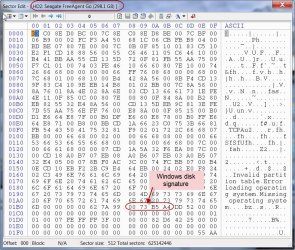
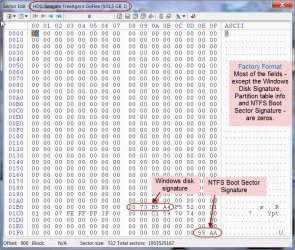
Anyway: "disk signature (each physical drive has a different signature)". hmmm... I have two physical external drives one 320GB and one 1 TB. 320GB was formatted by me atleast two to three years back. The 1TB is only months old and retains the factory format. Both have the same signature, A4 B5 73 00 !!!!!!

OK, the PW Partition Info and File System Info put out by the OP matches that of my 1TB exactly. I am just curious to see the byte by byte matching of the 0th and 63 sector.

User data is always written from the 64th Sector (in a single partition drive.) So irrespective of what is contained in sector 0 and sector 63 - I am not going to teach the user what 0 and 63 contain -, if one has backed up these sectors - just 520 bytes each , in an exigency these can be restored and in most cases ( though not all) it can bring the drive back to life. It will definitely help those who are in the habit shrinking and resizing and run into problems.
 

My Computer My Computer

At a glance

Windows 7 Home Premium 32 bit
OS
Windows 7 Home Premium 32 bit
Congrats Gerrit, you got all fixed. And hats off to Kaktussoft too. Did an excellent job.

And a request for additional info gathering.

Using Bootice, take a snapshot of sector 0 and sector 63 ( Run Bootice, select drive>sector edit). I just want to compare it with my Seagate 1 TB.

Also save these two sectors and anytime you have problems in future, just restore these two sectors from the backup and mostly this should bring the drive back to life. Note though, if anytime you modify the partition, such as multi partitioning, you should discard the old backups and take a fresh backup of Sector 0 and 63.

For GPT drives, http://www.sevenforums.com/hardware-devices/310295-lost-partitions.html#post2584426

As a concluding remark, in the current thread, the OP who is well-versed in Linux used Linux to fix the sector count and the rest followed. Now what about those who have nil acquaintance with Linux - like me :). For these people of course I found that Test Disk can come to rescue. Advanced NTFS Boot and MFT Repair - CGSecurity


sector 0 has only:
  • disk signature (each physical drive has a different signature)
  • master boot code. Normally the win7 boot code. It instructs to load the volume boot sector of ACTIVE partition. so actually it's loading sector 63 afterwards
  • Partition table. Begin and end sector of each partition. And filesystem id, and some flags like ACTIVE.
Why do you want a dump of sector 0.... having problems? Test Disk can also be run under linux.


:) Why do you think I am having problems?

Anyway: "disk signature (each physical drive has a different signature)". hmmm... I have two physical external drives one 320GB and one 1 TB. 320GB was formatted by me atleast two to three years back. The 1TB is only months old and retains the factory format. Both have the same signature, A4 B5 73 00 !!!!!!

OK, the PW Partition Info and File System Info put out by the OP matches that of my 1TB exactly. I am just curious to see the byte by byte matching of the 0th and 63 sector.

User data is always written from the 64th Sector (in a single partition drive.) So irrespective of what is contained in sector 0 and sector 63 - I am not going to teach the user what 0 and 63 contain -, if one has backed up these sectors - just 520 bytes each , in an exigency these can be restored and in most cases ( though not all) it can bring the drive back to life. It will definitely help those who are in the habit shrinking and resizing and run into problems.
Are the two disks with same disk signature clones? Did you ever attach them at the same time to windows? Blogs - Mark's Blog - Site Home - TechNet Blogs
 

My Computer My Computer

At a glance

Microsoft Windows 7 Home Premium 64-bits 7601...Intel(R) Core(TM) i3 CPU M 370 @ 2.40GHz4,00 GBATI Mobility Radeon HD 5400 Series
Computer type
Laptop
Computer Manufacturer/Model Number
ACER ASPIRE 5742G
OS
Microsoft Windows 7 Home Premium 64-bits 7601 Multiprocessor Free Service Pack 1
CPU
Intel(R) Core(TM) i3 CPU M 370 @ 2.40GHz
Motherboard
Acer Aspire 5742G
Memory
4,00 GB
Graphics Card(s)
ATI Mobility Radeon HD 5400 Series
Sound Card
(1) AMD High Definition Audio Device (2) Realtek High Defi
Screen Resolution
1366 x 768 x 32 bits (4294967296 colors) @ 60 Hz
Hard Drives
WDC WD5000BEVT-22ZAT0
Nope, these drives are not cloned.( I had seen Mark Russinovich’s blog long ago.)

As I said in my post the Seagate 320GB drive is atleast 3 year old, and as is my usual I had wiped it clean and formatted it before using it as my Data backup drive.

The Seagate 1 TB drive is actually not mine - I pulled it from my daughter to post the screenshots to the OP in this thread with a similar 1 TB drive. And as I said it is just a month or two old and retains the factory format.

After reading your statement "disk signature (each physical drive has a different signature)", I was casually examining the signatures of the two drives, of course one at a time - since I had only one port free on my monitor - and lo and behold your statement was not true, atleast in this instance :)

Not unusual, it can happen at times on similar drives but I was pretty much surprised to find it so on two drives of different times, different capacities and differently formatted.

My Seagate 320GB drive (Formatted by me)

SG320GB.jpg

Seagate 1 TB drive: Factory Format

SG 1TB.jpg

The NTFS Boot Sector signature for all NTFS formatted drives is unique and will always be 55 AA irrespective of which formatting utility was used to format.

[OP may please note: My posts #32 and # 41. In respect of non-bootable external drives it will hardly matter whether the drive has Windows MBR code or none except those indicated in the second screenshot above.]

OK, it does not bother me that both these drives have the same Windows Disk Signature because I am not the user of that 1 TB drive. And I also know pretty well that when both are plugged in, the second plugged drive will not show. Signature collision.

To those who encounter this problem occasionally, I had also indicated the solutions.

22 Jan 12 [URL]http://www.sevenforums.com/hardware-devices/209894-two-seagate-external-drives-one-not-recognised.html[/URL]

13 Jan 13 http://www.sevenforums.com/hardware-devices/273099-only-one-hard-drive-being-recognized-time.html

The diskpart way of changing the Windows Disk Signature:

10-01-2014 20-42-58.jpg

( I didn't press ENTER in the last step, since I do not want to change it.)

But if I were to change it on the 1TB Seagate drive, I will quietly change one field in the Bootice Sector Edit to 01 to read 01 73 B5 A4 and write it to sector 0. :)
 

My Computer My Computer

At a glance

Windows 7 Home Premium 32 bit
OS
Windows 7 Home Premium 32 bit
Back
Top