Solved New 5TB WD Green EZRX HDD only showing 561GB capacity

unclescrooge

New member
Local time
6:42 PM
Messages
13
5TB HDD only showing 561GB capacity on Gigabyte GA-MA785GMT-UD2H

Hi Gang,

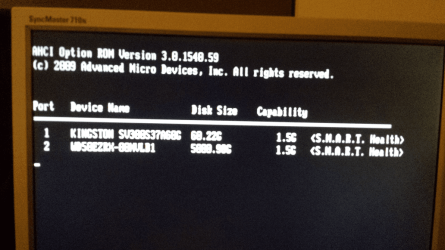
I've had the OS installed on the SSD for over a year now without a hitch. After hooking up the new HDD, I am faced with the problem in the title. Interestingly, during POST, it indicates that the capacity should be 5TB. The specs of the computer are:

CPU: AMD Athlon II X4 630 @ 2.8GHz (stock)
RAM: 4GB G.Skill DDR3-1600
Motherboard: Gigabyte GA-MA785GMT-UD2H (F9 BIOS)
Graphics Card: Integrated
PSU: Antec Earthwatts 380W
Case: Antec NSK-3480
HDD1: Kingston 60GB SSD (System)
HDD2: Western Digital 5TB Green EZRX (Storage)
OS: Windows 7 Pro

Please see the below screenshots for confirmation of my issue. I've tried formatting the drive (GPT) but the capacity stays at 561GB. Nothing turns up on Google too :confused: I've had a look at "WD Advanced Format HDD" but I'm not required to run "WD Align".

Any suggestions would be greatly appreciated and thanks for your time :)
 

Attachments

  • Capture.png
    Capture.png
    33.7 KB · Views: 6
  • POST.png
    POST.png
    235.8 KB · Views: 5
Last edited:

My Computer My Computer

At a glance

Windows 7 Pro x64AMD Phenom II X4 955 3.2GHz4GB CorsairnVidia GeForce GTX 650 Ti
Computer type
PC/Desktop
Computer Manufacturer/Model Number
Custom
OS
Windows 7 Pro x64
CPU
AMD Phenom II X4 955 3.2GHz
Motherboard
Gigabyte GA-MA785GMT-UD2H (1.1) (F9 bios)
Memory
4GB Corsair
Graphics Card(s)
nVidia GeForce GTX 650 Ti
Sound Card
External NuForce 2 USB DAC
Monitor(s) Displays
2
Screen Resolution
1680x1050
Hard Drives
Corsair GT (OS)
Seagate 250GB
Western Digital 2TB Green
Western Digital 4TB Green
PSU
Corsair VX-450
Case
Antec Solo
Cooling
Noctua NH-U12P SE2
Keyboard
Microsoft Natural Ergonomic Keyboard 4000
Mouse
Microsoft Natural Wireless Laser Mouse 6000
Internet Speed
24/1
Antivirus
MSE
Browser
Chrome
Hi there unclescrooge!

This is kind of strange. You have a Windows 7 OS x64, if you install the disk and initialize it in GPT you shouldn't need anything else to do or have a problem. You'd also need to have all of your updates.

EDIT: Actually, when looking closer to the stats given in POST, they do show an approximate capacity of 5000 GB, are you sure your drive is really 5TB? If so, please check the serial number and that the drive is an original WD 5 TB hard drive.

CK_WD
 
Last edited:

My Computer My Computer

At a glance

Windows 7 Home Premium x64
Computer type
PC/Desktop
OS
Windows 7 Home Premium x64
Hey CK_WD,

Thanks for your response! I'm pretty confused by the whole situation as well...

I've had a look at the screenshot and it does say 5000.00G - what I would expect for a 5TB drive. I do apologise for the blurry picture but that screen is only displayed for half a second and the shutter speeds on smartphones are notoriously slow.

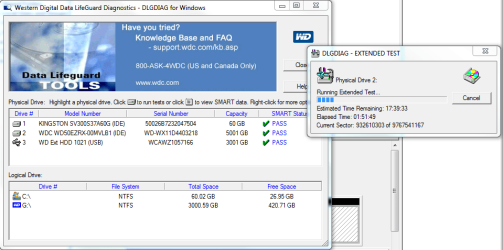
I'll run WD Align when I return home... Do you think there is anything else I can try? I'm puzzled that in the BIOS, during POST, and from within WD's diagnostic utility (see screenshot below), it states that the drive should be 5TB in size. I've even tried to extend the volume in CMD via diskpart who no luck.
 

Attachments

  • Capture2.PNG
    Capture2.PNG
    49.2 KB · Views: 2

My Computer My Computer

At a glance

Windows 7 Pro x64AMD Phenom II X4 955 3.2GHz4GB CorsairnVidia GeForce GTX 650 Ti
Computer type
PC/Desktop
Computer Manufacturer/Model Number
Custom
OS
Windows 7 Pro x64
CPU
AMD Phenom II X4 955 3.2GHz
Motherboard
Gigabyte GA-MA785GMT-UD2H (1.1) (F9 bios)
Memory
4GB Corsair
Graphics Card(s)
nVidia GeForce GTX 650 Ti
Sound Card
External NuForce 2 USB DAC
Monitor(s) Displays
2
Screen Resolution
1680x1050
Hard Drives
Corsair GT (OS)
Seagate 250GB
Western Digital 2TB Green
Western Digital 4TB Green
PSU
Corsair VX-450
Case
Antec Solo
Cooling
Noctua NH-U12P SE2
Keyboard
Microsoft Natural Ergonomic Keyboard 4000
Mouse
Microsoft Natural Wireless Laser Mouse 6000
Internet Speed
24/1
Antivirus
MSE
Browser
Chrome
Hi there

Check the BIOS -- for large volumes you might have to set the settings to LBA (older BIOSES couldn't calculate nr of sectors etc on these large volumes so they did a sort of "fiddle trick" known as LBA) .

You also will need to convert the HDD to GPT. Note that W7 cannot boot from a GPT HDD (not 100% sure about that one but I'm sure I read about it somewhere. - I use an SSD for my OS drive so the issue doesn't arise).

Convert the HDD with an elevated command prompt

Diskpart
Select disx xxx
clean
convert GPT

Now you should be able to view it in the system and start creating partitions on it.

I'm surprised the screenshot shows for example 3000GB - normally windows will show say something like 2.81TB.

Cheers
jimbo
 

My Computer My Computer

At a glance

Linux CENTOS 7 / various Windows OS'es and se...Intel i7 Intel i58GB, 16GBOn Motherboard
Computer type
PC/Desktop
Computer Manufacturer/Model Number
Custom built, several laptops HP/ASUS
OS
Linux CENTOS 7 / various Windows OS'es and servers
CPU
Intel i7 Intel i5
Memory
8GB, 16GB
Graphics Card(s)
On Motherboard
Sound Card
Realtek HD audio
Monitor(s) Displays
Apple Cinema display, Samsung LCD
Screen Resolution
1920 X 1080
Hard Drives
4 X 1TB SATA
Mouse
Toshiba wireless laser
Internet Speed
> 20MB up
The Gigabyte Tech Support seems to have said :

"Dear customer,

Unfortunately GA-MA785GMT-UD2H was old chipset board use Award bios which only be able support up to 2TB capacity drives.

Best regards,

Gigabyte technical support team."

However this user in March 2014 said:

"I had been using an old driver. With a newer driver, the issue is solved, and the full 4TB drive is now seen.

The version of the AMD SATA driver that does not see it is dated 05/05/2009 with version 1.2.0.125. (That's the one you currently get if you download from the MA785GMT page on USA site.)

But, on the general downloads section of the gigabyte website, NOT on the support page specific to the MA785GMT motherboard, there is a newer driver dated 10/12/2012, version 1.21.337.

After updating to this newer driver, all is well."

The driver mentioned is the AMD Sata Controller driver.
Can onboard SATA of MA785GMT-UD2h see a 4TB hard drive (AHCI) ?

So search for the new driver install it and then check.

Please create a System Restore point before you make any changes so that if need be, you can roll back.

Good Luck.

EDIT: As jimbo45 opined a BIOS update may also help. But first try the SATA Controller driver update.
 

My Computer My Computer

At a glance

Windows 7 Home Premium 32 bit
OS
Windows 7 Home Premium 32 bit
Hi Everyone,

Success!

As I wasn't able to find the newer SATA Controller driver from the Gigabyte website, I uninstalled the AMD AHCI driver and used the default Windows AHCI driver. The full capacity of the 5TB drive is now unlocked :D

Thank you very much for your time and I hope this thread can help someone in the future.
 

My Computer My Computer

At a glance

Windows 7 Pro x64AMD Phenom II X4 955 3.2GHz4GB CorsairnVidia GeForce GTX 650 Ti
Computer type
PC/Desktop
Computer Manufacturer/Model Number
Custom
OS
Windows 7 Pro x64
CPU
AMD Phenom II X4 955 3.2GHz
Motherboard
Gigabyte GA-MA785GMT-UD2H (1.1) (F9 bios)
Memory
4GB Corsair
Graphics Card(s)
nVidia GeForce GTX 650 Ti
Sound Card
External NuForce 2 USB DAC
Monitor(s) Displays
2
Screen Resolution
1680x1050
Hard Drives
Corsair GT (OS)
Seagate 250GB
Western Digital 2TB Green
Western Digital 4TB Green
PSU
Corsair VX-450
Case
Antec Solo
Cooling
Noctua NH-U12P SE2
Keyboard
Microsoft Natural Ergonomic Keyboard 4000
Mouse
Microsoft Natural Wireless Laser Mouse 6000
Internet Speed
24/1
Antivirus
MSE
Browser
Chrome
Glad that I could lead you to resolve the problem.:)
 

My Computer My Computer

At a glance

Windows 7 Home Premium 32 bit
OS
Windows 7 Home Premium 32 bit
Back
Top