So I have a machine I have just replaced the mobo on for someone but everytime it is unplugged from the wall upon reboot a message appears during post saying default values have been loaded and you have to press F1 to enter setup (bios) or F2 to continue.
I thought this was no big problem and swiftly replaced the CMOS battery but it is exactly the same, resets everytime power is cut
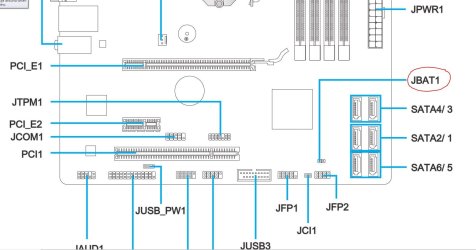
The board is an MSI B75MA-P45 and is brand new
Thankfully the default sata mode is AHCI so the machine still boots after reset but its really annoying me and the clock resetting stops WU from working and also threw a temp activation problem that was easily dealt with.
HWinfo does not show VBatt reading and speedfan does but reports 4.08V which is clearly wrong from a 3V battery
Any thoughts/ideas would be gratefully received as im running out of options other than an RMA which is going to be a major pain as this is her only computer and cant be without it
1. Is their a default jumper pin on the motherboard that is in the wrong position.
2. I have seen a power supply cause this problem.
3. Lately HWmonitor for other members has been giving wrong readings.
4. It has been know that a infection will monkey with the time so one can't get help on line.
My Computer
At a glance
Windows 10 Pro. 64/ version 1709 Windows 7 Pr...Intel i7-6800K @ 4.3Corsair Platinum 16 gig @2400EVGA GTX 1070 OC
Computer type
PC/Desktop
Computer Manufacturer/Model Number
Home made Desktop
OS
Windows 10 Pro. 64/ version 1709 Windows 7 Pro/64
CPU
Intel i7-6800K @ 4.3
Motherboard
ASUS X-99 Deluxe II
Memory
Corsair Platinum 16 gig @2400
Graphics Card(s)
EVGA GTX 1070 OC
Monitor(s) Displays
Asus 27" LED LCD/VE278Q
Screen Resolution
1920-1080 or 1280-720 HDMI
Hard Drives
INTEL SSD 730-240 Gb Sata 3.0/
PSU
EVGA Platium 1200W
Case
Phanteks Luxe Tempered Glass 8 fans/ one radiator
Cooling
XSPC/ Water Cooled CPU
Keyboard
Das 4 Professional
Mouse
Logitech M705/MX Anywhere 2-S
Internet Speed
100 mbits
Antivirus
Microsoft Security Essentials/ Malwarebytes Premium 3.0/ SAS
Browser
I.E. 11 default/Firefox/ ISP Time Warner Cable/Spectrum
Other Info
LG BluRay Burner/
Sound system-KLipsch-THX/
Icy Dock ssd Hot Swap bays.
If making the necessary changes to the BIOS and Accepting them or simply Accepting the defaults causes the same issue I'd get a replacement board as something with the battery not saving changes to the CMOS is not working as it should.
If a person works on computer fairly often it is good to have a loaner machine, I have both a Notebook and a Desktop for the purpose, both with Win7 and a Notebook with Win8.1. These are computers I have resurrected when the owners opted to get new with a warranty instead of spending upwards of half as much on a computer with no warranty, just wiser use of funds but then every situation is different.
My Computer
At a glance
Windows 7 Ultimate 64-bit, Windows 8.1 64-bit...
Computer type
PC/Desktop
Computer Manufacturer/Model Number
Customs, Dell, Gateway, HP, Toshiba, Acer, ASUS
OS
Windows 7 Ultimate 64-bit, Windows 8.1 64-bit, Mac OS X 10.10, Linux Mint 17, Windows 10 Pro TP
I replaced the mobo as the old one was faulty, machine worked fine when I received it was only planning to do a case swap (as the old one was damaged) and an SSD upgrade but after moving mobo into new case it was DOA giving continuous beeps which indicated a power supply fault, tried different psu and no joy so I bought her a new board.
Reset jumper is not in place just two bare pins - machine does not reset bios on reboot only if unplugged from wall and I have swapped out the PSU for a different unit to be sure it wasn't causing probs on new board
I am thinking I may have to RMA it was just hoping someone may have an epiphany that could work
I am planning to pull the battery and test with a multimeter before I return it just to be sure though
I use a battery tester made for the purpose, tests several different types using leads or a socket for the CMOS type battery. I've found a multimeter does give a voltage reading which can be an indicator good or bad but doesn't put any kind of load on it, no sense of quality.
My Computer
At a glance
Windows 7 Ultimate 64-bit, Windows 8.1 64-bit...
Computer type
PC/Desktop
Computer Manufacturer/Model Number
Customs, Dell, Gateway, HP, Toshiba, Acer, ASUS
OS
Windows 7 Ultimate 64-bit, Windows 8.1 64-bit, Mac OS X 10.10, Linux Mint 17, Windows 10 Pro TP
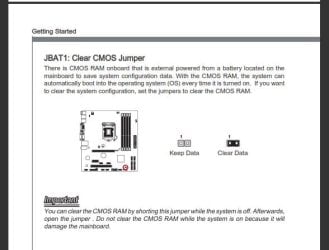
I believe the jumper that Layback Bear was referring to was the Clear CMOS or CLRTC jumper. Refer to the manual to find it's location.
There will be 3 pins and the jumper should be on pins 1&2. If it is on 2&3, or is missing completely, it could explain the problem.
My Computer
At a glance
Windows 7 64 Bit Home Premium SP1i7-3820GSkill F3-14900CL9Q - 16GBEVGA GeForce GTX660 - Driver 352.86
Computer type
PC/Desktop
Computer Manufacturer/Model Number
Home Built - Jan 2013
OS
Windows 7 64 Bit Home Premium SP1
CPU
i7-3820
Motherboard
Asus P9X79-PRO - Bios 4608
Memory
GSkill F3-14900CL9Q - 16GB
Graphics Card(s)
EVGA GeForce GTX660 - Driver 352.86
Sound Card
On board Realtek ALC898
Monitor(s) Displays
Acer S271HL
Screen Resolution
1920 x 1080
Hard Drives
#1- Samsung 840 Pro Series
#2- Western Digital WD1002FAEX Sata3 Black
#3- Western Digital WD1002FAEX Sata3 Black
PSU
Corsair CMPSU-850TX-V2 - 850 watt (by Seasonic)
Case
Corsair Obsidian 550D
Cooling
Standard 3 120mm case fans, Cooler Master Hyper 212 EVO
If the battery is a "known good" battery that was replaced and still has problems, the only other thing is the motherboard itself.
With the power supply off completely (no keep alive voltage) it should still retain the CMOS memory settings. If its not doing it, and there is a good battery installed (and installed with correct polarity) its the motherboard.
New motherboards can be "bad". I had a new ASRock motherboard that 2out of the 4 memory slots were defective. ASRock replaced the motherboard.
My Computer
At a glance
Windows 10 64 bitIntel i7 6700K16GB Corsair DominatorIntel CPU Graphics
Computer type
PC/Desktop
Computer Manufacturer/Model Number
My Own Build
OS
Windows 10 64 bit
CPU
Intel i7 6700K
Motherboard
ASUS ROG Maximus VIII Hero
Memory
16GB Corsair Dominator
Graphics Card(s)
Intel CPU Graphics
Sound Card
RealTek
Monitor(s) Displays
27" Dell S2719dgf
Screen Resolution
2560X1440
Hard Drives
1 TB Samsung 850 EVO SSD for Win 10 Pro
500GB Samsung 850 EVO SSD for Win 10 Insider
2 TB drive for backup
PSU
EVGA Supernova 750G2
Case
BeQuiet Silent Base 600
Cooling
Deepcool Captain 120EX
Keyboard
Microsoft Wireless 2000
Mouse
Microsoft wireless
Internet Speed
100 MB/sec (Cable)
Antivirus
Microsoft Defender and Malwarebytes
Browser
Edge/Firefox
Other Info
Cakewalk (Sonar) by BandLab and Studio One 4.1 Pro recording studio software. MOTU 896Mk3 Hybrid recording interface, Frontier Tranzport wireless control unit, Behringer X-Touch Control Surface.
Five USB connected optical drives for CD Audio production using Nero BurningROM
Thanks everyone for your input, I have tried again today with another new battery and its still the same
The system has been built out of case, everything double and triple checked, the clear cmos is just two pins that will reset when shorted and there is no jumper there at all.
I contacted the vendor today and they have kindly offered to send me a new board to replace it with which is great news so just a case of swapping them over when it arrives
I will mark this thread as solved as there really is nothing more to try