UPS monitoring in windows 7

incxbxs

New member
Local time
7:28 AM
Messages
10
Hello,

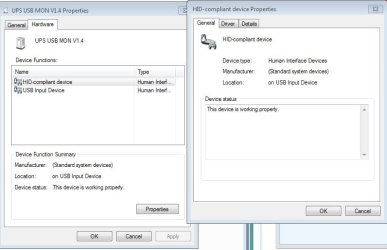
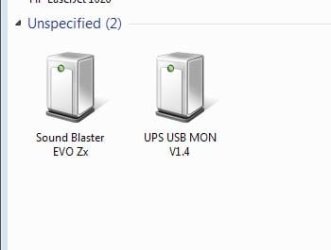
I've bought an UPS and connect it to computer via USB cable. Windows immediately recognize UPS as an: UPS USB MON V1.4.

Right now i want to monitor that UPS but there is no battery or Ups indicator neither any options available.
I looked advanced power options there is no battery option there too.

Am i missing something or this UPS just is not compatible?
 

Attachments
  • screen1.JPG
    screen1.JPG
    13 KB · Views: 11
  • screen2.JPG
    screen2.JPG
    45.3 KB · Views: 1
Last edited:

My Computer My Computer

At a glance

windows 7 pro 64biti5 3570k16gb corsairAsus 7850 DC-2
Computer type
PC/Desktop
OS
windows 7 pro 64bit
CPU
i5 3570k
Motherboard
asrock extreme4
Memory
16gb corsair
Graphics Card(s)
Asus 7850 DC-2
Hard Drives
Vertex 3 SSD
Am i missing something or this UPS just is not compatible?
I see no information on the brand and model of the UPS. Is it an APC, TrippLite, Cyberpower, etc.? What is the capacity? I have a few [2 APC and 2 TrippLite] and don't connect directly to the computer [except for the power cable] or install the software that comes with them as they are within eyesight/arm reach.
 

My Computer My Computer

At a glance

Windows 7 Ultimate 64-bit, Windows 8.1 64-bit...
Computer type
PC/Desktop
Computer Manufacturer/Model Number
Customs, Dell, Gateway, HP, Toshiba, Acer, ASUS
OS
Windows 7 Ultimate 64-bit, Windows 8.1 64-bit, Mac OS X 10.10, Linux Mint 17, Windows 10 Pro TP
Keyboard
Microsoft
Mouse
Microsoft
Did you get a disk with software for the UPS or did the instructions tell you to download the software? If so, you need to install it in order to be able to monitor the UPS on your computer and to change settings on the UPS.
 

My Computer My Computer

At a glance

Win 7 Ultimate 64 bitIntel i7-3930KKingston HyperX Genesis 32GB Kit (8x4GB Modul...MSI R7850 Twin Frozr 2GD5/OC Radeon HD 7850 2...
Computer type
PC/Desktop
Computer Manufacturer/Model Number
Custom Build
OS
Win 7 Ultimate 64 bit
CPU
Intel i7-3930K
Motherboard
ASUS P9X79 WS
Memory
Kingston HyperX Genesis 32GB Kit (8x4GB Modules) 1600MHz DDR
Graphics Card(s)
MSI R7850 Twin Frozr 2GD5/OC Radeon HD 7850 2GB 256-bit GDDR
Sound Card
Asus Xonar Essence STX
Monitor(s) Displays
3x Asus VG248QE 24", Vizio 32" TV
Screen Resolution
1920 x 1080, ?
Hard Drives
Samsung 128GB 840 Pro SSD (1),
Samsung 4TB 850 EVO SSDs (4)
Samsung 4TB 850 EVO SSDs (16) external backup drives used in 2.5" hot swap bays in the computer.
PSU
Corsair HX750w
Case
Antec Two Hundred v2 (modified)
Cooling
Cooler Master GeminII S524 120mm (fan replaced with a 140mm)
Keyboard
Logitech G510s
Mouse
Logitech M525 (two in use)
Internet Speed
=< 32Mbps down, 8Mbps up
Antivirus
AVAST!, MBAM, SAS, Spybot S&D (all but MBAM free) Glary Util
Browser
IE11
Other Info
LSI 9211-8i HBA card (8 SATA III ports), 2.5" & 3.5" Hot Swap Bays, HooToo HT-CR001 PCI-E to USB 3.0 Internal Hub + 6 Slot Card Reader, and LG Model CH12LS28 BD-ROM Optical Drive. Also, ScanSnap S1500 ADF duplexing scanner, Canon 9000F flat bed scanner, Corsair SP2500 2.1 speakers, Samsung CLP 415nw laser color printer, Cyberpower PP2200SW UPS
Brand is Tuncmatik, it gaves software called viewpower. (Software download for Uninterruptible Power Supply)

Thing is, this software is looking for com ports to find UPS but, it connects via Usb and recognized usb hid device by windows. So this program also failed to recognize UPS and i couldnot find a way to "convert" this usb port to virtual com port.
 

My Computer My Computer

At a glance

windows 7 pro 64biti5 3570k16gb corsairAsus 7850 DC-2
Computer type
PC/Desktop
OS
windows 7 pro 64bit
CPU
i5 3570k
Motherboard
asrock extreme4
Memory
16gb corsair
Graphics Card(s)
Asus 7850 DC-2
Hard Drives
Vertex 3 SSD
Try going to their support page and see if the company can help you.
 

My Computer My Computer

At a glance

Win 7 Ultimate 64 bitIntel i7-3930KKingston HyperX Genesis 32GB Kit (8x4GB Modul...MSI R7850 Twin Frozr 2GD5/OC Radeon HD 7850 2...
Computer type
PC/Desktop
Computer Manufacturer/Model Number
Custom Build
OS
Win 7 Ultimate 64 bit
CPU
Intel i7-3930K
Motherboard
ASUS P9X79 WS
Memory
Kingston HyperX Genesis 32GB Kit (8x4GB Modules) 1600MHz DDR
Graphics Card(s)
MSI R7850 Twin Frozr 2GD5/OC Radeon HD 7850 2GB 256-bit GDDR
Sound Card
Asus Xonar Essence STX
Monitor(s) Displays
3x Asus VG248QE 24", Vizio 32" TV
Screen Resolution
1920 x 1080, ?
Hard Drives
Samsung 128GB 840 Pro SSD (1),
Samsung 4TB 850 EVO SSDs (4)
Samsung 4TB 850 EVO SSDs (16) external backup drives used in 2.5" hot swap bays in the computer.
PSU
Corsair HX750w
Case
Antec Two Hundred v2 (modified)
Cooling
Cooler Master GeminII S524 120mm (fan replaced with a 140mm)
Keyboard
Logitech G510s
Mouse
Logitech M525 (two in use)
Internet Speed
=< 32Mbps down, 8Mbps up
Antivirus
AVAST!, MBAM, SAS, Spybot S&D (all but MBAM free) Glary Util
Browser
IE11
Other Info
LSI 9211-8i HBA card (8 SATA III ports), 2.5" & 3.5" Hot Swap Bays, HooToo HT-CR001 PCI-E to USB 3.0 Internal Hub + 6 Slot Card Reader, and LG Model CH12LS28 BD-ROM Optical Drive. Also, ScanSnap S1500 ADF duplexing scanner, Canon 9000F flat bed scanner, Corsair SP2500 2.1 speakers, Samsung CLP 415nw laser color printer, Cyberpower PP2200SW UPS
Sure i'll do but is there native ups support on windows 7? Because i remember there was an option in control panel called Uninterruptible Power Supply in old times...

ps: i checked this article Installing, configuring and testing a UPS for Windows 7 but i have no option called battery in power options as well.
 

My Computer My Computer

At a glance

windows 7 pro 64biti5 3570k16gb corsairAsus 7850 DC-2
Computer type
PC/Desktop
OS
windows 7 pro 64bit
CPU
i5 3570k
Motherboard
asrock extreme4
Memory
16gb corsair
Graphics Card(s)
Asus 7850 DC-2
Hard Drives
Vertex 3 SSD
Back
Top