Solved hard drive partition problem

jasonp44

New member
Local time
4:39 PM
Messages
19
Can anyone please advise. My PC has been upgraded from XP to Win7. It appears to have two drives C and D. D is labelled "recovery".
When i try to download anything it tries to put it in D, which has no room left.
Can i either change the default to C, which has plenty of space, or increase the partition share of D.
My PC is Dell with AMD Athlon.
Thanks in advance.
 

My Computer

Computer type
PC/Desktop
Computer Manufacturer/Model Number
dell
OS
windows 7 home premium 32bit
CPU
amd athlon x2
Motherboard
unknown
Memory
unknown
Graphics Card(s)
unknown
Hard Drives
Unknown
Antivirus
ms essentials
Browser
Firefox
Hi jasonp44,

It's tricky to re-size partitions as you have to reformat the hard drive, which will delete all the data. The easiest thing to do is change the default download location for whatever you're using. Is this occurring in your internet browsers like Chrome or IE (and if so, which browsers do you use?) or is it in every program?

Kind Regards,

Mark
 

My Computer

Computer type
PC/Desktop
Computer Manufacturer/Model Number
Custom Build
OS
Windows 7 Home Premium x64
CPU
AMD FX - 6200 3.8GHz
Motherboard
ASUS M5A99X EVO R2.0
Memory
Patriot Viper 3 Series DDR3 1600MHz
Graphics Card(s)
Sapphire AMD Radeon HD 7850
Hard Drives
2 x Seagate Barracuda 3.5" 2TB 6GB/s
Antivirus
Kaspersky Total Security 2016
Thanks for reply Mark. I'm using IE ànd Firefox and the same seems to happen in both. It seems to download Ok, but when I try to install a programme (eg. Adobe acrobat) I get a message saying there is no room on D drive. Is it possible to change the default to C drive where there's plenty of room?
Thanks again.
 

My Computer

Computer type
PC/Desktop
Computer Manufacturer/Model Number
dell
OS
windows 7 home premium 32bit
CPU
amd athlon x2
Motherboard
unknown
Memory
unknown
Graphics Card(s)
unknown
Hard Drives
Unknown
Antivirus
ms essentials
Browser
Firefox
Hi jasonp44,

So your problem is that if you try to install anything, it tries to install the program into your partition which has no space (D)?

If so, try changing the default installation directory for your OS:

1 - Start Registry Editor by entering “Regedit” in the search All programs.
2 - Find the following: HKEY_LOCAL_MACHINE\SOFTWARE\Microsoft\Windows\CurrentVersion
3 - Right click on the value named ProgramFilesDir & change the default value C:\Program Files to the path you want to install all your programs in.
4 - Click OK and Exit.

Hopefully this will change the default directory in which Windows installs your programs.

Kind Regards,

Mark
 

My Computer

Computer type
PC/Desktop
Computer Manufacturer/Model Number
Custom Build
OS
Windows 7 Home Premium x64
CPU
AMD FX - 6200 3.8GHz
Motherboard
ASUS M5A99X EVO R2.0
Memory
Patriot Viper 3 Series DDR3 1600MHz
Graphics Card(s)
Sapphire AMD Radeon HD 7850
Hard Drives
2 x Seagate Barracuda 3.5" 2TB 6GB/s
Antivirus
Kaspersky Total Security 2016

My Computer

Computer type
PC/Desktop
Computer Manufacturer/Model Number
Home made Desktop
OS
Windows 10 Pro. 64/ version 1709 Windows 7 Pro/64
CPU
Intel i7-6800K @ 4.3
Motherboard
ASUS X-99 Deluxe II
Memory
Corsair Platinum 16 gig @2400
Graphics Card(s)
EVGA GTX 1070 OC
Monitor(s) Displays
Asus 27" LED LCD/VE278Q
Screen Resolution
1920-1080 or 1280-720 HDMI
Hard Drives
INTEL SSD 730-240 Gb Sata 3.0/
PSU
EVGA Platium 1200W
Case
Phanteks Luxe Tempered Glass 8 fans/ one radiator
Cooling
XSPC/ Water Cooled CPU
Keyboard
Das 4 Professional
Mouse
Logitech M705/MX Anywhere 2-S
Internet Speed
100 mbits
Antivirus
Microsoft Security Essentials/ Malwarebytes Premium 3.0/ SAS
Browser
I.E. 11 default/Firefox/ ISP Time Warner Cable/Spectrum
Other Info
LG BluRay Burner/
Sound system-KLipsch-THX/
Icy Dock ssd Hot Swap bays.
Hi Mark.
Thanks for advice. I followed it through till i got a box called "Edit string", Value name, Value data.
I changed it from D:\Program Files to C:\Program Files.
I just tried to install my printer, but still get message there's no room on D drive. Also failed to install Adobe Acrobat
(
I'll have a look at that tutorial. Thanks.
 

My Computer

Computer type
PC/Desktop
Computer Manufacturer/Model Number
dell
OS
windows 7 home premium 32bit
CPU
amd athlon x2
Motherboard
unknown
Memory
unknown
Graphics Card(s)
unknown
Hard Drives
Unknown
Antivirus
ms essentials
Browser
Firefox
Hi jasonp44,

Can you take a screenshot of the registry and the bit you changed please?

Also, yeah if you attach the screenshot that the tutorial will guide you with that'll be a great help too, cheers.

Kind Regards,

Mark
 

My Computer

Computer type
PC/Desktop
Computer Manufacturer/Model Number
Custom Build
OS
Windows 7 Home Premium x64
CPU
AMD FX - 6200 3.8GHz
Motherboard
ASUS M5A99X EVO R2.0
Memory
Patriot Viper 3 Series DDR3 1600MHz
Graphics Card(s)
Sapphire AMD Radeon HD 7850
Hard Drives
2 x Seagate Barracuda 3.5" 2TB 6GB/s
Antivirus
Kaspersky Total Security 2016
OK. I'll try. Thanks
 

My Computer

Computer type
PC/Desktop
Computer Manufacturer/Model Number
dell
OS
windows 7 home premium 32bit
CPU
amd athlon x2
Motherboard
unknown
Memory
unknown
Graphics Card(s)
unknown
Hard Drives
Unknown
Antivirus
ms essentials
Browser
Firefox
Hi Mark. Been struggling for a couple of hours to sort out screen shots. My brain hurts... I'll try again tomorrow :(
 

My Computer

Computer type
PC/Desktop
Computer Manufacturer/Model Number
dell
OS
windows 7 home premium 32bit
CPU
amd athlon x2
Motherboard
unknown
Memory
unknown
Graphics Card(s)
unknown
Hard Drives
Unknown
Antivirus
ms essentials
Browser
Firefox
Hi Jason,

No problem, we can sort it out tomorrow.

Kind Regards,

Mark
 

My Computer

Computer type
PC/Desktop
Computer Manufacturer/Model Number
Custom Build
OS
Windows 7 Home Premium x64
CPU
AMD FX - 6200 3.8GHz
Motherboard
ASUS M5A99X EVO R2.0
Memory
Patriot Viper 3 Series DDR3 1600MHz
Graphics Card(s)
Sapphire AMD Radeon HD 7850
Hard Drives
2 x Seagate Barracuda 3.5" 2TB 6GB/s
Antivirus
Kaspersky Total Security 2016

My Computer

Computer type
PC/Desktop
Computer Manufacturer/Model Number
Home made Desktop
OS
Windows 10 Pro. 64/ version 1709 Windows 7 Pro/64
CPU
Intel i7-6800K @ 4.3
Motherboard
ASUS X-99 Deluxe II
Memory
Corsair Platinum 16 gig @2400
Graphics Card(s)
EVGA GTX 1070 OC
Monitor(s) Displays
Asus 27" LED LCD/VE278Q
Screen Resolution
1920-1080 or 1280-720 HDMI
Hard Drives
INTEL SSD 730-240 Gb Sata 3.0/
PSU
EVGA Platium 1200W
Case
Phanteks Luxe Tempered Glass 8 fans/ one radiator
Cooling
XSPC/ Water Cooled CPU
Keyboard
Das 4 Professional
Mouse
Logitech M705/MX Anywhere 2-S
Internet Speed
100 mbits
Antivirus
Microsoft Security Essentials/ Malwarebytes Premium 3.0/ SAS
Browser
I.E. 11 default/Firefox/ ISP Time Warner Cable/Spectrum
Other Info
LG BluRay Burner/
Sound system-KLipsch-THX/
Icy Dock ssd Hot Swap bays.

My Computer

Computer type
PC/Desktop
Computer Manufacturer/Model Number
Custom Build
OS
Windows 7 Home Premium x64
CPU
AMD FX - 6200 3.8GHz
Motherboard
ASUS M5A99X EVO R2.0
Memory
Patriot Viper 3 Series DDR3 1600MHz
Graphics Card(s)
Sapphire AMD Radeon HD 7850
Hard Drives
2 x Seagate Barracuda 3.5" 2TB 6GB/s
Antivirus
Kaspersky Total Security 2016
Sorry MarkP15 I didn't mean to get in your way.
I thought that 9 hours was long enough.
I also thought that maybe my request wasn't read or missed.

Your in charge.
Have a nice day.
 

My Computer

Computer type
PC/Desktop
Computer Manufacturer/Model Number
Home made Desktop
OS
Windows 10 Pro. 64/ version 1709 Windows 7 Pro/64
CPU
Intel i7-6800K @ 4.3
Motherboard
ASUS X-99 Deluxe II
Memory
Corsair Platinum 16 gig @2400
Graphics Card(s)
EVGA GTX 1070 OC
Monitor(s) Displays
Asus 27" LED LCD/VE278Q
Screen Resolution
1920-1080 or 1280-720 HDMI
Hard Drives
INTEL SSD 730-240 Gb Sata 3.0/
PSU
EVGA Platium 1200W
Case
Phanteks Luxe Tempered Glass 8 fans/ one radiator
Cooling
XSPC/ Water Cooled CPU
Keyboard
Das 4 Professional
Mouse
Logitech M705/MX Anywhere 2-S
Internet Speed
100 mbits
Antivirus
Microsoft Security Essentials/ Malwarebytes Premium 3.0/ SAS
Browser
I.E. 11 default/Firefox/ ISP Time Warner Cable/Spectrum
Other Info
LG BluRay Burner/
Sound system-KLipsch-THX/
Icy Dock ssd Hot Swap bays.
Hi Mark
Following your instructions, after "Program File Dir" I get a box with
Modify
ModifyPrimary Data
Delete
Rename.
I select "modify" and alter
D to C

(I attached a screenshot but I couldn't post because it said i had too many characters. 44,020??)
 

Attachments

  • Capture 2.JPG
    Capture 2.JPG
    25.3 KB · Views: 23

My Computer

Computer type
PC/Desktop
Computer Manufacturer/Model Number
dell
OS
windows 7 home premium 32bit
CPU
amd athlon x2
Motherboard
unknown
Memory
unknown
Graphics Card(s)
unknown
Hard Drives
Unknown
Antivirus
ms essentials
Browser
Firefox
Hi Jason,

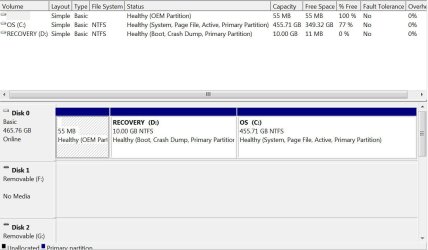
If you try just uploading the screenshot on its own with no text that might work. Also, if you upload a screenshot from the Disk Management window, we could see what were are dealing with exactly.

Kind Regards,

Mark
 

My Computer

Computer type
PC/Desktop
Computer Manufacturer/Model Number
Custom Build
OS
Windows 7 Home Premium x64
CPU
AMD FX - 6200 3.8GHz
Motherboard
ASUS M5A99X EVO R2.0
Memory
Patriot Viper 3 Series DDR3 1600MHz
Graphics Card(s)
Sapphire AMD Radeon HD 7850
Hard Drives
2 x Seagate Barracuda 3.5" 2TB 6GB/s
Antivirus
Kaspersky Total Security 2016
Capture.JPG
 

My Computer

Computer type
PC/Desktop
Computer Manufacturer/Model Number
dell
OS
windows 7 home premium 32bit
CPU
amd athlon x2
Motherboard
unknown
Memory
unknown
Graphics Card(s)
unknown
Hard Drives
Unknown
Antivirus
ms essentials
Browser
Firefox
Recovery partition should not be a primary partition. It should be hidden, no drive letter assigned. A utiltiy as powerful as Acronis Drive Director may be needed to quickly and effectively fix this. Again, recovery partition should be hidden, it should not have a drive letter assigned to it.
And, the 55MB OEM partition might be the SystemReserved partition, which Windows must have.
 

My Computer

Computer type
PC/Desktop
Computer Manufacturer/Model Number
Antec desktop; Acer Aspire laptops
OS
Windows 7 Professional 64-bit
CPU
Desktop i5; Acers i5 & i7
Memory
desktop 16GB; 1 Acer 8GB & 1 Acer 16GB
Hard Drives
1TB split into 2 equal partitions [OS and data] usable by RJS
Internet Speed
AT&T DSL
Browser
FF, GChrome, msIE
Other Info
Windows 7 Firewall, Emsisoft AM/AV, MSE [scan-only], SpywareBlaster, Ruiware/BillP combine
Hi Jason,

I think a good idea would be to remove the drive letter allocated to the reserved partition (D) so although the files are still there, they aren't recognised as a drive. To do this, right-click the drive that you want to change, and then click*Change Drive Letter and Paths, then click Remove and then confirm.

Kind Regards,

Mark
 

My Computer

Computer type
PC/Desktop
Computer Manufacturer/Model Number
Custom Build
OS
Windows 7 Home Premium x64
CPU
AMD FX - 6200 3.8GHz
Motherboard
ASUS M5A99X EVO R2.0
Memory
Patriot Viper 3 Series DDR3 1600MHz
Graphics Card(s)
Sapphire AMD Radeon HD 7850
Hard Drives
2 x Seagate Barracuda 3.5" 2TB 6GB/s
Antivirus
Kaspersky Total Security 2016
Mark, your idea is much easier to do! I thought OP indicated something amiss with diskmanagement -- I guess I read this topic wrongly :)
 

My Computer

Computer type
PC/Desktop
Computer Manufacturer/Model Number
Antec desktop; Acer Aspire laptops
OS
Windows 7 Professional 64-bit
CPU
Desktop i5; Acers i5 & i7
Memory
desktop 16GB; 1 Acer 8GB & 1 Acer 16GB
Hard Drives
1TB split into 2 equal partitions [OS and data] usable by RJS
Internet Speed
AT&T DSL
Browser
FF, GChrome, msIE
Other Info
Windows 7 Firewall, Emsisoft AM/AV, MSE [scan-only], SpywareBlaster, Ruiware/BillP combine
Mark, your idea is much easier to do! I thought OP indicated something amiss with diskmanagement -- I guess I read this topic wrongly :)

No problem Roland and thanks :)
 

My Computer

Computer type
PC/Desktop
Computer Manufacturer/Model Number
Custom Build
OS
Windows 7 Home Premium x64
CPU
AMD FX - 6200 3.8GHz
Motherboard
ASUS M5A99X EVO R2.0
Memory
Patriot Viper 3 Series DDR3 1600MHz
Graphics Card(s)
Sapphire AMD Radeon HD 7850
Hard Drives
2 x Seagate Barracuda 3.5" 2TB 6GB/s
Antivirus
Kaspersky Total Security 2016
Back
Top