Solved No access to 2nd partition after hibernation: column filesystem: RAW

Alonzo Poodle

New member
Member
Local time
8:58 PM
Messages
21
The Notebook was sent to hibernation by a program and after the Notebook did not start anymore with the first try, a message displayed, something like, the computer cannot be started from hibernation. The Notebook started and there was no access to the 2nd (I:) partition (of 2 ones on that drive, the first partition has the OS, Win 7). The HDD:
http://i.imgur.com/K9imtqY.png
http://i.imgur.com/v5ZE42u.png

When I try to access I: a message appears to first format the partition.

In the column "Filesystem" in computer management for I: is shown "RAW" and no problems, for C: still is displayed "NTFS": http://i.imgur.com/zIwhhNg.jpg.

How could I recover the files / repair the drive?
 
Last edited:

My Computer My Computer

At a glance

Windows 7 Home Premium 64-bit SP1
Computer type
Laptop
OS
Windows 7 Home Premium 64-bit SP1
Open Command prompt. Start > All programs > Accessories > Command Prompt

Type
CHKDSK I: /f /v /r /x Press enter. Note: Replace I: with the actual drive letter of the RAW volume. Also note there is a space before every /

Allow check disk to complete. Reboot your PC.

Hope this resolves your problem. Please report the result.
 
Last edited:

My Computer My Computer

At a glance

Windows 7 Home Premium 32 bit
OS
Windows 7 Home Premium 32 bit
Thank you very much, jumanji,

Very happy about your help.

Type
CHKDSK I: /f /v /r /x Press enter. Note: Replace I: with the actual drive letter of the RAW volume. Also note there is a space before every /
OK, I just will copy and paste your command so there cannot occur any typing errors. The drive letter(s) of the partition kept staying the same (I:) (the first drive on the last screen shot) like before, and the partition C: obviously kept staying untouched.

Might there be better chances when I dissemble the drive and plug it in as an external USB drive (with another computer)? I assume, there is a (physically) defect in the drive / Notebook causing the issue.

And, when I run the command, will there be overwritten anything of my data on I:? So should I do a recovery before I start the command just for safety reasons (if the command fails and files are overwritten irreversibly)?

Many thanks again.
 

My Computer My Computer

At a glance

Windows 7 Home Premium 64-bit SP1
Computer type
Laptop
OS
Windows 7 Home Premium 64-bit SP1
Running checkdisk will only correct file system errors which I presume is the cause for your volume turning RAW. It will not harm your data in anyway. The only precaution is do not interrupt checkdisk halfway through. Allow it to take its own time and compelte it oneway or the other even if it takes 10 hours. During the period checkdisk runs, do not use your computer for other work.Leave it alone.

If checkdisk does not correct the problem then we shall think of what should be done. Not until then.
 

My Computer My Computer

At a glance

Windows 7 Home Premium 32 bit
OS
Windows 7 Home Premium 32 bit
Alright, I understand, I will - of course - exactly do it like you say it.

Yes, no interruption. The entire Notebook seems to be instable, may be it is caused by that drive, just switched off a few times some time ago. So I guess, I first have to get another Notebook for that action. I will report as fast as possible.

Many thanks again.
 

My Computer My Computer

At a glance

Windows 7 Home Premium 64-bit SP1
Computer type
Laptop
OS
Windows 7 Home Premium 64-bit SP1
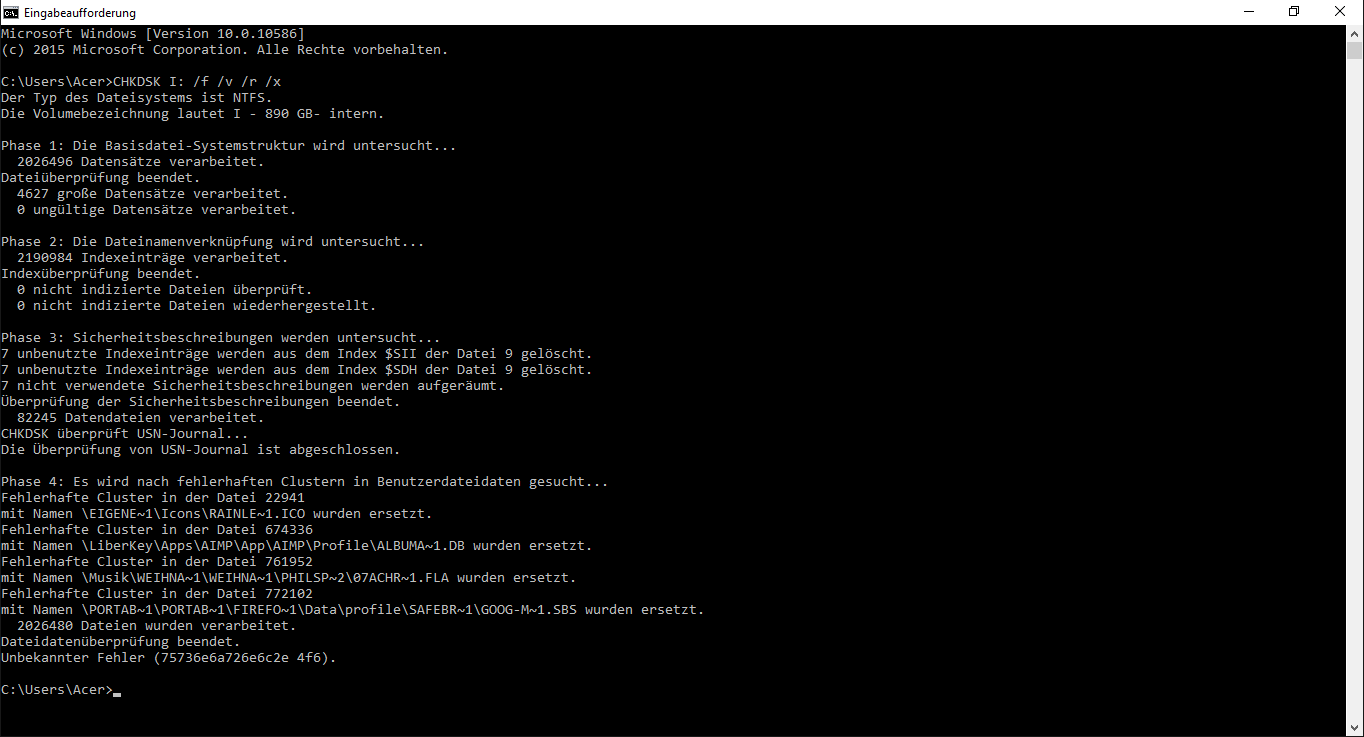
Done. It appears to have worked perfectly. The partition is accessible again. chkdsk ran about 8, 9 hours (over one million files).

I now will try to find out if all of the files are back / OK. It looks very good.

This was shown when chkdsk was finished (http://i.imgur.com/pPBh9Z4.png):
pPBh9Z4.png


In the line before the last line an "unknown error" is shown.

So many thanks, only because of your great help I was able to get the data back. Very many thanks.
 

My Computer My Computer

At a glance

Windows 7 Home Premium 64-bit SP1
Computer type
Laptop
OS
Windows 7 Home Premium 64-bit SP1
You are returning after almost - why almost, surely at the most :) - one and half months, keeping me in suspense all the time - that is a bluff, I forgot all about it :D.

Anyway glad that it worked and you are happy with it.:party:

Unfortunately I can't understand that language ( German?? Spanish ???) Do you mean this "Unbekannter Fehler (75736e6a726e6c2e 4f6)" I really do not know but will check on it. I am also trying to learn with every attempt to resolve issues and when we come to know how much we do not know :).

In future please upload the screenshots to SevenForums servers. That way there will be a permanent record in the forum without the necessity of going into third party servers which may not be permanent hosts with any fixed policy on retaining the images uploaded.

http://www.sevenforums.com/tutorials/9733-screenshots-files-upload-post-seven-forums.html

Do you know the manufacturer of the drive used in your laptop? Find out from Device Manager or any other source and run the manufacturer's Diagnostic/repair Utility. Although Checkdisk can repair "soft" bad sectors it may not repair the "Hard" bad sectors. Run the HDD manufacturer's Extended Test ( without the repair option in the first attempt) and see what it says. If it finds too many bad sectors, immediately backup all the critical information from all the partitions - the complete drive) before running the extended Test again with the repair option.

For the time being you may mark the thread as solved since you have mostly got your data back. That should help others.

We are only branching off now to check whether your HDD is developing bad sectors and your problem was a result of such bad sectors.

EDIT: OK your drive seems to be a Seagate drive. You would then check your drive with Seatools for Windows.
 
Last edited:

My Computer My Computer

At a glance

Windows 7 Home Premium 32 bit
OS
Windows 7 Home Premium 32 bit
As for the unspecified error message is concerned, my assessment and inference that it may be due to a failing drive indeed seems to be correct.

Now do not wait. Backup all critical data to another drive ASAP. No excuses. Refrain from using your laptop till you are ready to backup all data to another external drive.

Once you have backed up all data then and only then run Seatools for Windows and check your drive.If your laptop is still under warranty, take up the issue with the laptop manufacturer for a solution - replacement.

See the last post dated Jan 18,2016 here where a user experimented with bad drives and confirmed this. http://answers.microsoft.com/en-us/...d/90ef8f1f-e976-4d9d-a51b-c2f405a1dec5?page=2

"There's NO SOFTWARE SOLUTION for this.
All you need is to backup your drive to not lose any data and replace it with a new one as soon as possible.
If your disk (laptop) is still under warranty - send it to the official service."

As the user had suggested you may use HDSentinel to check your drive's health - after backing up the data..
 
Last edited:

My Computer My Computer

At a glance

Windows 7 Home Premium 32 bit
OS
Windows 7 Home Premium 32 bit
You are returning after almost - why almost, surely at the most - one and half months, keeping me in suspense all the time - that is a bluff, I forgot all about it .
Yes, I am very sorry about that, I had to get a new Notebook first, the old one just shut off while running, do not know why, and Christmas came across and...sorry again.

Unfortunately I can't understand that language ( German?? Spanish ???)
Ah sorry, yes, the odd language is German.

Do you mean this "Unbekannter Fehler (75736e6a726e6c2e 4f6)"
Yes, exactly. I should have posted the txt file (of the content of the screenshot).

I really do not know but will check on it. I am also trying to learn with every attempt to resolve issues and when we come to know how much we do not know .
Oh yes, that is really true.

In future please upload the screenshots to SevenForums servers. That way there will be a permanent record in the forum without the necessity of going into third party servers which may not be permanent hosts with any fixed policy on retaining the images uploaded.
Yes, of course, I will do it, sorry.

We are only branching off now to check whether your HDD is developing bad sectors and your problem was a result of such bad sectors.
Yes, of course, I understand.

Now do not wait. Backup all critical data to another drive ASAP. No excuses. Refrain from using your laptop till you are ready to backup all data to another external drive.
I had done it before already, because I had thought that issue, the broken MFT, might have been caused by a physical damage or so. So, all of my data should be save now.

Many thanks for the link to that tread and also for finding out what the unknown error means.
Yes, a Seagate. I did some tests / checks with different programs (with the ones you mentioned) and there are shown bad sectors, the drive appears to be very instable, and as there is no warranty anymore I just will / must throw it away and get a new one. At the moment I have a 256 GB SSD drive in the new Notebook with Win 10 (and either on another partition on the same drive or in just a single folder the portable programs I use) and intend to use a 2,5" or 3,5 external USB drive for all of my own data (I have backed up).

So all of my data should be recovered and be save now, two back ups of them.

I am very glad about your tremendous help.
 

My Computer My Computer

At a glance

Windows 7 Home Premium 64-bit SP1
Computer type
Laptop
OS
Windows 7 Home Premium 64-bit SP1
Glad to see the solved tick mark. I am also glad to note that you have also done quite a bit of homework on the problem.

The one positive thing that has emerged from this thread is that if Checkdisk gives a message "An unspecified error occurred (75736e6a726e6c2e 4f6)" that is a warning bell that the drive is failing and one should ASAP back up the data.

But for your query what is that error message, I wouldn't have looked into it. I should thank you for it.
 

My Computer My Computer

At a glance

Windows 7 Home Premium 32 bit
OS
Windows 7 Home Premium 32 bit
Actually I do not know for sure if all of my files / data are back again, I would not notice it (at the moment) if there is a file missing, but it does not seem to be like that, it looks really good, so I guess all of my data are still there, respectively back again.

Yes, if I should get such an error message again - I do not hope so - I will know what to do immediately.

No, no, not at all, I have to say thank you thousands of times, you saved my data, so again, thank you very, very much.
 

My Computer My Computer

At a glance

Windows 7 Home Premium 64-bit SP1
Computer type
Laptop
OS
Windows 7 Home Premium 64-bit SP1
I do not know how many bad sectors were found by the diagnostic tools but presume that it is just a handful since the drive was caught in the early stage of failure. Whatever, the data in those bad sectors is already lost. So some files will invariably be corrupt and yes you will come to know only when you access those files. But majority of the files must be alright.
 

My Computer My Computer

At a glance

Windows 7 Home Premium 32 bit
OS
Windows 7 Home Premium 32 bit
Yes, not more than a handful, 3 bad sectors.

Whatever, the data in those bad sectors is already lost. So some files will invariably be corrupt and yes you will come to know only when you access those files.
Actually I had hoped these sectors or at least 1 or 2 of them (I assume one bad sector had caused that issue) would have been marked as bad sector before a file had been written to it. If I am right, the OS when it recognizes a bad sector somehow marks / locks / disables it to not be written (again).

Yes, by far the majority is saved, may be I will never know.
 

My Computer My Computer

At a glance

Windows 7 Home Premium 64-bit SP1
Computer type
Laptop
OS
Windows 7 Home Premium 64-bit SP1
Every HDD has a certain percentage of total sectors ( this varies from manufacturer to manufacturer) reserved to take in bad sectors. This keeps going in the background seemlessy without the user ever knowing it. When all the reserved sectors have been exhausted then the new bad sectors created have no place to go and that is when the HDD grumbles and starts grinding its teeth. And that is when the user finds it. In your case the failure had just started and you should consider yourself lucky you were able to catch it before it became worse. There are cases when there was a sudden deluge of bad sectors knocking out the HDD entirely and alongwith it all the data. A regular backup of important data only can save you from such catastrophies.A mechanical device and for that matter even an electronic device can fail anytime. It can be a slow cancer or sudden heart attack. God only knows.
 

My Computer My Computer

At a glance

Windows 7 Home Premium 32 bit
OS
Windows 7 Home Premium 32 bit
Yes, I wished God would tell me before my drives fail. Yes, so I had luck in bad luck. I do not even want to think of my drives totally knocked out completely with complete loss of data. So I will consequently do a back up and may be use CrystalDisk or / and the manufactures programs to control the health of the drives.

Many thanks again for you great help.
 

My Computer My Computer

At a glance

Windows 7 Home Premium 64-bit SP1
Computer type
Laptop
OS
Windows 7 Home Premium 64-bit SP1
Back
Top