Request for guidance: Recovery of data from external USB drive

C x

New member
Local time
10:05 PM
Messages
5
Location
Brooklyn
Hi SevenForums!

First time posting here so thanks in advance for any help offered to this noob!

Have read over the tutorial thread started by @Jumanji "Windows 7: Regain a lost drive using Test Disk - An Illustrated Guide" which was very informative and gave me hope that I might find assistance here for the issue I've encountered.

Base issue:
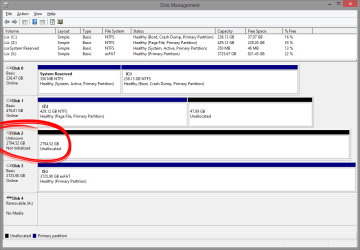
HDD no longer showing data / partition. Listed as Disk 2 in the Disk Management screenshot attached.
Screenshot 2016-04-04 11.34.30.png

Suspected cause:
Loss of power to external HDD enclosure due to pet rabbit attacking power cable. (Have read that rabbits see wires as roots that are encroaching upon their warren, and actively "trim" them as to keep the warren tidy. :eek:)

Current status:
  1. Have removed the drive from the external closure and have installed it as a standard HDD. As you can see from the Disk Management screenshot attached, the drive is recognized and shows up as "Unallocated" and "Not Initialized"
  2. Using Test Disk to attempt partition recovery; see attached screenshot. Currently in progress and showing some very cryptic output. Has taken over 48 hours to reach 93% analysis complete.
    Screenshot 2016-04-04 12.23.52.png
  3. Unsure of next steps; please advise.

As I said, thanks in advance for any suggestions. Really appreciate the contributions on this site so far and will endeavor to update this with what works (or does not work :() for me!
 

My Computer My Computer

At a glance

Microsoft Windows 8.1 Pro 64-bitIntel Core i7-4930K (BX80633I74930K)G.SKILL Ripjaws 6 x 4GB DDR3 1600 (F3-12800CL...EVGA GeForce GTX 780 Ti Superclocked (03G-P4-...
Computer type
PC/Desktop
Computer Manufacturer/Model Number
Custom Build
OS
Microsoft Windows 8.1 Pro 64-bit
CPU
Intel Core i7-4930K (BX80633I74930K)
Motherboard
Asus X79-Deluxe
Memory
G.SKILL Ripjaws 6 x 4GB DDR3 1600 (F3-12800CL9T2-24GBRL)
Graphics Card(s)
EVGA GeForce GTX 780 Ti Superclocked (03G-P4-2884-KR)
Hard Drives
Samsung SSD 840 Pro 256GB (OS / Boot)
Samsung SSD 850 Pro 512GB (Cache / Swap / Temp)
Western Digital WDC WD4003FZEX-00Z4SA0 (Persistent Data)
PSU
EVGA SuperNOVA 1000 P2
Case
Corsair Obsidian Series 750D Full Tower ATX
Cooling
XIGMATEK Dark Knight II SD1283 Night Hawk Edition
Welcome to Seven Forums.

I can see that your drive is a 3TB drive.

1. Is it a desktop external having a power brick and your rabbit chewed of the power cable to the external HDD?

2. You have removed the HDD from the enclosure. Was it a branded external drive? If so the manufacturer, Model No of the external drive, Model name etc., required. Please read the label on the enclosure and present all details. If it is a Western Digital My Book, Passport, you are in deep trouble taking out the HDD from the enclosure. Not Recommended and no DIY data recovery from the HDD possible out of the enclosure.

3. Now that you have taken out the HDD, read the label on the HDD and present all details. Manufacturer, Model/Part No, Model name etc., of the HDD

My physician has given me a long list of all sorts of tests including ECG, Ultrasound - it is a terribly long list - and what not and so tom whole morning I shall be in the Diagnostic Laboratory and may see your post only after another 14 hrs. from now.

Off to sleep now.
 

My Computer My Computer

At a glance

Windows 7 Home Premium 32 bit
OS
Windows 7 Home Premium 32 bit
If you want help in gathering hardware info, install and run Piriform's Speccy and/or tweaking.com's hardware identify. Save the logs, you will need to copyNpaste the appropriate hard-drive information. If that doesn't work, then type the label information of the hard-drive in question into a text file and copyNpaste into your next post.
 

My Computer My Computer

At a glance

Windows 7 Professional 64-bitDesktop i5; Acers i5 & i7desktop 16GB; 1 Acer 8GB & 1 Acer 16GB
Computer type
PC/Desktop
Computer Manufacturer/Model Number
Antec desktop; Acer Aspire laptops
OS
Windows 7 Professional 64-bit
CPU
Desktop i5; Acers i5 & i7
Memory
desktop 16GB; 1 Acer 8GB & 1 Acer 16GB
Hard Drives
1TB split into 2 equal partitions [OS and data] usable by RJS
Internet Speed
AT&T DSL
Browser
FF, GChrome, msIE
Other Info
Windows 7 Firewall, Emsisoft AM/AV, MSE [scan-only], SpywareBlaster, Ruiware/BillP combine
Hi Jumanji & RolandJS!

Thank you both for your replies. Jumanji, I hope the outcome of the tests was good news!

Attaching a .TXT file generated by Speccy which has details about the drive. View attachment hdd_report.txt

It did originate as a Western Digital My Book drive; I do still have the enclosure. In removing the drive from the enclosure I took caution, ensuring I'd be able to re-enclose it if necessary. It is not at hand; I'll try to update this post later with the details.

Also, it was as you assumed, Jumanji: external drive with power brick; power was severed.

Why is there no DIY data recovery available with the drive out of the enclosure?
2016-04-05 13_46_18-Piriform Speccy.png

Thank you both again for your insight!
 
Last edited:

My Computer My Computer

At a glance

Microsoft Windows 8.1 Pro 64-bitIntel Core i7-4930K (BX80633I74930K)G.SKILL Ripjaws 6 x 4GB DDR3 1600 (F3-12800CL...EVGA GeForce GTX 780 Ti Superclocked (03G-P4-...
Computer type
PC/Desktop
Computer Manufacturer/Model Number
Custom Build
OS
Microsoft Windows 8.1 Pro 64-bit
CPU
Intel Core i7-4930K (BX80633I74930K)
Motherboard
Asus X79-Deluxe
Memory
G.SKILL Ripjaws 6 x 4GB DDR3 1600 (F3-12800CL9T2-24GBRL)
Graphics Card(s)
EVGA GeForce GTX 780 Ti Superclocked (03G-P4-2884-KR)
Hard Drives
Samsung SSD 840 Pro 256GB (OS / Boot)
Samsung SSD 850 Pro 512GB (Cache / Swap / Temp)
Western Digital WDC WD4003FZEX-00Z4SA0 (Persistent Data)
PSU
EVGA SuperNOVA 1000 P2
Case
Corsair Obsidian Series 750D Full Tower ATX
Cooling
XIGMATEK Dark Knight II SD1283 Night Hawk Edition

Attachments

  • Capture.PNG
    Capture.PNG
    24.3 KB · Views: 1

My Computer My Computer

At a glance

Windows 10 Pro x64Intel Core i7 6700KGSkill TridentZ RGB 16GB 3600 16-16-16-36EVGA GTX 980 Ti SC x2
Computer type
PC/Desktop
Computer Manufacturer/Model Number
Skylake Special #666
OS
Windows 10 Pro x64
CPU
Intel Core i7 6700K
Motherboard
Asus Sabertooth Z170 Mark 1
Memory
GSkill TridentZ RGB 16GB 3600 16-16-16-36
Graphics Card(s)
EVGA GTX 980 Ti SC x2
Sound Card
Realtek High Definition
Monitor(s) Displays
AOC G2460PG
Screen Resolution
1920 x 1080 144Hz
Hard Drives
Samsung 860 Pro 256GB, Seagate Barracuda 4TB x2
PSU
EVGA 1000 P2, EVGA White Custom Braided Cables
Case
Corsair Vengeance C70 Gunmetal Black
Cooling
Corsair H100i v2, Corsair ML120 x2, Thermal Grizzly Kryonaut
Keyboard
Logitech G910 Orion Spectrum
Mouse
Logitech G700s
Internet Speed
Verizon Fios Quantum Gateway 75/75
Antivirus
Windows Defender, Malwarebytes Free 3.8.3
Browser
Chrome
Other Info
Corsair SP120 x4, LG Blu-ray Drive, Durabrand HT-395 100 Watt Dolby Digital Amp, Corsair H2100 Wireless 7.1 Headset
hmmm... my worst fears a reality now. No, I am not talking of my medical laboratory diagnostic reports which I had just downloaded and examined. As far as I can see those are normal or near normal except for HDL Cholesterol putting me in the moderate risk group. It has been so even earlier. So no surprises.

But you are in the high risk and deep trouble group with your WD My Book :). Yes, smile when you are in trouble.

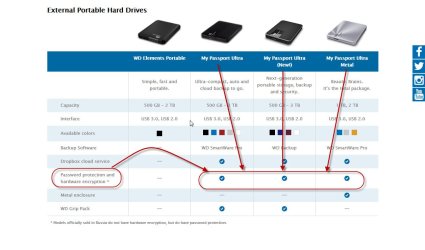
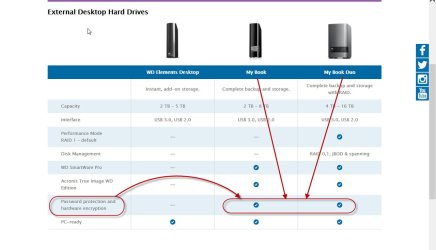
Follow AddRAM's advice aforesaid by him. I have no Qualms. If at all Partition Wizard can correct the anamolies and makes your drive accessible, you can jollywell recover the data. But......that will be the encrypted data and it will be as good as useless since it was encrypted by the hardware encrypt/decrypt chip in the enclosure electronics.. Only if your HDD is inside the enclosure and the enclosure electronics has not been damaged in anyway, and the HDD data being read passes through the decryption chip and gets decrypted, you will get your data. HDD out of the enclosure NIL/useless.

Only Western Digital Elements, both in the desktop and portable variety, does not employ hardware encryption/decryption.I have been repeatedly telling this in this forum and will continue to repeat to caution those reading this post. If they have any of the hardware encrypted drives, they should always have a backup of it.

06-04-2016 01-38-31.jpg

06-04-2016 01-34-50.jpg

Now read this: Should you avoid external hard drives that boast built-in encryption? | Bald Nerd

Lecture over. Now what should you do?

Since you have connected the HDD internally, check your drive's status with WD Datalifeguard Diagnostic for Windows Software and Firmware Downloads | WD Support

If it passes the short and long tests, OK the HDD is healthy.

If it doesn't, the HDD has gone bad. No DIY data recovery possible whether inside the enclosure or outside the enclosure..

If your HDD is healthy, put it back inside the original enclosure and repeat the tests. If your external is recognised and you can run the tests, well and good. The enclosure electronics has not failed. It was just a glitch that turned your HDD inaccessible. Assured that both the enclosure electronics and the HDD are OK, we may attempt to set it right or attempt data recovery.

If inside the enclosure, the external is not recognised and you are unable to run the tests, the enclosure electronics has failed/ faulty. No DIY data recovery is possible even if the HDD by itself is healthy because of the internal encryption/decryption..

Note:When DIY data recovery is not possible because of the faulty HDD, you can give the external drive (enclosure + HDD inside) it to any professional Data Recovery Service to attempt data recovery.

If on the other hand it is determined the enclosure electronics has failed, you have to return the complete external drive to WD authorised/patronised Data Recovery Service and they will do it in a jiffy since only they have the decryption key.

Now perform the diagnostic tests as aforesaid and report. Take your time. It is a long road ahead..
 

My Computer My Computer

At a glance

Windows 7 Home Premium 32 bit
OS
Windows 7 Home Premium 32 bit
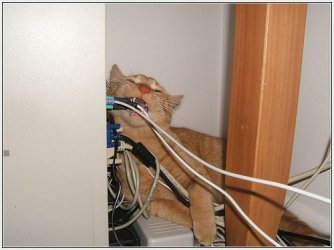
I would just get a new cable for the enclosure, or worse open up the cat :eek:

I wrapped all my cables in corrugated plastic because he chews cables, strange when he has perfectly fine food to eat :confused:

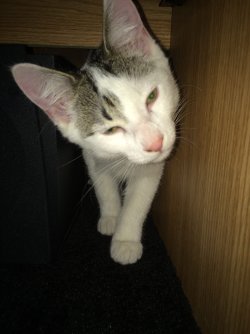
The bottom kitty is not mine ;)
 

Attachments

  • 85742993.jpg
    85742993.jpg
    24.5 KB · Views: 17
  • IMG_0478.JPG
    IMG_0478.JPG
    509.3 KB · Views: 1

My Computer My Computer

At a glance

Windows 10 Pro x64Intel Core i7 6700KGSkill TridentZ RGB 16GB 3600 16-16-16-36EVGA GTX 980 Ti SC x2
Computer type
PC/Desktop
Computer Manufacturer/Model Number
Skylake Special #666
OS
Windows 10 Pro x64
CPU
Intel Core i7 6700K
Motherboard
Asus Sabertooth Z170 Mark 1
Memory
GSkill TridentZ RGB 16GB 3600 16-16-16-36
Graphics Card(s)
EVGA GTX 980 Ti SC x2
Sound Card
Realtek High Definition
Monitor(s) Displays
AOC G2460PG
Screen Resolution
1920 x 1080 144Hz
Hard Drives
Samsung 860 Pro 256GB, Seagate Barracuda 4TB x2
PSU
EVGA 1000 P2, EVGA White Custom Braided Cables
Case
Corsair Vengeance C70 Gunmetal Black
Cooling
Corsair H100i v2, Corsair ML120 x2, Thermal Grizzly Kryonaut
Keyboard
Logitech G910 Orion Spectrum
Mouse
Logitech G700s
Internet Speed
Verizon Fios Quantum Gateway 75/75
Antivirus
Windows Defender, Malwarebytes Free 3.8.3
Browser
Chrome
Other Info
Corsair SP120 x4, LG Blu-ray Drive, Durabrand HT-395 100 Watt Dolby Digital Amp, Corsair H2100 Wireless 7.1 Headset
That reminds me what I missed. You need to get another power brick. If the power brick itself has not been damaged you can replace the power cable. Contact your friendly computer shop nearby to check the power brick and change the cable. You need to power your enclosure.
 

My Computer My Computer

At a glance

Windows 7 Home Premium 32 bit
OS
Windows 7 Home Premium 32 bit
Hi all - thanks for the suggestions. Had already tested with new USB & power cables before removing from enclosure; known good cables did enable the drive to be seen. Was only able to see drive once removed from enclosure and attached to SATA bus.

Will post further updates later. Thank you again!
 

My Computer My Computer

At a glance

Microsoft Windows 8.1 Pro 64-bitIntel Core i7-4930K (BX80633I74930K)G.SKILL Ripjaws 6 x 4GB DDR3 1600 (F3-12800CL...EVGA GeForce GTX 780 Ti Superclocked (03G-P4-...
Computer type
PC/Desktop
Computer Manufacturer/Model Number
Custom Build
OS
Microsoft Windows 8.1 Pro 64-bit
CPU
Intel Core i7-4930K (BX80633I74930K)
Motherboard
Asus X79-Deluxe
Memory
G.SKILL Ripjaws 6 x 4GB DDR3 1600 (F3-12800CL9T2-24GBRL)
Graphics Card(s)
EVGA GeForce GTX 780 Ti Superclocked (03G-P4-2884-KR)
Hard Drives
Samsung SSD 840 Pro 256GB (OS / Boot)
Samsung SSD 850 Pro 512GB (Cache / Swap / Temp)
Western Digital WDC WD4003FZEX-00Z4SA0 (Persistent Data)
PSU
EVGA SuperNOVA 1000 P2
Case
Corsair Obsidian Series 750D Full Tower ATX
Cooling
XIGMATEK Dark Knight II SD1283 Night Hawk Edition
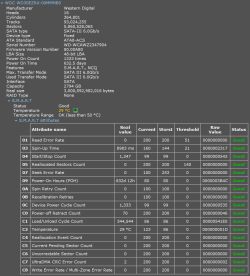
Ran a quick scan using MiniTool Partition Wizard Free and no partitions were found.
 

My Computer My Computer

At a glance

Microsoft Windows 8.1 Pro 64-bitIntel Core i7-4930K (BX80633I74930K)G.SKILL Ripjaws 6 x 4GB DDR3 1600 (F3-12800CL...EVGA GeForce GTX 780 Ti Superclocked (03G-P4-...
Computer type
PC/Desktop
Computer Manufacturer/Model Number
Custom Build
OS
Microsoft Windows 8.1 Pro 64-bit
CPU
Intel Core i7-4930K (BX80633I74930K)
Motherboard
Asus X79-Deluxe
Memory
G.SKILL Ripjaws 6 x 4GB DDR3 1600 (F3-12800CL9T2-24GBRL)
Graphics Card(s)
EVGA GeForce GTX 780 Ti Superclocked (03G-P4-2884-KR)
Hard Drives
Samsung SSD 840 Pro 256GB (OS / Boot)
Samsung SSD 850 Pro 512GB (Cache / Swap / Temp)
Western Digital WDC WD4003FZEX-00Z4SA0 (Persistent Data)
PSU
EVGA SuperNOVA 1000 P2
Case
Corsair Obsidian Series 750D Full Tower ATX
Cooling
XIGMATEK Dark Knight II SD1283 Night Hawk Edition
Back
Top