Are flash drives reliable for storing photos and documents?

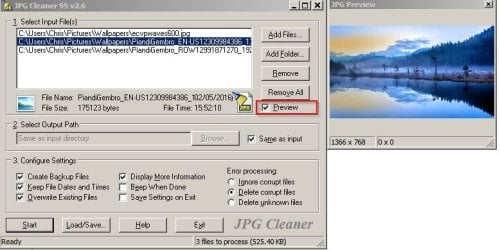
For .jpg files I use a certain utility:

Callender:

Thanks for the pointer to the md5 utility.

What's the name of that jpg utility with the "delete corrupt files" checkbox?

Edit: I think I can read the name of it in the lower right corner of the screen shot, where it appears you deliberately obscured the name, but it's semi-legible?

I'm guessing you had a good reason to obscure the name, but I'm at a bit of a loss about that.

More edit: I found it with Google from Softonic, but still not sure why the obscured name.

Are deleted files sent to recycle or deleted outright? Is there any way to examine them prior to deletion in case they are in fact readable?
 

My Computer My Computer

At a glance

Windows 7 Home Premium SP1, 64-bitIntel Skylake i5-6600K, not overclocked8 GB HyperX DDR4-2666 (2 x 4 GB)none; graphics are integrated on CPU
Computer type
PC/Desktop
Computer Manufacturer/Model Number
Ignatz Special; 4 speed manual gearbox; factory air conditioning; one of one
OS
Windows 7 Home Premium SP1, 64-bit
CPU
Intel Skylake i5-6600K, not overclocked
Motherboard
AsRock Z170M Extreme 4, micro ATX
Memory
8 GB HyperX DDR4-2666 (2 x 4 GB)
Graphics Card(s)
none; graphics are integrated on CPU
Sound Card
onboard: Realtek ALC1150; external: USB Behringer UF0-202
Monitor(s) Displays
Dell S2340M 23 inch IPS
Screen Resolution
1600 x 900
Hard Drives
System: Crucial MX100 series SSD, 128 GB;
Data: Samsung Spinpoint 103SJ, 1 TB;
Backup: WD Caviar Green WD30EZRX-00D8PB0, 3 TB
PSU
Rosewill SilentNight 500 watt fanless, semi-modular
Case
Antec Solo II
Cooling
Noctua NH-U12S; Noctua F12 intake, Noctua S12A exhaust
Keyboard
Microsoft 200 6JH-00001 USB
Mouse
Dell or Microsoft optical wired; USB
Antivirus
Microsoft Security Essentials and Malwarebytes Premium
Browser
Pale Moon
Other Info
All fans PWM; speeds at idle: CPU circa 500 rpm; intake circa 600 rpm; exhaust circa 600 rpm; CPU temps 27 idle and 47 C load in a warm room (27 C/81 F) when running Intel Extreme Tuning Utility stress test.
What's the name of that jpg utility with the "delete corrupt files" checkbox?

Edit: I think I can read the name of it in the lower right corner of the screen shot, where it appears you deliberately obscured the name, but it's semi-legible?

I'm guessing you had a good reason to obscure the name, but I'm at a bit of a loss about that.

More edit: I found it with Google from Softonic, but still not sure why the obscured name.

Download link can be found in this post:

http://www.sevenforums.com/general-...-empty-directori-post2670015.html#post2670015

The reason for obscuring the name: The program will remove all non picture data including any personal info/ metadata. For that reason it should not be run on personal photos if this information is required. (Or Professionally taken photos)

Are deleted files sent to recycle or deleted outright? Is there any way to examine them prior to deletion in case they are in fact readable?

For me Recycle Bin options are set to "Don't move files to recycle bin. Remove files imeediately when deleted"

Yes you can examine files prior to deletion if you select the preview option.

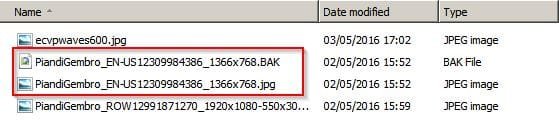
JPG Cleaner 1.jpg

There's also a results log displayed with the option to save the log.

JPG Cleaner 2.jpg

The way I use it:

For important images that I must keep: Make backup copies of folders and run the program keeping the backup copies available. Usually I have weekly system image backups available anyway.

For any other non personal directories I just run the program every month or so.

EDIT:

It can be set to make backup copies of files before deletion/ modification but if working with a large number of files you end up with a lot of backup images to delete. Personally I don't use the backup option.

JPG Cleaner 3.jpg
 
Last edited:

My Computer My Computer

At a glance

Microsoft Windows 7 Home Premium 64-bit 7601 ...AMD C-60 APU with Radeon(tm) HD Graphics4.00 GBAMD Radeon HD 6290 Graphics
Computer type
Laptop
Computer Manufacturer/Model Number
ASUS
OS
Microsoft Windows 7 Home Premium 64-bit 7601 Multiprocessor Free Service Pack 1
CPU
AMD C-60 APU with Radeon(tm) HD Graphics
Motherboard
ASUSTeK COMPUTER INC. X501U
Memory
4.00 GB
Graphics Card(s)
AMD Radeon HD 6290 Graphics
Sound Card
(1) AMD High Definition Audio Device (2) Realtek High Defi
Screen Resolution
1366 x 768 x 32 bits (4294967296 colors) @ 60 Hz
Hard Drives
Hitachi HTS545050A7E380 SATA Disk Device
Antivirus
Comodo CIS & FW, SecureAplus App Whitelisting, Threatfire
Browser
Cyberfox 64bit, Opera 64bit, Airfox
Other Info
Spy-The-Spy, HitmanPro.Alert, Norton Connect Safe, MJRegWatcher, BitDefender TrafficLight, Voodoo Shield, Zemana AntiMalware
Aye aye.

Your usual good job, Callender.
 

My Computer My Computer

At a glance

Windows 7 Home Premium SP1, 64-bitIntel Skylake i5-6600K, not overclocked8 GB HyperX DDR4-2666 (2 x 4 GB)none; graphics are integrated on CPU
Computer type
PC/Desktop
Computer Manufacturer/Model Number
Ignatz Special; 4 speed manual gearbox; factory air conditioning; one of one
OS
Windows 7 Home Premium SP1, 64-bit
CPU
Intel Skylake i5-6600K, not overclocked
Motherboard
AsRock Z170M Extreme 4, micro ATX
Memory
8 GB HyperX DDR4-2666 (2 x 4 GB)
Graphics Card(s)
none; graphics are integrated on CPU
Sound Card
onboard: Realtek ALC1150; external: USB Behringer UF0-202
Monitor(s) Displays
Dell S2340M 23 inch IPS
Screen Resolution
1600 x 900
Hard Drives
System: Crucial MX100 series SSD, 128 GB;
Data: Samsung Spinpoint 103SJ, 1 TB;
Backup: WD Caviar Green WD30EZRX-00D8PB0, 3 TB
PSU
Rosewill SilentNight 500 watt fanless, semi-modular
Case
Antec Solo II
Cooling
Noctua NH-U12S; Noctua F12 intake, Noctua S12A exhaust
Keyboard
Microsoft 200 6JH-00001 USB
Mouse
Dell or Microsoft optical wired; USB
Antivirus
Microsoft Security Essentials and Malwarebytes Premium
Browser
Pale Moon
Other Info
All fans PWM; speeds at idle: CPU circa 500 rpm; intake circa 600 rpm; exhaust circa 600 rpm; CPU temps 27 idle and 47 C load in a warm room (27 C/81 F) when running Intel Extreme Tuning Utility stress test.
Yes I've never had a problem with flash drives loaded with repair tools. Only problems with corrupted personal files.

That's an interesting observation, and, in the vein of Murphy's Law, suggests a more general rule. In your honor, I will call it

Callender's Law: The likelihood of data loss is directly proportional to the value of the data and inversely proportional to the frequency of backup and number of backup methods used.
:geek:
 

My Computer My Computer

At a glance

Windows 7 Ultimate x86 and x64
Computer type
PC/Desktop
Computer Manufacturer/Model Number
Dell, HP, Toshiba, Compaq
OS
Windows 7 Ultimate x86 and x64
Personally I have had frequently trouble with the storage of photo's.
Whether it was on a USB flash drive or a SD card.
Taken out of the camera or the CPU although with camera off, or the proper procedure to disconnect the device, still corrupted the file somehow.
Check Disk was usually unable to repair these files.
So I always back it up on a HD or a DVD.
Never trust any single backup.

As Murphy pointed out:
something that could be going wrong, will most likely do so at the worst moment.

Several of my flashdrives died without known reason.
A brandnew USB HD drive wouldn't read or write the next day etc.
So no, flashdrives are no reliable medium.
Apart that you could easily loose them.

My Photographer has a drawer full of forgotten USB drives or cards.
 

My Computer My Computer

At a glance

Microsoft Windows 7 Ultimate 64-bits 7601 Mul...Intel(R) Core(TM)2 Duo CPU E8400 @ 3.00GHz8,00 GB(1) Intel(R) G41 Express Chipset (2) Intel(R)...
Computer type
PC/Desktop
OS
Microsoft Windows 7 Ultimate 64-bits 7601 Multiprocessor Free Service Pack 1
CPU
Intel(R) Core(TM)2 Duo CPU E8400 @ 3.00GHz
Motherboard
ASRock G41MH/USB3.
Memory
8,00 GB
Graphics Card(s)
(1) Intel(R) G41 Express Chipset (2) Intel(R) G41 Express
Sound Card
(1) VIA High Definition Audio (2) Intel(R) High Definition
Monitor(s) Displays
S24B350 Samsung
Screen Resolution
1920 x 1080 x 32 bits (4294967296 colors) @ 60 Hz
Hard Drives
(1) ST31000528AS ATA Device (2) Generic- Compact Flash USB Device (3) Generic- MS/MS-Pro USB Device (4) Generic- SD/MMC USB Device (5) Generic- SM/xD-Picture USB Device
Antivirus
ZoneAlarm Free Antivirus + Firewall version: 12.0.104.000 Vs
Back
Top