Solved "Master File Table" error on new Samsung 850 EVO NAND SSD

XweAponX

Recycle Bin Diver
Member
VIP
Local time
2:26 PM
Messages
222
Location
Spring Valley
The customer was in the middle of reading some Data from ISO Images mounted with UltraISO. Apparently, in the middle of reading the data he got the BSOD that means "Drive can't be read" (0x000000ED) and could not re-boot. I tried to check the Drive using CHKDSK and that's when I got the Master File Table error.

This was a brand new drive with a fresh install of Windows 7 x64, it had been running perfectly for a month. This error happened in the middle of a windows session.

The only software that might have caused this was Perfect Disk v13, which I assumed would be OK for optimizing SSD's. But I had that scheduled to run only between midnight and 6AM. The machine generally stays on 24/7, maybe shut down during weekends. But this happened in the middle of the week.

I ran Partition Wizard 7.x to try to recover the drive, but it failed to fix the error. I had used that to repair one partition on my main machine about a year ago, but that was not the boot partition.

Is there any tool that can check a disk that has Master File Table errors? Else I just have to re-install Windows. But I need to know what caused this so it does not happen again.

The Machine is an AMD CPU, I'm not sure which one, probably an AM2 CPU like a 4400+. Sorry, I have no logs for it, they are all on the unreadable drive. What would cause a drive to go out like that, could UltraISO cause it when accessing mounted ISO images?

TIA.
 

My Computer My Computer

At a glance

Windows 10/Windows 7 (My Idea- Virtual PC)Intel(R) Core(TM) i5-3470 CPU @ 3.20GHz16 GBnVidia GeForce GTX 750 Ti (2GB)
Computer type
PC/Desktop
Computer Manufacturer/Model Number
Lenovo Thinkcenter M92p
OS
Windows 10/Windows 7 (My Idea- Virtual PC)
CPU
Intel(R) Core(TM) i5-3470 CPU @ 3.20GHz
Motherboard
Lenovo MahoBay
Memory
16 GB
Graphics Card(s)
nVidia GeForce GTX 750 Ti (2GB)
Sound Card
nVidia HD Audio
Monitor(s) Displays
RCA 4KTV 50"
Screen Resolution
3840p x 2160p
Hard Drives
Onboard:
Seagate ST500DM009-2F110A 500GB
WDC WD4000FYYZ-01UL1B1 (WD-WCC131910831) [3726 GB]

USB 3.0
My Book 1140 (WCAZAD122454) [1862 GB]
Apple MDT MD10EAVS-00D7B0 (0000AB123473) [931 GB]

External:
WD Blue Innostar/Matsunichi (465 GB)
WD
PSU
Stock Thinkcenter M92p
Case
Stock Thinkcenter M92p
Cooling
Active
Keyboard
BYTEC BY-GA-KT-100-AC
Mouse
BYTEC
Internet Speed
1 GHz Down, 40 Mbps Up
Antivirus
Windows Defender
Browser
EDGE
Other Info
Old Other Info:
I finally have an Intel machine that has more than 8GB of Ram.
My ASUS M2N-SE AMD Windows 7 machine is back to Windows 7. Replaced the AMD 4400+ CPU and maxed out the RAM (4GB).
My Core Duo machine is only 2GB of Ram and it is locked to Windows XP in order to run Pro Tools 6.4, which I have been using since 2004.
I have one other Dell OptiPlex 980 tower, Identical to this one,

My Computer My Computer

At a glance

Windows 10/Windows 7 (My Idea- Virtual PC)Intel(R) Core(TM) i5-3470 CPU @ 3.20GHz16 GBnVidia GeForce GTX 750 Ti (2GB)
Computer type
PC/Desktop
Computer Manufacturer/Model Number
Lenovo Thinkcenter M92p
OS
Windows 10/Windows 7 (My Idea- Virtual PC)
CPU
Intel(R) Core(TM) i5-3470 CPU @ 3.20GHz
Motherboard
Lenovo MahoBay
Memory
16 GB
Graphics Card(s)
nVidia GeForce GTX 750 Ti (2GB)
Sound Card
nVidia HD Audio
Monitor(s) Displays
RCA 4KTV 50"
Screen Resolution
3840p x 2160p
Hard Drives
Onboard:
Seagate ST500DM009-2F110A 500GB
WDC WD4000FYYZ-01UL1B1 (WD-WCC131910831) [3726 GB]

USB 3.0
My Book 1140 (WCAZAD122454) [1862 GB]
Apple MDT MD10EAVS-00D7B0 (0000AB123473) [931 GB]

External:
WD Blue Innostar/Matsunichi (465 GB)
WD
PSU
Stock Thinkcenter M92p
Case
Stock Thinkcenter M92p
Cooling
Active
Keyboard
BYTEC BY-GA-KT-100-AC
Mouse
BYTEC
Internet Speed
1 GHz Down, 40 Mbps Up
Antivirus
Windows Defender
Browser
EDGE
Other Info
Old Other Info:
I finally have an Intel machine that has more than 8GB of Ram.
My ASUS M2N-SE AMD Windows 7 machine is back to Windows 7. Replaced the AMD 4400+ CPU and maxed out the RAM (4GB).
My Core Duo machine is only 2GB of Ram and it is locked to Windows XP in order to run Pro Tools 6.4, which I have been using since 2004.
I have one other Dell OptiPlex 980 tower, Identical to this one,


Nah, I appreciate the response but it's not what I'm looking for. I need to know if there is a scanner for this type of drive like GWscan or WDDiag, those have always worked well with fixing little hiccups with a hard drive. There's absolutely nothing like this for an SSD?

I'll try the program that came with the disk, maybe that has a Drive scanner in it.
 

My Computer My Computer

At a glance

Windows 10/Windows 7 (My Idea- Virtual PC)Intel(R) Core(TM) i5-3470 CPU @ 3.20GHz16 GBnVidia GeForce GTX 750 Ti (2GB)
Computer type
PC/Desktop
Computer Manufacturer/Model Number
Lenovo Thinkcenter M92p
OS
Windows 10/Windows 7 (My Idea- Virtual PC)
CPU
Intel(R) Core(TM) i5-3470 CPU @ 3.20GHz
Motherboard
Lenovo MahoBay
Memory
16 GB
Graphics Card(s)
nVidia GeForce GTX 750 Ti (2GB)
Sound Card
nVidia HD Audio
Monitor(s) Displays
RCA 4KTV 50"
Screen Resolution
3840p x 2160p
Hard Drives
Onboard:
Seagate ST500DM009-2F110A 500GB
WDC WD4000FYYZ-01UL1B1 (WD-WCC131910831) [3726 GB]

USB 3.0
My Book 1140 (WCAZAD122454) [1862 GB]
Apple MDT MD10EAVS-00D7B0 (0000AB123473) [931 GB]

External:
WD Blue Innostar/Matsunichi (465 GB)
WD
PSU
Stock Thinkcenter M92p
Case
Stock Thinkcenter M92p
Cooling
Active
Keyboard
BYTEC BY-GA-KT-100-AC
Mouse
BYTEC
Internet Speed
1 GHz Down, 40 Mbps Up
Antivirus
Windows Defender
Browser
EDGE
Other Info
Old Other Info:
I finally have an Intel machine that has more than 8GB of Ram.
My ASUS M2N-SE AMD Windows 7 machine is back to Windows 7. Replaced the AMD 4400+ CPU and maxed out the RAM (4GB).
My Core Duo machine is only 2GB of Ram and it is locked to Windows XP in order to run Pro Tools 6.4, which I have been using since 2004.
I have one other Dell OptiPlex 980 tower, Identical to this one,
Please boot your computer with Windows Setup Media and from Windows Recovery Environment start the Command Prompt.

Please type below commands into Command Prompt and press Enter key.

Following commands will repair Master Boot Record (MBR), Boot Sector and BCD Store.


Code:
Bootrec /FixMbr

Bootrec  /FixBoot

Bootrec  /RebuildBcd
 

My Computer My Computer

At a glance

Windows 10 Pro x64Intel Core i5 6600Corsair Vengeance LPX 16GB 2666MHz DDR4AMD Radeon R9 380 Series
Computer type
PC/Desktop
Computer Manufacturer/Model Number
Custom Build
OS
Windows 10 Pro x64
CPU
Intel Core i5 6600
Motherboard
Gigabyte Technology Z170M-D3H-CF (U3E1)
Memory
Corsair Vengeance LPX 16GB 2666MHz DDR4
Graphics Card(s)
AMD Radeon R9 380 Series
Hard Drives
SSD
HDD
Antivirus
Eset Smart Security
Browser
Mozila Firefox
^/FixMbr, /FixBoot,/RebuildBcd - How will it repair a corrupted MFT ?????? !!!!!!!! Nay.

Hi XweAponX,

What exactly was the error message ? Is it the exact same error message as shown in the Eaesus website Samuria referred you to?

Where and how is the SSD connected now? Please post a screenshot of how it appears in Windows Disk Management and in Partition Wizard

Disk Management - Post a Screen Capture Image - Windows 7 Help Forums

Screenshots and Files - Upload and Post in Seven Forums - Windows 7 Help Forums
 

My Computer My Computer

At a glance

Windows 7 Home Premium 32 bit
OS
Windows 7 Home Premium 32 bit
Oh my bad i thought OP wanted to repair Master Boot Record.

Assuming the partition is NTFS, there will be a mirror copy of the MFT in the middle of the drive that can be used to recover from.

I suggest TestDisk utility to repair MFT.

If Microsoft's Checkdisk (chkdsk) failed to repair the MFT, run TestDisk. In the Advanced menu, select your NTFS partition, choose Boot, then Repair MFT. TestDisk will compare the MFT and MFT mirror (its backup). If the MFT is damaged, it will try to repair the MFT using the backup. If the MFT backup is damaged, it will use the main MFT.
 

My Computer My Computer

At a glance

Windows 10 Pro x64Intel Core i5 6600Corsair Vengeance LPX 16GB 2666MHz DDR4AMD Radeon R9 380 Series
Computer type
PC/Desktop
Computer Manufacturer/Model Number
Custom Build
OS
Windows 10 Pro x64
CPU
Intel Core i5 6600
Motherboard
Gigabyte Technology Z170M-D3H-CF (U3E1)
Memory
Corsair Vengeance LPX 16GB 2666MHz DDR4
Graphics Card(s)
AMD Radeon R9 380 Series
Hard Drives
SSD
HDD
Antivirus
Eset Smart Security
Browser
Mozila Firefox
^ Good :thumbsup: Atlast someone on the same wavelength :) but your instructions could have been more explicit . You will definitely learn to improve upon your skills and presentation.
XweAponX, FreeBooter has suggested that you try TestDisk to repair MFT and that is the way I shall go. But first show me the screenshots that I have asked for and also let me now how the problem drive is connected.

Download TestDisk 7.0 for windows from TestDisk Download - CGSecurity ( not the beta 7.1, not the Windows 64bit version even if your system is 64bit) Roll down in that page and you will find 7.0

12-11-2017 12-28-28.jpg

Extract the zip file to the root of your system drive C:

Reboot your system, plug in your problem drive.

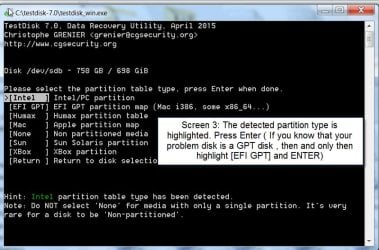
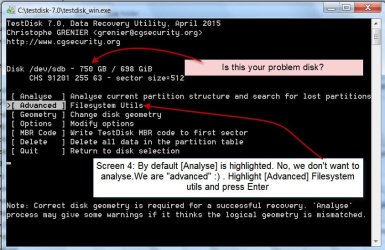
Run testdisk_win.exe in the testdisk-7.0 folder in the C: drive. ( You may create a shortcut on the Desktop for convenience and future runs.)

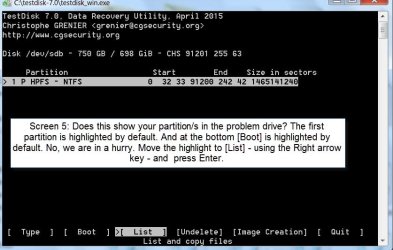
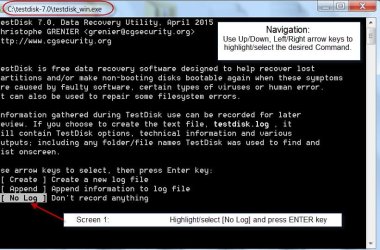
Go as per the screenshots below.

Note: You need not plugin a destination drive to copy right now since we are only trying to repair the MFT. However when on Screen 5
  • appears, you can highlight it and press enter key to check whether it shows all your files. It may not, if the MFT is corrupt. Press Q to go back to the prevoius screen, highlight [BOOT] and then press Enter.

    Screen 1:

    S1 12-11-2017 12-43-53.jpg

    Screen 2:

    S2 12-11-2017 13-43-29.jpg

    Screen 3:

    S3 12-11-2017 14-08-33.jpg

    Screen 4:

    S4 12-11-2017 14-51-03.jpg

    Screen 5:

    S5 12-11-2017 15-05-12.jpg

    Post the screenshot of screen 5. Since I am retiring for the day, I shall see it only my tom morning that is about 8 hours from now.

    If FreeBooter is online he may perhaps guide you further. He seems to know things.

    Note:

    If you get a different screen at anytime, post a screenshot and then close TestDisk.

    You can close TestDisk Window anytime by clicking on X in top right of the Title Bar.

    You can run TestDisk any number of times as per the above instructions. Your data will not be affected since we are not writing anything to the disk.
 

My Computer My Computer

At a glance

Windows 7 Home Premium 32 bit
OS
Windows 7 Home Premium 32 bit
"Master File Table" error on new Samsung 850 EVO NAND SSD

Wow this is a lot to go through. I have no regular access to the drive except for the boot partition. I am using easeUS to recover some of the important files that were on the machine, but other than that I find easeUS wholly useless as far as enacting any actual partition repair.

But I don't know exactly what I'm looking at here I need to know exactly where to start from what do I need to start with us is it on the install medium or do I need to download a tool from Microsoft?

These utilities are on the windows seven install disk?
 

My Computer My Computer

At a glance

Windows 10/Windows 7 (My Idea- Virtual PC)Intel(R) Core(TM) i5-3470 CPU @ 3.20GHz16 GBnVidia GeForce GTX 750 Ti (2GB)
Computer type
PC/Desktop
Computer Manufacturer/Model Number
Lenovo Thinkcenter M92p
OS
Windows 10/Windows 7 (My Idea- Virtual PC)
CPU
Intel(R) Core(TM) i5-3470 CPU @ 3.20GHz
Motherboard
Lenovo MahoBay
Memory
16 GB
Graphics Card(s)
nVidia GeForce GTX 750 Ti (2GB)
Sound Card
nVidia HD Audio
Monitor(s) Displays
RCA 4KTV 50"
Screen Resolution
3840p x 2160p
Hard Drives
Onboard:
Seagate ST500DM009-2F110A 500GB
WDC WD4000FYYZ-01UL1B1 (WD-WCC131910831) [3726 GB]

USB 3.0
My Book 1140 (WCAZAD122454) [1862 GB]
Apple MDT MD10EAVS-00D7B0 (0000AB123473) [931 GB]

External:
WD Blue Innostar/Matsunichi (465 GB)
WD
PSU
Stock Thinkcenter M92p
Case
Stock Thinkcenter M92p
Cooling
Active
Keyboard
BYTEC BY-GA-KT-100-AC
Mouse
BYTEC
Internet Speed
1 GHz Down, 40 Mbps Up
Antivirus
Windows Defender
Browser
EDGE
Other Info
Old Other Info:
I finally have an Intel machine that has more than 8GB of Ram.
My ASUS M2N-SE AMD Windows 7 machine is back to Windows 7. Replaced the AMD 4400+ CPU and maxed out the RAM (4GB).
My Core Duo machine is only 2GB of Ram and it is locked to Windows XP in order to run Pro Tools 6.4, which I have been using since 2004.
I have one other Dell OptiPlex 980 tower, Identical to this one,
Get access to the drive and do TestDisk on it whenever you can. With that in view, I shall complete my previous post by adding this. (It is not a partition lost for you to recover the partition. )

Did you buy Easeus? I know for sure that it is not freeware.

To continue with TestDisk, when you reach Screen 5, highlight [BOOT] and press Enter. The next screen will show you the status of the volume Boot Sector and its back up.

If both are OK, then highlight [MFT REPAIR] and press Enter.

Check whether it gets repaired.

If repaired, you should gain access to the drive.

In most cases TestDisk will fail to repair MFT ( That is what we have seen so far)

In such a case you have no other go except to try commercial software and recover the data.

active@ file recovery USD 29 GetDataBack Simple USD 69 Zero Assumption Recovery You can download the trial version, check whether it shows all your files and then buy if you consider that your data is worth that price.
 

My Computer My Computer

At a glance

Windows 7 Home Premium 32 bit
OS
Windows 7 Home Premium 32 bit
I had an old copy of EaseUS, I guess I bought it a while ago and then deleted the hell out of it whjen it was worthless. I have a MiniTool program that's better. Damn! This is yet another reccovery tool, which assumes I have a 500GB drive hooked up to back it up onto, I don't. I have the tool installed, and I'm running it, but I simply don't have a 500GB drive that's empty.

Will this tool check the drive without deleting one of my DATA drives? I can't move forward until I know if this is going to delete the recovery drive I select.
 

My Computer My Computer

At a glance

Windows 10/Windows 7 (My Idea- Virtual PC)Intel(R) Core(TM) i5-3470 CPU @ 3.20GHz16 GBnVidia GeForce GTX 750 Ti (2GB)
Computer type
PC/Desktop
Computer Manufacturer/Model Number
Lenovo Thinkcenter M92p
OS
Windows 10/Windows 7 (My Idea- Virtual PC)
CPU
Intel(R) Core(TM) i5-3470 CPU @ 3.20GHz
Motherboard
Lenovo MahoBay
Memory
16 GB
Graphics Card(s)
nVidia GeForce GTX 750 Ti (2GB)
Sound Card
nVidia HD Audio
Monitor(s) Displays
RCA 4KTV 50"
Screen Resolution
3840p x 2160p
Hard Drives
Onboard:
Seagate ST500DM009-2F110A 500GB
WDC WD4000FYYZ-01UL1B1 (WD-WCC131910831) [3726 GB]

USB 3.0
My Book 1140 (WCAZAD122454) [1862 GB]
Apple MDT MD10EAVS-00D7B0 (0000AB123473) [931 GB]

External:
WD Blue Innostar/Matsunichi (465 GB)
WD
PSU
Stock Thinkcenter M92p
Case
Stock Thinkcenter M92p
Cooling
Active
Keyboard
BYTEC BY-GA-KT-100-AC
Mouse
BYTEC
Internet Speed
1 GHz Down, 40 Mbps Up
Antivirus
Windows Defender
Browser
EDGE
Other Info
Old Other Info:
I finally have an Intel machine that has more than 8GB of Ram.
My ASUS M2N-SE AMD Windows 7 machine is back to Windows 7. Replaced the AMD 4400+ CPU and maxed out the RAM (4GB).
My Core Duo machine is only 2GB of Ram and it is locked to Windows XP in order to run Pro Tools 6.4, which I have been using since 2004.
I have one other Dell OptiPlex 980 tower, Identical to this one,
Get access to the drive and do TestDisk on it whenever you can. With that in view, I shall complete my previous post by adding this. (It is not a partition lost for you to recover the partition. )

Did you buy Easeus? I know for sure that it is not freeware.

To continue with TestDisk, when you reach Screen 5, highlight [BOOT] and press Enter. The next screen will show you the status of the volume Boot Sector and its back up.

If both are OK, then highlight [MFT REPAIR] and press Enter.

Check whether it gets repaired.

If repaired, you should gain access to the drive.

In most cases TestDisk will fail to repair MFT ( That is what we have seen so far)

In such a case you have no other go except to try commercial software and recover the data.

active@ file recovery USD 29 GetDataBack Simple USD 69 Zero Assumption Recovery You can download the trial version, check whether it shows all your files and then buy if you consider that your data is worth that price.

Ok it does THIS

Well CRAP, I can't upload a pic like I can at 8Forums. :/

It says THIS:

Code:
TestDisk 7.1-WIP, Data Recovery Utility, October
Christophe GRENIER <[email protected]>
http://www.cgsecurity.org

 2 P HPFS - NTFS             12 223 20 60801  47


Can't open filesystem. Filesystem seems damaged.

So, what? The hell with it, I have to use Recovery software that does not even list the files in the same way they were on the drive? I saved what's important. Or is there some way to fix this? I;ve fixed issues like this on hundreds of HDDs. This is the first (and last) SSD I will ever tell anyone to buy from SamSuck. I've known their product was bad but I told the client to buy it anyway, on the word of a friend that this particular SSD was good. It's NOT.

Maybe the Samsung software has a repair tool bundled, installing that.
 

My Computer My Computer

At a glance

Windows 10/Windows 7 (My Idea- Virtual PC)Intel(R) Core(TM) i5-3470 CPU @ 3.20GHz16 GBnVidia GeForce GTX 750 Ti (2GB)
Computer type
PC/Desktop
Computer Manufacturer/Model Number
Lenovo Thinkcenter M92p
OS
Windows 10/Windows 7 (My Idea- Virtual PC)
CPU
Intel(R) Core(TM) i5-3470 CPU @ 3.20GHz
Motherboard
Lenovo MahoBay
Memory
16 GB
Graphics Card(s)
nVidia GeForce GTX 750 Ti (2GB)
Sound Card
nVidia HD Audio
Monitor(s) Displays
RCA 4KTV 50"
Screen Resolution
3840p x 2160p
Hard Drives
Onboard:
Seagate ST500DM009-2F110A 500GB
WDC WD4000FYYZ-01UL1B1 (WD-WCC131910831) [3726 GB]

USB 3.0
My Book 1140 (WCAZAD122454) [1862 GB]
Apple MDT MD10EAVS-00D7B0 (0000AB123473) [931 GB]

External:
WD Blue Innostar/Matsunichi (465 GB)
WD
PSU
Stock Thinkcenter M92p
Case
Stock Thinkcenter M92p
Cooling
Active
Keyboard
BYTEC BY-GA-KT-100-AC
Mouse
BYTEC
Internet Speed
1 GHz Down, 40 Mbps Up
Antivirus
Windows Defender
Browser
EDGE
Other Info
Old Other Info:
I finally have an Intel machine that has more than 8GB of Ram.
My ASUS M2N-SE AMD Windows 7 machine is back to Windows 7. Replaced the AMD 4400+ CPU and maxed out the RAM (4GB).
My Core Duo machine is only 2GB of Ram and it is locked to Windows XP in order to run Pro Tools 6.4, which I have been using since 2004.
I have one other Dell OptiPlex 980 tower, Identical to this one,
You were doing a good job but at Screen 5, we select the problem drive and we select Boot option and press Enter key.
At next screen select Repair MFT and press Enter key.

zWhujmF.png


Please let me know if you have problem following my instructions.

After repairing MFT execute Chkdsk C: /r command to scan and repair any surface errors. If needed replace the C: drive letter with the problem HDD assigned drive letter.
 

My Computer My Computer

At a glance

Windows 10 Pro x64Intel Core i5 6600Corsair Vengeance LPX 16GB 2666MHz DDR4AMD Radeon R9 380 Series
Computer type
PC/Desktop
Computer Manufacturer/Model Number
Custom Build
OS
Windows 10 Pro x64
CPU
Intel Core i5 6600
Motherboard
Gigabyte Technology Z170M-D3H-CF (U3E1)
Memory
Corsair Vengeance LPX 16GB 2666MHz DDR4
Graphics Card(s)
AMD Radeon R9 380 Series
Hard Drives
SSD
HDD
Antivirus
Eset Smart Security
Browser
Mozila Firefox
Ah, I knew I missed something. Yah it's hard for me right now because I have the Box the drive is installed into between me and my PC that I am working on. I Have the drive connected via a SATA to USB adapter. If I hook it to my Laptop, I could hok it up via SATA which would give me better access to tools that run off of boot disks.

OK! I see it! Repair MFT! Crossing Fingers!
 

My Computer My Computer

At a glance

Windows 10/Windows 7 (My Idea- Virtual PC)Intel(R) Core(TM) i5-3470 CPU @ 3.20GHz16 GBnVidia GeForce GTX 750 Ti (2GB)
Computer type
PC/Desktop
Computer Manufacturer/Model Number
Lenovo Thinkcenter M92p
OS
Windows 10/Windows 7 (My Idea- Virtual PC)
CPU
Intel(R) Core(TM) i5-3470 CPU @ 3.20GHz
Motherboard
Lenovo MahoBay
Memory
16 GB
Graphics Card(s)
nVidia GeForce GTX 750 Ti (2GB)
Sound Card
nVidia HD Audio
Monitor(s) Displays
RCA 4KTV 50"
Screen Resolution
3840p x 2160p
Hard Drives
Onboard:
Seagate ST500DM009-2F110A 500GB
WDC WD4000FYYZ-01UL1B1 (WD-WCC131910831) [3726 GB]

USB 3.0
My Book 1140 (WCAZAD122454) [1862 GB]
Apple MDT MD10EAVS-00D7B0 (0000AB123473) [931 GB]

External:
WD Blue Innostar/Matsunichi (465 GB)
WD
PSU
Stock Thinkcenter M92p
Case
Stock Thinkcenter M92p
Cooling
Active
Keyboard
BYTEC BY-GA-KT-100-AC
Mouse
BYTEC
Internet Speed
1 GHz Down, 40 Mbps Up
Antivirus
Windows Defender
Browser
EDGE
Other Info
Old Other Info:
I finally have an Intel machine that has more than 8GB of Ram.
My ASUS M2N-SE AMD Windows 7 machine is back to Windows 7. Replaced the AMD 4400+ CPU and maxed out the RAM (4GB).
My Core Duo machine is only 2GB of Ram and it is locked to Windows XP in order to run Pro Tools 6.4, which I have been using since 2004.
I have one other Dell OptiPlex 980 tower, Identical to this one,
To repair NTFS filesystem we have chkdsk utility which is not working i think its time to backup your personal files and clean install Windows OS.


Can't open filesystem. Filesystem seems damaged.
 

My Computer My Computer

At a glance

Windows 10 Pro x64Intel Core i5 6600Corsair Vengeance LPX 16GB 2666MHz DDR4AMD Radeon R9 380 Series
Computer type
PC/Desktop
Computer Manufacturer/Model Number
Custom Build
OS
Windows 10 Pro x64
CPU
Intel Core i5 6600
Motherboard
Gigabyte Technology Z170M-D3H-CF (U3E1)
Memory
Corsair Vengeance LPX 16GB 2666MHz DDR4
Graphics Card(s)
AMD Radeon R9 380 Series
Hard Drives
SSD
HDD
Antivirus
Eset Smart Security
Browser
Mozila Firefox
OK, that was on the Boot partition. It said there was nothing wrong with the MFT there. Selecting the partition that's bad, it gives me different options when I press "boot"

Code:
TestDisk 7.1-WIP, Data Recovery Utility, October 2017
Christophe GRENIER <[email protected]>
http://www.cgsecurity.org

Disk /dev/sdk - 500 GB / 465 GiB - CHS 60801 255 63
     Partition                  Start        End    Size in sectors
 2 P HPFS - NTFS             12 223 20 60801  47 46  976564224

Boot sector
Status: OK

Backup boot sector
Status: OK

Sectors are not identical.

A valid NTFS Boot sector must be present in order to access
any data; even if the partition is not bootable.


 [  Quit  ]  [  List  ]  [Org. BS ] >[Backup BS]  [Rebuild BS]  [  Dump  ]
                    Copy backup boot sector over boot sector

What can I do from here? Should I copy the Backup Boot sector over the one that's there?
 

My Computer My Computer

At a glance

Windows 10/Windows 7 (My Idea- Virtual PC)Intel(R) Core(TM) i5-3470 CPU @ 3.20GHz16 GBnVidia GeForce GTX 750 Ti (2GB)
Computer type
PC/Desktop
Computer Manufacturer/Model Number
Lenovo Thinkcenter M92p
OS
Windows 10/Windows 7 (My Idea- Virtual PC)
CPU
Intel(R) Core(TM) i5-3470 CPU @ 3.20GHz
Motherboard
Lenovo MahoBay
Memory
16 GB
Graphics Card(s)
nVidia GeForce GTX 750 Ti (2GB)
Sound Card
nVidia HD Audio
Monitor(s) Displays
RCA 4KTV 50"
Screen Resolution
3840p x 2160p
Hard Drives
Onboard:
Seagate ST500DM009-2F110A 500GB
WDC WD4000FYYZ-01UL1B1 (WD-WCC131910831) [3726 GB]

USB 3.0
My Book 1140 (WCAZAD122454) [1862 GB]
Apple MDT MD10EAVS-00D7B0 (0000AB123473) [931 GB]

External:
WD Blue Innostar/Matsunichi (465 GB)
WD
PSU
Stock Thinkcenter M92p
Case
Stock Thinkcenter M92p
Cooling
Active
Keyboard
BYTEC BY-GA-KT-100-AC
Mouse
BYTEC
Internet Speed
1 GHz Down, 40 Mbps Up
Antivirus
Windows Defender
Browser
EDGE
Other Info
Old Other Info:
I finally have an Intel machine that has more than 8GB of Ram.
My ASUS M2N-SE AMD Windows 7 machine is back to Windows 7. Replaced the AMD 4400+ CPU and maxed out the RAM (4GB).
My Core Duo machine is only 2GB of Ram and it is locked to Windows XP in order to run Pro Tools 6.4, which I have been using since 2004.
I have one other Dell OptiPlex 980 tower, Identical to this one,
To repair NTFS filesystem we have chkdsk utility which is not working i think its time to backup your personal files and clean install Windows OS.


Can't open filesystem. Filesystem seems damaged.

I've already done this with the worthless EaseUS app, I should have used the Minitool app which is better.

I have a choice to write the backup boot sector over the default boot sector, write the default boot sector over the backup, or rebuild all boot sectors. Which one should I try, if the valid data is present in the backup, it may fix this?
 

My Computer My Computer

At a glance

Windows 10/Windows 7 (My Idea- Virtual PC)Intel(R) Core(TM) i5-3470 CPU @ 3.20GHz16 GBnVidia GeForce GTX 750 Ti (2GB)
Computer type
PC/Desktop
Computer Manufacturer/Model Number
Lenovo Thinkcenter M92p
OS
Windows 10/Windows 7 (My Idea- Virtual PC)
CPU
Intel(R) Core(TM) i5-3470 CPU @ 3.20GHz
Motherboard
Lenovo MahoBay
Memory
16 GB
Graphics Card(s)
nVidia GeForce GTX 750 Ti (2GB)
Sound Card
nVidia HD Audio
Monitor(s) Displays
RCA 4KTV 50"
Screen Resolution
3840p x 2160p
Hard Drives
Onboard:
Seagate ST500DM009-2F110A 500GB
WDC WD4000FYYZ-01UL1B1 (WD-WCC131910831) [3726 GB]

USB 3.0
My Book 1140 (WCAZAD122454) [1862 GB]
Apple MDT MD10EAVS-00D7B0 (0000AB123473) [931 GB]

External:
WD Blue Innostar/Matsunichi (465 GB)
WD
PSU
Stock Thinkcenter M92p
Case
Stock Thinkcenter M92p
Cooling
Active
Keyboard
BYTEC BY-GA-KT-100-AC
Mouse
BYTEC
Internet Speed
1 GHz Down, 40 Mbps Up
Antivirus
Windows Defender
Browser
EDGE
Other Info
Old Other Info:
I finally have an Intel machine that has more than 8GB of Ram.
My ASUS M2N-SE AMD Windows 7 machine is back to Windows 7. Replaced the AMD 4400+ CPU and maxed out the RAM (4GB).
My Core Duo machine is only 2GB of Ram and it is locked to Windows XP in order to run Pro Tools 6.4, which I have been using since 2004.
I have one other Dell OptiPlex 980 tower, Identical to this one,
Select Rebuild BS option see this will display the Repair MFT.
 

My Computer My Computer

At a glance

Windows 10 Pro x64Intel Core i5 6600Corsair Vengeance LPX 16GB 2666MHz DDR4AMD Radeon R9 380 Series
Computer type
PC/Desktop
Computer Manufacturer/Model Number
Custom Build
OS
Windows 10 Pro x64
CPU
Intel Core i5 6600
Motherboard
Gigabyte Technology Z170M-D3H-CF (U3E1)
Memory
Corsair Vengeance LPX 16GB 2666MHz DDR4
Graphics Card(s)
AMD Radeon R9 380 Series
Hard Drives
SSD
HDD
Antivirus
Eset Smart Security
Browser
Mozila Firefox
Allrighty!

The MFT and the MFT Mirror are both bad. Can't repair this. I've already backed up whats important.

Hm, on one last try, I told it to rebuild the BS. It's searching the MFT now, doing a long process. I'll wait until that process is finished before I use DISKPART on it.

Code:
TestDisk 7.1-WIP, Data Recovery Utility, October 2017
Christophe GRENIER <[email protected]>
http://www.cgsecurity.org

Disk /dev/sdk - 500 GB / 465 GiB - CHS 60801 255 63
     Partition                  Start        End    Size in sectors
 2 P HPFS - NTFS             12 223 20 60801  47 46  976564224


Search mft    3670016/976564224
 

My Computer My Computer

At a glance

Windows 10/Windows 7 (My Idea- Virtual PC)Intel(R) Core(TM) i5-3470 CPU @ 3.20GHz16 GBnVidia GeForce GTX 750 Ti (2GB)
Computer type
PC/Desktop
Computer Manufacturer/Model Number
Lenovo Thinkcenter M92p
OS
Windows 10/Windows 7 (My Idea- Virtual PC)
CPU
Intel(R) Core(TM) i5-3470 CPU @ 3.20GHz
Motherboard
Lenovo MahoBay
Memory
16 GB
Graphics Card(s)
nVidia GeForce GTX 750 Ti (2GB)
Sound Card
nVidia HD Audio
Monitor(s) Displays
RCA 4KTV 50"
Screen Resolution
3840p x 2160p
Hard Drives
Onboard:
Seagate ST500DM009-2F110A 500GB
WDC WD4000FYYZ-01UL1B1 (WD-WCC131910831) [3726 GB]

USB 3.0
My Book 1140 (WCAZAD122454) [1862 GB]
Apple MDT MD10EAVS-00D7B0 (0000AB123473) [931 GB]

External:
WD Blue Innostar/Matsunichi (465 GB)
WD
PSU
Stock Thinkcenter M92p
Case
Stock Thinkcenter M92p
Cooling
Active
Keyboard
BYTEC BY-GA-KT-100-AC
Mouse
BYTEC
Internet Speed
1 GHz Down, 40 Mbps Up
Antivirus
Windows Defender
Browser
EDGE
Other Info
Old Other Info:
I finally have an Intel machine that has more than 8GB of Ram.
My ASUS M2N-SE AMD Windows 7 machine is back to Windows 7. Replaced the AMD 4400+ CPU and maxed out the RAM (4GB).
My Core Duo machine is only 2GB of Ram and it is locked to Windows XP in order to run Pro Tools 6.4, which I have been using since 2004.
I have one other Dell OptiPlex 980 tower, Identical to this one,
Even if this does not work, I appreciate being pointed to this tool, even if it does not help me with this drive, it WILL help me with others.

Thanks to all for all the help.
 

My Computer My Computer

At a glance

Windows 10/Windows 7 (My Idea- Virtual PC)Intel(R) Core(TM) i5-3470 CPU @ 3.20GHz16 GBnVidia GeForce GTX 750 Ti (2GB)
Computer type
PC/Desktop
Computer Manufacturer/Model Number
Lenovo Thinkcenter M92p
OS
Windows 10/Windows 7 (My Idea- Virtual PC)
CPU
Intel(R) Core(TM) i5-3470 CPU @ 3.20GHz
Motherboard
Lenovo MahoBay
Memory
16 GB
Graphics Card(s)
nVidia GeForce GTX 750 Ti (2GB)
Sound Card
nVidia HD Audio
Monitor(s) Displays
RCA 4KTV 50"
Screen Resolution
3840p x 2160p
Hard Drives
Onboard:
Seagate ST500DM009-2F110A 500GB
WDC WD4000FYYZ-01UL1B1 (WD-WCC131910831) [3726 GB]

USB 3.0
My Book 1140 (WCAZAD122454) [1862 GB]
Apple MDT MD10EAVS-00D7B0 (0000AB123473) [931 GB]

External:
WD Blue Innostar/Matsunichi (465 GB)
WD
PSU
Stock Thinkcenter M92p
Case
Stock Thinkcenter M92p
Cooling
Active
Keyboard
BYTEC BY-GA-KT-100-AC
Mouse
BYTEC
Internet Speed
1 GHz Down, 40 Mbps Up
Antivirus
Windows Defender
Browser
EDGE
Other Info
Old Other Info:
I finally have an Intel machine that has more than 8GB of Ram.
My ASUS M2N-SE AMD Windows 7 machine is back to Windows 7. Replaced the AMD 4400+ CPU and maxed out the RAM (4GB).
My Core Duo machine is only 2GB of Ram and it is locked to Windows XP in order to run Pro Tools 6.4, which I have been using since 2004.
I have one other Dell OptiPlex 980 tower, Identical to this one,
Back
Top