- Local time
- 3:16 AM
- Messages
- 203
Hi folks,
This is really puzzling me.
I have an elderly Dell Vostro desktop with Windows 7 SP1 64-bit (installed 24.09.2021). Not much software on it to be honest, Office 2010 and a few other progs (like Gadwin Print Screen) and a couple of printer drivers.
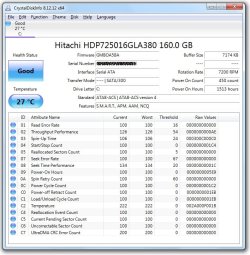
PC has 2GHz Core 2 Duo, 4Gb RAM and a 160Gb Hitachi HDD.
It takes an age to start and quite a while for it to shut down, despite this being a clean install of Windows 7.
Each time the pc is used, it is shut down (not sleep or hibernation).
Everything was peachy until around 3 weeks ago (apart from it being SLOOOOW).
Suddenly it wouldn't boot.
I get the Dell BIOS splash screen and the pc POSTs with no errors then I get a black screen with a flashing white cursor.
There is no hard disk activity.
If I press the power button - the pc immediately powers off.
If I take all the cables out, press and hold power button in for 20 sec, reconnect everything and pc boots normally. In fact, I'm writing this on the very same pc.
If I shut it down or even restart, the pc stalls at that black screen aster POSTing and I have to power off, remove cables, do a static drain, plug the cables back in and it then boots up.
ANY idea as to what is going on? I can't make sense out of it at all.
Is it a RAM issue or processor or motherboard or BIOS?
Anyone know of a fix for this??
Thanks in advance,
Zaph
UPDATE
So I shut down the machine to time it >> 1m 16sec
I started the machine and it booted into WIndows (bl**dy typical) taking 56sec to desktop & Windows welcome theme.
As it seemed to be behaving, I tried a restart. It took 1m 04sec to get to desktop & Windows welcome theme.
Okay. Click on Chrome and it takes 38sec to open Chrome (97.0.4692.99). Firefox (92.0.1) takes 82sec to display the first page. Both Chrome and Firefox then updated. Chrome is now updated to 98.0.4758.82 and Firefox updated to 96.0.3.
Chrome has 15 processes running (?) with only 4 tabs open (so lots running in the background), CPU load is between 3 and 7% and RAM usage approx 50%. Chrome had 4 active extensions - Adblock Plus, Popup Blocker for Chrome, Kaspersky Protection and Laspersky Security. All other extensions are off.
Can't see why there are 15 Chrome processes.
Running virus scan (although I don't see how this is linked to the static problem this tread was all about)
This is really puzzling me.
I have an elderly Dell Vostro desktop with Windows 7 SP1 64-bit (installed 24.09.2021). Not much software on it to be honest, Office 2010 and a few other progs (like Gadwin Print Screen) and a couple of printer drivers.
PC has 2GHz Core 2 Duo, 4Gb RAM and a 160Gb Hitachi HDD.
It takes an age to start and quite a while for it to shut down, despite this being a clean install of Windows 7.
Each time the pc is used, it is shut down (not sleep or hibernation).
Everything was peachy until around 3 weeks ago (apart from it being SLOOOOW).
Suddenly it wouldn't boot.
I get the Dell BIOS splash screen and the pc POSTs with no errors then I get a black screen with a flashing white cursor.
There is no hard disk activity.
If I press the power button - the pc immediately powers off.
If I take all the cables out, press and hold power button in for 20 sec, reconnect everything and pc boots normally. In fact, I'm writing this on the very same pc.
If I shut it down or even restart, the pc stalls at that black screen aster POSTing and I have to power off, remove cables, do a static drain, plug the cables back in and it then boots up.
ANY idea as to what is going on? I can't make sense out of it at all.
Is it a RAM issue or processor or motherboard or BIOS?
Anyone know of a fix for this??
Thanks in advance,
Zaph
UPDATE
So I shut down the machine to time it >> 1m 16sec
I started the machine and it booted into WIndows (bl**dy typical) taking 56sec to desktop & Windows welcome theme.
As it seemed to be behaving, I tried a restart. It took 1m 04sec to get to desktop & Windows welcome theme.
Okay. Click on Chrome and it takes 38sec to open Chrome (97.0.4692.99). Firefox (92.0.1) takes 82sec to display the first page. Both Chrome and Firefox then updated. Chrome is now updated to 98.0.4758.82 and Firefox updated to 96.0.3.
Chrome has 15 processes running (?) with only 4 tabs open (so lots running in the background), CPU load is between 3 and 7% and RAM usage approx 50%. Chrome had 4 active extensions - Adblock Plus, Popup Blocker for Chrome, Kaspersky Protection and Laspersky Security. All other extensions are off.
Can't see why there are 15 Chrome processes.
Running virus scan (although I don't see how this is linked to the static problem this tread was all about)
Last edited:
My Computer
At a glance
Windows 7 Home Premium SP1 64-bit (now lookin...Core2 Duo T5750 2GHz/Core2 Duo T5800 2GHz/Cor...4Gb / 4Gb / 8GbIntel 965 Express/ATi Mob Radeon HD 3400/AMD ...
- Computer type
- Laptop
- Computer Manufacturer/Model Number
- DELL Inspiron 1525 / Sony VAIO VGN FW21L / Zoostorm 7877-0095
- OS
- Windows 7 Home Premium SP1 64-bit (now looking at Linux Mint!)
- CPU
- Core2 Duo T5750 2GHz/Core2 Duo T5800 2GHz/Core i5 3300 3.1GH
- Motherboard
- DELL 0U990C / "SONY Corp VAIO" (??) / GA-H61M-DS2 DVI
- Memory
- 4Gb / 4Gb / 8Gb
- Graphics Card(s)
- Intel 965 Express/ATi Mob Radeon HD 3400/AMD Radeon R7 200
- Hard Drives
- WD 750Gb Black (WD7500BPKT) - DELL
WD 1Tb Black (WD10JPLX) - SONY
ST 2Tb Barracuda (2000DM001) - Zoostorm
- Internet Speed
- VM Fibre 100 Mbps
- Antivirus
- Kaspersky IS 2019 / Kaspersky IS 2019 / Kaspersky IS 2019
- Browser
- Chrome 76.0.3809 / Chrome 79.0.3945 / Chrome 76.0.3809