Lifecam Cinema HD not compatible because my computer is too powerful?

Windows10

New member
Local time
12:45 AM
Messages
9
I just bought the camera today...the Lifecam Cinema HD and it's not installing properly in my Windows 7 x64 system. I thought it may have been the firmware so I updated it. I also tried the latest software for it...version 3.21.
I tried again and now it says:
Setup cannot install the software because your system does not meet the system requirements. For additional system requirements and compatibility information, see the product packaging or the Microsoft Hardware Web site."
The drivers for this device are not installed. (Code 28)
The extended attributes are inconsistent.


So tech support provide the following solution:


To find a driver for this device, click Update Driver.

Device manager, select LifeCam ( exclamation mark ), select driver, browse my computer for driver software and selectc:\windows\winsxs
Tried it on MSN and works. Keep in mind that the software will not work.


Tech support indicated that it was TOO POWERFUL.?:sarc:..rather odd but that's what he mentioned.The system processor:
I7920 2.7 GHZ
6144MB RAM
Videocard are two ATI 5870 ( crossfire ) with 3804 MB of memory
System requirements for Life Cam:

Microsoft LifeCam Cinemaâ„¢

Windows® 7, Windows Vista®, Windows XP with Service Pack 2 (SP2) or higher (Excluding Windows XP 64-bit); minimum: Intel Dual-Core 1.6 GHz or higher, 1 GB of RAM; recommended: Intel Dual-Core 3.0 GHz or higher, 2 GB of RAMHard Drive1.5 GB free

Does that make sense why the software will not install properly?
 

My Computer My Computer

At a glance

Windows 7 x64i7920OCZ triple channel2 ATI 5870 crossfire
Computer Manufacturer/Model Number
My own
OS
Windows 7 x64
CPU
i7920
Motherboard
Asus P6T
Memory
OCZ triple channel
Graphics Card(s)
2 ATI 5870 crossfire
Sound Card
built in realtek
Monitor(s) Displays
Dell 2711
Hard Drives
Intell SSD x25 v 2 80G
2 Raptors Raid 0
PSU
Enermax Revolution 85+
Case
Silverstone custom
Cooling
Water
Hello Windows10, and welcome to Seven Forums.

LOL, TOO POWERFUL, that's just plain BS. I have the exact same web cam with that driver version on my system (see my system specs below), and it works just fine for me.

You might see if right clicking on the driver installation file, and click on Run as administrator may allow it to install afterwards.

Hope this helps,
Shawn
 

My Computer My Computer

At a glance

64-bit Windows 11 Pro for WorkstationsIntel i7-8700K OC'd to 5 GHz64 GB (4x16GB) G.SKILL TridentZ RGB DDR4 3600...ASUS ROG-STRIX-GTX1080TI-O11G-GAMING
Computer type
PC/Desktop
Computer Manufacturer/Model Number
Self built custom
OS
64-bit Windows 11 Pro for Workstations
CPU
Intel i7-8700K OC'd to 5 GHz
Motherboard
ASUS ROG Maximus XI Formula Z390
Memory
64 GB (4x16GB) G.SKILL TridentZ RGB DDR4 3600 MHz
Graphics Card(s)
ASUS ROG-STRIX-GTX1080TI-O11G-GAMING
Sound Card
Integrated
Monitor(s) Displays
2 x Samsung Odyssey G7 27"
Screen Resolution
2560x1440
Hard Drives
1TB Samsung 990 PRO M.2,
4TB Samsung 990 PRO PRO M.2,
TerraMaster F8 SSD Plus NAS
PSU
Seasonic Prime Titanium 850W
Case
Thermaltake Core P3
Cooling
Corsair Hydro H115i
Keyboard
Logitech wireless K800
Mouse
Logitech MX Master 4
Internet Speed
2 Gb/s Download and 100 Mb/s Upload
Antivirus
Malwarebyte Anti-Malware Premium
Browser
Google Chrome
Other Info
Logitech Z625 speaker system,
Logitech BRIO 4K Pro webcam,
HP Color LaserJet Pro MFP M477fdn,
APC SMART-UPS RT 1000 XL - SURT1000XLI,
Galaxy S23 Plus phone
I thought that was a silly comment as well.

I tried Admin but no go. Oh well.
 

My Computer My Computer

At a glance

Windows 7 x64i7920OCZ triple channel2 ATI 5870 crossfire
Computer Manufacturer/Model Number
My own
OS
Windows 7 x64
CPU
i7920
Motherboard
Asus P6T
Memory
OCZ triple channel
Graphics Card(s)
2 ATI 5870 crossfire
Sound Card
built in realtek
Monitor(s) Displays
Dell 2711
Hard Drives
Intell SSD x25 v 2 80G
2 Raptors Raid 0
PSU
Enermax Revolution 85+
Case
Silverstone custom
Cooling
Water
Just to double check the basics:

Driver download link: (Double check that you have the Windows 7 version)
Download Webcam & Headset Software

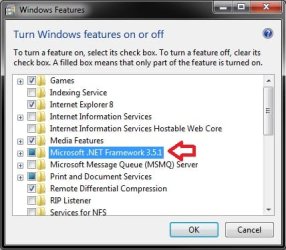
Troubleshooting link: (Double check to make sure that .NET is turned on in Windows and Features)
Microsoft LifeCam Readme and Troubleshooting Information
Windows_and_Features.jpg
In addition, try this to see if it may help:
  • If listed, uninstall the Microsoft LifeCam in Programs and Features.
  • If listed, uninstall Microsoft LifeCam Cinema under Imaging devices in Device Manager. Be sure to also check the Delete the driver software for this device box as well.
  • Delete the hidden C:\Users\User-Name\AppData\Local\Microsoft\LifeCam.exe_StrongName folder.
  • Try having the webcam plugged into another USB port.
  • Try reinstalling the driver again.
 

My Computer My Computer

At a glance

64-bit Windows 11 Pro for WorkstationsIntel i7-8700K OC'd to 5 GHz64 GB (4x16GB) G.SKILL TridentZ RGB DDR4 3600...ASUS ROG-STRIX-GTX1080TI-O11G-GAMING
Computer type
PC/Desktop
Computer Manufacturer/Model Number
Self built custom
OS
64-bit Windows 11 Pro for Workstations
CPU
Intel i7-8700K OC'd to 5 GHz
Motherboard
ASUS ROG Maximus XI Formula Z390
Memory
64 GB (4x16GB) G.SKILL TridentZ RGB DDR4 3600 MHz
Graphics Card(s)
ASUS ROG-STRIX-GTX1080TI-O11G-GAMING
Sound Card
Integrated
Monitor(s) Displays
2 x Samsung Odyssey G7 27"
Screen Resolution
2560x1440
Hard Drives
1TB Samsung 990 PRO M.2,
4TB Samsung 990 PRO PRO M.2,
TerraMaster F8 SSD Plus NAS
PSU
Seasonic Prime Titanium 850W
Case
Thermaltake Core P3
Cooling
Corsair Hydro H115i
Keyboard
Logitech wireless K800
Mouse
Logitech MX Master 4
Internet Speed
2 Gb/s Download and 100 Mb/s Upload
Antivirus
Malwarebyte Anti-Malware Premium
Browser
Google Chrome
Other Info
Logitech Z625 speaker system,
Logitech BRIO 4K Pro webcam,
HP Color LaserJet Pro MFP M477fdn,
APC SMART-UPS RT 1000 XL - SURT1000XLI,
Galaxy S23 Plus phone
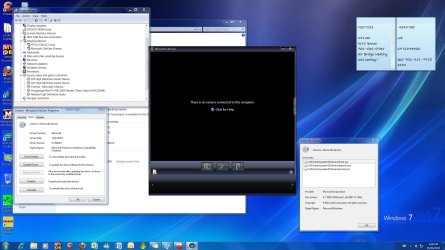
Tried but now lifecam software says there's no camera but there is and it works only with MSN:
 

Attachments

  • camera.jpg
    camera.jpg
    265.1 KB · Views: 75

My Computer My Computer

At a glance

Windows 7 x64i7920OCZ triple channel2 ATI 5870 crossfire
Computer Manufacturer/Model Number
My own
OS
Windows 7 x64
CPU
i7920
Motherboard
Asus P6T
Memory
OCZ triple channel
Graphics Card(s)
2 ATI 5870 crossfire
Sound Card
built in realtek
Monitor(s) Displays
Dell 2711
Hard Drives
Intell SSD x25 v 2 80G
2 Raptors Raid 0
PSU
Enermax Revolution 85+
Case
Silverstone custom
Cooling
Water

My Computer My Computer

At a glance

64-bit Windows 11 Pro for WorkstationsIntel i7-8700K OC'd to 5 GHz64 GB (4x16GB) G.SKILL TridentZ RGB DDR4 3600...ASUS ROG-STRIX-GTX1080TI-O11G-GAMING
Computer type
PC/Desktop
Computer Manufacturer/Model Number
Self built custom
OS
64-bit Windows 11 Pro for Workstations
CPU
Intel i7-8700K OC'd to 5 GHz
Motherboard
ASUS ROG Maximus XI Formula Z390
Memory
64 GB (4x16GB) G.SKILL TridentZ RGB DDR4 3600 MHz
Graphics Card(s)
ASUS ROG-STRIX-GTX1080TI-O11G-GAMING
Sound Card
Integrated
Monitor(s) Displays
2 x Samsung Odyssey G7 27"
Screen Resolution
2560x1440
Hard Drives
1TB Samsung 990 PRO M.2,
4TB Samsung 990 PRO PRO M.2,
TerraMaster F8 SSD Plus NAS
PSU
Seasonic Prime Titanium 850W
Case
Thermaltake Core P3
Cooling
Corsair Hydro H115i
Keyboard
Logitech wireless K800
Mouse
Logitech MX Master 4
Internet Speed
2 Gb/s Download and 100 Mb/s Upload
Antivirus
Malwarebyte Anti-Malware Premium
Browser
Google Chrome
Other Info
Logitech Z625 speaker system,
Logitech BRIO 4K Pro webcam,
HP Color LaserJet Pro MFP M477fdn,
APC SMART-UPS RT 1000 XL - SURT1000XLI,
Galaxy S23 Plus phone
As a test, unplug the webcam and try different USB ports to see if it may be detected and work properly in one of them instead.

Here's some more to check. However, most from what I read, they ended up fixing this by doing a clean reinstall of Windows 7, then installed the webcam and drivers.

Resolve blank preview, "initialization error," or "no camera connected" error in LifeCam software

The only option I'm having trouble with is :

Step 7: Perform a clean boot procedure

For more information about how to perform a clean boot procedure, click the following article: How to Troubleshoot a Problem by Performing a Clean Startup in Windows 7 or Vista How to perform a clean boot procedure to determine whether background programs are interfering with a game or a program that you currently use
Configure Selective Startup options


  1. In the System Configuration Utility dialog box, click Selective Startup on the General tab.
  2. Click to clear the Load Startup Items check box.Note The Use Original Boot.ini check box is unavailable.
  3. Click the Services tab.
  4. Click to select the Hide All Microsoft Services check box.
  5. Click Disable All, and then click OK.
  6. When you are prompted, click Restart.


When use the setup above, I cannot install the software since I no longer have internet access. It seems rather odd...why would Lifecam 3.22 ( fully downloaded) require access to the computer?
 
Last edited by a moderator:

My Computer My Computer

At a glance

Windows 7 x64i7920OCZ triple channel2 ATI 5870 crossfire
Computer Manufacturer/Model Number
My own
OS
Windows 7 x64
CPU
i7920
Motherboard
Asus P6T
Memory
OCZ triple channel
Graphics Card(s)
2 ATI 5870 crossfire
Sound Card
built in realtek
Monitor(s) Displays
Dell 2711
Hard Drives
Intell SSD x25 v 2 80G
2 Raptors Raid 0
PSU
Enermax Revolution 85+
Case
Silverstone custom
Cooling
Water
You might see if you can boot into Safe Mode with Networking to see if you may be able to install it. This way you are trying to do so with limited programs and drivers running.
 

My Computer My Computer

At a glance

64-bit Windows 11 Pro for WorkstationsIntel i7-8700K OC'd to 5 GHz64 GB (4x16GB) G.SKILL TridentZ RGB DDR4 3600...ASUS ROG-STRIX-GTX1080TI-O11G-GAMING
Computer type
PC/Desktop
Computer Manufacturer/Model Number
Self built custom
OS
64-bit Windows 11 Pro for Workstations
CPU
Intel i7-8700K OC'd to 5 GHz
Motherboard
ASUS ROG Maximus XI Formula Z390
Memory
64 GB (4x16GB) G.SKILL TridentZ RGB DDR4 3600 MHz
Graphics Card(s)
ASUS ROG-STRIX-GTX1080TI-O11G-GAMING
Sound Card
Integrated
Monitor(s) Displays
2 x Samsung Odyssey G7 27"
Screen Resolution
2560x1440
Hard Drives
1TB Samsung 990 PRO M.2,
4TB Samsung 990 PRO PRO M.2,
TerraMaster F8 SSD Plus NAS
PSU
Seasonic Prime Titanium 850W
Case
Thermaltake Core P3
Cooling
Corsair Hydro H115i
Keyboard
Logitech wireless K800
Mouse
Logitech MX Master 4
Internet Speed
2 Gb/s Download and 100 Mb/s Upload
Antivirus
Malwarebyte Anti-Malware Premium
Browser
Google Chrome
Other Info
Logitech Z625 speaker system,
Logitech BRIO 4K Pro webcam,
HP Color LaserJet Pro MFP M477fdn,
APC SMART-UPS RT 1000 XL - SURT1000XLI,
Galaxy S23 Plus phone
Setup cannot install the software because your system does not meet the system requirements. For additional system requirements and compatibility information, see the product packaging or the Microsoft Hardware Web site."
The drivers for this device are not installed. (Code 28)

Does that make sense why the software will not install properly?
Hello Windows10;

I came across a similar situation with my own system. Blocking me was system resources. Like the Titanic had more people than life boats to hold them? I had to go to the bios and turn off anything I was not using, for example IR, USB features, IE1394, com ports, serial ports, anything using up my computer resources that I did not need. Once freed, the feature I was installing was able to find adequate resources and worked fine.

Cheers!
Robert
 

My Computer My Computer

At a glance

...
OS
...
I think the problem is directly related to windows 7 x64 by the looks of it. I unplugged what I could and did everything possible. Pretty disappointed with Microsoft lack luster product/software release.

I'm going to call them and bug'm until a solution is found.

Seems odd that it works fine with MSN ( audio, video ) but not the software. Most likely do to using an alternative driver instead of the drivers that are part of the software package.
 

My Computer My Computer

At a glance

Windows 7 x64i7920OCZ triple channel2 ATI 5870 crossfire
Computer Manufacturer/Model Number
My own
OS
Windows 7 x64
CPU
i7920
Motherboard
Asus P6T
Memory
OCZ triple channel
Graphics Card(s)
2 ATI 5870 crossfire
Sound Card
built in realtek
Monitor(s) Displays
Dell 2711
Hard Drives
Intell SSD x25 v 2 80G
2 Raptors Raid 0
PSU
Enermax Revolution 85+
Case
Silverstone custom
Cooling
Water
SOLVED

Ok, I solved the problem by using the drivers suggested in my previous post and by using a different program all together called Camtasia Studio 7.

WORKS PERFECTLY!:party:

Cheers.

BAD MICROSOFT:mad:
 
Last edited:

My Computer My Computer

At a glance

Windows 7 x64i7920OCZ triple channel2 ATI 5870 crossfire
Computer Manufacturer/Model Number
My own
OS
Windows 7 x64
CPU
i7920
Motherboard
Asus P6T
Memory
OCZ triple channel
Graphics Card(s)
2 ATI 5870 crossfire
Sound Card
built in realtek
Monitor(s) Displays
Dell 2711
Hard Drives
Intell SSD x25 v 2 80G
2 Raptors Raid 0
PSU
Enermax Revolution 85+
Case
Silverstone custom
Cooling
Water
That's great news. :)
 

My Computer My Computer

At a glance

64-bit Windows 11 Pro for WorkstationsIntel i7-8700K OC'd to 5 GHz64 GB (4x16GB) G.SKILL TridentZ RGB DDR4 3600...ASUS ROG-STRIX-GTX1080TI-O11G-GAMING
Computer type
PC/Desktop
Computer Manufacturer/Model Number
Self built custom
OS
64-bit Windows 11 Pro for Workstations
CPU
Intel i7-8700K OC'd to 5 GHz
Motherboard
ASUS ROG Maximus XI Formula Z390
Memory
64 GB (4x16GB) G.SKILL TridentZ RGB DDR4 3600 MHz
Graphics Card(s)
ASUS ROG-STRIX-GTX1080TI-O11G-GAMING
Sound Card
Integrated
Monitor(s) Displays
2 x Samsung Odyssey G7 27"
Screen Resolution
2560x1440
Hard Drives
1TB Samsung 990 PRO M.2,
4TB Samsung 990 PRO PRO M.2,
TerraMaster F8 SSD Plus NAS
PSU
Seasonic Prime Titanium 850W
Case
Thermaltake Core P3
Cooling
Corsair Hydro H115i
Keyboard
Logitech wireless K800
Mouse
Logitech MX Master 4
Internet Speed
2 Gb/s Download and 100 Mb/s Upload
Antivirus
Malwarebyte Anti-Malware Premium
Browser
Google Chrome
Other Info
Logitech Z625 speaker system,
Logitech BRIO 4K Pro webcam,
HP Color LaserJet Pro MFP M477fdn,
APC SMART-UPS RT 1000 XL - SURT1000XLI,
Galaxy S23 Plus phone
Update.

Well one of my SSD starting showing signs of failure so I took the opportunity to reinstall windows 7 x64 from scratch. This time, I left all accessories from my livecam to my hauupage external tuner, game pad controller etc attached. Well, the camera work's flawlessly now with Microsoft LifeCam.:D

...Now that is what I call odd.:sarc:
 

My Computer My Computer

At a glance

Windows 7 x64i7920OCZ triple channel2 ATI 5870 crossfire
Computer Manufacturer/Model Number
My own
OS
Windows 7 x64
CPU
i7920
Motherboard
Asus P6T
Memory
OCZ triple channel
Graphics Card(s)
2 ATI 5870 crossfire
Sound Card
built in realtek
Monitor(s) Displays
Dell 2711
Hard Drives
Intell SSD x25 v 2 80G
2 Raptors Raid 0
PSU
Enermax Revolution 85+
Case
Silverstone custom
Cooling
Water
Ya I have 4 of the cams and had no issues at all with install of any of them , but all it takes is one issue and you can have problems as we all now with computers. Two are 64 bit W7 and one is 32bit W7 all Ultimate and one is Vista 32 bit . love the Lifecam Cinema HD.
 

My Computer My Computer

At a glance

Window's 7 Ultimate 64bitE8400 LappedKingston 4 gig2=ATI 5670Video Crossfire / HVR2250 TV Tuner ...
Computer Manufacturer/Model Number
Custom Build
OS
Window's 7 Ultimate 64bit
CPU
E8400 Lapped
Motherboard
P5Q Pro Turbo Asus
Memory
Kingston 4 gig
Graphics Card(s)
2=ATI 5670Video Crossfire / HVR2250 TV Tuner Card
Sound Card
HDMI sound
Monitor(s) Displays
Sony 46"
Screen Resolution
1280x720
Hard Drives
1 WD 160gig YS, 1 Black Edition 320gig and one 250gig WD YS Model plus external Caviar Black 640gig Drives
PSU
Antec 550 Modular
Case
Antec Custom 180B
Cooling
X-1283 Lapped Artic Silver 5
Keyboard
Wave Combo Logitech
Mouse
Logitech LX-8
Internet Speed
5mb down 768 up
Other Info
Custom side fan in case, plus moved middle lower fan to the front of hard drives , also installed a second intake fan in lower two optical drive slots. Rear fans are controlled by Fan mate controllers. temps inside case are monitored by probe and temps coming out the top exhaust are also monitored, temps as of right now 20c inside and 22.7 out the exhaust. Front intake fans are controlled by Asu

My Computer My Computer

At a glance

WIN7 Ultimate, 64bit OEMi5-750 quad core8GB dual channel DDR3 @ 668MHZ (9-9-9-24) 4 x...ATI Radeon HD5750
Computer Manufacturer/Model Number
homebuilt
OS
WIN7 Ultimate, 64bit OEM
CPU
i5-750 quad core
Motherboard
MSI P55-GD55 (MS-7589) (CPU1)
Memory
8GB dual channel DDR3 @ 668MHZ (9-9-9-24) 4 x 2GB each
Graphics Card(s)
ATI Radeon HD5750
Sound Card
onboard
Monitor(s) Displays
LG widescreen LCD 1920 x 1080 FLATRON
Hard Drives
2 x WD 500 GB SATA drives, room for 8 more in the drive bays. 1 WD USB 320 GB used for backup the system.
PSU
SEASONIC M-12D 850 watt sli ready
Case
ANTEC DARK FLEET (biggest one they make)
Cooling
case: 6 x 120mm fans 2 x 140mm fans, CPU: Corsair H50
Keyboard
generic
Mouse
microsoft wireless
Internet Speed
bloody slow thanks to Canadian ISP's throttling our net
Other Info
soon to have a ZALMAN RESERATOR just for the GPU...also dedicated 500 GB of virtual memory for paging file,caching
Back
Top