
You are using an out of date browser. It may not display this or other websites correctly.
You should upgrade or use an alternative browser.
You should upgrade or use an alternative browser.
Permanently changing default language to English UK
- Thread starter foxint
- Start date

If you want to use US English input language in Windows but UK English as proofing language in Word, you are where you started: you need to manually change proofing language.
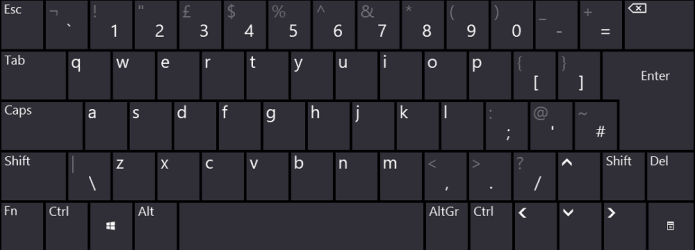
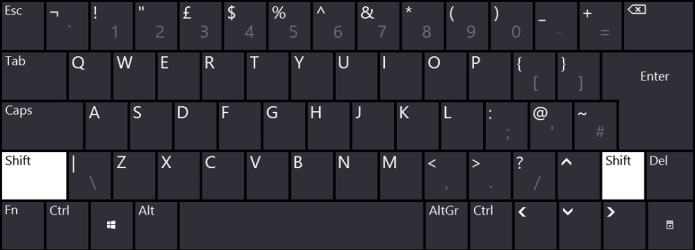
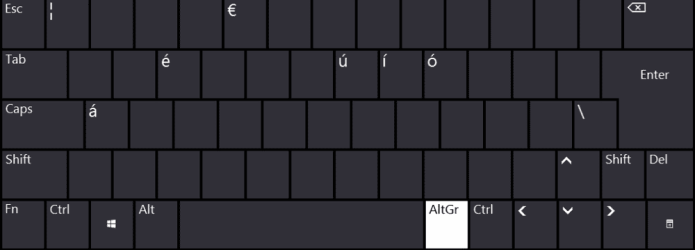
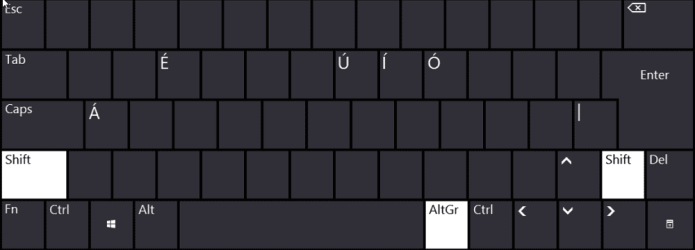
If you want your new documents automatically use UK English as proofing language, you need to use UK English input language and learn its differences compared to US English (click screenshots to enlarge):
UK English No Caps:
 UK English Caps:
 UK English Alt Gr + No Caps:
 UK English Alt Gr + Caps:
Kari
If you want your new documents automatically use UK English as proofing language, you need to use UK English input language and learn its differences compared to US English (click screenshots to enlarge):
UK English No Caps:
Note
Screenshots above from a laptop keyboard as the Fn key reveals. As the Fn key is not used in typing but instead only for various settings (brightness, contrast, volume, backlight etc.) the letters, numbers and special characters can be found exactly in same places as shown in the screenshots, regardless if you use a laptop built-in keyboard or a full size external keyboard.
Kari
Last edited:
My Computer
At a glance
Windows 10 Pro x64 EN-GB1.6 GHz Intel Core i7-720QM Processor6 GBATI Mobility Radeon HD 5850 Graphics
- Computer type
- Laptop
- Computer Manufacturer/Model Number
- HP ENVY 17-1150eg
- OS
- Windows 10 Pro x64 EN-GB
- CPU
- 1.6 GHz Intel Core i7-720QM Processor
- Memory
- 6 GB
- Graphics Card(s)
- ATI Mobility Radeon HD 5850 Graphics
- Sound Card
- Beats sound system with integrated subwoofer
- Monitor(s) Displays
- 17" laptop display, 22" LED and 32" Full HD TV through HDMI
- Screen Resolution
- 1600*900 (1), 1920*1080 (2&3)
- Hard Drives
- Internal: 2 x 500 GB SATA Hard Disk Drive 7200 rpm
External: 2TB for backups, 3TB USB3 network drive for media
- Cooling
- As Envy runs a bit warm, I have it on a Cooler Master pad
- Keyboard
- Logitech diNovo Media Desktop Laser (bluetooth)
- Mouse
- Logitech Performance Mouse MX
- Internet Speed
- 50/10 Mbps VDSL
- Antivirus
- Windows Defender 4.3.9431.0
- Browser
- Maxthon 3.5.2., IE11

- Local time
- 10:49 PM
- Messages
- 16,792
I have a short attention span.
I will let Kari explain.
He is great at that.
I will let Kari explain.
He is great at that.
My Computers
-
At a glance
7 X64i5 84002x8gb 3200mhz- Computer type
- PC/Desktop
- OS
- 7 X64
- CPU
- i5 8400
- Motherboard
- gigabyte b365m ds3h
- Memory
- 2x8gb 3200mhz
- Hard Drives
- various
- PSU
- pure power 11 400w cm
- Case
- Coolermaster
- Cooling
- cryorig m9i
-
At a glance
7x64g54008gb ddr4 2400- Computer type
- PC/Desktop
- OS
- 7x64
- CPU
- g5400
- Motherboard
- ga b365m ds3h
- Memory
- 8gb ddr4 2400
- PSU
- xfx pro 450w
Ok.. I have a US keyboard.... so I am screwed. OK I will accept that Microsoft and the Americans have won... I am now going to see if I can fix the network/NAS that was working yesterday, but now not.
Thanks for the explanation and the answer is NO.
Regards
Dan
Thanks for the explanation and the answer is NO.
Regards
Dan
My Computer
At a glance
Wind 7 Pro 64-bit
- OS
- Wind 7 Pro 64-bit
- Local time
- 10:49 PM
- Messages
- 16,792
The answer to what?
My Computers
-
At a glance
7 X64i5 84002x8gb 3200mhz- Computer type
- PC/Desktop
- OS
- 7 X64
- CPU
- i5 8400
- Motherboard
- gigabyte b365m ds3h
- Memory
- 2x8gb 3200mhz
- Hard Drives
- various
- PSU
- pure power 11 400w cm
- Case
- Coolermaster
- Cooling
- cryorig m9i
-
At a glance
7x64g54008gb ddr4 2400- Computer type
- PC/Desktop
- OS
- 7x64
- CPU
- g5400
- Motherboard
- ga b365m ds3h
- Memory
- 8gb ddr4 2400
- PSU
- xfx pro 450w
- Local time
- 10:49 PM
- Messages
- 16,792
Oh.
Strange, I have a mesh keyboard. I can change it to Chinese PRC (US keybd) and back to UK keybd without any trouble.
Strange, I have a mesh keyboard. I can change it to Chinese PRC (US keybd) and back to UK keybd without any trouble.
My Computers
-
At a glance
7 X64i5 84002x8gb 3200mhz- Computer type
- PC/Desktop
- OS
- 7 X64
- CPU
- i5 8400
- Motherboard
- gigabyte b365m ds3h
- Memory
- 2x8gb 3200mhz
- Hard Drives
- various
- PSU
- pure power 11 400w cm
- Case
- Coolermaster
- Cooling
- cryorig m9i
-
At a glance
7x64g54008gb ddr4 2400- Computer type
- PC/Desktop
- OS
- 7x64
- CPU
- g5400
- Motherboard
- ga b365m ds3h
- Memory
- 8gb ddr4 2400
- PSU
- xfx pro 450w
Is there something I am missing with Kari's explanation???
Before you ask.... I cannot change keyboards, it is a special ergonomic Kinesis keyboard. I have tried many and this is the only one that does not give me pain. It is a US keyboard.
But if there is a way of retaining the keys and changing the input language - let me know....
Before you ask.... I cannot change keyboards, it is a special ergonomic Kinesis keyboard. I have tried many and this is the only one that does not give me pain. It is a US keyboard.
But if there is a way of retaining the keys and changing the input language - let me know....
My Computer
At a glance
Wind 7 Pro 64-bit
- OS
- Wind 7 Pro 64-bit

But in my post #6 I said:Sir,
I am totally confused.
You mentioned:
“Create a system restore point or better still use Macrium Reflect to create a back up image” – I said I have no idea what this means, but you offered no explanation.
If you click on these links and read the contents you will fully understand what is meant by System Restore and Back up. These two links explain this much better than I can so it seemed the best option. Back up is a very important part of your general PC maintenance, or should be! It gives you the confidence to try different approaches knowing that if things go wrong you can very easily get your PC back to a good state. I really don't think I can explain it any better for you.Read this for System Restore:
System Restore Point - Create
and this for Macrium Reflect:
Macrium Reflect FREE Edition - Information and download
When you are ready if you have any questions on either subject post them here on the Forum.
My Computer
At a glance
Microsoft Windows 7 Home Premium 64-bit 7601 ...Intel(R) Core(TM) i7-3770 CPU @ 3.40GHz8.00 GBIntel(R) HD Graphics 4000
- Computer type
- PC/Desktop
- OS
- Microsoft Windows 7 Home Premium 64-bit 7601 Multiprocessor Free Service Pack 1
- CPU
- Intel(R) Core(TM) i7-3770 CPU @ 3.40GHz
- Motherboard
- ASUSTeK COMPUTER INC. P8H77-M
- Memory
- 8.00 GB
- Graphics Card(s)
- Intel(R) HD Graphics 4000
- Sound Card
- On Board
- Monitor(s) Displays
- Dell 24"
- Screen Resolution
- 1920 x 1080
- Hard Drives
- (1) INTEL SSDSC2CT180A3 ATA Device (2) ST500DM002-1BD142 ATA Device (3) WDC WD3200AAKS-75L9A0 ATA Device (4) Generic- Compact Flash USB Device (5) Generic- MS/MS-Pro USB Device (6) Generic- SD/MMC USB Device (7) Generic- SM/xD-Picture USB
- PSU
- 500w Corsair
- Case
- Cooler Master
- Cooling
- 3 Fans
- Keyboard
- Logitech MK300
- Mouse
- Logitech WOM
- Internet Speed
- 75Mb
- Antivirus
- Norton 360
- Browser
- Firefox, Opera, IE
Sir
Please Mr Mitchell65, I am not meaning to be rude, but I will take the advice of Mr Kari.
Thank you for your input in this question. It obviously cannot be done, unless one wants to use a UK keyboard, which as I said I do not have.
But if there is a way of retaining the keys and changing the input language - let me know.... I am still open to suggestions, but as I said I cannot change my US-styled keyboard.
Please Mr Mitchell65, I am not meaning to be rude, but I will take the advice of Mr Kari.
Thank you for your input in this question. It obviously cannot be done, unless one wants to use a UK keyboard, which as I said I do not have.
But if there is a way of retaining the keys and changing the input language - let me know.... I am still open to suggestions, but as I said I cannot change my US-styled keyboard.
My Computer
At a glance
Wind 7 Pro 64-bit
- OS
- Wind 7 Pro 64-bit
That's fine, I certainly don't think you are being rude. We are all here to try to resolve your problem for you in the best way we can. Kari will help you all he can, I know. One tiny point, I suppose I was a bit out of order for going off topic with my suggestion that you should back up your system before making any big alterations to your system but if you do a good back up and then things go wrong I guarantee you will be very, very pleased that you have a back up. It's like a good insurance policy, useless until you need it!Sir
Please Mr Mitchell65, I am not meaning to be rude, but I will take the advice of Mr Kari.
I hope all goes well for you!
My Computer
At a glance
Microsoft Windows 7 Home Premium 64-bit 7601 ...Intel(R) Core(TM) i7-3770 CPU @ 3.40GHz8.00 GBIntel(R) HD Graphics 4000
- Computer type
- PC/Desktop
- OS
- Microsoft Windows 7 Home Premium 64-bit 7601 Multiprocessor Free Service Pack 1
- CPU
- Intel(R) Core(TM) i7-3770 CPU @ 3.40GHz
- Motherboard
- ASUSTeK COMPUTER INC. P8H77-M
- Memory
- 8.00 GB
- Graphics Card(s)
- Intel(R) HD Graphics 4000
- Sound Card
- On Board
- Monitor(s) Displays
- Dell 24"
- Screen Resolution
- 1920 x 1080
- Hard Drives
- (1) INTEL SSDSC2CT180A3 ATA Device (2) ST500DM002-1BD142 ATA Device (3) WDC WD3200AAKS-75L9A0 ATA Device (4) Generic- Compact Flash USB Device (5) Generic- MS/MS-Pro USB Device (6) Generic- SD/MMC USB Device (7) Generic- SM/xD-Picture USB
- PSU
- 500w Corsair
- Case
- Cooler Master
- Cooling
- 3 Fans
- Keyboard
- Logitech MK300
- Mouse
- Logitech WOM
- Internet Speed
- 75Mb
- Antivirus
- Norton 360
- Browser
- Firefox, Opera, IE
Mr Mitchell65,
Thank you for your explanation. Sometimes these forums get out of hand and we take things the wrong way. If I was rude or dismissive, accept my apologies. I did not think the language issue was such a major change. But you are spot on with back-ups.
In my experience all the backups I have used always take days to restore, so I have really had my head in the sand with that. I am using Raid 1, for system SSD (2 drives) on F-PC (my main one) for the programme files, plus I have an external box that has my data again 2 drives in Raid 1. Plus D-PC again with 2 drives in Raid 1 and a 3rd PC called T-PC with 2 HDD in Raid 1. Plus a NAS with Raid 1
If you have the time and you know of a good back-up and “restore” protocol, plus how would it physical happen – would I need more drives??
Dan
Thank you for your explanation. Sometimes these forums get out of hand and we take things the wrong way. If I was rude or dismissive, accept my apologies. I did not think the language issue was such a major change. But you are spot on with back-ups.
In my experience all the backups I have used always take days to restore, so I have really had my head in the sand with that. I am using Raid 1, for system SSD (2 drives) on F-PC (my main one) for the programme files, plus I have an external box that has my data again 2 drives in Raid 1. Plus D-PC again with 2 drives in Raid 1 and a 3rd PC called T-PC with 2 HDD in Raid 1. Plus a NAS with Raid 1
If you have the time and you know of a good back-up and “restore” protocol, plus how would it physical happen – would I need more drives??
Dan
My Computer
At a glance
Wind 7 Pro 64-bit
- OS
- Wind 7 Pro 64-bit
I've done some more testing. I am now convinced changing the default proofing language in Microsoft Office products is a useless feature, with no real effect. Selected Windows input language determines the default proofing language in all new documents.
I also found some Microsoft articles supporting this. For instance:
Although already said but let's repeat:
Your original question: How to change default proofing language in Microsoft Word?
Answer: Microsoft Word uses selected Windows input language as default proofing language. In order to set default proofing language to UK English you need to use UK English as Windows input language.
I guess you did not read the tutorials I linked in one of my previous posts?
Input language and keyboard layout are not synonyms, they mean something totally different. An input language can have and use several different keyboard layouts. An input language and a keyboard layout can both be set independently.
See below, remember that as my Taskbar is on the left your actual location of the language selectors is bottom right instead of bottom left as in these screenshots.
If you have installed two or more keyboard layouts to an input language, the language selector has two parts. A two letter abbreviation for selected input language, and a keyboard icon for layout:
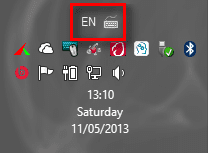 In my case I want to have US English as input language by default but use Finnish keyboard layout. To achieve this I select first the input language:
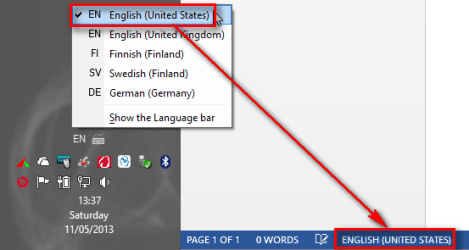 ... and then the keyboard layout within that input language:
 As you can see from the screenshots, the empty word document next to the pictured Taskbar notification area shows that Word uses US English as proofing language although the keyboard is set to Finnish. This is because the input language determines the proofing language, not the keyboard layout.
The same might be easier to understand if you look at the Language Bar instead of notification icons:
 Select input language on left, keyboard on right.
To achieve this, setting the default input language to US English and default keyboard layout to Finnish I have simply installed needed input languages and keyboard layouts, then selected the correct combination in Regional Settings:
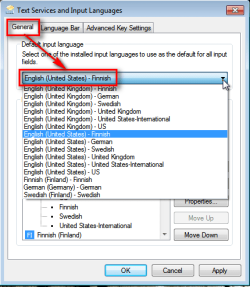 Now in this my case all new word documents use default US English as proofing language even though I am by default using the Finnish keyboard layout.
In your case, setting the defaults to UK English input language with US English keyboard would do exactly what you wanted and came here to ask.
Kari
I also found some Microsoft articles supporting this. For instance:
(Source: Change the default language for Office programs - Word - Office.com)To change the default language in Office programs, you must change the default input language for the Windows operating system, and then change the default editing language for Office
Of course you can. You just don't want to. A big difference there, something being impossible or the user being stubborn.But if there is a way of retaining the keys and changing the input language - let me know.... I am still open to suggestions, but as I said I cannot change my US-styled keyboard.
Although already said but let's repeat:
Your original question: How to change default proofing language in Microsoft Word?
Answer: Microsoft Word uses selected Windows input language as default proofing language. In order to set default proofing language to UK English you need to use UK English as Windows input language.
I guess you did not read the tutorials I linked in one of my previous posts?
Note
Pleaser read the below very carefully, ask if there's something you do not understand. OK?
Input language and keyboard layout are not synonyms, they mean something totally different. An input language can have and use several different keyboard layouts. An input language and a keyboard layout can both be set independently.
See below, remember that as my Taskbar is on the left your actual location of the language selectors is bottom right instead of bottom left as in these screenshots.
If you have installed two or more keyboard layouts to an input language, the language selector has two parts. A two letter abbreviation for selected input language, and a keyboard icon for layout:
The same might be easier to understand if you look at the Language Bar instead of notification icons:
To achieve this, setting the default input language to US English and default keyboard layout to Finnish I have simply installed needed input languages and keyboard layouts, then selected the correct combination in Regional Settings:
In your case, setting the defaults to UK English input language with US English keyboard would do exactly what you wanted and came here to ask.
Kari
My Computer
At a glance
Windows 10 Pro x64 EN-GB1.6 GHz Intel Core i7-720QM Processor6 GBATI Mobility Radeon HD 5850 Graphics
- Computer type
- Laptop
- Computer Manufacturer/Model Number
- HP ENVY 17-1150eg
- OS
- Windows 10 Pro x64 EN-GB
- CPU
- 1.6 GHz Intel Core i7-720QM Processor
- Memory
- 6 GB
- Graphics Card(s)
- ATI Mobility Radeon HD 5850 Graphics
- Sound Card
- Beats sound system with integrated subwoofer
- Monitor(s) Displays
- 17" laptop display, 22" LED and 32" Full HD TV through HDMI
- Screen Resolution
- 1600*900 (1), 1920*1080 (2&3)
- Hard Drives
- Internal: 2 x 500 GB SATA Hard Disk Drive 7200 rpm
External: 2TB for backups, 3TB USB3 network drive for media
- Cooling
- As Envy runs a bit warm, I have it on a Cooler Master pad
- Keyboard
- Logitech diNovo Media Desktop Laser (bluetooth)
- Mouse
- Logitech Performance Mouse MX
- Internet Speed
- 50/10 Mbps VDSL
- Antivirus
- Windows Defender 4.3.9431.0
- Browser
- Maxthon 3.5.2., IE11
I am not as clever as you.... I had to take a photo with my camera and TRY and post it. I do not think it worked.... But I have only 2 options US and Australian English as my input languages... so I am screwed
My Computer
At a glance
Wind 7 Pro 64-bit
- OS
- Wind 7 Pro 64-bit
Kari
You lost me???
As it was obvious you had read responses you got very selectively, I asked this in my last post:I cannot find "Text Service and Input Language
With that I was referring to this, one of my earlier posts:
In those tutorials I linked you will find detailed instructions.
Kari
My Computer
At a glance
Windows 10 Pro x64 EN-GB1.6 GHz Intel Core i7-720QM Processor6 GBATI Mobility Radeon HD 5850 Graphics
- Computer type
- Laptop
- Computer Manufacturer/Model Number
- HP ENVY 17-1150eg
- OS
- Windows 10 Pro x64 EN-GB
- CPU
- 1.6 GHz Intel Core i7-720QM Processor
- Memory
- 6 GB
- Graphics Card(s)
- ATI Mobility Radeon HD 5850 Graphics
- Sound Card
- Beats sound system with integrated subwoofer
- Monitor(s) Displays
- 17" laptop display, 22" LED and 32" Full HD TV through HDMI
- Screen Resolution
- 1600*900 (1), 1920*1080 (2&3)
- Hard Drives
- Internal: 2 x 500 GB SATA Hard Disk Drive 7200 rpm
External: 2TB for backups, 3TB USB3 network drive for media
- Cooling
- As Envy runs a bit warm, I have it on a Cooler Master pad
- Keyboard
- Logitech diNovo Media Desktop Laser (bluetooth)
- Mouse
- Logitech Performance Mouse MX
- Internet Speed
- 50/10 Mbps VDSL
- Antivirus
- Windows Defender 4.3.9431.0
- Browser
- Maxthon 3.5.2., IE11
Kari - you are a smart guy....
I had to add UK English with the US-keyboard... Is that right?? Then I put my default input language as English (United Kingdom) - US....??? Is this right??
How am I going to remember this when I change PC's... all my formating and my personal dictionary (whatever that is called) all goes....
If this is it - you are a genius..
I had to add UK English with the US-keyboard... Is that right?? Then I put my default input language as English (United Kingdom) - US....??? Is this right??
How am I going to remember this when I change PC's... all my formating and my personal dictionary (whatever that is called) all goes....
If this is it - you are a genius..
My Computer
At a glance
Wind 7 Pro 64-bit
- OS
- Wind 7 Pro 64-bit
Yes, that's how you should set it. In your case it should look like this:
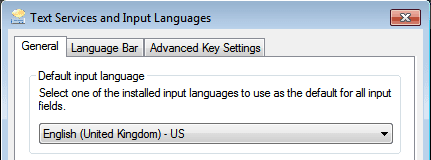 English (United Kingdom as Input Language, US keyboard layout.
My Computer
At a glance
Windows 10 Pro x64 EN-GB1.6 GHz Intel Core i7-720QM Processor6 GBATI Mobility Radeon HD 5850 Graphics
- Computer type
- Laptop
- Computer Manufacturer/Model Number
- HP ENVY 17-1150eg
- OS
- Windows 10 Pro x64 EN-GB
- CPU
- 1.6 GHz Intel Core i7-720QM Processor
- Memory
- 6 GB
- Graphics Card(s)
- ATI Mobility Radeon HD 5850 Graphics
- Sound Card
- Beats sound system with integrated subwoofer
- Monitor(s) Displays
- 17" laptop display, 22" LED and 32" Full HD TV through HDMI
- Screen Resolution
- 1600*900 (1), 1920*1080 (2&3)
- Hard Drives
- Internal: 2 x 500 GB SATA Hard Disk Drive 7200 rpm
External: 2TB for backups, 3TB USB3 network drive for media
- Cooling
- As Envy runs a bit warm, I have it on a Cooler Master pad
- Keyboard
- Logitech diNovo Media Desktop Laser (bluetooth)
- Mouse
- Logitech Performance Mouse MX
- Internet Speed
- 50/10 Mbps VDSL
- Antivirus
- Windows Defender 4.3.9431.0
- Browser
- Maxthon 3.5.2., IE11
Similar threads
- Replies
- 1
- Views
- 6K
- Replies
- 15
- Views
- 90K