How to convert MKV to another format, but KEEPING the quality?

xSaxby

New member
Local time
2:54 PM
Messages
16
Location
London, England.
Okay, So I've got a MKV Video which is 720p - I'd like to convert it to a different format which can run on PS3, but without losing the quality or the voice sync?

Thanks, xSaxby.​
 

My Computer My Computer

At a glance

Windows 7 Home Premium x64intel Core i53GB RAMATI RADEON
Computer Manufacturer/Model Number
Sony Vaio
OS
Windows 7 Home Premium x64
CPU
intel Core i5
Memory
3GB RAM
Graphics Card(s)
ATI RADEON
I've found formatfactory to be good for this.
That's all it really does it convert one format to another.
The only real problem you are going to face is any format other than mp4 is not going to hold the full quality of the mkv.
Xvid and avi are very old formats now, and the containers were just never meant for high def.
 

My Computer My Computer

At a glance

Windows 7 x64Intel i7 2600kG.skill Ripjaw 16gigs @ 1866Nvidia gtx580 (evga)
Computer Manufacturer/Model Number
Insane hobo technologies. ;-)
OS
Windows 7 x64
CPU
Intel i7 2600k
Motherboard
Asrock z68 extreme 4 gen 3
Memory
G.skill Ripjaw 16gigs @ 1866
Graphics Card(s)
Nvidia gtx580 (evga)
Sound Card
Integrated HD audio + hdmi
Monitor(s) Displays
24" ASUS widescreen + 42" insignia
Screen Resolution
1080p (1920x1080)
Hard Drives
128 Samsung 830
256 Samsung 840
3 x 1tb storage drive (various)
1 western digital 1tb (eSATA)
1 Seagate 1tb (eSATA)
PSU
1 kilowatt SLI/Crossfire rated Silverstone modular
Case
NZXT Phantom + additional 220 fan
Cooling
Zalmann
Keyboard
Microsoft wireless 3000 (v2)
Mouse
MS - wireless 5000 (bluetrack)
Internet Speed
depends on if you ask me or my provider.
Other Info
The above information is provided as is, and the author assumes no responsibility for issues it may cause with your sanity or fanboyism.
There is a suggestion in one forum to convert the mkv to m2ts using PS3Muxer, stream it to your PS3 and copy it to the PS3. Thereafter you can play the same on the PS3.

If you do not want to go through all this hassle, try BDtoAVCHD BDtoAVCHD - Create an AVCHD disc (BD5/BD9/BD25) from a Blu-Ray or MKV | Blu-Ray to MKV | Blu-Ray to AVCHD | MKV to AVCHD | Blu-Ray 3D to MKV 3D SBS | Connecta 2000 to convert your mkv into AVCHD and write it to DVD5 or DVD9. Play on your PS3.

If your mkvs are more than 9GB, and you don't want to lose even a bit, then you have to choose BD25 or BD50 which also means that you have to write it with a BD Writer on a BD.

You may perhaps stream the AVCHD to your PS3 and copy it too. You have to try.
 

My Computer My Computer

At a glance

Windows 7 Home Premium 32 bit
OS
Windows 7 Home Premium 32 bit
You have a couple options.

I wasnt sure, but a quick Google seems to siggest the PS3 will support MP4 as well MT2S with H264 video streams, and AAC or AC3 audio.

What type of Video and Audio streams did you use? If DTS, you may need to convert it to AC3 or AAC.


You can try TSMuxer.
Just add the MKV, and select MT2S muxing add your done.

Alternatively, you can use something like YAMB, and mux it into a MP4 container.
MT2S will probably be the best bet.
 

My Computer My Computer

At a glance

Windows 7 Home Premium 64bitIntel Core i7 2700k8GB Mushkin Redline Ridgebacks @1866EVGA GTX570 SC
Computer Manufacturer/Model Number
Custom (Self Build)
OS
Windows 7 Home Premium 64bit
CPU
Intel Core i7 2700k
Motherboard
eVGA P67 SLI
Memory
8GB Mushkin Redline Ridgebacks @1866
Graphics Card(s)
EVGA GTX570 SC
Sound Card
XiFi Titanium HD
Monitor(s) Displays
LG W2453V
Screen Resolution
1920x1080
Hard Drives
Intel 320 80GB -- Intel X25-V 40GB --WD Black 1TB x2 -- WD Blue 640GB
PSU
Seasonic x750
Case
Corsair 600T SE White
Cooling
eVGA Superclocked CPU Cooler
Keyboard
Saitek Cyborg
Antivirus
Kaspersky
Browser
IE
Other Info
LG BD/DVD

My Computer My Computer

At a glance

Microsoft Windows 7 Home Premium 64-bit Servi...Intel(R) Core(TM) i3 CPU M 330 @ 2.13GHz8 GB DDR3Intel(R) HD Graphics
Computer type
Laptop
Computer Manufacturer/Model Number
Hewlett-Packard/G62-107SA Notebook
OS
Microsoft Windows 7 Home Premium 64-bit Service Pack 1
CPU
Intel(R) Core(TM) i3 CPU M 330 @ 2.13GHz
Motherboard
Hewlett-Packard 1425
Memory
8 GB DDR3
Graphics Card(s)
Intel(R) HD Graphics
Sound Card
Realtek High Definition Audio
Monitor(s) Displays
Builtin
Screen Resolution
1366 x 768 x 32 bits (4294967296 colors) @ 60 Hz
Hard Drives
250 GB SATA Hard Disk Drive 7200 rpm
2TB Seagate GoFlex USB 2 Drive
1TB Iomega Prestige USB 2 Drive
1.5TB Iomega Prestige USB 2 Drive (Samsung)
2TB WD MyBook Live NAS.
Mouse
Logitech Anywhere MX
Internet Speed
152 Mbs download 10 Mbs upload
Antivirus
Norton 360
Browser
Chrome
There is a suggestion in one forum to convert the mkv to m2ts using PS3Muxer, stream it to your PS3 and copy it to the PS3. Thereafter you can play the same on the PS3........

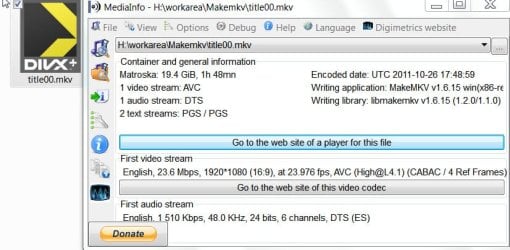
I actually tried the PS3Muxer PS3Muxer today and converted a 20GB 1080p mkv file - a main movie BD rip with DTS audio and two subtitles - to m2ts.
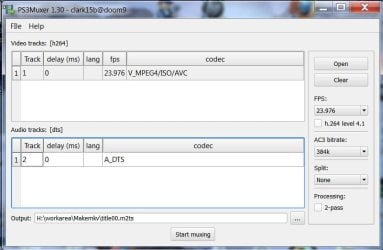
PS3Muxer.jpg

Mediainfo of the mkv file:

01my1080pmkv.jpg

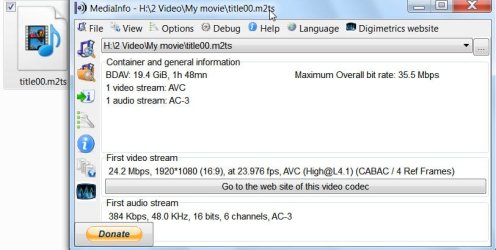
Mediainfo of the output m2ts file:

02my1080pm2ts.jpg

The process was fairly easy and took about 13' to create the m2ts file. (PS3Muxer uses tsmuxer and whereas the tsmuxer can output the m2ts with DTS sound, it converts the DTS to AC3 audio. )

Now to the PS3.

If one has set up Windows 7 Mediaplayer to stream media to the PS3 in the home network, one can see the Windows 7 (MP) PC in the PS3's XMB. (Here I put the title00.m2ts file in a folder named My Movie and added this to Windows Media Center library.)

Browse to the m2ts file under Video and then press the Triangle button on the controller or PS3 remote to bring the options menu, select the Copy command and press the X button to start copying the file from the Windows 7 PC. ( No need to press X and stream the m2ts from the PC)
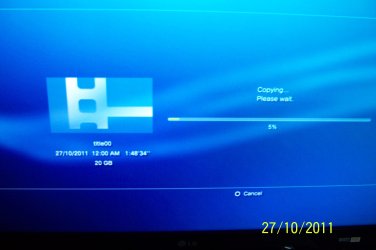
03Copy2PS3.JPG

In my setup it took about three and a half hours to import the 20GB file to the PS3.

The file details in the PS3:
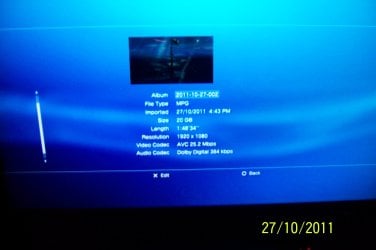
04FileinPS3.JPG

And thats it. One can play the m2ts from within the PS3. ( No subtitles for whatever reason.)

No loss in quality. 100% unadulterated.

The irony is that you cannot copy the 20GB file to the PS3 using a pendrive or external HDD since PS3 will recognise only FAT32 with the 4GB limit.

Personally though, I will prefer a BD9 AVCHD disk burnt on a DVD-DL that can be played on the PS3 instead of loading a large file into the PS3 HDD. Of course individual mileage varies.:)
 
Last edited:

My Computer My Computer

At a glance

Windows 7 Home Premium 32 bit
OS
Windows 7 Home Premium 32 bit
Back
Top