can see printer from xp but not 7

MilesAhead

Eclectician
I have Windows 7 installed on 2 PCs. One just has 7 the other dual boots 7 and XP Pro. No matter which PC I hook the printer up to, the other Windows 7 PC cannot connect to it on the network. XP Pro can connect and print remotely.

I'm losin' it. I tried homegroup no homegroup media sharing on, off.. I can see the Icon in Network explorer window. cannot connect from 7.

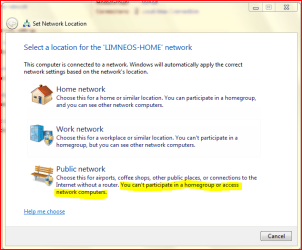
I have it as Public network, file and print sharing on, allow modify files on, allow everyone to manage the printer yadda yadda.

It just won't work if the client is 7.

The error codes don't get any google hits.
I can access and modify files in both directions but it won't let me install the network printer in 7.

All PCs are in workgroup named WORKGROUP

password is off
homegroup control is off
It's like 7 just won't agree on permissions.
 

My Computer

Computer Manufacturer/Model Number
HP Media Center
OS
Windows 7 32 bit
CPU
AMD 5200+ dual core
Memory
2 GB
Graphics Card(s)
NVidia GeForce 6150SE 128 MB
Monitor(s) Displays
CRT
Screen Resolution
1280x1024
Hard Drives
500 GB Sata internal :

SIIG USB 3.0 docking stations w/WD Caviar Black 6 Gb/s drives
Keyboard
PS/2
Mouse
PS/2 Wheel Mouse
Other Info
SIIG USB 3.0 PCIexpress card.
I have it as Public network, file and print sharing on, allow modify files on, allow everyone to manage the printer yadda yadda.

Public network is your problem. You must switch it to home or work network instead.

Definition in case you have it mixed up :

Public Network : Security at full, no shares, no homegroups cause you go public and must be protected.

Work Network: Security medium , no homegroup but shares between PCs allowed.

Home Network: Everything accessible, we are safe at home.
 

Attachments

  • Capture.PNG
    Capture.PNG
    84.3 KB · Views: 66

My Computer

Computer Manufacturer/Model Number
ENIAC
OS
Windows 7 RC 7100 32bit/64bit
CPU
Intel Core2Duo E4500 2.20 GHz
Motherboard
ASUS P5LD2-X/1333
Memory
2x1GB Kinsgston DDR2 800MHz
Graphics Card(s)
Nvidia 8500GT
Sound Card
Onboard High Definition Audio Device
Monitor(s) Displays
Sony Bravia 42"
Case
LINKW 2222
Cooling
Standard Intel
Keyboard
Some cheap one
Mouse
Microsoft Intellimouse something
Internet Speed
24MBps ADSL
Public network is your problem. You must switch it to home or work network instead.

Definition in case you have it mixed up :

Public Network : Security at full, no shares, no homegroups cause you go public and must be protected.

Work Network: Security medium , no homegroup but shares between PCs allowed.

Home Network: Everything accessible, we are safe at home.

It won't let me enter the password on the homegroup on the machine that didn't create the group. I click join, it says enter password, it doesn't like it no matter how many times I change the password on the host, power both machines down etc etc..

edit: it's got to be a bug because it lets me print remotely if the client is XP. I think it finds the stuff during install with no security and saves the information because when I first put 7 on, the other machine had a different workgroup name and it still worked!! Now you can set anything you want and if the host is W7 then the client has to be XP.
 

My Computer

Computer Manufacturer/Model Number
HP Media Center
OS
Windows 7 32 bit
CPU
AMD 5200+ dual core
Memory
2 GB
Graphics Card(s)
NVidia GeForce 6150SE 128 MB
Monitor(s) Displays
CRT
Screen Resolution
1280x1024
Hard Drives
500 GB Sata internal :

SIIG USB 3.0 docking stations w/WD Caviar Black 6 Gb/s drives
Keyboard
PS/2
Mouse
PS/2 Wheel Mouse
Other Info
SIIG USB 3.0 PCIexpress card.
my theory

Well last night I did an image backup of the system that had the printer. Everything was working. I gave up and laid the partition back on. Printer works locally, but trying to access from the other W7 machine gives the same error #721. My theory is when I installed W7 on the PC without the printer, it looked at the network and set up my printer cuz the stupid thing worked even though the machine was on a different workgroup!!! I give up. I'll just copy the files over the network then print.
 

My Computer

Computer Manufacturer/Model Number
HP Media Center
OS
Windows 7 32 bit
CPU
AMD 5200+ dual core
Memory
2 GB
Graphics Card(s)
NVidia GeForce 6150SE 128 MB
Monitor(s) Displays
CRT
Screen Resolution
1280x1024
Hard Drives
500 GB Sata internal :

SIIG USB 3.0 docking stations w/WD Caviar Black 6 Gb/s drives
Keyboard
PS/2
Mouse
PS/2 Wheel Mouse
Other Info
SIIG USB 3.0 PCIexpress card.
Don't know why it works but I shared it on the XP PC and then put the W7 client back to a private network and have connectivity with printing all the way around. I'll see if it carries across a power down of the PCs. Man printer sharing was finally easy with XP(relatively) and then they always have to through cold water in the ointment!! :)
 

My Computer

Computer Manufacturer/Model Number
HP Media Center
OS
Windows 7 32 bit
CPU
AMD 5200+ dual core
Memory
2 GB
Graphics Card(s)
NVidia GeForce 6150SE 128 MB
Monitor(s) Displays
CRT
Screen Resolution
1280x1024
Hard Drives
500 GB Sata internal :

SIIG USB 3.0 docking stations w/WD Caviar Black 6 Gb/s drives
Keyboard
PS/2
Mouse
PS/2 Wheel Mouse
Other Info
SIIG USB 3.0 PCIexpress card.
Oh well, that's one instance where the USB hot plugging is a pita. Can't just install a driver for the same model printer on each OS. As soon as I power down all bets are off over the network. I put Vista back on and sliced off 100 GB to play with W7. At least that way I should be be able to print from everywhere as long as I boot some other OS first. The Taskbar with Aero is too much fun so I had to put it back on. :)
 

My Computer

Computer Manufacturer/Model Number
HP Media Center
OS
Windows 7 32 bit
CPU
AMD 5200+ dual core
Memory
2 GB
Graphics Card(s)
NVidia GeForce 6150SE 128 MB
Monitor(s) Displays
CRT
Screen Resolution
1280x1024
Hard Drives
500 GB Sata internal :

SIIG USB 3.0 docking stations w/WD Caviar Black 6 Gb/s drives
Keyboard
PS/2
Mouse
PS/2 Wheel Mouse
Other Info
SIIG USB 3.0 PCIexpress card.
Is it because of a lack of drivers for W7?
 

My Computers

System One System Two

  • Computer type
    PC/Desktop
    Computer Manufacturer/Model Number
    The Beast Model A (homebrew)
    OS
    Windows 11 21H2 Current build
    CPU
    AMD Ryzen 9 3950X
    Motherboard
    MSI MEG X570 GODLIKE
    Memory
    4 * 32 GB - Corsair Vengeance 3600 MHz
    Graphics Card(s)
    EVGA GeForce RTX 3080 Ti XC3 ULTRA GAMING (12G-P5-3955-KR)
    Sound Card
    Realtek® ALC1220 Codec
    Monitor(s) Displays
    2x Eve Spectrum ES07D03 4K Gaming Monitor (Matte) | Eve Spec
    Screen Resolution
    3x 3840 x 2160
    Hard Drives
    3x Samsung 980 Pro NVMe PCIe 4 M.2 2 TB SSD (MZ-V8P2T0B/AM) } 3x Sabrent Rocket NVMe 4.0 1 TB SSD
    PSU
    PC Power & Cooling’s Silencer Series 1050 Watt, 80 Plus Plat
    Case
    Fractal Design Define 7 XL Dark ATX Full Tower Case
    Cooling
    SteelSeries Apex Pro Wired Gaming Keyboard
    Keyboard
    SteelSeries Apex Pro
    Mouse
    Logitech MX Master 3S | MX Master 3 for business
    Internet Speed
    AT&T LightSpeed Gigabit Duplex Ftth
    Antivirus
    Windows Defender + MB 3
    Browser
    Nightly (default) + Firefox (stable),Chrome, Edge
  • Computer type
    PC/Desktop
    System Manufacturer/Model Number
    Dell Latitude E5470
    OS
    ChromeOS Flex Dev Channel (current)
    CPU
    Intel(R) Core(TM) i5-6300U CPU @ 2.40GHz, 2501 Mhz, 2 Core(s), 4 Logical Processor(s)
    Motherboard
    Dell
    Memory
    16 GB
    Graphics Card(s)
    Intel(R) HD Graphics 520
    Sound Card
    Intel(R) HD Graphics 520 + RealTek Audio
    Monitor(s) Displays
    Dell laptop display 15"
    Screen Resolution
    1920 * 1080
    Hard Drives
    Toshiba 128GB M.2 22300 drive
    INTEL Cherryville 520 Series SSDSC2CW180A 180 GB SATA III SSD
    PSU
    Dell
    Case
    Dell
    Cooling
    Dell
    Keyboard
    Dell
    Mouse
    Logitech MX Master 3S (shared w. Sys 1) | Dell TouchPad
    Internet Speed
    AT&T LightSpeed Gigabit Duplex Ftth
The driver will come up but it usually shows a folder icon instead of printer. You can print on the local PC but it won't serve it properly across the network. When I powered down and booted XP on the PC with the printer, it took me about 2 minutes to change network settings and get the connection on the client. It messes you up because you can see and copy and delete files over the network so it's like, "what's goin' on here?" type of deal.

Right now I have the client running W7 and the PC with the printer is dual boot Vista/XP. I have the computer name, workgroup name, and printer share name all the same on both OS on the printer server. So it should connect without me intervening no matter which OS I boot on the server since I always boot it first(I have a KVMA switch so stuff goes better if you power up the side that really sees the monitor and keyboard first.)

I think I have everything going now that I have Vista/XP on the server. What complicated stuff was I plugged into a flaky USB when I changed connections. I was getting intermittent boot failures. I didn't realize the USB was hanging my boot like every other boot.
 

My Computer

Computer Manufacturer/Model Number
HP Media Center
OS
Windows 7 32 bit
CPU
AMD 5200+ dual core
Memory
2 GB
Graphics Card(s)
NVidia GeForce 6150SE 128 MB
Monitor(s) Displays
CRT
Screen Resolution
1280x1024
Hard Drives
500 GB Sata internal :

SIIG USB 3.0 docking stations w/WD Caviar Black 6 Gb/s drives
Keyboard
PS/2
Mouse
PS/2 Wheel Mouse
Other Info
SIIG USB 3.0 PCIexpress card.
I had this similar problem with my original printer. I went to walmart and bought a $30 photo printer and it installed right away. Some printers will need to be changed in order to work with 7. They dont take the same drivers as previous o.s. did. I once heard someone say if it works with vista it will work with 7. That wasn't the case for mine. For me i had to buy a whole new printer and now it all works great. Hope this helps someone.
 

My Computer

OS
7
I had this similar problem with my original printer. I went to walmart and bought a $30 photo printer and it installed right away. Some printers will need to be changed in order to work with 7. They dont take the same drivers as previous o.s. did. I once heard someone say if it works with vista it will work with 7. That wasn't the case for mine. For me i had to buy a whole new printer and now it all works great. Hope this helps someone.

This particular printer, for some unknown reason, doesn't merit a driver download from Espon. If you want the driver you have to get it by hot plugging. Sorry but I'm not throwing away a perfectly good printer so I can use W7 beta. You can use the beta on the client side. The server simply has to serve the printer driver over the network properly.

I suspect Epson or somebody will fix this issue since there's millions of these things out there. I don't think most people go along with the "buy a new TV so your vcr will work" solution.
 

My Computer

Computer Manufacturer/Model Number
HP Media Center
OS
Windows 7 32 bit
CPU
AMD 5200+ dual core
Memory
2 GB
Graphics Card(s)
NVidia GeForce 6150SE 128 MB
Monitor(s) Displays
CRT
Screen Resolution
1280x1024
Hard Drives
500 GB Sata internal :

SIIG USB 3.0 docking stations w/WD Caviar Black 6 Gb/s drives
Keyboard
PS/2
Mouse
PS/2 Wheel Mouse
Other Info
SIIG USB 3.0 PCIexpress card.
Is it because of a lack of drivers for W7?

This was my first thought as well... I'm having the same problem as the OP. My file/print server is running XP, and I can print to it from my desktop and my wife's laptop (both running Vista) with no problem. When I try to connect from my laptop with Win 7 (x86 Build 7000) I can see the printer when I click Add Printer->Network, but when I actually try to connect to the printer it fails with error 0x000046a.

I tried connecting the printer to the laptop via USB directly, and that worked fine after I installed the driver from Canon (MF4150 multi-function printer) for Vista x86. I don't know if all the functions worked, but printing was fine. However, as soon as I try to connect via the network, I get the error as described above.

All the computers are on the same workgroup, the Win 7 laptop is configured as being on a Home network, and I am able to browse/copy/write shared files on the same XP file/print server. I'm stumped... Of course the OS is beta, so it's not the end of the world. :)
 

My Computer

OS
Windows 7 Beta x86 Build 7000
Hi guys! I've been lurking on the site for a few days now, and this is a great site! Lot's of good info! I have been using Win 7 for about 3 weeks now and love it! I have had my ups and downs with it, but that is for another thread.

For printer issues, I have found that this fix works well. I am using a Triton USB hard drive server, supposedly not compatible with any OS beyond XP, but this trick works. I have two USB printers attached to it, and I access it with computers running Vista and Win 7.

To make it work I had to setup new TCP/IP ports through the Add printer option in Vista and Win 7, so this should work if your using a dedicated computer as a print server.

When you go to add a new printer to your Win 7 system select "Printer connected to this computer". Next screen select "Create new port". Next screen it will ask for a host name or IP address. Use the print servers actual name on the network, not the IP. This is important if you are using DHCP and not static IPs. Next window, select custom settings, and assign the proper port number. You can get the port number from the printer setup on your server.

Next step is to load the print driver, if Win 7 doesn't have it, select the update option, and be patient as it takes a few minutes to access all the drivers on Microsoft's site. Once you get the driver install it and print a test page.

Let me know if this works for you, it works great on an old Triton black box.

UCAV
 

My Computer

Computer Manufacturer/Model Number
Custom Built
OS
Win 7/Vista X64/Win XP SP3
CPU
Intel Core 2 Quad Q6700 2.66 Gig
Motherboard
Gigabyte X48-DS4
Memory
4 Gigs Cosair 1066
Graphics Card(s)
Saphire ATI Radeon 3870 X2 1 Gig
Sound Card
Onboard Dolby 7.1
Monitor(s) Displays
2 x Acer AL2216W
Screen Resolution
1680x1050
Hard Drives
2x500 gig Seagate Sata II, 1xWD 1 TB Sata II.
PSU
Thermaltake Tough Power 750 watt
Case
Thermaltake Armour, original
Cooling
Zalman 9700 all copper
Keyboard
Logitech wireless
Mouse
Logitch Wireless
Internet Speed
512 Mbps
To change out of local network, you can use this simple fix:

open Local Security Policy under Administrative Tools.
Navigate down the tree: Security Settings | Local Policies | Security Options
Find: Network Security:LAN Manager authentication level
Set To: Send LM & NTLM - use NTLMv2 session security if negotiated

This should allow you to access your XP mapped network drives, and shares. The printer may not show up in the list, but be sure to add the "UNC" path under "the printer I want to use is not listed".

http://aheaton.com/printerinfo.png
 

My Computer

Computer Manufacturer/Model Number
SELF BUILT
OS
Windows 7 RC Build7100
CPU
AMD Athlon(tm) 64 X2 Dual Core Processor 6000+
Motherboard
MSI K9AGM2
Memory
2.00GB
Graphics Card(s)
Radeon X1650 Series
Sound Card
Real TEK
Monitor(s) Displays
Westing House 22" Wide screen
Hard Drives
120 Gigabyte Segate Baracuda
PSU
Thermal take True Power Trio 750 Watts
Case
Cooler Master Lite
Cooling
Default what it comes it
Keyboard
Logitech Y-SAB59 Elite Keyboard LE
Mouse
Logitech MX Revolution (Laptop Edition)
Internet Speed
DSL 3.5 Down / 768 Up
Back
Top