Is there a way to file share with XP?

djhallucn8

"To Punish & Enslave"
Power User
VIP
Local time
9:04 PM
Messages
307
Location
Brandon, FL
I need to be able to file share with drives on my main PC, I have tried setting up homegroup but this did not help me at all. If it doesn't then my question would be is Microsoft going to make file & printer sharing backwards compatible?
 

My Computer

Computer Manufacturer/Model Number
Custom
OS
XP Pro, Windows 7 Ultimate 64 & 32 Build 7022
CPU
6600 2.40 Ghz Intel Core 2 Duo
Motherboard
Nvidia nForce 650i Ultra
Memory
4096 GB DDR2
Graphics Card(s)
512 MB Nvidia GeForce 8400 GS PCI E
Hard Drives
2 x 250 GB Western Digital SATA
1 x 500 GB Western Digital SATA
1 x 250 GB Western Digital SATA USB
1 x 80 GB Western Digital IDE
PSU
600 Watt
Case
Custom
Cooling
Zalman
Keyboard
Logitech Wireless Keyboard
Mouse
Logitech MX 700 Wireless Optical Mouse
Internet Speed
Fios
Other Info
Also a Dell Inspiron E1505 1.6 Core Duo with 2GB DDR2, 320GB HDD running dual boot Windows 7 32 build 7057 & XP Pro 32 SP3.
Hi djhallucn8,

have not tried with XP yet but It fileshares with vista without homegroup no problems. just check the normal things workgroup, shares set-up, identical users etc if you give me an bit will see if my XP box is visible from 7 ...
 

My Computers

System One System Two

  • Computer type
    PC/Desktop
    Computer Manufacturer/Model Number
    ChillBlast - Custom to my design
    OS
    Windows 11 Pro x64 [Latest Release and Release Preview]
    CPU
    Ryzen 9 5950X, 3.8 - 5.2 MHz
    Motherboard
    Asus Prime X570-Pro
    Memory
    64GB [2 x 32GB] DDR4 3200MHz
    Graphics Card(s)
    4GB NVIDIA GEFORCE GTX 1650 Ti
    Sound Card
    On-board SPDIF to 5.1 System + HDMI [5.1 system]
    Monitor(s) Displays
    32" UHD 32 Bit HDR Monitor + 43" UHD 4K 32Bit HDR TV
    Screen Resolution
    2 x 3840 x 2160 @60Hz
    Hard Drives
    1TB M2 SSD OS, 500GB Fast Access SSD, 2 x 8TB Data + Various Externals from 1TB to 4TB, 10TB NAS
    PSU
    NZXT C750 80 PLUS Gold 750W Modular PSU
    Case
    Workstation Case [Matt Black]
    Cooling
    NZXT Kraken X63 280mm CPU Cooler +2x Quiet Case fans
    Keyboard
    Logitech Wireless MX Keys & K400 + others
    Mouse
    Logitech Wireless MX Master 3S
    Internet Speed
    920 MB Down 50 MB Up
    Antivirus
    BitDefender Total Security Pro
    Browser
    Chrome (always run latest Non-Beta)
    Other Info
    Also run ...
    Laptop - Quad 8GB - Windows 10 Pro x64
    Nexus 7 Android tablet x2
    Samsung 10.2" tablet
    Blackview TAB 8 4G Android Tablet c/w Keyboard
    Wacom Intuos Pro Medium Pen Pad
    Wacom Intuos Pro Small Pen Pad
    Wacom Expresskeys Remote
    Loopdeck+ Graphics Controller
    Shuttle Pro v2 Control
  • Computer type
    Laptop
    System Manufacturer/Model Number
    Dell XPS 17 10750H
    OS
    Windows 11 Pro x64 Latest RP
    CPU
    Intel I7 10750H 5.0GHz
    Motherboard
    Dell XPS
    Memory
    32GB [2x16GB] DDR4 2933 MHz
    Graphics Card(s)
    nVidia GTX1650Ti 4 GB GDDR6
    Sound Card
    Stock [Realtek] 4 Speaker
    Monitor(s) Displays
    17" IPS UHD+ Infinity Edge Touchscreen
    Screen Resolution
    3840 x 2400
    Hard Drives
    2TB M2 NVMe, 4TB External + various 500GB & 1TB External NVMe (also have access to spinner HDD from
    PSU
    Stock
    Case
    Stock XPS Aluminium & Carbon Fibre
    Cooling
    Stock - Active Fan Control
    Keyboard
    Backlit + Various Logitech
    Mouse
    Stock Track Pad + Logitech MX Trackball
    Internet Speed
    72 MB Down 18MB Up
    Browser
    Chrome
    Other Info
    Also run ...
    Laptop - Quad 8GB - Windows 10 Pro x64
    Nexus 7 Android tablet x2
    10.2" tablet
    Sony Z3 Android Smartphone
    Wacom Intuos Pro Medium Pen Pad
    Wacom Intuos Pro Small Pen Pad
    Wacom Expresskeys Remote
    Loopdeck+ Graphics Controller
    Shuttle Pro v2 Control Pad
    10TB NAS
Trying to do the samething here. Seven on lappy. XP on desktop. Can't seem to figure out how to set it up. It would b nice to print to the printer connected to my desktop from my Lappy.

GBridge works for file sharing but not printers.
 

My Computer

OS
Seven
Ok,

Have set-up sharing on my old xp box, (took a while didn't have screen or anything connected :D ), and
at the moment this now shows in Network and sharing centre (I have the LLP provider running on XP),
and I can link to shares via \\servername\sharename.
at the moment I cannot browse the network for resources but obviously can see the shares. :D

I can also ping the xp box by either name or IP address

whatasteal, you could try to set-up your printer as local then set up a network port pointing to the \\server\printername

XP can see and browse the network and a vista and Win7 box

it may be that something is not working on XP or one of the old protocols not working on Win 7 so will have to check this out and post back :D
 

My Computers

System One System Two

  • Computer type
    PC/Desktop
    Computer Manufacturer/Model Number
    ChillBlast - Custom to my design
    OS
    Windows 11 Pro x64 [Latest Release and Release Preview]
    CPU
    Ryzen 9 5950X, 3.8 - 5.2 MHz
    Motherboard
    Asus Prime X570-Pro
    Memory
    64GB [2 x 32GB] DDR4 3200MHz
    Graphics Card(s)
    4GB NVIDIA GEFORCE GTX 1650 Ti
    Sound Card
    On-board SPDIF to 5.1 System + HDMI [5.1 system]
    Monitor(s) Displays
    32" UHD 32 Bit HDR Monitor + 43" UHD 4K 32Bit HDR TV
    Screen Resolution
    2 x 3840 x 2160 @60Hz
    Hard Drives
    1TB M2 SSD OS, 500GB Fast Access SSD, 2 x 8TB Data + Various Externals from 1TB to 4TB, 10TB NAS
    PSU
    NZXT C750 80 PLUS Gold 750W Modular PSU
    Case
    Workstation Case [Matt Black]
    Cooling
    NZXT Kraken X63 280mm CPU Cooler +2x Quiet Case fans
    Keyboard
    Logitech Wireless MX Keys & K400 + others
    Mouse
    Logitech Wireless MX Master 3S
    Internet Speed
    920 MB Down 50 MB Up
    Antivirus
    BitDefender Total Security Pro
    Browser
    Chrome (always run latest Non-Beta)
    Other Info
    Also run ...
    Laptop - Quad 8GB - Windows 10 Pro x64
    Nexus 7 Android tablet x2
    Samsung 10.2" tablet
    Blackview TAB 8 4G Android Tablet c/w Keyboard
    Wacom Intuos Pro Medium Pen Pad
    Wacom Intuos Pro Small Pen Pad
    Wacom Expresskeys Remote
    Loopdeck+ Graphics Controller
    Shuttle Pro v2 Control
  • Computer type
    Laptop
    System Manufacturer/Model Number
    Dell XPS 17 10750H
    OS
    Windows 11 Pro x64 Latest RP
    CPU
    Intel I7 10750H 5.0GHz
    Motherboard
    Dell XPS
    Memory
    32GB [2x16GB] DDR4 2933 MHz
    Graphics Card(s)
    nVidia GTX1650Ti 4 GB GDDR6
    Sound Card
    Stock [Realtek] 4 Speaker
    Monitor(s) Displays
    17" IPS UHD+ Infinity Edge Touchscreen
    Screen Resolution
    3840 x 2400
    Hard Drives
    2TB M2 NVMe, 4TB External + various 500GB & 1TB External NVMe (also have access to spinner HDD from
    PSU
    Stock
    Case
    Stock XPS Aluminium & Carbon Fibre
    Cooling
    Stock - Active Fan Control
    Keyboard
    Backlit + Various Logitech
    Mouse
    Stock Track Pad + Logitech MX Trackball
    Internet Speed
    72 MB Down 18MB Up
    Browser
    Chrome
    Other Info
    Also run ...
    Laptop - Quad 8GB - Windows 10 Pro x64
    Nexus 7 Android tablet x2
    10.2" tablet
    Sony Z3 Android Smartphone
    Wacom Intuos Pro Medium Pen Pad
    Wacom Intuos Pro Small Pen Pad
    Wacom Expresskeys Remote
    Loopdeck+ Graphics Controller
    Shuttle Pro v2 Control Pad
    10TB NAS
Thanks Barman, Your relpy put me on the right track. All I need to do to access my XP shares is type
\\myxpcomputername
in explorer and hit enter.

:D

Ok,

Have set-up sharing on my old xp box, (took a while didn't have screen or anything connected :D ), and
at the moment this now shows in Network and sharing centre (I have the LLP provider running on XP),
and I can link to shares via \\servername\sharename.
at the moment I cannot browse the network for resources but obviously can see the shares. :D

I can also ping the xp box by either name or IP address

whatasteal, you could try to set-up your printer as local then set up a network port pointing to the \\server\printername

XP can see and browse the network and a vista and Win7 box

it may be that something is not working on XP or one of the old protocols not working on Win 7 so will have to check this out and post back :D
 

My Computer

OS
Seven
Hi Whatasteal,

First
glad to hear you're up and running.:party:

Second
an update - after a while a refresh of the network on the windows 7 machine showed the XP Box and it's shares, there was a similar problem with Vista so will have to check out solutions and try applying to Windows 7
 

My Computers

System One System Two

  • Computer type
    PC/Desktop
    Computer Manufacturer/Model Number
    ChillBlast - Custom to my design
    OS
    Windows 11 Pro x64 [Latest Release and Release Preview]
    CPU
    Ryzen 9 5950X, 3.8 - 5.2 MHz
    Motherboard
    Asus Prime X570-Pro
    Memory
    64GB [2 x 32GB] DDR4 3200MHz
    Graphics Card(s)
    4GB NVIDIA GEFORCE GTX 1650 Ti
    Sound Card
    On-board SPDIF to 5.1 System + HDMI [5.1 system]
    Monitor(s) Displays
    32" UHD 32 Bit HDR Monitor + 43" UHD 4K 32Bit HDR TV
    Screen Resolution
    2 x 3840 x 2160 @60Hz
    Hard Drives
    1TB M2 SSD OS, 500GB Fast Access SSD, 2 x 8TB Data + Various Externals from 1TB to 4TB, 10TB NAS
    PSU
    NZXT C750 80 PLUS Gold 750W Modular PSU
    Case
    Workstation Case [Matt Black]
    Cooling
    NZXT Kraken X63 280mm CPU Cooler +2x Quiet Case fans
    Keyboard
    Logitech Wireless MX Keys & K400 + others
    Mouse
    Logitech Wireless MX Master 3S
    Internet Speed
    920 MB Down 50 MB Up
    Antivirus
    BitDefender Total Security Pro
    Browser
    Chrome (always run latest Non-Beta)
    Other Info
    Also run ...
    Laptop - Quad 8GB - Windows 10 Pro x64
    Nexus 7 Android tablet x2
    Samsung 10.2" tablet
    Blackview TAB 8 4G Android Tablet c/w Keyboard
    Wacom Intuos Pro Medium Pen Pad
    Wacom Intuos Pro Small Pen Pad
    Wacom Expresskeys Remote
    Loopdeck+ Graphics Controller
    Shuttle Pro v2 Control
  • Computer type
    Laptop
    System Manufacturer/Model Number
    Dell XPS 17 10750H
    OS
    Windows 11 Pro x64 Latest RP
    CPU
    Intel I7 10750H 5.0GHz
    Motherboard
    Dell XPS
    Memory
    32GB [2x16GB] DDR4 2933 MHz
    Graphics Card(s)
    nVidia GTX1650Ti 4 GB GDDR6
    Sound Card
    Stock [Realtek] 4 Speaker
    Monitor(s) Displays
    17" IPS UHD+ Infinity Edge Touchscreen
    Screen Resolution
    3840 x 2400
    Hard Drives
    2TB M2 NVMe, 4TB External + various 500GB & 1TB External NVMe (also have access to spinner HDD from
    PSU
    Stock
    Case
    Stock XPS Aluminium & Carbon Fibre
    Cooling
    Stock - Active Fan Control
    Keyboard
    Backlit + Various Logitech
    Mouse
    Stock Track Pad + Logitech MX Trackball
    Internet Speed
    72 MB Down 18MB Up
    Browser
    Chrome
    Other Info
    Also run ...
    Laptop - Quad 8GB - Windows 10 Pro x64
    Nexus 7 Android tablet x2
    10.2" tablet
    Sony Z3 Android Smartphone
    Wacom Intuos Pro Medium Pen Pad
    Wacom Intuos Pro Small Pen Pad
    Wacom Expresskeys Remote
    Loopdeck+ Graphics Controller
    Shuttle Pro v2 Control Pad
    10TB NAS
Wow, I will try this today when I have some time, for now I have a Bucs game to watch.
 

My Computer

Computer Manufacturer/Model Number
Custom
OS
XP Pro, Windows 7 Ultimate 64 & 32 Build 7022
CPU
6600 2.40 Ghz Intel Core 2 Duo
Motherboard
Nvidia nForce 650i Ultra
Memory
4096 GB DDR2
Graphics Card(s)
512 MB Nvidia GeForce 8400 GS PCI E
Hard Drives
2 x 250 GB Western Digital SATA
1 x 500 GB Western Digital SATA
1 x 250 GB Western Digital SATA USB
1 x 80 GB Western Digital IDE
PSU
600 Watt
Case
Custom
Cooling
Zalman
Keyboard
Logitech Wireless Keyboard
Mouse
Logitech MX 700 Wireless Optical Mouse
Internet Speed
Fios
Other Info
Also a Dell Inspiron E1505 1.6 Core Duo with 2GB DDR2, 320GB HDD running dual boot Windows 7 32 build 7057 & XP Pro 32 SP3.
I can see my XP and WHS box on the network map after installing LLTP but they still don't show in Windows Explorer. Yes, you can access them by \\name but this only a temproaray solution. It doesn't stick.

If you cant make and XP product show up this will be a show stopper for many people. I can not believe that MS doesn't know about this issue or why it was allowed to get this far.

Anyone found any solutions??

Rich
 

My Computer

OS
XP Pro, Vista Ultimate, Windows 7 Ultimate, WHS
Best I could figure so far is to pin windows explorer to the task bar then right click, properties and change target to \\xpcomputer name.

Note: Won't stick after reboot.
 
Last edited:

My Computer

OS
Seven
Trying to do the samething here. Seven on lappy. XP on desktop. Can't seem to figure out how to set it up. It would b nice to print to the printer connected to my desktop from my Lappy.

GBridge works for file sharing but not printers.

what is Gbridge? i've been trying to file share with my xp laptop but can't figure it out.
 

My Computer

OS
windows 7
File sharing seven/xp

Isn't there always a way gentleman? Search and type services..make sure DHCP Client is auto, DNS is auto and IKE AuthIP is started.Also, Net.TCP Port sharing is also started. As far as the other services make sure they're the norm for vista sharing with xp..good luck!! Works like a charm.
 

My Computer

OS
seven, xp
I can see my XP and WHS box on the network map after installing LLTP but they still don't show in Windows Explorer. Yes, you can access them by \\name but this only a temproaray solution. It doesn't stick.

If you cant make and XP product show up this will be a show stopper for many people. I can not believe that MS doesn't know about this issue or why it was allowed to get this far.

Anyone found any solutions??

Rich

I'm going to step up to the wager window and place a $20 win bet on the #1 horse named "ibetyoudonthaveapasswordsetupontheXPmachine"

also, "use user accounts and passwords to connect..." under advanced sharing / Homegroup
 

My Computer

Computer Manufacturer/Model Number
CUSTOM
OS
XP/win7 x86 build 7127
CPU
Athlon64 X2 DUAL 4200+ 2.21ghz
Motherboard
ASUS K8 PRO SLI
Memory
2GB Dual Chan DDR2 Corsair
Graphics Card(s)
Nvidia 6800GT
Sound Card
nvidia
Monitor(s) Displays
19' LCD
Screen Resolution
1280x1024
Hard Drives
WD 250, 2x500, 2x1TB IDE/USB
WD 250 SATA (system)
SEAGATE 120 Sata
PSU
coolermaster 450
Case
SUPERFLOWER
Cooling
1 HDD bay fan, 5x80mm Case Fans, AEROGATE II Fan/Temp
Keyboard
MS wireless
Mouse
MS Wireless
Internet Speed
fassssssssst
Hi, it is my first post here, and I'm sorry for my english (in advance).

After a lot of work I can set up my network: main PC with W7 and secondary with XP SP2. With W7 Beta.

When I installed RC I can never setup my network again.

My W7 PC have a net card (onboard) connecter with the internet modem, and a second card connected with a net switch. It always worked with XP on both PCs.

When I installed W7RC my second adapter was set as public network and I can't change it on no way. When I made work the network with W7 Beta I changed this to Work network.

Is there a hiden command or a secret way to do this?

Thanks.

PS: I have set on the discovery network, and sometimes it sees the XP pC, but I can´t access the shares.

EDITD: I forget to say, I can access the shares on the W7 PC from the XP one, but not the opposite case.
 
Last edited:
Xp to win 7 file sharing easy

Hi all been fiddling around for ages and finally figured out how to do this.

1. in xp go to control panel/system/computer name and call your computer that has xp something that you want.and call the workgroup WORKGROUP! you pc may need a restart ok

2.On the pc that has win 7 on it go to

controlpanel/network and internet/homegroup and make sure that you are not joined or have left the homegroup

right click computer click properties and go to advanced sytem settings and then computer name.

call this pc something that you want and call the workgroup WORKGROUP!

To start file sharing from xp to win 7 right click any file and click sharing

and adjust the settings to suit.

you should now see all computers and sharing files on win 7 pc

good luck
 

My Computer

OS
7
Thanks, but no. That's the standard procedure to share files since Windows 98 SE. When you try to do this linking a W7 and a XP, this don't work.
 
Thanks, but no. That's the standard procedure to share files since Windows 98 SE. When you try to do this linking a W7 and a XP, this don't work.

Nothing has changed at all with networking in Windows 7. It can be effectively treated as if it was Vista, XP etc...

Common problems are no passwords being set, "change advanced sharing settings" in Network and Sharing center not being configured, not allowing everyone permission for a shared drive/folder on remote machine, not allowing firewall access if using 3rd party.
 

My Computer

Computer Manufacturer/Model Number
self built
OS
7600.20510 x86
CPU
P4 550 3.4 GHz HT running at 3.5 GHz
Motherboard
MSI PM8M3-V (MS-7211 v1.x) Micro-ATX mainboard
Memory
OCZ 2 GB(2x1GB) DDR400mHz running @ 414 mHz
Graphics Card(s)
HIS Radeon HD 3850 IceQ 3 Turbo HDMI Dual DL-DVI AGP
Sound Card
MOTU Traveler firewire studio interface 192 kHz 24 bit
Monitor(s) Displays
22" widescreen Acer X223W LCD, 17" Compaq P75 CRT
Screen Resolution
1680x1050 and 1280x1024
Hard Drives
SATA I x2 WD, 400 GB and 120 GB, SATA 2 WD Caviar Black 1 TB
PSU
350W generic
Case
Cybertronpc, it glows blue
Cooling
stock cpu fan, Ice-Q 3 gpu and system, many case fans
Keyboard
Logitch Classical Keyboard 200
Mouse
Logitech Mediaplay cordless
Internet Speed
1792/448 kbits/sec
Other Info
SATA II PCI fake RAID adapter, 1 GB Readyboost, original ATI Remote Wonder (even works with WMC perfectly), Logitech Rumblepad 2 game controller x2
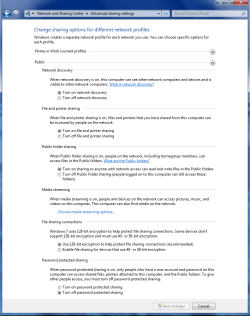
Torrentg is correct. I have been sharing from my XP machine since Jan. You can just use the "public" sharing option which can be accessed from the advanced sharing options menu. You also need to enable sharing on the XP machine.

You need to have all of these checked on the Win 7 machine for public sharing.
 

Attachments

  • public sharing enabled all.PNG
    public sharing enabled all.PNG
    39.7 KB · Views: 1,693

My Computer

Computer type
PC/Desktop
Computer Manufacturer/Model Number
Home built
OS
Windows 7 Ult, Windows 8.1 Pro,
CPU
Q9650-4.275GHz, E8600 4.5GHz, E6750-3.8GHz
Motherboard
Evga 780i FTW
Memory
G.Skill PC2 9600 1200Mhz 5 5 5 15 2T
Graphics Card(s)
GTX480
Sound Card
Asus Xonar D2
Monitor(s) Displays
HannsG
Screen Resolution
1680X1050
Hard Drives
GSkill Phoenix Pro 120GB SSD
PSU
ThermalTake Toughpower 1000Watt modular
Case
ThermalTake XaserV
Cooling
Xigmatek S1283
Keyboard
Logitech G15
Mouse
Logitech G9
Internet Speed
T1
Hi. I use networks over Windows since W98SE (but never used Vista).

It worked always by connect a PC with another via cross-cable or via hub or switch. Always worked, even when I connected PCs with different Windows versions.

However, with Windows 7 (I'm beta testing it since the first beta version) I can never connect a W7 PC with a XP PC.

Net:

- PC with W7 connected to internet ADSL modem.
- switch
- PC with WXP

The XP can navigate, see, read and write the W7 shared files and folders. The W7 PC can see the XP PC and its shared folders but can't access this.

I tried everything: of course the "discover" turned on; the addresses "forced" to 192.168.0.1 - n; password protect / unprotect... every option, but almost never can do the job.

Of course, if I use a router I suppose everything will go well, but I haven't a router right now so I can't try it.

When I installed the different W7 beta versions, the RTM and the final versions I almost never can manage the network as it must be. One of the versions (I can't remember the version) allowed me to set the network to "work network" and it was the only moment I can connect the PCs in a double-way. With all of the other versions, W7 sets my netowrks as Public networks and I cannot modify this setting (only on the internet connection, but if I change this, I can't access the internet).
 
Hi. I use networks over Windows since W98SE (but never used Vista).

It worked always by connect a PC with another via cross-cable or via hub or switch. Always worked, even when I connected PCs with different Windows versions.

However, with Windows 7 (I'm beta testing it since the first beta version) I can never connect a W7 PC with a XP PC.

Net:

- PC with W7 connected to internet ADSL modem.
- switch
- PC with WXP

The XP can navigate, see, read and write the W7 shared files and folders. The W7 PC can see the XP PC and its shared folders but can't access this.

I tried everything: of course the "discover" turned on; the addresses "forced" to 192.168.0.1 - n; password protect / unprotect... every option, but almost never can do the job.

Of course, if I use a router I suppose everything will go well, but I haven't a router right now so I can't try it.

When I installed the different W7 beta versions, the RTM and the final versions I almost never can manage the network as it must be. One of the versions (I can't remember the version) allowed me to set the network to "work network" and it was the only moment I can connect the PCs in a double-way. With all of the other versions, W7 sets my netowrks as Public networks and I cannot modify this setting (only on the internet connection, but if I change this, I can't access the internet).

Copy and paste Services.msc to the start menu search box and hit enter on the W7 machine.

Look for Internet Connection Sharing (ICS) service. Set it to automatic and start it too.

Might have to do the same thing on the XP machine, but I don't think so.
 

My Computer

Computer Manufacturer/Model Number
self built
OS
7600.20510 x86
CPU
P4 550 3.4 GHz HT running at 3.5 GHz
Motherboard
MSI PM8M3-V (MS-7211 v1.x) Micro-ATX mainboard
Memory
OCZ 2 GB(2x1GB) DDR400mHz running @ 414 mHz
Graphics Card(s)
HIS Radeon HD 3850 IceQ 3 Turbo HDMI Dual DL-DVI AGP
Sound Card
MOTU Traveler firewire studio interface 192 kHz 24 bit
Monitor(s) Displays
22" widescreen Acer X223W LCD, 17" Compaq P75 CRT
Screen Resolution
1680x1050 and 1280x1024
Hard Drives
SATA I x2 WD, 400 GB and 120 GB, SATA 2 WD Caviar Black 1 TB
PSU
350W generic
Case
Cybertronpc, it glows blue
Cooling
stock cpu fan, Ice-Q 3 gpu and system, many case fans
Keyboard
Logitch Classical Keyboard 200
Mouse
Logitech Mediaplay cordless
Internet Speed
1792/448 kbits/sec
Other Info
SATA II PCI fake RAID adapter, 1 GB Readyboost, original ATI Remote Wonder (even works with WMC perfectly), Logitech Rumblepad 2 game controller x2
None of the mentioned methods work for me. I can't access my xp box (could be that its password protected tho). The thing is, this worked just fine when i was using vista. Oh yea and i can't remove the password because i have no monitor for the pc... so if anyone has any ideas on how to set up sharing without changing anything on the pc, post them here please
 

My Computer

OS
windows 7
Back
Top