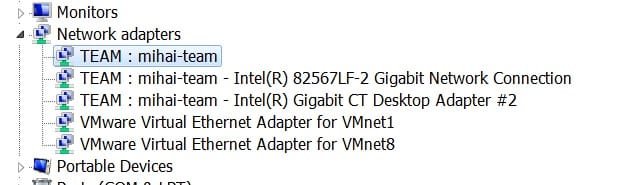
Link aggregation for bandwidth doubling: 2PCs, 2 NICs each

antitetanos

New member
I have 2 PCs, Windows 7 on both, each one with an Intel desktop board that has one integrated GBLan.
I put on each PC an additional Intel PCI-ex GBLan adapter.
So, each PC has now 2 active LAN adapters, each one supports Intel ANS, with teaming support.

I have also a Linksys WRT610N router (with 4 ports wired switch).

I connected each LAN by a cable to the Linksys switch (4 cables connected).

How can I implement link aggreagation/teaming in a way that the bandwith between the 2 computers grows up to 2Gnps ? (Yes, I have hardware supporting > 125MBps speed transfer and I need bandwidth)

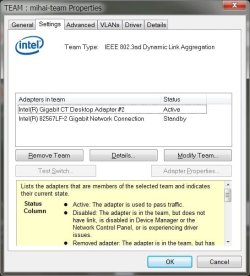
I tried IEEE 802.3ad dynamic aggregation, but as you see in the image one adapter is always in standby mode....
How can I configure all in a way that the 2 adapters in each PC are seen as one and via the switch I can have the double of a single link bandwidth ?
Each computer has set-up a team as seen in the images - but apparently not working as it should - on the router only 2 leds are quickly blinking.

Do I have to enable VLAN ?
Thanks, I hope some network guru enlightens me.
 

Attachments
  • team.jpg
    team.jpg
    110.3 KB · Views: 349
  • team2.jpg
    team2.jpg
    47.8 KB · Views: 129

My Computer

OS
Windows 7
Do you have other selections be sides: IEEE 802.3ad dynamic aggregation? That is the wrong selection.
 

My Computer

Computer type
PC/Desktop
Computer Manufacturer/Model Number
Dell OP7010
OS
Windows 7 Enterprise (x64); Windows Server 2008 R2 (x64)
Memory
16GB
Monitor(s) Displays
4 Dell 24" LCD
Screen Resolution
1280x1024
Keyboard
Dell
Mouse
Dell Optical
Internet Speed
40meg
As mentioned here:
Network Connectivity — How do I use Teaming with Advanced Networking Services (ANS)?

i have available all types of teaming.
I';m only interested in bandwidth increasing using simultaneously the 2 nics on each computer, not fault tolerance.

  • Adapter Fault Tolerance (AFT)
  • Switch Fault Tolerance (SFT)
  • Adaptive Load Balancing (ALB)
  • Receive Load Balancing (RLB)
  • Virtual Machine Load Balancing (VMLB)
  • IEEE 802.3ad
    Static Link Aggregation:
    DYNAMIC mode
 

My Computer

OS
Windows 7
You want ALB:

Adaptive Load Balancing (ALB)
Offers increased network bandwidth by allowing transmission over 2-8 ports to multiple destination addresses, and also incorporates Adapter Fault Tolerance. Only the primary receives incoming traffic. Only the primary transmits broadcasts/multicasts and non routed protocols. The ANS software load balances transmissions, based on Destination Address, and can be used with any switch. Simultaneous transmission only occurs at multiple addresses Implemented in Microsoft Windows* 2000, Windows Server* 2003, and Windows NT 4; NetWare 4.111 and above; UnixWare 7.x with ddi8; and Linux. This mode can be connected to any switch.
  • Receive Load Balancing (RLB)
    • Offers increased network bandwidth by allowing reception over 2-8 ports from multiple addresses.
    • Can only be used in conjunction with ALB.
    • RLB is enabled by default when an RLB team is configured.
    • Only the adapters connected at the fastest speed will be used to load balance incoming TCP/IP traffic. The primary, regardless of speed, will receive all other RX traffic.
    • Can be used with any switch. Any failover will increase network latency until ARPs are re-sent. Simultaneous reception only occurs from multiple clients.
    • Available for Microsoft Windows.
    • If using NetWare*1 Load Balancing, you can use ALB but not RLB.
 

My Computer

Computer type
PC/Desktop
Computer Manufacturer/Model Number
Dell OP7010
OS
Windows 7 Enterprise (x64); Windows Server 2008 R2 (x64)
Memory
16GB
Monitor(s) Displays
4 Dell 24" LCD
Screen Resolution
1280x1024
Keyboard
Dell
Mouse
Dell Optical
Internet Speed
40meg
Teaming doesn't really work like that, and trust me, this issue has been talked about many times. It doesn't double your bandwidth it only opens up another lane for uploading though one eithernet port while the other one downloads. Is a matter of fact teaming is not supported in Windows 7, it was supported in Vista but it did not double your bandwidth.
 

My Computer

Computer type
PC/Desktop
Computer Manufacturer/Model Number
Home built
OS
Windows 7 Ult, Windows 8.1 Pro,
CPU
Q9650-4.275GHz, E8600 4.5GHz, E6750-3.8GHz
Motherboard
Evga 780i FTW
Memory
G.Skill PC2 9600 1200Mhz 5 5 5 15 2T
Graphics Card(s)
GTX480
Sound Card
Asus Xonar D2
Monitor(s) Displays
HannsG
Screen Resolution
1680X1050
Hard Drives
GSkill Phoenix Pro 120GB SSD
PSU
ThermalTake Toughpower 1000Watt modular
Case
ThermalTake XaserV
Cooling
Xigmatek S1283
Keyboard
Logitech G15
Mouse
Logitech G9
Internet Speed
T1
Teaming is typically used to provide dual network paths to servers...so in the event that a single NIC fails, cable gets unplugged, or LAN switch gets disconnected, the interface remains up and online to service requests.
 

My Computer

Computer Manufacturer/Model Number
Self-Built in July 2009
OS
Windows 7 Ultimate x64
CPU
Intel Q9550 2.83Ghz OC'd to 3.40Ghz
Motherboard
Gigabyte GA-EP45-UD3R rev. 1.1, F12 BIOS
Memory
8GB G.Skill PI DDR2-800, 4-4-4-12 timings
Graphics Card(s)
EVGA 1280MB Nvidia GeForce GTX570
Sound Card
Realtek ALC899A 8 channel onboard audio
Monitor(s) Displays
23" Acer x233H
Screen Resolution
1920x1080
Hard Drives
Intel X25-M 80GB Gen 2 SSD
Western Digital 1TB Caviar Black, 32MB cache. WD1001FALS
PSU
Corsair 620HX modular
Case
Antec P182
Cooling
stock
Keyboard
ABS M1 Mechanical
Mouse
Logitech G9 Laser Mouse
Internet Speed
15/2 cable modem
Other Info
Windows and Linux enthusiast. Logitech G35 Headset.
Teaming doesn't really work like that, and trust me, this issue has been talked about many times. It doesn't double your bandwidth it only opens up another lane for uploading though one eithernet port while the other one downloads. Is a matter of fact teaming is not supported in Windows 7, it was supported in Vista but it did not double your bandwidth.

Apologies for the UberNecro but with limited info on the net regarding this (relative to everything else anyhow) and misinformation abound, I just wanted to add a little slice of political correctness :P

Server 720 - Server 2012 R2 Blog: SMB 3.0 Multipath over Nic Team in Windows Server 2012

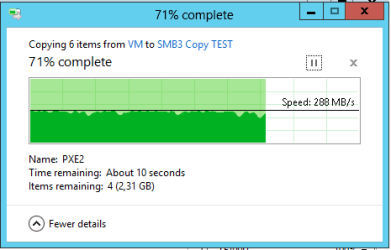
you are correct, it doesn't double it - it comes darn close though. (with 3 nic's these tests show screenshots of nearly 3x the transfer rate)
 

My Computer

Computer type
PC/Desktop
Computer Manufacturer/Model Number
HomeGrown
OS
8.1
CPU
4770k
Motherboard
OC-Force
Memory
32gb DDR3
Graphics Card(s)
Quad-SLI GTX Titan SC
Hard Drives
256gb Samsung EVO x 2 RAID0
2tb Seagate Barracuda x2 RAID0
Antivirus
YeaRight
Browser
IE
Teaming doesn't really work like that, and trust me, this issue has been talked about many times. It doesn't double your bandwidth it only opens up another lane for uploading though one eithernet port while the other one downloads. Is a matter of fact teaming is not supported in Windows 7, it was supported in Vista but it did not double your bandwidth.

Apologies for the UberNecro but with limited info on the net regarding this (relative to everything else anyhow) and misinformation abound, I just wanted to add a little slice of political correctness :P

Server 720 - Server 2012 R2 Blog: SMB 3.0 Multipath over Nic Team in Windows Server 2012

you are correct, it doesn't double it - it comes darn close though. (with 3 nic's these tests show screenshots of nearly 3x the transfer rate)

Thanks for the info, it's nice to know this can be done using an expensive server Op system along with a managed switch. All you need is a $6,155.00 Server and an $1895.00 DELL PowerConnect 6224 managed switch not to mention a business class fiber optic connection to get the most out of it. Piece of cake right? Very useful for a Server I'd say but not very practical for the average consumer. In fact, at the time of the original post "2010" this new tech teaming was not even available.

Of course that is totally out of the context of this thread because the original poster was using a standard Windows 7 Op system without the expensive managed switch. I do wish that Msoft would at least include the software for this but I'm pretty sure they save that tech for the more expensive server systems.

I have one of the few NVidia desktop motherboards that comes with NIC teaming "built in". My board already has the dual NIC's etc. And as I stated before it required Vista drivers in order to get it working, still true and still a waste of time, it really did not work as advertised back then.

It was a fairly useless endeavor back then and it was talked about in great detail over at the NVidia forum. I'm not really sure why the link says it works with Windows 7 then says the line below which says support stopped with Vista, still echo's what I said about this 3 years ago.

From the Intel page> Intel® PRO/100 and PRO/1000 adapters that plug into PCI or PCI-X* slots do not support ANS teaming in any Windows versions later than Windows Vista* and Windows Server* 2008.
 

My Computer

Computer type
PC/Desktop
Computer Manufacturer/Model Number
Home built
OS
Windows 7 Ult, Windows 8.1 Pro,
CPU
Q9650-4.275GHz, E8600 4.5GHz, E6750-3.8GHz
Motherboard
Evga 780i FTW
Memory
G.Skill PC2 9600 1200Mhz 5 5 5 15 2T
Graphics Card(s)
GTX480
Sound Card
Asus Xonar D2
Monitor(s) Displays
HannsG
Screen Resolution
1680X1050
Hard Drives
GSkill Phoenix Pro 120GB SSD
PSU
ThermalTake Toughpower 1000Watt modular
Case
ThermalTake XaserV
Cooling
Xigmatek S1283
Keyboard
Logitech G15
Mouse
Logitech G9
Internet Speed
T1
I guess you would be surprised to hear that I'm doing it on a 50 dollar (at best) old hand me down planet switch and 2 integrated nics that came with my mobo? Grand total - 0 :p
 

My Computer

Computer type
PC/Desktop
Computer Manufacturer/Model Number
HomeGrown
OS
8.1
CPU
4770k
Motherboard
OC-Force
Memory
32gb DDR3
Graphics Card(s)
Quad-SLI GTX Titan SC
Hard Drives
256gb Samsung EVO x 2 RAID0
2tb Seagate Barracuda x2 RAID0
Antivirus
YeaRight
Browser
IE
I guess you would be surprised to hear that I'm doing it on a 50 dollar (at best) old hand me down planet switch and 2 integrated nics that came with my mobo? Grand total - 0 :p

Surprised if it actually worked as advertised. I had it working also but in reality it made no difference.

With 2 NIC's you might see 188Mbps which would be great, they are using 3 NIC's for 288mbps using LACP mode after configuring the switch.
 

Attachments

  • NIC teaming 288mbps.PNG
    NIC teaming 288mbps.PNG
    9.4 KB · Views: 16
Last edited:

My Computer

Computer type
PC/Desktop
Computer Manufacturer/Model Number
Home built
OS
Windows 7 Ult, Windows 8.1 Pro,
CPU
Q9650-4.275GHz, E8600 4.5GHz, E6750-3.8GHz
Motherboard
Evga 780i FTW
Memory
G.Skill PC2 9600 1200Mhz 5 5 5 15 2T
Graphics Card(s)
GTX480
Sound Card
Asus Xonar D2
Monitor(s) Displays
HannsG
Screen Resolution
1680X1050
Hard Drives
GSkill Phoenix Pro 120GB SSD
PSU
ThermalTake Toughpower 1000Watt modular
Case
ThermalTake XaserV
Cooling
Xigmatek S1283
Keyboard
Logitech G15
Mouse
Logitech G9
Internet Speed
T1
Back
Top