Windows 7 pc to Vista pc?

Brian6121990

Black Ops
Power User
VIP
Local time
12:34 PM
Messages
319
Location
san diego, ca
Hi, i am asking for help here a bit. I know theres a microsoft program that allows me to access another pc through something...An assist or whatever its called. My dad has a vista laptop across the states from where im at and i have windows 7 and he has vista and i gotta help him with a problem with IE8 so i gotta help him.
 

My Computer My Computer

Computer type
PC/Desktop
Computer Manufacturer/Model Number
Macbook Pro Retina
OS
Mac OS X Yosemite
CPU
2.4 GHz Intel Core i7
Memory
8 GB 1600 MHz DDR3
Graphics Card(s)
NVIDIA GeForce GT 650M
Monitor(s) Displays
Retina
Screen Resolution
Retina
Hard Drives
250GB SSD
Other Info
Macbook Pro Retina (2013)
Remote desktop?

~Lordbob
 

My Computer My Computer

Computer Manufacturer/Model Number
Hera
OS
Windows 7 Ultimate x64, Mint 9
CPU
Intel i5-2500k
Motherboard
ASUS P8P67 Pro
Memory
2x 4Gb Corsair VENGEANCE DDR3-1600
Graphics Card(s)
NVidia GeForce N260GTX Twin Frozr
Sound Card
Realtek HD OnBoard Audio
Monitor(s) Displays
ASUS 24" Monitor
Screen Resolution
1920x1080
Hard Drives
G.SKILL Phoenix Series 60GB SATA II MLC Internal Solid State Drive (SSD)
SAMSUNG Spinpoint F3R 1TB 7200 RPM 32MB Cache SATA II
PSU
Cooler Master Real Power Pro 750W
Case
Cooler Master Haf 932
Cooling
Fans
Keyboard
Razer Tarantula
Mouse
Razer Lachesis
Internet Speed
not fast enough

My Computer My Computer

Computer type
PC/Desktop
Computer Manufacturer/Model Number
Macbook Pro Retina
OS
Mac OS X Yosemite
CPU
2.4 GHz Intel Core i7
Memory
8 GB 1600 MHz DDR3
Graphics Card(s)
NVIDIA GeForce GT 650M
Monitor(s) Displays
Retina
Screen Resolution
Retina
Hard Drives
250GB SSD
Other Info
Macbook Pro Retina (2013)
Hit start and type remote desktop and click on remote desktop session (or whatever it says).

Enter the IP address of your dads computer (google my ip), and hit connect. He will need to enable remote access and allow you in.

You might find a better tutorial by searching for it.

~Lordbob
 

My Computer My Computer

Computer Manufacturer/Model Number
Hera
OS
Windows 7 Ultimate x64, Mint 9
CPU
Intel i5-2500k
Motherboard
ASUS P8P67 Pro
Memory
2x 4Gb Corsair VENGEANCE DDR3-1600
Graphics Card(s)
NVidia GeForce N260GTX Twin Frozr
Sound Card
Realtek HD OnBoard Audio
Monitor(s) Displays
ASUS 24" Monitor
Screen Resolution
1920x1080
Hard Drives
G.SKILL Phoenix Series 60GB SATA II MLC Internal Solid State Drive (SSD)
SAMSUNG Spinpoint F3R 1TB 7200 RPM 32MB Cache SATA II
PSU
Cooler Master Real Power Pro 750W
Case
Cooler Master Haf 932
Cooling
Fans
Keyboard
Razer Tarantula
Mouse
Razer Lachesis
Internet Speed
not fast enough
Hit start and type remote desktop and click on remote desktop session (or whatever it says).

Enter the IP address of your dads computer (google my ip), and hit connect. He will need to enable remote access and allow you in.

You might find a better tutorial by searching for it.

~Lordbob

It asks for computer and user name...?
 

My Computer My Computer

Computer type
PC/Desktop
Computer Manufacturer/Model Number
Macbook Pro Retina
OS
Mac OS X Yosemite
CPU
2.4 GHz Intel Core i7
Memory
8 GB 1600 MHz DDR3
Graphics Card(s)
NVIDIA GeForce GT 650M
Monitor(s) Displays
Retina
Screen Resolution
Retina
Hard Drives
250GB SSD
Other Info
Macbook Pro Retina (2013)
Type in the name of his computer (for instance, mine is ERIS-PC on my laptop), and then the username you will use to connect, so his. Make sure you have the password as well if it asks.

~Lordbob
 

My Computer My Computer

Computer Manufacturer/Model Number
Hera
OS
Windows 7 Ultimate x64, Mint 9
CPU
Intel i5-2500k
Motherboard
ASUS P8P67 Pro
Memory
2x 4Gb Corsair VENGEANCE DDR3-1600
Graphics Card(s)
NVidia GeForce N260GTX Twin Frozr
Sound Card
Realtek HD OnBoard Audio
Monitor(s) Displays
ASUS 24" Monitor
Screen Resolution
1920x1080
Hard Drives
G.SKILL Phoenix Series 60GB SATA II MLC Internal Solid State Drive (SSD)
SAMSUNG Spinpoint F3R 1TB 7200 RPM 32MB Cache SATA II
PSU
Cooler Master Real Power Pro 750W
Case
Cooler Master Haf 932
Cooling
Fans
Keyboard
Razer Tarantula
Mouse
Razer Lachesis
Internet Speed
not fast enough
Type in the name of his computer (for instance, mine is ERIS-PC on my laptop), and then the username you will use to connect, so his. Make sure you have the password as well if it asks.

~Lordbob

What is the username part? Sorry about the noob questions but this is a first time
 

My Computer My Computer

Computer type
PC/Desktop
Computer Manufacturer/Model Number
Macbook Pro Retina
OS
Mac OS X Yosemite
CPU
2.4 GHz Intel Core i7
Memory
8 GB 1600 MHz DDR3
Graphics Card(s)
NVIDIA GeForce GT 650M
Monitor(s) Displays
Retina
Screen Resolution
Retina
Hard Drives
250GB SSD
Other Info
Macbook Pro Retina (2013)
Type in the name of his computer (for instance, mine is ERIS-PC on my laptop), and then the username you will use to connect, so his. Make sure you have the password as well if it asks.

~Lordbob

What is the username part? Sorry about the noob questions but this is a first time
It should be the same username that he uses when he logs in. So like his name.

~Lordbob
 

My Computer My Computer

Computer Manufacturer/Model Number
Hera
OS
Windows 7 Ultimate x64, Mint 9
CPU
Intel i5-2500k
Motherboard
ASUS P8P67 Pro
Memory
2x 4Gb Corsair VENGEANCE DDR3-1600
Graphics Card(s)
NVidia GeForce N260GTX Twin Frozr
Sound Card
Realtek HD OnBoard Audio
Monitor(s) Displays
ASUS 24" Monitor
Screen Resolution
1920x1080
Hard Drives
G.SKILL Phoenix Series 60GB SATA II MLC Internal Solid State Drive (SSD)
SAMSUNG Spinpoint F3R 1TB 7200 RPM 32MB Cache SATA II
PSU
Cooler Master Real Power Pro 750W
Case
Cooler Master Haf 932
Cooling
Fans
Keyboard
Razer Tarantula
Mouse
Razer Lachesis
Internet Speed
not fast enough

My Computer My Computer

Computer type
PC/Desktop
Computer Manufacturer/Model Number
Built them myself, Science Experiments !
OS
Win7 Enterprise, Win7 x86 (Ult 7600), Win7 x64 Ult 7600, TechNet RTM on AMD x64 (2.8Ghz)
CPU
AMD fx8350 4ghz, AMD-32 2400mhz, AMD-64 3200mhz, AMDx64 2.8G
Motherboard
SIS 755, ECS-K8M890M-M (Ult 7600), GigaByte & others
Memory
2gb, 4gb on the Ult 7600, 4gb on Technet RTM, 32gb on FX8350
Graphics Card(s)
Draw my own Graphics, several nVidia cards
Sound Card
on motherboard
Monitor(s) Displays
19" flat scr, 28" I-Inc widescr,22" Emprex Widescr, 23" Acer
Screen Resolution
1280 x 1024, 1440 x 900, 1920 x 1080
Hard Drives
6 pata Ide HD's & 2 Sata HD's
added 80gb external on Ult 7600 computer,
numerous extra 1tb, 2TB, 3Tb SATA HD's
A collection of ext HD Docks w/ HDs
PSU
430w, 550w, 600w, 700, 800, etc
Case
All Generic Full Towers
Cooling
Open Air & a few fans, some w/ colored LEDs
Keyboard
Compaq & Dell recycled from GoodWill
Mouse
Made in China Optical Wired Mouse
Internet Speed
Fast Cable InterNet
Antivirus
AVG Free on 24 different Desktops, NO Problems!
Browser
IE 8 is preferred, but use FireFox sometimes
Other Info
Linksys Routers, switches, & Hubs
Too Many USB Flash Drives to count, Biggest is 64GB !
Eight computers in my home network.
Sixteen computers at my business network.
Linked via TeamViewer !
Lots of old used spare computer parts everywhere!

My Computer My Computer

Computer type
PC/Desktop
Computer Manufacturer/Model Number
Macbook Pro Retina
OS
Mac OS X Yosemite
CPU
2.4 GHz Intel Core i7
Memory
8 GB 1600 MHz DDR3
Graphics Card(s)
NVIDIA GeForce GT 650M
Monitor(s) Displays
Retina
Screen Resolution
Retina
Hard Drives
250GB SSD
Other Info
Macbook Pro Retina (2013)
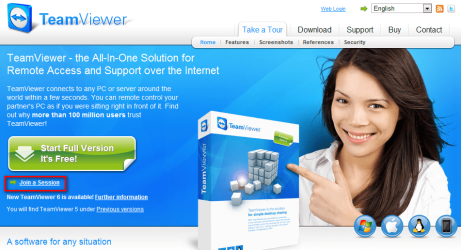
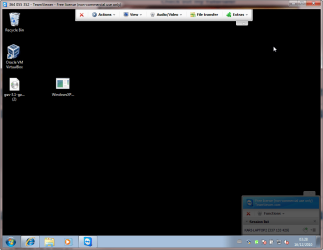
The absolutely easiest way is for you to download TeamViewer and install it on your computer. Ask then you your dad to go to teamviewer.com, and click Join a Session link.

When he has joined (a bit misleading term), he gets a session ID and password. You run TeamViewer on your computer, and using your dads session ID and password, take remotely control of his computer.

Where the Join A Session link is located on teamviewer.com (you click the big green download button just above it):

TeamViewer.png

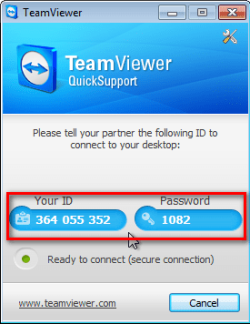
Your dad's computer downloads and runs then a small applet, nothing is installed on his computer. He gets the session ID and password to give to you:

TeamViewer_2.png

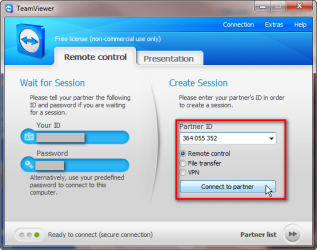
You run the TeamViewer application and enter session ID:

TeamViewer_3.png

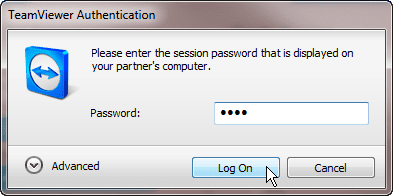
And password:

TeamViewer_4.png

You are in:

TeamViewer_5.png

I take care of my mother's computer back in Finland with TeamViewer, nothing could be easier.

Kari

EDIT: Doc beat me again!
 

My Computer My Computer

Computer type
Laptop
Computer Manufacturer/Model Number
HP ENVY 17-1150eg
OS
Windows 10 Pro x64 EN-GB
CPU
1.6 GHz Intel Core i7-720QM Processor
Memory
6 GB
Graphics Card(s)
ATI Mobility Radeon HD 5850 Graphics
Sound Card
Beats sound system with integrated subwoofer
Monitor(s) Displays
17" laptop display, 22" LED and 32" Full HD TV through HDMI
Screen Resolution
1600*900 (1), 1920*1080 (2&3)
Hard Drives
Internal: 2 x 500 GB SATA Hard Disk Drive 7200 rpm
External: 2TB for backups, 3TB USB3 network drive for media
Cooling
As Envy runs a bit warm, I have it on a Cooler Master pad
Keyboard
Logitech diNovo Media Desktop Laser (bluetooth)
Mouse
Logitech Performance Mouse MX
Internet Speed
50/10 Mbps VDSL
Antivirus
Windows Defender 4.3.9431.0
Browser
Maxthon 3.5.2., IE11
Or you could just use that haha.

Another easy way to do it would be to setup a VPN client and connect to that, and you are on their network so you can type \\computer name and connect.

~Lordbob
 

My Computer My Computer

Computer Manufacturer/Model Number
Hera
OS
Windows 7 Ultimate x64, Mint 9
CPU
Intel i5-2500k
Motherboard
ASUS P8P67 Pro
Memory
2x 4Gb Corsair VENGEANCE DDR3-1600
Graphics Card(s)
NVidia GeForce N260GTX Twin Frozr
Sound Card
Realtek HD OnBoard Audio
Monitor(s) Displays
ASUS 24" Monitor
Screen Resolution
1920x1080
Hard Drives
G.SKILL Phoenix Series 60GB SATA II MLC Internal Solid State Drive (SSD)
SAMSUNG Spinpoint F3R 1TB 7200 RPM 32MB Cache SATA II
PSU
Cooler Master Real Power Pro 750W
Case
Cooler Master Haf 932
Cooling
Fans
Keyboard
Razer Tarantula
Mouse
Razer Lachesis
Internet Speed
not fast enough
In reference to the earlier posts, you actually would have been able to use "Windows Remote Assistance" much more easily than "Remote Desktop." You cannot use Remote Desktop to connect to a computer by its name unless you are on the same network with the other machine. You would have to use the IP address, and then if the other computer is connect to a router, even that won't work. Remote Assistance takes care of all the connection issues by using a simple invite/respond system.

Having said all that, TeamViewer is much easier.
 

My Computer My Computer

Computer Manufacturer/Model Number
Custom
OS
Windows 7 Ultimate RTM (Technet)
CPU
3.00 gigahertz Intel Core2 Duo E8400
Motherboard
ASUSTeK Computer INC. P5K/EPU Rev 1.xx
Memory
4GB
Graphics Card(s)
ATI Radeon X1950 Pro
Sound Card
Built in HD Audio
Monitor(s) Displays
22" Gateway LCD
Screen Resolution
1920 x 1200
Hard Drives
ST3160023A [Hard drive] (160.04 GB) -- drive 0, rev 8.01, ST3500630AS [Hard drive] (500.11 GB) -- drive 2, rev 3.AAK
ST3500630AS [Hard drive] (500.11 GB) -- drive 1, rev 3.AAK
Keyboard
Logitech G11
Mouse
Microsoft Wireless Laser Mouse 5000
Internet Speed
13.44 Mbps
In reference to the earlier posts, you actually would have been able to use "Windows Remote Assistance" much more easily than "Remote Desktop." You cannot use Remote Desktop to connect to a computer by its name unless you are on the same network with the other machine. You would have to use the IP address, and then if the other computer is connect to a router, even that won't work. Remote Assistance takes care of all the connection issues by using a simple invite/respond system.

Having said all that, TeamViewer is much easier.

Thanks for the heads up...no wonder i couldn't connect with remote desktop connection xD
 

My Computer My Computer

Computer type
PC/Desktop
Computer Manufacturer/Model Number
Macbook Pro Retina
OS
Mac OS X Yosemite
CPU
2.4 GHz Intel Core i7
Memory
8 GB 1600 MHz DDR3
Graphics Card(s)
NVIDIA GeForce GT 650M
Monitor(s) Displays
Retina
Screen Resolution
Retina
Hard Drives
250GB SSD
Other Info
Macbook Pro Retina (2013)
In reference to the earlier posts, you actually would have been able to use "Windows Remote Assistance" much more easily than "Remote Desktop." You cannot use Remote Desktop to connect to a computer by its name unless you are on the same network with the other machine. You would have to use the IP address, and then if the other computer is connect to a router, even that won't work. Remote Assistance takes care of all the connection issues by using a simple invite/respond system.

Having said all that, TeamViewer is much easier.
Ah, didn't know that. I will keep that in mind next time.

Remote desktop should work over VPN right? I will have to test this at some point.

~Lordbob
 

My Computer My Computer

Computer Manufacturer/Model Number
Hera
OS
Windows 7 Ultimate x64, Mint 9
CPU
Intel i5-2500k
Motherboard
ASUS P8P67 Pro
Memory
2x 4Gb Corsair VENGEANCE DDR3-1600
Graphics Card(s)
NVidia GeForce N260GTX Twin Frozr
Sound Card
Realtek HD OnBoard Audio
Monitor(s) Displays
ASUS 24" Monitor
Screen Resolution
1920x1080
Hard Drives
G.SKILL Phoenix Series 60GB SATA II MLC Internal Solid State Drive (SSD)
SAMSUNG Spinpoint F3R 1TB 7200 RPM 32MB Cache SATA II
PSU
Cooler Master Real Power Pro 750W
Case
Cooler Master Haf 932
Cooling
Fans
Keyboard
Razer Tarantula
Mouse
Razer Lachesis
Internet Speed
not fast enough
Back
Top