- Local time
- 4:01 PM
- Messages
- 501
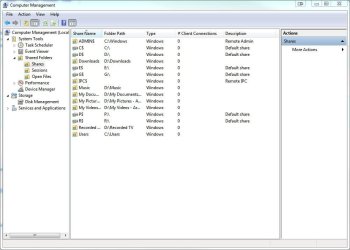
How can I know which files and folders I am sharing?
How can I stop sharing any files on my computer?
(I mean I want to share some files and folders, but I want to stop sharing the other ones, and I would like to know which ones I have shared, and how can I stop sharing them? )
I turned off the public folder sharing.
When I turn off file and printer sharing, it doesn't share any file, which is not I want.
And even though password protected sharing is on, after I enter the password once, it doesn't ask it again on the other computer, which means that the other computer can still see my files (At least until they restart the computer I guess). Why doesn't it ask the password always (Every time Windows Explorer Window is opened) ?
Is there anyway to stop sharing all the files on my computer and start over sharing the files and folders I want again without including any of my documents, pictures, videos, etc.?
Thanks.
How can I stop sharing any files on my computer?
(I mean I want to share some files and folders, but I want to stop sharing the other ones, and I would like to know which ones I have shared, and how can I stop sharing them? )
I turned off the public folder sharing.
When I turn off file and printer sharing, it doesn't share any file, which is not I want.
And even though password protected sharing is on, after I enter the password once, it doesn't ask it again on the other computer, which means that the other computer can still see my files (At least until they restart the computer I guess). Why doesn't it ask the password always (Every time Windows Explorer Window is opened) ?
Is there anyway to stop sharing all the files on my computer and start over sharing the files and folders I want again without including any of my documents, pictures, videos, etc.?
Thanks.
My Computer
- Computer Manufacturer/Model Number
- ASUS G72 Notebook
- OS
- Windows 7 Ultimate 64-bit
- CPU
- Intel® Core™2 Duo mobile processor P8700 2.53 GHz
- Memory
- 6GB DDRII
- Graphics Card(s)
- NVIDIA GeForce GTX 260M
- Sound Card
- EAX Advanced HD 4.0 + Logitech Wireless Headset G930
- Monitor(s) Displays
- 17.3" LED-backlit LCD high-definition plus widescreen
- Screen Resolution
- 1600 x 900
- Hard Drives
- 2 x Seagate Momentus 500 GB 5400.6 SATA 3Gb/s
- Cooling
- Targus
- Mouse
- Logitech Wireless Trackball M570
- Internet Speed
- 3 to 6 Mbps Download / .5 to 1 Mbps Upload
- Other Info
- Clear Modem with Wi-fi*
Comodo Internet Security Premium