Problem : automatically reconnect mapped drives at login

Golden

000
VIP
SF Team
Local time
3:47 PM
Messages
19,301
Location
South Australia
Hi,

I have a small issue, more of an annoyance, getting my mapped drives to be automatically connected during login.

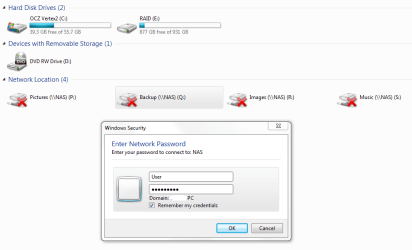
I have 4 NAS folders that I have mapped as drives P,Q,R and S. When I first set them up, I specifically set it up such that they will be connected during login. It seems to be doing this, but there seems to be an issue with the credentials.

Below is an image of what I see when I open up Explorer immediately after login -the 4 mapped drives are shown as not connected. When I select one of them, I am prompted to provide my user name and password (these are the NAS user names and passwords I setup, and not the Windows login user name and password).

If I supply the requested information, then the drives are connected. However, despite me putting tick in the "Remember my credentials", it doesn't seem to do this - every time I reboot or restart, I have to manually connect at least one drive to see it, plus the remaining 3 drives. My NAS is a Thecus N2200.

What have I missed? How do I get "Remember my credentials" to actually remember?

Thanks,
Golden
 

Attachments
  • Capture.PNG
    Capture.PNG
    18.9 KB · Views: 152
Last edited:

My Computer

Computer type
PC/Desktop
Computer Manufacturer/Model Number
Golden Mk. I.4
OS
Windows 10 Pro x64 ; Xubuntu x64
CPU
Intel i7 860 @ 2.80 GHz O/C'ed to 4.0GHz
Motherboard
Gigabyte P55A-UD3R Rev.1. Award BIOS F13
Memory
16GB Corsair Vengance DDR3 @ 661 MHz Dual Channel (9-9-9-24)
Graphics Card(s)
EVGA NVidia GTX 560 1024MB
Sound Card
Realtek Integrated
Monitor(s) Displays
Dual Samsung SyncMaster 2494HS
Screen Resolution
1920*1080 and 1920*1080
Hard Drives
1*Samsung 840 EVO 120GB SSD;
1*OCZ Vertex 2 60GB SSD;
2*Samsung F3 SpinPoint 1TB in RAID0;
1*Samsung F1 SpinPoint 1TB;
2*Western Digital 1TB External USB 3.0
1*Western Digital 500GB External USB 3.0
1*Seagate 500GB External USB 2.0
PSU
Thermaltake ToughPower QFan 750W
Case
Thermaltake Element S VK60001W2Z
Cooling
Corsair H60 Water Cooling, 2*230mm and 2*80mm case fans
Keyboard
Logitech G110
Mouse
Logitech MX518
I have had many issues like this with NAS devices. Here are a few options:

1) Write a Command Script to remap them, add to desktop or in startup. (i.e.):

Code:
[COLOR=#323232][FONT=Verdana][COLOR=#323232][FONT=Verdana]@echo off[/FONT][/COLOR]
[COLOR=#323232][FONT=Verdana]net use q: [URL="file://nas/share1"][U][COLOR=#0000ff]\\nas\share1[/COLOR][/U][/URL] /u:user@workgroup pa$$word[/FONT][/COLOR]
[COLOR=#323232][FONT=Verdana]net use s: [URL="file://nas/share1"][U][COLOR=#0000ff]\\nas\share1[/COLOR][/U][/URL] /u:user@workgroup pa$$word[/FONT][/COLOR]
[/FONT][/COLOR]


2) Make sure that your NAS is part of the same workgroup. Sometimes they are different or not set the same Windows will not remember the credentials.
3) Try using user@domain format and see if that will make it remember the credentials.
(i.e. user@workgroup <tab> pa$$word)

I hope that helps. -WS
 

My Computer

Computer type
PC/Desktop
Computer Manufacturer/Model Number
Dell OP7010
OS
Windows 7 Enterprise (x64); Windows Server 2008 R2 (x64)
Memory
16GB
Monitor(s) Displays
4 Dell 24" LCD
Screen Resolution
1280x1024
Keyboard
Dell
Mouse
Dell Optical
Internet Speed
40meg
Thanks WindowsStar - I'll give it a crack this evening.
 

My Computer

Computer type
PC/Desktop
Computer Manufacturer/Model Number
Golden Mk. I.4
OS
Windows 10 Pro x64 ; Xubuntu x64
CPU
Intel i7 860 @ 2.80 GHz O/C'ed to 4.0GHz
Motherboard
Gigabyte P55A-UD3R Rev.1. Award BIOS F13
Memory
16GB Corsair Vengance DDR3 @ 661 MHz Dual Channel (9-9-9-24)
Graphics Card(s)
EVGA NVidia GTX 560 1024MB
Sound Card
Realtek Integrated
Monitor(s) Displays
Dual Samsung SyncMaster 2494HS
Screen Resolution
1920*1080 and 1920*1080
Hard Drives
1*Samsung 840 EVO 120GB SSD;
1*OCZ Vertex 2 60GB SSD;
2*Samsung F3 SpinPoint 1TB in RAID0;
1*Samsung F1 SpinPoint 1TB;
2*Western Digital 1TB External USB 3.0
1*Western Digital 500GB External USB 3.0
1*Seagate 500GB External USB 2.0
PSU
Thermaltake ToughPower QFan 750W
Case
Thermaltake Element S VK60001W2Z
Cooling
Corsair H60 Water Cooling, 2*230mm and 2*80mm case fans
Keyboard
Logitech G110
Mouse
Logitech MX518
+1 WindowsStar.

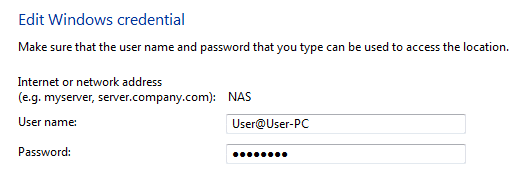
Option 3 did the trick: User@User-PC

Brady : persistence in the credentials panel is set to Enterprise. Any major difference with that?
 

Attachments

  • Capture.PNG
    Capture.PNG
    3.2 KB · Views: 82

My Computer

Computer type
PC/Desktop
Computer Manufacturer/Model Number
Golden Mk. I.4
OS
Windows 10 Pro x64 ; Xubuntu x64
CPU
Intel i7 860 @ 2.80 GHz O/C'ed to 4.0GHz
Motherboard
Gigabyte P55A-UD3R Rev.1. Award BIOS F13
Memory
16GB Corsair Vengance DDR3 @ 661 MHz Dual Channel (9-9-9-24)
Graphics Card(s)
EVGA NVidia GTX 560 1024MB
Sound Card
Realtek Integrated
Monitor(s) Displays
Dual Samsung SyncMaster 2494HS
Screen Resolution
1920*1080 and 1920*1080
Hard Drives
1*Samsung 840 EVO 120GB SSD;
1*OCZ Vertex 2 60GB SSD;
2*Samsung F3 SpinPoint 1TB in RAID0;
1*Samsung F1 SpinPoint 1TB;
2*Western Digital 1TB External USB 3.0
1*Western Digital 500GB External USB 3.0
1*Seagate 500GB External USB 2.0
PSU
Thermaltake ToughPower QFan 750W
Case
Thermaltake Element S VK60001W2Z
Cooling
Corsair H60 Water Cooling, 2*230mm and 2*80mm case fans
Keyboard
Logitech G110
Mouse
Logitech MX518
Persistant:Yes is more for DOS or Script side of mapping.
 

My Computer

OS
7 Pro
Thanks Brady.
 

My Computer

Computer type
PC/Desktop
Computer Manufacturer/Model Number
Golden Mk. I.4
OS
Windows 10 Pro x64 ; Xubuntu x64
CPU
Intel i7 860 @ 2.80 GHz O/C'ed to 4.0GHz
Motherboard
Gigabyte P55A-UD3R Rev.1. Award BIOS F13
Memory
16GB Corsair Vengance DDR3 @ 661 MHz Dual Channel (9-9-9-24)
Graphics Card(s)
EVGA NVidia GTX 560 1024MB
Sound Card
Realtek Integrated
Monitor(s) Displays
Dual Samsung SyncMaster 2494HS
Screen Resolution
1920*1080 and 1920*1080
Hard Drives
1*Samsung 840 EVO 120GB SSD;
1*OCZ Vertex 2 60GB SSD;
2*Samsung F3 SpinPoint 1TB in RAID0;
1*Samsung F1 SpinPoint 1TB;
2*Western Digital 1TB External USB 3.0
1*Western Digital 500GB External USB 3.0
1*Seagate 500GB External USB 2.0
PSU
Thermaltake ToughPower QFan 750W
Case
Thermaltake Element S VK60001W2Z
Cooling
Corsair H60 Water Cooling, 2*230mm and 2*80mm case fans
Keyboard
Logitech G110
Mouse
Logitech MX518
Back
Top