
Log into multiple RDP sessions and without interrupting user

SlasherIT

Slashing problems...
Guru
Local time
8:03 PM
Messages
1,375
Hello,

I would just like to tell you all of a very useful tool. It patches termsrv.dll (RDP) to allow the following features.

I take NO CREDIT for this tool btw.

The tool does multiple things. It allows you to:

1. Fully use Remote Desktop Connection on Windows 7 Home Premium and Basic (Client and Host RDP)

2. Connect to more than one computer at the same time with RDP

3. Log into a computer without interrupting the user on the computer (you can even log on with their account and they won't know)

4. Use RDP to log onto an account without a password

Note: You will need to allow Port TCP 3389 in your Firewall to allow this to work.
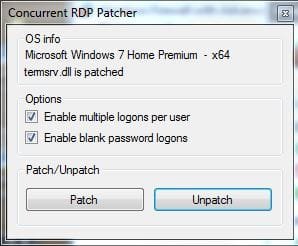
RDP.JPG

Download link: View attachment 151889
 

My Computer

Computer Manufacturer/Model Number
HP Pavilion dv6-2020ev
OS
Ubuntu 12.10
CPU
Intel Core i7 720QM
Motherboard
Its a HP secret...
Memory
4GB RAM
Graphics Card(s)
NVIDIA GeForce 230M
Sound Card
IDT
Screen Resolution
1366x768
Hard Drives
500 GB
Mouse
HP
Internet Speed
4 Mbps
do you install this on your client computer or the one you're trying to connect to? (multiple connections being attempted, possibly on different ports)
 

My Computer

OS
varies
It depends, whats your scenario?
 

My Computer

Computer Manufacturer/Model Number
HP Pavilion dv6-2020ev
OS
Ubuntu 12.10
CPU
Intel Core i7 720QM
Motherboard
Its a HP secret...
Memory
4GB RAM
Graphics Card(s)
NVIDIA GeForce 230M
Sound Card
IDT
Screen Resolution
1366x768
Hard Drives
500 GB
Mouse
HP
Internet Speed
4 Mbps
This will not work on other Windows versions (i.e Ultimate or Enterprise) ?

Edit: seems like a very nice tool btw :-)
 

My Computer

OS
Windows 7 Enterprise x64
Yes, it will work on Ultimate and Enterprise, except that Ultimate and Enterprise can already connect to other computers through RDP, Home Premium can only be connected to, and not connect to others. Of course, the extra options can still be used on Ultimate and Enterprise!
 

My Computer

Computer Manufacturer/Model Number
HP Pavilion dv6-2020ev
OS
Ubuntu 12.10
CPU
Intel Core i7 720QM
Motherboard
Its a HP secret...
Memory
4GB RAM
Graphics Card(s)
NVIDIA GeForce 230M
Sound Card
IDT
Screen Resolution
1366x768
Hard Drives
500 GB
Mouse
HP
Internet Speed
4 Mbps
Didn't work on my Windows 7 x64 Enterprise.

Says: Microsoft Windows 7 Enterprise - Unsupported

25klb86.jpg
 
Last edited:

My Computer

OS
Windows 7 Enterprise x64
wait, i have 7 home premium and i am connected right now to another computer with remote desktop, so what did you mean by "Home Premium can only be connected to, and not connect to others"?
 

My Computer

OS
varies
Hey Slasher, just a quick question... Are you still active on these forums? I have a question about Modern Warfare 2 PC Multiplayer...
 

My Computer

Computer Manufacturer/Model Number
Acer/nVidia
OS
Windows 7 Home Premium 64bit
Graphics Card(s)
GTX 560 Ti
Home Premium cannot be connected to in this way, it doesn't run a Terminal server, it can however connect to others like Ultimate
 

My Computer

OS
Windows 7 ultimate x64
Hey Slasher, just a quick question... Are you still active on these forums? I have a question about Modern Warfare 2 PC Multiplayer...

Hey yes, I am still active, I mean I am not actively helping people lately because I am quite busy to browse the forums to help people, but if I get an email I reply as soon as I can. So yes, go ahead, what would you like to know about Modern Warfare 2 Multiplayer? Let me guess, does it concern AlterIWNet?
 

My Computer

Computer Manufacturer/Model Number
HP Pavilion dv6-2020ev
OS
Ubuntu 12.10
CPU
Intel Core i7 720QM
Motherboard
Its a HP secret...
Memory
4GB RAM
Graphics Card(s)
NVIDIA GeForce 230M
Sound Card
IDT
Screen Resolution
1366x768
Hard Drives
500 GB
Mouse
HP
Internet Speed
4 Mbps
Home Premium cannot be connected to in this way, it doesn't run a Terminal server, it can however connect to others like Ultimate

I'm pretty sure it can pal. Unless you tested it yourself? I have tested this tool with Home Premium connecting to Ultimate and vice versa, though vice versa would work without this patch I guess (although its still great for allowing multiple RDP connections, blank password, ect.)
 

My Computer

Computer Manufacturer/Model Number
HP Pavilion dv6-2020ev
OS
Ubuntu 12.10
CPU
Intel Core i7 720QM
Motherboard
Its a HP secret...
Memory
4GB RAM
Graphics Card(s)
NVIDIA GeForce 230M
Sound Card
IDT
Screen Resolution
1366x768
Hard Drives
500 GB
Mouse
HP
Internet Speed
4 Mbps
Hey Slasher, just a quick question... Are you still active on these forums? I have a question about Modern Warfare 2 PC Multiplayer...

Hey yes, I am still active, I mean I am not actively helping people lately because I am quite busy to browse the forums to help people, but if I get an email I reply as soon as I can. So yes, go ahead, what would you like to know about Modern Warfare 2 Multiplayer? Let me guess, does it concern AlterIWNet?


Most likely, here is an in-depth thread conversation that I had with a moderator on MW2 Forums: MW2, MW3 & Black Ops Forums • View topic - Modern Warfare 2 PC - Multiplayer - Can't find games.


Mostly, nothing worked in what I tried... The last solution he told me was to get a friend on Steam and try joining the game he/she 's in... But I have no friends on there.


If you want, I can send you pictures of my Port Forwarding settings on my D-Link page to see if something is wrong?
 

My Computer

Computer Manufacturer/Model Number
Acer/nVidia
OS
Windows 7 Home Premium 64bit
Graphics Card(s)
GTX 560 Ti
Hi,

Sure I'll help you, but can you make a new thread and give the link to it, as it isn't really appropriate to help you on this thread about RDP connections :). Btw, you know me or anything? Just asking because you're new and you came straight to ask me on one of my threads that isn't about gaming...
 

My Computer

Computer Manufacturer/Model Number
HP Pavilion dv6-2020ev
OS
Ubuntu 12.10
CPU
Intel Core i7 720QM
Motherboard
Its a HP secret...
Memory
4GB RAM
Graphics Card(s)
NVIDIA GeForce 230M
Sound Card
IDT
Screen Resolution
1366x768
Hard Drives
500 GB
Mouse
HP
Internet Speed
4 Mbps
Hi,

Sure I'll help you, but can you make a new thread and give the link to it, as it isn't really appropriate to help you on this thread about RDP connections :). Btw, you know me or anything? Just asking because you're new and you came straight to ask me on one of my threads that isn't about gaming...


I don't actually, it's just one of my friends who referred me to you...


Can you send me a PM with any communication system you use so we don't have to wait over and over for replies of each other?
 

My Computer

Computer Manufacturer/Model Number
Acer/nVidia
OS
Windows 7 Home Premium 64bit
Graphics Card(s)
GTX 560 Ti
Actually if its ok, I'd prefer to help you on a thread or via PM, but a thread is better. Please create a thread, that would be best. Btw, who exactly referred you?
 

My Computer

Computer Manufacturer/Model Number
HP Pavilion dv6-2020ev
OS
Ubuntu 12.10
CPU
Intel Core i7 720QM
Motherboard
Its a HP secret...
Memory
4GB RAM
Graphics Card(s)
NVIDIA GeForce 230M
Sound Card
IDT
Screen Resolution
1366x768
Hard Drives
500 GB
Mouse
HP
Internet Speed
4 Mbps
Hi there
W7 systems aren't servers so they really are designed for Single User operation.

There was a trick in XP to set XP Professional to allow 4 simultaneous users - but this was stopped later by MS in the SP3 update. The loophole appeared basically because XP SP2 was based largely on W2003 Server (probably STILL the best server MS has ever written and still in a lot of use --especially the R2 version can address more than 4GB storage).

In any case whatever the trick used you will still need a UserID on the system you are trying to connect to -- and you will get into a LOT of problems once you want to start doing Disk writes --if the system doesn't handle simultaneous users like a server when doing Disk writes you are on a QUICK ONE WAY TRIP TO DATA CORRUPTION.

If you really need something like this try running a VM as you can logon to the VM without even having an account on the Host --and via vm's networking software you CAN have access to the Host's disks and printers.

With the Integration feature built in to VMWARE and VBOX you might even be able to run host applications too.

Cheers
jimbo
 

My Computer

Computer type
PC/Desktop
Computer Manufacturer/Model Number
Custom built, several laptops HP/ASUS
OS
Linux CENTOS 7 / various Windows OS'es and servers
CPU
Intel i7 Intel i5
Memory
8GB, 16GB
Graphics Card(s)
On Motherboard
Sound Card
Realtek HD audio
Monitor(s) Displays
Apple Cinema display, Samsung LCD
Screen Resolution
1920 X 1080
Hard Drives
4 X 1TB SATA
Mouse
Toshiba wireless laser
Internet Speed
> 20MB up
Back
Top